1
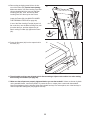
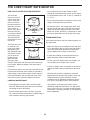
HOW TO ADJUST THE CUSHIONING SYSTEM
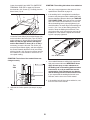
To decrease the firmness, step off the treadmill and
use a hex key to turn the cushion adjustors counterclockwise until the number of the desired firmness level
appears next to the cushion adjustor (1 is the lowest
firmness level).
Remove the key from the console and unplug the
power cord. The treadmill features a cushioning system that reduces the impact as you walk or run on the
treadmill.
Note: Make sure that both front cushions are set at
the same firmness level and both rear cushions are
set at the same firmness level. The faster you run
on the treadmill, or the more you weigh, the firmer
the walking platform should be.
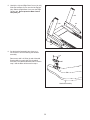
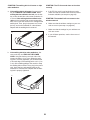
To increase the firmness of the walking platform, step
off the treadmill and use a hex key to turn the cushion
adjustors clockwise until the number of the desired
firmness level appears next to the cushion adjustor (9
is the highest firmness level).
Cushion
Adjustors
Cushion
Adjustors
28