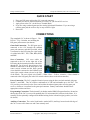
1
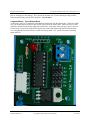
Cheap Control Systems Cheap Six Channel (C6C) Servo Controller v2.0 TESTING The following procedure is provided as a good way to test the functionality of the C6C to ensure that it is functioning properly. You'll need the following items in order to conduct the tests: ● ● ● ● ● Fully assembled C6C Battery – 6v to 8.4v Battery switch Tethered or wireless PS2 game pad At least two standard R/C servos Battery Connection The battery must be connected to the C6C as follows: ● the POSITIVE (RED) battery wire must be connected to the +V terminal of the BLUE terminal block ● the NEGATIVE (BLACK) battery wire must be connected to the GND terminal of the BLUE terminal block Whenever possible, you should use a battery switch between the battery and the C6C to turn the power on/off instead of disconnecting the battery wires from the terminal block. This reduces the likelihood of connecting the battery wires improperly. Failure to connect the battery wires properly could result in permanent damage to the C6C, Game Pad or Servos and is solely the responsibility of the operator. Test 1 – Game Pad Communication 1. Connect a tethered or wireless PS2 compatible game pad to the C6C, but do not connect any servos. Power on the C6C. The GREEN led on the C6C should flash twice and then the Analog led on the game pad should be lit, indicating that the C6C is properly communicating with the game pad. 2. If the GREEN led does not flash twice, then check the battery connection and ensure that the battery is providing at least 6 volts. If the problem persists, then either the microcontroller is defective or there is an electrical problem with the C6C board. 3. If the RED led on the C6C starts flashing, this indicates that the C6C cannot communicate properly with the game pad and you should check the game pad connection. If the problem persists, then the game pad is either defective or is not supported by the C6C's software. Test 2 - Servo Channels 1. Connect a single servo to Channel S1 and power on the C6C. The servo may immediately move to the center position when it is powered on, depending on where it was last positioned. 2. Move the right joystick left and right to move the servo one way and the other. The servo should move 45 degrees in each direction from the center position for a total of 90 degrees of swing. Revision 2008-04-13 Copyright 2008, Cheap Control Systems 12 of 15