1
48
INSTRUCTION MANUAL
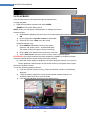
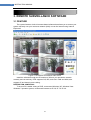
“M” means the channel is on motion detection
“I”means the channel is on alarm
“H” means there is either no HDD. the HDD is bad or the HDD is full
6. Question: DVR is having problem with real-time images, such as bad image
color or serious brightness distortion
Answer:
If PAL and NTSC is not correctly selected on the BNC output, the images
will be in black and white
DVR is not compatible with monitor
The video transmission distance is too far
The setting of DVR color, brightness and so on are wrong
7. Question: No audio sound when monitoring?
Answer:
Check sound box or speaker functions. Also check possible short circuit.
Audio source may be connected to the video channel. You can click to
full-screen to check.
The hardware of DVR is defective
8. Question: No audio sound when playing back?
Answer:
Setting problem: open audio-video item
Check the audio to see if it is closed in playback interface
9. Question: System time is not correct?
Answer:
Wrong setting or user did not click "Edit" to confirm
Battery is not connected properly
Battery is dead. Please change.
10. Question: Why the “Stop recording” by the right mouse button does not work,
how to stop recording?
Answer:
The “Stop recording” by the right mouse button is only suitable for Manual
recording. It can’t stop recording when it’s in “start recording” or the video in
video plan.
If you want to stop recording, please set the time is not recording.
11. Question: "Stop recording" function by the right mouse button does not work.
How to stop recording?
Answer:
The "Stop recording" by the right mouse button is for Manual Recording only. It can
not stop recording when it is in "start recording" or the video is in video plan. If you want to
stop recording, please set the time to not recoding.
12. Question: Motion detection is not working?
Answer:
The setting of motion detection area is not correct
Sensitivity is too low
13. Question: CD-writer /USB backup error
48