1
KVM over IP
Operation Procedures:
1. Please run Nero or any CD/DVD imaging tool to create CD/DVD ISO image.
2. Please create a folder and share this folder in the PC that shares out the image file. Copy the
CD/DVD ISO image file to this sharing folder. (Please make sure password has to be setup with
the authorized user during Sharing => Permission settings)
MS Windows
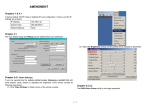
Open the Explorer, navigate to the directory (or share) and press the right mouse button to open
the context menu. Select Sharing to open the configuration dialog
Figure 5-7
Explorer Context Menu
64 / 132