1
MAEN922.book Page 14 Wednesday, November 7, 2007 9:57 AM
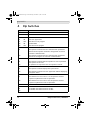
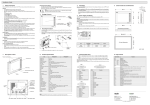
Dip Switches
4
Dip Switches
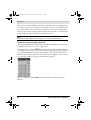
Dip switch
SW1
Function
Reserved
SW2
Reserved
SW3
SW4
Operation Mode
ON
ON
Runs user application
ON
OFF
Runs burn-in test program
OFF
ON
Updates BIOS
OFF
OFF
Runs bench test program
SW5
Communication Parameters
ON
The operator terminal uses the communication parameters
defined on the operator terminal’s configuration screen for
controller communication.
OFF
The operator terminal uses the communication parameters
defined in H-Designer for controller communication.
SW6
Password
ON
The operator terminal asks the operator to enter a password
after power-on self-test.
OFF
No password is required to start the operator terminal.
SW7
System Menu
ON
The operator terminal displays the system menu.
OFF
The operator terminal runs user application without displaying
the system menu.
SW8
Default User Level
ON
The default user level is set to 1 if the operator terminal
requires no password to start its operation.
OFF
The default user level is set to 9 if the operator terminal
requires no password to start its operation.
SW9
Reserved
SW10
Com2 Port
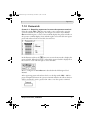
For RS485, this switch has to be set ON.
For RS422, this switch has to be set OFF.
ON
OFF
14
Beijer Electronics, MAEN922