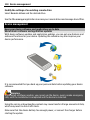
1
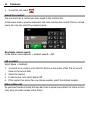
Nokia E7–00 User Guide
Issue 2.0
2
Contents
Contents
Safety
5
Get started
Keys and parts
Change the volume of a call, song, or
video
Lock or unlock the keys and screen
Flashlight
Insert or remove the SIM card
Charge your device
Antenna locations
Headset
Switch the device on or off
Use your device for the first time
Nokia account
Device set-up
Copy contacts or pictures from your old
device
Access codes
Use the in-device user guide
6
6
17
18
19
Install Nokia Ovi Suite on your PC
19
Basic use
Touch screen actions
Interactive home screen elements
Switch between open applications
Write text
Keyboard shortcuts
Display indicators
Set the notification light to blink for
missed calls or messages
Search in your device and on the
internet
Use your device offline
Prolong battery life
21
21
23
24
25
29
30
Personalisation and Ovi Store
Profiles
34
34
10
10
11
11
12
14
15
15
16
16
17
31
32
32
32
Change your theme
Home screen
Organise your applications
Ovi Store
35
36
38
39
Telephone
Call a phone number
Search for a contact
Call a contact
Make a video call
Make a conference call
Call the numbers you use the most
Use your voice to call a contact
Make calls over the internet
Call the last dialled number
Record a phone conversation
Turn to silence
View your missed calls
Call your voice mailbox
Divert calls to your voice mailbox or
another phone number
Prevent making or receiving calls
Allow calls only to certain numbers
Video sharing
41
41
42
42
42
44
44
45
46
46
47
47
47
48
48
48
49
50
Contacts
51
About Contacts
51
Save phone numbers and mail
addresses
52
Save a number from a received call or
message
52
Contact your most important people
quickly
52
Add a picture for a contact
53
Set a ringing tone for a specific
contact
53
Send your contact information using
My Card
54
Create a contact group
54
Send a message to a group of people 54
Copy contacts from the SIM card to your
device
54
Contents
Back up your contacts to Ovi by Nokia 55
Messaging
About Messaging
Send a message
Send an audio message
Receive messages
View a conversation
Listen to a text message
Change language
55
55
55
56
56
57
57
58
Mail
About Mail
Get a free mail account from Ovi by
Nokia
Add a mailbox
Read mail
Send a mail
Respond to a meeting request
Open mail from the home screen
58
58
59
59
60
61
61
61
Internet
62
About the web browser
62
Browse the web
62
Add a bookmark
62
Subscribe to a web feed
63
Discover nearby events
63
Unreadable characters while browsing
the web
64
Social networks
64
About Social
64
See your friends' status updates in one
view
64
Post your status to social networking
services
65
Link your online friends to their
contact information
65
See your friends' status updates on the
home screen
65
Upload a picture or video to a service 65
3
Share your location in your status
update
66
Contact a friend from a social
networking service
66
Add an event to your device calendar 67
Camera
About the camera
Take a picture
Save location information to your
pictures and videos
Take a picture in the dark
Picture and video tips
Record a video
Send a picture or video
Share a picture or video directly from
the camera
67
67
67
Your pictures and videos
Photos
Edit the pictures you have taken
Video editor
Print a picture you have taken
View pictures and videos on a TV
Connect your device to your home
theatre
71
71
74
74
75
76
Videos and TV
Videos
Watch Web TV
79
79
79
Music and audio
Music player
Buy music from Nokia's Ovi Music
Protected content
Record sounds
FM radio
80
80
83
83
83
83
Maps
Maps overview
My position
Search
85
85
86
90
68
68
69
69
69
70
77
4
Contents
Favourites
Check in
Drive and Walk
Give feedback on Maps
Report incorrect map information
Time management
Clock
Calendar
91
93
94
99
99
100
100
102
Office
105
Quickoffice
105
Read PDF documents
107
Calculator
107
Write notes
108
Translate words from one language to
another
108
Open or create zip files
109
Access your company intranet
109
Chat with your colleagues
109
Connectivity
Internet connections
Wireless LAN
Bluetooth
USB data cable
VPN connections
Close a network connection
Store your files on a remote drive
109
109
110
112
115
116
117
117
Device management
118
Keep your device software and
applications up to date
118
Manage files
119
Increase available memory so you can
add more content
121
Manage applications
121
Synchronise content
122
Copy contacts or pictures between
devices
124
Protect your device
124
Find more help
Support
126
126
Troubleshooting
126
If your device stops responding
126
Restore original settings
127
What to do when the memory is full? 127
Message indicator blinking
127
A contact appears twice in the contacts
list
127
Unreadable characters while browsing
the web
128
Prepare your device for recycling
128
Protect the environment
Save energy
Recycle
128
128
128
Product and safety information
129
Index
136
Safety
5
Safety
Read these simple guidelines. Not following them may be dangerous or illegal. Read
the complete user guide for further information.
SWITCH OFF IN RESTRICTED AREAS
Switch the device off when mobile phone use is not allowed or when it may
cause interference or danger, for example, in aircraft, near medical
equipment, fuel, chemicals, or blasting areas.
ROAD SAFETY COMES FIRST
Obey all local laws. Always keep your hands free to operate the vehicle while
driving. Your first consideration while driving should be road safety.
INTERFERENCE
All wireless devices may be susceptible to interference, which could affect
performance.
QUALIFIED SERVICE
Only qualified personnel may install or repair this product.
KEEP YOUR DEVICE DRY
Your device is not water-resistant. Keep it dry.
GLASS PARTS
The front cover of the device is made of glass. This glass can break if the device
is dropped on a hard surface or receives a substantial impact. If the glass
breaks, do not touch the glass parts of the device or attempt to remove the
broken glass from the device. Stop using the device until the glass is replaced
by qualified service personnel.
PROTECT YOUR HEARING
Listen to a headset at a moderate level, and do not hold the device near your
ear when the loudspeaker is in use.
6
Get started
Get started
Keys and parts
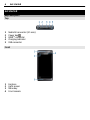
Top
1
2
3
4
5
Nokia AV connector (3.5 mm)
Power key
HDMI™ connector
Charging indicator
USB connector
Front
1
2
3
4
Earpiece
Light sensor
Menu key
Front camera
Get started
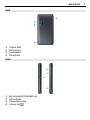
Back
1
2
3
4
Camera flash
Back camera
Loudspeaker
Microphone
Sides
1
2
3
4
Key lock switch/Flashlight key
SIM card slot
Volume/Zoom key
Camera key
7
8
Get started
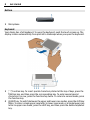
Bottom
1
Microphone
Keyboard
Your device has a full keyboard. To open the keyboard, push the touch screen up. The
display rotates automatically from portrait to landscape when you open the keyboard.
1
2
Function key. To insert special characters printed at the top of keys, press the
function key, and then press the corresponding key. To enter several special
characters in a row, press the function key twice. To return to normal mode, press
the function key.
Shift key. To switch between the upper and lower case modes, press the shift key
twice. To enter a single upper case letter in lower case mode, or a single lower case
letter in upper case mode, press the shift key, and then press the desired alphabet
key.
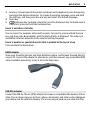
Get started
3
4
5
9
Sym key. To insert special characters not shown on the keyboard, press the sym key,
and select the desired character. To change the writing language, press and hold
the shift key, and then press the sym key, and select the desired language.
Space key
Backspace key. To delete a character, press the backspace key. To delete several
characters, press and hold the backspace key.
Insert a variation of a letter
You can insert, for example, letters with accents. To insert á, press and hold the sym
key, and then press A repeatedly, until the desired letter is displayed. The order and
availability of letters depends on the selected writing language.
Insert a number or special character that is printed at the top of a key
Press and hold the desired key.
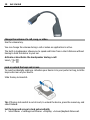
HDMI adapter
Share your favourite pictures and high-definition videos, and browse the web directly
on your TV. Connect the adapter to your device, and then connect any compatible HDMI
cable (available separately), to see it all on the big screen.
USB OTG adapter
Connect the USB On-The-Go (OTG) adapter to browse a compatible USB memory stick or
drive. You can then copy your pictures, videos, documents, and other content between
your device and the external memory. It's an easy way to back up your essential files.
10
Get started
Change the volume of a call, song, or video
Use the volume key.
You can change the volume during a call or when an application is active.
The built-in loudspeaker allows you to speak and listen from a short distance without
having to hold the device to your ear.
Activate or deactivate the loudspeaker during a call
or .
Select
Lock or unlock the keys and screen
To avoid accidentally making a call when your device is in your pocket or bag, lock the
keys and screen of your device.
Slide the key lock switch.
Tip: If the key lock switch is out of reach, to unlock the device, press the menu key, and
select Unlock.
Set the keys and screen to lock automatically
1 Select Menu > Settings and Phone > Display > Screen/keylock time-out.
Get started
2
11
Define the length of time after which the keys and screen are locked automatically.
Flashlight
The camera flash can be used as a flashlight. To switch the flashlight on or off, slide and
hold the key lock switch for two seconds.
The flashlight can only be used when you are on the home screen. You can switch the
flashlight on also when you are on the home screen and the keys and screen or the
device is locked.
Do not shine the flashlight in anyone's eyes.
Insert or remove the SIM card
Do not attach any stickers to your SIM card.
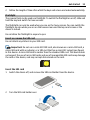
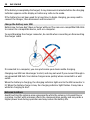
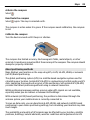
Important: Do not use a mini-UICC SIM card, also known as a micro-SIM card, a
micro-SIM card with an adapter, or a SIM card that has a mini-UICC cutout (see figure)
in this device. A micro SIM card is smaller than the standard SIM card. This device does
not support the use of micro-SIM cards and use of incompatible SIM cards may damage
the card or the device, and may corrupt data stored on the card.
Insert the SIM card
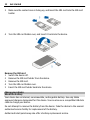
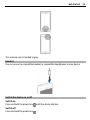
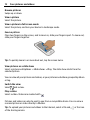
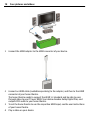
1 Switch the device off, and remove the SIM card holder from the device.
2
Turn the SIM card holder over.
12
Get started
3
Make sure the contact area is facing up, and insert the SIM card into the SIM card
holder.
4
Turn the SIM card holder over, and insert it back into the device.
Remove the SIM card
1 Switch the device off.
2 Remove the SIM card holder from the device.
3 Remove the SIM card.
4 Turn the SIM card holder over.
5 Insert the SIM card holder back into the device.
Charge your device
About the battery
Your device has an internal, nonremovable, rechargeable battery. Use only Nokia
approved chargers designated for this device. You can also use a compatible USB data
cable to charge your device.
Do not attempt to remove the battery from the device. Take the device to the nearest
authorised service facility for replacement of the battery.
Authorised retail points may also offer a battery replacement service.
Get started
13
Important: Only qualified personnel or an authorised service facility should
replace the battery. Unauthorised battery replacement may invalidate your warranty.
When your device is low on power, power save mode is activated. You may not be able
to modify the settings of certain applications. To deactivate power save mode, press
the power key , and select Deactivate power saving.
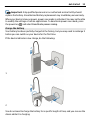
Charge the battery
Your battery has been partially charged at the factory, but you may need to recharge it
before you can switch on your device for the first time.
If the device indicates a low charge, do the following:
1
2
You do not need to charge the battery for a specific length of time, and you can use the
device while it is charging.
14
Get started
If the battery is completely discharged, it may take several minutes before the charging
indicator appears on the display or before any calls can be made.
If the battery has not been used for a long time, to begin charging, you may need to
connect the charger, then disconnect and reconnect it.
Charge the battery over USB
Battery low, but you don't have a charger with you? You can use a compatible USB cable
to connect to a compatible device, such as a computer.
To avoid breaking the charger connector, be careful when connecting or disconnecting
the charger cable.
If connected to a computer, you can synchronise your device while charging.
Charging over USB can take longer to start, and may not work if you connect through a
non-powered USB hub. Your device charges more quickly when connected to a wall
outlet.
When the battery is charging, the charging indicator light next to the USB connector is
lit. When the battery charge is low, the charging indicator light flashes. It may take a
while for charging to start.
Antenna locations
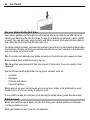
Avoid touching the antenna area unnecessarily while the antenna is transmitting or
receiving. Contact with antennas affects the communication quality and may cause a
higher power level during operation and may reduce the battery life.
Get started
The antenna area is marked in grey.
Headset
You can connect a compatible headset or compatible headphones to your device.
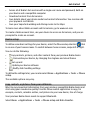
Switch the device on or off
Switch on
Press and hold the power key
until the device vibrates.
Switch off
Press and hold the power key
.
15
16
Get started
Use your device for the first time
Your device guides you through the initial setup when you insert your SIM card and
switch your device on for the first time. To use all of Nokia's Ovi services, create a Nokia
account. You can also copy your contacts and other content from your previous device,
and subscribe to receive helpful tips and tricks.
To create a Nokia account, you need an internet connection. For information about data
transmission charges, contact your service provider. If you can't connect to the internet,
you can create an account later.
Tip: To create and manage your Nokia account on the internet, go to www.ovi.com.
If you already have a Nokia account, sign in.
Tip: Forgotten your password? You can request it to be sent to you in a mail or text
message.
Use the Phone switch application to copy your content, such as:
•
•
•
•
Contacts
Messages
Pictures and videos
Personal settings
When you set up your mail account, you can set your inbox to be displayed on your
home screen, so you can easily check your mail.
If you need to make an emergency call during the setup phase, press the menu key.
Nokia account
When you switch on your device for the first time, your device guides you through
creating a Nokia account.
With your Nokia account, you can, for example:
Get started
•
•
•
•
17
Access all of Nokia's Ovi services with a single user name and password, both on
your device and a compatible computer
Download content from Ovi services
Save details about your device model and contact information. You can also add
your payment card details.
Save your important walking and driving routes to Ovi Maps
To learn more about Nokia account and Ovi services, go to www.ovi.com.
To create a Nokia account later, use your device to access an Ovi service, and you are
prompted to create an account.
Device set-up
that
To define some basic settings for your device, select the Phone setup shortcut
is on one of your home screens. To switch between home screens, swipe left or right.
You can do the following:
•
•
•
•
•
Copy contacts, pictures, and other content from your previous Nokia device
Personalise your device, by changing the ringtone and visual theme
Set up mail
Update your device software
Modify slide handling settings
To define the settings later, you can also select Menu > Applications > Tools > Phone
setup.
The available options may vary.
Copy contacts or pictures from your old device
Want to copy important information from your previous compatible Nokia device and
start using your new device quickly? Use the Phone switch application to copy, for
example, contacts, calendar entries, and pictures to your new device, free of charge.
Your previous Nokia device needs to support Bluetooth.
Select Menu > Applications > Tools > Phone setup and Data transfer.
18
Get started
If your previous Nokia device does not have the Phone switch application, your new
device sends it in a message using Bluetooth. To install the application, open the
message in your previous device, and follow the instructions.
1
2
3
Select the device you want to connect to, and pair the devices. Bluetooth needs to
be activated.
If the other device requires a passcode, enter the passcode. The passcode, which
you can define yourself, must be entered in both devices. The passcode in some
devices is fixed. For details, see the user guide of the device.
The passcode is valid only for the current connection.
Select the content and OK.
Access codes
PIN or PIN2 code
(4-8 digits)
These protect your SIM card against unauthorised use or are
required to access some features.
You can set your device to ask for the PIN code when you switch
it on.
If not supplied with your SIM card or you forget the codes,
contact your service provider.
If you enter the code incorrectly three times in a row, you need
to unblock the code with the PUK or PUK2 code.
PUK or PUK2 code
These are required to unblock a PIN or PIN2 code.
(8 digits)
If not supplied with your SIM card, contact your service provider.
Install Nokia Ovi Suite on your PC
IMEI number
(15 digits)
Lock code (security
code)
(min. 4 digits or
characters)
19
This is used to identify valid devices in the network. The number
can also be used to block, for example, stolen devices.
To view your IMEI number, dial *#06#.
This helps you protect your device against unauthorised use.
You can set your device to ask for the lock code that you define.
Keep the code secret and in a safe place, separate from your
device.
If you forget the code and your device is locked, your device will
require service. Additional charges may apply, and all the
personal data in your device may be deleted.
For more information, contact a Nokia Care Point or your device
dealer.
Use the in-device user guide
Select Menu > Applications > User guide.
Open the user guide from an application
Select Options > User guide. This is not available for every application.
Search the user guide
When the user guide is open, select Options > Search, and enter a letter or a word in
the search field.
Switch between the user guide and an application
Press and hold the menu key, swipe left or right, and select the desired application.
indicates a link to a web page. Links to related topics may be at the end of
instructions.
Install Nokia Ovi Suite on your PC
With the Nokia Ovi Suite PC application, you can manage content on your device, and
keep it in sync with your computer. You can also update your device with the latest
software, and download maps.
Download the latest version of Nokia Ovi Suite from www.ovi.com/suite to your
computer.
20
Install Nokia Ovi Suite on your PC
If your computer can't connect to the internet, to install Nokia Ovi Suite from your device
memory:
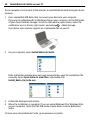
1
Use a compatible USB data cable to connect your device to your computer.
If you are using Windows XP or Windows Vista on your computer, set the USB mode
of your device to Mass storage. To set the USB mode on your device, select the
> Mass storage.
notification area in the top right corner, and select
Your device mass memory appears as a removable disk on your PC.
2
On your computer, select Install Nokia Ovi Suite.
If the installation window does not open automatically, open the installation file
manually. Select Open folder to view files, and double-click
Install_Nokia_Ovi_Suite.exe.
3
4
Follow the displayed instructions.
When the installation is complete, if you are using Windows XP or Windows Vista
on your computer, check that the USB mode of your device is set to Nokia Ovi
Suite.
To learn more about Nokia Ovi Suite, go to www.ovi.com/suite.
Basic use
21
To check which operating systems Nokia Ovi Suite supports, go to www.nokia.com/
support.
Basic use
Touch screen actions
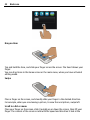
To interact with the user interface, tap or tap and hold the touch screen.
Open an application or other screen element
Tap the application or element.
Access functions quickly
Tap and hold the item. A pop-up menu with available options opens. For example, to
send an image or delete an alarm, tap and hold the image or alarm, and from the popup menu, select the appropriate option.
If you tap and hold the home screen, editing mode is activated.
22
Basic use
Drag an item
Tap and hold the item, and slide your finger across the screen. The item follows your
finger.
You can drag items in the home screen or the main menu, when you have activated
editing mode.
Swipe
Place a finger on the screen, and steadily slide your finger in the desired direction.
For example, when you are viewing a picture, to view the next picture, swipe left.
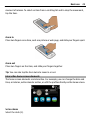
Scroll in a list or menu
Place your finger on the screen, slide it quickly up or down the screen, then lift your
finger. The content of the screen scrolls with the speed and direction it had at the
Basic use
23
moment of release. To select an item from a scrolling list and to stop the movement,
tap the item.
Zoom in
Place two fingers on an item, such as a picture or web page, and slide your fingers apart.
Zoom out
Place two fingers on the item, and slide your fingers together.
Tip: You can also tap the item twice to zoom in or out.
Interactive home screen elements
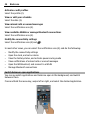
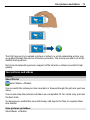
The home screen elements are interactive. For example, you can change the date and
time, set alarms, write calendar entries, or edit the profiles directly on the home screen.
Set an alarm
Select the clock (1).
24
Basic use
Activate or edit profiles
Select the profile (2).
View or edit your schedule
Select the date (3).
View missed calls or unread messages
Select the notification area (4).
View available WLANs or manage Bluetooth connections
Select the notification area (4).
Modify the connectivity settings
Select the notification area (4) and
.
In most other views, you can select the notification area (4), and do the following:
•
•
•
•
•
•
Modify the connectivity settings
Open the clock, and set an alarm
View the battery status, and activate power saving mode
View notifications of missed calls or unread messages
Open the WLAN wizard, and connect to a WLAN
Manage Bluetooth connections
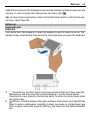
Switch between open applications
You can see which applications and tasks are open in the background, and switch
between them.
Press and hold the menu key, swipe left or right, and select the desired application.
Basic use
25
Applications running in the background increase the demand on battery power and use
memory. To close an application that you are not using, select .
Tip: To close all open applications, select and hold the task switcher, and from the popup menu, select Close all.
Write text
Keyboard input
Keyboard
Your device has a full keyboard. To open the keyboard, push the touch screen up. The
display rotates automatically from portrait to landscape when you open the keyboard.
1
2
Function key. To insert special characters printed at the top of keys, press the
function key, and then press the corresponding key. To enter several special
characters in a row, press the function key twice. To return to normal mode, press
the function key.
Shift key. To switch between the upper and lower case modes, press the shift key
twice. To enter a single upper case letter in lower case mode, or a single lower case
letter in upper case mode, press the shift key, and then press the desired alphabet
key.
26
3
4
5
Basic use
Sym key. To insert special characters not shown on the keyboard, press the sym key,
and select the desired character. To change the writing language, press and hold
the shift key, and then press the sym key, and select the desired language.
Space key
Backspace key. To delete a character, press the backspace key. To delete several
characters, press and hold the backspace key.
Insert a variation of a letter
You can insert, for example, letters with accents. To insert á, press and hold the sym
key, and then press A repeatedly, until the desired letter is displayed. The order and
availability of letters depends on the selected writing language.
Insert a number or special character that is printed at the top of a key
Press and hold the desired key.
Touch input
Enter text with the virtual keyboard
Use the virtual keyboard
To activate the virtual keyboard, select a text input field. You can use the virtual
keyboard both in landscape and portrait mode.
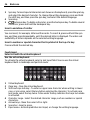
1
2
3
4
5
6
7
Virtual keyboard
Close key - Close the virtual keyboard.
Shift and caps lock key - To enter an upper case character when writing in lower
case, or vice versa, select the key before entering the character. To activate caps
lock mode, select the key twice. A line under the key indicates that caps lock mode
is activated.
Character range - Select the desired character range, such as numbers or special
characters.
Arrows keys - Move the cursor left or right.
Space bar - Insert a space.
Input menu - Activate predictive text input, or change the writing language.
Basic use
8
9
27
Enter key - Move the cursor to the next row or text input field. Additional functions
are based on the current context. For example, in the web address field of the web
browser, it acts as the Go icon.
Backspace key - Delete a character.
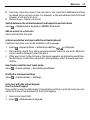
Switch between the virtual keyboard and keypad in portrait mode
> Alphanumeric keypad or QWERTY keyboard.
Select
Add an accent to a character
Select and hold the character.
Activate predictive text input with the virtual keyboard
Predictive text input may not be available in all languages.
1
2
3
Select
> Input options > Activate prediction.
is displayed.
Start writing a word. Your device suggests possible words as you write. When the
correct word is displayed, select the word.
If the word is not in the dictionary, the device suggests an alternative word from
the dictionary. To add the new word to the dictionary, select the word you have
written.
Deactivate predictive text input mode
> Input options > Deactivate prediction.
Select
Modify the text input settings
> Input options > Settings.
Select
Enter text with the virtual keypad
Use the virtual keypad
If you prefer to use the alphanumeric keypad when writing in portrait mode, you can
switch from the virtual keyboard to the virtual keypad.
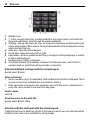
1
2
Select a text input field.
> Alphanumeric keypad.
Select
28
1
2
3
4
5
6
7
8
Basic use
Number keys
* - Enter a special character, or when predictive text input mode is activated and
the word underlined, cycle through the word candidates.
Shift key - Change the character case. To activate or deactivate predictive text input
mode, quickly select the key twice. To switch between the letter and number modes,
select and hold the key.
Close key - Close the virtual keypad.
Arrow keys - Move the cursor left or right.
Input menu - Activate predictive text input, change the writing language, or switch
to the virtual keyboard.
Backspace key - Delete a character.
Text input indicator (if available) - Indicates the character case, and if letter or
number mode or predictive text input mode is activated.
Activate traditional text input with the virtual keypad
Quickly select # twice.
Enter a character
1 Select a number key (1-9) repeatedly, until the desired character is displayed. There
are more characters available than are visible on the key.
2 If the next letter is located on the same key, wait until the cursor is displayed or
move the cursor forward, and select the key again.
Insert a space
Select 0.
Move the cursor to the next line
Quickly select 0 three times.
Activate predictive text input with the virtual keypad
Predictive text input is based on a built-in dictionary to which you can add new words.
Predictive text input is not available for all languages.
Basic use
1
2
3
4
5
29
Select
> Activate predictive text.
To write the desired word, use the keys 2-9. Select each key once for each letter. For
example, to write Nokia when the English dictionary is selected, select 6 for N, 6 for
o, 5 for k, 4 for i, and 2 for a.
The word suggestion changes after each key selection.
If the word is not correct, select * repeatedly, until the correct match is displayed.
If the word is not in the dictionary, select Spell, and enter the word using traditional
text input mode, and select OK.
If ? is displayed after the word, the word is not in the dictionary. To add a word to
the dictionary, select *, enter the word using traditional text input mode, and select
OK.
To insert a space, select 0. To insert a common punctuation mark, select 1, and then
select * repeatedly, until the correct punctuation mark is displayed.
Start writing the next word.
Deactivate predictive text input
Quickly select # twice.
Define the writing language
Select Menu > Settings and Phone > Touch input > Writing language.
Change the language when writing
> Input options > Writing language or
Select
> Writing language.
The available options may vary.
Keyboard shortcuts
Shortcuts can make the use of the applications more efficient.
General shortcuts
Ctrl + C
Copy text.
Ctrl + X
Cut text.
Ctrl + V
Paste text.
Shift + Sym
Change the writing language.
Ctrl + A
Select all.
Ctrl + B
Use bold font.
30
Basic use
Mail shortcuts
C
Create a new message.
R
Reply to a message.
A
Reply to all.
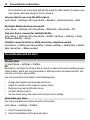
F
Forward a message.
D
Delete a message.
I
Collapse or expand the message list.
L
Mark a message with a flag.
M
Move a message to a different folder.
N
Go to the next message.
P
Go to the previous message.
S
Search for a message.
U
Mark a message as read or unread.
Z
Synchronise the mail account.
H
Open the in-device user guide.
Display indicators
General indicators
The touch screen and keys are locked.
The device alerts silently for incoming calls or messages.
An alarm is set.
A timed profile is activated.
You have a missed calendar event.
Call indicators
Someone has tried to call you.
You are using your second phone line (network service).
Incoming calls are diverted to another number (network service). If you have
two phone lines, a number indicates the active line.
Your device is ready for an internet call.
A data call is active (network service).
Basic use
31
Messaging indicators
You have unread messages. If the indicator is blinking, your Inbox folder may
be full.
Messages are waiting to be sent in the Outbox folder.
Network indicators
Your device is connected to a GSM network (network service).
Your device is connected to a 3G network (network service).
A GPRS data connection (network service) is open. indicates that the
connection is on hold and that a connection is opening or closing.
An EGPRS data connection (network service) is open. indicates that the
connection is on hold and that a connection is being established.
A 3G data connection (network service) is open. indicates that the connection
is on hold and that a connection is being established.
An HSPA data connection (network service) is open. indicates that the
connection is on hold and that a connection is being established.
A WLAN connection is available.
indicates that the connection is encrypted
that the connection is not encrypted.
and
Connectivity indicators
Bluetooth is active.
indicates that your device is sending data. If the
indicator is blinking, your device is trying to connect to another device.
A USB cable is connected to your device.
An HDMI cable is connected to your device.
GPS is active.
The device is synchronising.
A compatible headset is connected to your device.
A compatible TV-out cable is connected to your device.
A compatible text phone is connected to your device.
Set the notification light to blink for missed calls or messages
Your device has a notification light in the menu key. When the light blinks, you have
missed a call or a message has arrived.
Select Menu > Settings and Phone > Notification lights > Notification light.
32
Basic use
Search in your device and on the internet
You can search for items, such as messages, pictures, files, music, or videos stored
in your device or on the internet.
1
2
3
Select Menu > Applications > Search.
Start entering a search word, and select from the proposed matches.
To search on the internet, select the internet search link at the end of the search
results. You need an active internet connection.
Tip: You can add a search widget to the home screen. Tap and hold the home screen,
and the search widget from the list.
and select
Use your device offline
In places where you do not want to make or receive calls, you may still access your
calendar, contacts list, and offline games if you activate the offline profile. Switch the
device off when mobile phone use is not allowed or when it may cause interference or
danger.
On the home screen, select the profile and Offline.
When the offline profile is activated, your connection to the cellular network is closed.
All radio frequency signals between the device and the cellular network are prevented.
If you try to send a message, it is placed in the Outbox folder, and is sent only when
another profile is activated.
You can also use your device without a SIM card. Switch the device off, and remove the
SIM card. When you switch back on, the offline profile is activated.
Important: In the offline profile you cannot make or receive any calls, or use
other features that require cellular network coverage. You may be able to call the official
emergency number programmed into your device.To make calls, you must first change
to another profile.
When the offline profile is activated, you can still connect to a WLAN to, for example,
read your mail or browse the internet. You can also use Bluetooth.
Remember to comply with any applicable safety requirements.
Prolong battery life
If it seems you're always looking for a charger, there are steps you can take to reduce
the power consumption of your device.
•
Always charge the battery fully.
Basic use
•
33
When power saving mode is activated, device settings, such as Network mode and
the screen saver, are optimised.
Activate power saving mode
Press the power key , and select Activate power saving. To deactivate power saving
mode, press the power key , and select Deactivate power saving.
Close the applications you are not using
Press and hold the menu key, swipe until the desired application is displayed, and select
.
Sounds, themes, and effects
• Mute unnecessary tones, such as key tones.
• Use wired headphones, rather than the loudspeaker.
• Change the length of the time-out period after which the device display switches
off.
Set the length of the time-out period
Select Menu > Settings and Phone > Display > Light time-out.
Activate a dark theme and wallpaper
Select Menu > Settings and Themes > General. To change the wallpaper, on the home
screen, select Options > Change wallpaper.
Deactivate background animation effects
Select Menu > Settings and Themes > General > Options > Theme effects > Off.
Decrease the brightness of the display
In the display settings, select Brightness.
Deactivate the Big clock screen saver
Select Menu > Settings and Themes > Screen saver > None.
Network use
• If you are listening to music or otherwise using your device, but do not want to
make or receive calls, activate the offline profile.
• Set your device to check for new mail less frequently.
• Use a WLAN connection to connect to the internet, rather than a packet data (GPRS
or 3G) connection.
34
•
Personalisation and Ovi Store
If your device is set to use both GSM and 3G networks (dual mode), the device uses
more power when searching for the 3G network.
Set your device to use only the GSM network
Select Menu > Settings and Connectivity > Network > Network mode > GSM.
Deactivate Bluetooth when not needed
Select Menu > Settings and Connectivity > Bluetooth > Bluetooth > Off.
Stop your device scanning for available WLANs
Select Menu > Settings and Connectivity > WLAN > Options > Settings > Show
WLAN availability > Never.
Establish a packet data (3G or GPRS) connection only when needed
Select Menu > Settings and Connectivity > Admin. settings > Packet data > Packet
data connection > When needed.
Personalisation and Ovi Store
Profiles
About profiles
Select Menu > Settings > Profiles.
Waiting for a call but can't let your phone ring? Your device has various settings groups
called profiles, which you can personalise for different events and environments. You
can also create your own profiles.
You can personalise the profiles in the following ways:
•
•
•
•
•
Change the ringtone and message alert tones.
Adjust the volume of the ringtone and key tones.
Mute key tones and notification tones.
Activate vibration alerts.
Set the device to say the name of the contact who is calling.
Personalise your tones
You can personalise your device tones for each profile.
Select Menu > Settings > Profiles.
1
2
Select the desired profile.
Select Personalise and the desired option.
Personalisation and Ovi Store
35
Tip: Download ringtones from Ovi Store. To learn more about Ovi Store, go to
www.ovi.com.
Silence your device
When the silent profile is activated, all ringtones and alert tones are muted. Activate
this profile when you are at the cinema or in a meeting.
On the home screen, select the profile and Silent.
Change your profile for meetings or outdoor use
When the meeting profile is activated, your device discreetly beeps once instead of
ringing. When the outdoor profile is activated, the ringing tone is louder, so you won't
miss a call in a noisy environment.
In the home screen, select the profile and Meeting or Outdoor.
Create a new profile
How can you make your device meet your needs at work or college or home? You can
create new profiles for different situations, and give them appropriate names.
1
2
3
Select Menu > Settings > Profiles and Options > Create new.
Define your profile settings, and select Profile name.
Enter a name for the profile.
Set a timed profile
You can activate a profile until a set time, after which the previously used profile is
activated.
Select Menu > Settings > Profiles.
1
2
Select the desired profile and Timed.
Set the time that you want the timed profile to expire at.
Change your theme
With themes, you can change the colours and look of your display.
Select Menu > Settings > Themes.
Select General and a theme.
Some themes include background animation effects. To save battery power, select
General > Options > Theme effects > Off.
36
Personalisation and Ovi Store
Tip: Download themes from Nokia's Ovi Store. To learn more about Ovi Store, go to
www.ovi.com.
Home screen
About the home screen
On the home screen, you can:
•
•
•
•
•
See notifications of missed calls and received messages
Open your favourite applications
Control applications, such as the music player
Add shortcuts for different features, such as writing a message
View your favourite contacts, and quickly call or send messages to them
You can have more than one home screen page, for example, separate home screens
for work and private life.
The home screen elements are interactive. For example, if you select the clock, the clock
application opens.
Predefined home screens
Your device has separate home screens for business and personal needs, and a screen
for your internet links. You can personalise the screens to your liking.
To switch to another home screen, swipe left or right.
displayed home screen.
indicates the currently
Personalise the home screen
Want to see your favourite landscape or pictures of your family in the home screen
background? You can change this wallpaper, and rearrange items in the home screen,
to personalise it to your liking.
Tip: If you have more than one home screen, you can switch between them also while
editing, and personalise all your home screens at the same time.
Change the wallpaper
1 Tap and hold the home screen.
Personalisation and Ovi Store
2
3
4
37
Select Options > Change wallpaper > Image.
Select the desired picture.
Select Done.
Tip: Download more background images from Nokia's Ovi Store. To learn more about
Ovi Store, go to www.ovi.com.
Rearrange items in the home screen
1 Tap and hold the home screen.
2 Drag and drop items to a new location.
3
Select Done.
Add a widget to the home screen
Interested in today's weather or what's currently in the news? You can add miniapplications (widgets) to your home screen, and see your most relevant information at
a glance.
1
2
3
Tap and hold the home screen.
and the desired widget from the list.
Select
Select Done.
A widget can enhance the related application, and may also change the way the
application works. For example, if you add a notification widget, received messages are
notified in the widget.
Tip: To download more widgets, select OVI.
Using the service or downloading content may cause transfer of large amounts of data,
which may result in data traffic costs.
Some home screen widgets may connect to the internet automatically. To prevent this,
select Options > Widgets to offline mode.
Remove a widget from the home screen
1 Tap and hold the home screen.
38
2
3
Personalisation and Ovi Store
Select the widget, and from the pop-up menu, select Remove.
Select Done.
Add a shortcut to the home screen
Did you know that you can create shortcuts to your most used applications and features?
You can add shortcuts to applications, web bookmarks, or actions, such as writing a
message.
1
2
3
4
Tap and hold the home screen.
Select the shortcut widget and Settings.
Select the shortcut you want to define, and select Bookmark or Application and
the desired item.
Select Back > Done.
Tip: To remove a shortcut, replace it with another one.
Tip: If you add empty shortcut widgets when editing a home screen, you can later define
the shortcuts directly on the home screen.
Add your important contacts to the home screen
Add your most important contacts to the home screen, so you can quickly call or send
messages to them.
The contacts need to be stored in your device memory.
1
2
In the Favourite contacts widget, select .
To mark the contacts to add to the home screen, select the desired contacts. You
can add up to 20 contacts to the widget.
Call or send a message to a contact
In the widget, select the contact.
Remove a contact from the home screen
and the contact to remove. The contact is deleted from the
In the widget, select
widget, but remains in your contacts list.
Organise your applications
Want to open your most used applications more quickly? In the main menu, you can
organise your applications and hide less used applications in folders.
Press the menu key, and select Options > Edit.
Personalisation and Ovi Store
39
Create a new folder
Select Options > New folder.
Move an application to a folder
Select and hold the application, and from the pop-up menu, select Move to folder and
the new folder.
Tip: You can also drag and drop applications and folders.
Ovi Store
About Ovi Store
Select Menu > Store, and sign in to your Nokia account.
Did you know that you can personalise your device with more applications? Or download
games, also free of charge? Browse the Ovi Store to find the latest content that is
designed specifically for your device.
You can download:
•
•
•
•
•
Games
Applications
Videos
Themes and wallpapers
Ringtones
You can also:
•
•
Get content that is relevant to your tastes and location
Share recommendations with your friends
To download from Ovi Store, you need a Nokia account.
When you sign in, you are offered content compatible with your device.
You can search for and download content directly on your mobile device, or browse Ovi
Store on your compatible computer and send links to content to your mobile device as
a text message.
Some items are free of charge; others you need to pay for with your credit card or on
your phone bill. The availability of payment methods depends on your country of
residence and your network service provider.
To learn more about Ovi Store, go to www.ovi.com.
40
Personalisation and Ovi Store
Search Ovi Store
Check out the latest and most downloaded apps or games, and items recommended for
you and your device. You can browse the different categories, or search for a specific
item.
Select Menu > Store, and sign in to your Nokia account.
1
2
Select Store menu > Search.
Enter search words in the search field, and select Go.
When you view an item, related items are also displayed.
Tip: Did you find something in Ovi Store that you know your friends would be interested
in? Send them a link!
Tip: To see what others have to say about an item, select the item. You can also see a
description, the price, and the size of the download.
Download a game, application, or other item
Download free games, apps, or videos, or buy more content to your device! From Ovi
Store, you can find content designed specifically for your device.
Select Menu > Store, and sign in to your Nokia account.
1
2
3
4
5
6
Select the item.
If the item has a price, select Buy. If the item is free, select Download.
You can pay with a credit or debit card, or, if available, on your phone bill.
To save your card information to your Nokia account, select Save this card to my
Nokia account.
If your card information is already saved, to use a different payment method, select
Change billing details.
To get a receipt of your purchase, select or enter a mail address.
Select Confirm.
When the download is complete, you can open or view the item, or continue
browsing for more content. The content type determines where the item is stored
in your mobile device. To change the default location, select Account >
Installation preferences and the desired memory.
Tip: Use a WLAN connection to download larger files, such as games, applications, or
videos.
Telephone
41
Tip: To avoid entering your payment card details over and over when buying items from
Ovi Store, save your details to your Nokia account. You can add more than one payment
card, and choose which one to use when buying.
For more information on an item, contact the publisher of the item.
View your download queue
While an item is downloading, you can continue to browse for other content and add
items to your download queue.
Select Menu > Store, and sign in to your Nokia account.
Select Account.
The status of currently downloading items is displayed in the New downloads section.
One item is downloaded at a time, and pending items wait in your download queue.
Previously downloaded items are displayed in the My stuff section.
Tip: If you need to, for example, temporarily close your WLAN connection, select the
downloading item, and in the details view, select Pause. To resume downloading, select
Resume. Pause pending items individually.
If a download fails, you can re-download the item.
Write a review
Do you want to share your opinion on an item with other Ovi Store users? Write your
own review, and rate the item.
You can post one review per item that you have downloaded.
1
2
3
Select the item and Review.
Write your review, rate the item, and select Add review.
If you want to edit your review, select Edit review.
To publish your review, select Submit.
Help us keep Ovi Store clean, and report if you find inappropriate content. Select Report
abuse and the reason. Enter additional details, if needed.
Telephone
Call a phone number
1 On the home screen, select Call to open the dialler, and enter the phone number.
To enter the + character, used for international calls, select * twice.
2 To make the call, select .
42
3
Telephone
To end the call, select
.
Search for a contact
You can search for a contact you have saved in the contacts list.
In the home screen, open the keyboard, and start entering the contact's first or second
name. You can also search by company name.
Deactivate contact search
In the dialler, select Options > Contact search > Off.
Call a contact
Select Menu > Contacts.
1
2
3
4
To search for a contact, enter the first letters or characters of the first or second
name in the search field.
Select the contact.
In the contact card, select Voice call.
If the contact has more than one phone number, select the desired number.
Make a video call
Do you have friends or family that you don't see in person very often? For a face-to-face
chat, why not make a video call to them?
Telephone
43
Video calls are a network service, and to make a video call, you need to be in a 3G
network.
For information on availability and costs, contact your service provider.
Video calls can only be made between two parties. Video calls cannot be made while
another voice, video, or data call is active.
1
2
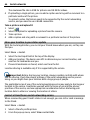
3
Select Menu > Contacts, and search for a contact.
Select the contact, and in the contact card, select Video call.
The camera on the front of your device is used by default for video calls. Starting a
video call may take a while. If the call is not successful (for example, video calls are
not supported by the network, or the receiving device is not compatible), you are
asked if you want to make a normal call or send a message instead.
The video call is active when you see two videos, and hear the sound through the
loudspeaker. The call recipient may deny video sending, and you only hear the voice
of the caller, and may see an image or a grey screen.
.
To end the video call, select
Send an image rather than live video
Select Menu > Settings and Calling > Call > Image in video call.
If you do not send live video, the call is still charged as a video call.
44
Telephone
Make a conference call
Your device supports conference calls (network service) between a maximum of six
participants, including yourself. Video conference calls are not supported.
1
2
3
Make a call to the first participant.
To make a call to another participant, select Options > New call. The first call is
put on hold.
When the new call is answered, to add the first participant to the conference call,
select
.
Add a new participant to a conference call
Make a call to another participant, and add the new call to the conference call.
Have a private conversation with a conference call participant
1 Select .
2
3
Go to the participant, and select . The conference call is put on hold on your device.
The other participants continue the conference call.
To return to the conference call, select
.
Drop a participant from a conference call
Select , go to the participant, and select .
End an active conference call
Select
.
Call the numbers you use the most
You can quickly call your friends and family when you assign your most-used phone
numbers to the number keys of your device.
Telephone
45
Select Menu > Settings and Calling > Speed dialling.
Assign a phone number to a number key
1 Select the number key to which you want to assign the phone number.
1 is reserved for the voice mailbox.
2 Select the phone number from your contacts list.
Remove or change a phone number assigned to a number key
Select and hold the assigned key, and from the pop-up menu, select Remove or
Change.
Make a call
On the home screen, select Call to open the dialler, and select and hold the assigned
number key.
Use your voice to call a contact
With the Voice commands application you can use your voice to make calls or control
your device.
Voice commands are not dependent on the speaker’s voice. Commands are
automatically created by your device.
Note: Using voice tags may be difficult in a noisy environment or during an
emergency, so you should not rely solely upon voice dialling in all circumstances.
When you use voice dialling, the loudspeaker is in use. Hold the device at a short distance
away when you say the voice command.
1
2
3
In the home screen, select and hold Call. If a compatible headset with the headset
key is attached, press and hold the headset key.
A short tone sounds, and Speak now is displayed. Say clearly the name that is saved
for the contact.
The device plays a synthesised voice command for the recognised contact in the
selected device language, and displays the name and number. To cancel the voice
dialling, select Quit.
Listen to a voice command for a contact
1 Select a contact and Options > Voice tag details.
2 Select a contact detail.
If several numbers are saved for a name, you can say also the name and the number
type, such as mobile or telephone.
46
Telephone
Make calls over the internet
About internet calls
With the internet call network service, you can make and receive calls over the internet.
Internet call services may support calls between computers, between mobile phones,
and between a VoIP device and a traditional telephone.
Some internet call service providers allow free internet calls. For availability and
connectivity costs, contact your internet call service provider.
To make or receive an internet call, you must be in the service area of a WLAN or have
a packet data (GPRS) connection in a 3G network, and be signed in to an internet call
service.
Install an internet call service
You can search for internet call services from Ovi Store. For details, go to
www.ovi.com.
1
2
3
Download an installation widget for the internet call service.
To start the installation, select the installation widget.
Follow the displayed instructions.
When an internet call service has been installed, a tab for the service is displayed in the
contacts list.
Make an internet call
When you are signed into a internet call service, you can make a call from the friends
list or the contacts list.
Select Menu > Contacts.
Call a contact in the friends list
1 Open the internet call service tab, and sign in to a internet call service.
2 Select a contact from the friends list, and select Internet call.
Make an internet call to a phone number or SIP address
1 On the home screen, select Call to open the dialler, and enter the number.
2 Select Options > Call > Internet call.
Call the last dialled number
Trying to call someone, but they are not answering? It is easy to call them again. In the
call log, you can see information about the calls you have made and received.
In the home screen, select Call to open the dialler, and select
number, select the number from the list.
. To call the last dialled
Telephone
47
Record a phone conversation
With the Recorder application, you can record phone conversations.
1
2
3
During an active voice call, select Menu > Office > Recorder.
To start recording, select .
To stop recording, select . The sound clip is automatically saved to the Sound files
folder in the File manager application.
Both parties hear a tone at regular intervals during the recording.
Turn to silence
If your device rings in a situation where you do not want to be disturbed, you can turn
the device to silence the ringtone.
Activate the turn to silence feature
Select Menu > Settings and Phone > Sensor settings > Silence calls > On.
When your device rings, turn your device display down.
View your missed calls
In the home screen, you can see when you have missed calls. To view the phone number,
select Show. The caller's name is displayed if stored in the contacts list.
Missed and received calls are logged only if supported by the network, and the device
is switched on and within the network service area.
Call back the contact or number
Select the contact or number.
48
Telephone
To view the missed calls list later, in the home screen, select Call to open the dialler,
select , and open the missed calls tab
.
Tip: To view missed calls quickly, in the home screen, select
.
calls tab
, and open the missed
Call your voice mailbox
You can divert your incoming calls to your voice mailbox (network service). People can
leave you a message, for example, when you have not answered the call.
In the home screen, select Call to open the dialler, and select and hold 1.
Change the phone number of your voice mailbox
1 Select Menu > Settings and Calling > Call mailbox.
2 Select and hold a mailbox, and from the pop-up menu, select Change number.
3 Enter the number (obtained from your network service provider), and select OK.
Divert calls to your voice mailbox or another phone number
If you cannot answer your calls, you can divert incoming calls to your voice mailbox or
another phone number.
Select Menu > Settings and Calling > Call divert > Voice calls.
Call divert is a network service. For details, contact your service provider.
Divert all voice calls to your voice mailbox
Select All voice calls > Activate > To voice mailbox.
Divert all voice calls to another phone number
1 Select All voice calls > Activate > To other number.
2 Enter the number, or select Find to use a number saved in your contacts list.
Several diverting options, such as If busy and If not answered can be active at the
same time.
On the home screen,
indicates that all calls are diverted.
Call barring and call diverting cannot be active at the same time.
Prevent making or receiving calls
Sometimes you may want to restrict the calls that can be made or received with your
device. With call barring (network service), you can, for example, restrict all outgoing
international calls or incoming calls when you are abroad.
Telephone
49
Select Menu > Settings and Calling > Call barring.
To modify the settings, you need the barring password from your service provider.
Prevent making calls
1 If an internet call service is installed, select Mobile call barring.
2 To prevent making any calls or international calls, select Outgoing calls or
International calls. To prevent making international calls, but allow calls to your
home country, select International calls except to home country.
3 Select Activate. Call barring affects all calls, including data calls.
Prevent receiving calls
1 If an internet call service is installed, select Mobile call barring.
2 To prevent receiving any calls or international calls when you are abroad, select
Incoming calls or Incoming calls when roaming.
3 Select Activate.
Prevent anonymous internet calls
Select Internet call barring > Anonymous call barring > On.
Allow calls only to certain numbers
With the fixed dialling service, you can restrict calls, and only allow calls to certain phone
numbers. For example, you can allow your children to call only family members or other
key numbers.
Select Menu > Contacts and Options > SIM numbers > Fixed dial contacts.
Not all SIM cards support the fixed dialling service. You need your PIN2 code from your
service provider.
Activate fixed dialling
Select Options > Activate fixed dialling. Enter the PIN2 code.
Select the people to whom calls are allowed
1 Select Options > New SIM contact.
2 Enter the PIN2 code.
3 Enter the contact name and phone number to which calls are allowed, and select
Done. To add a contact from the contacts list to the fixed dialling list, select Add
from Contacts and a contact.
To send a text message to a SIM contact while the fixed dialling service is active, you
need to add the text message centre number to the fixed dialling list.
50
Telephone
Video sharing
About video sharing
With video sharing (network service), you can share live or recorded video from your
device to another compatible device, during a voice call.
When you activate video sharing, the loudspeaker is automatically activated. If you do
not want to use the loudspeaker, you can use a compatible headset.
Video sharing requirements
To share video, both you and the recipient must:
•
•
•
Be in a 3G network. If either of you move outside the 3G network, the voice call
continues.
Have the video sharing feature activated.
Have person-to-person connections set up.
For more information on the service, 3G network availability, and fees associated with
using this service, contact your service provider.
Set up video sharing
To set up video sharing, you need person-to-person and 3G connection settings.
A person-to-person connection is also known as a Session Initiation Protocol (SIP)
connection. The SIP profile settings must be configured in your device before you can
use video sharing. Contact your service provider for the SIP profile settings, and save
them to your device. Your service provider may send you the settings in a configuration
message or give you a list of the needed parameters.
Set up a person-to-person connection
1 Select Menu > Settings and Connectivity > Admin. settings > SIP settings and
a SIP profile.
2 Enter the needed SIP profile settings.
Modify video sharing settings
Select Menu > Settings and Connectivity > Video sharing.
Use a 3G connection
For details about networks, contact your service provider.
Add a SIP address to a contact
1 Select Menu > Contacts.
2 Select a contact or create a new contact.
Contacts
3
4
5
51
Select Options > Edit.
Select Options > Add detail > Share video.
Enter the SIP address in the format username@domainname (you can use an IP
address instead of a domain name).
If you do not know the SIP address for the contact, you can use the phone number
of the recipient, including the country code, to share video (if supported by the
network service provider).
Share live or recorded video
During an active voice call, select Options > Share video.
1
2
To share live video, select Live video.
To share a video, select Video clip.
Select the desired SIP address or phone number that is stored in the contact card
for the recipient. If the SIP address or phone number is not available, manually enter
the details, and select OK. If entering a phone number, you need to enter the country
code. The invitation is sent to the SIP address.
If you access another application while sharing a video, the sharing is paused.
Continue sharing
On the home screen, select Options > Resume video sharing.
Stop sharing video
Select Stop. To end the voice call, select
ends.
. When you end the call, video sharing also
Save automatically the live video you shared
Select Menu > Settings and Connectivity > Video sharing > Video saving > On.
Accept a video sharing invitation
Select Yes. Video sharing begins automatically.
Contacts
About Contacts
Select Menu > Contacts.
You can save and organise your friends' phone numbers, addresses, and other contact
information. If you want to keep in touch with your most important contacts easily, you
can add them to the home screen.
52
Contacts
Save phone numbers and mail addresses
You can save your friends' phone numbers, mail addresses, and other information to
your contacts list.
Select Menu > Contacts.
Add a contact to the contacts list
1 Select Options > New contact.
2 Select a field, and enter the details.
Edit contact information
1 Select a contact.
2 Open the contact card tab
3 Select a contact detail.
.
Add details about a contact
Select a contact and Options > Edit > Options > Add detail.
Save a number from a received call or message
Have you received a call or a message from a person whose phone number is not yet
saved in the contacts list? You can easily save the number in a new or existing contact
list entry.
Save a number from a received call
1 Select Menu > Applications > Log.
2 Select Recent calls > Received calls.
3 Select and hold a phone number, and from the pop-up menu, select Save to
Contacts.
4 Select whether you want to create a new contact list entry or update an existing
one.
Save a number from a received message
1 Select Menu > Messaging.
2 Select Inbox and a message.
3 Select the phone number and Save to Contacts.
4 Select whether you want to create a new contact list entry or update an existing
one.
Contact your most important people quickly
You can set your most important contacts as favourites. Your favourites are at the top
of the contacts list, so you can contact them quickly.
Contacts
53
Select Menu > Contacts.
Set a contact as a favourite
Select and hold a contact, and from the pop-up menu, select Add to favourites.
Remove a contact from favourites
Select and hold a contact, and from the pop-up menu, select Remove from
favourites. The contact is not deleted from your standard contacts list.
Add a picture for a contact
Want to see quickly who is calling you? Add a picture for a specific contact.
Select Menu > Contacts and a contact.
1
2
Select the icon next to the contact's name, and from the pop-up menu, select Add
image.
Select a picture from Photos.
Change or remove a picture
Select the picture, and from the pop-up menu, select Change image or Remove
image.
The contacts must be stored in your device memory. To check which memory is in use,
select Options > Settings > Contacts to display.
Set a ringing tone for a specific contact
Want to be able to hear that a particular person is calling you? You can set a ringing
tone specifically for that person.
Select Menu > Contacts.
Set a ringing tone for a contact
1 Select a contact and Options > Edit.
2 Select the Ringtone field and a ringing tone.
Set a ringing tone for a contact group
1 Open the Groups tab.
2 Select and hold the title of a group, and from the pop-up menu, select Ringtone.
3 Select a ringing tone from the list.
The ringing tone only applies to the members of the group at the time that the ringing
tone is set.
54
Contacts
Send your contact information using My Card
My card is your electronic business card. With My card, you can send your contact
information to others.
Select Menu > Contacts.
Send your contact information as a business card
Select and hold My card, and from the pop-up menu, select Send as business card.
Edit your contact information in My Card
Select My card, and the detail to edit.
Create a contact group
When you have created contact groups, you can send a message to several people at
the same time. For example, you can assign the members of your family to one group.
Select Menu > Contacts.
1
2
3
4
5
Open the Groups tab.
Select Options > New group.
Enter a name for the group, and select OK.
Select the group and Options > Add members.
To mark the contacts you want to add to the group, select them.
Send a message to a group of people
Would you like to send a message to all your family members quickly? If you have
assigned them to a group, you can send a message to all of them at the same time.
Select Menu > Contacts.
1
2
Open the Groups tab.
Select and hold a group title, and from the pop-up menu, select Create message.
Copy contacts from the SIM card to your device
If you have contacts stored on your SIM card, you can copy them to your device. You can
add more details to contacts that are stored on your device, such as alternative phone
numbers, addresses, or a picture.
Select Menu > Contacts.
Select Options > SIM numbers > Copy all to phone.
Messaging
55
Tip: If you now have a contact twice in your contacts list, select Options > Settings >
Contacts to display, and clear the SIM memory check box.
Back up your contacts to Ovi by Nokia
If you back up your contacts to Ovi by Nokia, you can easily copy your contacts to a new
device. If your device is stolen or damaged, you can still access your contacts list online.
Select Menu > Contacts and Options > Ovi sync.
If you allow automatic synchronisation, all the changes you make in the contacts list
are automatically backed up to Ovi by Nokia.
You need a Nokia account to use Ovi. If you do not have an account, create one at
www.ovi.com. You are also prompted to create an account, if you access any Ovi service
using your device.
If you use Ovi Sync to automatically synchronise your contacts with Ovi, do not allow
contact synchronisation with any other service as there may be conflicts. Ovi Sync for
contacts is not available if you have activated contacts synchronisation in Mail for
Exchange.
Messaging
About Messaging
Select Menu > Messaging.
You can send and receive various kinds of messages:
•
•
•
•
Text messages
Audio messages
Multimedia messages that contain pictures and videos
Group messages
Messaging requires network support.
Send a message
With text and multimedia messages, you can quickly contact your friends and family.
In a multimedia message, you can attach pictures, videos, and sound clips that you want
to share.
Select Menu > Messaging.
1
Select New message.
56
2
3
4
Messaging
To select recipients from the contacts list, select the To title. To enter the recipient’s
phone number manually, enter the number in the To field.
To add an attachment, select .
Select
.
Sending a message with an attachment may be more expensive than sending a normal
text message. For more information, contact your service provider.
You can send text messages that are longer than the character limit for a single message.
Longer messages are sent as two or more messages. Your service provider may charge
accordingly.
Characters with accents, other marks, or some language options, take more space, and
limit the number of characters that can be sent in a single message.
If the item you inserted in a multimedia message is too large for the network, the device
may automatically reduce the size.
Only compatible devices can receive and display multimedia messages. Messages may
look different in different devices.
Send an audio message
You can record a sound clip, such as a birthday song, and send it to your friend as an
audio message.
Select Menu > Messaging.
1
2
3
4
Select Options > Create message > Audio message.
To record the message, select .
To select the recipient from the contacts list, select the To title. To enter the
recipient's phone number manually, enter the number in the To field.
Select
.
Receive messages
When you receive a message, you can open it directly from the home screen. Later, you
can find the message in the Conversations folder or in the Inbox folder in Messaging.
Select Menu > Messaging.
When you receive a message, and 1 new message are displayed on the home screen.
To open the message, select Show. If you have added a notification widget to the home
screen, open the message from the widget. By default, the message is opened in the
Conversations view.
Messaging
57
Reply to a received message in the Conversations view
Select the text input field at the bottom of the display, write a message, and select
.
Open a message in the Inbox folder
Select Menu > Messaging and Inbox and a message.
Reply to a received message in the Inbox view
Open a message, and select
.
Forward a message in the Inbox view
Open a message, and select
.
Save a received multimedia item
Select and hold the item, and from the pop-up menu, select Save. The item can be
viewed in the corresponding application. For example, to view saved pictures, open
Photos.
View a conversation
You can see the messages you have sent to and received from a particular contact from
a single view, and continue the conversation from that view.
Select Menu > Messaging.
Select Conversations and a contact. All messages sent to and received from that contact
are displayed.
Reply to a message in a conversation
1 Open the conversation.
2 Select the text input field at the bottom of the display, and write a message.
3 To add attachments or more recipients, select Options > Add.
.
4 To send the message, select
When you send a new message, it is added to the current conversation. If no
conversation exists, a new conversation is started.
When you open a received message from the home screen, by default, the message
opens in the Conversations view. If you want messages to open in the Inbox view, select
Options > Message view > Inbox.
Listen to a text message
You can set your device to read your text messages aloud.
58
1
2
3
Mail
Select Menu > Messaging.
Select Inbox.
Select and hold a message, and from the pop-up menu, select Listen.
Select Menu > Settings > Phone > Speech.
Change the language
Select Language and a language.
Download an additional language
Select Options > Download languages.
Change the voice
. To preview a voice, select and hold the voice, and select Play voice.
Select
Change language
You can change the device language and the language in which you write your messages
and mails. You can also activate predictive text input.
Select Menu > Settings and Phone > Language.
Change the device language
Select Phone language.
Change the writing language
Select Writing language.
Activate predictive text input
Select Predictive text.
Mail
About Mail
Select Menu > Applications > Mail.
You can add several mailboxes and access them directly from your home screen. In the
main mail view, you can switch from one mailbox to another.
Mail
1
2
3
4
59
Write a mail.
Switch between your mailboxes.
Sort your mail by, for example, date.
Mail in current mailbox.
Mail contains interactive elements. Select and hold, for example, a mail to view a popup menu.
Using the service or downloading content may cause transfer of large amounts of data,
which may result in data traffic costs.
Get a free mail account from Ovi by Nokia
With Nokia's Ovi Mail, you can use your device or PC to access your mail. The antispam protection helps keep your mailbox in order, and the virus protection increases
security.
1
2
Select Menu > Applications > Mail.
Select New mailbox > Start > Ovi Mail and Sign up now.
Use your PC to access your mail account
Go to www.ovi.com, and sign in.
Add a mailbox
You can add several mailboxes to your device.
Select Menu > Applications > Mail.
Add a mailbox
Select New mailbox, and follow the instructions.
To get a free Ovi Mail account from Nokia, select Ovi Mail and Sign up now.
60
Mail
Add a mail widget to the home screen
1 In the home screen, tap and hold an empty area.
and the desired widget from the list.
2 Select
Delete a mailbox
1 Select Menu > Applications > Mail.
2 Select Options > Delete mailbox and the mailbox.
Read mail
You can use your device to read and reply to mail.
Select Menu > Applications > Mail.
Read a mail
Select the mail.
Tip: To zoom in or out, place two fingers on the screen, and slide them together or
apart.
Open or save an attachment
Select the attachment and the appropriate option. If there is more than one attachment,
you can save them all at once.
Reply to a mail
Select Options > Reply.
Forward a mail
Select Options > Forward.
Tip: If there is a web address in a mail and you would like to open the address in the
device browser, select the address.
Tip: To open the next or previous mail, use the arrow icons.
Mail
61
Send a mail
You can use your device to write and send mail, and attach files to your mail.
Select Menu > Applications > Mail.
1
2
3
4
Select
.
To add a recipient from your contacts list, select the To, Cc, or Bcc icon. To enter a
mail address manually, select the To, Cc, or Bcc field.
To add an attachment to the mail, select .
To send the mail, select
.
Respond to a meeting request
You can open and accept meeting requests using Mail for Exchange. When you accept a
meeting request, it appears in your calendar.
Select Menu > Applications > Mail, and open the meeting request.
Select
(Accept),
(Decline), or
(Tentative).
Check your availability
Select Options > View calendar.
To edit, send, or forward an accepted meeting request, open the request in your
calendar.
The available options may vary.
Open mail from the home screen
You can have several mail widgets on the home screen, depending on your device. Each
mail widget contains one mailbox. In the widget, you can see if you have received new
mail and the number of unread mails.
Add a mail widget to the home screen
On the home screen, select New mailbox, and follow the instructions.
Add another mail widget to the home screen
and the desired widget from the list.
Tap and hold the home screen, and select
Open a mail
Select the mail widget.
62
Internet
Internet
About the web browser
Select Menu > Web.
Catch up on the news and visit your favourite websites. You can use your device web
browser to view web pages on the internet.
To browse the web, you must have an internet access point configured in your device
and be connected to a network.
Browse the web
Select Menu > Web.
Tip: If you do not have a flat-rate data plan from your service provider, to save data
costs in your phone bill, you can use a WLAN to connect to the internet.
Go to a website
Select the web address bar, enter a web address, and select
.
Tip: To search the internet, select the web address bar, enter the search word, and select
the link below the web address bar.
Zoom in or out
Place two fingers on the screen, and slide your fingers together or apart.
A cache is a memory location that is used to store data temporarily. If you have, or have
tried to, access confidential information or a secure service, requiring passwords, clear
the cache after each use.
Empty the cache
>
> Privacy > Clear privacy data > Cache.
Select
Add a bookmark
If you visit the same websites all the time, add them to your Bookmarks view, so you
can easily access them.
Select Menu > Web.
While browsing, select
>
.
Internet
63
Go to a bookmarked website while browsing
>
and a bookmark.
Select
Subscribe to a web feed
You don't have to visit your favourite websites regularly to keep up with what's new on
them. You can subscribe to web feeds and get links to latest content automatically.
Select Menu > Web.
Web feeds on web pages are usually indicated with
example, the latest news headlines or blog entries.
. They are used to share, for
Go to a blog or web page that contains a web feed, and select
feed.
>
and the desired
Update a feed
In the Web feeds view, select and hold the feed, and from the pop-up menu, select
Refresh.
Set a feed to automatically update
In the Web feeds view, select and hold the feed, and from the pop-up menu, select Edit >
Automatic updates.
Discover nearby events
Are you looking for interesting things to do near your current location? With Here and
now, you can get information about, for example, the weather, events, cinema times,
or restaurants nearby.
Select Menu > Web.
1
2
>
> Here and now.
Select
Browse the available services, and for more information, select the service.
Some content is generated by third parties and not Nokia. The content may be
inaccurate and is subject to availability.
Some services may not be available in all countries, and may be provided only in selected
languages. The services may be network dependent. For more information, contact your
network service provider.
Using the service or downloading content may cause transfer of large amounts of data,
which may result in data traffic costs.
64
Social networks
Unreadable characters while browsing the web
>
> Page >
If unreadable characters are displayed, select Menu > Web and
Default encoding and the correct encoding for the character set of the language.
Social networks
About Social
Select Menu > Social, and sign in to the social networking services that you use.
To enhance your social networking experience, get Social on Ovi. When signed in to
social networking services through Social, you can do the following:
•
•
•
•
•
•
•
See your friends' status updates from multiple services in one view
Post your own status update to multiple services at the same time
Instantly share pictures you take with the camera
Share videos you record with your device
Link your online friends' profiles to their contact information in your device
Add your location information to your status update
Add events from the service calendar to your device calendar
Only those features that are supported by the social networking service are available.
Using social networking services requires network support. This may involve the
transmission of large amounts of data and related data traffic costs. For information
about data transmission charges, contact your service provider.
The social networking services are third party services and not provided by Nokia. Check
the privacy settings of the social networking service you are using as you may share
information with a large group of people. The terms of use of the social networking
service apply to sharing information on that service. Familiarise yourself with the terms
of use and the privacy practices of that service.
See your friends' status updates in one view
When you are signed in to social networking services through the Social application,
you can see your friends' status updates from all those services in a single view. You do
not have to switch between different applications to see what everyone is up to.
Select Menu > Social.
1
2
3
Select a service, and sign in.
Select Add social network.
Select another service, and sign in.
Social networks
4
65
Select All Activity.
All the feeds from the services you have added are automatically included in the
view.
Post your status to social networking services
With the Social application, you can post your status update to social networking
services.
Select Menu > Social.
Write your status update in the text field.
Link your online friends to their contact information
You can link your online friends' profiles from social networking services to their contact
information in your device. After linking, you can view their contact information directly
from the Social application, and see their latest status updates in your contacts list.
Select Menu > Social.
1
2
3
Select an online friend's profile picture.
From the pop-up menu, select Link Profile to Contact.
From your contacts list, select the contact to which to link the profile.
See your friends' status updates on the home screen
When you sign in to social networking services through Ovi by Nokia, you can see your
online friends' status updates directly on the home screen.
Browse updates on the home screen
When you are signed into a service, you can see updates in the Social widget.
Open the Social application from the home screen
Select the Social widget. If you are signed in, the status updates view opens. If you are
not signed in, the sign-in view opens.
Upload a picture or video to a service
Use the Social application to upload your pictures or videos to social networking
services.
Select Menu > Social.
1
2
3
Select
.
Select whether to upload a picture or video.
To mark the items to upload, select the items.
66
4
Social networks
The maximum file size is 4 MB for pictures and 10 MB for videos.
If uploading a single picture, you can add a caption and a tag with a comment to a
particular section of the picture.
To upload a video, the feature needs to be supported by the social networking
service, and you need to use a WLAN connection.
Take a picture and upload it
.
1 Select
2 Select the option for uploading a picture from the camera.
3 Take a picture.
4 Add a caption and a tag with a comment to a particular section of the picture.
Share your location in your status update
With the Social application, you can let your friends know where you are, so they can
find you.
Select Menu > Social.
1
2
3
Select the text input field at the top of the display.
Add your location. The device uses GPS to determine your current location, and
searches for landmarks near you.
If several landmarks are found, select one from the list.
Location sharing is available only if it is supported by the service.
Important: Before sharing your location, always consider carefully with whom
you are sharing. Check the privacy settings of the social networking service you are
using, as you might share your location with a large group of people.
The applicable terms of use of the social networking service may apply to sharing your
location to the service. Familiarise yourself with the terms of use and the privacy
practices of the service, and use appropriate consideration before disclosing your
location data to others or viewing the location of others.
Contact a friend from a social networking service
When commenting your friend's status is not enough, you can call or send a message
to the friend.
Select Menu > Social.
1
2
Select a friend's profile picture.
From the pop-up menu, select View contact info.
Camera
3
67
Select a communication method.
This feature is available if you have linked your online friends to their contact
information in your device.
The available communication methods vary. To call or send a text message to a friend,
the feature needs to be supported by the service.
Add an event to your device calendar
When responding to invitations to events in a social networking service, you can add
the events to your device calendar, so you can view upcoming events even if you are
not online.
Select Menu > Social and a service, and sign in.
1
2
Select an invitation to an event.
Add the event to your device calendar.
This feature is available only if supported by the service.
Camera
About the camera
Press and hold the camera key.
Why carry a separate camera if your device has all you need for capturing memories?
With your device camera, you can easily take pictures or record videos.
You can later use your device to view or edit the pictures and videos, share them on the
internet, or send them to compatible devices.
Take a picture
Press and hold the camera key.
Zoom in or out
Use the volume keys.
68
Camera
The face tracker detects faces, draws rectangles around them, and optimises the focus
— even when the faces are moving. Face tracking is activated by default.
Deactivate face tracking
> Face detect..
Select
Pictures and videos are saved to the mass memory by default.
Save location information to your pictures and videos
If you sometimes struggle to remember exactly where you were when you took a
particular picture or video, you can set your device to automatically record the location.
Location information can be attached to an image or a video clip if location coordinates
can be determined via network and GPS. If you share an image or a video clip which has
location information attached, the location information may be visible to others that
view the image or the video clip. You can deactivate geotagging in the camera settings.
Press and hold the camera key.
Activate the location recording feature
Select Options > Settings > Save location info > Yes.
It may take several minutes to obtain the coordinates of your location. The availability
and quality of GPS signals may be affected by your location, buildings, natural obstacles,
and weather conditions. If you share a file that includes location information, also the
location information is shared, and your location may be visible to third parties viewing
the file. This feature requires network service.
Location information indicators:
— Location information is unavailable. Location information may not be saved to
pictures or videos.
— Location information is available. Location information is saved to pictures or
videos.
Take a picture in the dark
To take pictures even when light levels are low, activate night mode.
Press and hold the camera key.
Activate night mode
> Scene mode.
1 Select
2 To use the flash, select Night portrait. If you do not want to use the flash, select
Night.
Camera
69
Picture and video tips
Press and hold the camera key.
When taking a picture:
•
•
•
•
Use both hands to keep the camera steady.
When you zoom in, the image quality may decrease.
The camera activates battery saving mode after about a minute of inactivity. To
activate the camera again, press the camera key briefly.
You can set the user defined scene to be used as the default scene every time you
> Scene mode > User defined > Edit. Modify
open the camera. Select
the settings, and select Set as default scene mode > Yes.
Keep a safe distance when using the flash. Do not use the flash on people or animals at
close range. Do not cover the flash while taking a picture.
When recording a video:
•
For best results, close any open applications before recording.
Record a video
Besides taking pictures with your device, you can also capture your special moments as
videos.
Press and hold the camera key.
1
2
3
4
.
To switch from image mode to video mode, if necessary, select
To start recording, press the camera key. A red record icon is displayed.
To pause recording, select Pause. If you pause recording and do not press any key
within five minutes, the recording stops.
To zoom in or out, use the volume keys.
To stop recording, press the camera key. The video is automatically saved in Photos.
Tip: You can send your video in a multimedia message. To limit the video size for
sending, before recording, select Options > Settings > Video quality, and drag the
slider to Basic.
Send a picture or video
You can send pictures and videos in a multimedia or mail message, or using Bluetooth.
Send in a multimedia message
1 Take a picture or record a video.
> Via message.
2 Select
70
3
4
Camera
To select a recipient from your contacts list, select . To enter the recipient's name
or phone number manually, select the To field, and enter the name or phone
number.
.
Select
Send in a mail message
1 Take a picture or record a video.
2 Select
> Via mail.
3 To select a recipient from your contacts list, select the To title. To enter the
recipient's address manually, select the To field, and enter the address.
.
4 Select
Send using Bluetooth
1 Take a picture or record a video.
2 Select
> Via Bluetooth.
3 Select the device to connect to, or search for more devices.
If the other device requires a passcode, enter the passcode.
Share a picture or video directly from the camera
After taking a picture or recording a video, you can upload your picture or video to a
social networking service.
Press and hold the camera key.
After taking a picture or recording a video, select
instructions.
, and follow the displayed
Your pictures and videos
71
The first time you try to upload a picture or video to a social networking service, you
are guided through the service activation procedure. The service you add is set as the
default sharing service.
Not all social networking services support all file formats or videos recorded in high
quality.
Your pictures and videos
Photos
About Photos
Select Menu > Photos.
You can watch the videos you have recorded, or browse through the pictures you have
taken.
You can also view the pictures and videos on a compatible TV. For a hard copy, print out
the best shots.
To manage your media files more effectively, add tags to the files, or organise them
into albums.
View pictures and videos
Select Menu > Photos.
72
Your pictures and videos
Browse pictures
Swipe up or down.
View a picture
Select the picture.
View a picture in full screen mode
Select the picture, and turn your device to landscape mode.
Zoom a picture
Place two fingers on the screen, and to zoom in, slide your fingers apart. To zoom out,
slide your fingers together.
Tip: To quickly zoom in or zoom back out, tap the screen twice.
View pictures as a slide show
Select a picture and Options > Slide show > Play. The slide show starts from the
selected picture.
You can view all your pictures and videos, or your pictures and videos grouped by album
or tag.
Switch the view
and a view.
Select
Play a video
Select a video. Videos are marked with
.
Pictures and videos can also be sent to you from a compatible device. You can view a
received picture or video directly in Photos.
Tip: To upload your pictures and videos to the internet, select a file and
of the sharing service.
, or the icon
Your pictures and videos
73
Organise your pictures
You can organise your pictures into albums, and tag them to make it easier to find a
particular picture.
Select Menu > Photos.
Create a new album
>
> .
1 In the main view, select
2 To rename the album, select the album name.
Rename an album
Select and hold the album, and from the pop-up menu, select Rename and the album
name.
Move a picture to an album
1 Select and hold a picture, and from the pop-up menu, select Add to album.
2 Select the album to move the picture to. To create a new album to move the picture
to, select New album.
Tip: To move several pictures to an album, mark the pictures, and select Options > Add
to album.
Remove an album
Select and hold the album, and from the pop-up menu, select Delete.
The pictures and videos in the album are not deleted from your device.
Tag a picture
1 Select and hold a picture, and from the pop-up menu, select Add tag.
2 Select a tag from the list, or enter a new tag.
Share a picture or video from Photos
Want to upload your pictures or videos to a social networking service for your friends
and family to see? You can upload pictures and videos directly from Photos.
Select Menu > Photos.
1
2
Select a picture or video to upload.
To select several items, select , and mark the items.
Select
, and follow the displayed instructions.
74
Your pictures and videos
Copy your pictures or videos between your device and computer
Have you taken pictures or recorded videos with your device that you want to watch on
your computer? Or do you want to copy your pictures or videos from your device to your
computer? Use a compatible USB data cable to copy your pictures and videos between
your device and a computer.
1
2
Use a compatible USB data cable to connect your device to a computer.
Open Nokia Ovi Suite on your computer, and follow the displayed instructions.
If you use a file manager to manually copy pictures or videos to your device memory,
to view them in the Photos application, copy pictures to the Images folder and videos
to the Videos folder.
Back up your pictures
Want to make sure that you will not lose any important pictures? Back up your pictures
with Nokia Ovi Suite.
1
2
Use a compatible USB data cable to connect your device to a computer.
Open Nokia Ovi Suite on your computer, and follow the displayed instructions on
synchronising Photos.
Edit the pictures you have taken
With Photo editor, you can add effects, text, clip art, or frames to your pictures.
Select Menu > Applications > Photo editor and a picture.
1
2
To insert effects, select the desired option from the extended toolbar.
To save the edited picture, select Options > Save. The edited picture does not
replace the original picture.
To later view your edited pictures, select Menu > Photos.
Video editor
About Video Editor
With Video editor, you can combine pictures and videos with sounds, effects, and text,
and easily turn them into short movies or slideshows.
Select Menu > Applications > Video editor.
The following codecs and file formats are supported: MPEG–4, H.263, H.263 BL, WMV,
JPEG, PNG, BMP, GIF, MP3, AAC/AAC+/eAAC+, WAV, and AMR‑NB/AMR‑WB.
Save the sound files that you want to use in a movie to the Sound files folder on your
device.
Your pictures and videos
75
You cannot add a DRM protected sound file to a movie.
Create a movie
You can create short movies from your pictures and videos to share with your friends
and family.
Select Menu > Applications > Video editor and
1
2
3
4
5
6
.
. To view the files you have
To add videos and pictures to your movie, select
selected, swipe left or right.
To add transitions between videos and pictures, select +.
To add sounds to play in the background, select .
To add text or subtitles to your movie, select
.
To edit your movie, select . In editing mode, you can cut the length of the video
or define how long a picture is displayed.
Save your movie.
To later view your movie, select Menu > Applications > Videos & TV > Videos.
Create a slide show
Want to turn your holiday pictures into a stylish slide show? With templates for different
moods and events, you can create slide shows for anniversaries, parties, or holidays.
Select Menu > Applications > Video editor.
3
Select .
Select a template to use for the slide show. When you select a template, a preview
is displayed.
.
To add pictures to your slide show, select
5
6
To add a title, select .
Preview and save your slide show.
1
2
4
To add sounds to play in the background, select
.
To later view your slide show, select Menu > Applications > Videos & TV > Videos.
Print a picture you have taken
You can print your pictures directly using a compatible printer.
1
2
Use a compatible USB data cable to connect your device to a printer in Media transfer
mode.
Select the picture to print.
76
3
4
5
Your pictures and videos
Select Options > Print.
To use the USB connection to print, select Print > Via USB.
To print the picture, select Options > Print.
Tip: You can also use a Bluetooth printer. Select Print > Via Bluetooth. Change the
selected printer to Bluetooth, and follow the displayed instructions.
Tip: When the USB cable is connected, you can change the USB mode. In the top right
.
corner of the browsing view, select
View pictures and videos on a TV
You can view pictures and videos on a compatible TV, making it easier for you to show
them to your family and friends.
You need to use a Nokia Video Connectivity Cable (available separately), and may need
to modify the TV-out settings and aspect ratio. To modify the TV-out settings, select
Menu > Settings and Phone > Accessories > TV-Out.
If your device supports HDMI, you can use a compatible HDMI adapter and a standard
HDMI cable (cable available separately) to connect your device to a compatible HD TV.
Pictures and videos retain the original video and audio quality.
View pictures and videos on a standard definition TV
1 Connect a Nokia Video Connectivity Cable to the video input of a compatible TV. The
colour of the plugs must match the colour of the sockets.
2 Connect the other end of the Nokia Video Connectivity Cable to the Nokia AV
connector of your device. You may need to select TV-Out cable as the connection
mode.
3 Select a picture or video.
View pictures and videos on an HD TV
1 Connect the HDMI adapter to the HDMI connector of your device.
Your pictures and videos
77
2
Connect an HDMI cable to the adapter, and then to the HDMI connector of a TV. You
may need to manually select the HDMI input on the TV.
3
Select a picture or video.
Connect your device to your home theatre
You can use your device with home theatre systems. With compatible home theatres,
you can enjoy HD videos with Dolby™ Digital Plus 5.1 multichannel audio for an
immersive surround sound experience.
78
Your pictures and videos
1
Connect the HDMI adapter to the HDMI connector of your device.
2
Connect an HDMI cable (available separately) to the adapter, and then to the HDMI
connector of your home theatre.
The home theatre needs to support the HDMI 1.3 standard and be able to pass
through video to your TV over HDMI. Your device decodes Dolby Digital Plus, and
outputs PCM audio to your home theatre.
To set the home theatre to use the respective HDMI input, see the user instructions
of your home theatre.
Play a video on your device.
3
4
Videos and TV
79
The maximum supported video resolution is 1280x720 (720p), and your device does
not support files that are larger than 4 GB.
Example: An MP4 or MKV video that has the following properties:
•
•
Video: AVC 1916kbps, 24fps, High Profile Level 3.1, 3 ref. frames
Audio: Dolby Digital Plus E-AC-3, 384kbps, 6 channels
Videos and TV
Videos
About the video player
Select Menu > Applications > Videos & TV > Videos.
You can watch videos on your device when out and about.
Tip: Get new videos from Ovi Store. To learn more about Ovi Store, go to
www.ovi.com.
Using a packet data access point to download a video may involve the transmission of
large amounts of data through your service provider's network. For information about
data transmission charges, contact your service provider.
Play a video
Select Menu > Applications > Videos & TV > Videos.
Select the video.
Use the video player controls
Tap the screen.
Copy your videos between your device and computer
Have you recorded videos with your device that you want to watch on your computer?
Or do you want to copy your videos from your device to your computer? Use a compatible
USB data cable to copy your videos between your device and a computer.
1
2
Use a compatible USB data cable to connect your device to a computer.
Open Nokia Ovi Suite on your computer, and follow the displayed instructions.
Watch Web TV
With on-demand Web TV, you can keep up with the news and catch up on the latest
episodes of your favourite TV series.
80
Music and audio
Select Menu > Applications > Videos & TV and a service.
To stream content over the air, you need to use a 3G, 3.5G, or WLAN connection. Using
Web TV services may involve the transmission of large amounts of data. For information
about data transmission charges, contact your network service provider.
The selection of pre-installed Web TV services depends on the country and network
service provider. The content of the Web TV services varies by service.
1
2
3
4
To browse Web TV content, swipe the screen.
To start playback, select the thumbnail image.
To show or hide the controls during playback, tap the screen.
To change the volume, use the volume keys.
Add a Web TV widget to your home screen
and the desired Web TV service.
Tap and hold the home screen, and select
Find more Web TV services
To download Web TV services from Nokia's Ovi Store, select Get more. Downloaded
services are saved in the Applications folder, but you can move them to another folder,
such as a dedicated Web TV folder.
To learn more about Ovi Store, go to www.ovi.com.
Music and audio
Music player
About Music player
Select Menu > Music > Music player.
With the Music player application, you can listen to music and podcasts while on the
move.
Tip: Get more music from Ovi Music. Select Menu > Music > Ovi Music. To learn more
about Ovi, go to www.ovi.com.
Play music
Select Menu > Music > Music player.
1
Select Options and the desired view. You can browse by song, album, or genre.
To browse the album covers in the album view, swipe left or right.
Music and audio
2
Select a song or album.
Tip: To listen to the songs in a random order, select
Pause and resume playback
To pause playback, select ; to resume, select
.
.
Rewind or fast-forward a song
Select and hold
or
.
Tip: When listening to music, you can return to the home screen, leaving the music
playing in the background.
Create a playlist
Want to listen to different music for different moods? With playlists, you can create
selections of songs to play in a specific order.
Select Menu > Music > Music player.
1
2
3
4
Select Options > Playlists.
Select Options > New playlist.
Enter a name for the playlist, and select OK.
Select the songs to add to the playlist, in the order you want them to play.
81
82
Music and audio
Add a song to a playlist
Select and hold the song, and from the pop-up menu, select Add to playlist.
Remove a song from playlist
In the playlist view, select and hold the song, and from the pop-up menu, select
Remove.
This does not delete the song from the device; it only removes it from the playlist.
Play a playlist
Select Options > Playlists and the playlist.
Tip: Music player automatically creates a playlist for the most played songs, recently
played songs, and recently added songs.
Copy music from your PC
Do you have music on your PC that you want to listen on your device? Nokia Ovi Suite is
the fastest way to transfer music on your device, and you can use it to manage and
synchronise your music collection.
1
2
3
Use a compatible USB data cable to connect your device to a compatible computer.
On your device, select the notification area in the top right corner, and select
>
Media transfer.
Open Nokia Ovi Suite on your computer, and follow the displayed instructions. For
more information, see the Nokia Ovi Suite user guide.
Download the latest version of Nokia Ovi Suite from www.ovi.com.
Some music files can be protected by digital rights management (DRM) and cannot be
played on more than one device.
Music and audio
83
Buy music from Nokia's Ovi Music
With Nokia's Ovi Music, you can purchase and download songs to your device and
your computer. To manage your music collection and downloads, you can install Nokia
Ovi Player on your compatible PC, or use your internet browser to download music.
To start discovering music, select Menu > Music > Ovi Music or go to www.ovi.com.
Protected content
Digital rights management (DRM) protected content, such as pictures, videos, or music,
comes with an associated licence that defines your rights to use the content.
You can view the details and status of the licences, and reactivate and remove licences.
Manage digital rights licences
Select Menu > Settings > Phone > Phone management > Security settings >
Protected content.
Record sounds
You can use your device recorder to record sounds from nature, such as birds singing,
as well as voice memos. You can send the recorded sound clips to your friends.
Select Menu > Office > Recorder.
Record a sound clip
Select .
Stop recording
Select . The sound clip is automatically saved to the Sound files folder in the File
manager application.
Send a recorded sound clip as an audio message
Select Options > Send.
FM radio
About the FM radio
Select Menu > Music > Radio.
You can listen to FM radio stations using your device - just plug in a headset, and select
a station!
To listen to the radio, you need to attach a compatible headset to the device. The headset
acts as an antenna.
84
Music and audio
A Bluetooth headset cannot be used as an antenna.
Find and save radio stations
Search for your favourite radio stations, and save them, so you can easily listen to them
later.
Select Menu > Music > Radio.
From the toolbar, select
>
.
To find radio stations, you can use the automatic scanning, or you can set a frequency
manually. The first time you open the FM radio, the application automatically searches
for radio stations audible at your location.
Scan for all available stations
1 From the toolbar, select .
2
To save all found stations, from the toolbar, select . To save a single station, select
and hold the station title, and from the pop-up menu, select Save.
Set a frequency manually
1 From the toolbar, select Tune manually.
2 Use the up and down arrow icons to enter a frequency.
Listen to the radio
You can enjoy your favourite FM radio stations on the go.
Select Menu > Music > Radio.
Listen to a saved station
From the toolbar, select
>
, and select a station from the list.
Maps
Go to the next or previous saved station
Swipe right or left. Alternatively, select
or
Scan for another available station
Swipe up or down. Alternatively, select and hold
85
.
or
.
Listen to the radio using the loudspeaker
Select Options > Activate loudspeaker. You still need to have a headset attached.
You can make or answer a call while listening to the radio. The radio is automatically
muted during an active call.
Tip: To search and buy music from Ovi Music, from the toolbar, select
>
.
The quality of the radio broadcast depends on the coverage of the radio station in the
area.
Reorder the list of saved stations
You can reorder the list of saved stations, so that your favourites are at the top.
Select Menu > Music > Radio.
The stations you have saved are listed in the Station list view.
Move a station on the list
> .
1 From the toolbar, select
2 Select and hold the station title, and from the pop-up menu, select Move.
3 Select the new place on the list.
Maps
Maps overview
Select Menu > Maps.
Welcome to Maps.
Maps shows you what is nearby, helps you plan your route, and guides you where you
want to go.
•
•
Find cities, streets, and services.
Find your way with turn-by-turn directions.
86
•
•
Maps
Synchronise your favourite locations and routes between your mobile device and
the Ovi Maps web service.
Check weather forecasts and other local information, if available.
Some services may not be available in all countries, and may be provided only in selected
languages. The services may be network dependent. For more information, contact your
network service provider.
Using the service or downloading content may cause transfer of large amounts of data,
which may result in data traffic costs.
Almost all digital cartography is inaccurate and incomplete to some extent. Never rely
solely on the cartography that you download for use in this device.
Some content is generated by third parties and not Nokia. The content may be
inaccurate and is subject to availability.
My position
View your location and the map
See your current location on the map, and browse maps of different cities and countries.
Select Menu > Maps and Map.
indicates your current position, if available. When searching for your position,
blinks. If your position is not available,
indicates your last known position.
If accurate positioning is not available, a red halo around the positioning icon indicates
the general area you might be in. In densely populated areas, the accuracy of the
estimate increases, and the red halo is smaller than in lightly populated areas.
Browse the map
Drag the map with your finger. By default, the map is oriented north.
View your current or last known location
.
Select
If you search for or browse to a location, and view details about the location using a
service, such as Weather, the information for the location you are currently viewing is
displayed. To return to viewing your current location, or to view information for your
current location, select
.
Zoom in or out
Select + or -.
Maps
87
Tip: To zoom, you can also place two fingers on the map, and slide your fingers apart
to zoom in or together to zoom out. Not all devices support this feature.
If you browse to an area not covered by the street maps that are stored on your device,
and you have an active data connection, new street maps are automatically
downloaded.
Prevent downloading new street maps automatically
> Internet > Connection > Offline.
In the main menu, select
New street maps are also downloaded if you upgrade to the latest Maps application
version. When you use Maps the first time after an upgrade, select Use Ovi Maps
online. You need an active data connection.
Map coverage varies by country and region.
Map view
1
2
3
4
5
Selected location
Indicator area
Point of interest (for example, a railway station or a museum)
Information area
Compass
Change the look of the map
View the map in different modes, to easily identify where you are.
Select Menu > Maps and Map.
Select
and from the following:
88
Maps
Map view — In the standard map view, details such as location names or motorway
numbers are easy to read.
Satellite view — For a detailed view, use satellite images.
Terrain view — View at a glance the ground type, for example, when you are travelling
off-road.
3D view — For a more realistic view, change the perspective of the map.
Landmarks — Display prominent buildings and attractions on the map.
Night mode — Dim the colours of the map. When travelling at night, the map is easier
to read in this mode.
Transit lines — View selected public transport services, such as metro and tram routes.
The available options and features may vary by region. The unavailable options are
dimmed.
Download and update maps
Save new street maps to your device before a journey, so you can browse the maps
without an internet connection when travelling.
To download and update maps on your device, you need an active WLAN connection.
Download maps
1 Select Update > Add new maps.
2 Select a continent and a country, and select Download.
To complete the download later, select Pause or Exit download.
Tip: You can also use the Nokia Ovi Suite PC application to download the latest street
maps and voice guidance files, and copy them to your device. To download and install
Nokia Ovi Suite, go to www.ovi.com.
When you install a newer version of the Maps application on your device, the country
or region maps are deleted. Before using Nokia Ovi Suite to download new country or
region maps, open and close the Maps application, and make sure you have the latest
version of Nokia Ovi Suite installed on your computer.
Update maps
Select Update > Check for updates.
Use the compass
When the compass is activated, both the arrow of the compass and the map rotate
automatically in the direction to which the top of your device is pointing.
Select Menu > Maps and Map.
Maps
89
Activate the compass
Select .
Deactivate the compass
Select
again. The map is oriented north.
The compass is active when it is green. If the compass needs calibration, the compass
is red.
Calibrate the compass
Turn the device around until it beeps or vibrates.
The compass has limited accuracy. Electromagnetic fields, metal objects, or other
external circumstances may also affect the accuracy of the compass. The compass should
always be properly calibrated.
About positioning methods
Maps displays your location on the map using GPS, A-GPS, SA-GPS, WLAN, or network
(cell ID) based positioning.
The global positioning system (GPS) is a satellite-based navigation system used for
calculating your location. Assisted GPS (A-GPS) is a network service that sends you GPS
data, improving the speed and accuracy of the positioning. Self-assisted GPS (SA-GPS)
provides the fastest positioning without using a network connection.
WLAN positioning improves position accuracy when GPS signals are not available,
especially when you are indoors or between tall buildings.
With network (cell ID) based positioning, the position is determined through the
antenna system your mobile device is currently connected to.
To save on data costs, you can deactivate A-GPS, WLAN, and network (cell ID) based
positioning in your device positioning settings, but calculating your location may take
much longer.
The availability and quality of GPS signals may be affected by your location, satellite
positions, buildings, natural obstacles, weather conditions and adjustments to GPS
90
Maps
satellites made by the United States government. GPS signals may not be available inside
buildings or underground.
Do not use GPS for precise location measurement, and never rely solely on the location
information provided by GPS and cellular networks.
The trip meter may not be accurate, depending on the availability and quality of your
GPS connection.
Note: Using WLAN may be restricted in some countries. For example, in France,
you are only allowed to use WLAN indoors. For more information, contact your local
authorities.
Depending on the available positioning methods, the accuracy of positioning may vary
from a few metres to several kilometres.
Search
Find a location
Maps helps you find specific locations and businesses.
Select Menu > Maps and Map > Search.
1
2
Enter search words, such as a street address or place name.
Select an item from the list of proposed matches.
The location is displayed on the map.
Return to the list of proposed matches
Select Search.
Tip: In the search view, you can also select from the list of your previous search words.
Search for different types of nearby places
Select Categories and a category, such as shopping, accommodation, or transport.
If no search results are found, make sure the spelling of your search words is correct.
Problems with your internet connection may also affect results when searching online.
If you have maps of the searched area stored on your device, to avoid data transfer costs,
you can also get search results without an active internet connection, but the search
results may be limited.
Maps
91
View location details
Find more information about a specific location or place, such as a hotel or restaurant,
if available.
Select Menu > Maps and Map > Search.
The available options may vary by region. To view all the available place details, you
need an active internet connection.
View the details of a place
Search for a place. Select the place and its information area.
Rate a place
Search for a place. Select the place, its information area, Rate, and the star rating. For
example, to rate a place as being 3 out of 5 stars, select the third star.
When you find a place that does not exist or contains inappropriate information or
incorrect details, such as the wrong contact information or location, it is recommended
that you report it to Nokia.
Report incorrect place information
Select the place, its information area, Report, and the appropriate option.
Favourites
Save or view a place or route
Save an address, place of interest, or route, so it can be quickly used later.
Select Menu > Maps.
Save a place
1 Select Map.
2 Tap the location. To search for an address or place, select Search.
3 Tap the location's information area.
4 Select Save.
Save a route
1 Select Map.
2 Tap the location. To search for an address or place, select Search.
3 Tap the location's information area.
4 To add another route point, select Navigate > Add to Route.
5 Select Add new route point and the appropriate option.
92
6
Maps
Select Show route > Options > Save route.
View a saved place
In the main view, select Favourites > Places, the place, and Show on map.
View a saved route
In the main view, select Favourites > Routes and the route.
View and organise places or routes
Use your Favourites to quickly access the places and routes you have saved.
Group the places and routes into a collection, for example, when planning a trip.
Select Menu > Maps and Favourites.
View a saved place on the map
1 Select Places.
2 Go to the place.
3 Select Show on map.
To return to the list of saved places, select List.
Create a collection
Select Create new collection, and enter a collection name.
Add a saved place to a collection
1 Select Places and the place.
2 Select Organise collections.
3 Select New collection or an existing collection.
Rename or delete a saved place in a collection
1 Select Places.
2 Select the place, and from the pop-up menu, select the appropriate option.
Rename or delete a route in a collection
1 Select Routes.
2 Select and hold the route, and from the pop-up menu, select the appropriate option.
Send a place to a friend
When you want to show your friends where a place is on the map, you can send the
place to them.
Maps
93
Select Menu > Maps and Map.
To view the place on the map, your friends don't need to have a Nokia mobile device,
but an active internet connection is required.
1
2
Select a place and its information area.
Select Share > Share via SMS or Share via Email.
A mail or text message containing a link to the location on the map is sent to your friend.
Opening the link requires a network connection.
Synchronise your Favourites
Plan a trip on your computer at the Ovi Maps website, synchronise the saved places and
routes with your mobile device, and access the plan on the go.
To synchronise places or routes between your mobile device and the Ovi Maps internet
service, you need to be signed in to your Nokia account.
Synchronise saved places and routes
Select Favourites > Synchronise with Ovi. If you do not have a Nokia account, you are
prompted to create one.
You can set your device to synchronise your Favourites automatically when you open
or close the Maps application.
Synchronise Favourites automatically
> Synchronisation > Synchronisation > At start-up and shut-d..
Select
Synchronising requires an active internet connection, and may involve the transmission
of large amounts of data through your service provider’s network. For information
about data transmission charges, contact your service provider.
To use the Ovi Maps internet service, go to www.ovi.com.
Check in
With the Check in feature, you can keep a private record of where you have been. Keep
your social networking friends and contacts up to date with what you are doing, and
share your location on your favourite social networking services.
Select Menu > Maps and Check in.
To check in, you need a Nokia account. To share your location, you also need a social
networking service account. The supported social networking services vary by country
or region.
94
1
2
3
4
5
Maps
Sign in to your Nokia account, or, if you do not yet have one, create the account.
It is possible to share your location on the social networking services that you use.
When you use Check in for the first time, you can set your account credentials for
the services that you use. To later set up accounts, select
.
Select your current location.
Write your status update.
You can post only to selected services that you have set up. To exclude a service,
select the service logo. To exclude all the services, keeping your location and status
update private, clear the and post on check box.
Select Check in.
You may also be able to attach a picture to your post, depending on the social
networking service.
View your Check in history
.
Select
Checking in and sharing your location requires an internet connection. This may involve
the transmission of large amounts of data and related data traffic costs.
The social networking services are third-party services and not provided by Nokia. Check
the privacy settings of the social networking service you are using as you may share
information with a large group of people. The terms of use of the social networking
service apply to sharing information on that service. Familiarise yourself with the terms
of use and the privacy practices of that service.
Important: Before sharing your location, always consider carefully with whom
you are sharing. Check the privacy settings of the social networking service you are
using, as you might share your location with a large group of people.
Drive and Walk
Get voice guidance
Voice guidance, if available for your language, helps you find your way to a destination,
leaving you free to enjoy the journey.
Select Menu > Maps and Drive or Walk.
When you use drive or walk navigation for the first time, you are asked to select the
language of the voice guidance, and download the appropriate files.
If you select a language that includes street names, also the street names are said aloud.
Maps
95
Change the voice guidance language
> Navigation > Drive guidance or Walk guidance and
In the main view, select
the appropriate option.
Deactivate voice guidance
> Navigation > Drive guidance or Walk guidance, and
In the main view, select
selectNone.
Repeat the voice guidance for car navigation
In the navigation view, select Options > Repeat.
Change the volume of the voice guidance for car navigation
In the navigation view, select Options > Volume.
Drive to your destination
When you need turn-by-turn directions while driving, Maps helps you get to your
destination.
Select Menu > Maps and Drive.
Drive to a destination
Select Set destination and the appropriate option.
Drive to your home
Select Drive home.
You can start driving without a set destination. The map follows your location, and
traffic information is automatically displayed, if available. To set the destination later,
select Destination.
By default, the map rotates to your driving direction.
Orient the map to north
Select . To rotate the map back to your driving direction, select
.
When you select Drive home or Walk home for the first time, you are prompted to
define your home location.
Change your home location
1 In the main view, select .
2 Select Navigation > Home Location > Redefine.
96
3
Maps
Select the appropriate option.
Change views during navigation
Swipe left to select 2D view, 3D view, Arrow view, or Route overview.
Obey all local laws. Always keep your hands free to operate the vehicle while driving.
Your first consideration while driving should be road safety.
Navigation view
1
2
3
Route
Your location and direction
Information bar (speed, distance, time)
Get traffic and safety information
Enhance your driving experience with real-time information about traffic events, lane
assistance, and speed limit warnings, if available for your country or region.
Select Menu > Maps and Drive.
View traffic events on the map
During drive navigation, select Options > Traffic info. The events are displayed as
triangles and lines.
Update traffic information
Select Options > Traffic info > Update traffic info.
Maps
97
When planning a route, you can set the device to avoid traffic events, such as traffic
jams or roadworks.
Avoid traffic events
In the main view, select
> Navigation > Reroute due to traffic.
The location of speed cameras may be shown on your route during navigation, if this
feature is enabled. Some jurisdictions prohibit or regulate the use of speed camera
location data. Nokia is not responsible for the accuracy, or the consequences of using
speed camera location data.
Walk to your destination
When you need directions to follow a route on foot, Maps guides you over squares, and
through parks, pedestrian zones, and even shopping centres.
Select Menu > Maps and Walk.
Walk to a destination
Select Set destination and the appropriate option.
Walk to your home
Select Walk home.
You can start walking without a set destination.
By default, the map is oriented to north.
Rotate the map to your walking direction
Select . To rotate the map back to north, select
.
When you select Drive home or Walk home for the first time, you are prompted to
define your home location.
Change your home location
1 In the main view, select .
2 Select Navigation > Home Location > Redefine.
3 Select the appropriate option.
Plan a route
Plan your journey, and create your route and view it on the map before setting off.
Select Menu > Maps and Map.
98
Maps
Create a route
1 Tap the location of your starting point. To search for an address or place, select
Search.
2 Tap the location's information area.
3 Select Navigate > Add to Route.
4 To add another route point, select Add new route point and the appropriate
option.
Tip: If you want to plan a route from the convenience of your computer, and copy it to
your device, go to the Ovi Maps web service at www.ovi.com.
Change the order of the route points
1 Select a route point.
2 Select Move.
3 Tap the place where you want to move the route point to.
Edit the location of a route point
Tap the route point, and select Edit and the appropriate option.
View the route on the map
Select Show route.
Navigate to the destination
Select Show route > Options > Start driving or Start walking.
The route settings affect the navigation guidance and the way the route is displayed on
the map.
Change the settings for a route
1 In the route planner view, open the Settings tab. To get to the route planner view
from the navigation view, select Options > Route points or Route points list.
2 Set the transportation mode to Drive or Walk. If you select Walk, one-way streets
are regarded as normal streets, and walkways and routes through, for example,
parks and shopping centres, can be used.
3 Select the desired option.
Select the walking mode
Open the Settings tab, set the transportation mode to Walk, and select Preferred
route > Streets or Straight line. Straight line is useful on off-road terrain as it
indicates the walking direction.
Maps
99
Use the faster or shorter driving route
Open the Settings tab, set the transportation mode to Drive, and select Route
selection > Faster route or Shorter route.
Use the optimised driving route
Open the Settings tab, set the transportation mode to Drive, and select Route
selection > Optimised. The optimised driving route combines the advantages of both
the shorter and the faster routes.
You can also choose to allow or avoid using, for example, motorways, toll roads, or
ferries.
Give feedback on Maps
Participate in improving the Maps application, and send your feedback.
Select Menu > Maps.
1
2
3
> Feedback.
Select
Select how likely you are to recommend Maps to other people.
You can also give your reasons. The feedback is anonymous.
Select Submit.
To give feedback, you need to have an active internet connection.
After you have sent your feedback for the current version of Maps, the option is no longer
available.
Report incorrect map information
If you notice that information on the map is incorrect or missing, report it to Nokia.
Select Menu > Maps and More > Map Reporter.
The service may not be available for your country or region. Reporting incorrect or
missing information requires an internet connection.
You can report issues, such as:
•
•
•
Missing or incorrect street names
Streets that are blocked or unsuitable for walking on
Incorrect restrictions or speed limits
You can add further details when reporting.
100 Time management
Time management
Clock
About the clock
Select Menu > Applications > Clock.
Set and manage alarms, and check local times in different countries and cities.
Set the time and date
On the home screen, select the clock and Options > Settings > Time or Date.
Tip: To view the time and date when the screen and keys are locked, press and hold the
menu key.
Set an alarm
You can use your device as an alarm clock.
On the home screen, select the clock.
1
2
3
Select New alarm.
Set the alarm time, and enter a description.
To set the alarm to sound, for example, at the same time every day, select Repeat.
Remove an alarm
Select and hold the alarm, and from the pop-up menu, select Delete alarm.
Snooze an alarm
When an alarm sounds, you can snooze the alarm. This pauses the alarm for a defined
length of time.
When the alarm sounds, select Snooze.
Set the length of the snooze time
1 On the home screen, select the clock.
2 Select Options > Settings > Alarm snooze time, and set the length of time.
Tip: You can snooze alarms also by turning your device display down.
Time management 101
Activate turning control for snoozing
Select Menu > Settings and Phone > Sensor settings > Silence alarms > On.
Update the time and date automatically
You can set your device to update the time, date, and time zone automatically.
On the home screen, select the clock and Options > Settings > Automatic time
update > On.
Automatic update is a network service.
Change the time zone when travelling
You can set the clock to the local time when travelling abroad.
On the home screen, select the clock, and open the world clock tab.
Add a location
Select Options > Add location and a location.
Set your current location
Select and hold a location, and from the pop-up menu, select Set as current location.
The time in your device is changed according to the selected location. Make sure the
time is correct.
Check the time in different cities
To view the time in different locations, add them to your world clock tab. You can also
add pictures for the locations, for example, a picture of your friend who lives in the city
in question, or a view from your favourite tourist attraction.
On the home screen, select the clock, and open the world clock tab.
102 Time management
Add a location
Select Options > Add location and a location. You can add up to 15 locations.
Add a picture for a location
Select and hold a location, and from the pop-up menu, select Change image and a
picture.
Calendar
About the calendar
Select Menu > Calendar.
With your device calendar, you can keep your schedules organised.
Add a calendar entry
Save your important appointments to your calendar as calendar entries.
On the home screen, select the date.
1
2
3
4
Select (Tap to create entry), or if there are existing entries, tap the area below an
entry. The calendar entry type is meeting by default.
Fill in the fields.
and the time interval.
To repeat the calendar entry at regular intervals, select
Select Repeat until, and enter the end date.
Select Done.
Tip: You can also add a calendar entry in the day view. Select and hold the starting time,
and drag the arrows to set the duration.
Time management 103
View your schedule for the week
You can browse your calendar entries in different views. To easily check all the entries
for a particular week, use the week view.
On the home screen, select the date.
Select the number of the desired week.
Tip: To increase or decrease the size of the viewable area, place two fingers on the
screen, and slide them apart or together.
Browse your calendar in different views
Want to see all your calendar entries for a particular day? You can browse your calendar
entries in different views.
On the home screen, select the date.
Select Options > Change view and the desired view.
Tip: To go to the previous or next day, week, or month, in the appropriate view, swipe
left or right.
Add a task to your to-do list
Do you have important tasks to handle at work, library books to return, or maybe an
event you want to attend? You can add tasks (to-do notes) to your calendar. If you have
a particular deadline, set a reminder.
104 Time management
On the home screen, select the date.
1
2
3
4
5
Select (Tap to create entry), or if there are existing entries, tap the area below an
entry.
, and select To-do as the entry type.
Select the entry type field
Fill in the fields.
To add a reminder for the task, select .
Select Done.
Send a meeting request
You can create meeting requests, and send them to the participants.
On the home screen, select the date.
Before you can create and send a new meeting request, you need to set up a mailbox.
1
2
3
In a calendar view, select and hold a calendar entry, and from the pop-up menu,
select Send > Via mail.
Add the meeting participants as recipients of the request mail.
.
To send the request, select
Remember a birthday
You can add a reminder for birthdays and other special dates. The reminders are
repeated annually.
On the home screen, select the date.
1
2
3
Go to the desired date, and select (Tap to create entry), or if there are existing
entries, tap the area below an entry.
, and select Anniversary as the entry type.
Select the entry type field
Fill in the fields, and select Done.
Use separate calendars for work and free time
You can have more than one calendar. Create one for work and another for your free
time.
On the home screen, select the date.
Create a new calendar
1 Select Options > Manage calendars.
2 Select Options > Create new calendar.
3 Enter a name, and set a colour code for the calendar.
Office 105
4
5
Define the visibility for the calendar. When a calendar is hidden, the calendar entries
and reminders are not displayed in different calendar views or on the home screen.
Select Done.
Modify the settings for a calendar
1 In the Manage calendars view, select the desired calendar.
2 Change the name, colour, and visibility.
3 Select Done.
Add an entry to a particular calendar
1 When adding a calendar entry, select
2 Select Done.
and the calendar.
Colour codes indicate which calendar an entry belongs to.
Add the location to a calendar entry
Do you have an appointment in a place you have never visited? You can add the location
information to your calendar entry.
On the home screen, select the date.
1
2
3
Select (Tap to create entry), or if there are existing entries, tap the area below an
entry.
Select Add location, and select the location in the Maps application. You can also
manually enter the location in the text field.
Select Done.
Office
Quickoffice
About Quickoffice
Select Menu > Office > Quickoffice.
Quickoffice consists of the following:
•
•
•
Quickword for viewing and editing Microsoft Word documents
Quicksheet for viewing and editing Microsoft Excel worksheets
Quickpoint for viewing and editing Microsoft PowerPoint presentations
Not all file formats or features are supported.
106 Office
Read Microsoft Word, Excel, and PowerPoint documents
You can view Microsoft Office documents, such as Word documents, Excel worksheets,
or PowerPoint presentations.
Select Menu > Office > Quickoffice.
Open a file
Select Browse files and the memory where the file is stored, browse to the correct
folder, and select the file.
Sort files
Select Options > Sort by.
Not all formats or features are supported.
Edit a document
With Quickoffice, you can edit Microsoft Word documents.
Select Menu > Office > Quickoffice.
Create a new document
Select New document.
Insert text
Select an empty area, and enter text.
Edit text
Select a paragraph.
Format text
To edit the font and paragraph properties, select Options > Format.
Edit a workbook
With Quickoffice, you can edit Microsoft Excel workbooks.
Select Menu > Office > Quickoffice.
Create a new document
Select New document.
Office 107
Edit a cell
Select the cell and Options > Edit cell. To insert a function, in the editing view, select
Options > Insert function.
Edit a presentation
With Quickoffice, you can edit Microsoft PowerPoint presentations.
Select Menu > Office > Quickoffice.
Create a new document
Select New document.
Add a slide
Select Options > Slide options > Insert new slide.
Insert an image, textbox, shape, or other element
Select Options > Insert.
Edit text
Select a textbox and Options > Edit textbox.
Read PDF documents
With Adobe Reader, you can read PDF documents.
Select Menu > Office > Adobe Reader.
Open a file
Select the memory where the file is stored, browse to the correct folder, and select the
file.
Calculator
Make a calculation
Select Menu > Office > Calculator.
1
2
3
4
Enter the first number of the calculation.
Select a function, such as add or subtract.
Enter the second number of the calculation.
Select =.
108 Office
Save or retrieve the result of a calculation
Select Options > Memory > Save or Recall.
Write notes
About Notes
Select Menu > Office > Notes.
You can write notes, such as meeting memos, and save received plain text files (TXT
files) to the Notes application.
Make a shopping list
Shopping lists on paper are easy to lose. Instead of writing them on paper, you can make
your shopping lists with Notes. This way, you always have the list with you! You can
also send the list to, for example, a family member.
Select Menu > Office > Notes.
1
2
Select Options > New note.
Enter text in the note field.
Send the list
Open the note, and select Options > Send and the sending method.
Translate words from one language to another
You can translate words from one language to another. Not all languages may be
supported.
Select Menu > Office > Dictionary.
1
2
Enter text in the search field. Suggestions of words to translate are displayed.
Select the word from the list.
Change the source or target language
Select Options > Languages > Source or Target.
Download more languages from the internet
Select Options > Languages > Download languages.
English is preinstalled, and you can add two additional languages.
Connectivity 109
Open or create zip files
You can open and extract files from zip files. You can also create new zip files, to store
and compress files.
Select Menu > Office > Zip.
Access your company intranet
You can use your device to connect to your company intranet.
Select Menu > Office > Intranet.
1
2
Select Options > Settings. For the relevant settings, contact your system
administrator. You must also define a VPN access point.
Select Options > Connect.
Tip: If you have several intranet destinations, for example, partner extranets, defined
in Connection settings, to define which intranet to browse, select Manual
connection.
Chat with your colleagues
You can communicate and collaborate with your colleagues in the office and
around the world.
1
2
Select Menu > Office and Communicator.
Define the settings.
Some services may not be available in all countries, and may be provided only in selected
languages. The services may be network dependent. For more information, contact your
network service provider.
Using the service or downloading content may cause transfer of large amounts of data,
which may result in data traffic costs.
Connectivity
Internet connections
Define how your device connects to the internet
Your device automatically checks for and connects to an available known network when
a network connection is needed. Selection is based on the connection settings, unless
there are application-specific settings applied.
Select Menu > Settings and Connectivity > Settings.
110 Connectivity
Automatically switch to a known WLAN connection when available
Select Switch to WLAN > Known WLANs only.
You can also connect to WLANs manually using the WLAN wizard application.
Only use a WLAN connection
For WLAN connections when in your home network, select Data use in home country >
WLAN only. For WLAN connections when outside your home network, select Data use
when abroad > WLAN only.
Automatically use a packet data connection when in your home network
Select Data use in home country > Automatic.
To set the device to connect only through your home network service provider when in
your home country, select Data use in home country > Home network only. To set
the device to request confirmation before connecting, select Data use in home
country > Always ask.
Request confirmation before using a packet data connection when outside your
home network
Select Data use when abroad > Always ask.
To set the device to automatically connect, select Data use when abroad >
Automatic. Opening connections when abroad can raise data transfer costs
substantially.
Create a new access point
Select Destinations > Access point.
Change access point priority for the internet connection
1 Select Destinations > Internet.
2 Select and hold an access point, and from the pop-up menu, select Change
priority.
3 Tap the position in the list to move the access point to.
Example: If a WLAN access point is ranked above a packet data access point in the list,
the device will always try to first connect to the WLAN access point, only connecting to
the packet data access point if the WLAN is not available.
Wireless LAN
About WLAN connections
Select Menu > Settings and Connectivity > WLAN.
Connectivity 111
The WLAN wizard application helps you connect to a wireless local area network (WLAN)
and manage your WLAN connections.
Important: Use encryption to increase the security of your WLAN connection.
Using encryption reduces the risk of others accessing your data.
Note: Using WLAN may be restricted in some countries. For example, in France,
you are only allowed to use WLAN indoors. For more information, contact your local
authorities.
Connect to a WLAN at home
To help save data costs, connect to your home WLAN when you are at home and want
to browse the web on your device.
1
2
Select Menu > Settings and Connectivity > WLAN.
Select and hold your home WLAN, and from the pop-up menu, select Start web
browsing.
If your home WLAN is secured, enter the passcode. If your home WLAN is hidden,
select Other (hidden netw.), and enter the network name (service set identifier,
SSID).
Close the WLAN connection
Select and hold the connection, and from the pop-up menu, select Disconnect WLAN.
Connect to a WLAN on the move
Connecting to a WLAN is a handy way of accessing the internet when not at home.
Connect to public WLANs in public places, such as a library or internet café.
1
Select Menu > Settings and Connectivity > WLAN.
112 Connectivity
2
Select and hold the desired WLAN connection, and from the pop-up menu, select
Start web browsing.
Bluetooth
About Bluetooth connectivity
Select Menu > Settings and Connectivity > Bluetooth.
With Bluetooth connectivity, you can make a wireless connection to other compatible
devices, such as mobile devices, computers, headsets, and car kits.
You can use the connection to send items from your device, transfer files from your
compatible PC, and print files with a compatible printer.
Since devices with Bluetooth wireless technology communicate using radio waves, they
do not need to be in direct line-of-sight. However, they must be within 10 metres (33
feet) of each other, although the connection may be subject to interference from
obstructions such as walls or from other electronic devices.
When the device is locked, only connections to authorised devices are possible.
Connect to a wireless headset
With a wireless headset you can answer a call even if your device is not directly at hand,
and you can have your hands free, for example, to continue working at your computer
during a call. Wireless headsets are available separately.
1
Select Menu > Settings and Connectivity > Bluetooth > On.
Connectivity 113
2
3
4
5
Switch the headset on.
To pair your device and the headset, open the Paired devices tab.
Select the headset.
If the headset is not displayed in the list, to search for it, select Options > New
paired device.
You may need to enter a passcode. For details, see the user guide of the headset.
Send a picture or other content to another device using Bluetooth
You can use Bluetooth to send pictures, videos, business cards, calendar entries, and
other content to your friend's compatible devices and to your computer.
You can have several Bluetooth connections active at a time. For example, if you are
connected to a compatible headset, you can also send files to another compatible device
at the same time.
1
2
3
4
Select and hold the item, for example, a picture. From the pop-up menu, select
Send > Via Bluetooth.
Select the device to connect to. If the desired device is not displayed, to search for
it, select More devices. When searching, Bluetooth devices within range are
displayed.
If the other device requires a passcode, enter the passcode. The passcode, which
you can define yourself, must be entered in both devices. The passcode in some
devices is fixed. For details, see the user guide of the other device.
The passcode is valid only for the current connection.
If you connect to a device frequently, to set it as authorised, accept the authorisation
query Authorise device to make connections automatically? when pairing.
When a device is authorised, you do not have to enter the passcode every time.
Connect to a car kit using remote SIM mode
With remote SIM mode, a compatible car kit can use the SIM card of your device.
Select Menu > Settings and Connectivity > Bluetooth.
Before remote SIM mode can be activated, your device and accessory must be paired.
Initiate the pairing from the car kit accessory.
1
2
3
To activate Bluetooth, select Bluetooth > On.
To activate remote SIM mode in your device, select Remote SIM mode > On.
Activate Bluetooth in the car kit accessory.
When remote SIM mode is activated, Remote SIM mode is displayed in the home screen.
The connection to the wireless network is closed, and you cannot use SIM card services
or features that require cellular network coverage.
114 Connectivity
To make or receive calls when in remote SIM mode, you need to have a compatible
accessory, such as a car kit, connected to your device.
Your device will only allow emergency calls in this mode.
Deactivate remote SIM mode
Press the power key, and select Exit remote SIM mode.
Block a device
You can prevent devices from creating a Bluetooth connection to your device.
Select Menu > Settings and Connectivity > Bluetooth.
Open the Paired devices tab, select and hold the device you want to block, and from the
pop-up menu, select Block.
Remove a device from the blocked devices list
Open the Blocked devices tab, select and hold the device you want to remove from the
list, and from the pop-up menu, select Delete.
If you reject a pairing request from another device, you are asked if you want to add
the device to the list of blocked devices.
Protect your device
When Bluetooth is activated in your device, you can control who can find and connect
to your device.
Select Menu > Settings and Connectivity > Bluetooth.
Prevent others from detecting your device
Select My phone's visibility > Hidden.
When your device is hidden, others cannot detect it. However, paired devices can still
connect to your device.
Deactivate Bluetooth
Select Bluetooth > Off.
Do not pair with or accept connection requests from an unknown device. This helps to
protect your device from harmful content.
Connectivity 115
USB data cable
Copy a picture or other content between your device and a computer
You can use a USB data cable to copy pictures and other content between your device
and a computer.
1
2
3
To make sure that Media transfer is set as the USB mode, select Menu > Settings
and Connectivity > USB > Media transfer.
data cable to connect your device to a computer.
Use a compatible USB
The device is displayed as a portable device on your computer. If Media transfer
mode does not work on your computer, use Mass storage mode instead.
Use the file manager of the computer to copy the content.
Change the USB mode
For best results when copying content or synchronising your device with your computer,
activate the appropriate USB mode when using a USB data cable to connect to various
devices.
Select Menu > Settings and Connectivity > USB and from the following:
Nokia Ovi Suite — Connect your device to a compatible computer that has Nokia
Ovi Suite installed. In this mode, you can synchronise your device with Ovi Suite and use
other Ovi Suite features.
This mode is activated automatically when you open the Ovi Suite application.
Mass storage — Connect your device to a compatible computer that does not have
Ovi Suite installed. Your device is recognised as a USB flash memory. You can also connect
your device to other devices, such as a home or car stereo, to which you can connect a
USB drive.
While connected to a computer in this mode, you may not be able to use some of the
device applications.
The mass memory in your device cannot be accessed by the other device.
Media transfer — Connect your device to a compatible computer that does not
have Ovi Suite installed. Music protected by digital rights management (DRM) must be
transferred in this mode. Some home entertainment systems and printers can also be
used in this mode.
Conn. PC to net — Connect your device to a compatible computer, and use the
device as a wireless modem. The computer connects to the internet automatically.
Tip: When the USB cable is connected, you can change the USB mode in most views. In
the top right corner, select
.
116 Connectivity
Connect a USB mass storage device
With the USB On-The-Go (OTG) adapter, you can connect your device to a compatible
USB memory stick or hard drive. For example, you can save your pictures on a USB
memory stick without needing to connect to a PC.
Connect a memory stick
1 Connect the micro-USB end of the USB OTG adapter to the USB port in your device.
2 Connect a memory stick to the USB OTG adapter.
The File manager application opens, and the memory stick is displayed as a mass
memory.
Copy or move a file
In File manager, select and hold the file you want to copy or move, and from the popup menu, select the desired option and the target folder.
If you connect a hard drive that requires more power than your device can supply, an
error message is displayed. You need to connect an external power source to the hard
drive.
VPN connections
Select Menu > Settings and Connectivity > Settings > VPN.
You need a virtual private network (VPN) connection to, for example, browse your
company intranet or access your work mails remotely.
VPN policies define how data is encrypted and how your company authenticates your
device. To configure the VPN client, certificates, and policies, contact your company's IT
department. After installing a policy, a VPN connection method is automatically added
to an intranet destination.
For more information, search for mobile VPN at www.nokia.com.
Connectivity 117
Close a network connection
If several applications are using an internet connection, you can use the Connection
manager application to close some or all network connections.
Select Menu > Settings and Connectivity > Connection manager.
Select and hold the connection, and from the pop-up menu, select Disconnect.
In the active data connections view, you can see your current network connections.
indicates a packet data connection, and
indicates a wireless local area network
(WLAN) connection.
View details for a connection
Select and hold the connection, and from the pop-up menu, select Details.
Details, such as the amount of transferred data and connection duration, are displayed.
Tip: In most views, to open the Connection manager application, select the notification
> Connection manager.
area in the top right corner and
Store your files on a remote drive
If you want to back up your data or save space on your device, you can use a remote
drive for storing and managing your files.
Select Menu > Settings and Connectivity > Remote drives.
You may receive the remote drive settings as a configuration message from your service
provider. Open the message, and save the settings.
The service may be chargeable. For information on availability and possible costs,
contact your service provider.
Connect to a remote drive
Select and hold the remote drive, and from the pop-up menu, select Connect.
Add a new remote drive
1 Select Options > New drive.
2 Enter the name of the remote drive.
3 Enter the web address of the remote drive, including the port number.
4 To select the access point to use to connect to the remote drive, select Access
point > User defined. If you select Ask when needed, you are prompted for the
destination or access point every time the application connects to the network.
5 Enter your user name and password, if required by the remote drive service.
118 Device management
Modify the settings of an existing remote drive
Select Remote drives and the desired drive.
Use the File manager application to access your remote drives and manage stored files.
Device management
Keep your device software and applications up to date
About device software and application updates
With device software updates and application updates, you can get new features and
enhanced functions for your device. Updating the software may also improve your
device performance.
It is recommended that you back up your personal data before updating your device
software.
Warning:
If you install a software update, you cannot use the device, even to make emergency
calls, until the installation is completed and the device is restarted.
Using the service or downloading content may cause transfer of large amounts of data,
which may result in data traffic costs.
Make sure that the device battery has enough power, or connect the charger before
starting the update.
Device management 119
After the update, the instructions in the user guide may no longer be up to date.
Update device software and applications using your device
You can check if there are updates available for your device software or for
individual applications, and then download and install them to your device (network
service). You can also set your device to automatically check for updates and notify you
when important or recommended updates are available.
Select Menu > Applications > SW update.
If there are available updates, select which updates to download and install, and select
.
Set your device to automatically check for updates
Select Options > Settings > Auto-check for updates.
Update device software using your PC
You can use the Nokia Ovi Suite PC application to update your device software. You need
a compatible PC, a high-speed internet connection, and a compatible USB data cable to
connect your device to the PC.
To get more information and to download the Nokia Ovi Suite application, go to
www.ovi.com/suite.
Manage files
About File manager
Select Menu > Office > File mgr..
With File manager, you can browse, manage, and open files on your device.
View the files stored on your device
Select Menu > Office > File mgr. and the desired memory.
The folders on the root of the memory are displayed.
Organise files
You can create new folders, to help organise your files. This can make it easier to back
up or upload your content. Within folders, you can copy, move, or delete files and
subfolders.
Select Menu > Office > File mgr..
120 Device management
Create a new folder
In the folder where you want to create a subfolder, select Options > New folder.
Copy or move a file to a folder
Select and hold the file, and from the pop-up menu, select the appropriate option.
Delete a file from a folder
Select and hold the file, and from the pop-up menu, select the appropriate option.
Tip: To copy, move, or delete several files at the same time, select Options > Mark
multiple items.
Back up files
Want to make sure that you will not lose any important files? You can back up the device
memory to a compatible computer.
1
2
3
Open Nokia Ovi Suite on your PC.
Connect your device to your PC using Nokia Ovi Suite mode.
In Ovi Suite, select Tools > Backup.
It is recommended that you back up the device memory regularly to a compatible
computer.
Tip: If you have DRM-protected content, use Nokia Ovi Suite to back up both the licences
and the content to your computer.
Format the mass memory
Want to delete all content from your device mass memory? When you format the mass
memory, all the data on it is deleted.
Back up all data you want to keep before formatting the mass memory. All data is
permanently deleted.
Device management 121
1
2
Select Menu > Office > File mgr..
Select and hold the mass memory, and from the pop-up menu, select Format.
Do not format the mass memory using PC software, because it may cause degraded
performance.
You can use Nokia Ovi Suite to back up data to a compatible computer. Digital rights
management (DRM) technologies may prevent some backup data from being restored.
For more information about DRM used for your content, contact your service provider.
Increase available memory so you can add more content
Do you need to increase the available device memory, so you can install more
applications or add more content?
You can delete the following if no longer needed:
•
•
•
•
•
Text, multimedia, and mail messages
Contact entries and details
Applications
Installation files (.sis or .sisx) for installed applications
Music, pictures, or videos
Copy content you want to keep to the mass memory or to a compatible computer.
Tip: If expired trial or demo applications are installed, remove them.
Manage applications
About Application manager
Select Menu > Settings and Application manager.
With Application manager you can view details of installed applications, remove
applications, and define installation settings.
You can install the following types of applications:
•
•
•
Java™ ME applications that have the .jad or .jar file extension
Applications, compatible with the Symbian operating system, that have the .sis
or .sisx file extension
Widgets that have the .wgz file extension
Only install applications that are compatible with your device.
122 Device management
Remove an application from your device
You can remove installed applications that you no longer want to keep or use, to
increase the amount of available memory.
Select Menu > Settings and Application manager.
1
2
Select Installed apps..
Select and hold the application to remove, and from the pop-up menu, select
Uninstall.
If you remove an application, you can only reinstall it, if you have the original installation
file or a full backup of the removed application. You may not be able to open files created
with a removed application.
If an installed application depends on a removed application, the installed application
may stop working. For details, see the user documentation of the installed application.
The installation files may use large amounts of memory and prevent you from storing
other files. Use Nokia Ovi Suite to back up installation files to a compatible PC, then file
manager to remove the installation files from the device memory.
Synchronise content
About Sync
Select Menu > Settings and Connectivity > Data transfer > Sync.
With the Sync application, you can synchronise your contacts, notes, and other content
between your device and a remote server. After the synchronisation, you have a backup of your important data on the server.
Synchronise content between your device and a remote server
Would you like to have your calendar, notes, and other content backed up and at hand,
whether you are sitting by your computer or on the go with your mobile device? With
Device management 123
the Sync application, you can synchronise the important content between your device
and a remote server.
Select Menu > Settings and Connectivity > Data transfer > Sync.
You may receive synchronisation settings as a configuration message from your service
provider. The synchronisation settings are saved as a synchronisation profile. When you
open the application, the default or previously used synchronisation profile is displayed.
Include or exclude content types
Select a content type.
Synchronise data
Select Options > Synchronise.
Tip: To synchronise content between your device and Ovi, you can use the Ovi Sync
application.
About Ovi Sync
Select Menu > Applications > Tools > Ovi sync.
With Ovi Sync, you can synchronise contacts, calendar entries, and notes between your
device and Ovi by Nokia. This way you always have a backup of your important content.
To use Ovi Sync, you need a Nokia account. If you do not have a Nokia account, create
one at www.ovi.com.
If you use Ovi Sync to automatically synchronise your contacts with Ovi, do not allow
synchronisation with any other service, such as Mail for Exchange, as there may be
conflicts.
Back up content to Ovi
Would you like to have your calendar entries, notes, and other content on your device
backed up on Ovi? With the Ovi Sync application, you can synchronise the content
between your device and Ovi manually or automatically.
Select Menu > Applications > Tools > Ovi sync.
When you open the application for the first time, the synchronisation wizard helps you
define the settings and select the content to synchronise.
Define the content to synchronise
Select Options > Sync settings > Items to synchronise.
124 Device management
Synchronise manually
Select Synchronise.
Synchronise automatically
1 To activate automatic synchronisation, select Options > Sync settings > Autosync.
2 To define how often to synchronise, select Options > Sync settings > Scheduled
sync interval.
Copy contacts or pictures between devices
With the Phone switch application, you can use Bluetooth to synchronise and copy
content between two compatible Nokia devices, free of charge.
Select Menu > Settings > Connectivity > Data transfer > Phone switch.
1
Select from the following:
— Synchronise content between two devices.
— Copy content from another device.
2
3
4
— Copy content to another device.
Select the device you want to connect to, and pair the devices. Bluetooth needs to
be activated.
If the other device requires a passcode, enter the passcode. The passcode, which
you can define yourself, must be entered in both devices. The passcode in some
devices is fixed. For details, see the user guide of the device.
The passcode is valid only for the current connection.
Select the content and OK.
Tip: If you save the details, it is easier to later exchange the same content with the same
device.
Protect your device
Set your device to lock automatically
Want to protect your device against unauthorised use? Define a lock code, and set your
device to lock itself automatically when you're not using it.
1
2
Select Menu > Settings and Phone > Phone management > Security
settings > Phone and SIM card.
Select Lock code, and enter a lock code. A minimum of 4 characters is required, and
numbers, symbols, and upper and lower case letters can be used.
Device management 125
3
Keep the lock code secret and in a safe place separate from your device. If you forget
the lock code and your device is locked, your device will require service. Additional
charges may apply, and all the personal data in your device may be deleted. For
more information, contact a Nokia Care point or your device dealer.
Select Phone autolock period, and define the length of time after which the device
is locked automatically.
Lock your device manually
In the home screen, press the power key
, select Lock phone, and enter the lock code.
Unlock your device
Slide the key lock switch, enter the lock code, and select OK.
If the key lock switch is out of reach, press the menu key, and select Unlock.
Encrypt your data
Want to protect your data against unauthorised use? You can encrypt data on your
device using an encryption key.
Select Menu > Settings > Phone > Phone management > Security settings >
Encryption.
It may take several minutes to encrypt or decrypt your data. During the encryption
process, do not:
•
•
Use your device unless you have to
Switch your device off
If you haven't set your device to lock itself automatically when not in use, you are
prompted to do so when you encrypt your data for the first time.
Encrypt the device memory
Select Encryption off.
Encrypt the mass memory
Select Encryption off.
Decrypt the device memory
Select Encryption on.
Decrypt the mass memory
Select Encryption on.
126 Find more help
Lock your device remotely
Forgot your device at work and want to lock it to prevent unauthorised use? You can
lock your device remotely using a predefined text message.
Enable remote locking
1 Select Menu > Settings and Phone > Phone management > Security
settings > Phone and SIM card > Remote phone locking > Enabled.
2 Enter the text message content. It can be 5-20 characters, and both upper and lower
case letters can be used.
3 Enter the same text again to verify it.
4 Enter the lock code.
Send the lock message
To lock the device remotely, write the predefined text, and send it to your device as a
text message.
To unlock your device, you need the lock code.
Find more help
Support
When you want to learn more about how to use your product or you are unsure how
your device should function, go to www.nokia.com/support, or using your mobile
device, nokia.mobi/support. You can also read the in-device guide. Select Menu >
Applications > User guide.
If this does not resolve your issue, do one of the following:
•
•
•
Reboot your device. Press and hold the power key for about 8 seconds. The device
vibrates three times and switches off. To switch your device on again, press the
power key .
Update your device software
Restore the original factory settings
If your issue remains unsolved, contact Nokia for repair options. Go to www.nokia.com/
repair. Before sending your device for repair, always back up your device data.
Troubleshooting
If your device stops responding
Reboot your device. Press and hold the power key
for about 8 seconds. The device
vibrates three times and switches off. To switch your device on again, press the power
key .
Troubleshooting 127
No content, such as contacts or messages, is deleted.
Restore original settings
If your device is not working properly, you can reset some settings to their original
values.
1
2
3
End all active calls and connections.
Select Menu > Settings and Phone > Phone management > Factory settings >
Restore.
Enter the lock code.
This does not affect documents or files stored on your device.
After restoring the original settings, the device switches off, and then on again. This
may take longer than usual.
What to do when the memory is full?
If either of the following messages is displayed when you are deleting several items at
the same time, delete items one by one, beginning with the smallest items:
•
•
Not enough memory to perform operation. Delete some data first.
Memory low. Delete some data from phone memory.
Move data you want to keep to the mass memory or to a compatible computer. If
possible, install applications to the mass memory, rather than the device memory.
Message indicator blinking
Q: Why is the message indicator blinking in the home screen?
A: The maximum number of messages are stored on your device. Delete some messages.
The number of messages that can be stored on the SIM card is considerably lower than
the number that can be stored in the device memory. You can use Nokia Ovi Suite to
save messages to a compatible computer.
A contact appears twice in the contacts list
Q: I have a contact twice in my contacts list. How can I remove the extra contact?
A: You can merge two contacts into one. Select Options > Merge contacts, select the
contacts to merge, and select Merge.
128 Protect the environment
Unreadable characters while browsing the web
>
> Page >
If unreadable characters are displayed, select Menu > Web and
Default encoding and the correct encoding for the character set of the language.
Prepare your device for recycling
If you buy a new device, or otherwise want to dispose of your device, Nokia recommends
that you recycle your device. Beforehand, remove all personal information and content
from your device.
Remove all content and restore settings to the default values
1 Back up the content you want to keep to a compatible memory card (if available)
or to a compatible computer.
2 Close all active connections and calls.
3 Select Menu > Settings and Phone > Phone management > Factory settings >
Delete data and restore.
4 Your device switches off and then on again. Check carefully that all your personal
content, such as contacts, pictures, music, videos, notes, messages, mails,
presentations, games and other installed applications have been removed.
Content and information stored on the memory card or SIM card is not removed.
Protect the environment
Save energy
You do not need to charge your battery so often if you do the following:
•
•
•
•
Close applications and data connections, such as WLAN or Bluetooth, when not in
use.
Decrease the brightness of the screen.
Set your device to enter power saver mode after the minimum period of inactivity.
Deactivate unnecessary sounds, such as touch screen and key tones.
Recycle
When this device has reached the end of its working life, all of its materials can be
recovered as materials and energy. To guarantee the correct disposal and reuse, Nokia
co-operates with its partners through a program called We:recycle. For information on
how to recycle your old Nokia products and where to find collection sites, go to
Product and safety information 129
www.nokia.com/werecycle, or using a mobile device, nokia.mobi/werecycle, or call the
Nokia Contact Center.
Recycle packaging and user guides at your local recycling scheme.
The crossed-out wheeled-bin symbol on your product, battery, literature, or packaging
reminds you that all electrical and electronic products, batteries, and accumulators must
be taken to separate collection at the end of their working life. This requirement applies
in the European Union. Do not dispose of these products as unsorted municipal waste.
For more information on the environmental attributes of your device, see
www.nokia.com/ecodeclaration.
Product and safety information
Network services and costs
Your device is approved for use on the WCDMA 850, 900, 1700, 1900, 2100 and GSM/EDGE 850, 900, 1800, 1900 MHz networks.
To use the device, you need a subscription with a service provider.
Using network services and downloading content to your device requires a network connection and may result in data traffic
costs. Some product features require support from the network, and you may need to subscribe to them.
Take care of your device
Handle your device, battery, charger and accessories with care. The following suggestions help you protect your warranty
coverage.
•
•
•
•
•
•
•
•
•
•
•
Keep the device dry. Precipitation, humidity, and all types of liquids or moisture can contain minerals that corrode
electronic circuits. If your device gets wet, allow the device to dry.
Do not use or store the device in dusty or dirty areas. Moving parts and electronic components can be damaged.
Do not store the device in high temperatures. High temperatures can shorten the life of the device, damage the battery,
and warp or melt plastics.
Do not store the device in cold temperatures. When the device warms to its normal temperature, moisture can form inside
the device and damage electronic circuits.
Do not attempt to open the device other than as instructed in the user guide.
Unauthorised modifications may damage the device and violate regulations governing radio devices.
Do not drop, knock, or shake the device. Rough handling can break internal circuit boards and mechanics.
Only use a soft, clean, dry cloth to clean the surface of the device.
Do not paint the device. Paint can clog the moving parts and prevent proper operation.
Keep your device away from magnets or magnetic fields.
To keep your important data safe, store it in at least two separate places, such as your device, memory card, or computer,
or write down important information.
During extended operation, the device may feel warm. In most cases, this condition is normal. If you suspect the device is not
working properly, take it to the nearest authorised service facility.
130 Product and safety information
Recycle
Always return your used electronic products, batteries, and packaging materials to dedicated collection points. This way you
help prevent uncontrolled waste disposal and promote the recycling of materials. Check product environmental information
and how to recycle your Nokia products at www.nokia.com/werecycle, or with a mobile device, nokia.mobi/werecycle.
About Digital Rights Management
When using this device, obey all laws and respect local customs, privacy and legitimate rights of others, including copyrights.
Copyright protection may prevent you from copying, modifying, or transferring images, music, and other content.
Content owners may use different types of digital rights management (DRM) technologies to protect their intellectual property,
including copyrights. This device uses various types of DRM software to access DRM-protected content. With this device you can
access content protected with WM DRM 10 and OMA DRM 2.0. If certain DRM software fails to protect the content, content owners
may ask that such DRM software's ability to access new DRM-protected content be revoked. Revocation may also prevent renewal
of such DRM-protected content already in your device. Revocation of such DRM software does not affect the use of content
protected with other types of DRM or the use of non-DRM-protected content.
Digital rights management (DRM) protected content comes with an associated licence that defines your rights to use the content.
If your device has OMA DRM-protected content, to back up both the licences and the content, use the backup feature of Nokia
Ovi Suite.
Other transfer methods may not transfer the licences which need to be restored with the content for you to be able to continue
the use of OMA DRM-protected content after the device memory is formatted. You may also need to restore the licences in case
the files on your device get corrupted.
If your device has WMDRM-protected content, both the licences and the content will be lost if the device memory is formatted.
You may also lose the licences and the content if the files on your device get corrupted. Losing the licences or the content may
limit your ability to use the same content on your device again. For more information, contact your service provider.
Some licences may be connected to a specific SIM card, and the protected content can be accessed only if the SIM card is inserted
in the device.
Batteries and chargers
Battery and charger information
Your device has an internal, non-removable, rechargeable battery. Do not attempt to remove the battery, as you may damage
the device. To replace the battery, take the device to the nearest authorised service facility.
This device is intended for use when supplied with power from the following chargers: AC-10. The exact Nokia charger model
number may vary depending on the plug type, identified by E, X, AR, U, A, C, K, or B.
The battery can be charged and discharged hundreds of times, but it will eventually wear out. When the talk and standby times
are noticeably shorter than normal, to replace the battery, take the device to the nearest authorised service facility.
Battery safety
device.
Note: The battery in your device is non-removable, so refer to the battery-related statements as applicable to your
When you unplug a charger or an accessory, hold and pull the plug, not the cord.
When your charger is not in use, unplug it from the electrical plug and the device. Do not leave a fully charged battery connected
to a charger, as overcharging may shorten the battery’s lifetime. If left unused, a fully charged battery will lose its charge over
time.
Product and safety information 131
Always keep the battery between 15°C and 25°C (59°F and 77°F). Extreme temperatures reduce the capacity and lifetime of the
battery. A device with a hot or cold battery may not work temporarily.
Accidental short-circuiting can happen when a metallic object touches the metal strips on the battery. Short-circuiting may
damage the battery or the connecting object.
Do not dispose of batteries in a fire as they may explode. Dispose of batteries according to local regulations. Recycle when
possible. Do not dispose as household waste.
Do not dismantle, cut, open, crush, bend, puncture, or shred cells or batteries. If a battery leaks, do not let battery liquid touch
skin or eyes. If this happens, immediately flush the affected areas with water, or seek medical help.
Do not modify, remanufacture, attempt to insert foreign objects into the battery, or immerse or expose it to water or other
liquids. Batteries may explode if damaged.
Use the battery and charger for their intended purposes only. Improper use, or use of unapproved batteries or incompatible
chargers may present a risk of fire, explosion, or other hazard, and may invalidate any approval or warranty. If you believe the
battery or charger is damaged, take it to a service centre for inspection before continuing to use it. Never use a damaged battery
or charger. Only use the charger indoors.
Additional safety information
Emergency calls
Make an emergency call
1
Ensure the device is switched on.
2
Check for adequate signal strength. You may also need to do the following:
•
•
•
•
Insert a SIM card.
Remove call restrictions you have activated for your device, such as call barring, fixed dialling, or closed user group.
Ensure your device is not in an offline or flight profile.
If the device screen and keys are locked, unlock them.
3
To clear the display, press the menu key as many times as needed.
5
Enter the official emergency number for your present location.
4
Select Call.
.
6
Select
7
Give the necessary information as accurately as possible. Do not end the call until given permission to do so.
When you switch your device on for the first time, you may be asked to create a Nokia account. To make an emergency call
during the account setup, press the menu key.
Important: Activate both cellular and internet calls, if your device supports internet calls. The device may attempt to
make emergency calls both through cellular networks and through your internet call service provider. Connections in all
conditions cannot be guaranteed. Never rely solely on any wireless device for essential communications like medical
emergencies.
Small children
Your device and its accessories are not toys. They may contain small parts. Keep them out of the reach of small children.
Medical devices
Operation of radio transmitting equipment, including wireless phones, may interfere with the function of inadequately
protected medical devices. Consult a physician or the manufacturer of the medical device to determine whether they are
132 Product and safety information
adequately shielded from external RF energy. Switch off your device when regulations posted instruct you to do so, for example,
in hospitals.
Implanted medical devices
Manufacturers of medical devices recommend a minimum separation of 15.3 centimetres (6 inches) between a wireless device
and an implanted medical device, such as a pacemaker or implanted cardioverter defibrillator, to avoid potential interference
with the medical device. Persons who have such devices should:
•
•
•
•
•
Always keep the wireless device more than 15.3 centimetres (6 inches) from the medical device.
Not carry the wireless device in a breast pocket.
Hold the wireless device to the ear opposite the medical device.
Turn the wireless device off if there is any reason to suspect that interference is taking place.
Follow the manufacturer directions for the implanted medical device.
If you have any questions about using your wireless device with an implanted medical device, consult your health care provider.
Hearing
Warning:
When you use the headset, your ability to hear outside sounds may be affected. Do not use the headset where it can endanger
your safety.
Some wireless devices may interfere with some hearing aids.
Nickel
steel.
Note: The surface of this device does not contain nickel in the platings. The surface of this device contains stainless
Protect your device from harmful content
Your device may be exposed to viruses and other harmful content. Take the following precautions:
•
•
•
•
•
Be cautious when opening messages. They may contain malicious software or otherwise be harmful to your device or
computer.
Be cautious when accepting connectivity requests, browsing the internet, or downloading content. Do not accept
Bluetooth connections from sources you do not trust.
Only install and use services and software from sources that you trust and that offer adequate security and protection.
Install antivirus and other security software on your device and any connected computer. Only use one antivirus
application at a time. Using more may affect performance and operation of the device and/or computer.
If you access preinstalled bookmarks and links to third party internet sites, take the appropriate precautions. Nokia does
not endorse or assume liability for such sites.
Operating environment
This device meets RF exposure guidelines in the normal use position at the ear or at least 1.5 centimetres (5/8 inch) away from
the body. Any carry case, belt clip, or holder for body-worn operation should not contain metal and should position the device
the above-stated distance from your body.
To send data files or messages requires a quality connection to the network. Data files or messages may be delayed until such
a connection is available. Follow the separation distance instructions until the transmission is completed.
Copyright and other notices 133
Vehicles
Radio signals may affect improperly installed or inadequately shielded electronic systems in motor vehicles such as electronic
fuel injection, electronic antilock braking, electronic speed control, and air bag systems. For more information, check with the
manufacturer of your vehicle or its equipment.
Only qualified personnel should install the device in a vehicle. Faulty installation or service may be dangerous and may invalidate
your warranty. Check regularly that all wireless device equipment in your vehicle is mounted and operating properly. Do not
store or carry flammable liquids, gases, or explosive materials in the same compartment as the device, its parts, or accessories.
Remember that air bags inflate with great force. Do not place your device or accessories in the air bag deployment area.
Switch off your device before boarding an aircraft. The use of wireless devices in an aircraft may be dangerous to the operation
of the aircraft and may be illegal.
Potentially explosive environments
Switch off your device in any area with a potentially explosive atmosphere. Obey all posted instructions. Sparks in such areas
could cause an explosion or fire resulting in bodily injury or death. Switch off the device at refuelling points such as near gas
pumps at service stations. Observe restrictions in fuel depots, storage, and distribution areas; chemical plants; or where blasting
operations are in progress. Areas with a potentially explosive atmosphere are often, but not always, clearly marked. They include
areas where you would be advised to turn off your vehicle engine, below deck on boats, chemical transfer or storage facilities
and where the air contains chemicals or particles such as grain, dust, or metal powders. You should check with the manufacturers
of vehicles using liquefied petroleum gas (such as propane or butane) to determine if this device can be safely used in their
vicinity.
Certification information (SAR)
This mobile device meets guidelines for exposure to radio waves.
Your mobile device is a radio transmitter and receiver. It is designed not to exceed the limits for exposure to radio waves
recommended by international guidelines. These guidelines were developed by the independent scientific organisation ICNIRP
and include safety margins designed to assure the protection of all persons, regardless of age and health.
The exposure guidelines for mobile devices employ a unit of measurement known as the Specific Absorption Rate or SAR. The
SAR limit stated in the ICNIRP guidelines is 2.0 watts/kilogram (W/kg) averaged over 10 grams of tissue. Tests for SAR are
conducted using standard operating positions with the device transmitting at its highest certified power level in all tested
frequency bands. The actual SAR level of an operating device can be below the maximum value because the device is designed
to use only the power required to reach the network. That amount changes depending on a number of factors such as how
close you are to a network base station.
The highest SAR value under the ICNIRP guidelines for use of the device at the ear is 0.56 W/kg.
Use of device accessories may result in different SAR values. SAR values may vary depending on national reporting and testing
requirements and the network band. Additional SAR information may be provided under product information at
www.nokia.com.
Copyright and other notices
DECLARATION OF CONFORMITY
Hereby, NOKIA CORPORATION declares that this RM-626 product is in compliance with the essential requirements and other
relevant provisions of Directive 1999/5/EC. A copy of the Declaration of Conformity can be found at http://www.nokia.com/
phones/declaration_of_conformity/.
134 Copyright and other notices
© 2010 Nokia. All rights reserved.
Nokia, Nokia Connecting People, Eseries, Nokia Original Accessories logo, and Ovi are trademarks or registered trademarks of
Nokia Corporation. Nokia tune is a sound mark of Nokia Corporation. Other product and company names mentioned herein may
be trademarks or tradenames of their respective owners.
Reproduction, transfer, distribution, or storage of part or all of the contents in this document in any form without the prior
written permission of Nokia is prohibited. Nokia operates a policy of continuous development. Nokia reserves the right to make
changes and improvements to any of the products described in this document without prior notice.
HDMI and the HDMI Logo are trademarks or registered trademarks of HDMI Licensing LLC.
‘Dolby’ is a trademark of Dolby Laboratories.
Manufactured under license from Dolby Laboratories.
Java and all Java-based marks are trademarks or registered trademarks of Sun Microsystems, Inc.
This product is licensed under the MPEG-4 Visual Patent Portfolio License (i) for personal and noncommercial use in connection
with information which has been encoded in compliance with the MPEG-4 Visual Standard by a consumer engaged in a personal
and noncommercial activity and (ii) for use in connection with MPEG-4 video provided by a licensed video provider. No license
is granted or shall be implied for any other use. Additional information, including that related to promotional, internal, and
commercial uses, may be obtained from MPEG LA, LLC. See http://www.mpegla.com.
To the maximum extent permitted by applicable law, under no circumstances shall Nokia or any of its licensors be responsible
for any loss of data or income or any special, incidental, consequential or indirect damages howsoever caused.
The contents of this document are provided "as is". Except as required by applicable law, no warranties of any kind, either
express or implied, including, but not limited to, the implied warranties of merchantability and fitness for a particular purpose,
are made in relation to the accuracy, reliability or contents of this document. Nokia reserves the right to revise this document
or withdraw it at any time without prior notice.
Reverse engineering of software in the device is prohibited to the extent permitted by applicable law. Insofar as this user guide
contains any limitations on Nokia's representations, warranties, damages and liabilities, such limitations shall likewise limit
any representations, warranties, damages and liabilities of Nokia's licensors.
The availability of products, features, applications and services may vary by region. For more information, contact your Nokia
dealer or your service provider. This device may contain commodities, technology or software subject to export laws and
regulations from the US and other countries. Diversion contrary to law is prohibited.
Nokia does not provide a warranty for or take any responsibility for the functionality, content, or end-user support of thirdparty applications provided with your device. By using an application, you acknowledge that the application is provided as is.
Nokia does not make any representations, provide a warranty, or take any responsibility for the functionality, content, or enduser support of third-party applications provided with your device.
FCC/INDUSTRY CANADA NOTICE
Your device may cause TV or radio interference (for example, when using a telephone in close proximity to receiving equipment).
The FCC or Industry Canada can require you to stop using your telephone if such interference cannot be eliminated. If you require
assistance, contact your local service facility. This device complies with part 15 of the FCC rules. Operation is subject to the
Copyright and other notices 135
following two conditions: (1) This device may not cause harmful interference, and (2) this device must accept any interference
received, including interference that may cause undesired operation. Any changes or modifications not expressly approved by
Nokia could void the user's authority to operate this equipment.
Some operations and features are SIM card and/or network dependent, MMS dependent, or dependent on the compatibility of
devices and the content formats supported. Some services are subject to a separate charge.
/Issue 2.0 EN
136 Index
Index
A
access codes
18
alarm clock
100
anniversary entries
104
antennas
14
applications
24, 38, 39, 119, 121, 122
audio messages
55, 56
B
backing up data
barring calls
battery
— charging
— saving power
birthday entries
blocking
— device
blogs
Bluetooth
bookmarks
browser
See web browser
business cards
74, 120
48
12, 130
13, 14
32
104
114
63
112, 113, 114
62
54, 113
C
cable connection
74, 115
cache memory
62
Calculator
107
calendar
67, 102, 103, 104, 105
calls
47
— conference
44
— diverting
48
— emergency
131
— internet calls
46
— last dialled
46
— making
41, 42
— restricting
48, 49
— video calls
42
camera
67
— location information
68
— recording videos
69
— sending pictures
69
— sharing pictures
70
— sharing videos
70
— taking pictures
67, 68, 69
charging the battery
13, 14, 130
chat services (IM)
109
clock
100, 101
connectivity
117
contacts
51
— adding
52
— copying
17, 54, 124
— editing
52
— favourites
52
— groups
54
— in social networks
65, 66
— pictures
53
— ringing tones
53
— saving
52
— searching
42
— sending
54, 113
— synchronising
55, 122
— troubleshooting
127
— widgets
38
copying content 16, 17, 74, 79, 82, 115,
124
copyright protection
83
D
data connections
— Bluetooth
date and time
decrypting
device
— rebooting
— setup
— switching on/off
dictionary
diverting calls
117
112
101
125
126
16, 17
126
108
48
Index 137
downloads
39, 40, 41
— themes
35
DRM (digital rights management)
83
E
e-mail
See mail
emergency calls
encrypting
F
factory settings, restoring
favourites
feeds, news
file management
flashlight
FM radio
131
125
127
52
63
119, 120
11
83, 84, 85
G
GPS (global positioning system)
89
H
HDMI (high-definition multimedia
interface)
9, 77
headset
15
help
19
home screen
23, 36, 37, 38, 61
I
icons
IM (instant messaging)
images
See pictures
IMEI number
inbox, messages
indicators
installing applications
internet
See web browser
internet calls
internet connection
30
109
18
56
30, 127
121
46
109
intranet
109
J
Java applications
121
K
key lock
keyboard
keyguard
keypad
keys and parts
10
8, 25, 26, 29
10
27
6, 7, 8
L
language settings
58
licences
83
local events and services
63
location information
66, 68, 89, 105
lock code
18, 124
locking
— device
124
— keys
10
— remotely
126
— screen
10
Log
47
loudspeaker
10
M
mail
— attachments
— creating
— mailbox
— reading and replying to
— sending
— setup
— widgets
mailbox
— voice
Maps
— browsing
— changing views
— Check in
58, 59, 61
61
61
59
60
61
59
61
48
85
86
87
93
138 Index
— compass
88
— display elements
87, 96
— downloading maps
88
— driving routes
95
— Favourites
92
— finding locations
90
— giving feedback
99
— location details
91
— navigating
95, 97
— organising places
92
— organising routes
92
— planning routes
97
— positioning
89
— reporting
99
— saving places
91
— saving routes
91
— sharing locations
92, 93
— synchronising
93
— traffic information
96
— viewing saved places
91
— viewing saved routes
91
— voice guidance
94
— walking routes
97
mass memory
120
meeting entries
102, 104
meeting requests
61
memory
119, 128
— clearing
121, 127
menus
38
message reader
57
messages
55, 56, 127
— audio
56
— conversations
57
— sending
55
MMS (multimedia message service)
55
movies
75
multimedia messages
55
multitasking
24
music
80, 82
— playlists
81
My Card
54
N
news feeds
Nokia account
Nokia Ovi Suite
Nokia support information
Notes
notification light
O
office applications
Office Communicator
offline profile
Ovi account
See Nokia account
Ovi by Nokia
Ovi Mail
Ovi Music
Ovi Store
— browsing
— buying
— downloads
— reviews
— searching
Ovi Suite
See Nokia Ovi Suite
Ovi Sync
63
16
19
126
108
31
105, 106, 107
109
32
55
59
83
39
40
40
40, 41
41
40
123
P
personalising your device34, 35, 36, 37, 38
Phone switch
17, 124
phonebook
See contacts
Photo editor
74
photographs
See pictures
pictures
74
— copying
17, 74, 115, 124
— editing
74
— location information
68
— organising
73
— printing
75
Index 139
— sending
— sharing
— taking
— viewing
— viewing on a TV
PIN codes
playlists
positioning information
powering on/off
printing
profiles
— creating
— offline
— personalising
PUK codes
Q
Quickoffice
R
radio
RDS (radio data system)
rebooting
recording
— calls
— sounds
— videos
recycling
remote drives
remote lock
remote locking
restoring settings
ringing tones
ringtones
S
searching
— contacts
— radio stations
security code
sensor settings
69, 113
65, 70, 73
67, 68, 69
71
76
18
81
66, 89
15, 126
75
34, 35
35
32
34, 35
18
105, 106, 107
83, 84, 85
83, 85
126
47
83
69
128
117
124
126
127
34, 53
34, 47
32
42
84
18, 124
47
settings
— access points
109
— language
58
— restoring
127
sharing, online
65, 66, 70, 73
shortcuts
23, 29, 38
silent profile
35
SIM card
54
— inserting
11
— removing
11
slide show
75
SMS (short message service)
55
social networks
64, 65, 66, 67
software
121
software updates
118, 119
speakerphone
10
speed dialling
44
status updates
65, 66
support
19, 126
switching on/off
15, 126
synchronisation
55, 122, 123
T
tasks
103
text input
8, 25, 26, 27, 28, 29
text messages
55
themes
35
time and date
101
tones
— personalising
34
touch screen
21, 26, 27
transferring content 17, 74, 79, 82, 115,
124
troubleshooting
64, 128
turning on/off
15, 126
TV
— viewing pictures and videos on
76
— watching programmes
79
140 Index
U
updates
— applications
— device software
USB connection
user guide
118, 119
118, 119
9, 74, 115, 116
19
V
video calls
42
videos
79
— copying
17, 74, 79, 115, 124
— editing
74, 75
— location information
68
— playing
79
— recording
69
— sending
69, 113
— sharing
50, 51, 65, 70, 73
— watching
71
— watching on a TV
76, 77
virtual keyboard
26
virtual keypad
27
voice calls
See calls
voice commands
45
volume control
10
VPN (virtual private network)
116
W
wallpaper
36
web browser
62, 64, 128
— bookmarks
62, 63
— browsing pages
62
— cache memory
62
— intranet
109
web connection
109
web feeds
63
widgets
37, 38, 61, 79
WLAN (wireless local area network) 110,
111
world clock
101
Z
zip files
109