1
Control Panel
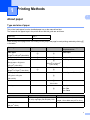
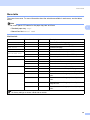
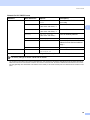
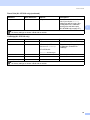
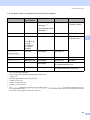
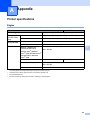
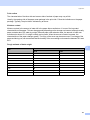
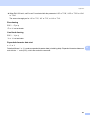
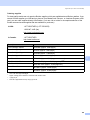
Print Menu (continued)
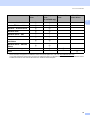
Submenu
Menu Selections
Options
Descriptions
Paper
(HL-3070CW only)
Sets the size of paper.
Letter*/Legal/A4/
Executive/Com-10/DL/JI
S B5/B5/A5/A5 L/JIS B6/
B6/A6/Monarch/C5/A4 Lon
g/Folio/DL L/Hagaki
Copies
(HL-3070CW only)
1*/2.../999
Sets the number of printed pages.
Orientation
(HL-3070CW only)
Portrait*/Landscape
This printer can print pages in portrait
or landscape orientation.
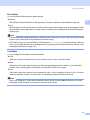
X Offset
-500/-499.../0*.../499/
500Dots
Moves the print start position (at the
top-left corner of pages) horizontally
up to -500 (left) to +500 (right) dots in
300 dpi.
Y Offset
-50/-49.../0*.../499/
500Dots
Moves the print start position (at the
top-left corner of pages) vertically up
to -50 (up) to +500 (down) dots in
300 dpi.
Off*/On
Allows you to print the remaining
data without pressing Go.
Print Position
Auto FF
(HL-3070CW only)
3
The factory settings are shown in Bold with an asterisk.
86