1
Unity Pro
35006144 07/2011
Unity Pro
Program Languages and Structure
Reference Manual
35006144.10
07/2011
www.schneider-electric.com
The information provided in this documentation contains general descriptions and/or
technical characteristics of the performance of the products contained herein. This
documentation is not intended as a substitute for and is not to be used for
determining suitability or reliability of these products for specific user applications. It
is the duty of any such user or integrator to perform the appropriate and complete
risk analysis, evaluation and testing of the products with respect to the relevant
specific application or use thereof. Neither Schneider Electric nor any of its affiliates
or subsidiaries shall be responsible or liable for misuse of the information contained
herein. If you have any suggestions for improvements or amendments or have found
errors in this publication, please notify us.
No part of this document may be reproduced in any form or by any means, electronic
or mechanical, including photocopying, without express written permission of
Schneider Electric.
All pertinent state, regional, and local safety regulations must be observed when
installing and using this product. For reasons of safety and to help ensure
compliance with documented system data, only the manufacturer should perform
repairs to components.
When devices are used for applications with technical safety requirements, the
relevant instructions must be followed.
Failure to use Schneider Electric software or approved software with our hardware
products may result in injury, harm, or improper operating results.
Failure to observe this information can result in injury or equipment damage.
© 2011 Schneider Electric. All rights reserved.
2
35006144 07/2011
Table of Contents
Safety Information . . . . . . . . . . . . . . . . . . . . . . . . . . . . . .
About the Book . . . . . . . . . . . . . . . . . . . . . . . . . . . . . . . . .
Part I General Presentation of Unity Pro . . . . . . . . . . . . . .
Chapter 1 Presentation . . . . . . . . . . . . . . . . . . . . . . . . . . . . . . . . . . .
11
13
15
17
Capabilities of Unity Pro . . . . . . . . . . . . . . . . . . . . . . . . . . . . . . . . . . . . . .
User Interface . . . . . . . . . . . . . . . . . . . . . . . . . . . . . . . . . . . . . . . . . . . . . .
Project Browser . . . . . . . . . . . . . . . . . . . . . . . . . . . . . . . . . . . . . . . . . . . . .
User Application and Project File Formats . . . . . . . . . . . . . . . . . . . . . . . .
Configurator. . . . . . . . . . . . . . . . . . . . . . . . . . . . . . . . . . . . . . . . . . . . . . . .
Data Editor . . . . . . . . . . . . . . . . . . . . . . . . . . . . . . . . . . . . . . . . . . . . . . . .
Program Editor . . . . . . . . . . . . . . . . . . . . . . . . . . . . . . . . . . . . . . . . . . . . .
Function Block Diagram FBD . . . . . . . . . . . . . . . . . . . . . . . . . . . . . . . . . .
Ladder Diagram (LD) Language . . . . . . . . . . . . . . . . . . . . . . . . . . . . . . . .
General Information about SFC Sequence Language . . . . . . . . . . . . . . .
Instruction List IL . . . . . . . . . . . . . . . . . . . . . . . . . . . . . . . . . . . . . . . . . . . .
Structured Text ST . . . . . . . . . . . . . . . . . . . . . . . . . . . . . . . . . . . . . . . . . .
PLC Simulator . . . . . . . . . . . . . . . . . . . . . . . . . . . . . . . . . . . . . . . . . . . . . .
Export/Import. . . . . . . . . . . . . . . . . . . . . . . . . . . . . . . . . . . . . . . . . . . . . . .
User Documentation . . . . . . . . . . . . . . . . . . . . . . . . . . . . . . . . . . . . . . . . .
Debug Services . . . . . . . . . . . . . . . . . . . . . . . . . . . . . . . . . . . . . . . . . . . . .
Diagnostic Viewer . . . . . . . . . . . . . . . . . . . . . . . . . . . . . . . . . . . . . . . . . . .
Operator Screen . . . . . . . . . . . . . . . . . . . . . . . . . . . . . . . . . . . . . . . . . . . .
18
22
24
25
29
32
40
43
45
47
50
51
52
53
54
55
62
63
Part II Application Structure. . . . . . . . . . . . . . . . . . . . . . . . .
65
Chapter 2 Description of the Available Functions for Each Type of
PLC. . . . . . . . . . . . . . . . . . . . . . . . . . . . . . . . . . . . . . . . . . .
67
Functions Available for the Different Types of PLC. . . . . . . . . . . . . . . . . .
Chapter 3 Application Program Structure . . . . . . . . . . . . . . . . . . . .
3.1 Description of Tasks and Processes . . . . . . . . . . . . . . . . . . . . . . . . . . . . .
Presentation of the Master Task . . . . . . . . . . . . . . . . . . . . . . . . . . . . . . . .
Presentation of the Fast Task . . . . . . . . . . . . . . . . . . . . . . . . . . . . . . . . . .
Presentation of Auxiliary Tasks . . . . . . . . . . . . . . . . . . . . . . . . . . . . . . . . .
Overview of Event Processing . . . . . . . . . . . . . . . . . . . . . . . . . . . . . . . . .
35006144 07/2011
67
69
70
71
72
73
75
3
3.2 Description of Sections and Subroutines . . . . . . . . . . . . . . . . . . . . . . . . .
Description of Sections . . . . . . . . . . . . . . . . . . . . . . . . . . . . . . . . . . . . . .
Description of SFC sections. . . . . . . . . . . . . . . . . . . . . . . . . . . . . . . . . . .
Description of Subroutines. . . . . . . . . . . . . . . . . . . . . . . . . . . . . . . . . . . .
3.3 Mono Task Execution . . . . . . . . . . . . . . . . . . . . . . . . . . . . . . . . . . . . . . .
Description of the Master Task Cycle . . . . . . . . . . . . . . . . . . . . . . . . . . .
Mono Task: Cyclic Execution. . . . . . . . . . . . . . . . . . . . . . . . . . . . . . . . . .
Periodic Execution . . . . . . . . . . . . . . . . . . . . . . . . . . . . . . . . . . . . . . . . . .
Control of Cycle Time . . . . . . . . . . . . . . . . . . . . . . . . . . . . . . . . . . . . . . .
Execution of Quantum Sections with Remote Inputs/Outputs . . . . . . . . .
3.4 Multitasking Execution . . . . . . . . . . . . . . . . . . . . . . . . . . . . . . . . . . . . . . .
Multitasking Software Structure . . . . . . . . . . . . . . . . . . . . . . . . . . . . . . . .
Sequencing of Tasks in a Multitasking Structure . . . . . . . . . . . . . . . . . . .
Task Control. . . . . . . . . . . . . . . . . . . . . . . . . . . . . . . . . . . . . . . . . . . . . . .
Assignment of Input/Output Channels to Master, Fast and Auxiliary Tasks
Management of Event Processing . . . . . . . . . . . . . . . . . . . . . . . . . . . . . .
Execution of TIMER-type Event Processing . . . . . . . . . . . . . . . . . . . . . .
Input/Output Exchanges in Event Processing . . . . . . . . . . . . . . . . . . . . .
How to Program Event Processing . . . . . . . . . . . . . . . . . . . . . . . . . . . . .
4
76
77
79
80
81
82
84
85
86
87
89
90
92
94
97
99
100
104
105
Chapter 4 Application Memory Structure . . . . . . . . . . . . . . . . . . . . .
107
4.1 Memory Structure of the Premium, Atrium and Modicon M340 PLCs . . .
Memory Structure of Modicon M340 PLCs . . . . . . . . . . . . . . . . . . . . . . .
Memory Structure of Premium and Atrium PLCs. . . . . . . . . . . . . . . . . . .
Detailed Description of the Memory Zones . . . . . . . . . . . . . . . . . . . . . . .
4.2 Memory Structure of Quantum PLCs. . . . . . . . . . . . . . . . . . . . . . . . . . . .
Memory Structure of Quantum PLCs . . . . . . . . . . . . . . . . . . . . . . . . . . .
Detailed Description of the Memory Zones . . . . . . . . . . . . . . . . . . . . . . .
108
109
112
114
115
116
119
Chapter 5 Operating Modes . . . . . . . . . . . . . . . . . . . . . . . . . . . . . . . .
121
5.1 Modicon M340 PLCs Operating Modes . . . . . . . . . . . . . . . . . . . . . . . . . .
Processing of Power Outage and Restoral of Modicon M340 PLCs . . . .
Processing on Cold Start for Modicon M340 PLCs . . . . . . . . . . . . . . . . .
Processing on Warm Restart for Modicon M340 PLCs . . . . . . . . . . . . . .
Automatic Start in RUN for Modicon M340 PLCs . . . . . . . . . . . . . . . . . .
5.2 Premium, Quantum PLCs Operating Modes . . . . . . . . . . . . . . . . . . . . . .
Processing of Power Outage and Restoral for Premium/Quantum PLCs
Processing on Cold Start for Premium/Quantum PLCs . . . . . . . . . . . . . .
Processing on Warm Restart for Premium/Quantum PLCs. . . . . . . . . . .
Automatic Start in RUN for Premium/Quantum . . . . . . . . . . . . . . . . . . . .
5.3 PLC HALT Mode . . . . . . . . . . . . . . . . . . . . . . . . . . . . . . . . . . . . . . . . . . .
PLC HALT Mode . . . . . . . . . . . . . . . . . . . . . . . . . . . . . . . . . . . . . . . . . . .
122
123
125
129
132
133
134
136
141
144
145
145
Chapter 6 System Objects . . . . . . . . . . . . . . . . . . . . . . . . . . . . . . . . .
147
6.1 System Bits . . . . . . . . . . . . . . . . . . . . . . . . . . . . . . . . . . . . . . . . . . . . . . .
System Bit Introduction . . . . . . . . . . . . . . . . . . . . . . . . . . . . . . . . . . . . . .
Description of System Bits %S0 to %S7 . . . . . . . . . . . . . . . . . . . . . . . . .
Description of System Bits %S9 to %S13 . . . . . . . . . . . . . . . . . . . . . . . .
148
149
150
152
35006144 07/2011
Description of System Bits %S15 to %S21 . . . . . . . . . . . . . . . . . . . . . . . .
Description of System Bits %S30 to %S59 . . . . . . . . . . . . . . . . . . . . . . . .
Description of System Bits %S65 to %S79 . . . . . . . . . . . . . . . . . . . . . . . .
Description of System Bits %S80 to %S96 . . . . . . . . . . . . . . . . . . . . . . . .
Description of System Bits %S100 to %S123 . . . . . . . . . . . . . . . . . . . . . .
System Words . . . . . . . . . . . . . . . . . . . . . . . . . . . . . . . . . . . . . . . . . . . . . .
Description of System Words %SW0 to %SW11 . . . . . . . . . . . . . . . . . . .
Description of System Words %SW12 to %SW29 . . . . . . . . . . . . . . . . . .
Description of System Words %SW30 to %SW47 . . . . . . . . . . . . . . . . . .
Description of System Words %SW48 to %SW59 . . . . . . . . . . . . . . . . . .
Description of System Words %SW70 to %SW100 . . . . . . . . . . . . . . . . .
Description of System Words %SW108 to %SW116 . . . . . . . . . . . . . . . .
Description of System Words %SW123 to %SW127 . . . . . . . . . . . . . . . .
Atrium/Premium-specific System Words . . . . . . . . . . . . . . . . . . . . . . . . . .
Description of System Words %SW60 to %SW65 . . . . . . . . . . . . . . . . . .
Description of System Words %SW128 to %SW143 . . . . . . . . . . . . . . . .
Description of System Words %SW144 to %SW146 . . . . . . . . . . . . . . . .
Description of System Words %SW147 to %SW152 . . . . . . . . . . . . . . . .
Description of System Word %SW153 . . . . . . . . . . . . . . . . . . . . . . . . . . .
Description of System Word %SW154 . . . . . . . . . . . . . . . . . . . . . . . . . . .
Description of Premium/Atrium System Words %SW155 to %SW167 . . .
Quantum-specific System Words . . . . . . . . . . . . . . . . . . . . . . . . . . . . . . .
Description of Quantum System Words %SW60 to %SW66 . . . . . . . . . .
Description of Quantum System Words %SW98 to %SW109 . . . . . . . . .
Description of Quantum System Words %SW110 to %SW177 . . . . . . . .
Description of Quantum System Words %SW180 to %SW702 . . . . . . . .
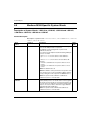
Modicon M340-Specific System Words. . . . . . . . . . . . . . . . . . . . . . . . . . .
Description of System Words: %SW142 to %SW145, %SW146 and
%SW147, %SW150 to %SW154, %SW160 to %SW167 . . . . . . . . . . . . .
154
157
160
165
168
170
171
175
179
181
183
193
194
196
197
200
201
203
204
206
207
208
209
212
213
216
222
Part III Data Description. . . . . . . . . . . . . . . . . . . . . . . . . . . . .
225
6.2
6.3
6.4
6.5
Chapter 7 General Overview of Data . . . . . . . . . . . . . . . . . . . . . . . .
General . . . . . . . . . . . . . . . . . . . . . . . . . . . . . . . . . . . . . . . . . . . . . . . . . . .
General Overview of the Data Type Families . . . . . . . . . . . . . . . . . . . . . .
Overview of Data Instances . . . . . . . . . . . . . . . . . . . . . . . . . . . . . . . . . . .
Overview of the Data References . . . . . . . . . . . . . . . . . . . . . . . . . . . . . . .
Syntax Rules for Type\Instance Names . . . . . . . . . . . . . . . . . . . . . . . . . .
Chapter 8 Data Types. . . . . . . . . . . . . . . . . . . . . . . . . . . . . . . . . . . . .
8.1 Elementary Data Types (EDT) in Binary Format. . . . . . . . . . . . . . . . . . . .
Overview of Data Types in Binary Format. . . . . . . . . . . . . . . . . . . . . . . . .
Boolean Types . . . . . . . . . . . . . . . . . . . . . . . . . . . . . . . . . . . . . . . . . . . . .
Integer Types . . . . . . . . . . . . . . . . . . . . . . . . . . . . . . . . . . . . . . . . . . . . . .
The Time Type . . . . . . . . . . . . . . . . . . . . . . . . . . . . . . . . . . . . . . . . . . . . .
35006144 07/2011
222
227
228
229
231
233
234
235
236
237
239
244
246
5
6
8.2 Elementary Data Types (EDT) in BCD Format . . . . . . . . . . . . . . . . . . . .
Overview of Data Types in BCD Format . . . . . . . . . . . . . . . . . . . . . . . . .
The Date Type . . . . . . . . . . . . . . . . . . . . . . . . . . . . . . . . . . . . . . . . . . . . .
The Time of Day (TOD) Type . . . . . . . . . . . . . . . . . . . . . . . . . . . . . . . . .
The Date and Time (DT) Type . . . . . . . . . . . . . . . . . . . . . . . . . . . . . . . . .
8.3 Elementary Data Types (EDT) in Real Format . . . . . . . . . . . . . . . . . . . .
Presentation of the Real Data Type. . . . . . . . . . . . . . . . . . . . . . . . . . . . .
8.4 Elementary Data Types (EDT) in Character String Format . . . . . . . . . . .
Overview of Data Types in Character String Format . . . . . . . . . . . . . . . .
8.5 Elementary Data Types (EDT) in Bit String Format . . . . . . . . . . . . . . . . .
Overview of Data Types in Bit String Format. . . . . . . . . . . . . . . . . . . . . .
Bit String Types . . . . . . . . . . . . . . . . . . . . . . . . . . . . . . . . . . . . . . . . . . . .
8.6 Derived Data Types (DDT/IODDT) . . . . . . . . . . . . . . . . . . . . . . . . . . . . .
Arrays . . . . . . . . . . . . . . . . . . . . . . . . . . . . . . . . . . . . . . . . . . . . . . . . . . .
Structures . . . . . . . . . . . . . . . . . . . . . . . . . . . . . . . . . . . . . . . . . . . . . . . .
Overview of the Derived Data Type family (DDT) . . . . . . . . . . . . . . . . . .
DDT: Mapping Rules . . . . . . . . . . . . . . . . . . . . . . . . . . . . . . . . . . . . . . . .
Overview of Input/Output Derived Data Types (IODDT) . . . . . . . . . . . . .
8.7 Function Block Data Types (DFB\EFB) . . . . . . . . . . . . . . . . . . . . . . . . . .
Overview of Function Block Data Type Families . . . . . . . . . . . . . . . . . . .
Characteristics of Function Block Data Types (EFB\DFB). . . . . . . . . . . .
Characteristics of Elements Belonging to Function Blocks . . . . . . . . . . .
8.8 Generic Data Types (GDT) . . . . . . . . . . . . . . . . . . . . . . . . . . . . . . . . . . .
Overview of Generic Data Types . . . . . . . . . . . . . . . . . . . . . . . . . . . . . . .
8.9 Data Types Belonging to Sequential Function Charts (SFC). . . . . . . . . .
Overview of the Data Types of the Sequential Function Chart Family . .
8.10 Compatibility Between Data Types . . . . . . . . . . . . . . . . . . . . . . . . . . . . .
Compatibility Between Data Types . . . . . . . . . . . . . . . . . . . . . . . . . . . . .
247
248
250
251
252
253
253
258
258
261
262
263
265
266
269
270
272
275
277
278
280
282
285
285
287
287
289
289
Chapter 9 Data Instances . . . . . . . . . . . . . . . . . . . . . . . . . . . . . . . . . .
293
Data Type Instances . . . . . . . . . . . . . . . . . . . . . . . . . . . . . . . . . . . . . . . .
Data Instance Attributes. . . . . . . . . . . . . . . . . . . . . . . . . . . . . . . . . . . . . .
Direct Addressing Data Instances . . . . . . . . . . . . . . . . . . . . . . . . . . . . . .
294
298
300
Chapter 10 Data References. . . . . . . . . . . . . . . . . . . . . . . . . . . . . . . . .
307
References to Data Instances by Value. . . . . . . . . . . . . . . . . . . . . . . . . .
References to Data Instances by Name . . . . . . . . . . . . . . . . . . . . . . . . .
References to Data Instances by Address. . . . . . . . . . . . . . . . . . . . . . . .
Data Naming Rules . . . . . . . . . . . . . . . . . . . . . . . . . . . . . . . . . . . . . . . . .
308
310
313
317
Part IV Programming Language . . . . . . . . . . . . . . . . . . . . . .
319
Chapter 11 Function Block Language FBD. . . . . . . . . . . . . . . . . . . . .
321
General Information about the FBD Function Block Language . . . . . . . .
Elementary Functions, Elementary Function Blocks, Derived Function
Blocks and Procedures (FFBs) . . . . . . . . . . . . . . . . . . . . . . . . . . . . . . . .
Subroutine Calls. . . . . . . . . . . . . . . . . . . . . . . . . . . . . . . . . . . . . . . . . . . .
Control Elements . . . . . . . . . . . . . . . . . . . . . . . . . . . . . . . . . . . . . . . . . . .
322
324
334
335
35006144 07/2011
Link . . . . . . . . . . . . . . . . . . . . . . . . . . . . . . . . . . . . . . . . . . . . . . . . . . . . . .
Text Object . . . . . . . . . . . . . . . . . . . . . . . . . . . . . . . . . . . . . . . . . . . . . . . .
Execution Sequence of the FFBs . . . . . . . . . . . . . . . . . . . . . . . . . . . . . . .
Change Execution Sequence . . . . . . . . . . . . . . . . . . . . . . . . . . . . . . . . . .
Loop Planning . . . . . . . . . . . . . . . . . . . . . . . . . . . . . . . . . . . . . . . . . . . . . .
Chapter 12 Ladder Diagram (LD) . . . . . . . . . . . . . . . . . . . . . . . . . . . .
Chapter 13
347
General Information about the LD Ladder Diagram Language . . . . . . . . .
Contacts . . . . . . . . . . . . . . . . . . . . . . . . . . . . . . . . . . . . . . . . . . . . . . . . . .
Coils . . . . . . . . . . . . . . . . . . . . . . . . . . . . . . . . . . . . . . . . . . . . . . . . . . . . .
Elementary Functions, Elementary Function Blocks, Derived Function
Blocks and Procedures (FFBs) . . . . . . . . . . . . . . . . . . . . . . . . . . . . . . . . .
Control Elements. . . . . . . . . . . . . . . . . . . . . . . . . . . . . . . . . . . . . . . . . . . .
Operate Blocks and Compare Blocks . . . . . . . . . . . . . . . . . . . . . . . . . . . .
Links . . . . . . . . . . . . . . . . . . . . . . . . . . . . . . . . . . . . . . . . . . . . . . . . . . . . .
Text Object . . . . . . . . . . . . . . . . . . . . . . . . . . . . . . . . . . . . . . . . . . . . . . . .
Edge Recognition . . . . . . . . . . . . . . . . . . . . . . . . . . . . . . . . . . . . . . . . . . .
Execution Sequence and Signal Flow. . . . . . . . . . . . . . . . . . . . . . . . . . . .
Loop Planning . . . . . . . . . . . . . . . . . . . . . . . . . . . . . . . . . . . . . . . . . . . . . .
Change Execution Sequence . . . . . . . . . . . . . . . . . . . . . . . . . . . . . . . . . .
354
364
365
367
370
371
380
382
383
SFC Sequence Language . . . . . . . . . . . . . . . . . . . . . . . .
389
13.1 General Information about SFC Sequence Language . . . . . . . . . . . . . . .
General Information about SFC Sequence Language . . . . . . . . . . . . . . .
Link Rules . . . . . . . . . . . . . . . . . . . . . . . . . . . . . . . . . . . . . . . . . . . . . . . . .
13.2 Steps and Macro Steps . . . . . . . . . . . . . . . . . . . . . . . . . . . . . . . . . . . . . . .
Step . . . . . . . . . . . . . . . . . . . . . . . . . . . . . . . . . . . . . . . . . . . . . . . . . . . . . .
Macro Steps and Macro Sections . . . . . . . . . . . . . . . . . . . . . . . . . . . . . . .
13.3 Actions and Action Sections . . . . . . . . . . . . . . . . . . . . . . . . . . . . . . . . . . .
Action . . . . . . . . . . . . . . . . . . . . . . . . . . . . . . . . . . . . . . . . . . . . . . . . . . . .
Action Section . . . . . . . . . . . . . . . . . . . . . . . . . . . . . . . . . . . . . . . . . . . . . .
Qualifier . . . . . . . . . . . . . . . . . . . . . . . . . . . . . . . . . . . . . . . . . . . . . . . . . . .
13.4 Transitions and Transition Sections . . . . . . . . . . . . . . . . . . . . . . . . . . . . .
Transition. . . . . . . . . . . . . . . . . . . . . . . . . . . . . . . . . . . . . . . . . . . . . . . . . .
Transition Section . . . . . . . . . . . . . . . . . . . . . . . . . . . . . . . . . . . . . . . . . . .
13.5 Jump . . . . . . . . . . . . . . . . . . . . . . . . . . . . . . . . . . . . . . . . . . . . . . . . . . . . .
Jump . . . . . . . . . . . . . . . . . . . . . . . . . . . . . . . . . . . . . . . . . . . . . . . . . . . . .
13.6 Link . . . . . . . . . . . . . . . . . . . . . . . . . . . . . . . . . . . . . . . . . . . . . . . . . . . . . .
Link . . . . . . . . . . . . . . . . . . . . . . . . . . . . . . . . . . . . . . . . . . . . . . . . . . . . . .
13.7 Branches and Merges . . . . . . . . . . . . . . . . . . . . . . . . . . . . . . . . . . . . . . . .
Alternative Branches and Alternative Joints . . . . . . . . . . . . . . . . . . . . . . .
Parallel Branch and Parallel Joint . . . . . . . . . . . . . . . . . . . . . . . . . . . . . . .
13.8 Text Objects . . . . . . . . . . . . . . . . . . . . . . . . . . . . . . . . . . . . . . . . . . . . . . .
Text Object . . . . . . . . . . . . . . . . . . . . . . . . . . . . . . . . . . . . . . . . . . . . . . . .
35006144 07/2011
336
338
339
342
346
348
351
352
390
391
395
396
397
400
404
405
407
408
410
411
413
415
415
416
416
417
418
419
420
420
7
13.9
Single-Token . . . . . . . . . . . . . . . . . . . . . . . . . . . . . . . . . . . . . . . . . . . . . .
Execution Sequence Single-Token . . . . . . . . . . . . . . . . . . . . . . . . . . . . .
Alternative String . . . . . . . . . . . . . . . . . . . . . . . . . . . . . . . . . . . . . . . . . . .
Sequence Jumps and Sequence Loops . . . . . . . . . . . . . . . . . . . . . . . . .
Parallel Strings. . . . . . . . . . . . . . . . . . . . . . . . . . . . . . . . . . . . . . . . . . . . .
Asymmetric Parallel String Selection . . . . . . . . . . . . . . . . . . . . . . . . . . . .
13.10 Multi-Token . . . . . . . . . . . . . . . . . . . . . . . . . . . . . . . . . . . . . . . . . . . . . . .
Multi-Token Execution Sequence . . . . . . . . . . . . . . . . . . . . . . . . . . . . . .
Alternative String . . . . . . . . . . . . . . . . . . . . . . . . . . . . . . . . . . . . . . . . . . .
Parallel Strings. . . . . . . . . . . . . . . . . . . . . . . . . . . . . . . . . . . . . . . . . . . . .
Jump into a Parallel String . . . . . . . . . . . . . . . . . . . . . . . . . . . . . . . . . . . .
Jump out of a Parallel String . . . . . . . . . . . . . . . . . . . . . . . . . . . . . . . . . .
421
422
423
424
427
429
432
433
435
438
442
444
Chapter 14 Instruction List (IL) . . . . . . . . . . . . . . . . . . . . . . . . . . . . . .
449
14.1
General Information about the IL Instruction List . . . . . . . . . . . . . . . . . . .
General Information about the IL Instruction List . . . . . . . . . . . . . . . . . . .
Operands . . . . . . . . . . . . . . . . . . . . . . . . . . . . . . . . . . . . . . . . . . . . . . . . .
Modifier . . . . . . . . . . . . . . . . . . . . . . . . . . . . . . . . . . . . . . . . . . . . . . . . . .
Operators . . . . . . . . . . . . . . . . . . . . . . . . . . . . . . . . . . . . . . . . . . . . . . . . .
Subroutine Call . . . . . . . . . . . . . . . . . . . . . . . . . . . . . . . . . . . . . . . . . . . .
Labels and Jumps . . . . . . . . . . . . . . . . . . . . . . . . . . . . . . . . . . . . . . . . . .
Comment . . . . . . . . . . . . . . . . . . . . . . . . . . . . . . . . . . . . . . . . . . . . . . . . .
Calling Elementary Functions, Elementary Function Blocks, Derived
Function Blocks and Procedures . . . . . . . . . . . . . . . . . . . . . . . . . . . . . .
Calling Elementary Functions . . . . . . . . . . . . . . . . . . . . . . . . . . . . . . . . .
Calling Elementary Function Blocks and Derived Function Blocks . . . . .
Calling Procedures. . . . . . . . . . . . . . . . . . . . . . . . . . . . . . . . . . . . . . . . . .
472
473
478
489
Chapter 15 Structured Text (ST) . . . . . . . . . . . . . . . . . . . . . . . . . . . . .
497
14.2
15.1
15.2
8
General Information about the Structured Text ST . . . . . . . . . . . . . . . . .
General Information about Structured Text (ST) . . . . . . . . . . . . . . . . . . .
Operands . . . . . . . . . . . . . . . . . . . . . . . . . . . . . . . . . . . . . . . . . . . . . . . . .
Operators . . . . . . . . . . . . . . . . . . . . . . . . . . . . . . . . . . . . . . . . . . . . . . . . .
Instructions . . . . . . . . . . . . . . . . . . . . . . . . . . . . . . . . . . . . . . . . . . . . . . .
Instructions . . . . . . . . . . . . . . . . . . . . . . . . . . . . . . . . . . . . . . . . . . . . . . .
Assignment . . . . . . . . . . . . . . . . . . . . . . . . . . . . . . . . . . . . . . . . . . . . . . .
Select Instruction IF...THEN...END_IF. . . . . . . . . . . . . . . . . . . . . . . . . . .
Select Instruction ELSE . . . . . . . . . . . . . . . . . . . . . . . . . . . . . . . . . . . . . .
Select Instruction ELSIF...THEN . . . . . . . . . . . . . . . . . . . . . . . . . . . . . . .
Select Instruction CASE...OF...END_CASE . . . . . . . . . . . . . . . . . . . . . .
Repeat Instruction FOR...TO...BY...DO...END_FOR. . . . . . . . . . . . . . . .
Repeat Instruction WHILE...DO...END_WHILE . . . . . . . . . . . . . . . . . . . .
Repeat Instruction REPEAT...UNTIL...END_REPEAT . . . . . . . . . . . . . .
Repeat Instruction EXIT. . . . . . . . . . . . . . . . . . . . . . . . . . . . . . . . . . . . . .
Subroutine Call . . . . . . . . . . . . . . . . . . . . . . . . . . . . . . . . . . . . . . . . . . . .
450
451
454
457
459
468
469
471
498
499
502
504
508
509
510
513
514
515
516
517
520
521
522
523
35006144 07/2011
RETURN . . . . . . . . . . . . . . . . . . . . . . . . . . . . . . . . . . . . . . . . . . . . . . . . . .
Empty Instruction. . . . . . . . . . . . . . . . . . . . . . . . . . . . . . . . . . . . . . . . . . . .
Labels and Jumps . . . . . . . . . . . . . . . . . . . . . . . . . . . . . . . . . . . . . . . . . . .
Comment. . . . . . . . . . . . . . . . . . . . . . . . . . . . . . . . . . . . . . . . . . . . . . . . . .
15.3 Calling Elementary Functions, Elementary Function Blocks, Derived
Function Blocks and Procedures. . . . . . . . . . . . . . . . . . . . . . . . . . . . . . . .
Calling Elementary Functions . . . . . . . . . . . . . . . . . . . . . . . . . . . . . . . . . .
Call Elementary Function Block and Derived Function Block . . . . . . . . . .
Procedures . . . . . . . . . . . . . . . . . . . . . . . . . . . . . . . . . . . . . . . . . . . . . . . .
528
529
535
544
Part V User Function Blocks (DFB) . . . . . . . . . . . . . . . . . . .
551
Chapter 16 Overview of User Function Blocks (DFB). . . . . . . . . . . .
Introduction to User Function Blocks. . . . . . . . . . . . . . . . . . . . . . . . . . . . .
Implementing a DFB Function Block . . . . . . . . . . . . . . . . . . . . . . . . . . . . .
Chapter 17 Description of User Function Blocks (DFB). . . . . . . . . .
Definition of DFB Function Block Internal Data . . . . . . . . . . . . . . . . . . . . .
DFB Parameters . . . . . . . . . . . . . . . . . . . . . . . . . . . . . . . . . . . . . . . . . . . .
DFB Variables . . . . . . . . . . . . . . . . . . . . . . . . . . . . . . . . . . . . . . . . . . . . . .
DFB Code Section. . . . . . . . . . . . . . . . . . . . . . . . . . . . . . . . . . . . . . . . . . .
Chapter 18 User Function Blocks (DFB) Instance . . . . . . . . . . . . . .
Creation of a DFB Instance . . . . . . . . . . . . . . . . . . . . . . . . . . . . . . . . . . . .
Execution of a DFB Instance. . . . . . . . . . . . . . . . . . . . . . . . . . . . . . . . . . .
Programming Example for a Derived Function Block (DFB) . . . . . . . . . . .
Chapter 19 Use of the DFBs from the Different Programming
Languages. . . . . . . . . . . . . . . . . . . . . . . . . . . . . . . . . . . . .
Rules for Using DFBs in a Program . . . . . . . . . . . . . . . . . . . . . . . . . . . . .
Use of IODDTs in a DFB . . . . . . . . . . . . . . . . . . . . . . . . . . . . . . . . . . . . . .
Use of a DFB in a Ladder Language Program . . . . . . . . . . . . . . . . . . . . .
Use of a DFB in a Structured Text Language Program. . . . . . . . . . . . . . .
Use of a DFB in an Instruction List Program . . . . . . . . . . . . . . . . . . . . . . .
Use of a DFB in a Program in Function Block Diagram Language . . . . . .
Chapter 20 User Diagnostics DFB . . . . . . . . . . . . . . . . . . . . . . . . . . .
524
525
526
527
553
554
556
559
560
562
566
568
571
572
574
575
579
580
584
587
589
592
596
599
Presentation of User Diagnostic DFBs . . . . . . . . . . . . . . . . . . . . . . . . . . .
599
Appendices . . . . . . . . . . . . . . . . . . . . . . . . . . . . . . . . . . . . . . . . . . .
601
Appendix A EFB Error Codes and Values. . . . . . . . . . . . . . . . . . . . . .
603
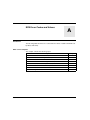
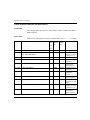
Tables of Error Codes for the Base Library. . . . . . . . . . . . . . . . . . . . . . . .
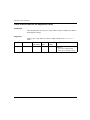
Tables of Error Codes for the Diagnostics Library . . . . . . . . . . . . . . . . . .
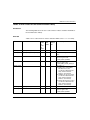
Tables of Error Codes for the Communication Library . . . . . . . . . . . . . . .
Tables of Error Codes for the IO Management Library . . . . . . . . . . . . . . .
Tables of Error Codes for the CONT_CTL Library . . . . . . . . . . . . . . . . . .
Tables of Error Codes for the Motion Library . . . . . . . . . . . . . . . . . . . . . .
Tables of Error Codes for the Obsolete Library. . . . . . . . . . . . . . . . . . . . .
Common Floating Point Errors . . . . . . . . . . . . . . . . . . . . . . . . . . . . . . . . .
35006144 07/2011
604
606
607
611
620
627
629
637
9
Appendix B IEC Compliance . . . . . . . . . . . . . . . . . . . . . . . . . . . . . . . . .
B.1
640
640
642
643
654
656
657
658
659
662
664
664
666
666
Glossary . . . . . . . . . . . . . . . . . . . . . . . . . . . . . . . . . . . . . . . . . . .
Index . . . . . . . . . . . . . . . . . . . . . . . . . . . . . . . . . . . . . . . . . . .
667
695
B.2
B.3
B.4
10
639
General Information regarding IEC 61131-3 . . . . . . . . . . . . . . . . . . . . . .
General information about IEC 61131-3 Compliance . . . . . . . . . . . . . . .
IEC Compliance Tables . . . . . . . . . . . . . . . . . . . . . . . . . . . . . . . . . . . . . .
Common elements. . . . . . . . . . . . . . . . . . . . . . . . . . . . . . . . . . . . . . . . . .
IL language elements . . . . . . . . . . . . . . . . . . . . . . . . . . . . . . . . . . . . . . .
ST language elements . . . . . . . . . . . . . . . . . . . . . . . . . . . . . . . . . . . . . . .
Common graphical elements . . . . . . . . . . . . . . . . . . . . . . . . . . . . . . . . . .
LD language elements . . . . . . . . . . . . . . . . . . . . . . . . . . . . . . . . . . . . . . .
Implementation-dependent parameters . . . . . . . . . . . . . . . . . . . . . . . . . .
Error Conditions . . . . . . . . . . . . . . . . . . . . . . . . . . . . . . . . . . . . . . . . . . . .
Extensions of IEC 61131-3 . . . . . . . . . . . . . . . . . . . . . . . . . . . . . . . . . . .
Extensions of IEC 61131-3, 2nd Edition . . . . . . . . . . . . . . . . . . . . . . . . .
Textual language syntax . . . . . . . . . . . . . . . . . . . . . . . . . . . . . . . . . . . . .
Textual Language Syntax . . . . . . . . . . . . . . . . . . . . . . . . . . . . . . . . . . . .
35006144 07/2011
Safety Information
§
Important Information
NOTICE
Read these instructions carefully, and look at the equipment to become familiar with
the device before trying to install, operate, or maintain it. The following special
messages may appear throughout this documentation or on the equipment to warn
of potential hazards or to call attention to information that clarifies or simplifies a
procedure.
35006144 07/2011
11
PLEASE NOTE
Electrical equipment should be installed, operated, serviced, and maintained only by
qualified personnel. No responsibility is assumed by Schneider Electric for any
consequences arising out of the use of this material.
A qualified person is one who has skills and knowledge related to the construction
and operation of electrical equipment and its installation, and has received safety
training to recognize and avoid the hazards involved.
12
35006144 07/2011
About the Book
At a Glance
Document Scope
This manual describes the elements necessary for the programming of Premium,
Atrium and Quantum PLCs using the Unity Pro programming workshop.
Validity Note
This documentation is valid from Unity Pro v6.0.
Product Related Information
WARNING
UNINTENDED EQUIPMENT OPERATION
The application of this product requires expertise in the design and programming
of control systems. Only persons with such expertise should be allowed to
program, install, alter, and apply this product.
Follow all local and national safety codes and standards.
Failure to follow these instructions can result in death, serious injury, or
equipment damage.
User Comments
We welcome your comments about this document. You can reach us by e-mail at
[email protected].
35006144 07/2011
13
14
35006144 07/2011
Unity Pro
General Presentation
35006144 07/2011
General Presentation of Unity Pro
I
35006144 07/2011
15
General Presentation
16
35006144 07/2011
Unity Pro
Presentation
35006144 07/2011
Presentation
1
Overview
This chapter describes the general design and behavior of a project created with
Unity Pro.
What’s in this Chapter?
This chapter contains the following topics:
Topic
Capabilities of Unity Pro
35006144 07/2011
Page
18
User Interface
22
Project Browser
24
User Application and Project File Formats
25
Configurator
29
Data Editor
32
Program Editor
40
Function Block Diagram FBD
43
Ladder Diagram (LD) Language
45
General Information about SFC Sequence Language
47
Instruction List IL
50
Structured Text ST
51
PLC Simulator
52
Export/Import
53
User Documentation
54
Debug Services
55
Diagnostic Viewer
62
Operator Screen
63
17
Presentation
Capabilities of Unity Pro
Hardware Platforms
Unity Pro supports the following hardware platforms:
Modicon M340
z Premium
z Atrium
z Quantum
z
Programming Languages
Unity Pro provides the following programming languages for creating the user
program:
z Function Block Diagram FBD
z Ladder Diagram (LD) language
z Instruction List IL
z Structured Text ST
z Sequential Control SFC
All of these programming languages can be used together in the same project.
All these languages conform to IEC 61131-3.
Block Libraries
The blocks that are included in the delivery of Unity Pro extensive block libraries
extend from blocks for simple Boolean operations, through blocks for strings and
array operations to blocks for controlling complex control loops.
For a better overview the different blocks are arranged in libraries, which are then
broken down into families.
The blocks can be used in the programming languages FBD, LD, IL and ST.
Elements of a Program
A program can be constructed from:
z a Master task (MAST)
z a Fast task (FAST)
z one to four Aux Tasks (not available for Modicon M340)
z sections, which are assigned one of the defined tasks
z sections for processing time controlled events (Timerx)
z sections for processing hardware controlled events (EVTx)
z subroutine sections (SR)
18
35006144 07/2011
Presentation
Software Packages
The following software packages are available:
z Unity Pro S
z Unity Pro M
z Unity Pro L
z Unity Pro XL
z Unity Pro XLS
z Unity Developers Edition (UDE)
Performance Scope
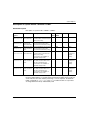
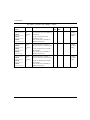
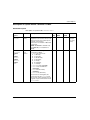
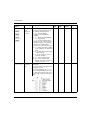
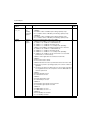
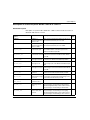
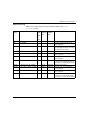
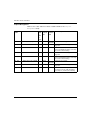
The following table shows the main characteristics of the individual software
packages:
Unity Pro S
Unity Pro M
Unity Pro L
Unity Pro XL
Unity Pro XLS
Programming languages
Function Block
Diagram FBD
+
+
+
+
+
Ladder Diagram
(LD) language
+
+
+
+
+
Instruction List IL
+
+
+
+
+( 2)
Structured Text
ST
+
+
+
+
+( 2)
Sequential Language SFC
+
+
+
+
+( 2)
Standard library
+
+
+
+
+( 2)
Control library
+
+
+
+
+( 2)
Communication
library
+
+
+
+
+( 2)
Diagnostics library
+
+
+
+
+( 2)
I/O Management
library
+
+
+
+
+( 2)
System library
+
+
+
+
+( 2)
Motion control
drive library
-
+
+
+
+( 2)
Libraries (1)
TCP Open library -
optional
optional
optional
optional (2)
Obsolete library
+
+
+
+
+( 2)
MFB library
+
+
+
+
+( 2)
Safety library
-
-
-
-
+
35006144 07/2011
19
Presentation
Memory card file
management library
Unity Pro S
Unity Pro M
Unity Pro L
Unity Pro XL
Unity Pro XLS
+
+
+
+
+( 2)
General information
Create and use
data structures
(DDTs)
+
+
+
+
+( 2)
Create and use
Derived Function
Blocks (DFBs)
+
+
+
+
+( 2)
Project browser
with structural
and/or functional
view
+
+
+
+
+
Managing access rights
+
+
+
+
+
Operator screen
+
+
+
+
+
Diagnostic viewer +
+
+
+
+
System diagnostics
+
+
+
+
+
Project diagnostics
+
+
+
+
+( 2)
Application converter
-
PL7 converter
PL7 converter
Concept Converter
PL7 converter
Concept
Converter
PL7 converter
Concept Converter
Managing multistations
-
-
-
-
-
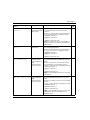
Supported platforms
Modicon M340
BMX P34 1000 BMX P34 1000
BMX P34 20•• BMX P34 20••
BMX P34 1000
BMX P34 20••
BMX P34 1000
BMX P34 20••
BMX P34 1000
BMX P34 20••
Premium
-
All CPUs except:
P57 554M
P57 5634M
All CPUs
All CPUs
20
P57 0244M
P57 CA 0244M
P57 CD 0244M
P57 104M
P57 154M
P57 1634M
P57 204M
P57 254M
P57 2634M
H57 24M
35006144 07/2011
Presentation
Unity Pro S
Unity Pro M
Unity Pro L
Unity Pro XL
Unity Pro XLS
Quantum
-
-
140 CPU 311 10
140 CPU 434 12 U/A*
140 CPU 534 14 U/A*
* Upgrade using Unity
OS
CPU 311 10
CPU 534 14 U/A
CPU 651 50
CPU 652 60
CPU 651 60
CPU 671 60
CPU 311 10
CPU 434 12 U/A
CPU 534 14 U/A
CPU 651 50
CPU 651 60
CPU 652 60
CPU 671 60
CPU 651 60 S
CPU 671 60 S
CPU 672 61
Atrium
-
PCI 57 204
All CPUs
All CPUs
All CPUs
Simulator
+
+
+
+
+
Hyperlinks
+
+
+
+
+
Unity Pro Server
(for OFS, UDE,
UAG)
-
-
-
+
+
Openess
Software components contained in the software package
Documentation
as context help
and PDF
+
+
+
+
+
OS Loader tool +
HW Firmware
+
+
+
+
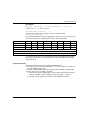
+
Unity loader
+
+
+
+
+
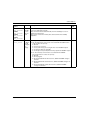
+ = available
+ (1) = Availability of the blocks depends of the hardware platforms (see Unity Pro,
Standard, Block Library).
+ (2) = Available on all PLC except platforms CPU 651 60 S, CPU 671 60 S.
- = not available
Naming Convention
In the following documentation, "Unity Pro" is used as general term for "Unity Pro S",
"Unity Pro M", "Unity Pro L", "Unity Pro XL" and "Unity Pro XLS".
35006144 07/2011
21
Presentation
User Interface
Overview
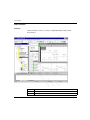
The user interface consists of several, configurable windows and toolbars.
User interface:
Legend:
22
Number
Description
1
Menu bar (see Unity Pro, Operating Modes)
2
Toolbar (see Unity Pro, Operating Modes)
35006144 07/2011
Presentation
35006144 07/2011
Number
Description
3
Project Browser (see Unity Pro, Operating Modes)
4
Editor window (programming language editors, data editor, etc.)
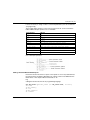
5
Register tabs for direct access to the editor window
6
Information window (see Unity Pro, Operating Modes) (provides information
about errors which have occurred, signal tracking, import functions, etc.)
7
Status bar (see Unity Pro, Operating Modes)
23
Presentation
Project Browser
Introduction
The Project Browser displays all project parameters. The view can be shown as
structural (topological) and/or functional view.
Structural View
The project browser offers the following features in the structural view:
Creation and deletion of elements
z The section symbol shows the section programming language and if it is
protected (in case of an empty section the symbol is grey)
z View the element properties
z Creation of user directories
z Launching the different editors
z Start the import/export function
z
Functional View
The project browser offers the following features in functional view:
z Creation of functional modules
z Insertion of sections, animation tables etc. using Drag and Drop from the
structural view
z Creation of sections
z View the element properties
z Launching the different editors
z The section symbol shows the section programming language and other
attributes
24
35006144 07/2011
Presentation
User Application and Project File Formats
Introduction
Unity Pro manages three types of files for storing user applications and projects.
Each type of file can be used according to specific requirements.
File types can be identified by their extension:
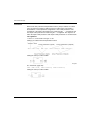
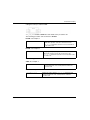
z *.STU: Unity Pro File.
z *.STA: Unity Pro Archived Application File.
z *.XEF: Unity Pro Application Exchange File.
STU File
This file type is used for daily working tasks. This format is used by default when
opening or saving a user project.
The following table presents the STU file advantages and drawbacks:
Advantages
Drawbacks
z The project can be saved at any stage
z Not convenient when transferring project
(consistent or inconsistent) through the
default command.
z Project saving and opening is fast as the
entire internal database is present in the
file.
due to the very large size of the file.
z Not compatible when updating Unity Pro
from one version to another.
z Automatic creation of BAK files¹
¹ Each time a STU file is saved, a backup copy is also created, with the same name
as the STU file, and the extension BAK files. By changing the file extension from
BAK to STU, it is possible to revert to the state the project was, the last time it was
saved. BAK files are stored in the same folder as the project STU file.
STA File
This file type is used for archiving projects and can be created only after the project
has been generated. This file type allows forward compatibility between the different
versions of Unity Pro.
There is 2 ways to create a STA file:
z STA file can be created manually by accessing the File →Save Archive menu
in the Unity Pro main window.
z STA file is created automatically every time the project is saved as a STU file if
it is in Built state.
NOTE: The STA file created automatically is saved into the same directory and with
the same filename as the STU project file, exept that a “.Auto” suffix is appended
to the filename. If an existing automatic STA file already exists, it is overwritten
without any confirmation.
35006144 07/2011
25
Presentation
NOTE: If the project is in Built state, saving a STU file through a Unity Pro Server
creates a STA file as well.
Opening a STA file is done by accessing the File →Open menu in the Unity Pro main
window.
NOTE: In the Open menu window, the selected file type must be
Unity Pro Archived Application File (STA).
z
z
For more information about creating an STA file, see the
Unity Pro Installation Manual (see Unity Pro, Installation manual): Create
Unity Pro Archived Application File (see Unity Pro, Installation manual).
For more information about opening an STA file, see the
Unity Pro Installation Manual (see Unity Pro, Installation manual): Restoring
Unity Pro Archived Application File (see Unity Pro, Installation manual).
The following table presents the STA file advantages and drawbacks:
Advantages
Drawbacks
z Fast project saving.
z Can be created
only after the
project has been
generated.
z Projects can be shared vie e-mail or low size memory supports.
z Opening of the
project is long, as
the project file is
rebuilt before
operation.
z Capability to connect in Equal Online Mode to the PLC after
opening the project on a new version of Unity Pro. For additional
information, see Connection/Disconnection (see Unity Pro,
Operating Modes) in the Operating Modes (see Unity Pro,
Operating Modes) manual.
z Allow online modifications with the PLC without any prior
download into the PLC.
z Generated STA file is compatible with all Unity Pro versions.
NOTE: In order to load a STA file created with another version of
Unity Pro, all the features used in the application have to be
supported by the current version.
26
35006144 07/2011
Presentation
XEF File
This file type is used for exporting projects in an XML source format and can be
created at any stage of a project.
Exporting an XEF file is done by accessing the File →Export Project menu in the
Unity Pro main window.
Importing an XEF file is done by accessing the File →Open menu in the Unity Pro
main window.
NOTE: In the Open menu window, the selected file type must be
Unity Pro Application Exchange File XEF.
For more information about creating an XEF file, see the
Unity Pro Installation Manual (see Unity Pro, Installation manual): Create
Unity Pro Application Exchange File (see Unity Pro, Installation manual).
For more information about restoring an XEF file, see the
Unity Pro Installation Manual (see Unity Pro, Installation manual): Restoring
Unity Pro Application Exchange File (see Unity Pro, Installation manual).
The following table presents the XEF file advantages and drawbacks:
Advantages
Drawbacks
z The XML source
z Medium size.
format ensures
project compatibility
with any version of
Unity Pro.
z Opening of the project takes time while the project is imported
before operation.
z Generation of the project is mandatory to re-assemble the
project binary code.
z Operating with the PLC requires to rebuild all the project and
perform a download in the processor.
z Connecting to the PLC in Equal Online mode with an XEF file
is not possible. For additional information, see
Connection/Disconnection (see Unity Pro, Operating Modes)
in the Operating Modes (see Unity Pro, Operating Modes)
manual.
Important Information
The STU files are not compatible across Unity Pro versions. In order to use a project
with different Unity Pro versions, users must either store, the:
z Unity Pro Archived Application Files (STA):
With the STA file, it is possible to reuse the current built project with the new
Unity Pro version installed on the computer.
z Unity Pro Application Exchange Files (XEF):
The XEF file must be used if the project has been built.
35006144 07/2011
27
Presentation
Comparative File Types
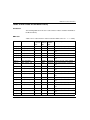
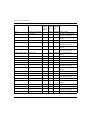
The following table gives a summary of the three files types:
File Types
STU
STA
XEF
Binary applications
Yes
Yes
No
Source applications
Yes
Yes
Yes
Internal database
Yes
No
No
Comparative file size
10, see (1)
0.03, see (1)
3
Comparative time to save
10
1.6
6
Comparative time to open
1
10
10
Connection to the PLC in Equal
Online mode
Possible
Possible
Not possible, see (2)
File backup
Possible
Possible, see (3)
Possible
(1): Compressed files.
(2): The project needs to be first uploaded into the PLC.
(3): The project can be saved only if it has been generated.
NOTE: The values in the table represent a ratio between file types, where the STU
value is the reference.
28
35006144 07/2011
Presentation
Configurator
Configurator Window
The configurator window is split into two windows:
z Catalog window
A module can be selected from this window and directly inserted in the graphical
representation of the PLC configuration by dragging and dropping.
z Graphical representation of the PLC configuration
Representation of the Configurator window:
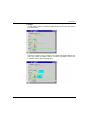
One of the following shortcut menus is called depending on the position of the
mouse pointer:
z Mouse pointer on the background allows among others:
z Change CPU,
z Selection of different Zoom factors.
35006144 07/2011
z
Mouse pointer on the module allows among others:
z Access to editor functions (delete, copy, move),
z Open the module configuration for defining the module specific parameters,
z Show the I/O properties and the total current.
z
Mouse pointer on an empty slot allows among others:
z Insert a module from the catalog,
z Insert a previously copied module including its defined properties.
29
Presentation
Module Configuration
The module configuration window (called via the modules shortcut menu or a
double-click on the module) is used to configure the module. This also includes
channel selection, selection of functions for the channel selected, assignment of
State RAM addresses (only Quantum) etc.
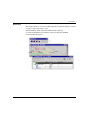
Module configuration window for a Premium I/O module:
Module Properties
The module properties window (called via the modules shortcut menu) shows the
modules properties such as the power consumption, number of I/O points (only
Premium) and more.
The module properties window for the power supply shows the total current of the
rack:
30
35006144 07/2011
Presentation
Network Configuration
The network configuration is called via the communications folder.
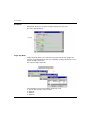
Network configuration:
The network configuration windows allow among others:
z Creation of networks
z Network analysis
z Printout of the network configuration
A window for configuring a network:
After configuration the network is assigned a communications module.
35006144 07/2011
31
Presentation
Data Editor
Introduction
The data editor offers the following features:
Declaration of variable instances
z Definition of derived data types (DDTs)
z Instance declaration of elements and derived function blocks (EFBs/DFBs)
z Definition of derived function block (DFBs) parameters
z
The following functions are available in all tabs of the data editor:
Copy, Cut, Paste
z Expand/collapse structured data
z Sorting according to Type, Symbol, Address etc.
z Filter
z Inserting, deleting and changing the position of columns
z Drag and Drop between the data editor and the program editors
z Undo the last change
z Export/Import
z
Variables
The Variables tab is used for declaring variables.
Variables tab:
The following functions are available:
z Defining a symbol for variables
z Assigning data types
z Own selection dialog box for derived data types
z Assignment of an address
32
35006144 07/2011
Presentation
z
z
z
z
Automatic symbolization of I/O variables
Assignment of an initial value
Entering a comment
View all properties of a variable in a separate properties dialog box
Hardware Dependent Data Types (IODDT)
IODDTs are used to assign the complete I/O structure of a module to an individual
variable.
Assignment of IODDTs:
The following functions are available:
Complete I/O structures can be assigned with individual variables using IO DDTs
z After entering the variables addresses, all elements of the structure are
automatically assigned with the correct input/output bit or word
z Because it is possible to assign addresses later on, standard modules can be
simply created whose names are defined at a later date.
z An alias name can be given to all elements of an IODDT structure.
z
35006144 07/2011
33
Presentation
Derived Data Types (DDT)
The DDT types tab is used for defining derived data types (DDTs).
A derived data type is the definition of a structure or array from any data type already
defined (elementary or derived).
Tab DDT types:
The following functions are available:
Definition of nested DDTs (max. 8 levels)
z Definition of arrays with up to 6 dimensions
z Assignment of an initial value
z Assignment of an address
z Entering a comment
z Analysis of derived data types
z Assignment of derived data types to a library
z View all properties of a derived data type in a separate properties dialog box
z An alias name can be given to all elements of a DDT structure or an array.
z
34
35006144 07/2011
Presentation
Function Blocks
The Function blocks tab is used for the instance declaration of elements and
derived function blocks (EFBs/DFBs).
Tab Function blocks:
The following functions are available:
z Display of the function blocks used in the project
z Definition of a symbol for the function blocks used in the project
z Automatic enabling of the defined symbols in the project
z Enter a comment about the function block
z View all parameters (inputs/outputs) of the function block
z Assignment of an initial value to the function block inputs/outputs
35006144 07/2011
35
Presentation
DFB Types
The DFB types tab is used for the defining derived function block (DFBs)
parameters.
The creation of DFB logic is carried out directly in one or more sections of the FBD,
LD, IL or ST programming languages.
Tab DFB types:
The following functions are available:
Definition of the DFB name
z Definition of all parameter of the DFB, such as:
z Inputs
z Outputs
z VAR_IN_OUT (combined inputs/outputs)
z Private variables
z Public variables
z
z
z
z
z
z
z
z
z
z
36
Assignment of data types to DFB parameters
Own selection dialog box for derived data types
Assignment of an initial value
Nesting DFBs
Use of several sections in a DFB
Enter a comment for DFBs and DFB parameters
Analyze the defined DFBs
Version management
Assignment of defined DFBs to a library
35006144 07/2011
Presentation
Data Usage
Data types and instances created using the data editor can be inserted (context
dependent) in the programming editors.
The following functions are available:
z Access to all programming language editors
z Only compatible data is displayed
z View of the functions, function blocks, procedures and derived data types
arranged according to their library affiliation
z Instance declaration during programming is possible
Data selection dialog box:
35006144 07/2011
37
Presentation
Online Modifications
It is possible to modify the type of a variable or a Function Block (FB) instance
declared in application or in a Derived Function Block (DFB) directly in online mode
(see Unity Pro, Operating Modes). That means it is not required to stop the
application to perform such a type modification.
These operations can be done either in the data editor or in the properties editor, in
the same way as in offline mode.
CAUTION
UNEXPECTED APPLICATION BEHAVIOR
When changing the type of a variable, the new value of the variable to be modified
depends on its kind:
z In the case of an unlocated variable, the variable is set to the initial value, if
one exists. Otherwise, it is set to the default value.
z In the case of a located variable, the variable restarts with the initial value if
one exists. Otherwise, the current binary value is unchanged.
Before applying the variable type change, check the impact of the new value of the
variable on the application execution.
Failure to follow these instructions can result in injury or equipment damage.
NOTE: It is not possible to modify the type of a variable declared in Derived Data
Type (DDT) in online mode (see Unity Pro, Operating Modes). The application has
to be switched into offline mode (see Unity Pro, Operating Modes) in order to build
such a modification.
Restrictions About Online Modifications
In the following cases, the online type modification of a variable or of a Function
Block (FB) is not allowed:
z If the variable is used as network global data, the online type modification is not
permitted.
z Whether the current FB can not be removed online, or a new FB can not be added
online, the online type modification of this FB is not allowed. Indeed, some
Elementary Function Blocks (EFB) like the Standard Function Blocks (SFB) do
not allow to be added or removed online. As a result, changing the type of an EFB
instance to a SFB instance is not possible, and conversely.
38
35006144 07/2011
Presentation
In both of these cases, the following dialog box is displayed:
NOTE: Due to these limitations, if a Derived Function Block (DFB) contains at least
one instance of a SFB, it is not be possible to add or remove instance of this DFB in
online mode (see Unity Pro, Operating Modes).
35006144 07/2011
39
Presentation
Program Editor
Introduction
A program can be built from:
Tasks, that are executed cyclically or periodically.
Tasks are built from:
z Sections
z Subroutines
z
z
Event processing, that is carried out before all other tasks.
Event processing is built from:
z Sections for processing time controlled events
z Sections for processing hardware controlled events
Example of a Program:
40
35006144 07/2011
Presentation
Tasks
Unity Pro supports multiple tasks (Multitasking).
The tasks are executed "parallel" and independently of each other whereby the
execution priorities are controlled by the PLC. The tasks can be adjusted to meet
various requirements and are therefore a powerful instrument for structuring the
project.
A multitask project can be constructed from:
z A Master task (MAST)
The Master task is executed cyclically or periodically.
It forms the main section of the program and is executed sequentially.
z A Fast task (FAST)
The Fast task is executed periodically. It has a higher priority than the Master
task. The Fast task is used for processes that are executed quickly and
periodically.
z One to four AUX task(s))
The AUX tasks are executed periodically. They are used for slow processing and
have the lowest priority.
The project can also be constructed with a single task. In this case, only the Master
task is active.
Event Processing
Event processing takes place in event sections. Event sections are executed with
higher priority than the sections of all other tasks. They are suited to processing that
requires very short reaction times after an event is triggered.
The following section types are available for event processing:
Sections for processing time controlled events (Timerx Section)
z Sections for processing hardware controlled events (Evtx Section)
z
The following programming languages are supported:
z FBD (Function Block Diagram)
z LD (Ladder Diagram Language)
z IL (Instruction List)
z ST (Structured Text)
35006144 07/2011
41
Presentation
Sections
Sections are autonomous program units in which the logic of the project is created.
The sections are executed in the order shown in the project browser (structural
view). Sections are connected to a task.
The same section cannot be belong to more than one task at the same time.
The following programming languages are supported:
FBD (Function Block Diagram)
z LD (Ladder Diagram Language)
z SFC (Sequential Function Chart)
z IL (Instruction List)
z ST (Structured Text)
z
Subroutine
Subroutines are created as separate units in subroutine sections.
Subroutines are called from sections or from another subroutine.
Nesting of up to 8 levels is possible.
A subroutine cannot call itself (not recursive).
Subroutines are assigned a task. The same subroutine cannot be called by different
tasks.
The following programming languages are supported:
FBD (Function Block Diagram)
z LD (Ladder Diagram Language)
z IL (Instruction List)
z ST (Structured Text)
z
42
35006144 07/2011
Presentation
Function Block Diagram FBD
Introduction
The FBD editor is used for graphical function block programming according to IEC
61131-3.
Representation
Representation of an FBD section:
Objects
The objects of the FBD (Function Block Diagram) programming language help to
divide a section into a number of:
z Elementary Functions (EFs),
z Elementary Function Blocks (EFBs)
z Derived Function Blocks (DFBs)
z Procedures
z Subroutine calls
z Jumps
z Links
z Actual Parameters
z Text objects to comment on the logic
35006144 07/2011
43
Presentation
Properties
FBD sections have a grid behind them. A grid unit consists of 10 coordinates. A grid
unit is the smallest possible space between 2 objects in an FBD section.
The FBD programming language is not cell oriented but the objects are still aligned
with the grid coordinates.
An FBD section can be configured in number of cells (horizontal grid coordinates
and vertical grid coordinates).
The program can be entered using the mouse or the keyboard.
Input Aids
The FBD editor offers the following input aids:
Toolbars for quick and easy access to the desired objects
z Syntax and semantics are checked as the program is being written.
z Incorrect functions and function blocks are displayed in blue
z Unknown words (e.g. undeclared variables) or unsuitable data types are
marked with a red wavy line
z Brief description of errors in the Quickinfo (Tooltip)
z
z
Information for variables and pins can be displayed in a Quickinfo (Tooltip)
z type, name, address and comment of a variable/expression
z type, name and comment of an FFB pin
z
Tabular display of FFBs
Actual parameters can be entered and displayed as symbols or topological
addresses
Different zoom factors
Tracking of links
Optimization of link routes
Display of inspection windows
z
z
z
z
z
44
35006144 07/2011
Presentation
Ladder Diagram (LD) Language
Introduction
The LD editor is used for graphical ladder diagram programming according to IEC
61131-3.
Representation
Representation of an LD section:
Objects
The objects of the LD programming language help to divide a section into a number
of:
z Contacts,
z Coils,
z Elementary Functions (EFs)
z Elementary Function Blocks (EFBs),
z Derived Function Blocks (DFBs)
z Procedures
z Control elements
z Operation and compare blocks which represent an extension to IEC 61131-3
z Subroutine calls
z Jumps
z Links
z Actual Parameters
z Text objects to comment on the logic
35006144 07/2011
45
Presentation
Properties
LD sections have a background grid that divides the section into lines and columns.
The LD programming language is cell oriented, i.e. only one object can be placed in
each cell.
LD sections can be 11-64 columns and 17-2000 lines in size.
The program can be entered using the mouse or the keyboard.
Input Aids
The LD editor offers the following input aids:
Objects can be selected from the toolbar, the menu or directly using shortcut keys
z Syntax and semantics are checked as the program is being written.
z Incorrect objects are displayed in blue
z Unknown words (e.g. undeclared variables) or unsuitable data types are
marked with a red wavy line
z Brief description of errors in the Quickinfo (Tooltip)
z
z
Information for variables and for elements of an LD section, that can be
connected to a variable (pins, contacts, coils, operation and compare blocks), can
be displayed in a Quickinfo (Tooltip)
z type, name, address and comment of a variable/expression
z type, name and comment of FFB pins, contacts etc.
z
Tabular display of FFBs
Actual parameters can be entered and displayed as symbols or topological
addresses
Different zoom factors
Tracking of FFB links
Optimizing the link routes of FFB links
Display of inspection windows
z
z
z
z
z
46
35006144 07/2011
Presentation
General Information about SFC Sequence Language
Introduction
The sequence language SFC (Sequential Function Chart), which conforms to IEC
61131-3, is described in this section.
IEC conformity restrictions can be lifted through explicit enable procedures.
Features such as multi token, multiple initial steps, jumps to and from parallel strings
etc. are then possible.
Representation
Representation of an SFC section:
35006144 07/2011
47
Presentation
Objects
An SFC section provides the following objects for creating a program:
Steps
z Macro steps (embedded sub-step sequences)
z Transitions (transition conditions)
z Transition sections
z Action sections
z Jumps
z Links
z Alternative sequences
z Parallel sequences
z Text objects to comment on the logic
z
Properties
The SFC editor has a background grid that divides the section into 200 rows and 32
columns.
The program can be entered using the mouse or the keyboard.
Input Aids
The SFC editor offers the following input aids:
Toolbars for quick and easy access to the desired objects
z Automatic step numbering
z Direct access to actions and transition conditions
z Syntax and semantics are checked as the program is being written.
z Incorrect objects are displayed in blue
z Unknown words (e.g. undeclared variables) or unsuitable data types are
marked with a red wavy line
z Brief description of errors in the Quickinfo (Tooltip)
z
z
Information for variables and for transitions can be displayed in a Quickinfo
(Tooltip)
z type, name, address and comment of a variable/expression
z type, name and comment of transitions
z
Different zoom factors
Show/hide the allocated actions
Tracking of links
Optimization of link routes
z
z
z
48
35006144 07/2011
Presentation
Step Properties
Step properties:
The step properties are defined using a dialog box that offers the following features:
z Definition of initial steps
z Definition of diagnostics times
z Step comments
z Allocation of actions and their qualifiers
35006144 07/2011
49
Presentation
Instruction List IL
Introduction
The IL editor is used for instruction list programming according to IEC 61131-3.
Representation
Representation of an IL section:
Objects
An instruction list is composed of a series of instructions.
Each instruction begins on a new line and consists of:
An operator
z A modifier if required
z One or more operands if required
z A label as a jump target if required
z A comment about the logic if required.
z
Input Aids
The IL editor offers the following input aids:
z Syntax and semantics are checked as the program is being written.
z Keywords and comments are displayed in color
z Unknown words (e.g. undeclared variables) or unsuitable data types are
marked with a red wavy line
z Brief description of errors in the Quickinfo (Tooltip)
z
z
z
z
50
Tabular display of the functions and function blocks
Input assistance for functions and function blocks
Operands can be entered and displayed as symbols or topological addresses
Display of inspection windows
35006144 07/2011
Presentation
Structured Text ST
Introduction
The ST editor is used for programming in structured text according to IEC 61131-3.
Representation
Representation of an ST section:
Objects
The ST programming language works with "Expressions".
Expressions are constructions consisting of operators and operands that return a
value when executed.
Operators are symbols representing the operations to be executed.
Operators are used for operands. Operands are variables, literals, function and
function block inputs/outputs etc.
Instructions are used to structure and control the expressions.
Input Aids
The ST editor offers the following input aids:
z Syntax and semantics are checked as the program is being written.
z Keywords and comments are displayed in color
z Unknown words (e.g. undeclared variables) or unsuitable data types are
marked with a red wavy line
z Brief description of errors in the Quickinfo (Tooltip)
z
z
z
z
35006144 07/2011
Tabular display of the functions and function blocks
Input assistance for functions and function blocks
Operands can be entered and displayed as symbols or topological addresses
Display of inspection windows
51
Presentation
PLC Simulator
Introduction
The PLC simulator enables error searches to be carried out in the project without
being connected to a real PLC.
All project tasks (Mast, Fast, AUX and Event) that run on a real PLC are also
available in the Simulator. The difference from a real PLC is the lack of I/O modules
and communication networks (such as e.g. ETHWAY, Fipio and Modbus Plus) nondeterministic realtime behavior.
Naturally, all debugging functions, animation functions, breakpoints, forcing
variables etc. are available with the PLC simulator.
Representation
Representation of a dialog box:
Structure of the Simulator
The simulator controller offers the following views:
Type of simulated PLC
z Current status of the simulated PLC
z Name of the loaded project
z IP address and DNS name of the host PC for the simulator and all connected
Client PCs
z Dialog box for simulating I/O events
z Reset button to reset the simulated PLC (simulated cold restart)
z Power Off/On button (to simulate a warm restart)
z Shortcut menu (right mouse button) for controlling the Simulator
z
52
35006144 07/2011
Presentation
Export/Import
Introduction
The export and import functions allow you to use existing data in a new project. The
XML export/import format makes is possible to provide or accept data from external
software.
Export
The following objects can be exported:
z Complete projects, including configuration
z Sections of all programming languages
z Subroutine sections of all programming languages
z Derived function blocks (DFBs)
z Derived data types (DDTs)
z Variable declarations
z Operator Screen
Import
All objects that can be exported can naturally be imported as well.
There are two types of import:
Direct import
Imports the object exactly as it was exported.
z Import with the assistant
The assistant allows you to change the variables names, sections or functional
modules. The mapping of addresses can also be modified.
z
35006144 07/2011
53
Presentation
User Documentation
User Documentation
Scope of the user documentation:
The following are just some of the services provided for documenting the project:
Print the entire project (2) or in sections (3)
z Selection between structural and functional view (1)
z Adjustment of the result (footer, general information, etc.)
z Local printing for programming language editors, configurator, etc.
z Special indication (bold) for keywords
z Paper format can be selected
z Print preview (4)
z Documentation save
z
54
35006144 07/2011
Presentation
Debug Services
Searching for Errors in the User Application
The following are just some of the features provided to optimize debugging in the
project:
z Set breakpoints in the programming language editors
z Step by step program execution, including step into, step out and step over
z Call memory for recalling the entire program path
z Control inputs and outputs
Online Mode
Online mode is when a connection is established between the PC and the PLC.
Online mode is used on the PLC for debugging, for animation and for changing the
program.
A comparison between the project of the PC and project of the PLC takes place
automatically when the connection is established.
This comparison can produce the following results:
Different projects on the PC and the PLC
In this case, online mode is restricted. Only PLC control commands (e.g. start,
stop), diagnostic services and variable monitoring are possible. Changes cannot
be made to the PLC program logic or configuration. However, the downloading
and uploading functions are possible and run in an unrestricted mode (same
project on PC and PLC).
z Same projects on the PC and the PLC
There are two different possibilities:
z ONLINE SAME, BUILT
The last project generation on the PC was downloaded to the PLC and no
changes were made afterwards, i.e. the projects on the PC and the PLC are
absolutely identical.
In this case, all animation functions are available and unrestricted.
z ONLINE EQUAL, NOT BUILT
The last project generation on the PC was downloaded to the PLC, however
changes were made afterwards.
In this case, the animation functions are only available in the unchanged
project components.
z
35006144 07/2011
55
Presentation
Animation
Different possibilities are provided for the animation of variables:
Section animation
All programming languages (FBD, LD, SFC, IL and ST) can be animated.
The variables and connections are animated directly in the section.
z
56
35006144 07/2011
Presentation
35006144 07/2011
z
Tooltips
A tooltip with the value of a variable is displayed when the mouse pointer passes
over that variable.
z
Inspection window
An inspection window can be created for any variable. This window displays the
value of the variable, the address and any comments (if available). This function
is available in all programming languages.
57
Presentation
58
z
Variables window
This window displays all variables used in the current section.
z
Animation table
The value of all variables in the project can be displayed, changed or forced in
animation tables. Values can be changed individually or simultaneously together.
35006144 07/2011
Presentation
Watch Point
Watch points allow you to view PLC data at the exact moment at which it is created
(1) and not only at the end of a cycle.
Animation tables can be synchronized with the watch point (2).
A counter (3) determines how often the watch point has been updated.
ST section with watch point:
35006144 07/2011
59
Presentation
Breakpoint
Breakpoints allow you to stop processing of the project at any point.
ST section with breakpoint:
Single Step Mode
Single step mode allows you to execute the program step by step. Single step
functions are provided if the project was stopped by reaching a breakpoint or if it is
already in single step mode.
ST section in single step mode:
The following functions are provided in single step mode:
Step by step execution of the program
z StepIn (1)
z StepOut
z StepOver
z
60
35006144 07/2011
Presentation
z
z
Show Current Step (2)
Call memory (3)
When the "step into" function is executed several times, the call memory enables
the display of the entire path, starting with the first breakpoint
NOTE: Running the PLC program in step by step mode, as well as entering (StepIn)
in a read/write protected section may lead to the inability to read the program and
exit from the section. The user must switch the PLC in "Stop" mode to get back to
the initial state.
Bookmarks
Bookmarks allow you to select code sections and easily find them again.
35006144 07/2011
61
Presentation
Diagnostic Viewer
Description
Unity Pro provides system and project diagnostics.
Errors which occur are displayed in a diagnostics window. The section which caused
the error can be opened directly from the diagnostics window in order to correct the
error.
62
35006144 07/2011
Presentation
Operator Screen
Introduction
Operator windows visualize the automation process.
The operator screen editor makes it easy to create, change and manage operator
screens.
Operator screens are created and accessed via the project browser.
35006144 07/2011
63
Presentation
Operator Screen Editor
An operator window contains much information (dynamic variables, overviews,
written text, etc.) and makes it easy to monitor and change automation variables.
Operator Screen
The operator screen editor offers the following features:
Extensive visualization functions
z Geometric elements
Line, rectangle, ellipse, curve, polygon, bitmap, text
z Control elements
Buttons, control box, shifter, screen navigation, hyperlinks, input field, rotating
field
z Animation elements
Bar chart, trend diagram, dialog, date, disappear, blinking colors, variable
animation
z
z
z
z
z
z
z
z
z
64
Create a library for managing graphical objects
Copying objects
Creating a list of all variables used in the operator screen
Creating messages to be used in the operator screen
Direct access from the operator screen to the animation table or the cross
reference table for one or more variables
Tooltips give additional information about the variables
Managing operator screens in families
Import/export of individual operator screens or entire families
35006144 07/2011
Unity Pro
Application Structure
35006144 07/2011
Application Structure
II
In This Part
This part describes the application program and memory structures associated with
each type of PLC.
What’s in this Part?
This part contains the following chapters:
Chapter
35006144 07/2011
Chapter Name
Page
2
Description of the Available Functions for Each Type of PLC
67
3
Application Program Structure
69
4
Application Memory Structure
107
5
Operating Modes
121
6
System Objects
147
65
Application Structure
66
35006144 07/2011
Unity Pro
PLC Functions
35006144 07/2011
Description of the Available
Functions for Each Type of PLC
2
Functions Available for the Different Types of PLC
Programming Languages
All the following languages are available for platforms Modicon M340, Premium,
Atrium and Quantum:
z LD
z FBD
z ST
z IL
z SFC
NOTE: Only LD and FBD languages are available on Quantum Safety PLCs.
Tasks and Processes
The following table describes the available tasks and processes.
Platforms
Modicon M340
Processors
P34 1000 P34 20•• P57 0244 P57 2••
P57 1••
P57 3••
P57 4••
H57 24M
H57 44M
P57 5••
PCI 57
P57 6634 204/354
31••••
43••••
53••••
651 60S
651••
652 60 671 60S
671 60
672 61
Master task
cyclic or
periodic
X
X
X
X
X
X
X
X
X
Fast task
periodic
X
X
X
X
X
X
X
X
-
Auxiliary tasks
periodic
-
-
-
-
4
-
-
4
-
16Mb
-
Maximum size
of a section
35006144 07/2011
Premium: TSX
64Kb
Atrium:
TSX
Quantum: 140 CPU
67
PLC Functions
Platforms
Modicon M340
Premium: TSX
Atrium:
TSX
Quantum: 140 CPU
I/O type event
processing
32
64
32
64
128
64
64
128
-
Timer type
event
processing
16
32
-
-
32
-
16
32
-
32
Total of I/O
type and Timer
type event
processing
64
32
64
128
64
64
128
-
X or Value available tasks or processes (the value is the maximum number)
- unavailable tasks or processes.
68
35006144 07/2011
Unity Pro
Program Structure
35006144 07/2011
Application Program Structure
3
Subject of this Chapter
This chapter describes the structure and execution of the programs created using
the Unity Pro software.
What’s in this Chapter?
This chapter contains the following sections:
Section
35006144 07/2011
Topic
Page
3.1
Description of Tasks and Processes
70
3.2
Description of Sections and Subroutines
76
3.3
Mono Task Execution
81
3.4
Multitasking Execution
89
69
Program Structure
3.1
Description of Tasks and Processes
Subject of this Section
This section describes the tasks and processes that comprise the application
program.
What’s in this Section?
This section contains the following topics:
Topic
Presentation of the Master Task
70
Page
71
Presentation of the Fast Task
72
Presentation of Auxiliary Tasks
73
Overview of Event Processing
75
35006144 07/2011
Program Structure
Presentation of the Master Task
General
The master task represents the main task of the application program. It is obligatory
and created by default.
Structure
The master task (MAST) is made up of sections and subroutines.
Each section of the master task is programmed in the following languages: LD, FBD,
IL, ST or SFC.
The subroutines are programmed in LD, FBD, IL, or ST and are called in the task
sections.
NOTE: SFC can be used only in the master task sections. The number of sections
programmed in SFC is unlimited.
Execution
You can choose the type of master task execution:
z
z
cyclic (default selection)
or periodic (1 to 255ms)
Control
The master task can be controlled by program, by bits and system words.
35006144 07/2011
System objects
Description
%SW0
Task period.
%S30
Master task activation.
%S11
Watchdog error.
%S19
Period overrun.
%SW27
Number of ms spent in the system during the last Mast cycle.
%SW28
Maximum overhead time (in ms) for Modicon M340.
%SW29
Minimum overhead time (in ms) for Modicon M340.
%SW30
Execution time (in ms) of the last cycle.
%SW31
Execution time (in ms) of the longest cycle.
%SW32
Execution time (in ms) of the shortest cycle.
71
Program Structure
Presentation of the Fast Task
General
The fast task is intended for short duration and periodic processing tasks.
Structure
The fast task (FAST) is made up of sections and subroutines.
Each section of the fast task is programmed in one of the following languages: LD,
FBD, IL or ST.
SFC language cannot be used in the sections of a fast task.
Subroutines are programmed in LD, FBD, IL, or ST language and are called in the
task sections.
Execution
The execution of the fast task is periodic.
It is higher priority than the master task.
The period of the fast task (FAST) is fixed by configuration, from 1 to 255ms.
The executed program must however remain short to avoid the overflow of lowerpriority tasks.
Control
The fast task can be controlled by program by bits and system words.
72
System objects
Description
%SW1
Task period.
%S31
Fast task activation.
%S11
Watchdog error
%S19
Period overrun.
%SW33
Execution time (in ms) of the last cycle.
%SW34
Execution time (in ms) of the longest cycle.
%SW35
Execution time (in ms) of the shortest cycle.
35006144 07/2011
Program Structure
Presentation of Auxiliary Tasks
General
The auxiliary tasks are intended for slower processing tasks. These are the least
priority tasks.
It is possible to program up to 4 auxiliary tasks (AUX0, AUX1, AUX2 or AUX3) on
the Premium TSX P57 5•• and Quantum 140 CPU 6•••• PLCs. Auxiliary tasks are
not available for Modicon M340 PLCs.
Structure
The auxiliary tasks (AUX) are made up of sections and subroutines.
Each section of the auxiliary task is programmed in one of the following languages:
LD, FBD, IL or ST.
The SFC language is not usable in the sections of an auxiliary task.
A maximum of 64 subroutines can be programmed in the LD, FBD, IL or ST
language. These are called in the task sections.
Execution
The execution of auxiliary tasks is periodic .
They are the least priority.
The auxiliary task period can be fixed from 10ms to 2.55s.
Control
The auxiliary tasks can be controlled by program by bits and system words.
35006144 07/2011
System objects
Description
%SW2
Period of auxiliary task 0.
%SW3
Period of auxiliary task 1.
%SW4
Period of auxiliary task 2.
%SW5
Period of auxiliary task 3.
%S32
Activation of auxiliary task 0.
%S33
Activation of auxiliary task 1.
%S34
Activation of auxiliary task 2.
%S35
Activation of auxiliary task 3.
%S11
Watchdog error
%S19
Period overrun.
%SW36
Execution time (in ms) of the last cycle of auxiliary task 0.
73
Program Structure
74
System objects
Description
%SW39
Execution time (in ms) of the last cycle of auxiliary task 1.
%SW42
Execution time (in ms) of the last cycle of auxiliary task 2.
%SW45
Execution time (in ms) of the last cycle of auxiliary task 3.
%SW37
Execution time (in ms) of the longest cycle of auxiliary task 0.
%SW40
Execution time (in ms) of the longest cycle of auxiliary task 1.
%SW43
Execution time (in ms) of the longest cycle of auxiliary task 2.
%SW46
Execution time (in ms) of the longest cycle of auxiliary task 3.
%SW38
Execution time (in ms) of the shortest cycle of auxiliary task 0.
%SW41
Execution time (in ms) of the shortest cycle of auxiliary task 1.
%SW44
Execution time (in ms) of the shortest cycle of auxiliary task 2.
%SW47
Execution time (in ms) of the shortest cycle of auxiliary task 3.
35006144 07/2011
Program Structure
Overview of Event Processing
General
Event processing is used to reduce the response time of the application program to
events:
z coming from input/output modules,
z from event timers.
These processing tasks are performed with priority over all other tasks. They are
therefore suited to processing tasks requiring a very short response time in relation
to the event.
The number of event processing tasks (see page 67) that can be programmed
depends on the type of processor.
Structure
An event processing task is monosectional, and made up of a single (unconditioned)
section.
It is programmed in either LD, FBD, IL or ST language.
Two types of event are offered:
z I/O event: for events coming from input/output modules
z TIMER event: for events coming from event timers.
Execution
The execution of an event processing task is asynchronous.
The occurrence of an event reroutes the application program to the processing task
associated with the input/output channel or event timer which caused the event.
Control
The following system bits and words can be used to control event processing tasks
during the execution of the program.
35006144 07/2011
System objects
Description
%S38
Activation of event processing.
%S39
Saturation of the event call management stack.
%SW48
Number of IO events and telegram processing tasks executed.
NOTE: TELEGRAM is available only for PREMIUM (not on Quantum
neither M340)
%SW75
Number of timer type events in the queue.
75
Program Structure
3.2
Description of Sections and Subroutines
Aim of this Section
This section describes the sections and the subroutines that make up a task.
What’s in this Section?
This section contains the following topics:
Topic
76
Page
Description of Sections
77
Description of SFC sections
79
Description of Subroutines
80
35006144 07/2011
Program Structure
Description of Sections
Overview of the Sections
Sections are autonomous programming entities.
The identification tags of the instruction lines, the contact networks, etc. are specific
to each section (no program jump to another section is possible).
These are programmed either in:
z
z
z
z
z
Ladder language (LD)
Functional block language (FBD)
Instruction List (IL)
Structured Text (ST)
or Sequential Function Charting (SFC)
on condition that the language is accepted in the task.
The sections are executed in the order of their programming in the browser window
(structure view).
An execution condition can be associated with one or more sections in the master,
fast and auxiliary tasks, but not in the event processing tasks.
The sections are linked to a task. The same section cannot belong simultaneously
to several tasks.
Example
The following diagram shows a task structured into sections.
35006144 07/2011
77
Program Structure
Characteristics of a Section
The following table describes the characteristics of a section.
78
Characteristic
Description
Name
32 characters maximum (accents are possible, but spaces are not
allowed).
Language
LD, FBD, IL, ST or SFC
Task or
processing
Master, fast, auxiliary, event
Condition
(optional)
A BOOL or EBOOL type bit variable can be used to condition the
execution of the section.
Comment
256 characters maximum
Protection
Write-protection, read/write protection.
35006144 07/2011
Program Structure
Description of SFC sections
General
The sections in Sequential Function Chart language are made up of:
z
z
z
a main chart programmed in SFC
macro steps (MS) programmed in SFC
actions and transitions programmed in LD, FBD, ST, or IL
The SFC sections are programmable only in the master task (see detailed
description of SFC sections)
Example
The following diagram gives an example of the structure of an SFC section, and
uses the chart to show the macro step calls that are used.
35006144 07/2011
79
Program Structure
Description of Subroutines
Overview of Subroutines
Subroutines are programmed as separate entities, either in:
z
z
z
z
Ladder language (LD),
Functional block language (FBD),
Instruction List (IL),
Structured Text (ST).
The calls to subroutines are carried out in the sections or from another subroutine.
The number of nestings is limited to 8.
A subroutine cannot call itself (non recursive).
Subroutines are also linked to a task. The same subroutine cannot be called from
several different tasks.
Example
The following diagram shows a task structured into sections and subroutines.
Characteristics of a Subroutine
The following table describes the characteristics of a subroutine.
80
Characteristic
Description
Name
32 characters maximum (accents are possible, but spaces are not
allowed).
Language
LD, FBD, IL or ST.
Task
Master, fast or auxiliary
Comment
512 characters maximum
35006144 07/2011
Program Structure
3.3
Mono Task Execution
Subject of this Section
This section describes how a mono task application operates.
What’s in this Section?
This section contains the following topics:
Topic
35006144 07/2011
Page
Description of the Master Task Cycle
82
Mono Task: Cyclic Execution
84
Periodic Execution
85
Control of Cycle Time
86
Execution of Quantum Sections with Remote Inputs/Outputs
87
81
Program Structure
Description of the Master Task Cycle
General
The program for a mono task application is associated with a single user task, the
master task (see page 71).
You can choose the type of master task execution:
z
z
cyclic
periodic
Illustration
The following illustration shows the operating cycle.
Description of the Different Phases
The table below describes the operating phases.
Phase
Description
Acquisition of
inputs
Writing to memory of the status of the data on the inputs of the discrete and application-specific
modules associated with the task,
These values can be modified by forcing values.
Program
processing
Execution of application program, written by the user,
Updating of
outputs
Writing of output bits or words to the discrete or application-specific modules associated with the
task depending on the state defined by the application.
As for the inputs, the values written to the outputs can be modified by forcing values.
NOTE: During the input acquisition and output update phases, the system also
implicitly monitors the PLC (management of system bits and words, updating of
current values of the real time clock, updating of status LEDs and LCD screens (not
for Modicon M340), detection of changes between RUN/STOP, etc.) and the
processing of requests from the terminal (modifications and animation).
82
35006144 07/2011
Program Structure
Operating Mode
PLC in RUN, the processor carries out internal processing, input acquisition,
processing of the application program and the updating of outputs in that order.
PLC in STOP, the processor carries out:
z
z
z
internal processing,
input acquisition (1),
and depending on the chosen configuration:
z fallback mode: the outputs are set to fallback position.
z maintain mode: the last value of the outputs is maintained.
(1) for Premium , Atrium and Quantum PLCs, input acquisition is inhibited when the
PLC is in STOP.
35006144 07/2011
83
Program Structure
Mono Task: Cyclic Execution
General
The master task operates as outlined below. A description is provided of cyclic
execution of the master task in mono task operation.
Operation
The following drawing shows the execution phases of the PLC cycle.
%I Reading of inputs
%Q Writing of outputs
Description
This type of operation consists of sequencing the task cycles, one after another.
After having updated the outputs, the system performs its own specific processing
then starts another task cycle, without pausing.
Cycle Check
The cycle is checked by the watchdog (see page 86).
84
35006144 07/2011
Program Structure
Periodic Execution
Description
In this operating mode, input acquisition, the processing of the application program
and the updating of outputs are all carried out periodically over a defined period of
1 to 255 ms.
At the start of the PLC cycle, a time out whose current value is initialized to the
defined period starts the countdown.
The PLC cycle must be completed before this time out expires and launches a new
cycle.
Operation
The following diagram shows the execution phases of the PLC cycle.
%I Reading of inputs
%Q Writing of outputs
Operating Mode
The processor carries out internal processing, input acquisition, processing of the
application program and the updating of outputs in that order.
z
z
If the period is not yet over, the processor completes its operating cycle until the
end of the period by performing internal processing.
If the operating time is longer than that assigned to the period, the PLC signals a
period overrun by setting the system bit %S19 of the task to 1. Processing then
continues and is executed fully (however, it must not exceed the watchdog time
limit). The following cycle is started after the outputs have been implicitly written
for the current cycle.
Cycle Check
Two checks are carried out:
z
z
35006144 07/2011
period overrun (see page 86),
by watchdog (see page 86).
85
Program Structure
Control of Cycle Time
General
The period of master task execution, in cyclic or periodic operation, is controlled by
the PLC (watchdog) and must not exceed the value defined in Tmax configuration
(1500 ms by default, 1.5 s maximum).
Software Watchdog (Periodic or Cyclic Operation)
If watchdog overflow should occur, the application is declared in error, which causes
the PLC to stop immediately (HALT state).
The bit %S11 indicates a watchdog overflow. It is set to 1 by the system when the
cycle time becomes greater than the watchdog.
The word %SW11 contains the watchdog value in ms. This value is not modifiable
by the program.
NOTE:
z
z
The reactivation of the task requires the terminal to be connected in order to
analyze the cause of the error, correct it, reinitialize the PLC and switch it to RUN.
It is not possible to exit HALT by switching to STOP. To do this you must
reinitialize the application to ensure consistency of data.
Control in Periodic Operation
In periodic operation, an additional control enables a period overrun to be detected.
A period overrun does not cause the PLC to stop if it remains less than the watchdog
value.
The bit %S19 indicates a period overflow. It is set to 1 by the system, when the cycle
time becomes greater than the task period.
The word %SW0 contains the value of the period (in ms). It is initialized on cold
restart by the defined value. It can be changed by the user.
Exploitation of Master Task Execution Times
The following system words can be used to obtain information on the cycle time:
z
z
z
%SW30 contains the execution time of the last cycle
%SW31 contains the execution time of the longest cycle
%SW32 contains the execution time of the shortest cycle
NOTE: These different items of information can also be accessed explicitly from the
configuration editor.
86
35006144 07/2011
Program Structure
Execution of Quantum Sections with Remote Inputs/Outputs
General
Quantum PLCs have a specific section management system. It applies to stations
with remote inputs/outputs.
These stations are used with following RIO modules:
z 140 CRA 931 00
z 140 CRA 932 00
This system allows remote inputs/outputs to be updated on sections with optimum
response times (without waiting for the entire task cycle before updating the
inputs/outputs).
Operation
The following diagram shows the IO phases when 5 drops are associated to client
task sections.
%Ii inputs of drop No. i
%Qi outputs of drop No. i
i drop number
35006144 07/2011
87
Program Structure
Description
Phase
1
Description
Request to update:
z the inputs of the first drop (i=1)
z the outputs of the last drop (i=5)
2
Processing the program
3
z Updating the inputs of the first drop (i=1)
z Request to update the inputs of the second drop (i=2)
4
Request to update:
z the inputs of the third drop (i=3)
z the outputs of the first drop (i=1)
5
Request to update:
z the inputs of the fourth drop (i=4)
z the outputs of the second drop (i=2)
6
Request to update:
z the inputs of the last drop (i=5)
z the outputs of the third drop (i=3)
7
Request to update the outputs of the fourth drop (i=4)
Adjustment of the Drop Hold-Up Time Value
In order for the remote outputs to be correctly updated and avoid fallback values to
be applied, the drop hold-up time must be set to at least twice the mast task cycle
time. Therefore the default value, 300 ms, must be changed if the MAST period is
set to the maximum value, 255 ms. The adjustment of the Drop Hold-Up time
(see Modicon Quantum, Hot Standby System, User Manual) must be done on all
configured drops.
88
35006144 07/2011
Program Structure
3.4
Multitasking Execution
Subject of this Section
This section describes how a multitasking application operates.
What’s in this Section?
This section contains the following topics:
Topic
Multitasking Software Structure
90
Sequencing of Tasks in a Multitasking Structure
92
Task Control
94
Assignment of Input/Output Channels to Master, Fast and Auxiliary Tasks
97
Management of Event Processing
35006144 07/2011
Page
99
Execution of TIMER-type Event Processing
100
Input/Output Exchanges in Event Processing
104
How to Program Event Processing
105
89
Program Structure
Multitasking Software Structure
Tasks and Processing
The task structure of this type of application is as follows:
Task/Processing Designation
Description
Master
MAST
Always present, may be cyclic or periodic.
Fast
FAST
Optional, always periodic.
Auxiliary
AUX 0 to 3
Optional and always periodic.
Event
EVTi and
TIMERi
(see page 99)
Called by the system when an event occurs on an
input/output module or triggered by the event timer.
These types of processing are optional and can be
used by applications that need to act on inputs/outputs
within a short response time.
Illustration
The following diagram shows the tasks in a multitasking structure and their level of
priority.
Description
The master (MAST) task is still the application base. The other tasks differ
depending on the type of PLC (see page 67).
Levels of priority are fixed for each task in order to prioritize certain types of
processing.
Event processing can be activated asynchronously with respect to periodic tasks by
an order generated by external events. It is processed as a priority and requires any
processing in progress to be stopped.
90
35006144 07/2011
Program Structure
Precautions
Multitasks: golden rules
CAUTION
UNEXPECTED MULTITASK APPLICATION BEHAVIOR
The sharing of Inputs/Outputs between different tasks can lead to unforeseen
behavior by the application.
We specifically recommend you associate each output or each input to one task
only.
Failure to follow these instructions can result in injury or equipment damage.
35006144 07/2011
91
Program Structure
Sequencing of Tasks in a Multitasking Structure
General
The master task is active by default.
The fast and auxiliary tasks are active by default if they have been programmed.
Event processing is activated when the associated event occurs.
Operation
The table below describes the execution of priority tasks (this operation is also
illustrated in the diagram below).
Phase
Description
1
Occurrence of an event or start of the fast task cycle.
2
Execution of lower priority tasks in progress stopped,
3
Execution of the priority task.
4
The interrupted task takes over again when processing of the priority task is
complete.
Description of the Task Sequence
The following diagram illustrates the task sequence of multitasking processing with
a cyclic master task, a fast task with a 20ms period and event processing.
Legend:
I: acquisition of inputs
P: program processing
O: updating of outputs
92
35006144 07/2011
Program Structure
Task Control
The execution of fast and event processing tasks can be controlled by the program
using the following system bits:
z
z
z
z
%S30 is used to control whether or not the MAST master task is active
%S31 is used to control whether or not the FAST task is active..
%S32 to %S35 are used to control whether or not the auxiliary tasks AUX0 to
AUX3 are active.
%S38 is used to control whether EVTi event processing is active.
NOTE: The elementary functions MASKEVT and UNMASKEVT also allow the
global masking and unmasking of events by the program.
35006144 07/2011
93
Program Structure
Task Control
Cyclic and Periodic Operation
In multitasking operation, the highest priority task shall be used in periodic mode in
order to allow enough time for lower priority tasks to be executed.
For this reason, only the task with the lowest priority should be used in cyclic mode.
Thus, choosing cyclic operating mode for the master task excludes using auxiliary
tasks.
Measurement of Task Durations
The duration of tasks is continually measured. This measurement represents the
duration between the start and the end of execution of the task. This measurement
includes the time taken up by tasks of higher priority which may interrupt the
execution of the task being measured.
The following system words (see page 179) give the current, maximum and
minimum cycle times for each task (value in ms)
Measurement of times
MAST
Current
Maximum
Minimum
FAST
AUX0
AUX1
AUX2
AUX3
%SW30 %SW33 %SW36
%SW39
%SW42
%SW45
%SW31 %SW34 %SW37
%SW40
%SW43
%SW46
%SW32 %SW35 %SW38
%SW41
%SW44
%SW47
NOTE: The maximum and minimum times are taken from the times measured since
the last cold restart.
94
35006144 07/2011
Program Structure
Task Periods
The task periods are defined in the task properties. They can be modified by the
following system words.
System words
Task
Values
Default values
Observations
%SW0
MAST
0..255ms
Cyclic
0 = cyclic operation
%SW1
FAST
1..255ms
5ms
-
%SW2
AUX0
10ms..2.55s
100ms
%SW3
AUX1
10ms..2.55s
200ms
The values of the period are
expressed in 10ms.
%SW4
AUX2
10ms..2.55s
300ms
%SW5
AUX3
10ms..2.55s
400ms
When the cycle time of the task exceeds the period, the system sets the system bit
%S19 of the task to 1 and continues with the following cycle.
NOTE: The values of the periods do not depend on the priority of tasks. It is possible
to define the period of a fast task which is larger than the master task.
Watchdog
The execution of each task is controlled by a configurable watchdog by using the
task properties.
The following table gives the range of watchdog values for each of the tasks:
Tasks
Watchdog values Default watchdog
(min...max) (ms) value (ms)
Associated system word
MAST
10..1500
%SW11
250
FAST
10..500
100
-
AUX0
100..5000
2000
-
AUX1
100..5000
2000
-
AUX2
100..5000
2000
-
AUX3
100..5000
2000
-
If watchdog overflow should occur, the application is declared in error, which causes
the PLC to stop immediately (HALT state).
The word %SW11 contains the watchdog value of the master task in ms. This value
is not modifiable by the program.
35006144 07/2011
95
Program Structure
The bit %S11 indicates a watchdog overflow. It is set to 1 by the system when the
cycle time becomes greater than the watchdog.
NOTE:
z
z
The reactivation of the task requires the terminal to be connected in order to
analyze the cause of the error, correct it, reinitialize the PLC and switch it to RUN.
It is not possible to exit HALT by switching to STOP. To do this you must
reinitialize the application to ensure consistency of data.
Task Control
When the application program is being executed, it is possible to activate or inhibit
a task by using the following system bits:
System bits
Task
%S30
MAST
%S31
FAST
%S32
AUX0
%S33
AUX1
%S34
AUX2
%S35
AUX3
The task is active when the associated system bit is set to 1. These bits are tested
by the system at the end of the master task.
When a task is inhibited, the inputs continue to be read and the outputs continue to
be written.
On startup of the application program, for the first execution cycle only the master
task is active. At the end of the first cycle the other tasks are automatically activated
except if one of the tasks in inhibited (associated system bit set to 0) by the program.
Controls on Input Reading and Output Writing Phases
The bits of the following system words can be used (only when the PLC is in RUN)
to inhibit the input reading and output writing phases.
Inhibition of phases...
MAST
FAST
AUX0
AUX1
AUX2
AUX3
reading of inputs
%SW8.0
%SW8.1
%SW8.2
%SW8.3
%SW8.4
%SW8.5
writing of outputs
%SW9.0
%SW9.1
%SW9.2
%SW9.3
%SW9.4
%SW9.5
NOTE: By default, the input reading and output writing phases are active (bits of
system words %SW8 and %SW9 set to 0).
On Quantum, inputs/outputs which are distributed via DIO bus are not assigned by
the words %SW8 and %SW9.
96
35006144 07/2011
Program Structure
Assignment of Input/Output Channels to Master, Fast and Auxiliary Tasks
General
Each task writes and reads the inputs/outputs assigned to it.
The association of a channel, group of channels or an input/output module with a
task is defined in the configuration screen of the corresponding module.
The task that is associated by default is the MAST task.
Reading of Inputs and Writing of Outputs on Premium
All the input/output channels of in-rack modules can be associated with a task
(MAST, FAST or AUX 0..3).
Local and remote inputs/outputs (X bus):
For each task cycle, the inputs are read at the start of the task and the outputs are
written at the end of the task.
Remote inputs/outputs on Fipio bus:
In controlled mode, the refreshing of inputs/outputs is correlated with the task
period. The system guarantees that inputs/outputs are updated in a single period.
Only the inputs/outputs associated with this task are refreshed.
In this mode, the period of the PLC task (MAST, FAST or AUX) must be greater than
or equal to the network cycle time.
In free mode, no restriction is imposed on the task period. The PLC task period
(MAST, FAST or AUX) can be less than the network cycle. If this is the case, the
task can be executed without updating the inputs/outputs. Selecting this mode gives
you the possibility of having the lowest possible task times for applications where
speed is critical.
Reading of Inputs and Writing of Outputs on Quantum
Local inputs/outputs:
Each input/output module or group of modules can be associated with a single task
(MAST, FAST or AUX 0..3).
Remote inputs/outputs:
Remote input/output stations can only be associated with the master (MAST) task.
The assignment is made for sections (see page 87), with 1 remote input station and
1 remote output station per section.
35006144 07/2011
97
Program Structure
Distributed inputs/outputs:
Distributed input/output stations can only be associated with the master (MAST)
task.
The inputs are read at the start of the master task and the outputs are written at the
end of the master task.
Example on Premium
With its 8 successive channel modularity (channels 0 to 7, channels 8 to 15, etc.),
the inputs/outputs of the Premium discrete modules can be assigned in groups of 8
channels, independently of the MAST, AUXi or FAST task.
Example: it is possible to assign the channels of a 28 input/output module as
follows:
z
z
z
z
98
inputs 0 to 7 assigned to the MAST task,
inputs 8 to 15 assigned to the FAST task,
outputs 0 to 7 assigned to the MAST task,
outputs 8 to 15 assigned to the AUX0 task.
35006144 07/2011
Program Structure
Management of Event Processing
General
Event processing take priority over tasks.
The following illustration describes the 3 defined levels of priority:
Management of Priorities
z
z
z
z
z
EVT0 event processing is the highest priority processing. It can itself interrupt
other types of event processing.
EVTi event processing triggered by input/output modules (priority 1) take priority
over TIMERi event processing triggered by timers (priority 2).
On Modicon M340, Premium and Atrium PLCs: types of event processing with
priority level 1 are stored and processed in order.
On Quantum PLC: the priority of priority 1 processing types is determined:
z by the position of the input/output module in the rack,
z by the position of the channel in the module.
The module with the lowest position number has the highest level of priority.
Event processing triggered by timer is given priority level 2. The processing
priority is determined by the lowest timer number.
Control
The application program can globally validate or inhibit the various types of event
processing by using the system bit %S38. If one or more events occur while they are
inhibited, the associated processing is lost.
Two elementary functions of the language, MASKEVT() and UNMASKEVT(), used
in the application program can also be used to mask or unmask event processing.
If one or more events occur while they are masked, they are stored by the system
and the associated processing is carried out after unmasking.
35006144 07/2011
99
Program Structure
Execution of TIMER-type Event Processing
Description
TIMER-type event processing is any process triggered by the ITCNTRL (see Unity
Pro, System, Block Library) function.
This timer function periodically activates event processing every time the preset
value is reached.
Reference
The following parameters are selected in the event processing properties.
Parameter
Value
Default value
Role
Time base
1 ms, 10ms,
100ms, 1 sec
10ms
Timer time base. Note: the time base of 1ms
should be used with care, as there is a risk
of overrun if the processing triggering
frequency is too high.
Preset
1..1023
10
Timer preset value. The time period
obtained equals: Preset x Time Base.
Phase
0..1023
0
The value of the temporal offset between
the STOP/RUN transition of the PLC and
the first restart of the timer from 0.
The temporal value equals:
Phase x Time Base.
NOTE: The Phase must be lower than Preset in TIMER-type Event.
ITCNTRL Function
Representation in FBD:
The following table describes the input parameters:
100
Parameter
Type
Comment
Enable
BOOL
Enable input selected
Reset_Timer
BOOL
At 1 resets the timer
35006144 07/2011
Program Structure
Parameter
Type
Comment
Hold_Timer
BOOL
At 1, freezes timer incrementation.
Nb_Task_Event
BYTE
Input byte which determines the event
processing number to be triggered.
The following table describes the output parameters:
Parameter
Type
Comment
Status_Timer
WORD
Status word.
Current_Value
TIME
Current value of timer.
Timing Diagram for Normal Operation
Timing diagram.
Normal operation
The following table describes the triggering of TIMER-type event processing
operations (see timing diagram above).
Phase
35006144 07/2011
Description
1
When a rising edge is received on the RESET input, the timer is reset to 0.
2
The current value VALUE of the timer increases from 0 towards the preset value
at a rate of one unit for each pulse of the time base.
3
An event is generated when the current value has reached the preset value, the
timer is reset to 0, and then reactivated. The associated event processing is also
triggered, if the event is not masked. It can be deferred if an event processing
task with a higher or identical priority is already in progress.
101
Program Structure
Phase
Description
4
When the ENABLE input is at 0, the events are no longer sent out. TIMER type
event processing is no longer triggered.
5
When the HOLD input is at 1, the timer is frozen, and the current value stops
incrementing, until this input returns to 0.
Event Processing Synchronization
The Phase parameter is used to trigger different TIMER-type event processing tasks
at constant time intervals.
This parameter set a temporal offset value with an absolute time origin, which is the
last passage of the PLC from STOP to RUN.
Operating condition:
z
z
The event processing tasks must have the same time base and preset values.
The RESET and HOLD inputs must not be set to 1.
Example: 2 event processing tasks Timer1 and Timer2 to be executed at 70ms
interval.
Timer1 can be defined with a phase equal to 0 and the second Timer2 with a phase
of 70ms (phase of 7 and time base of 10ms).
Any event triggered by the timer associated with the Timer1 processing task
shall be followed after an interval of 70ms by an event from the timer associated with
the Timer2 processing task
102
35006144 07/2011
Program Structure
Timing Diagram: STOP/RUN Transition
Timing diagram of the example provided above with the same preset value of 16
(160ms) for Timer1 and Timer2.
Operation after PLC STOP/RUN
The following table describes the operation of the PLC after a transition from STOP
into RUN (see timing diagram above):
Phase
35006144 07/2011
Description
1
ON a STOP RUN transition of the PLC, timing is triggered so that the preset
value is reached at the end of a time period equal to Phase x time base, when
the first event is sent out.
2
The current value VALUE of the timer increases from 0 towards the preset value
at a rate of one unit for each pulse of the time base.
3
An event is generated when the current value has reached the preset value, the
timer is reset to 0, and then reactivated. The associated event processing is also
triggered, if the event is not masked. If can be deferred, if there is an event
processing task of higher or identical priority already in progress.
103
Program Structure
Input/Output Exchanges in Event Processing
General
With each type of event processing it is possible to use other input/output channels
than those for the event.
As with tasks, exchanges are then performed implicitly by the system before (%I)
and after (%Q) application processing.
Operation
The following table describes the exchanges and processing performed.
Phase
Description
1
The occurrence of an event reroutes the application program to perform the
processing associated with the input/output channel which caused the event.
2
All inputs associated with event processing are acquired automatically.
3
The event processing is executed. It must be as short as possible.
4
All the outputs associated with the event processing are updated.
Premium/Atrium PLCs
The inputs acquired and the outputs updated are:
z
z
the inputs associated with the channel which caused the event
the inputs and outputs used during event processing
NOTE: These exchanges may relate:
z
z
to a channel (e.g. counting module) or
to a group of channels (discrete module). In this case, if the processing modifies,
for example, outputs 2 and 3 of a discrete module, the image of outputs 0 to 7 is
then transferred to the module.
Quantum PLCs
The inputs acquired and the outputs updated are selected in the configuration. Only
local inputs/outputs can be selected.
Programming Rule
The inputs (and the associated group of channels) exchanged during the execution
of event processing are updated (loss of historical values, and thus edges). You
should therefore avoid testing fronts on these inputs in the master (MAST), fast
(FAST) or auxiliary (AUXi) tasks.
104
35006144 07/2011
Program Structure
How to Program Event Processing
Procedure
The table below summarizes the essential steps for programming event processing.
Step
Action
1
Configuration phase (for events triggered by input/output modules)
In offline mode, from the configuration editor, select Event Processing (EVT) and
the event processing number for the channel of the input/output module concerned.
2
Unmasking phase
The task which can be interrupted must in particular:
z Enable processing of events at system level: set bit %S38 to 1 (default value).
z Unmask events with the instruction UNMASKEVT (active by default).
z Unmask the events concerned at channel level (for events triggered by
input/output modules) by setting the input/output module’s implicit language
objects for unmasking of events to 1. By default, the events are masked.
z Check that the stack of events at system level is not saturated (bit %S39 must
be at 0).
3
Event program creation phase
The program must:
z Determine the origin of the event(s) on the basis of the event status word
associated with the input/output module if the module is able to generate several
events.
z Carry out the reflex processing associated with the event. This process must be
as short as possible.
z Write the reflex outputs concerned.
Note: the event status word is automatically reset to zero.
35006144 07/2011
105
Program Structure
Illustration of Event Unmasking
This figure shows event unmasking in the MAST task.
Illustration of the Contents of Event Processing
This figure shows the possible contents of event processing (bit test and action).
106
35006144 07/2011
Unity Pro
Memory Structure
35006144 07/2011
Application Memory Structure
4
Subject of this Chapter
This chapter describes the application memory structure of Premium, Atrium and
Quantum PLCs.
What’s in this Chapter?
This chapter contains the following sections:
Section
35006144 07/2011
Topic
Page
4.1
Memory Structure of the Premium, Atrium and Modicon M340
PLCs
108
4.2
Memory Structure of Quantum PLCs
115
107
Memory Structure
4.1
Memory Structure of the Premium, Atrium and
Modicon M340 PLCs
Subject of this Section
This section describes memory structure and detailed description of the memory
zones of the Premium, Atrium and Modicon M340 PLCs.
What’s in this Section?
This section contains the following topics:
Topic
108
Page
Memory Structure of Modicon M340 PLCs
109
Memory Structure of Premium and Atrium PLCs
112
Detailed Description of the Memory Zones
114
35006144 07/2011
Memory Structure
Memory Structure of Modicon M340 PLCs
Overview
The PLC memory supports:
z
z
z
located application data
unlocated application data
the program: task descriptors and executable code, constant words, initial
values and configuration of inputs/outputs
Structure
The data and program are supported by the processor module’s internal RAM.
The following diagram describes the memory structure.
Program Backup
If the memory card is present, working properly and not write-protected, the program
is saved on the memory card:
z Automatically, after:
z a download
z online modification
z a rising edge of the system bit %S66 in the project program
35006144 07/2011
109
Memory Structure
z
Manually:
z with the command PLC →Project backup →Backup Save
z in an animation table by setting the system bit %S66
WARNING
LOSS OF DATA - APPLICATION NOT SAVED
The interruption of an application saving procedure by an untimely or rough
extraction of the memory card, may lead to the loss of saved application.The bit
%S65 (see page 160) allows managing a correct extraction (See help page
%65 bit in system bit chapter)
Failure to follow these instructions can result in death, serious injury, or
equipment damage.
The memory card uses Flash technology, therefore no battery is necessary.
Program Restore
If the memory card is present and working properly, the program is copied from the
PLC memory card to the internal memory:
z Automatically after:
z a power cycle
z
Manually, with the Unity Pro command PLC →Project backup →Backup
Restore
NOTE: When you insert the memory card in run or stop mode, you have to do a
power cycle to restore the project on the PLC.
Saved Data
Located, unlocated data, diagnostic buffer are automatically saved in the internal
Flash memory at power-off. They are restored at warm start.
Save_Param
The SAVE_PARAM function does both current and initial parameter adjustment in
internal RAM (as in other PLCs). In this case, the internal RAM and the memory card
content are different (%S96 = 0 and the CARDERR LED is on). On cold start (after
application restore), the current parameter are replaced by the last adjusted initial
values only if a save to memory card function (Backup Save or %S66 rising edge)
was done.
110
35006144 07/2011
Memory Structure
Save Current Value
On a %S94 rising edge, the current values replace the initial values in internal
memory. The internal RAM and the memory card content are different (%S96 = 0
and the CARDERR LED is on). On cold start, the current values are replaced by the
most recent initial values only if a save to memory card function (Backup Save or
%S66 rising edge) was done.
Delete Files
There are two ways to delete all the files on the memory card:
z
z
Formatting the memory card (delete all files of the file system partition)
Deleting the content of directory \DataStorage\ ( delete only files added by user)
Both actions are performed using %SW93 (see page 183).
The system word %SW93 can only be used after download of a default application in
the PLC.
CAUTION
INOPERABLE MEMORY CARD
Do not format the memory card with a non-Schneider tool. The memory card needs
a structure to contain program and data. Formatting with another tool destroys this
structure.
Failure to follow these instructions can result in injury or equipment damage.
%MW Backup
The values of the %MWi can be saved in the internal Flash memory using %SW96
(see page 183). These values will be restored at cold start, including application
download, if the option Initialize of %MW on cold start is unchecked in the
processor Configuration screen (see Unity Pro, Operating Modes).
For %MW words, the values can be saved and restored on cold restart or download if
the option Reset of %MW on cold restart is not checked in the processor Configuration
screen. With the %SW96 word, management of memory action %MW internal words
(save, delete) and information on the actions’ states %MW internal words is possible.
Memory Card Specifics
Two types of memory card are available:
z
z
35006144 07/2011
application: these cards contain the application program and Web pages
application + file storage: these cards contain the application program, data
files from Memory Card File Management EFBs, and Web pages
111
Memory Structure
Memory Structure of Premium and Atrium PLCs
General
The PLC memory supports:
z
z
z
located application data,
unlocated application data,
the program: task descriptors and executable code, constant words, initial
values and configuration of inputs/outputs.
Structure without Memory Extension Card
The data and program are supported by the internal RAM of the processor module.
The following diagram describes the memory structure.
Structure with Memory Extension Card
The data is supported by the internal RAM of the processor module.
The program is supported by the extension memory card.
The following diagram describes the memory structure.
112
35006144 07/2011
Memory Structure
Memory Backup
The internal RAM is backed up by a Ni-Cad battery supported by the processor
module.
The RAM memory cards are backed up by a Ni-Cad battery.
Specificities of Memory Cards
Three types of memory card are offered:
z
z
z
application: these cards contain the application program. The cards offered use
either RAM or Flash EPROM technology
application + file storage: in addition to the program, these cards also contain
a zone which can be used to backup/restore data using the program. The cards
on offer use either RAM or Flash EPROM technology
file storage: these cards can be used to backup/restore data using the program.
These cards use SRAM technology.
The following diagram describes the memory structure with an application and file
storage card.
NOTE: On processors with 2 memory card slots, the lower slot is reserved for the
file storage function.
35006144 07/2011
113
Memory Structure
Detailed Description of the Memory Zones
User Data
This zone contains the located and unlocated application data.
z
located data:
z %M, %S Boolean and %MW,%SW numerical data
z data associated with modules (%I, %Q, %IW, %QW,%KW etc.)
z
unlocated data:
z Boolean and numerical data (instances)
z EFB and DFB instances
User Program and Constants
This zone contains the executable codes and constants of the application.
z
executable codes:
z program code
z code associated with EFs, EFBs and the management of I/O modules
z code associated with DFBs
z
constants:
z KW constant words
z constants associated with inputs/outputs
z initial data values
This zone also contains the necessary information for downloading the application:
graphic codes, symbols etc.
Other Information
Other information relating to the configuration and structure of the application are
also stored in the memory (in a data or program zone depending on the type of
information).
z
z
z
114
Configuration: other data relating to the configuration (hardware configuration,
software configuration).
System: data used by the operating system (task stack, etc.).
Diagnostics: information relating to process or system diagnostics, diagnostics
buffer.
35006144 07/2011
Memory Structure
4.2
Memory Structure of Quantum PLCs
Subject of this Section
This section describes memory structure and detailed description of the memory
zones of the Quantum PLCs.
What’s in this Section?
This section contains the following topics:
Topic
35006144 07/2011
Page
Memory Structure of Quantum PLCs
116
Detailed Description of the Memory Zones
119
115
Memory Structure
Memory Structure of Quantum PLCs
General
The PLC memory supports:
z
z
z
located application data (State Ram),
unlocated application data,
the program: task descriptors and executable code, initial values and
configuration of inputs/outputs.
Structure without Memory Extension Card
The data and program are supported by the internal RAM of the processor module.
The following diagram describes the memory structure.
Structure with Memory Extension Card
Quantum 140 CPU 6••• processors can be fitted with a memory extension card.
The data is supported by the internal RAM of the processor module.
The program is supported by the extension memory card.
The following diagram describes the memory structure.
116
35006144 07/2011
Memory Structure
Memory Backup
The internal RAM is backed up by a Ni-Cad battery supported by the processor
module.
The RAM memory cards are backed up by a Ni-Cad battery.
Start-up with Application Saved in Backup Memory
The following table describes the different results according to the PLC state,
according to the PLC mem switch (see Quantum with Unity Pro, Hardware,
Reference Manual), and also indicates if the box "Auto RUN" is checked or not
checked.
PLC State
PLC Mem
Auto RUN in
Switch1
Appl2
NONCONF
Start or Off
Off
Cold Start, application is loaded from Backup memory to RAM
of the PLC. The PLC remains in STOP.
NONCONF
Start or Off
On
Cold Start, application is loaded from Backup memory to RAM
of the PLC. The PLC remains in RUN.
NONCONF
Mem Prt or Stop
Not Applicable
No application loaded. PLC power up in NONCONF state.
Configured
Start or Off
Off
Cold Start, application is loaded from Backup memory to RAM
of the PLC. The PLC remains in STOP.
Configured
Start or Off
On
Cold Start, application is loaded from Backup memory to RAM
of the PLC. The PLC remains in RUN.
Configured
Mem Prt or Stop
Do not Care
Warm Start, no application loaded. PLC powers up in previous
state.
1
2
Results
Start and Stop are valid for the 434 and 534 models only and Off is valid for the 311 only. Mem Prt is valid on all
models.
The Automatic RUN in the application refers to the application that is loaded.
Specificities of Memory Cards
Three types of memory card are offered:
z
z
z
35006144 07/2011
application: these cards contain the application program. The cards on offer use
either RAM or Flash EPROM technology
application + file storage: in addition to the program, these cards also contain
a zone which can be used to backup/restore data using the program. The cards
on offer use either RAM or Flash EPROM technology
file storage: these cards can be used to backup/restore data using the program.
These cards use SRAM technology.
117
Memory Structure
The following diagram describes the memory structure with an application and file
storage card.
NOTE: On processors with 2 memory card slots, the lower slot is reserved for the
file storage function.
118
35006144 07/2011
Memory Structure
Detailed Description of the Memory Zones
Unlocated Data
This zone contains unlocated data:
z
z
Boolean and numerical data
EFB and DFB
Located Data
This zone contains located data (State Ram):
Address Object address
Data use
0xxxxx
output module bits and internal bits.
%Qr.m.c.d,%Mi
1xxxxx
%Ir.m.c.d, %Ii
input module bits.
3xxxxx
%IWr.m.c.d, %IWi
input register words of input/output modules.
4xxxxx
%QWr.m.c.d, %MWi
output words of input/output modules and internal words.
User Program
This zone contains the executable codes of the application.
z
z
z
z
program code
code associated with EFs, EFBs and the management of I/O modules
code associated with DFBs
initial variable values
This zone also contains the necessary information for downloading the application:
graphic codes, symbols etc.
Operating System
On 140 CPU 31••/41••/51•• processors, this contains the operating system for
processing the application. This operating system is transferred from an internal
EPROM memory to internal RAM on power up.
Application Backup
A Flash EPROM memory zone of 1435K8, available on processors 140 CPU
31••/41••/51••, can be used to backup the program and the initial values of variables.
The application stored in this zone is automatically transferred to internal RAM when
the PLC processor is powered up (if the PLC MEM switch is set to off on the
processor front panel).
35006144 07/2011
119
Memory Structure
Other Information
Other information relating to the configuration and structure of the application are
also stored in the memory (in a data or program zone depending on the type of
information).
z
z
z
120
Configuration: other data relating to the configuration (hardware configuration,
software configuration).
System: data used by the operating system (task stack, etc.).
Diagnostics: information relating to process or system diagnostics, diagnostics
buffer.
35006144 07/2011
Unity Pro
Operating Modes
35006144 07/2011
Operating Modes
5
Subject of this Chapter
The chapter describes the operating modes of the PLC in the event of power outage
and restoral, the impacts on the application program and the updating of
inputs/outputs.
What’s in this Chapter?
This chapter contains the following sections:
Section
35006144 07/2011
Topic
Page
5.1
Modicon M340 PLCs Operating Modes
5.2
Premium, Quantum PLCs Operating Modes
133
5.3
PLC HALT Mode
145
122
121
Operating Modes
5.1
Modicon M340 PLCs Operating Modes
Subject of this Section
This section describes the operating modes of the Modicon M340 PLCs.
What’s in this Section?
This section contains the following topics:
Topic
122
Page
Processing of Power Outage and Restoral of Modicon M340 PLCs
123
Processing on Cold Start for Modicon M340 PLCs
125
Processing on Warm Restart for Modicon M340 PLCs
129
Automatic Start in RUN for Modicon M340 PLCs
132
35006144 07/2011
Operating Modes
Processing of Power Outage and Restoral of Modicon M340 PLCs
General
If the duration of the outage is less than the power supply filtering time, it has no
effect on the program, which continues to run normally. If this is not the case, the
program is interrupted and power restoration processing is activated.
Filtering time:
PLC
Alternating Current
Direct Current
BMX CPS 2000
BMX CPS 3500
BMX CPS 3540T
10ms
-
BMX CPS 2010
BMX CPS 3020
-
1ms
Illustration
The following illustration shows the different power cycle phases.
35006144 07/2011
123
Operating Modes
Operation
The table describes the power outage processing phases.
Phase
Description
1
On power outage, the system saves the application context, the values of
application variables, and the state of the system on internal Flash memory.
2
The system sets all the outputs into fallback state (state defined in
configuration).
3
On power restoral, some actions and checks are done to verify if warm restart
is available:
z restoring from internal Flash memory application context,
z verification with memory card (presence, application availability),
z verification that the application context is identical to the memory card
context,
If all checks are correct, a warm restart (see page 129) is done, otherwise a cold
start (see page 125) is carried out.
124
35006144 07/2011
Operating Modes
Processing on Cold Start for Modicon M340 PLCs
Cause of a Cold Start
The following table describes the different possible causes of a cold start.
Causes
Startup characteristics
Loading of an application
Cold start forced in STOP
Restore application from memory card,
when the application is different from the
one in internal RAM
Cold start forced in STOP or RUN mode as
defined in the configuration
Restore application from memory card, with
Unity Pro commands PLC →Project
backup →....
Cold start forced in STOP or RUN mode as
defined in the configuration
RESET button pressed on supply
Cold start forced in STOP or RUN mode as
defined in the configuration
RESET button pressed on supply less than
500ms after a power down
Cold start forced in STOP or RUN mode as
defined in the configuration
RESET button pressed on supply after a
processor error, except in the case of a
watchdog error
Cold start forced in STOP. The start in RUN
mode as defined in the configuration is not
taken into account
Initialization from Unity Pro
Forcing the system bit %S0
Start in STOP or in RUN (retaining the
operating mode in progress at downtime),
initialization only of application
Restoral after power supply outage with loss Cold start forced in STOP or RUN mode as
of context
defined in the configuration
CAUTION
LOSS OF DATA ON APPLICATION TRANSFER
Loading or transferring an application to the PLC typically involves initialization of
unlocated variables.
To save the located variables:
z Avoid the initialization of the %MWi by unchecking Initialize %MWi on cold start
in the configuration screen of the CPU.
It is necessary to assign a topological address to the data if the process requires
keeping the current values of the data when transferring the application.
Failure to follow these instructions can result in injury or equipment damage.
35006144 07/2011
125
Operating Modes
CAUTION
LOSS OF DATA ON APPLICATION TRANSFER
Do not press the RESET button on the power supply. Otherwise, %MWi is reset
and initial values are loaded.
Failure to follow these instructions can result in injury or equipment damage.
CAUTION
RISK OF LOSS OF APPLICATION
If there is no memory Card in the PLC during a cold restart the application is lost.
Failure to follow these instructions can result in injury or equipment damage.
Illustration
The diagram below describes how a cold restart operates.
126
35006144 07/2011
Operating Modes
Operation
The table below describes the program execution restart phases on cold restart.
Phase
1
2
Description
The startup is performed in RUN or in STOP depending on the status of the
Automatic start in RUN parameter defined in the configuration or, if this is in
use, depending on the state of the RUN/STOP input.
Program execution is resumed at the start of the cycle.
The system carries out the following:
z Deactivating tasks, other than the master task, until the end of the first master
task cycle.
z Initializing data (bits, I/O image, words etc.) with the initial values defined in the
data editor (value set to 0, if no other initial value has been defined). For %MW
words, the values can be retrieved on cold restart if the two conditions are valid :
z the Initialize of %MW on cold restart option (see Unity Pro, Operating
Modes) is unchecked in the processor’s configuration screen,
z the internal flash memory has a valid backup (see %SW96 (see page 183)).
z
z
z
z
z
z
z
3
Note : If the number of %MW words exceeds the backup size (see the memory
structure of M340 PLCs (see page 109)) during the save operation the
remaining words are set to 0.
Initializing elementary function blocks on the basis of initial data.
Initializing data declared in the DFBs: either to 0 or to the initial value declared
in the DFB type.
Initializing system bits and words.
Positioning charts to initial steps.
Cancelling any forcing.
Initializing message and event queues.
Sending configuration parameters to all discrete input/output modules and
application-specific modules.
For this first restart cycle the system does the following:
z Relaunches the master task with the %S0 (cold restart) and %S13 (first cycle in
RUN) bits set to 1, and the %SW10 word (detection of a cold restart during the
first task cycle) is set to 0.
z Resets the %S0 and %S13 bits to 0, and sets each bit of the word %SW10 to 1
at the end of this first cycle of the master task.
z Activates the fast task and event processing at the end of the first cycle of the
master task.
Processing a cold start by program
It is advisable to test the bit %SW10.0 to detect a cold start and start processing
specific to this cold start.
NOTE: It is possible to test the bit %S0, if the parameter Automatic start in
RUN has been selected. If this is not the case, the PLC starts in STOP, the bit %S0
then switches to 1 on the first cycle after restart but is not visible to the program
because it is not executed.
35006144 07/2011
127
Operating Modes
Output Changes
As soon as a power outage is detected, the outputs are set in the fallback position:
either they are assigned the fallback value,
z or the current value is maintained,
z
depending on the choice made in the configuration.
After power restoral, the outputs remain at zero until they are updated by the task.
128
35006144 07/2011
Operating Modes
Processing on Warm Restart for Modicon M340 PLCs
Cause of a Warm Restart
A warm restart may be caused by a power restoral without loss of context.
CAUTION
RISK OF LOSS OF APPLICATION
If there is no Memory Card in the PLC during a warm restart the application is lost.
Failure to follow these instructions can result in injury or equipment damage.
Illustration
The diagram below describes how a warm restart operates.
35006144 07/2011
129
Operating Modes
Operation
The table below describes the program execution restart phases on warm restart.
Phase
1
2
Description
Program execution doesn’t resume from the element where the power outage
occurred. The remaining program is discarded during the warm start. Each
task will restart from the beginning.
At the end of the restart cycle, the system carries out the following:
restore the application’s variable value,
set bit %S1 to 1,
the initialization of message and event queues,
the sending of configuration parameters to all discrete input/output and
application-specific modules,
z the deactivation of the fast task and event processing (until the end of the
master task cycle).
z
z
z
z
3
The system performs a restart cycle during which it:
z relaunches the master task from beginning of cycle,
z resets bit %S1 to 0 at the end of this first master task cycle,
z reactivates the fast task, event processing at the end of this first cycle of the
master task.
Processing a Warm Restart by Program
In the event of a warm restart, if you want the application to be processed in a
particular way, you must write the corresponding program to test that %S1 is set to
1 at the start of the master task program.
SFC Warm start specific features
The Warm start on M340 PLCs is not considered as a real warm start by the CPU.
SFC interpreter does not depend on tasks.
SFC publishes a memory area "ws_data" to the OS that contains SFC-sectionspecific data to be saved at a power fail. At the beginning of chart processing the
currently active steps are saved to "ws_data" and processing is marked to be in
"critical section". At the end of chart processing the "critical section" is unmarked.
If a power failure hits into "critical section" this could be detected if this state is active
at the beginning (as the scan is aborted and MAST task is restarted from the
beginning). In this case the workspace might be inconsistent and is restored from
the saved data.
Additional information from SFCSTEP_STATE in located data area is used to
reconstruct the state machine.
When a power failure occurs:
during first scan %S1 =1 Mast is executed but Fast and Event tasks are not
executed.
z
130
35006144 07/2011
Operating Modes
On power restoral:
z Clears chart, deregisters diagnostics, keeps set actions
z sets steps from saved area
z sets step times from SFCSTEP_STATE
z restores elapsed time for timed actions
NOTE: SFC interpreter is independent, if the transition is valid, the SFC chart
evolves while %S1 is true.
Output Changes
As soon as a power outage is detected, the outputs are set in the fallback position:
z either they are assigned the fallback value,
z or the current value is maintained,
depending on the choice made in the configuration.
After power restoral, the outputs stay in security mode (equal to 0) until they are
updated by a running task.
35006144 07/2011
131
Operating Modes
Automatic Start in RUN for Modicon M340 PLCs
Description
Automatic start in RUN is a processor configuration option. This option forces the
PLC to start in RUN after a cold restart (see page 125), except after an application
has been loaded onto the PLC.
For Modicon M340 this option is not taken into account when the power supply
RESET button is pressed after a processor error, except in the case of a watchdog
error.
WARNING
UNEXPECTED SYSTEM BEHAVIOR - UNEXPECTED PROCESS START
The following actions will trigger automatic start in RUN:
z Restoring the application from memory card,
z Unintentional or careless use of the reset button.
To avoid an unwanted restart when in RUN mode use:
z The RUN/STOP input on Modicon M340
Failure to follow these instructions can result in death, serious injury, or
equipment damage.
132
35006144 07/2011
Operating Modes
5.2
Premium, Quantum PLCs Operating Modes
Subject of this Section
This section describes the operating modes of the Premium and Quantum PLCs.
What’s in this Section?
This section contains the following topics:
Topic
35006144 07/2011
Page
Processing of Power Outage and Restoral for Premium/Quantum PLCs
134
Processing on Cold Start for Premium/Quantum PLCs
136
Processing on Warm Restart for Premium/Quantum PLCs
141
Automatic Start in RUN for Premium/Quantum
144
133
Operating Modes
Processing of Power Outage and Restoral for Premium/Quantum PLCs
General
If the duration of the outage is less than the power supply filtering time, it has no
effect on the program which continues to run normally. If this is not the case, the
program is interrupted and power restoral processing is activated.
Filtering time:
PLC
Alternating Current
Direct Current
Premium
10ms
1ms
Atrium
30ms
-
Quantum
10ms
1ms
Illustration
The illustration shows the different types of power restoral detected by the system.
134
35006144 07/2011
Operating Modes
Operation
The table below describes the power outage processing phases.
Phase
Description
1
On power outage the system stores the application context and the time of
outage.
2
It sets all the outputs in the fallback state (state defined in configuration).
3
On power restoral, the saved context is compared to the current one, which
defines the type of startup to be performed:
z if the application context has changed (i.e. loss of system context or new
application), the PLC initializes the application: cold start,
z if the application context is the same, the PLC carries out a restart without
initialization of data: warm restart.
Power Outage on a Rack, Other than Rack 0
All the channels on this rack are seen as in error by the processor, but the other
racks are not affected. The values of the inputs in error are no longer updated in the
application memory and are reset to zero in a discrete input module, unless they
have been forced, in which case they are maintained at the forcing value.
If the duration of the outage is less than the filtering time, it has no effect on the
program which continues to run normally.
35006144 07/2011
135
Operating Modes
Processing on Cold Start for Premium/Quantum PLCs
Cause of a Cold Start
The following table describes the different possible causes of a cold start.
Causes
Startup characteristics
Loading of an application
Cold start forced in STOP
RESET button pressed on processor
(Premium)
Cold start forced in STOP or RUN mode as
defined in the configuration
RESET button pressed on the processor
Cold start forced in STOP
after a processor or system error (Premium).
Movement of handle or insertion/removal of
a PCMCIA memory card
Cold start forced in STOP or RUN mode as
defined in the configuration
Initialization from Unity Pro
Forcing the system bit %S0
Start in STOP or in RUN (retaining the
operating mode in progress at downtime),
without initialization of discrete input/output
and application-specific modules
Restoral after power supply outage with loss Cold start forced in STOP or RUN mode as
of context
defined in the configuration
CAUTION
LOSS OF DATA ON APPLICATION TRANSFER
Loading or transferring an application to the PLC typically involves initialization of
unlocated variables.
To save located variables with Premium and Quantum PLCs:
z Save and restore %M and %MW by clicking PLC →Transfer Data.
For Premium PLCs:
z Avoid the initialization of %MW by unchecking Initialize %MWi on cold start in
the configuration screen of the CPU.
For Quantum PLCs:
z Avoid the initialization of %MW by unchecking %MWi Reset in the configuration
screen of the CPU.
It is necessary to assign a topological address to the data if the process requires
keeping the current values of the data when transferring the application.
Failure to follow these instructions can result in injury or equipment damage.
136
35006144 07/2011
Operating Modes
Illustration
The diagram below describes how a cold restart operates.
35006144 07/2011
137
Operating Modes
Operation
The table below describes the program execution restart phases on cold restart.
Phase
1
2
Description
The startup is performed in RUN or in STOP depending on the status of the
Automatic start in RUN parameter defined in the configuration or, if this
is in use, depending on the state of the RUN/STOP input.
Program execution is resumed at the start of the cycle.
The system carries out the following:
z the initialization of data (bits, I/O image, words etc.) with the initial values
z
z
z
z
z
z
z
z
3
defined in the data editor (value set to 0, if no other initial value has been
defined). For %MW words, the values can be retained on cold restart if the
Reset of %MW on cold restart option is unchecked in the Configuration
screen of the processor
the initialization of elementary function blocks on the basis of initial data
the initialization of data declared in the DFBs: either to 0 or to the initial value
declared in the DFB type
the initialization of system bits and words
the deactivation of tasks, other than the master task, until the end of the first
master task cycle
the positioning of charts to initial steps
the cancellation of any forcing
the initialization of message and event queues
the sending of configuration parameters to all discrete input/output modules
and application-specific modules
For this first restart cycle the system does the following:
z relaunches the master task with the %S0 (cold restart) and %S13 (first cycle
in RUN) bits set to 1, and the %SW10 word (detection of a cold restart during
the first task cycle) is set to 0
z resets the %S0 and %S13 bits to 0, and sets each bit of the word %SW10 to
1 at the end of this first cycle of the master task
z activates the fast task and event processing at the end of the first cycle of the
master task
Processing a Cold Start by Program
It is advisable to test the bit %SW10.0 to detect a cold start and start processing
specific to this cold start.
NOTE: It is possible to test the bit %S0, if the parameter Automatic start in
RUN has been selected. If this is not the case, the PLC starts in STOP, the bit %S0
then switches to 1 on the first cycle after restart but is not visible to the program
because it is not executed.
138
35006144 07/2011
Operating Modes
Output Changes, for Premium and Atrium
As soon as a power outage is detected, the outputs are set in the fallback position:
z either they are assigned the fallback value, or
z the current value is maintained
depending on the choice made in the configuration.
After power restoral, the outputs remain at zero until they are updated by the task.
Output Changes, for Quantum
As soon as a power outage is detected,
z the local outputs are set to zero
z the outputs of the remote or distributed extension racks are set in the fallback
position
After power restoral, the outputs remain at zero until they are updated by the task.
NOTE: The behavior of forced outputs was changed between Modsoft/NxT/Concept
and Unity Pro.
With Modsoft/NxT/Concept, you cannot force outputs if the Quantum processor
memory protection switch is set to "On".
With Unity Pro, you can force outputs if the Quantum processor memory protection
switch is set to "On".
With Modsoft/NxT/Concept, forced outputs retain their status after a cold start.
With Unity Pro, forced outputs lose their status after a cold start.
CAUTION
UNEXPECTED APPLICATION BEHAVIOR - FORCED VARIABLES
Check your forced variables and memory protection switch when shifting
betweenModsoft/NxT/Concept and Unity Pro.
Failure to follow these instructions can result in injury or equipment damage.
35006144 07/2011
139
Operating Modes
For Quantum 140 CPU 31••/41••/51••
These processors have a Flash EPROM memory of 1,435 KB which can be used to
save the program and the initial values of variables.
On power restoral, you can choose the desired operating mode using the PLC MEM
switch on the processor front panel. For detailed information on how this switch
works, you can consult the Quantum manual (see Quantum with Unity Pro,
Hardware, Reference Manual).
z off position: The application contained in this zone is automatically transferred
to internal RAM when the PLC processor is powered up: cold restart of the
application.
on position: The application contained in this zone is not transferred to internal
RAM: warm restart of the application.
140
35006144 07/2011
Operating Modes
Processing on Warm Restart for Premium/Quantum PLCs
Cause of a Warm Restart
A warm restart may be caused:
z by a power restoral without loss of context
z by the system bit %S1 being set to 1 by the program
z by Unity Pro from the terminal
z by pressing the RESET button of the power supply module of rack 0 (on Premium
PLC)
Illustration
The diagram below describes how a warm restart operates.
35006144 07/2011
141
Operating Modes
Operation
The table below describes the program execution restart phases on warm restart.
Phase
Description
1
Program execution resumes starting from the element where the power outage
occurred, without updating the outputs.
2
At the end of the restart cycle, the system carries out the following:
z the initialization of message and event queues
z the sending of configuration parameters to all discrete input/output and
application-specific modules
z the deactivation of the fast task and event processing (until the end of the
master task cycle)
3
The system performs a restart cycle during which it:
re-acknowledges all the input modules
relaunches the master task with the bits %S1 (warm restart) set to 1
resets bit %S1 to 0 at the end of this first master task cycle
reactivates the fast task, the auxiliary tasks and event processing at the end of
this first cycle of the master task
z
z
z
z
Processing a Warm Restart by Program
In the event of warm restart, if you want the application to be processed in a
particular way, you must write the corresponding program conditional on the test that
%S1 is set to 1 at the start of the master task program.
For Quantum PLCs, the switch on the front panel of the processor can be used to
configure operating modes. For further details, see Quantum documentation
(see Quantum with Unity Pro, Hardware, Reference Manual).
Output Changes, for Premium and Atrium
As soon as a power outage is detected, the outputs are set in the fallback position:
either they are assigned the fallback value, or
z the current value is maintained.
z
depending on the choice made in the configuration.
After power restoral, the outputs remain in the fallback position until they are
updated by the task.
NOTE: after a power on while the CPU is not started, outputs are in security mode
state (equal to 0). After the CPU start, if the module didn’t stay powered on, the
maintain state is lost and the output stay in state 0.
142
35006144 07/2011
Operating Modes
Output Changes, for Quantum
As soon as a power outage is detected:
z the local outputs are set to zero
z the outputs of the remote or distributed extension racks are set in the fallback
position
After power restoral, the outputs remain in the fallback position until they are
updated by the task.
Output Changes, for Extension Rack
If power outage occurs on rack where CPU is located:
z Fallback state as soon as CPU loss is detected
z Security state during I/O configuration
z State calculated by CPU after the first run of the task driving this output
After power is restored, the outputs remain in the fallback position until they are
updated by the task
35006144 07/2011
143
Operating Modes
Automatic Start in RUN for Premium/Quantum
Description
Automatic start in RUN is a processor configuration option. This option forces the
PLC to start in RUN after a cold restart (see page 136), except after an application
has been loaded onto the PLC.
For Quantum PLCs, automatic start in RUN also depends on the position of the
switch on the front panel of the processor. For more details, refer to the Quantum
documentation (see Quantum with Unity Pro, Hardware, Reference Manual).
WARNING
UNEXPECTED SYSTEM BEHAVIOR - UNEXPECTED PROCESS START
The following actions will trigger "automatic start in RUN":
z Inserting the PCMCIA card when the PLC is powered up (Premium, Quantum),
z Replacing the processor while powered up (Premium, Quantum),
z Unintentional or careless use of the reset button,
z If the battery is found to be defective in the event of a power outage (Premium,
Quantum).
To avoid an unwanted restart when in RUN mode:
z We stongly recommend to use the RUN/STOP input on Premium PLCs or the
switch on the front of the panel of the processor for Quantum PLCs
z We strongly recommend not to use memorized inputs as RUN/STOP input of
the PLC.
Failure to follow these instructions can result in death, serious injury, or
equipment damage.
144
35006144 07/2011
Operating Modes
5.3
PLC HALT Mode
PLC HALT Mode
At a Glance
The following actions switches the PLC to HALT mode:
z
z
z
using the HALT instruction
watchdog overflow
Program execution error (division by zero, overflow, etc.) if the bit %S78
(see page 160) is set to 1.
Precaution
WARNING
UNEXPECTED APPLICATION BEHAVIOR
When the PLC is in Halt, all tasks are stopped. Check the behavior of the
associated I/Os to ensure that the consequences of the PLC Halt on the
application are acceptable.
Failure to follow these instructions can result in death, serious injury, or
equipment damage.
35006144 07/2011
145
Operating Modes
146
35006144 07/2011
Unity Pro
System Objects
35006144 07/2011
System Objects
6
Subject of this Chapter
This chapter describes the system bits and words of Unity Pro language.
Note: The symbols, associated with each bit object or system word, mentioned in
the descriptive tables of these objects, are not implemented as standard in the
software, but can be entered using the data editor.
They are proposed in order to ensure the homogeneity of their names in the different
applications.
What’s in this Chapter?
This chapter contains the following sections:
Section
35006144 07/2011
Topic
Page
6.1
System Bits
6.2
System Words
170
6.3
Atrium/Premium-specific System Words
196
6.4
Quantum-specific System Words
208
6.5
Modicon M340-Specific System Words
222
148
147
System Objects
6.1
System Bits
Subject of this Section
This section describes the system bits.
WARNING
UNEXPECTED APPLICATION BEHAVIOR
Do not use system objects (%Si, %SWi) as variable when they are not
documented.
Failure to follow these instructions can result in death, serious injury, or
equipment damage.
What’s in this Section?
This section contains the following topics:
Topic
148
Page
System Bit Introduction
149
Description of System Bits %S0 to %S7
150
Description of System Bits %S9 to %S13
152
Description of System Bits %S15 to %S21
154
Description of System Bits %S30 to %S59
157
Description of System Bits %S65 to %S79
160
Description of System Bits %S80 to %S96
165
Description of System Bits %S100 to %S123
168
35006144 07/2011
System Objects
System Bit Introduction
General
The Modicon M340, Premium, Atrium and Quantum PLCs use %Si system bits
which indicate the state of the PLC, or they can be used to control how it operates.
These bits can be tested in the user program to detect any functional development
requiring a set processing procedure.
Some of these bits must be reset to their initial or normal state by the program.
However, the system bits that are reset to their initial or normal state by the system
must not be reset by the program or by the terminal.
35006144 07/2011
149
System Objects
Description of System Bits %S0 to %S7
Detailed Description
Description of system bits %S0 to %S7:
Bit
Symbol
Function
Description
Initial
state
%S0
COLDSTART
Cold start
Normally on 0, this bit is set on 1 by:
z power restoral with loss of data
(battery fault)
z the user program
z the terminal
z a change of cartridge
Modicon
M340
Premium
Atrium
Quantum
1
YES
(1 cycle)
YES
YES
0
YES
YES
(except
for safety
PLCs)
This bit is set to 1 during the first complete
restored cycle of the PLC either in RUN or
in STOP mode. It is reset to 0 by the
system before the following cycle.
To detect the first cycle in run after cold
start, please refer to %SW10.
In Safe mode, this bit is not available on
Quantum safety PLCs.
%S0 is not always set in the first scan of
the PLC. If a signal set for every start of
the PLC is needed, %S21 should be used
instead.
For Premium and Quantum, Processing
on Cold Start for Premium/Quantum
PLCs (see page 138)
For Modicon M340, Processing on Cold
Start for Modicon M340 PLCs
(see page 127)
%S1
WARMSTART
Warm
restart
Normally at 0, this bit is set to 1 by:
z power is restored with data save,
z the user program,
z the terminal,
YES
It is reset to 0 by the system at the end of
the first complete cycle and before the
outputs are updated.
This bit is not available on Quantum
safety PLCs.
%S1 is not always set in the first scan of
the PLC. If a signal set for every start of
the PLC is needed, %S21 should be used
instead.
150
35006144 07/2011
System Objects
Bit
Symbol
Function
Description
%S4
TB10MS
Timebase An internal timer regulates the change in
10 ms
status of this bit.
It is asynchronous in relation to the PLC
cycle.
Graph:
Initial
state
Modicon
M340
Premium
Atrium
Quantum
-
YES
YES
YES
(except
for safety
PLCs)
This bit is not available on Quantum
safety PLCs.
%S5
TB100MS
Timebase Idem %S4
100 ms
-
YES
YES
YES
(except
for safety
PLCs)
%S6
TB1SEC
Time
base 1 s
Idem %S4
-
YES
YES
YES
(except
for safety
PLCs)
%S7
TB1MIN
Time
base
1 min
Idem %S4
-
YES
YES
YES
(except
for safety
PLCs)
35006144 07/2011
151
System Objects
Description of System Bits %S9 to %S13
Detailed Description
Description of system bits %S9 to %S13:
Bit
Symbol
Function
Description
%S9
OUTDIS
Normally at 0, this bit is set to 1 by the
Outputs
program or the terminal:
set to the
fallback
z set to 1: sets the bit to 0 or maintains the
position on
current value depending on the chosen
all buses
configuration (X bus, Fipio, AS-i, etc.).
z set to 0: outputs are updated normally.
Initial
state
Modicon Premium Quantum
M340
Atrium
0
YES (1)
YES
NO
YES
YES
YES
Note: The system bit acts directly on the
physical outputs and not on the image bits of
the outputs.
Note: On Modicon M340, ethernet I/O
scanner and Global Data are affected by the
%S9 bit.
(1) Note: On Modicon M340, inputs/outputs
distributed via CANopen bus are not affected
by the %S9 bit.
On Modicon M340, after an operating mode,
outputs are in security mode state equal to 0
while the bit is set.
%S10
IOERR
Global I/O
detected
error
Normally at 1, this bit is set to 0 when an error 1
on an in-rack module or device on a network
is detected (e.g. non-compliant configuration,
exchange fault, hardware fault, etc.). The
%S10 bit is reset to 1 by the system when all
the detected errors have disappeared.
Detected network communication errors with remote devices are not reported on
bits %S10, %S16 and %S119.
CAUTION
UNEXPECTED APPLICATION BEHAVIOR - SPECIFIC VARIABLE BEHAVIOR
Manage detected network communication errors with remote devices with a
method specific to each type of communication modules (NOM, NOE, NWM, CRA,
CRP) or motion modules (MMS):
z communication function blocks status (if they are used
z communication modules status (if they exist)
Failure to follow these instructions can result in injury or equipment damage.
152
35006144 07/2011
System Objects
Bit
Symbol
Function
Description
Initial
state
Modicon Premium Quantum
M340
Atrium
%S11
WDG
Watchdog
overflow
Normally at 0, this is set to 1 by the
system as soon as the task execution
time becomes greater than the
maximum execution time (i.e. the
watchdog) declared in the task
properties.
0
YES
YES
YES
%S12
PLCRUNNING
0
PLC in RUN This bit is set to 1 by the system when
the PLC is in RUN.
It is set to 0 by the system as soon as the
PLC is no longer in RUN (STOP, INIT,
etc.).
YES
YES
YES
Switching the PLC from STOP mode to RUN mode (including after a cold start
with automatic start in run) is indicated
by setting system bit %S13 to 1. This bit
is reset to 0 at the end of the first cycle of
the MAST task in RUN mode.
YES
YES
YES
%S13
First cycle
1RSTSCANRUN after
switching to
RUN
35006144 07/2011
153
System Objects
Description of System Bits %S15 to %S21
Detailed Description
Description of system bits %S15 to %S21:
Bit
Symbol
Function
Description
Initial Modicon Premium Quantum
state M340
Atrium
%S15
Character
STRINGERROR string fault
Normally set to 0, this bit is set to 1 when the 0
destination zone for a character string
transfer is not of sufficient size (including the
number of characters and the end of string
character) to receive this character string.
The application stops in error state if the
%S78 bit has been to set to 1.
This bit must be reset to 0 by the application.
This bit is not available on Quantum safety
PLCs.
YES
YES
YES
(except
for safety
PLCs)
%S16
IOERRTSK
1
Normally set to 1, this bit is set to 0 by the
system when a fault on an in-rack module or
device on Fipio is detected (e.g. noncompliant configuration, exchange fault,
hardware fault, etc.).
This bit must be reset to 1 by the user.
YES
YES
YES
Task input/output
fault
CAUTION
UNEXPECTED APPLICATION BEHAVIOR - SPECIFIC VARIABLE BEHAVIOR
On Quantum, network communication errors with remote devices detected by
communication modules (NOM, NOE, NWM, CRA, CRP) and motion modules
(MMS) are not reported on bits %S10, %S16 and %S119.
Failure to follow these instructions can result in injury or equipment damage.
154
35006144 07/2011
System Objects
Bit
Symbol
Function
Description
Initial Modicon Premium Quantum
state M340
Atrium
%S17
CARRY
Rotate shift Normally at 0.
output
During a rotate shift operation, this bit
takes the state of the outgoing bit.
0
YES
YES
YES
%S18
OVERFLOW
Overflow or Normally set to 0, this bit is set to 1 in the 0
event of a capacity overflow if there is:
arithmetic
error
z a result greater than + 32 767 or less
than - 32 768, in single length,
z result greater than + 65 535, in
unsigned integer,
z a result greater than + 2 147 483 647
or less than - 2 147 483 648, in double
length,
z result greater than +4 294 967 296, in
double length or unsigned integer,
z real values outside limits,
z division by 0,
z the root of a negative number,
z forcing to a non-existent step on a
drum,
z stacking up of an already full register,
emptying of an already empty register.
YES
YES
YES
YES
YES
YES
There is only one case for which bit %S18
is not raised by the Modicon M340 PLCs
when real values are outside limits. It is
only if denormalized operands or some
operations which generate denormalized
results are used (gradual underflow).
It must be tested by the user program after
each operation where there is a risk of
overflow, then reset to 0 by the user if
there is indeed an overflow.
When the %S18 bit switches to 1, the
application stops in error state if the %S78
bit has been to set to 1.
%S19
OVERRUN
35006144 07/2011
Task period
overrun
(periodical
scanning)
Normally set to 0, this bit is set to 1 by the 0
system in the event of a time period
overrun (i.e. task execution time is greater
than the period defined by the user in the
configuration or programmed into the
%SW word associated with the task). The
user must reset this bit to 0. Each task
manages its own %S19 bit.
155
System Objects
Bit
Symbol
Function
Description
%S20
INDEXOVF
Index
overflow
Normally set to 0, this bit is set to 1 when 0
the address of the indexed object
becomes less than 0 or exceeds the
number of objects declared in the
configuration.
In this case, it is as if the index were equal
to 0.
It must be tested by the user program after
each operation where there is a risk of
overflow, then reset to 0 if there is indeed
an overflow.
When the %S20 bit switches to 1, the
application stops in error state if the %S78
bit has been to set to 1.
This bit is not available on Quantum safety
PLCs.
YES
YES
YES
(except
for safety
PLCs)
Tested in a task (Mast, Fast, Aux0, Aux1, 0
Aux2 Aux3), the bit %S21 indicates the
first cycle of this task, including after a
cold start with automatic start in run and a
warm start. %S21 is set to 1 at the start of
the cycle and reset to zero at the end of
the cycle.
Note: The bit %S21 does not have the
same meaning in PL7 as in Unity Pro.
YES
YES
YES
%S21
First task
1RSTTASKRUN cycle
156
Initial Modicon Premium Quantum
state M340
Atrium
35006144 07/2011
System Objects
Description of System Bits %S30 to %S59
Detailed Description
Description of system bits %S30 to %S59:
Bit
Symbol
Function
Description
%S30
MASTACT
Activation/de
activation of
the master
task
Modicon Premium
M340
Atrium
Quantum
1
Normally set to 1. The master task is
deactivated when the user sets the bit to 0.
This bit is taken into consideration by the
system at the end of each MAST task cycle.
This bit is not available on Quantum safety
PLCs.
YES
YES
YES
(except
for safety
PLCs)
%S31
FASTACT
Activation/de Normally set to 1 when the user creates the 1
activation of task. The task is deactivated when the user
the fast task sets the bit to 0.
This bit is not available on Quantum safety
PLCs.
YES
YES
YES
(except
for safety
PLCs)
%S32
AUX0ACT
Activation/de
activation of
the auxiliary
task 0
Normally set to 1 when the user creates the 0
task. The auxiliary task is deactivated when
the user sets the bit to 0.
This bit is not available on Quantum safety
PLCs.
NO
YES
YES
(except
for safety
PLCs)
%S33
AUX1ACT
Activation/de
activation of
the auxiliary
task 1
Normally set to 1 when the user creates the 0
task. The auxiliary task is deactivated when
the user sets the bit to 0.
This bit is not available on Quantum safety
PLCs.
NO
YES
YES
(except
for safety
PLCs)
%S34
AUX2ACT
Activation/de
activation of
the auxiliary
task 2
Normally set to 1 when the user creates the 0
task. The auxiliary task is deactivated when
the user sets the bit to 0.
This bit is not available on Quantum safety
PLCs.
NO
YES
YES
(except
for safety
PLCs)
%S35
AUX3ACT
Activation/de
activation of
the auxiliary
task 3
Normally set to 1 when the user creates the 0
task. The auxiliary task is deactivated when
the user sets the bit to 0.
This bit is not available on Quantum safety
PLCs.
NO
YES
YES
(except
for safety
PLCs)
%S38
ACTIVEVT
Enabling/inhibition of
events
Normally set to 1. Events are inhibited
when the user sets the bit to 0.
This bit is not available on Quantum safety
PLCs.
YES
YES
YES
(except
for safety
PLCs)
35006144 07/2011
Initial
state
1
157
System Objects
Bit
Symbol
Function
Description
%S39
EVTOVR
Saturation in This bit is set to 1 by the system to indicate 0
that one or more events cannot be
event
processed following saturation of the
processing
queues.
The user must reset this bit to 0.
This bit is not available on Quantum safety
PLCs.
%S40
RACK0ERR
Rack 0
input/output
fault
The %S40 bit is assigned to rack 0.
Normally set to 1, this bit is set to 0 when a
fault occurs on the rack’s I/Os.
In this case:
z the %S10 bit is set to 0,
z the I/O processor LED is on,
z the %Ir.m.c.Err module bit is set to 1.
Initial
state
Modicon Premium
M340
Atrium
Quantum
YES
YES
YES
(except
for safety
PLCs)
1
YES
YES
NO
This bit is reset to 1 when the fault
disappears.
%S41
RACK1ERR
Rack 1
input/output
fault
Idem %S40 for rack 1.
1
YES
YES
NO
%S42
RACK2ERR
Rack 2
input/output
fault
Idem %S40 for rack 2.
1
YES
YES
NO
%S43
RACK3ERR
Rack 3
input/output
fault
Idem %S40 for rack 3.
1
YES
YES
NO
%S44
RACK4ERR
Rack 4
input/output
fault
Idem %S40 for rack 4.
1
YES
YES
NO
%S45
RACK5ERR
Rack 5
input/output
fault
Idem %S40 for rack 5.
1
YES
YES
NO
%S46
RACK6ERR
Rack 6
input/output
fault
Idem %S40 for rack 6.
1
YES
YES
NO
%S47
RACK7ERR
Rack 7
input/output
fault
Idem %S40 for rack 7.
1
YES
YES
NO
158
35006144 07/2011
System Objects
Bit
Symbol
Function
Description
%S50
RTCWRITE
Updating of
time and
date via
words
%SW50 to
%SW53
%S51
RTCERR
Time loss in
real time
clock
%S59
Incremental
RTCTUNING update of the
time and
date via
word
%SW59
35006144 07/2011
Initial
state
Modicon Premium
M340
Atrium
Quantum
Normally set to 0, this bit is set to 1 or 0 by 0
the program or the terminal.
z set to 0: update of system words
%SW50 to %SW53 by the date and time
supplied by the PLC real-time clock.
z set to 1: system words %SW50 to
%SW53 are no longer updated,
therefore making it possible to modify
them.
z The switch from 1 to 0 updates the realtime clock with the values entered in
words %SW50 to %SW53.
YES
YES
YES
This system-managed bit set to 1 indicates –
that the real-time clock is missing or that its
system words (%SW50 to %SW53) are
meaningless. In this case the clock must be
reset to the correct time.
YES
YES
YES
Normally set to 0, this bit can be set to 1 or
0 by the program or the terminal:
z set to 0: the system does not manage
the system word %SW59,
z set to 1: the system manages edges on
word %SW59 to adjust the date and
current time (by increment).
YES
YES
YES
0
159
System Objects
Description of System Bits %S65 to %S79
Detailed Description
Description of system bits %S65 to %S79:
Bit
Symbol
Function
%S65
CARDIS
0
Card disable It is necessary to generate a rising
edge on the bit %S65 before extracting
the card, in order to ensure the
information consistency.
In fact, on rising edge detection, the
current accesses are finished
(reading and writing of files,
application saving), then the card
accessing LED is off (CARDERR light
is unchanged).
Then, the card can be extracted,
CARDERR LED is on.
Inserting the card: the accessing LED
is on and CARDERR LED shows the
status (%S65 is unchanged).
The user has to reset %S65 to 0 to
allows edge detection later.
If a rising edge has been generated on
the bit %S65 and that the card hasn’t
been extracted, the reset to 0 of the bit
doesn’t make the card accessible. To
make the card accessible again it has
to be extracted and re-inserted or the
PLC has to be re-initialited (Reset
button from the power supply).
160
Description
Initial Modicon
state M340
YES
Premium
Atrium
Quantum
NO
NO
35006144 07/2011
System Objects
Bit
Symbol
Function
Description
%S66
LEDBATT
APPLIBCK
Application
backup
This bit is set to 1 by the user to start 0
a backup operation (transfer
application from RAM to card). The
system will detect the rising edge to
start the backup. The state of this bit is
polled by the system every second. A
backup takes place only if the
application in RAM is different from
the one in the card.
This bit is set to 0 by the system when
the backup is finished.
Warning: Before doing a new backup
by setting bit %S66 to 1, you must test
that bit %S66 has been set to 0 by the
system (meaning that the previous
backup has finished).Never use %S66
if it is set to 1. This may lead to a loss
of data.
Bit %S66 is particularly useful after
replacement of init value %S94 and
save-param.
35006144 07/2011
Initial Modicon
state M340
YES
Premium
Atrium
Quantum
NO
NO
161
System Objects
Bit
Symbol
Function
Description
Initial Modicon
state M340
%S67
PCMCIABAT0
State of the
application
memory
card battery
This bit is used to monitor the status of the main battery when the memory
card is in the upper PCMCIA slot.
This applies to Atriums, Premiums
and Quantums
(CPU 140 CPU 671 60/60S,
140 CPU 672 61,
140 CPU 651 60/60S,
140 CPU 652 60 and
140 CPU 651 50):
z set to 1: main voltage battery is
low. The application is kept but the
battery must be replaced following
the predictive maintenance
(see Premium and Atrium using
Unity Pro, Processors, racks and
power supply modules,
Implementation manual)
procedure),
z set to 0: main battery voltage is
sufficient (application always
kept).
z Bit %S67 is supported by Unity
version ≥ 2.02.
Premium
Atrium
Quantum
NO
YES
YES
NO
YES
YES
NOTE: With “blue” PCMCIAs
(PV>=04), bit %S67 is not set to 1
when main battery is absent, though
with “green“ PCMCIAs (PV<04), bit
%S67 is set to 1 in the same condition.
%S68
PLCBAT
162
State of
processor
battery
This bit is used to check the operating state of the backup battery for saving
data and the program in RAM.
z set to 0: battery present and
operational
z set to 1: battery missing or nonoperational
35006144 07/2011
System Objects
Bit
Symbol
Function
Description
Initial Modicon
state M340
%S75
PCMCIABAT1
State of the
data storage
memory
card battery
This bit is supported by Unity Pro
equal or greater to version 2.02. It is
used to monitor the main battery
status when the memory card is in the
lower PCMCIA slot.
For Premium processors, %S75 is
supported by the following
processors: TSX P57 4••,
TSX P57 5•• and TSX P57 6••.
NOTE: For all others Premium
processors, %S75 shows a low battery
level only when the battery is already
at a critical level.
Premium
Atrium
Quantum
NO
YES
YES
YES
YES
YES
For Quantum processors, %S75 is
supported by the following
processors:
140 CPU 672 61*,140 CPU 671
60/60S*, 140 CPU 651 60/60S*,
140 CPU 652 60, and
140 CPU 651 50.
%S75 is:
z set to 1 when the main battery
voltage is low. The application is
kept but the battery must be
replaced following the predictive
maintenance (see Premium and
Atrium using Unity Pro,
Processors, racks and power
supply modules, Implementation
manual) procedure,
z set to 0 when the main battery
voltage is sufficient (application
always kept).
* Data stored on a memory card in
slot B is not processed in safety
projects.
%S76
DIAGBUFFCONF
35006144 07/2011
Configured
diagnostics
buffer
This bit is set to 1 by the system when 0
the diagnostics option has been
configured – a diagnostics buffer for
storage of errors found by diagnostics
DFBs is then reserved.
This bit is read-only.
163
System Objects
Bit
Symbol
Function
Description
Initial Modicon
state M340
Premium
Atrium
Quantum
%S77
DIAGBUFFFFULL
Full
diagnostics
buffer
This bit is set to 1 by the system when 0
the buffer that receives errors from the
diagnostics function blocks is full.
This bit is read-only.
YES
YES
YES
%S78
HALTIFERROR
Stop in the
event of
error
Normally at 0, this bit can be set to 1 0
by the user, to program a PLC stop on
application fault: %S15, %S18, %20.
On Quantum safety PLCs, the Halt
state is replaced by the Error state
when you are in Safe mode. Note also
that %S15 and %20 are not available.
YES
YES
YES
%S79
MBFBCTRL
Modbus
forced bit
control
This bit change the behavior of the
0
Quantum Modbus server regarding
forced bits:
z at 0 (default value), standard
management: bit value is changed
even if the bit is forced.
z if set to 1 by the user: write bits
request on forced bits do not
change their value. There is no
error in the response of the
request.
NO
NO
YES
As other accesses, the history bit is
always updated, whatever the forcing
state.
164
35006144 07/2011
System Objects
Description of System Bits %S80 to %S96
Detailed Description
Description of system bits %S80 to %S96:
Bit
Symbol
Function
%S80
RSTMSGCNT
Reset message Normally set to 0, this bit can be set
counters
to 1 by the user to reset the
message counters %SW80 to
%SW86.
0
YES
YES
YES
%S82
MB+PCMCIA
polling adjust
This bit is used to change the
request exchange mode with
MB+MBP100 PCMCIA.
By default (value 0), the system
sends a request to the card and will
poll for a reponse in the next Mast
cycle.This mode is recommended
for small Mast duration.
When set to 1, the system sends a
request to the card and waits for a
response.This mode is
recommended for large Mast
duration.
0
NO
YES
NO
%S90
COMRFSH
Refresh
common words
Normally set to 0, this bit is set to 1 0
on receiving common words from
another network station.
This bit can be set to 0 by the
program or the terminal to check the
common words exchange cycle.
NO
YES
NO
%S91
LCKASYNREQ
Lock asynchronous request
0
When this bit is set to 1, the
asynchronous communication
requests processed in the
monitoring task are entirely
executed without interruption from
the other MAST or FAST tasks, thus
ensuring the data is read or written
consistently.
Reminder: the request server of the
monitoring task is addressed via
gate 7 (X-Way).
NO
YES
NO
35006144 07/2011
Description
Initial Modicon Premium Quantum
state M340
Atrium
165
System Objects
Bit
Symbol
Function
Description
%S92
EXCHGTIME
Measurement
mode of the
communication
function
Normally set to 0, this bit can be set 0
to 1 by the user to set
communication functions to
performance measurement mode.
The communication functions’ timeout parameter (see Unity Pro,
Communication, Block Library) (in
the management table) then
displays the round trip exchange
time in milliseconds.
Note: The communication functions
are executed with a time base of
100 ms.
YES
YES
NO
%S94
SAVECURRVAL
Saving
adjustment
values
Normally at 0, this bit can be set to 1 0
by the user to replace the initial
values of the declared variables with
a ‘Save’ attribute (e.g.: DFB
variables) with the current values.
For Modicon M340, on a %S94
rising edge, the internal RAM and
the memory card content are
different (%S96 = 0 and the
CARDERR LED is on). On cold
start, the current values are replaced
by the most recent initial values only
if a save to memory card function
(Backup Save or %S66 rising edge)
was done.
The system resets the bit %S94 to 0
when the replacement has been
made.
Note: this bit must be used with care:
do not set this bit permanently to 1
and use the master task only.
This bit is not available on Quantum
safety PLCs.
When used with the TSX MFP • or
TSX MCP •flash PCMCIA memory
the saving adjustment values is not
available.
YES
YES
YES
(except
for safety
PLCs)
166
Initial Modicon Premium Quantum
state M340
Atrium
35006144 07/2011
System Objects
Bit
Symbol
Function
Description
Initial Modicon Premium Quantum
state M340
Atrium
%S96
BACKUPPROGOK
Backup
program OK
This bit is set to 0 or 1 by the system. z Set to 0 when the card is missing
or unusable (bad format,
unrecognized type, etc.), or the
card content is inconsistent with
Internal Application RAM.
z Set to 1 when the card is correct
and the application is consistent
with CPU Internal Application
RAM.
YES
NO
NO
CAUTION
APPLICATION UPLOAD NOT SUCCESSFUL
The bit %S94 must not be set to 1 during an upload.
If the bit %S94 is set to 1 then the upload may be impossible.
Failure to follow these instructions can result in injury or equipment damage.
CAUTION
LOSS OF DATA
The bit %S94 must not be used with the TSX MFP • or the TSX MCP • flash
PCMCIA memory. The function of this system bit is not available with this type of
memory.
Failure to follow these instructions can result in injury or equipment damage.
35006144 07/2011
167
System Objects
Description of System Bits %S100 to %S123
Detailed Description
Description of system bits %S100 to %S123:
Bit
SYMBOL
Function
Description
Initial
state
%S100
PROTTERINL
Protocol on This bit is set to 0 or 1 by the system
according to the state of the INL/DPT shunt
terminal
on the console.
port
z if the shunt is missing (%S100=0), then
the master Uni-Telway protocol is used,
z if the shunt is present (%S100=1) then
the protocol used is the one indicated
by the application configuration.
NO
YES
NO
%S117
ERIOERR
Detected
RIO error
on Ethernet
I/O network
Normally set to 1, this bit is set to 0 by the system when a detected error occurs in a
device on the Ethernet RIO.
This bit is reset to 1 by the system when all
the detected errors disappear.
No
No
YES
%S118
REMIOERR
Normally set to 1, this bit is set to 0 by the General
Remote I/O system when a fault occurs on a device
connected to the RIO (Fipio for Premium or
fault
Drop S908 for Quantum) remote
input/output bus.
This bit is reset to 1 by the system when
the fault disappears.
This bit is not updated if an error occurs on
the other buses (DIO, ProfiBus, ASI).
YES
YES
YES
%S119
LOCIOERR
General inrack I/O
fault
-
YES
YES
YES
Normally set to 1, this bit is set to 0 by the
system when a fault occurs on an I/O
module placed in one of the racks.
This bit is reset to 1 by the system when
the fault disappears.
Modicon Premium Quantum
M340
Atrium
CAUTION
%S119 for Quantum PLCs
On Quantum, network communication errors with remote devices detected by
communication modules (NOM, NOE, NWM, CRA, CRP) and motion modules
(MMS) are not reported on bits %S10, %S16 and %S119.
Failure to follow these instructions can result in injury or equipment damage.
168
35006144 07/2011
System Objects
Bit
Symbol
Function
Description
%S120
DIOERRPLC
DIO bus fault
(CPU)
Modicon
M340
Premium
Atrium
Quantum
Normally set to 1, this bit is set to 0 by the system when a fault occurs on a
device connected to the DIO bus
managed by the Modbus Plus link
built into the CPU.
This bit is not available on Quantum
safety PLCs.
In the Diagnostic viewer some
information are available (if the entry
is selected) to clarify error type on the
bus. This information can identify the
correct remote bus with the bus
number (RIO, DIO).
NO
NO
YES
(except for
safety
PLCs)
%S121
DIOERRNOM1
DIO bus fault Normally set to 1, this bit is set to 0 by (NAME No. 1) the system when a fault occurs on a
device connected to the DIO bus
managed by the first 140 NAME 2••
module.
This bit is not available on Quantum
safety PLCs.
In the Diagnostic viewer some
information are available (if the entry
is selected) to clarify error type on the
bus. This information can identify the
correct remote bus with the bus
number (RIO, DIO).
NO
NO
YES
(except for
safety
PLCs)
%S122
DIOERRNOM2
DIO bus fault Normally set to 1, this bit is set to 0 by (NAME No. 2) the system when a fault occurs on a
device connected to the DIO bus
managed by the second 140 NAME
2•• module.
This bit is not available on Quantum
safety PLCs.
In the Diagnostic viewer some
information are available (if the entry
is selected) to clarify error type on the
bus. This information can identify the
correct remote bus with the bus
number (RIO, DIO).
NO
NO
YES
(except for
safety
PLCs)
%S123
ADJBX
Adjust Bus X
YES
YES
NO
35006144 07/2011
This bit is used by the system and
cannot be used by the user
application.
Initial
state
-
169
System Objects
6.2
System Words
Subject of this Section
This section describes the Modicon M340, Atrium, Premium and Quantum system
words.
WARNING
UNEXPECTED APPLICATION BEHAVIOR
Do not use system objects (%Si, %SWi) as variable when they are not
documented.
Failure to follow these instructions can result in death, serious injury, or
equipment damage.
What’s in this Section?
This section contains the following topics:
Topic
170
Page
Description of System Words %SW0 to %SW11
171
Description of System Words %SW12 to %SW29
175
Description of System Words %SW30 to %SW47
179
Description of System Words %SW48 to %SW59
181
Description of System Words %SW70 to %SW100
183
Description of System Words %SW108 to %SW116
193
Description of System Words %SW123 to %SW127
194
35006144 07/2011
System Objects
Description of System Words %SW0 to %SW11
Detailed Description
Description of system words %SW0 to %SW11.
Word
Symbol
Function Description
%SW0
MASTPERIOD
Master
task
scanning
period
Modicon Premium
M340
Atrium
Quantum
0
This word is used to modify the period of
the master task via the user program or via
the terminal.
The period is expressed in ms (1...255 ms)
%SW0=0 in cyclic operation.
On a cold restart: it takes the value defined
by the configuration.
This word is not available on Quantum
safety PLCs.
YES
YES
YES
(except
for safety
PLCs)
%SW1
FASTPERIOD
0
Fast task This word is used to modify the period of
scanning the fast task via the user program or via the
terminal.
period
The period is expressed in milliseconds
(1...255 ms).
On a cold restart, it takes the value defined
by the configuration.
This word is not available on Quantum
safety PLCs.
YES
YES
YES
(except
for safety
PLCs)
%SW2
AUX0PERIOD
%SW3
AUX1PERIOD
%SW4
AUX2PERIOD
%SW5
AUX3PERIOD
Auxiliary
task
scanning
period
NO
YES (1)
YES (1)
(except
for safety
PLCs)
%SW6
%SW7
IP Address
YES
NO
NO
35006144 07/2011
This word is used to modify the period of
the tasks defined in the configuration, via
the user program or via the terminal.
The period is expressed in tens of ms
(10ms to 2.55s).
Initial
state
0
(1) only on 140 CPU 6•• and TSX 57 5••
PLCs.
These words are not available on Quantum
safety PLCs.
Gives the IP address of the CPU Ethernet port. Modification is not taken into account.
Is 0 if the CPU does not have an Ethernet
link.
171
System Objects
Word
Symbol
Function Description
%SW8
TSKINHIBIN
Acquisition of
task input
monitoring
Initial
state
Normally set to 0, this bit can be set to 1 or 0
0 by the program or the terminal.
It inhibits the input acquisition phase of
each task:
z %SW8.0 = 1 inhibits the acquisition of
inputs relating to the MAST task.
z %SW8.1 = 1 inhibits the acquisition of
inputs relating to the FAST task.
z %SW8.2 to 5 = 1 inhibits the
acquisition of inputs relating to the AUX
0...3 tasks.
Modicon Premium
M340
Atrium
Quantum
YES(1)
YES(2)
(except
for safety
PLCs)
YES (3)
(1) Note: On Modicon M340, inputs/outputs
distributed via CANopen bus are not
affected by the word %SW8.
(2) Note: On Quantum, inputs/outputs
distributed via DIO bus are not affected by
the word %SW8.
(3) Note: On PREMIUM, inputs/outputs
distributed via ETY and ETY PORT are not
affected by the word %SW8. High End CPU
Ethernet Port is affected by the word %SW8.
This word is not available on Quantum
safety PLCs.
172
35006144 07/2011
System Objects
Word
Symbol
Function Description
%SW9
TSKINHIBOUT
Monitoring of
task output update
Normally set to 0, this bit can be set to 1 or
0 by the program or the terminal.
Inhibits the output updating phase of each
task.
z %SW9.0 = 1 assigned to the MAST
task; outputs relating to this task are no
longer managed.
z %SW9.1 = 1 assigned to the FAST
task; outputs relating to this task are no
longer managed.
z %SW9.2 to 5 = 1 assigned to the
AUX 0...3 tasks; outputs relating to
these tasks are no longer managed.
Initial
state
Modicon Premium
M340
Atrium
Quantum
0
YES (3)
YES (4)
(except
for safety
PLCs)
YES
(3) Note: On Modicon M340, inputs/outputs
distributed via CANopen bus are not
affected by the word %SW9.
On Modicon M340, after an operating
mode, outputs are in security mode state
equal to 0 while the bit is set.
(4) Note: On Quantum, inputs/outputs
distributed via DIO bus are not affected by
the word %SW9.
This word is not available on Quantum
safety PLCs.
CAUTION
UNEXPECTED APPLICATION BEHAVIOR
Before setting the %SW9 value to 1, ensure that the output behavior will remain
appropriate:
On Premium/Atrium:
Module outputs located on the X Bus automatically switch to the configured
mode(fallback or maintain). On the Fipio bus, certain devices do not manage
fallback mode, then only maintain mode is possible.
On Quantum:
All outputs, as well as the local or remote rack (RIO) are maintained in the state
that preceded the switch to 1 of the %SW9 bit corresponding to the task.
The Distributed Inputs/Outputs (DIO) are not assigned by the system word %SW9.
Failure to follow these instructions can result in injury or equipment damage.
35006144 07/2011
173
System Objects
Word
Symbol
Function
Description
Initial
state
Modicon Premium
M340
Atrium
Quantum
%SW10
TSKINIT
First cycle
after cold
start
If the value of the current task bit is set
to 0, this means that the task is
performing its first cycle after a cold
start.
z %SW10.0: assigned to the MAST
task.
z %SW10.1: assigned to the FAST
task.
z %SW10.2 to 5: assigned to the AUX
0...3 tasks.
0
YES
YES
YES
(except
for safety
PLCs)
-
YES
YES
YES
This word is not available on Quantum
safety PLCs.
%SW11
WDGVALUE
174
Watchdog
duration
Reads the duration of the watchdog.
The duration is expressed in
milliseconds (10...1500 ms). This word
cannot be modified.
35006144 07/2011
System Objects
Description of System Words %SW12 to %SW29
Detailed Description
Description of system words %SW12 to %SW29:
Word
Symbol
Function
Description
Initial state Modicon Premium QuanM340
Atrium
tum
%SW12
UTWPORTADDR
Processor
serial port
address
For Premium: Uni-Telway address of terminal port (in slave mode) as
defined in the configuration and
loaded into this word on cold start.
The modification of the value of this
word is not taken into account by the
system.
For Modicon M340: Gives the
Modbus slave address of the CPU
serial port. Modification is not taken
into account. Is 0 if the CPU does not
have a Serial Port link.
%SW12
APMODE
Mode of the For Quantum safety PLC only, this
16#A501
application word indicates the operating mode of
the application processor of the CPU
processor
module.
z 16#A501 = maintenance mode
z 16#5AFE = safe mode
YES
YES
NO
(see
%SW12
below)
NO
NO
YES
Only on
safety
PLCs
NO
YES
NO
(see
%SW13
below)
Any other value is interpreted as an
error.
Note: In a HotStand By safety
system, this word is exchanged from
the primary to the standby PLC to
inform the standby PLC of the safe or
maintenance mode.
%SW13
Main
XWAYNETWADDR address of
the station
This word indicates the following for 254
the main network (Fipway or Ethway): (16#00FE)
z the station number (least
significant byte) from 0 to 127,
z the network number (most
significant byte) from 0 to 63,
(value of the micro-switches on the
PCMCIA card).
35006144 07/2011
175
System Objects
Word
Symbol
Function
Description
Initial state Modicon Premium QuanM340
Atrium
tum
%SW13
INTELMODE
Mode of the For Quantum safety PLC only, this
word indicates the operating mode of
Intel
the Intel Pentium processor of the
processor
CPU module.
z 16#501A = maintenance mode
z 16#5AFE = safe mode
NO
NO
YES
Only on
safety
PLCs
Any other value is interpreted as an
error.
Note: In a HotStand By safety
system, this word is exchanged from
the primary to the standby PLC to
inform the standby PLC of the safe or
maintenance mode.
%SW14
OSCOMMVERS
Commercial version
of PLC processor
This word contains the current
Operating System (OS) version of the
PLC processor.
Example: 16#0135
version: 01
issue number: 35
YES
YES
YES
%SW15
OSCOMMPATCH
PLC
processor
patch
version
This word contains the commercial
version of the PLC processor patch.
It is coded onto the least significant
byte of the word.
Coding: 0 = no patch, 1 = A, 2 = B...
Example: 16#0003 corresponds to
patch C.
-
YES
YES
YES
%SW16
OSINTVERS
Firmware
version
number
This word contains the Firmware
version number in hexadecimal of the
PLC processor firmware.
Example: 16#0011
version: 2.1
VN: 17
YES
YES
YES
176
35006144 07/2011
System Objects
Word
Symbol
Function
Description
Initial state Modicon Premium QuanM340
Atrium
tum
%SW17
FLOATSTAT
Error status When an error in a floating arithmetic 0
on floating operation is detected, bit %S18 is set
to 1 and %SW17 error status is
operation
updated according to the following
coding:
z %SW17.0 = Invalid operation /
result is not a number,
z %SW17.1 =Denormalized
operand / result is acceptable (flag
not managed by Modicon M340 or
Quantum Safety PLCs),
z %SW17.2 = Division by 0 / result is
infinity,
z %SW17.3 = Overflow / result is
infinity,
z %SW17.4 = Underflow / result is 0,
z %SW17.5 to 15 = not used.
YES
YES
YES
Only on
safety
PLCs
YES
YES
YES
This word is reset to 0 by the system
on cold start, and also by the program
for re-usage purposes.
Absolute
%SD18:
time
%SW18 and
counter
%SW19
100MSCOUNTER
0
%SW18 represents the least
significant bytes and %SW19 the most
significant bytes of the double word
%SD18, which is incremented by the
system every 1/10th of a second. The
application can read or write these
words in order to perform duration
calculations.
%SD18 is incremented systematically,
even in STOP mode and equivalent
states. However, times when the PLC
is switched off are not taken into
account, since the function is not
linked to the real-time scheduler, but
only to the real-time clock.
For Quantum safety PLC, knowing
that the 2 processors must process
exactly the same data, the value of
%SD18 is updated at the beginning of
the mast task, and then frozen during
the application execution.
35006144 07/2011
177
System Objects
Word
Symbol
Function
Description
Initial state Modicon Premium QuanM340
Atrium
tum
%SD20:
%SW20 and
%SW21
MSCOUNTER
Absolute
time
counter
For M340 and Quantum PLCs %SD20 0
is incremented every 1/1000th of a
second by the system (even when the
PLC is in STOP, %SD20 is no longer
incremented if the PLC is powered
down). %SD20 can be read by the
user program or by the terminal.
%SD20 is reset on a cold start.
%SD20 is not reset on a warm start.
For Premium
TSX P57 1•4M/2•4M/3•4M/C024M/0
24M and TSX PCI57 204M/354M
PLCs, %SD20 is incremented by 5
every 5/1000th of a second by the
system. For all the others Premium
PLCs, %SD20 is time counter at 1 ms
like Quantum and M340 PLCs.
For Quantum safety PLC, knowing
that the 2 processors must process
exactly the same data, the value of
%SD18 is updated at the beginning of
the mast task, and then frozen during
the application execution.
YES
YES
YES
%SW23
Rotary
switch
value
The least significant byte contains the Ethernet processor rotary switch.
It can be read by the user program or
by the terminal.
YES
NO
NO
%SW26
Number of
requests
processed
This system word allows to verifiy on
server side the number of requests
processed by PLC per second.
-
YES
NO
NO
%SW27
%SW28
%SW29
System
overhead
time
z %SW27 is the last system
-
YES
NO
NO
overhead time.
z %SW28 contains the maximum
system overhead time.
z %SW29 contains the minimum
system overhead time.
The system overhead time depends
on the configuration (number of I/O...)
and on the current cycle requests
(communication, diagnostics).
System overhead time = Mast Cycle
Time - User code execution time.
These can be read and written by the
user program or by the terminal.
178
35006144 07/2011
System Objects
Description of System Words %SW30 to %SW47
Detailed Description
Description of system words %SW30 to %SW35:
Word
Symbol
Function
Description
Initial Modicon
state M340
Premium
Quantum
%SW30
MASTCURRTIME
Master task
execution time
This word indicates the
execution time of the last master
task cycle (in ms).
YES
YES
YES
%SW31
MASTMAXTIME
Maximum
master task
execution time
This word indicates the longest
master task execution time
since the last cold start (in ms).
-
YES
YES
YES
%SW32
MASTMINTIME
Minimum master This word indicates the shortest master task execution time
task execution
since the last cold start (in ms).
time
YES
YES
YES
%SW33
FASTCURRTIME
Fast task
execution time
This word indicates the
execution time of the last fast
task cycle (in ms).
This word is not available on
Quantum safety PLCs.
-
YES
YES
YES
(except for
safety
PLCs)
%SW34
FASTMAXTIME
Maximum fast
task execution
time
This word indicates the longest
fast task execution time since
the last cold start (in ms).
This word is not available on
Quantum safety PLCs.
-
YES
YES
YES
(except for
safety
PLCs)
%SW35
FASTMINTIME
Minimum fast
task execution
time
This word indicates the shortest fast task execution time since
the last cold start (in ms).
This word is not available on
Quantum safety PLCs.
YES
YES
YES
(except for
safety
PLCs)
NOTE: Execution time is the time elapsed between the start (input acquisition) and
the end (output update) of a scanning period. This time includes the processing of
event tasks, the fast task, and the processing of console requests. In Quantum
HSBY configuration, %SW30,%SW31 and %SW32 includes the time of Copro Data
exchange between Primary and Stand By CPU
35006144 07/2011
179
System Objects
Description of system words %SW36 to %SW47.
Word
Symbol
Function
Description
%SW36
AUX0CURRTIME
%SW39
AUX1CURRTIME
%SW42
AUX2CURRTIME
%SW45
AUX3CURRTIME
Auxiliary
task
execution
time
Those words indicate the execution time of the last cycle of the AUX 0...3
tasks (in ms).
%SW37
AUX0MAXTIME
%SW40
AUX1MAXTIME
%SW43
AUX2MAXTIME
%SW46
AUX3MAXTIME
Maximum
auxiliary
task
execution
time
Those words indicate the longest
task execution time of AUX 0...3
tasks since the last cold start (in ms).
%SW38
AUX0MINTIME
%SW41
AUX1MINTIME
%SW44
AUX2MINTIME
%SW47
AUX3MINTIME
Minimum
auxiliary
task
execution
time
Those words indicate the shortest
task execution time of AUX 0...3
tasks since the last cold start (in ms).
180
Initial
state
Modicon
M340
Quantum
Premium
NO
YES (1)
YES (1)
(except
for safety
PLCs)
NO
YES (1)
YES (1)
(except
for safety
PLCs)
NO
YES (1)
YES (1)
(except
for safety
PLCs)
(1) only on 140 CPU 6•• and
TSX P57 5•• PLCs.
These words are not available on
Quantum safety PLCs.
(1) only on 140 CPU 6•• and TSX
P57 5•• PLCs.
These words are not available on
Quantum safety PLCs.
(1) only on 140 CPU 6•• and TSX
P57 5•• PLCs.
These words are not available on
Quantum safety PLCs.
35006144 07/2011
System Objects
Description of System Words %SW48 to %SW59
Detailed Description
Description of system words %SW48 to %SW59.
Word
Symbol
Function
Description
%SW48
IOEVTNB
Number of
events
%SW49
DAYOFWEEK
%SW50
SEC
%SW51
HOURMIN
%SW52
MONTHDAY
%SW53
YEAR
Real-time
clock
function
Initial
state
Modicon
M340
Premium
Atrium
Quantum
This word indicates the IO events and 0
telegram processed since the last cold
start. This word can be written by the
program or the terminal
This word is not available on Quantum
safety PLCs.
NOTE: TELEGRAM is available only
for PREMIUM (not on Quantum or
M340).
YES
YES
YES
(except
for safety
PLCs)
System words containing date and
current time (in BCD):
z %SW49: day of the week:
z 1 = Monday,
z 2 = Tuesday,
z 3 = Wednesday,
z 4 = Thursday,
z 5 = Friday,
z 6 = Saturday,
z 7 = Sunday,
YES
YES
YES
-
z %SW50: Seconds (16#SS00),
z %SW51: Hours and Minutes
(16#HHMM),
z %SW52: Month and Day
(16#MMDD),
z %SW53: Year (16#YYYY).
These words are managed by the
system when the bit %S50 is set to 0.
These words can be written by the user
program or by the terminal when the bit
%S50 is set to 1.
35006144 07/2011
181
System Objects
Word
Symbol
Function
Description
%SW54
STOPSEC
%SW55
STOPHM
%SW56
STOPMD
%SW57
STOPYEAR
%SW58
STOPDAY
Real-time
clock
function on
last stop
%SW59
ADJDATETIME
Adjustment
of current
date
Contains two 8-bit series to adjust the
current date.
The action is always performed on the
rising edge of the bit.
This word is enabled by bit %S59=1.
In the following illustration, bits in the
left column increment the value, and
bits in the right column decrement the
value:
182
Initial
state
Modicon
M340
Premium
Atrium
Quantum
System words containing date and
time of the last power failure or PLC
stop (in Binary Coded Decimal):
z %SW54: Seconds (00SS),
z %SW55: Hours and Minutes
(HHMM),
z %SW56: Month and Day (MMDD),
z %SW57: Year (YYYY),
z %SW58: the most significant byte
contains the day of the week (1 for
Monday through to 7 for Sunday),
and the least significant byte
contains the code for the last stop:
z 1 = change from RUN to STOP
by the terminal or the dedicated
input,
z 2 = stop by watchdog (PLC task
or SFC overrun),
z 4 = power outage or memory
card lock operation,
z 5 = stop on hardware fault,
z 6 = stop on software fault.
Details on the type of software
fault are stored in %SW125.
YES
YES
YES
0
YES
YES
YES
35006144 07/2011
System Objects
Description of System Words %SW70 to %SW100
Detailed Description
Description of system words %SW70 to %SW100.
Word
Symbol
Function Description
Initial
state
Modicon Premium
M340
Atrium
Quantum
%SW70
WEEKOFYEAR
Real-time System word containing the number of
the week in the year: 1 to 52 (in BCD).
clock
function
-
YES
YES
YES
%SW71
KEY_SWITCH
Position
of the
switches
on the
Quantum
front panel
This word provides the image of the
0
positions of the switches on the front
panel of the Quantum processor. This
word is updated automatically by the
system.
z %SW71.0 = 1 switch in the "Memory
protected" position,
z %SW71.1 = 1 switch in the "STOP"
position,
z %SW71.2 = 1 switch in the "START"
position,
z %SW71.8 = 1 switch in the "MEM"
position,
z %SW71.9 = 1 switch in the "ASCII"
position,
z %SW71.10 = 1 switch in the "RTU"
position,
z %SW71.3 to 7 and 11 to 15 are not
used.
NO
NO
YES
%SW75
TIMEREVTNB
Timertype
event
counter
This word contains the number timer
type events in the queue.
(1): Not available on the following
processors: TSX 57 1•/2•/3•/4•/5•.
This word is not available on Quantum
safety PLCs.
0
YES
YES (1)
YES
(except
for
safety
PLCs)
%SW76
DLASTREG
Diagnos- Result of the last registration
tics func- z = 0 if the recording was successful,
tion:
z = 1 if the diagnostics buffer has not
recording
been configured,
z = 2 if the diagnostics buffer is full.
0
YES
YES
YES
35006144 07/2011
183
System Objects
Word
Symbol
Function Description
%SW77
DLASTDEREG
Diagnostics function:
non-recording
Result of the last de-registration
Initial
state
Modicon Premium
M340
Atrium
Quantum
0
YES
YES
YES
z = 0 if the non-recording was
successful,
z = 1 if the diagnostics buffer has not
been configured,
z = 21 if the error identifier is invalid,
z = 22 if the error has not been
recorded.
%SW78
DNBERRBUF
Diagnostics function:
number
of errors
Number of errors currently in the
diagnostics buffer.
0
YES
YES
YES
%SW80
MSGCNT0
%SW81
MSGCNT1
Message
management
These words are updated by the
0
system, and can also be reset using
%S80.
For Premium:
z %SW80: Number of message sent by
the system to the terminal port (UniTelway port)
z %SW81: Number of message
received by the system to the
terminal port (Uni-Telway port)
YES
YES
YES
For Modicon M340:
z %SW80: Number of message sent by
the system to the terminal port
(Modbus serial port),
z %SW81: Number of message
received by the system to the
terminal port (Modbus serial port).
For Quantum:
z %SW80: Number of Modbus
messages sent by the system as
client on all communication ports.
NOTE: Modbus messages sent by the
system as Master are not counted in this
word.
z %SW81: Number of Modbus
messages received by the system as
client on all communication port.
NOTE: Modbus messages received as
response to the requests sent by the
system, as Master, are not counted in
this word.
184
35006144 07/2011
System Objects
Word
Symbol
Function Description
%SW82
%SW83
Message
management
These words are updated by the
system, and can also be reset using
%S80.
For Premium:
z %SW82: Number of messages sent
by the system to the PCMCIA
module,
z %SW83: Number of messages
received by the system from the
PCMCIA module.
Initial
state
Modicon Premium
M340
Atrium
Quantum
0
NO
YES
YES
YES
YES
NO
YES
YES
NO
For Quantum:
z %SW82: Number of Modbus
messages sent or received on serial
port 1,
z %SW83: Number of Modbus
messages sent or received on serial
port 2.
%SW84
MSGCNT4
%SW85
MSGCNT5
%SW86
MSGCNT6
Premium: Telegram
management
Modicon
M340:
Message
management
These words are updated by the
0
system, and can also be reset using
%S80.
For Premium:
z %SW84: Number of telegrams sent by
the system,
z %SW85: Number of telegrams
received by the system.
Message
management
This word is updated by the system, and 0
can also be reset using %S80.
For Premium:
z Number of messages refused by the
system.
For Modicon M340:
z %SW84: Number of messages sent
to the USB port,
z %SW85: Number of messages
received by the USB port.
For Modicon M340:
z Number of messages refused by the
system, not treated because of lack
of resources for example.If the
message is refused by Modbus
Server then it corresponds to
Modbus exception messages, sent
by the CPU to the remote Modbus
client.
35006144 07/2011
185
System Objects
Word
Symbol
Function Description
%SW87
MSTSERVCNT
Communication
flow management
%SW88
ASNSERVCNT
%SW89
APPSERVCNT
Premium: Communicatio
n flow
management
Modicon
M340:
HTTP
and FTP
requests
received
by the
processor’s Web
server
and FTP
server
per second
186
Initial
state
Modicon Premium
M340
Atrium
Quantum
0
Number of requests processed by
synchronous server per master (MAST)
task cycle.
The requests processed may come
from all communication ports (having
access to the server Modbus/UNI-TE,
each of them having its own limitation).
This means also that requests from
other clients, then communication EFs
like IO Scanner, connected HMI and so
on should be counted.
YES
YES
YES
For Premium:
YES
YES
NO
0
z %SW88: Number of requests
processed by asynchronous server
per master (MAST) task cycle,
z %SW89: Number of requests
processed by server functions
(immediately) per master (MAST)
task cycle.
For Modicon M340:
z %SW88: Number of HTTP requests
received by the processor’s Web
server per second,
z %SW89: Number of FTP requests
received by the FTP server per
second.
35006144 07/2011
System Objects
Word
Symbol
Function Description
%SW90
MAXREQNB
Maximum
number
of requests
processed
per master task
cycle
Initial
state
This word is used to set a maximum
N
number of requests (all protocols
included: UNI-TE, Modbus, etc.) which
can be processed by the server of the
PLC per master task cycle.(Requests
sent by the PLC as client are not
concerned.)
This number of requests must be
between a minimum and a maximum
(defined as N+4) depending on the
model.
For M340 range:
z BMX P34 10••/20••/: N = 8 (minimum
2, maximum 8 + 4 = 12),
Modicon Premium
M340
Atrium
Quantum
YES
YES
YES
For Premium range:
z TSX 57 0•: N = 4 (minimum 2,
maximum 4 + 4 = 9),
z TSX 57 1•: N = 4 (minimum 2,
maximum 4 + 4 = 8),
z TSX 57 2•: N = 8 (minimum 2,
maximum 8 + 4 = 12),
z TSX 57 3•: N = 12 (minimum 2,
maximum 12 + 4 = 16),
z TSX 57 4•: N = 16 (minimum 2,
maximum 16 + 4 = 20),
z TSX 57 5•: N = 16 (minimum 2,
maximum 16 + 4 = 20)
For Quantum range:
z 140 CPU 31••/43••/53••/: N = 10
(minimum 5, maximum 10 + 4 = 14),
z 140 CPU 6••: N = 20 (minimum 5,
maximum 20 + 4 = 24),
NOTE: Requests may come from
various modules or embedded
communication ports. The
communication exchange capacity of
each port is limited, therefore the
maximum request value set in %SW90
might not be reached.
35006144 07/2011
187
System Objects
Word
Symbol
Function Description
Continued
%SW90
MAXREQNB
Maximum
number
of requests
processed
per master task
cycle
%SW91-92
Function
blocks
message
rates
Initial
state
Modicon Premium
M340
Atrium
Quantum
N
The Word is initialized by the system
with N (default value) If the value 0 is
entered, it is the value N that is taken
into account. If a value between 1 and
minimum is entered, it is the minimum
value that is taken into account. If a
value greater than maximum is entered,
it is maximum value that is taken into
account.
The number of requests to be
processed per cycle should take into
account requests from all
communication ports (having access to
the server.) This means that requests
from other clients than communication
EFs, like IO Scanner, connected HMI
and so on should also be taken into
account.
YES
YES
YES
z %SW91: Number of function blocks
YES
YES
NO
0
messages sent per second,
z %SW92: Number of function block
messages received per second.
Can be read by the user program or by
the terminal.
These counters does not include other
outgoing requests coming from an IO
Scanner for example.
188
35006144 07/2011
System Objects
Word
Symbol
Function Description
%SW93
Memory
card file
system
format
command &
status
Initial
state
Can be read and written by the user
0
program or the terminal. This word is
used by the customer to format or clean
up the memory card:
The format operation deletes the web
pages. To recover them, perform one of
the two following actions
z Use FTP.
z Before performing the format,
save the web pages using FTP.
Modicon Premium
M340
Atrium
Quantum
YES
NO
NO
YES
NO
NO
z After performing the format,
reload the web pages via FTP.
z Reinstall the firmware operating
system of the processor.
The clean up operation deletes the
content of the data storage directory.
Formatting or clean up is possible only
in Stop mode:
z %SW93.0 = 1 a rising edge starts
the format operation.
z %SW93.1 gives the file system
status after a format or a clean Up
operation request:
z %SW93.1 = 0 invalid file system
or command under progress,
z %SW93.1 = 1 valid file system.
z %SW93.2 = 1 a rising edge starts
the clean up operation.
%SW94
%SW95
Application modification
signature
These two words contain a 32-bit value
that changes at every application
modification except when:
z updating upload information,
z replacing the initial value with the
current value,
z saving the parameter command.
-
They can be read by the user program
or by the terminal.
35006144 07/2011
189
System Objects
Word
Symbol
Function Description
%SW96
CMDDIAGSAVEREST
Command and
Diagnostic of
Save and
Restore
This word is used to copy or delete the
current value of %MW to or from internal
flash memory (see page 109) and to
give the action’s status. It can be read
by the user program or by the terminal:
z %SW96.0: Request to copy current
value of %MW to internal Flash
memory. Set to 1 by the user to
request a save, and set to 0 by the
system when a save is in progress.
NOTE: You must stop the processor
before copying via %SW96.0.
Initial
state
Modicon Premium
M340
Atrium
Quantum
-
YES
NO
NO
-
YES
NO
NO
z %SW96.1 is set to 1 by the system
z
z
z
z
%SW96
CMDDIAGSAVEREST
when a save is finished, and set to 0
by the system when a save is in
progress.
%SW96.2 = 1 indicates an error on
a save or restore operation (see
%SW96.8 to 15 for error code
definitions).
%SW96.3 = 1 indicates that a
restore operation is in progress.
%SW96.4 may be set to 1 by the user
to delete %MW area in internal Flash
memory.
%SW96.7 = 1 indicates that internal
memory has valid %MW backup.
Comz %SW96.8 to 15 are error codes
mand and
when %SW96.2 is set to 1:
Diagnosz %SW96.9 = 1 indicates that the
tic of
saved %MW number is less than
Save and
the configured number,
Restore
z %SW96.8 = 1 and
%SW96.9 = 1 mean that the
saved %MW number is greater
than the configured number,
z %SW96.8 = 1, %SW96.9 = 1
and %SW96.10 = 1 indicate a
write error in internal flash
memory.
190
35006144 07/2011
System Objects
Word
Symbol
Function Description
%SW97
CARDSTS
Card status
%SW991
Communication
redundancy
management(1)
INPUTADR/SWAP1
35006144 07/2011
Initial
state
Modicon Premium
M340
Atrium
Quantum
Can be read by the user program or by the terminal. Indicates the status of the
card.
%SW97:
0000 = no error.
0001 = application backup or file write
sent to a write-protected card.
0002 = card not recognized, or
application backup damaged.
0003 = backup of the application
requested, but no card available.
0004 = card access error, for example
after a card has been removed not
properly.
0005 = no file system present in the
card, or file system not compatible. Use
%SW93.0 to format the card.
YES
NO
NO
NOTE: This word is used for Premium 0
and Quantum module but has a different
function.
NO
YES1
NO
Word used to manage the redundancy
of network modules.
When a problem is detected on a
communication module used to access
a network number x (X-WAY), it is
possible to switch to another
communication module (connected to
the same network) by entering the
network number in the %SW99 word.
%SW99 is reset to 0 by the system.
191
System Objects
Word
Symbol
Function Description
%SW992
2
CRA_COMPAT_HIGH
CRA
compatibility high
status
register
Initial
state
NOTE: This word is used for Premium 0
and Quantum module but has a different
function (see Modicon Quantum,
Change Configuration On The Fly, User
Guide).
Modicon Premium
M340
Atrium
Quantum
NO
NO
YES2
NO
NO
YES
Word used to manage the CCOTF
compatibility when a new module is
inserted.
When a module is inserted in the RIO
drop the corresponding bit is at 1 and
indicates that the module is connected
on the drop and CCOTF compatible.
%SW100
CCOTF_COUNT
192
CCOTF
counting
status
register
Word is incremented each time a
0
CCOTF modification is performed in a
PLC.
%SW100 = XXYY where:
z XX is incremented each time an I/O
configuration is done in RUN state in
a RIO drop,
z YY is incremented each time an I/O
configuration is done in RUN state in
local rack.
35006144 07/2011
System Objects
Description of System Words %SW108 to %SW116
Detailed Description
Description of system words %SW108 to %SW116.
Word
Symbol
Function
%SW108
Forced bit
FORCEDIOIM counting
status
register
Description
Initial
state
Modicon
M340
Quantum
Premium
Atrium
Word %SW108:
0
YES
YES
YES
z increments each time an discrete bit
(%I,%Q or %M) is forced
z decrements each time an discrete bit is
unforced
%SW109
FORCEDANA
Forced
analog
channel
counting
status
register
Word %SW109:
0
z increment each time an analog channel
is forced
z decrement each time an analog
channel is unforced
YES
NO
YES
%SW116
REMIOERR
Fipio I/O
error
Normally set to 0, each bit for this word
signifies the Fipio exchange status of the
exchange in which it is being tested.
This word is to be reset to 0 by the user.
More details on bits of word %SW116:
z %SW116.0 = 1 explicit exchange error
(variable has not been exchanged on
the bus)
z %SW116.1 = 1 time-out on an explicit
exchange (no reply at the end of timeout)
z %SW116.2 = 1 maximum number of
explicit exchanges achieved at the
same time
z %SW116.3 = 1 a frame is invalid
z %SW116.4 = 1 the length of frame
received is greater than the length that
was declared
z %SW116.5 = reserved on 0
z %SW116.6 = 1 a frame is invalid, or an
agent is initializing
z %SW116.7 = 1 absence of a
configured device
z %SW116.8 = 1 channel fault (at least
one device channel is indicating a fault)
z %SW116.9 to 15 = reserved on 0
NO
NO
YES
35006144 07/2011
193
System Objects
Description of System Words %SW123 to %SW127
Detailed Description
Description of system words %SW123 to %SW127.
Word
Symbol
Function
Description
%SW123
ADJBUSX
System
allowance
to BUS X
%SW124
CPUERR
Type of
processor
or system
error
194
Initial
state
Modicon
M340
Premium Quantum
Atrium
This system word is used by the system
and cannot be used by the user application
YES
YES
NO
The last type of system fault encountered is written into this word by the system
(these codes are unchanged on a cold
restart):
z 16#30: system code fault
z 16#53: time-out fault during I/O
exchanges
z 16#60 to 64: stack overrun
z 16#65: Fast task period of execution is
too low
z 16#81: detection of backplane
(see Premium and Atrium using Unity
Pro, Processors, racks and power
supply modules, Implementation
manual) error
NOTE: 16#81 system code is not
managed by Quantum PLCs
NOTE: If this error is detected, all racks
have to be re-initialized.
z 16#90: system switch fault: Unforeseen
IT
YES
YES
YES
35006144 07/2011
System Objects
Word
Symbol
Function
%SW125
Last fault
BLKERRTYPE detected
Description
Initial
state
The code of the last fault detected is given in this word:
The following error codes cause the PLC
to stop if %S78 is set to 1. %S15, %S18
and %S20 are always activated
independently of %S78:
z 16#2258: execution of HALT instruction
z 16#DE87: calculation error on floatingpoint numbers (%S18, these errors are
listed in the word %SW17)
z 16#DEB0: Watchdog overflow (%S11)
z 16#DEF0: division by 0 (%S18)
z 16#DEF1: character string transfer
error (%S15)
z 16#DEF2: arithmetic error; %S18
z 16#DEF3: index overflow (%S20)
Modicon
M340
Premium Quantum
Atrium
YES
YES
YES
YES
YES
YES
NOTE: The following codes 16#8xF4,
16#9xF4, and 16#DEF7 indicate an error
on Sequencial Function Chart (SFC).
%SW126
ERRADDR0
%SW127
ERRADDR1
Blocking
error
instruction
address
Address of the instruction that generated
the application blocking error.
For 16 bit processors, TSX P57 1••/2••:
z %SW126 contains the offset for this
address
z %SW127 contains the segment
number for this address.
0
For 32 bit processors:
z %SW126 contains the least significant
word for this address
z %SW127 contains the most significant
word for this address
35006144 07/2011
195
System Objects
6.3
Atrium/Premium-specific System Words
Subject of this Section
This section describes the system words %SW128 to %SW167 for Premium and
Atrium PLCs.
WARNING
UNEXPECTED APPLICATION BEHAVIOR
Do not use system objects (%Si, %SWi) as variable when they are not
documented.
Failure to follow these instructions can result in death, serious injury, or
equipment damage.
What’s in this Section?
This section contains the following topics:
Topic
Description of System Words %SW60 to %SW65
196
Page
197
Description of System Words %SW128 to %SW143
200
Description of System Words %SW144 to %SW146
201
Description of System Words %SW147 to %SW152
203
Description of System Word %SW153
204
Description of System Word %SW154
206
Description of Premium/Atrium System Words %SW155 to %SW167
207
35006144 07/2011
System Objects
Description of System Words %SW60 to %SW65
Detailed Description
Description of system words %SW60 to %SW65 on Premium and Atrium Hot
Standby.
Word
Symbol
Function
Description
Initial Premium Atrium
state
%SW60
HSB_CMD
Premium
Hot
Standby
command
register
Meaning of the different bits of the word %SW60:
z %SW60.1
z =0 sets PLC A to OFFLINE mode.
z =1 sets PLC A to RUN mode.
0
YES
NO
z %SW60.2
z =0 sets PLC B to OFFLINE mode.
z =1 sets PLC B to RUN mode.
z %SW60.4 OS Version Mismatch
z =0 If OS Versions Mismatch with Primary,
Standby goes to Offline mode.
z =1 If OS Versions Mismatch with Primary PLC,
Standby stays in standby mode.
Firmware OS Mismatch.This relate to main
processor OS version, embedded copro OS
version, monitored ETY OS version and enables
a Hot Standby system to operate with different
versions of the OS running on the Primary and
Standby.
35006144 07/2011
197
System Objects
Word
Symbol
Function
Description
Initial Premium Atrium
state
%SW61
HSB_STS
Premium
Hot
Standby
status
register
Meaning of the different bits of the word %SW61.0 to 0
%SW61.6:
z %SW61.0 and %SW61.1 Status of local PLC.
z %SW61.1=0 and %SW61.0=1: OFFLINE mode.
z %SW61.1=1 and %SW61.0=0: Primary mode.
z %SW61.1=1 and %SW61.0=1: Standby mode.
YES
NO
z %SW61.2 and %SW61.3 Status of remote PLC.
z %SW61.3=0 and %SW61.2=1: OFFLINE mode.
z %SW61.3=1 and %SW61.2=0: Primary mode.
z %SW61.3=1 and %SW61.2=1: Standby mode.
z %SW61.3=0 and %SW61.2=0: the remote PLC
is not accessible (Power off, no communication).
z %SW61.4 is set=1: whenever a logic mismatch is
detected between the Primary and Standby
controllers.
z %SW61.5 is set to 0 or 1, depending on the
Ethernet copro MAC address:
z =0 the PLC with the lowest MAC dress becomes
PLC A.
z =1 the PLC with the highest MAC address
becomes PLC B.
z %SW61.6: this bit indicates if the CPU-sync link
between the two PLC is valid:
z %SW61.6=0: the CPU-sync link is valid.The
content of bit 5 is significant.
z %SW61.6=1: the CPU-sync link is not valid. In
this case, the contents of the bit 5 is not
significant because the comparison of the two
MAC addresses cannot be performed.
198
35006144 07/2011
System Objects
Word
Symbol
Function
Description
Initial Premium Atrium
state
%SW61
HSB_STS
Premium
Hot
Standby
status
register
Meaning of the different bits of the word %SW61.7 to 0
%SW61.9:
z %SW61.7: this bit indicates if there is a Main
Processor OS version mismatch between Primary
and Standby:
z =0: no OS version firmware mismatch.
z =1: OS version mismatch. If OS version
mismatch is not allowed in the command register
(bit 4 = 0), the system will not work as redundant
as soon as the fault is signaled.
YES
NO
YES
NO
YES
NO
z %SW61.8: this bit indicates if there is a COPRO OS
version mismatch between Primary and Standby:
z =0: no COPRO OS version mismatch.
z =1: COPRO OS version mismatch. If OS version
mismatch is not allowed in the command register
(bit 4 = 0), the system will not work as redundant
as soon as the fault is signaled.
z %SW61.9: this bit indicates if at least one ETY
module does not have the minimum version:
z =0: all the ETY modules have the minimum
version.
z =1: at least one ETY module doesn’t have the
minimum version. In this case, no Primary PLC
could start.
%SW61
HSB_STS
Premium
Hot
Standby
status
register
Meaning of the different bits of the word %SW61.10
0
and %SW61.15:
z %SW61.10: this bit indicates if there is a Monitored
ETY OS version mismatch between Primary and
Standby:
z =0: no Monitored ETY OS version mismatch.
z =1: Monitored ETY OS version mismatch. If OS
version mismatch is not allowed in the command
register (bit 4 = 0), the system will not work as
redundant as soon as the fault is signaled.
z %SW61.15: If %SW 61.15 is set = 1, the setting
indicates that Ethernet Copro device is set up
correctly and working.
Premium
%SW62
HSBY_REVERSE0 Transfer
word
%SW63
HSBY_REVERSE1
%SW64
HSBY_REVERSE2
%SW65
HSBY_REVERSE3
35006144 07/2011
These four words are reverse registers reserved for the 0
Reverse Transfer process. These four reverse
registers can be written to the application program (first
section) of the Standby controller and are transferred at
each scan to the Primary controller.
199
System Objects
Description of System Words %SW128 to %SW143
Detailed Description
Description of system words %SW128 to SW143:
Word
Symbol
Function
Description
Initial
state
%SW128...143
ERRORCNXi
where i = 0 to 15
Faulty Fipio Each bit in this group of words indicates the state of a device connected 0
connection to the Fipio bus.
Normally set to 1, the presence of a 0 in one of these bits indicates the
point
occurrence of a fault on this connection point. For a non-configured
connection point, the corresponding bit is always 1.
Table showing correspondence between word bits and connection point address:
Bit 0 Bit 1 Bit 2 Bit 3 Bit 4 Bit 5 Bit 6 Bit 7 Bit 8 Bit 9 Bit 10 Bit 11 Bit 12 Bit 13 Bit 14 Bit 15
%SW128 0
1
2
3
4
5
6
7
8
9
10
11
12
13
14
15
%SW129 16
17
18
19
20
21
22
23
24
25
26
27
28
29
30
31
%SW130 32
33
34
35
36
37
38
39
40
41
42
43
44
45
46
47
%SW131 48
49
50
51
52
53
54
55
56
57
58
59
60
61
62
63
%SW132 64
65
66
67
68
69
70
71
72
73
74
75
76
77
78
79
%SW133 80
81
82
83
84
85
86
87
88
89
90
91
92
93
94
95
%SW134 96
97
98
99
100
101
102
103
104
105
106
107
108
109
110
111
%SW135 112
113
114
115
116
117
118
119
120
121
122
123
124
125
126
127
%SW136 128
129
130
131
132
133
134
135
136
137
138
139
140
141
142
143
%SW137 144
145
146
147
148
149
150
151
152
153
154
155
156
157
158
159
%SW138 160
161
162
163
164
165
166
167
168
169
170
171
172
173
174
175
%SW139 176
177
178
179
180
181
182
183
184
185
186
187
188
189
190
191
%SW140 192
193
194
195
196
197
198
199
200
201
202
203
204
205
206
207
%SW141 208
209
210
211
212
213
214
215
216
217
218
219
220
221
222
223
%SW142 224
225
226
227
228
229
230
231
232
233
234
235
236
237
238
239
%SW143 240
241
242
243
244
245
246
247
248
249
250
251
252
253
254
255
200
35006144 07/2011
System Objects
Description of System Words %SW144 to %SW146
Detailed Description
Description of system words %SW144 to %SW146.
Word
Symbol
Function
Description
Initial
state
%SW144
BAOPMOD
Fipio bus
arbiter function
operating
mode
This system word is used to start and stop the bus arbiter function and the
producer / consumer function. It can modify the starting, automatic and
manual modes of the bus in the event of a stop.
z %SW144.0
z = 1: producer / consumer function in RUN.
z = 0: producer / consumer function in STOP (no variables are
exchanged on the bus).
0
z %SW144.1
z = 1: bus arbiter is in RUN 0.
z = 0: bus arbiter is in STOP (no variables or message scanning is
carried out on the bus).
z %SW144.2
z = 1: automatic start in the event of an automatic bus stop.
z = 0: manual start in the event of an automatic bus stop.
z %SW144.3 to 15 reserved, %SW144.3 = 1, %SW144.4 to 15 = 0.
%SW145
BAPARAM
Modification of
Fipio Bus
Arbiter
Parameters
The bits are set to 1 by the user, and reset to 0 by the system when
initialization has been carried out.
z %SW145.0 = 1: modification of the priority of the bus arbiter; the most
significant byte for this system word contains the value of the priority of
the bus arbiter which is to be applied to the bus.
z %SW145.1 and %SW145.2 are reserved.
z %SW145.3 to %SW145.7 reserved on 0.
z %SW145.8 to %SW145.15: this byte contains the value which is applied
to the bus, according to the value of bit 0.
0
These parameters can be modified when the bus arbiter is in RUN, but for
them to be taken into account by the application, the BA must be stopped
then restarted.
35006144 07/2011
201
System Objects
Word
Symbol
Function
%SW146 Fipio bus
BASTATUS arbiter function
display
Description
Initial
state
The least significant byte indicates the status of the producer / consumer
function.
The most significant byte indicates the status of the bus arbiter function.
Byte value:
z 16#00: the function does not exist (no Fipio application).
z 16#70: the function has been initialized but is not operational (in STOP).
z 16#F0: the function is currently being executed normally (in RUN).
0
CAUTION
UNINTENDED SYSTEM BEHAVIOR
Modifying the %SW144 and %SW145 system words can cause the PLC to stop.
Failure to follow these instructions can result in injury or equipment damage.
202
35006144 07/2011
System Objects
Description of System Words %SW147 to %SW152
Detailed Description
Description of system words %SW147 to %SW152:
Word
Symbol
Function
Description
%SW147
TCRMAST
MAST network
cycle time
A value which is not zero indicates (in ms) the value of the MAST task 0
network cycle time (TCRMAST).
%SW148
TCRFAST
FAST network
cycle time
A value which is not zero indicates (in ms) the value of the first FAST
task network cycle time (TCRFAST).
0
%SW150
NBFRSENT
Number of
frames sent
This word indicates the number of frames sent by the Fipio channel
manager.
0
%SW151
NBFRREC
Number of
frames received
This word indicates the number of frames received by the Fipio
channel manager.
0
%SW152
NBRESENTMSG
Number of
This word indicates the number of messages resent by the Fipio
messages resent channel manager.
35006144 07/2011
Initial
state
0
203
System Objects
Description of System Word %SW153
Detailed Description
Description of system word %SW153:
Word
Symbol
Function
Description
Initial
state
%SW153
FipioERR0
List of Fipio channel Each bit is set to 1 by the system, and reset to 0 by the user.
manager faults
See the list below.
0
Description of the Bits
z
z
z
z
z
z
z
z
z
z
z
z
204
bit 0 = "overrun station fault": corresponds to loss of a MAC symbol while
receiving – this is linked to the receiver reacting too slowly.
bit 1 = "message refusal fault": indicates that a message with acknowledgment
was refused, or that it was not acknowledged in the first place. receiving MAC.
bit 2 = "interrupt variable refusal fault".
bit 3 = "underrun station fault": corresponds to the station being unable to respect
transfer speed on the network.
bit 4 = "physical layer fault": corresponds to a prolonged transmission absence in
the physical layer.
bit 5 = "non-echo fault": corresponds to a fault which occurs when the transmitter
is currently sending, with a transmission current in the operating range, and when
at the same time there is detection of an absence of signal on the same channel.
bit 6 = "talking fault": corresponds to a fault whereby the transmitter is controlling
the line for longer than the maximum set operating limit. This fault is caused, for
example, by deterioration of the modulator, or by a faulty data link layer.
bit 7 = "undercurrent fault": corresponds to a fault whereby the transmitter
generates, when solicited, a current weaker than the minimum set operating limit.
This fault is caused by increased line impedance (e.g. open line, etc.).
bit 8 = "pierced frame fault": indicates that a pause has been received in the frame
body, after identifying a delimiter at the start of the frame, and before identifying
a delimiter at the end of the frame. The appearance of a pause in normal
operating conditions takes place after a delimiter has been identified at the end
of a frame.
bit 9 = "Receiving frame CRC fault": indicates that the CRC calculated on a
normally received frame and the CRC contained within this frame have different
values.
bit 10 = "Receiving frame code fault": indicates that certain symbols, belonging
exclusively to delimitation sequences at the start and end of frames, have been
received within the body of the frame.
bit 11 = "received frame length fault": more than 256 bytes have been received
for the frame body.
35006144 07/2011
System Objects
z
z
z
z
35006144 07/2011
bit 12 = "unknown frame type received": within the frame body, the first byte
identifies the type of frame link. A set number of frame types are defined in the
WorldFip standard link protocol. Any other code found within a frame is therefore
an unknown frame type.
bit 13 = "a truncated frame has been received": a frame section is recognized by
a sequence of symbols delimiting the end of the frame, while the destination
station awaits the arrival of a delimiter sequence for the start of the frame.
bit 14 = "unused, non-significant value".
bit 15 = "unused, non-significant value"
205
System Objects
Description of System Word %SW154
Detailed Description
Description of system word %SW154:
Word
Symbol
Function
Description
Initial
state
%SW154
FipioERR1
List of Fipio channel
manager faults
Each bit is set to 1 by the system and reset
to 0 by the user.
See the list below.
0
Description of the Bits
z
z
z
z
z
z
z
z
z
206
bit 0 = "aperiodic sequence time-out": indicates that the messages or aperiodic
variables window has overflowed its limit within an elementary cycle of the macrocycle.
bit 1 = "refusal of messaging request": indicates that the message queue is
saturated - for the time being the bus arbiter is in no position to latch onto nor to
comply with a request.
bit 2 = "urgent update command refused": indicates that the queue for urgent
aperiodic variables exchange requests is saturated - for the time being the bus
arbiter is in no position to latch onto nor to comply with a request.
bit 3 = "non-urgent update command refused": indicates that the queue for nonurgent aperiodic variable exchange requests is saturated - for the time being the
bus arbiter is in no position to latch onto nor to comply with a request.
bit 4 = "pause fault": the bus arbiter has not detected any bus activity during a time
period larger than the standardized WorldFip time period.
bit 5 = "a network collision has occurred on identifier transmission": indicates
activity on the network during theoretical pause periods. Between a transmission
and awaiting a reply from the bus arbiter, there should be nothing circulating on
the bus. If the bus arbiter detects activity, it will generate a collision fault (for
example, when several arbiters are active at the same time on the bus).
bit 6 = "bus arbiter overrun fault": indicates a conflict on accessing the bus arbiter
station memory.
bit 7 = "unused, non-significant value".
bit 8 to bit 15 = reserved on 0.
35006144 07/2011
System Objects
Description of Premium/Atrium System Words %SW155 to %SW167
Detailed Description
Description of system words %SW155 to %SW167:
Word
Symbol
Function
Description
Initial
state
%SW155
NBEXPLFIP
Number of explicit
exchanges on Fipio
Number of explicit exchanges currently being processed on Fipio,
carried out by instructions (READ_STS, REA_PARAM, etc.).
Also takes into account the explicit exchanges carried out by
requests (READ_IO_OBJECT, WRITE_IO_OBJECT, etc.)
Note: The number of explicit exchanges is always less than 24.
0
The words %SW160 to %SW167 are respectively associated with
racks 0 to 7.
Bits 0 to 15 of each of these words are associated with the modules
located in positions 0 to 15 of these racks.
The bit is set to 0 if the module is faulty, and set to 1 if the module is
operating correctly.
Example: %SW163.5 =0
The module located in slot 5 of rack 3 is faulty.
0
Operating status of
%SW160 to
the PLC modules
%SW167
PREMRACK0 to
PREMRACK7
35006144 07/2011
207
System Objects
6.4
Quantum-specific System Words
Subject of this Section
This section describes the system words %SW60 to %SW640 for Quantum PLCs.
WARNING
UNEXPECTED APPLICATION BEHAVIOR
Do not use system objects (%Si, %SWi) as variable when they are not
documented.
Failure to follow these instructions can result in death, serious injury, or
equipment damage.
What’s in this Section?
This section contains the following topics:
Topic
Description of Quantum System Words %SW60 to %SW66
208
Page
209
Description of Quantum System Words %SW98 to %SW109
212
Description of Quantum System Words %SW110 to %SW177
213
Description of Quantum System Words %SW180 to %SW702
216
35006144 07/2011
System Objects
Description of Quantum System Words %SW60 to %SW66
Detailed Description
System words’ description %SW60 to %SW66.
Word
Symbol
Function
Description
%SW60
HSB_CMD
Quantum Different bits meaning of the word %SW60:
Hot
z %SW60.0 = 1 invalidates the commands entered in the display
Standby
(keypad).
command z %SW60.1
register
z 0 sets PLC A to OFFLINE mode.
z 1 sets PLC A to ONLINE mode.
Initial
state
0
z %SW60.2
z 0 sets PLC B to OFFLINE mode.
z 1 sets PLC B to ONLINE mode.
NOTE: The Primary CPU controller goes to RUN Offline only if the
secondary CPU is RUN Standby.
At Startup of the Secondary PLC, the secondary CPU goes to Online mode
(RUN Standby) only if both bits %SW60.1 and %SW60.2 are set to 1
(regardless of A/B assignment).
If bits %SW60.1 and %SW60.2 are set to 0 simultaneously, a switchover
occurs:
z Primary controller goes RUN Offline, and,
z Standby controller now operates as RUN Primary.
To complete the switchover, bits %SW60.1 and %SW60.2 must be set back
to 1. This makes the Offline CPU going back to Online mode (Run Standby).
The OFFLINE/ONLINE mode controlled by the %SW60.1 and %SW60.2
bits is not linked to the LCD Keypad ONLINE/OFFLINE mode (see Modicon
Quantum, Hot Standby System, User Manual).
z %SW60.3
z 0 If an application mismatch is detected, Standby CPU is forced to
OFFLINE mode.
z 1 Standby CPU operates normally even if a mismatch occurs.
z %SW60.4
z 0 authorizes an update of the firmware only after the application has
stopped.
z 1 authorizes an update of the firmware without the application
stopping.
z %SW60.5=1 application transfer request from the Standby to the
primary.
z %SW60.8
z 0 address switch on Modbus port 1 during a primary swap.
z 1 no address switch on Modbus port 1 during a primary swap.
35006144 07/2011
209
System Objects
Word
Symbol
Function
Description
%SW60
HSB_CMD
Quantum continued:
Hot
z %SW60.9
Standby
z 0 address switch on Modbus port 2 during a primary swap.
command
z 1 no address switch on Modbus port 2 during a primary swap.
register
z %SW60.10
z 0 address switch on Modbus port 3 during a primary swap.
z 1 no address switch on Modbus port 3 during a primary swap.
%SW61
HSB_STS
Quantum
status
register
Initial
state
0
Meaning of the different bits of the word %SW61:
0
z %SW61.0 and %SW61.1 PLC operating mode bits
z %SW61.1 = 0, %SW61.0 = 1: OFFLINE mode.
z %SW61.1 = 1, %SW61.0 = 0: primary mode.
z %SW61.1 = 1, %SW61.0 = 1: secondary mode (Standby).
z %SW61.2 and %SW61.3 operating mode bits from the other PLC
z %SW61.3 = 0, %SW61.2 = 1: OFFLINE mode.
z %SW61.3 = 1, %SW61.2 = 0: primary mode.
z %SW61.3 = 1, %SW61.2 = 1: secondary mode (Standby).
z %SW61.3 = 0, %SW61.2 = 0: the remote PLC is not accessible
(switched off, no communication).
z %SW61.4 = 0 the applications are identical on both PLCs.
z %SW61.5
z 0 the PLC is used as unit A.
z 1 the PLC is used as unit B.
z %SW61.6 indicates if the CPU-sync link between the two PLC is valid
z 0 The CPU-sync link is operating properly. The contents of bit 5 are
significant.
z 1 the CPU-sync link is not valid. In this case, the contents of the bit 5
is not significant because the comparison of the two MAC addresses
cannot be performed.
z %SW61.7
z 0 Same PLC OS version.
z 1 Different PLC version.
z %SW61.8
z 0 Same Copro OS version.
z 1 Different Copro version.
z %SW61.12
z 0 Information given by bit 13 is not relevant
z 1 Information given by bit 13 is valid
z %SW61.13
z 0 NOE address set to IP
z 1 NOE address set to IP + 1
z %SW61.15
z 0 Hot Standby not activated.
z 1 Hot Standby activated.
210
35006144 07/2011
System Objects
Word
Symbol
Function
Description
Initial
state
%SW62
HSBY_REVERSE0
%SW63
HSBY_REVERSE1
%SW64
HSBY_REVERSE2
%SW65
HSBY_REVERSE3
Hot
Standby
reverse
transfer
word
These 4 words may be modified is the Hot Standby MAST task first section 0
of the user application program.
They are then transferred automatically from the Standby processor to
update the Primary PLC.
They may be read on the Primary PLC and used in the Hot Standby
application.
%SW66
CCOTF_STATUS
Status of Meaning of the bytes of the word %SW66 (XXYY):
0
an Ether- z XX: The higher byte of the word is associated with the CCOTF status
net I/O
code. its values are (in hex):
configuraz 00: Idle
tion
z 1D: Process succeed
change
z 1E: System is busy processing the most recent CCOTF request
z 22: Remote drop not reachable
z 23: Request is rejected by Remote Drop specified in CCOTF request
z YY: The lower byte of the word is associated with the CCOTF
processing status. Its values are (in hex):
z 00: Idle
z 01: In progress
z 02: Completed without detected error, additional CCOTF changes
allowed
z 03: Completed with a detected error, additional CCOTF changes not
allowed
z 04: Completed with a fatal detected error, additional CCOTF
changes not allowed
35006144 07/2011
211
System Objects
Description of Quantum System Words %SW98 to %SW109
Detailed Description
Description system words %SW98 to %SW109:
Word
Symbol
Function
Description
%SW98
CRA_COMPAT_LOW
CRA compatibility Meaning of the different bits of the word %SW98:
low status register z %SW98.0 is not used and is set to 0 by default.
z %SW98.1 to %SW98.15
z =0 sets the drop 2 to 16 is not compatible.
z =1 sets the drop 2 to 16 is compatible.
%SW99
CRA_COMPAT_HIGH
CRA compatibility
high status
register
%SW100
CCOTF_COUNT
CCOTF counting
status register
Initial
state
0
Meaning of the different bits of the word %SW99:
0
z %SW99.0 to %SW99.15
z =0 sets the drop 17 to 32 is not compatible.
z =1 sets the drop 17 to 32 is compatible.
0
Meaning of the different bits of the word %SW100:
z XXYY
z XX increments each time an I/O configuration is
done in RUN state in a RIO drop,
z YY increments each time an I/O configuration is
done in RUN state in the Local rack.
NOTE: On a RUN-to-STOP mode transition, %SW100 is
reset to 0.
NOTE: When a byte reaches its maximum value of 255,
the counter is reset to 1.
%SW101
ERIO_ CCOTF_COUNT
ERIO CCOTF
counting status
register
Meaning of the bytes of the word %SW101:
0
z XXYY
z XX Reserved
z YY increments each time an Ethernet I/O
configuration changes.
NOTE: When the counter reaches its maximum value of
255, it is reset to 1.
NOTE: On a cold-start, warm-start or application
download, %SW101 is reset to 0.
%SW108
Forced bit
FORCED_DISCRETE_COUNT counting status
register
Word %SW108:
0
z increments each time an discrete bit (%I,%Q or %M)
is forced
z decrements each time an discrete bit is unforced
%SW109
FORCED_ANALOG_COUNT
212
Forced analog
channel counting
status register
Word %SW109:
0
z increment each time an analog channel is forced
z decrement each time an analog channel is unforced
35006144 07/2011
System Objects
Description of Quantum System Words %SW110 to %SW177
Detailed Description
Description of system words %SW110 to %SW177; these words are active on
Quantum 140 CPU 6•• ••• PLCs.
Word
Symbol
Function
%SW110
This system word gives information on the size of
number of
unrestricted memory the unrestricted memory area for %M.
area for %M
0
%SW111
This system word gives information on the size of
number of
unrestricted memory the unrestricted memory area for %MW.
area for %MW
0
%SW128
NB_P502_CNX
Number of
connections open
The Most Significant Byte of this word indicates
the number of TCP connections open on the
Ethernet link TCP/IP port 502.
0
%SW129
NB_DENIED_CNX
Number of
connections refused
This word indicates the number of TCP
connections refused on the Ethernet link TCP/IP
port 502.
0
%SW130
NB_P502_REF
Number of
messages refused
This word indicates the number of TCP messages 0
refused on the Ethernet link TCP/IP port 502.
%SW132 and %SW133
NB_SENT_MSG
Number of
messages sent
This double word %SDW132 indicates the number 0
of messages sent on the Ethernet link TCP/IP port
502.
%SW134 and %SW135
NB_RCV_MSG
Number of
messages received
This double word %SDW134 indicates the number 0
of messages received on the Ethernet link TCP/IP
port 502.
%SW136
NB_IOS_CNX
Number of devices
scanned
This word indicates the number of devices
scanned on the Ethernet link TCP/IP port 502.
%SW137
NB_IOS_MSG
0
This word indicates the number of messages
Number of IO
Scanning messages received per second from the IO Scanning service
on the Ethernet link TCP/IP port 502.
received
%SW138
GLBD_ERROR
Global Data
coherence error
Global Data coherence error
0
%SW139
BW_GLBD_IOS
Global Data and IO
Scanning service
load
The Least Significant Byte of this word measures
the percentage of load relating to IO Scanning.
The Most Significant Byte of this word measures
the percentage of load relating to Global Data.
0
%SW140
BW_OTHER_MSG
Load for messaging
service and other
services
The Least Significant Byte of this word measures
the percentage of load relating to messaging.
The Most Significant Byte of this word measures
the percentage of load relating to other services.
0
35006144 07/2011
Description
Initial
state
0
213
System Objects
Word
Symbol
Function
Description
Initial
state
%SW141 and %SW142
IP_ADDR
IP Address
This double word %SDW141 receives the IP
address of the Ethernet link.
0
%SW143 and %SW144
IP_NETMASK
IP subnetwork mask This double word %SDW143 receives the
subnetwork mask of the Ethernet link.
%SW145 and %SW146
IP_GATEWAY
Default Ethernet
gateway address
This double word %SDW145 receives the address 0
of the default Ethernet gateway.
%SW147 to %SW149
MAC_ADDR1 to 3
MAC Addresses
The words %SW147, %SW148,%SW149 code
the addresses MAC 1, MAC 2 and MAC 3
respectively.
%SW150
Coprocessor version This word codes the coprocessor version for
140 CPU 671 60 and 140 CPU 672 61 PLCs.
The version is displayed in hexadecimal format.
0
%SW151
BOARD_STS
Status of Ethernet
link
0
%SW152 to %SW153
ERIO_DROP_ERROR
Detected ERIO Drop The bits of words %SW152 to %SW153 are
error status
associated with the detected Ethernet RIO Drop
status.
The bit is set to 0 if at least one I/O module in the
drop has detected error.
It is set to 1 if all modules are operating correctly.
%SW152.0: Drop No. 1
%SW152.1: Drop No. 2
...........
%SW153.14: Drop No. 31
214
0
This word codes the status of the Ethernet link.
z Bit 0 =0 if the Ethernet link is stopped
z Bit 1 =0
z Bit 2: 0= half duplex mode, 1=full duplex
z Bit 3 =0
z Bits 4 to 11: =7 for Quantum, =6 for Hot
Standby Quantum
z Bit 12: 0 = 10 Mbits link, 1= 100 Mbits link
z Bit 13: 0 = 10/100Base-TX link (twisted pair)
z Bit 14: 0
z Bit 15: 0 = Ethernet link inactive, 1= Ethernet
link active
0
35006144 07/2011
System Objects
Word
Symbol
Function
%SW160 to %SW167
REFRESH_IO
The bits of words %SW160 to %SW167 are
Device operating
status determined by associated with devices that have been IO
scanned.
IO scanning
The bit is set to 0 if the device has a detected error.
It is set to 1 if the device is operating correctly.
%SW160.0: device No. 1.
%SW160.1: device No. 2.
...........
%SW167.15: device No. 128.
Note: These system words are only available for
Quantum coprocessors, and are unavailable for
NOE modules.
%SW168 to %SW171
VALID_GD
Operating status of
Global Data
The bits of words %SW168 to %SW171 are
associated with Global Data.
The bit is set to 0 if the device has a detected error.
It is set to 1 if the device is operating correctly.
%SW168.0: device No. 1.
%SW168.1: device No. 2.
...........
%SW171.15: device No. 64.
%SW172 to %SW173
ERIO_CONNECT_STATUS
Standalone and Hot
Standby Primary
Detected Ethernet
RIO
Communications
Drop error status
The bits of words %SW172 to %SW173 are
associated with the Ethernet RIO Drop connection
status.
The bit is set to 0 if the connection between the
PLC and the Drop is not operating correctly.
It is set to 1 if the connection is operating correctly.
%SW172.0: Drop No. 1
%SW172.1: Drop No. 2
...........
%SW173.14: Drop No. 31
NOTE: In a Hot Standby system, these are for the
Primary CPU.
%SW176 to %SW177
Hot Standby
SDBY_ERIO_CONNECT_STATUS Detected Ethernet
RIO
Communications
Drop error status
35006144 07/2011
Description
Initial
state
The bits of words %SW176 to %SW177 are
associated with Ethernet RIO Drop connection
status.
The bit is set to 0 if the connection is not operating
correctly.
It is set to 1 if the connection is operating correctly.
%SW176.0: Drop No. 1
%SW176.1: Drop No. 2
...........
%SW177.14: Drop No. 31
NOTE: In a Hot Standby system, these are for the
Standby CPU. They are not significant in a
Standalone PLC.
215
System Objects
Description of Quantum System Words %SW180 to %SW702
Detailed Description
Description of system words %SW180 to %SW702:
Word
Symbol
Function
Description
Initial
state
%SW180 to %SW339
IOHEALTHij
i=1..32, j=1..5
Health bits of the
PLC modules
Including Hot
Standby CPUs
Words %SW180 and %SW181 are associated with PLC stations 0
1 for Standalone and Hot Standby local PLC’s main (1) and
extension (2) racks:
z %SW180: module health bits of the station 1, rack 1
z %SW181: module health bits of the station 1, rack 2
Words %SW182 and %SW183 are associated with PLC stations
1 for only the Hot Standby peer PLC’s main (1) and extension (2)
racks:
z %SW182: module health bits of the station 1, rack 1
z %SW183: module health bits of the station1, rack 2
NOTE: SW182 - %SW183 are not used in a Standalone PLC.
z SW184 is reserved.
Words %SW185 and %SW339 are associated with PLC stations
2 to 32. Each station has 5 words available but only the first 2 are
used:
z %SW185: module health bits of the S908 station 2, rack 1
z %SW186: module health bits of the S908 station 2, rack 2
z SW187 is reserved.
z SW188 is reserved.
z SW189 is reserved.
z ...
z %SW335: module health bits of the S908 station 32, rack 1
z %SW336: module health bits of the S908 station 32, rack 2
z SW337 is reserved.
z SW338 is reserved.
z SW339 is reserved.
Bits 0 to 15 of each of these words are associated with the
modules located in positions 16 to 1 of these racks.
The bit equals 0 if the module is inoperative and equals 1 if the
module is operating correctly.
Example: %SW185.5 = 0: the module located in station 2, rack
1, slot 11 is inoperative.
Note: Modules 140 XBE 100 00 (see Quantum with Unity Pro,
Hardware, Reference Manual) require special management.
These words are not available on Safety PLCs.
%SW340
MB+DIOSLOT
216
Slot number of
the processor
with Modbus
Plus link
Slot number of the processor with the built-in Modbus Plus link for connection to the first DIO network. The slot number is coded
from 0 to 15.
This word is not available on Quantum safety PLCs.
35006144 07/2011
System Objects
Word
Symbol
Function
Description
%SW341 to %SW404
MB+IOHEALTHi
i=1..64
Operating status
of the distributed
station modules
of the first DIO
network
The words %SW341 to %SW404 are associated with the
distributed stations (DIO): 64 words associated with the 64 DIO
stations of the first network.
%SW341: operating status of the station 1 modules.
%SW342: operating status of the station 2 modules.
...........
%SW404: operating status of the station 64 modules.
Bits 0 to 15 of each of these words are associated with the
modules located in positions 16 to 1 of these stations.
The bit is set to 0 if the module is faulty, and set to 1 if the module
is operating correctly.
Example: %SW362.5 =0
The module located in station 22 slot 11 of the first DIO network
is faulty.
Note: For modules 140 CRA 2•• ••• the value of this bit is not
significant, and is always set to 0.
These words are not available on safety PLCs and DIO network.
%SW405
NOM1DIOSLOT
Slot number of
the first interface
module of the
DIO network
Slot number of module 140 NAME 2•• for connection to the
second DIO network.
The slot number is coded from 0 to 15.
This word is not available on Quantum safety PLCs.
%SW406 to %SW469
NOM1DIOHEALTHi
i=1..64
Operating status
of the distributed
station modules
of the second
DIO network
The words %SW406 to %SW469 are associated with the
distributed stations (DIO): 64 words associated with the 64 DIO
stations of the second network.
%SW406: operating status of the station 1 modules.
%SW407: operating status of the station 2 modules.
...........
%SW469: operating status of the station 64 modules.
Bits 0 to 15 of each of these words are associated with the
modules located in positions 16 to 1 of these stations.
The bit is set to 0 if the module is faulty, and set to 1 if the module
is operating correctly.
Example: %SW412.5 = 0
The module located in station 7 slot 11 of the second DIO
network is faulty.
Note: For modules 140 CRA 2•• ••• the value of this bit is not
significant, and is always set to 0.
These words are not available on safety PLCs and DIO network.
%SW470
NOM2DIOSLOT
Slot number of
the second
interface module
of the DIO
network
Slot number of module 140 NAME 2•• for connection to the third DIO network.
The slot number is coded from 0 to 15.
This word is not available on Quantum safety PLCs.
35006144 07/2011
Initial
state
-
217
System Objects
Word
Symbol
Function
Description
%SW471 to %SW534
NOM2DIOHEALTHi
i=1..64
Operating status
of the distributed
station modules
of the third DIO
network
The words %SW471 to %SW534 are associated with the
distributed stations (DIO): 64 words associated with the 64 DIO
stations of the third network.
%SW471: operating status of the station 1 modules.
%SW472: operating status of the station 2 modules.
...........
%SW534: operating status of the station 64 modules.
Bits 0 to 15 of each of these words are associated with the
modules located in positions 16 to 1 of these stations.
The bit is set to 0 if the module is faulty, and set to 1 if the module
is operating correctly.
Example: %SW520.5 = 0
The module located in station 86 slot 11 of the third DIO network
is faulty.
Note: For modules 140 CRA 2•• ••• the value of this bit is not
significant, and is always set to 0.
These words are not available on safety PLCs and DIO network.
218
Initial
state
35006144 07/2011
System Objects
Word
Symbol
Function
Description
%SW535
RIOERRSTAT
RIO error on
start-up
This word stores the start-up error code. This word is always set to 0 when the system is running; in the event of error, the PLC
does not start up, but generates a stop status code
01: I/O assignment length
02: Remote I/O link number
03: Number of stations in the I/O assignment
04: I/O assignment checksum
10: Length of the station descriptor
11: I/O station number
12: Station autonomy time
13: ASCII port number
14: Number of station modules
15: Station already configured
16: Port already configured
17: More than 1024 output points
18: More than 1024 input points
20: Module slot address
21: Module rack address
22: Number of output bytes
23: Number of input bytes
25: First reference number
26: Second reference number
28: Internal bits outside the 16 bit range
30: Unpaired odd output module
31: Unpaired odd input module
32: Unpaired odd module reference
33: Reference 1x after register 3x
34: Reference of dummy module already used
35: Module 3x is not a dummy module
36: Module 4x is not a dummy module
Communication The words %SW536 to %SW538 are the communication error
%SW536
status on cable A words on cable A.
CAERRCNT0
%SW537
z %SW536:
CAERRCNT1%SW538
z most significant byte: counts framing errors
CAERRCNT2
z least significant byte: counts overruns of the DMA
receiver.
Initial
state
-
z %SW537:
z most significant byte: counts receiver errors
z least significant byte: counts incorrect station receptions.
z %SW538:
z %SW538.15 = 1, short frame
z %SW538.14 = 1, no end-of-frame
z %SW538.3 = 1, CRC error
z %SW538.2 = 1, alignment error
z %SW538.1 = 1, overrun error
z %SW538.13 to 4 and 0 are unused
35006144 07/2011
219
System Objects
Word
Symbol
Function
Description
Initial
state
%SW539
CBERRCNT0
%SW540
CBERRCNT1 to
%SW541
CBERRCNT2
Communication The words %SW539 to %SW541 are the communication error
status on cable B words on cable B.
z %SW539:
z most significant byte: counts framing errors
z least significant byte: counts overruns of the DMA
receiver.
-
z %SW540:
z most significant byte: counts receiver errors
z least significant byte: counts incorrect station receptions.
z %SW541:
z %SW541.15 = 1, short frame
z %SW541.14 = 1, no end-of-frame
z %SW541.3 = 1, CRC error
z %SW541.2 = 1, alignment error
z %SW541.1 = 1, overrun error
z %SW541.13 to 4 and 0 are unused
%SW542
GLOBERRCNT0
%SW543
GLOBERRCNT1
%SW544
GLOBERRCNT2
Global
communication
status
The words %SW542 to %SW544 are the global communication
error words.
z %SW542: displays the global communication status.
z %SW542.15 = 1, communication operating correctly
z %SW542.14 = 1, communication on cable A operating
correctly
z %SW542.13 = 1, communication on cable B operating
correctly
z %SW542.11 to 8 = lost communications counter
z %SW542.7 to 0 = retry totalizer counter.
-
z %SW543: is the global error totalizer counter for cable A:
z most significant byte: counts the errors detected
z least significant byte: counts "non-responses".
z %SW544: is the global error totalizer counter for cable B:
z most significant byte: counts the errors detected
z least significant byte: counts "non-responses".
%SW545 to %SW547
MODUNHEALTH1
IOERRCNT1
IORETRY1
Status of the
local station
For the PLCs where station 1 is reserved for local input/outputs, the status words %SW545 to %SW547 are used in the following
way.
z %SW545: status of the local station.
z %SW545.15 = 1, all modules are operating correctly.
z %SW545.14 to 8 = unused, always set to 0.
z %SW545.7 to 0 = number of times the module has
appeared defective; the counter loops back at 255.
z %SW546: this is used as a counter for 16-bit input/output bus
errors.
z %SW547: this is used as a counter for 16-bit input/output bus
repetitions.
220
35006144 07/2011
System Objects
Word
Symbol
Function
Description
Initial
state
%SW548 to %SW640
MODUNHEALTHi
IOERRCNTi
IORETRYi
(i=2..32)
Status of
decentralized
stations
The words %SW548 to %SW640 are used to describe the status of the decentralized stations. Three status words are used for
each station.
z %SW548: displays the global communication status for
station 2:
z %SW548.15 = 1, communication operating correctly
z %SW548.14 = 1, communication on cable A operating
correctly
z %SW548.13 = 1, communication on cable B operating
correctly
z %SW548.11 to 8 = lost communications counter
z %SW548.7 to 0 = retry totalizer counter.
z %SW549: is the global error totalizer counter for cable A
station 2:
z most significant byte: counts the errors detected
z least significant byte: counts "non-responses".
z %SW550: is the global error totalizer counter for cable B
station 2:
z most significant byte: counts the errors detected
z least significant byte: counts "non-responses".
The words:
%SW551 to 553 are assigned to station 3
%SW554 to 556 are assigned to station 4
.......
%SW638 to 640 are assigned to station 32
%SW641 to %SW702
ERIO_MOD_HEALTH
Ethernet RIO
Module Health
bit status
The words %SW641 to %SW702 are the module health bits:
%SW641: health bits of the modules on rack 1, drop 1
%SW642: health bits of the modules on rack 2, drop 1
NOTE: Rack 1 is the Main rack., Rack 2 is the Extension rack.
0
...........
%SW701: health bits of the modules on rack 1, drop 31
%SW702: health bits of the modules on rack 2, drop 31
Bits 0 to 15 of each of these words are associated with the
modules located in positions 16 to 1 of the 140 CRA 312 00 Drop
module.
The bit is set to 0 if the module has a detected error
It is set to 1 if the module is operating correctly.
35006144 07/2011
221
System Objects
6.5
Modicon M340-Specific System Words
Description of System Words: %SW142 to %SW145, %SW146 and %SW147,
%SW150 to %SW154, %SW160 to %SW167
Detailed Description
Description of system words %SW142 to %SW145, %SW146 and %SW147, %SW150 to
%SW154, %SW160 to %SW167:
Word
Symbol
Function
%SW142 to %SW145 Modicon M340
Description
Initial
State
Inhibit the I/O error raised by the system when a configured
device on the CANopen bus is not present.
This inhibition can be managed with 4 system words
%SW142,143,144,145.
These System words implement a bitlist indicating CANopen
node error to inhibit:
z bit 0 of %SW142 concerns device at node address 1.
z bit 1 of %SW142 concerns device at node address 2.
z ...
z bit15 of %SW145 concerns device at node address 64.
-
Bit values :
z If the bit is at 0 and device not present, then an error is
raised.
z If the bit is at 1 and device not present, then no error is
raised.
NOTE: The default value is 0.
NOTE: This inhibition can be performed on the fly, but in order
for it to be taken into account, the CANopen Master must be
reset (by setting bit 5 of the output word .%QW0.0.2.0 to 1).
NOTE: The system words %SW142 to %SW145 are
available since SV 2.1 of the CPU OS.
%SW146 and
%SW147
222
Modicon M340
Those 2 system words contain the unique SD card serial
number (32bits).If there is not an SD card or an unrecognized
SD card, the 2 system words are set to 0.This information can
be used to protect an application (see Modicon M340 Using
Unity Pro, Processors, Racks, and Power Supply Modules,
Setup Manual) against duplication.
NOTE: The system words %SW146 and %SW147 are
available since SV 2.1 of the CPU OS.
35006144 07/2011
System Objects
Word
Symbol
Function
%SW150 to %SW154 CANopen Modicon
M340
%SW160 to %SW167 Premium and
Modicon M340
PREMRACK0 to
Rack 0 to 7 error
PREMRACK7
35006144 07/2011
Description
Initial
State
Informations concerning the last SDO abort transfert:
%SW150: Low word of the SDO abort code.
%SW151: High word of the SDO abort code.
%SW152: Node number of the SDO transfert.
%SW153: Index number of the SDO transfert.
%SW154: Sub-index number of the SDO transfert.
-
z
z
z
z
z
Words %SW160 to %SW167 are associated, respectively, to
racks 0 to 7.
Bits 0 to 15 of each of these words are associated with the
modules located in positions 0 to 15 of these racks.
The bit is at 0 if the module is in fault, and at 1 if the module
is operating correctly.
Example: %SW163.5=0 The module located in position 5 on
rack 3 is in fault.
In case of half racks, 2 contiguous half racks make a complete
normal rack, referenced by only one Swi.
223
System Objects
224
35006144 07/2011
Unity Pro
Data Description
35006144 07/2011
Data Description
III
In This Part
This part describes the different data types that can be used in a project, and how
to implement them.
What’s in this Part?
This part contains the following chapters:
Chapter
7
Page
227
8
Data Types
235
9
Data Instances
293
Data References
307
10
35006144 07/2011
Chapter Name
General Overview of Data
225
Data Description
226
35006144 07/2011
Unity Pro
General Overview of Data
35006144 07/2011
General Overview of Data
7
Subject of this Chapter
This chapter provides a general overview of:
z
z
z
the different data types
the data instances
the data references
What’s in this Chapter?
This chapter contains the following topics:
Topic
35006144 07/2011
Page
General
228
General Overview of the Data Type Families
229
Overview of Data Instances
231
Overview of the Data References
233
Syntax Rules for Type\Instance Names
234
227
General Overview of Data
General
Introduction
A data item designates an object which can beinstantiated such as:
z
z
a variable,
a function block.
Data is defined in three phases. These are:
z
the data types phase, which specifies the following:
z its category,
z its format.
z
the data instances phase, which defines its storage location and property, which
is:
z located, or
z unlocated.
z
the data references phase, which defines its means of access:
z by immediate value,
z by name,
z by address.
Illustration
The following are the three phases that characterize the data:
Instantiating a data item consists in allocating it a memory slot according to its type.
Referencing a data item consists in defining a reference for it (name, address, etc.)
allowing it to be accessed in the memory.
228
35006144 07/2011
General Overview of Data
General Overview of the Data Type Families
Introduction
A data type is a piece of software information which specifies for a data item:
z
z
z
z
its structure
its format
a list of its attributes
its behavior
These properties are shared by all instances of the data type.
Illustration
The data type families are filed in different categories (dark gray).
Definitions
Data type families and their definitions.
35006144 07/2011
Family
Definition
EDT
Elementary data types, such as:
z Bool
z Int
z Byte
z Word
z Dword
z etc.
229
General Overview of Data
Family
DDT
Definition
Derived Data Types, such as:
z tables, which contain elements of the same type:
z Bool tables (EDT tables)
z tables of tables (DDT tables)
z tables of structures (DDT tables)
z structures, which contain elements of the different types:
z Bool structures, Word structures, etc. (EDT structures)
z structures of tables, structures of structures, structures of
tables/structures (DDT structures)
z Bool structures, table structures, etc. (EDT and DDT structures)
z structures concerning input/output data (IODDT structures)
z Structures containing variables that restore the status properties of an
action or transition of a Sequential Function Chart
230
EFB
Elementary Function Blocks written in C language. These comprise:
z input variables
z internal variables
z output variables
z a processing algorithm
DFB
Derived Function Blocks written in automation languages (Structured Text,
Instruction List, etc.). These comprise:
z input variables
z internal variables
z output variables
z a processing algorithm
35006144 07/2011
General Overview of Data
Overview of Data Instances
Introduction
A data instance is an individual functional entity, which has all the characteristics of
the data type to which it belongs.
One or more instances can belong to a data type.
The data instance can have a memory allocation that is:
z
z
unlocated or
located
Illustration
Memory allocation of instances (dark gray) belonging to the different types.
35006144 07/2011
231
General Overview of Data
Definitions
Definition of the memory allocations of data instances.
Data instance Definition
232
Unlocated
The memory slot of the instance is automatically allocated by the system
and can change for each generation of the application.
The instance is located by a name (symbol) chosen by the user.
Located
The memory slot of the instance is fixed, predefined and never changes.
The instance is located by a name (symbol) chosen by the user and a
topological address defined by the manufacturer, or by the topological
address of the manufacturer only.
35006144 07/2011
General Overview of Data
Overview of the Data References
Introduction
A data reference allows the user to access the instance of this data either by:
z
z
z
immediate value, true only for data of type EDT
address settings, true only for data of type EDT
name (symbol), true for all EDT, DDT, EFB, DFB data types, as well as for SFC
objects
Illustration
Possible data references according to data type (dark gray).
35006144 07/2011
233
General Overview of Data
Syntax Rules for Type\Instance Names
Introduction
The syntax of names of types and variables can be written up with or without the
extended character set. This option can be selected in the Language extensions
tab of the Tools->Project settings menu.
z
z
With Allow extended character set option selected, the application is compliant
with the IEC standard
With Allow extended character set option not selected, the user has a certain
degree of flexibility, but the application is not compliant with the IEC standard
The extended character set used for names entered into the application concerns:
z
z
z
DFB (Derived Function Block) user function blocks or DDT (Derived data type)
the internal elements composing a DFB/EFB function block data type or a derived
data type (DDT)
the data instances
If the "Allow extended ..." Checkbox is Selected
The names entered are strings made up of alphanumeric characters and the
Underscore character.
The rules are as follows:
z
z
the first character of the name is an alphabetic character or an Underscore
two Underscore characters cannot be used consecutively
If the "Allow extended ..." Checkbox is not Selected
The names entered are strings made up of alphanumeric characters and the
Underscore character.
Additional characters are authorized such as:
z
z
characters corresponding to ASCII codes 192 to 223 (except for code 215)
characters corresponding to ASCII codes 224 to 255 (except for code 247)
The rules are as follows:
z
z
234
the first character of the name is an alphanumeric character or an Underscore
Underscore characters can be used consecutively
35006144 07/2011
Unity Pro
Data Types
35006144 07/2011
Data Types
8
Subject of this Chapter
This chapter describes all the data types that can be used in an application.
What’s in this Chapter?
This chapter contains the following sections:
Section
35006144 07/2011
Topic
Page
8.1
Elementary Data Types (EDT) in Binary Format
236
8.2
Elementary Data Types (EDT) in BCD Format
247
8.3
Elementary Data Types (EDT) in Real Format
253
8.4
Elementary Data Types (EDT) in Character String Format
258
8.5
Elementary Data Types (EDT) in Bit String Format
261
8.6
Derived Data Types (DDT/IODDT)
265
8.7
Function Block Data Types (DFB\EFB)
277
8.8
Generic Data Types (GDT)
285
8.9
Data Types Belonging to Sequential Function Charts (SFC)
287
8.10
Compatibility Between Data Types
289
235
Data Types
8.1
Elementary Data Types (EDT) in Binary Format
Subject of this Section
This section describes Binary format data types. These are:
z
z
z
Boolean types
Integer types
Time types
What’s in this Section?
This section contains the following topics:
Topic
236
Page
Overview of Data Types in Binary Format
237
Boolean Types
239
Integer Types
244
The Time Type
246
35006144 07/2011
Data Types
Overview of Data Types in Binary Format
Introduction
The data types in Binary format belong to the EDT (Elementary data type) family,
which includes single rather than derived data types (tables, structures, function
blocks).
Reminder Concerning Binary Format
A data item in binary format is made up of one or more bits, where each of these is
represented by one of the base 2 figures (0 or 1).
The scale of the data item depends on the number of bit(s) of which it is made.
Example:
A data item can be:
z
signed. Here the highest ranking bit is the sign bit:
z 0 indicates a positive value
z 1 indicates a negative value
The range of values is:
z
unsigned. Here all the bits represent the value
The range of values is:
Bits=number of bits (format).
35006144 07/2011
237
Data Types
Data Types in Binary Format
List of data types:
Type
238
Designation
Format (bits)
Default value
BOOL
Boolean
8
0=(False)
EBOOL
Boolean with forcing and edge
detection
8
0=(False)
INT
Integer
16
0
DINT
Double integer
32
0
UINT
Unsigned integer
16
0
UDINT
Unsigned double integer
32
0
TIME
Unsigned double integer
32
T=0s
35006144 07/2011
Data Types
Boolean Types
At a Glance
There are two types of Boolean. These are:
z
z
BOOL type, which contains only the value FALSE (=0) or TRUE (=1)
EBOOL type, which contains the value FALSE (=0) or TRUE (=1) but also
information concerning the management of falling or rising edges and forcing
Principle of the BOOL Type
This type takes up one memory byte, but the value is only stored in one bit.
The default value for this type is FALSE (=0).
It is accessible via an address containing the offset of the corresponding byte:
Address settings:
In the case of the word extracted bit, it is accessible via an address containing the
following information:
z
z
an offset of the corresponding byte
the rank defining its position in the word
Address settings:
35006144 07/2011
239
Data Types
Principle of the EBOOL Type
This type takes up one memory byte which contains:
z
z
z
the bit for the value (V),
the history bit (H) for managing rising or falling edges. Each time the object’s
status changes, the value is copied to this bit,
the bit containing the forcing status (F). Equal to 0 if the object is not forced and
equal to 1 if the object is forced.
The default value for the bits associated with the EBOOL type is FALSE (=0).
It is accessible via an address specifying the offset of the corresponding byte:
Address settings:
Historical Trend Diagram
The trend diagram below shows the main statuses of the value and history bits
associated with the EBOOL type.
The rising edges of the value bit (1, 4) are copied to the history bit in the next PLC
cycle (2, 5). The falling edges of the value bit (2, 7) are copied to the history bit of
the next PLC cycle (3, 8).
240
35006144 07/2011
Data Types
Trend Diagram and Forcing
The trend diagram below shows the main statuses of the value, history and forcing
bits associated with the EBOOL type.
The rising edges of the value bit (1, 4) are copied to the history bit in the next PLC
cycle (2, 5). The falling edges of the value bit (2, 7) are copied to the history bit in
the next PLC cycle (3, 8). Between (4 and 5), the forcing bit equals 1, while the value
and history bits remain at 1.
PLC Variables Belonging to Boolean Types
List of variables
Variable
Type
Internal bit
EBOOL
System bit
BOOL
Word extracted bit
BOOL
%I inputs
Module error bit
BOOL
Channel error bit
BOOL
Input bit
EBOOL
%Q outputs
Output bit
35006144 07/2011
EBOOL
241
Data Types
Compatibility between BOOL and EBOOL
The operations authorized between these two types of variables are:
z
z
value copying
address copying
Copies between types
BOOL destination
EBOOL destination
BOOL source
Yes
Yes
EBOOL source
Yes
Yes
Compatibility between the parameters of elementary functions (EF)
Effective parameter
(external to EF)
Formal BOOL parameter
(internal to EF)
Formal EBOOL parameter
(internal to EF)
BOOL
Yes
No
EBOOL
In ->Yes
In-Out ->No
Out ->Yes
Yes
Compatibility between the parameters of block functions (EFB\DFB)
Effective parameter
(external to FB)
Formal BOOL parameter
(internal to FB)
Formal EBOOL parameter
(internal to FB)
BOOL
Yes
In ->Yes
In-Out ->No
Out -> Yes
EBOOL
In ->Yes
In-Out ->No
Out -> Yes
Yes
Compatibility between array variables
ARRAY[i..j) OF BOOL
destination
242
ARRAY[i..j) OF EBOOL
destination
ARRAY[i..j) OF BOOL Yes
source
No
ARRAY[i..j) OF
EBOOL source
Yes
No
35006144 07/2011
Data Types
Compatibility between static variables
BOOL (%MW:xi) direct
addressing
EBOOL (%Mi) direct
addressing
BOOL (Var:BOOL)
declared variable
Yes
No
EBOOL (Var:EBOOL)
declared variable
No
Yes
Compatibility
EBOOL data types follow the rules below:
z
z
z
z
35006144 07/2011
A EBOOL type variable cannot be passed as a BOOL type input/output
parameter.
EBOOL arrays cannot be passed as ANY type parameters of an FFB.
BOOL and EBOOL arrays are not compatible for instructing assignment (same
rule as for FFB parameters).
On Quantum:
z EBOOL type located variables cannot be passed as EBOOL type input/output
parameters.
z EBOOL arrays cannot be passed as parameters of a DFB.
243
Data Types
Integer Types
At a Glance
Integer types are used to represent a value in different bases. These are:
z
z
z
z
base 10 (decimal) by default. Here the value is signed or unsigned depending on
the integer type
base 2 (binary). Here the value is unsigned and the prefix is 2#
base 8 (octal). Here the value is unsigned and the prefix is 8#
base 16 (hexadecimal). Here the value is unsigned and the prefix is 16#
NOTE: In decimal representation, if the chosen type is signed, the value can be
preceded by the + sign or - sign (the + sign is optional).
Integer Type (INT)
Signed type with a 16-bit format.
This table shows the range in each base.
Base
from...
to...
Decimal
-32768
32767
Binary
2#1000000000000000
2#0111111111111111
Octal
8#100000
8#077777
Hexadecimal
16#8000
16#7FFF
Double Integer Type (DINT)
Signed type with a 32-bit format.
This table shows the range in each base.
Base
from...
to...
Decimal
-2147483648
2147483647
Binary
2#10000000000000000000000000000000
2#01111111111111111111111111111111
Octal
8#20000000000
8#17777777777
Hexadecimal
16#80000000
16#7FFFFFFF
244
35006144 07/2011
Data Types
Unsigned Integer Type (UINT)
Unsigned type with a 16-bit format.
This table shows the range in each base.
Base
from...
to...
Decimal
0
65535
Binary
2#0
2#1111111111111111
Octal
8#0
8#177777
Hexadecimal
16#0
16#FFFF
Unsigned Double Integer Type (UDINT)
Unsigned type with a 32-bit format.
This table shows the range in each base.
35006144 07/2011
Base
from...
to...
Decimal
0
4294967295
Binary
2#0
2#11111111111111111111111111111111
Octal
8#0
8#37777777777
Hexadecimal
16#0
16#FFFFFFFF
245
Data Types
The Time Type
At a Glance
The Time type T# or TIME# is represented by an unsigned double integer (UDINT)
(see page 244) type.
It expresses a duration in milliseconds, which approximately represents a maximum
duration of 49 days.
The units of time authorized to represent the value are:
z
z
z
z
z
days (D)
hours (H)
minutes (M)
seconds (S)
milliseconds (MS)
Entering a Value
This table shows the possible ways of entering the maximum value of the Time type,
according the authorized units of time.
246
Diagram
Comment
T#4294967295MS
value in milliseconds
T#4294967S_295MS
value in seconds\milliseconds
T#71582M_47S_295MS
value in minutes\seconds\milliseconds
T#1193H_2M_47S_295MS
value in hours\minutes\seconds\milliseconds
T#49D_17H_2M_47S_295MS
value in days\hours\minutes\seconds\milliseconds
35006144 07/2011
Data Types
8.2
Elementary Data Types (EDT) in BCD Format
Subject of this section
This section describes BCD format (Binary Coded Decimal) data types. These are:
z
z
z
Date type
Time of Day type (TOD)
Date and Time (DT) type
What’s in this Section?
This section contains the following topics:
Topic
35006144 07/2011
Page
Overview of Data Types in BCD Format
248
The Date Type
250
The Time of Day (TOD) Type
251
The Date and Time (DT) Type
252
247
Data Types
Overview of Data Types in BCD Format
Introduction
The data types in BCD format belong to the EDT (Elementary data type) family,
which includes single rather than derived data types (tables, structures, function
blocks).
Reminder Concerning BCD Format
The Binary Coded Decimal (BCD) format is used to represent decimal numbers
between 0 and 9 using a group of four bits (half-byte).
In this format, the four bits used to code the decimal numbers have a range of
unused combinations.
Correspondence table:
Decimal
Binary
0
0000
1
0001
2
0010
3
0011
4
0100
5
0101
6
0110
7
0111
8
1000
9
1001
1010 (unused)
1011 (unused)
1100 (unused)
1101 (unused)
1110 (unused)
1111 (unused)
Example of coding using a 16 bit format:
248
Decimal value
2450
2
4
5
0
Binary value
0010
0100
0101
0000
35006144 07/2011
Data Types
Example of coding using a 32 bit format:
Decimal value
78993016
7
8
9
9
3
0
1
6
Binary value
0111
1000
1001
1001
0011
0000
0001
0110
Data Types in BCD Format
Three data types:
35006144 07/2011
Type
Designation
Scale (bits)
Default value
DATE
Date
32
D#1990-01-01
TIME_OF_DAY
Time of day
32
TOD#00:00:00
DATE_AND_TIME
Date and Time
64
DT#1990-01-01-00:00:00
249
Data Types
The Date Type
At a Glance
The Date type in 32 bit format contains the following information:
z
z
z
the year coded in a 16-bit field (4 most significant half-bytes)
the month coded in an 8-bit field (2 half bytes)
the day coded in an 8-bit field (2 least significant half bytes)
Representation in BCD format of the date 2001-09-20:
Year (2001)
Month (09)
Day (20)
0010 0000 0000 0001
0000 1001
0010 0000
Syntax Rules
The Date type is entered as follows: D#<Year>-<Month>-<Day>
This table shows the lower/upper limits in each field.
Field
Limits
Comment
Year
[1990,2099]
Month
[01,12]
The left 0 is always displayed, but can be omitted at the
time of entry
Day
[01,31]
For the months 01\03\05\07\08\10\12
[01,30]
For the months 04\06\09\11
[01,29]
For the month 02 (leap years)
[01,28]
For the month 02 (non leap years)
Example:
250
Entry
Comments
D#2001-1-1
The left 0 of the month and the day can be omitted
d#1990-02-02
The prefix can be written in lower case
35006144 07/2011
Data Types
The Time of Day (TOD) Type
At a Glance
The Time of Day type coded in 32 bit format contains the following information:
z
z
z
the hour coded in an 8-bit field (2 most significant half-bytes)
the minutes coded in an 8-bit field (2 half bytes)
the seconds coded in an 8-bit field (2 half bytes)
NOTE: The 8 least significant bits are unused.
Representation in BCD format of the time of day 13:25:47:
Hour (13)
Minutes (25)
Seconds (47)
Least significant byte
0001 0011
0010 0101
0100 0111
Unused
Syntax Rules
The Time of Day type is entered as follows: TOD#<Hour>:<Minutes>:<Seconds>
This table shows the lower/upper limits in each field.
Field
Limits
Comment
Hour
[00,23]
The left 0 is always displayed, but can be omitted at the time of entry
Minute
[00,59]
The left 0 is always displayed, but can be omitted at the time of entry
Second
[00,59]
The left 0 is always displayed, but can be omitted at the time of entry
Example:
35006144 07/2011
Entry
Comment
TOD#1:59:0
The left 0 of the hours and seconds can be omitted
tod#23:10:59
The prefix can be written in lower case
Tod#0:0:0
The prefix can be mixed (lower\upper case)
251
Data Types
The Date and Time (DT) Type
At a Glance
The Date and Time type coded in 64 bit format contains the following information:
z
z
z
z
z
z
The year coded in a 16-bit field (4 most significant half-bytes)
the month coded in an 8-bit field (2 half bytes)
the day coded in an 8-bit field (2 half bytes)
the hour coded in an 8-bit field (2 half bytes)
the minutes coded in an 8-bit field (2 half bytes)
the seconds coded in an 8-bit field (2 half bytes)
NOTE: The 8 least significant bits are unused.
Example: Representation in BCD format of the date and Time 2000-09-20:13:25:47.
Year (2000)
Month (09) Day (20)
Hour (13)
Minute (25) Seconds (47)
Least significant
byte
0010 0000 0000 0000
0000 1001
0001 0011
0010 0101
Unused
0010 0000
0100 0111
Syntax Rules
The Date and Time type is entered as follows:
DT#<Year>-<Month>-<Day>-<Hour>:<Minutes>:<Seconds>
This table shows the lower/upper limits in each field.
Field
Limits
Comment
Year
[1990,2099]
Month
[01,12]
The left 0 is always displayed, but can be omitted during entry
Day
[01,31]
For the months 01\03\05\07\08\10\12
[01,30]
For the months 04\06\09\11
[01,29]
For the month 02 (leap years)
[01,28]
For the month 02 (non leap years)
Hour
[00,23]
The left 0 is always displayed, but can be omitted during entry
Minute
[00,59]
The left 0 is always displayed, but can be omitted during entry
Second
[00,59]
The left 0 is always displayed, but can be omitted during entry
Example:
Entry
Comment
DT#2000-1-10-0:40:0
The left 0 of the month\hour\second can be omitted
dt#1999-12-31-23:59:59
The prefix can be written in lower case
Dt#1990-10-2-12:02:30
The prefix can be mixed (lower\upper case)
252
35006144 07/2011
Data Types
8.3
Elementary Data Types (EDT) in Real Format
Presentation of the Real Data Type
Introduction
The data types in Binary format belong to the EDT (Elementary data type) family,
which includes single rather than derived data types (tables, structures, function
blocks).
Reminder Concerning Real Format
The Real format (floating point in ANSI/IEEE 754 standard) is coded in 32 bit format
which corresponds to the single decimal point floating numbers.
The 32 bits representing the floating point value are organized in three distinct fields.
These are:
z S, the sign bit which can have the value:
z 0, for a positive floating point number
z 1, for a negative floating point number
z
z
e, the exponential coded in an 8 bit field (integer in binary format)
f, the fixed-point part coded in a 23 bit field (integer in binary format)
Representation:
The value of the fixed-point part (Mantissa) is between [0, 1[, and is calculated using
the following formula.
Number Types that Can Be Represented
These are the numbers which are:
z normalized
z denormalized
z of infinite values
z with values +0 and -0
35006144 07/2011
253
Data Types
This table gives the values in the different fields according to number type.
e
f
S
]0, 255[
[0, 1[
0 or 1
Number type
0
[0, 1[
normalized
E-45
near (1.4
)
denormalized DEN
255
0
0
+ infinity (INF)
255
0
1
- infinity (-INF)
255
]0,1[ and bit 22 = 0
0 or 1
SNAN
255
]0,1[ and bit 22 = 1
0 or 1
QNAN
0
0
0
+0
0
0
1
-0
NOTE:
Standard IEC 559 defines two classes of NAN (not a number): QNAN and SNAN.
z QNAN: is a NAN whose bit 22 is set to 1
z SNAN: is a NAN whose bit 22 is set to 0
They behave as follows:
z QNAN do not trigger errors when they appear in operands of a function or an
expression.
z SNAN trigger an error when they appear in operands of a function or an arithmetic
expression (See %SW17 (see page 175) and %S18 (see page 154)).
This table gives the calculation formula of the value of the floating-point number:
Floating-point number
Value
Normalized
Denormalized (DEN)
NOTE: A real number between -1.1754944e-38 and 1.1754944e-38 is a
denormalized DEN. When an operand is a DEN, the result is not guaranteed. The bits
%SW17 (see page 175) and %S18 (see page 154) are raised except for the
Modicon M340. The Modicon M340 PLCs are able to use the denormalized
operands but, due to the format, with a loss of precision. Underflow is signaled
depending on the operation only when the result is 0 (total underflow) or when the
result is a denormalized (gradual underflow, with loss of precision).
254
35006144 07/2011
Data Types
The Real Type
Presentation:
Type
Scale (bits)
Default value
REAL
32
0.0
Range of values (grayed out parts):
When a calculation result is:
z between -1.1754944e-38 and 1.1754944e-38, it is a DEN
z less than -3.4028234e+38, the symbol -INF (for -infinite) is displayed
z greater than +3.4028234e+38, the symbol INF (for +infinite) is displayed
z undefined (square root of a negative number), the symbol NAN is displayed
Examples of inaccuracy on normalized value
7.986 will be coded by the application as:
S
E=129
M=8359248
0
1000001
11111111000110101010000
Using the formula:
The number 7.986 should have a significant of:
As the significant is expressed as an integer, it can only be coded as 8359248
(rounded to the nearest limit).
No number can be coded between the significant 8359247 and 8359248, or
between the real number 7.985999584197998046875 and 7.98600006103515625
The weight of the less significant bit (gap) is, in absolute precision:
35006144 07/2011
255
Data Types
The gap becomes very important for big values as shown below:
Value
M=8359248
100 000 000
Between 226 and 227
2127
2127
NOTE: The gap corresponds to the weight of the less significant bit.
In order to get an expected resolution, it is necessary to define the maximum range
for the calculation according the following formula:
p being the accuracy and e the exponent (e = E-127)
For instance, if the accuracy needs to be = 0.001, the fixed-point part will be:
with:
Beyond of this limit F, the accuracy will be lost.
Typical case: Counters
Floating must be used carefully, especially when it needs to add a small number to
itself.
In case of small increments, the counter won’t count properly, giving wrong results
and stopping to rise when the increment will be lower than the less significant bit of
the counter.
To get correct values, it is recommended to count on an double integer (UDINT) and
multiply the result by the increment.
Example:
z Increment a value by 0.001 from 33000 to 1000000,
z Count from 33000000 to 1000000000 (value times 1000) with 1 as increment,
z Get the result multiplying the value by 0.001.
256
35006144 07/2011
Data Types
The accuracy F minimum per range will be:
From...to...
F (minimum)
3300...65536
0.004
65536...131072
0.008
...
...
524288...1000000
0.063
This counter can raise up to 4294967295 x 0.001 = 4294967.5 with a minimum
accuracy of 0.5
NOTE: The real value here are the binary value encoded. It may differs from the
display in an operator screen as rounding is done (4.294968e+006)
35006144 07/2011
257
Data Types
8.4
Elementary Data Types (EDT) in Character String
Format
Overview of Data Types in Character String Format
Introduction
Data types in character string format belong to the EDT (Elementary data type)
family, which includes single rather than derived data types (tables, structures,
function blocks).
The Character String Type
The character string format is used to represent a string of ASCII characters, with
each character being coded in an 8 bit format.
The characteristics of character string types are as follows:
16 characters by default in a string (excluding end of string characters)
z a string is composed of ASCII characters between 16#20 and 16#FF
(hexadecimal representation)
z in an empty string, the end of string character (code ASCII "ZERO") is the first
character of the string
z the maximum size of a string is 65535 characters
z
The size of the character string can be optimized during the definition of the type
using the STRING[<size>] command, <size> being an unsigned integer UINT
capable of defining a string of between 1 and 65535 ASCII characters.
NOTE: The ASCII characters 0-127 are common to all languages, but the
characters 128-255 are language dependent. Be careful is the language of the Unity
Pro is not the same as the OS language. If the two languages are not the same,
CHAR MODE communication can be disturbed and sending characters greater than
127 cannot be guaranteed to be correct. In particular, if the “Stop on Reception”
character is greater than 127, it is not taken into account.
Syntax Rules
The entry is preceded by and ends with the quote character "’" (ASCII code 16#27).
The $ (dollar) sign is a special character, followed by certain letters which indicate:
z $L or $l, go to the next line (line feed)
z $N or $n, go to the start of the next line (new line)
z $P or $p, go to the next page
z $R or $r, carriage return
z $T or $t tabulation (Tab)
258
35006144 07/2011
Data Types
z
z
$$, represents the character $ in a string
$’, represents the quote character in a string
The user can use the syntax $nn to display, in a STRING variable, caracters which
must not be printed. It can be a carriage return (ASCII code 16#0D) for instance.
Examples
Entry examples:
Type
Entry
Contents of the string
• represents the end of string character
* represents empty bytes
STRING
‘ABCD’
ABCD•************ (16 characters)
STRING[4]
‘john’
john•
STRING[10]
‘It$’s john’
It’s john•*
STRING[5]
’’
•*****
STRING[5]
’$’’
’•****
STRING[5]
‘the number’
the no•
STRING[13]
’0123456789’
0123456789•***
STRING[5]
‘$R$L’
<cr><lf>•***
STRING[5]
’$$1.00’
$1.00•
STRING Type Variable Declaration
A STRING type variable can be declared in two different ways:
z STRING and
z STRING[<Number of elements>]
Behavior differs depending on usage:
Type
Variable
declaration
FFB input parameter
EF output parameter
FB output
parameter
STRING
Fixed size:
16 characters
The size is equal to the actual
size of the input parameter.
The size is equal to the actual
size of the input parameter.
Fixed size of
16 characters
STRING[<n>]
Fixed size:
n characters
The size is equal to the actual
size of the input parameter
limited to n characters.
The EF writes a maximum of
n characters.
The FB writes a
maximum of
n characters.
35006144 07/2011
259
Data Types
Strings and the ANY Pin
When you use a STRING type variable as an ANY type parameter, it is highly
recommended to check that the size of the variable is less than the maximum
declared size.
Example:
Use of STRING on the SEL function (Selector).
String1: STRING[8]
String2: STRING[4]
String3: STRING[4]
String1:= ’AAAAAAAA’;
String3:= ’CC’;
Scenario 1:
String2:= ’BBBB’;
(* the size of the string is equal to the maximum declared size
*)
String1:= SEL(FALSE, String2, String3);
(* the result will be: ’BBBBAAAA’ *)
Scenario 2:
String2:= ’BBB’;
(* the size of the string is less than the maximum declared
size *)
String1:= SEL(FALSE, String2, String3);
(* the result will be: ’BBB’ *)
260
35006144 07/2011
Data Types
8.5
Elementary Data Types (EDT) in Bit String Format
Subject of this Section
This section describes data types in bit string format. These are:
z
z
z
Byte type
Word type
Dword type
What’s in this Section?
This section contains the following topics:
Topic
35006144 07/2011
Page
Overview of Data Types in Bit String Format
262
Bit String Types
263
261
Data Types
Overview of Data Types in Bit String Format
Introduction
Data types in bit string format belong to the EDT (Elementary data type) family,
which includes single rather than derived data types (tables, structure, function
blocks).
Reminder Concerning Bit String Format
The particularity of this format is that all of its component bits do not represent a
numerical value, but a combination of separate bits.
The data belonging to types of this format can be represented in three bases. These
are:
z
z
z
hexadecimal (16#)
octal (8#)
binary (2#)
Data Types in Bit String Format
Three data types:
Type
262
Scale
(bits)
Default value
BYTE
8
0
WORD
16
0
DWORD
32
0
35006144 07/2011
Data Types
Bit String Types
The Byte Type
The Byte type is coded in 8 bit format.
This table shows the lower/upper limits of the bases which can be used.
Base
Lower limit
Upper limit
Hexadecimal
16#0
16#FF
Octal
8#0
8#377
Binary
2#0
2#11111111
Representation examples:
Data content
Representation in one of the bases
00001000
16#8
00110011
8#63
00110011
2#110011
The Word Type
The Word type is coded in 16 bit format.
This table shows the lower/upper limits of the bases which can be used.
Base
Lower limit
Upper limit
Hexadecimal
16#0
16#FFFF
Octal
8#0
8#177777
Binary
2#0
2#1111111111111111
Representation examples:
35006144 07/2011
Data content
Representation in one of the bases
0000000011010011
16#D3
1010101010101010
8#125252
0000000011010011
2#11010011
263
Data Types
the Dword Type
The Dword type is coded in 32 bit format.
This table shows the lower/upper limits of the bases which can be used.
Base
Lower limit
Upper limit
Hexadecimal
16#0
16#FFFFFFFF
Octal
8#0
8#37777777777
Binary
2#0
2#11111111111111111111111111111111
Representation examples:
264
Data content
Representation in one of the bases
00000000000010101101110011011110
16#ADCDE
00000000000000010000000000000000
8#200000
00000000000010101011110011011110
2#10101011110011011110
35006144 07/2011
Data Types
8.6
Derived Data Types (DDT/IODDT)
Subject of this Section
This section presents Derived Data Types. These are:
z
z
tables (DDT)
structures
z structures concerning input/output data (IODDT)
z structures concerning other data (DDT)
What’s in this Section?
This section contains the following topics:
Topic
35006144 07/2011
Page
Arrays
266
Structures
269
Overview of the Derived Data Type family (DDT)
270
DDT: Mapping Rules
272
Overview of Input/Output Derived Data Types (IODDT)
275
265
Data Types
Arrays
What Is an Array?
It is a data item that contains a set of data of the same type, such as:
elementary data (EDT),
for example:
z a group of BOOL words,
z a group of UINT integer words,
z etc.
z
z
derived data (DDT),
for example:
z a group of WORD tables,
z a group of structures,
z etc.
Characteristics
An array is characterized by two parameters:
z a parameter which defines its organization (array dimension(s)),
z a parameter that defines the type of data it contains.
NOTE: The most complex organization is the array with six dimensions.
The syntax comprising these two parameters is:
266
35006144 07/2011
Data Types
Defining and Instancing an Array
Definition of an array type:
Instancing an array
The instances Tab_1 and Tab_2 are of the same type and the same dimension, the
only difference being that during instancing:
z the Tab_1 type takes the name X,
z the Tab_2 type must be defined (unnamed table).
NOTE: It is beneficial to name the type, as any modification that has to be made will
only be done so once, otherwise there will be as many modifications as there are
instances.
Examples
This table presents the instances of arrays of different dimensions:
Entry
Comments
Tab_1: ARRAY[1..2] OF BOOL
1 dimensional array with 2 Boolean words
Tab_2: ARRAY[-10..20] OF WORD
1 dimensional array with 31 WORD type
structures (structure defined by the user)
Tab_3: ARRAY[1..10, 1..20] OF INT
2 dimensional arrays with 10x20 integers
Tab_4: ARRAY[0..2, -1..1, 201..300, 0..1] OF
REAL
4 dimensional arrays with 3x3x100x2 reals
NOTE: Many functions (READ_VAR, WRITE_VAR for example) don’t recognize the
index of an array of words starting by a number different from 0. If you use such an
index the functions will look at the number of words in the array, but not at the
starting index set in the definition of the array.
WARNING
UNEXPECTED APPLICATION BEHAVIOR - INVALID ARRAY INDEX
When applying functions on variables of array type, check that the functions are
compatible with the arrays starting index value when this value is greater than 0.
Failure to follow these instructions can result in death, serious injury, or
equipment damage.
35006144 07/2011
267
Data Types
Access to a data item in array Tab_1 and Tab_3:
Inter-Arrays Assignment Rules
There are the 4 following arrays:
268
35006144 07/2011
Data Types
Structures
What is a Structure?
It is a data item containing a set of data of a different type, such as:
z
z
z
a group of BOOL, WORD, UNINT, etc. , (EDT structure),
a group of tables (DDT structure),
a group of REAL, DWORD, tables, etc., (EDT and DDT structures).
NOTE: You can create nested structures (nested DDTs) over 8 levels. Recurring
structures (DDT) are not allowed.
Characteristics
A structure is composed of data which are each characterized by:
z
z
z
a type,
a name, which enables it to be identified,
a comment (optional) describing its role.
Definition of a structure type:
Definition of two data instances of an IDENT type structure:
Access to the Data of a Structure
Access to the data of the Person_1 IDENT-type instance:
35006144 07/2011
269
Data Types
Overview of the Derived Data Type family (DDT)
Introduction
The DDT (Derived Data Type) family includes "derived" data types such as:
z
z
tables
structures
Illustration:
Characteristics
A data item belonging to the DDT family is made up of:
z
z
z
z
270
the type name (see page 234) (32 characters maximum) defined by the user (not
obligatory for tables but recommended) (see page 267)
the type (structure or table)
an optional comment (of a maximum of 1024 characters). Authorized characters
correspond to the ASCII codes 32 to 255
the description (in the case of a structure) of these elements
z the element name (see page 234) (32 characters maximum)
z
the element type
z
an optional comment (1024 characters maximum) describing its role. The
authorized characters correspond to the ASCII codes 32 to 255
35006144 07/2011
Data Types
z
information such as:
z type version number
z date of the last modification of the code or of the internal variables or of the
interface variables
z an optional descriptive file (32767 characters) describing the block function
and its different modifications
NOTE: The total size of a table or of a structure does not exceed 64 Kbytes.
Examples
Definition of types
Access to the data of a DRAW-type structure instance
35006144 07/2011
271
Data Types
DDT: Mapping Rules
At a Glance
The DDTs are stored in the PLC’s memory in the order in which its elements are
declared.
However, the following rules apply.
Principle for Premium and Quantum
The storage principle for Premium and Quantum is as follows:
the elements are stored in the order in which they are declared in the structure,
z the basic element is the byte (alignment of data on the memory bytes),
z each element has an alignment rule:
z the BOOL and BYTE types are indiscriminately aligned on the odd or even
bytes,
z all the other elementary types are aligned on the even bytes,
z the structures and tables are aligned according to the alignment rule for the
BOOL and BYTE types if they only contain BOOL and BYTE elements, otherwise
they are aligned on the memory’s even bytes.
z
WARNING
RISK OF INCOMPATIBILITY AFTER CONCEPT CONVERSION
With the Concept programming application, the data structures do not handle any
shift in offsets (each element is set one after the other in the memory, regardless
of its type). Consequently, we recommend that you check everything, in particular
the consistency of the data when using DDTs located on the "State RAM" (risk of
shifts) or functions for communication with other devices (transfers with a different
size from those programmed in Concept).
Failure to follow these instructions can result in death, serious injury, or
equipment damage.
272
35006144 07/2011
Data Types
Principle for Modicon M340
The storage principle for Modicon M340 PLCs is as follows:
z elements are stored in the order in which they are declared in the structure,
z the basic element is the byte,
z one alignment rule and function of the element:
z the BOOL and BYTE types are aligned on either even or uneven bytes,
z the INT, WORD and UINT types are aligned on even bytes,
z the DINT, UDINT, REAL, TIME, DATE, TOD, DT and DWORD are aligned on
double words,
z structures and tables are aligned according to the rules of their elements.
WARNING
BAD EXCHANGES BETWEEN A MODICON M340 AND A PREMIUM OR
QUANTUM.
Check if the structure of the exchanged data have the same alignments in the two
projects.
Otherwise, the data will not be exchanged properly.
Failure to follow these instructions can result in death, serious injury, or
equipment damage.
NOTE: It is possible that the alignment of data are not the same when the project is
transferred from the simulator of Unity Pro to a M340 PLC. So check the structure
of the data of the project.
NOTE: Unity Pro (see Unity Pro, Operating Modes) indicates where the alignment
seems to be different. Check the corresponding instances in the data editor. See the
page of Project settings (see Unity Pro, Operating Modes) to know how enable this
option.
Examples
The table below gives some examples of data structures. In the following examples,
structure type DDTs are addressed to %MWi. The word’s 1st byte corresponds to the
least significant 8 bits and the word’s 2nd byte corresponds to the most significant
8 bits.
For all the following structures, the first variable is mapped to the address %MW100:
First Memory Address
Modicon M340
Premium
Para_PWM1
%MW100 (1 byte)
%MW100 (1 byte)
t_period: TIME
%MW102 (1st byte)
%MW102 (1st byte)
t_min: TIME
st
35006144 07/2011
Description of the structure
st
273
Data Types
First Memory Address
%MW104 (1st byte)
Description of the structure
%MW104 (1st byte)
in_max: REAL
Mode_TOTALIZER
%MW100 (1st byte)
%MW100 (1st byte)
hold: BOOL
%MW100 (2nd byte)
%MW100 (2nd byte)
rst: BOOL
Info_TOTALIZER
%MW100 (1 byte)
%MW100 (1 byte)
outc: REAL
%MW102 (1st byte)
%MW102 (1st byte)
cter: UINT
%MW103 (1st byte)
%MW103 (1st byte)
done: BOOL
%MW103 (2nd byte)
%MW103 (2nd byte)
Reserved for the alignment
st
st
The table below gives two examples of data structures with arrays:
First Memory Address
Modicon M340
st
%MW100 (1 byte)
%MW100
(2nd
%MW104
(1st
byte)
byte)
Description of the structure
Premium
EHC105_Out
%MW100
(1st
byte)
Quit: BYTE
%MW100
(2nd
byte)
Control: ARRAY [1..5] OF BYTE
st
%MW103 (1 byte)
Final: ARRAY [1..5] OF DINT
CPCfg_ex
%MW100 (1 byte)
%MW100 (1 byte)
Profile_type: INT
%MW101 (1st byte)
%MW101 (1st byte)
Interp_type: INT
%MW102 (1st byte)
%MW102 (1st byte)
Nb_of_coords: INT
%MW103 (1st byte)
%MW103 (1st byte)
Nb_of_points: INT
%MW104 (1st byte)
%MW104 (1st byte)
reserved: ARRAY [0..4] OF BYTE
%MW106 (2nd byte)
%MW106 (2nd byte)
Reserved for the alignment of
variable Master_offset on even
bytes
%MW108 (1st byte)
%MW107 (1st byte)
Master_offset: DINT
%MW110 (1st byte)
%MW109 (1st byte)
Follower_offset: INT
%MW111 (entire word)
-
Reserved for the alignment
st
274
st
35006144 07/2011
Data Types
Overview of Input/Output Derived Data Types (IODDT)
At a Glance
The IODDTs (Input Output Derived Data Types) are predefined by the
manufacturer, and contain language objects of the EDT family belonging to the
channel of an application-specific module.
Illustration:
The IODDT types are structures whose size (the number of elements of which they
are composed) depends on the channel or the input\output module that they
represent.
A given input\output module can have more than one IODDT.
The difference with a conventional structure is that:
z
z
35006144 07/2011
the IODDT structure is predefined by the manufacturer
The elements comprising the IODDT structure do not have a contiguous memory
allocation, but rather a specific address in the module
275
Data Types
Examples
IODDT structure for an input\output channel of an analog module
Access to the data of an instance of the ANA_IN_GEN type:
Access by direct addressing:
276
35006144 07/2011
Data Types
8.7
Function Block Data Types (DFB\EFB)
Subject of this Section
This section describes function block data types. These are:
z
z
user function blocks (DFB)
elementary function blocks (EFB)
What’s in this Section?
This section contains the following topics:
Topic
35006144 07/2011
Page
Overview of Function Block Data Type Families
278
Characteristics of Function Block Data Types (EFB\DFB)
280
Characteristics of Elements Belonging to Function Blocks
282
277
Data Types
Overview of Function Block Data Type Families
Introduction
Function block data type families are:
z
z
the Elementary Function Block (EFB) (see page 229) type family
the User function block (DFB) (see page 229) type family
Illustration:
Function blocks are entities containing:
z
z
z
input and output variables acting as an interface with the application
a processing algorithm that operates input variables and completes the output
variables
private and public internal variables operated by the processing algorithm
Illustration
Function block:
278
35006144 07/2011
Data Types
User Function Block (DFB)
The user function block types (Derived Function Blocks) are developed by the user
using one or more languages (according to the number of sections). These
languages are:
z
z
z
z
Ladder language
Structured Text language
Instruction List language
Functional block language FBD
A DFB type can have one or more instances where each instance is referenced by
a name (symbol) and possesses DFB data types.
Elementary Function Block (EFB)
Elementary Function Blocks (EFBs) are provided by the manufacturer and are
programmed in C language.
The user can create his own EFB for which he will need an optional software tool
"SDKC".
An EFB type can have one or more instances where each instance is referenced by
a name (symbol) and possesses EFB type data.
35006144 07/2011
279
Data Types
Characteristics of Function Block Data Types (EFB\DFB)
Type Definition
The type of an EFB or DFB function block is defined by:
z
z
z
the type name (see page 234), defined by the user for the DFBs,
an optional comment. The authorized characters correspond to the ASCII codes
32 to 255,
the application interface data:
z the inputs, not accessible in read\write mode from the application, but read by
the function block code,
z the inputs\outputs, not accessible in read\write mode from the application, but
read and written by the function block code,
z the outputs, accessible in read only from the application and read and written
by the function block code.
z
the internal data:
z public internal data, accessible in read\write mode from the application, and
read and written by the function block code,
z private internal data, not accessible from the application, but read and written
by the function block code.
z
the code:
z for DFBs, this is written by the user in PLC language (Structured Text,
Instruction List, Ladder language, function block language), and is structured
in a single section if the IEC option is active, or may be structured in several
sections if this option is inactive
z for EFBs, this is written in C language.
z
information such as:
z type version number,
z date of the last modification of the code, or of the internal variables, or of the
interface variables.
z an optional descriptive file (32767 characters), describing the block function
and its different modifications.
Characteristics
This table gives the characteristics of the elements that make up a type:
280
Element
EFB
DFB
Name
32 characters
32 characters
Comment
1024 characters
1024 characters
Input Data
32 maximum
32 maximum
Input/Output data
32 maximum
32 maximum
Output data
32 maximum
32 maximum
35006144 07/2011
Data Types
Element
EFB
DFB
Number of interfaces
(Inputs+Outputs+Inputs/Outputs)
32 maximum (2)
32 maximum (2)
Public data
No limits (1)
No limits (1)
Private data
No limits (1)
No limits (1)
Programming language
C language
Language:
Structured Text,
Instruction List,
Ladder language,
function block.
z
z
z
z
Section
A section is defined by:
z a name (maximum 32
characters),
z a validation condition,
z a comment (maximum 256
characters),
z a protection:
z without,
z read only,
z read\write mode.
A section cannot access declared
variables in the application, except
for:
z system double words %SDi,
z system words %SWi,
z system bits %Si.
(1): the only limit is the size of the PLC’s memory.
(2): the EN input and ENO output are not taken into account.
35006144 07/2011
281
Data Types
Characteristics of Elements Belonging to Function Blocks
What is an element?
Each element (interface data or internal data) is defined by:
a name (see page 234) (maximum 32 characters), defined by the user,
z a type,
which can belong to the following families:
z Elementary Data Types (EDT),
z Derived Data Type (DDT),
z Function Block data types (EFB\DFB).
z
z
z
z
z
z
an optional comment (maximum 1024 characters). The authorized characters
correspond to the ASCII codes 32 to 255,
an initial value,
an access right from the application program (sections of the application or
section belonging to the DFBs see "Definition of the function block type (interface
and internal variables)" (see page 280),
an access right from communication requests,
a public variables backup flag.
Authorized Data Types for an Element Belonging to a DFB
The authorized data types are:
Element of the DFB EDT types
DDT types
ANY...
Function
block types
IODDT
Unnamed
tables
ANY_ARRAY other
Yes
No
Yes
Yes
Yes
Yes (2)
No
Input/output data
Yes (1)
Yes
Yes
Yes
Yes
Yes (2)
No
Output data
Yes
No
Yes
No
Yes
Yes (2) (3)
No
Input data
Public data
Yes
No
Yes
No
Yes
No
No
Private data
Yes
No
Yes
No
Yes
No
Yes
(1): not authorized for the EBOOL type static data used on Quantum PLCs
(2): not authorized for BOOL and EBOOL type data
(3): must be completed during the execution of the DFB, and not usable outside the
DFB
282
35006144 07/2011
Data Types
Authorized Data Types for an Element Belonging to an EFB
The authorized data types are:
Element of the EFB
EDT
types
DDT types
IODDT
Unnamed
tables
ANY_ARRAY
other
ANY...
Function
block types
Input data
Yes
No
No
Yes
Yes
Yes (1)
No
Input/output data
Yes
Yes
No
Yes
Yes
Yes (1)
No
Output data
Yes
No
No
No
Yes
Yes (1) (2)
No
Public data
Yes
No
No
No
Yes
No
No
Private data
Yes
No
No
No
Yes
No
Yes
(1): not authorized for BOOL and EBOOL type data
(2): must be completed during the execution of the EFB, and not usable outside the
EFB
Initial Values for an Element Belonging to a DFB
This table specifies whether the initial values can be entered from the DFB type
definition or the DFB instance:
Element of the DFB
From the DFB type
From the DFB instance
Input data (no ANY... type)
Yes
Yes
Input data (of ANY... type)
No
No
Input/output data
No
No
Output data (no ANY... type)
Yes
Yes
Output data (of ANY... type)
No
No
Public data
Yes
Yes
Private data
Yes
No
Initial Values for an Element Belonging to an EFB
This table specifies whether the initial values can be entered from the EFB type
definition or the EFB instance:
35006144 07/2011
Element of the EFB
From the EFB type
From the DFB instance
Input data (no ANY... type
See generic data types
(see page 285))
Yes
Yes
Input data (of ANY... type)
No
No
Input/output data
No
No
283
Data Types
Element of the EFB
From the EFB type
From the DFB instance
Output data (no ANY... type) Yes
Yes
Output data (of ANY... type)
No
No
Public data
Yes
Yes
Private data
Yes
No
WARNING
UNEXPECTED APPLICATION BEHAVIOR - INVALID ARRAY INDEX
When using EFBs and DFBs on variables of array type, only use arrays with
starting index=0.
Failure to follow these instructions can result in death, serious injury, or
equipment damage.
284
35006144 07/2011
Data Types
8.8
Generic Data Types (GDT)
Overview of Generic Data Types
At a Glance
Generic Data Types are conventional groups of data types (EDT, DDT) specifically
intended to determine compatibility among these conventional groups of data types.
These groups are identified by the prefix ‘ANY_ARRAY’, but these prefixes can
under no circumstances be used to instance the data.
Their field of use concerns function block (EFB\DFB) and elementary function (EF)
data type families, in order to define which data types are compatible with their
interfaces for the following :
z
z
z
inputs
input/outputs
outputs
Available Generic Data Types
The generic data types available in Unity Pro are the following types:
z
z
z
z
z
z
z
z
z
z
z
z
z
z
z
35006144 07/2011
ANY_ARRAY_WORD
ANY_ARRAY_UINT
ANY_ARRAY_UDINT
ANY_ARRAY_TOD
ANY_ARRAY_TIME
ANY_ARRAY_STRING
ANY_ARRAY_REAL
ANY_ARRAY_INT
ANY_ARRAY_EBOOL
ANY_ARRAY_DWORD
ANY_ARRAY_DT
ANY_ARRAY_DINT
ANY_ARRAY_DATE
ANY_ARRAY_BYTE
ANY_ARRAY_BOOL
285
Data Types
Example
This gives us the following DFB:
NOTE: The authorized objects for the various parameters are defined in this table
(see page 561).
286
35006144 07/2011
Data Types
8.9
Data Types Belonging to Sequential Function
Charts (SFC)
Overview of the Data Types of the Sequential Function Chart Family
Introduction
The Sequential Function Chart (SFC) data type family includes derived data types,
such as the structures that restore the properties and status of the chart and its
component actions.
Each step is represented by two structures. These are:
z
z
the SFCSTEP_STATE structure
the SFCSTEP_TIMES structure
Illustration:
NOTE: The two structure types SFCSTEP_STATE and SFCSTEP_TIMES are also
linked to each Macro step of the sequential function chart.
Definition of the SFCSTEP_STATE Structure Type
This structure includes all types of data linked to the status of the step or of the
Macro step.
These data types are:
z
z
35006144 07/2011
x: BOOL elementary data type (EDT) containing the value TRUE when the step
is active,
t: TIME elementary data type (EDT) containing the activity time of the step. When
deactivated, the step value is maintained until the next activation,
287
Data Types
z
z
tminErr: BOOL elementary data type (EDT) containing the value TRUE if the
activity time of the step is less than the minimum programmed activity time,
tmaxErr: BOOL elementary data type (EDT) containing the value TRUE if the
activity time of the step is greater than the maximum programmed activity time,
These data types are accessible from the application in read only mode.
Definition of the SFCSTEP_TIMES Structure Type
This structure includes all types of data linked to the definition of the runtime
parameters of the step or of the Macro step.
These data types are:
z
z
z
delay: TIME elementary data type (EDT), defining the polling delay time of the
transition situated downstream from the active step,
tmin: TIME elementary data type (EDT) containing the minimum value during
which the step must at least be executed. If this value is not respected the data
tmin.Err switches to the value TRUE,
tmax: TIME elementary data type (EDT) containing the maximum value during
which the step must at least be executed. If this value is not respected the data
tmax.Err switches to the value TRUE.
These data types are only accessible from the SFC editor.
Data Access Syntax of the Structure SFCSTEP_STATE
The instance names of this structure correspond to the names of the steps or macro
steps of the sequential function chart
288
Syntax
Comment
Name_Step.x
Used to find out the status of the step (active\inactive)
Name_Step.t
Used to find out the current or total activation time for the step
Name_Step.tminErr
Used to find out if the minimum activation time of the step is less than
the time programmed in Name_Step.tmin
Name_Step.tmaxErr
Used to find out if the maximum activation time of the step is greater
than the time programmed in Name_Step.tmax
35006144 07/2011
Data Types
8.10
Compatibility Between Data Types
Compatibility Between Data Types
Introduction
The following is a presentation of the different rules of compatibility between types
within each of the following families:
z
z
z
the Elementary Data Type (EDT) family
the Derived Data Type (DDT) family
the Generic Data Type (GDT) family
The Elementary Data Type (EDT) Family
The Elementary Data Type (EDT) family contains the following sub-families:
z
z
z
z
z
the binary format data type sub-family
the BCD format data type sub-family
the Real format data type sub-family
the character string format data type sub-family
the bit string format data type sub-family
There is no compatibility whatsoever between two data types, even if they belong to
the same sub-family.
Derived Data Type (DDT) Family
The Derived Data Type (DDT) family contains the following sub-families:
z
z
35006144 07/2011
the table type sub-family
the structure type sub-family:
z structures concerning input/output data (IODDT)
z structures concerning other data
289
Data Types
Rules concerning the structures:
Two structures are compatible if their elements are:
z
z
z
of the same name
of the same type
organized in the same order
There are four types of structure:
Compatibility between the structure types
Types
ELEMENT_1
ELEMENT_1
290
ELEMENT_2
ELEMENT_3
ELEMENT_4
YES
NO
NO
NO
NO
ELEMENT_2
YES
ELEMENT_3
NO
NO
ELEMENT_4
NO
NO
NO
NO
35006144 07/2011
Data Types
Rules concerning the tables
Two tables are compatible if:
z
z
their dimensions and the order of their dimensions are identical
each corresponding dimension is of the same type
There are five types of table:
Compatibility between the table types:
35006144 07/2011
Type...
and type...
are...
TAB_1
TAB_2
incompatible
TAB_2
TAB_3
compatible
TAB_4
TAB_5
compatible
TAB_4[25]
TAB_5[28]
compatible
291
Data Types
The Generic Data Type (GDT) Family
The Generic Data Type (GDT) family is made up of groups organized hierarchically
which contain data types belonging to the following families:
z
z
Elementary Data Types (EDT)
Derived Data Types (DDT)
Rules:
A conventional data type is compatible with the genetic data types related to it
hierarchically.
A generic data type is compatible with the generic data types related to it
hierarchically.
Example:
292
35006144 07/2011
Unity Pro
Data Instances
35006144 07/2011
Data Instances
9
What’s in this Chapter?
This chapter describes data instances and their characteristics.
These instances can be:
z
z
z
unlocated data instances
located data instances
direct addressing data instances
What’s in this Chapter?
This chapter contains the following topics:
Topic
35006144 07/2011
Page
Data Type Instances
294
Data Instance Attributes
298
Direct Addressing Data Instances
300
293
Data Instances
Data Type Instances
Introduction
What is a data type instance? (see page 231)
A data type instance is referenced either by:
a name (symbol), in which case we say the data is unlocated because its
memory allocation is not defined but is carried out automatically by the system,
z a name (symbol) and a topological address defined by the manufacturer, in
which case we say the data is located since its memory allocation is known,
z a topological address defined by the manufacturer, in which case we say the
data is direct addressing, and its memory allocation is known.
z
Unlocated Data Instances
Unlocated data instances are managed by the PLC operating system, and their
physical location in the memory is unknown to the user.
Unlocated data instances are defined using data types belonging to one of the
following families:
z Elementary Data Types (EDT)
z Derived Data Types (DDT)
z Function Block data types (EFB\DFB)
z Sequential Function Chart data types (SFC)
Examples:
NOTE: Sequential Function Chart (SFC) data type instances are created when they
are inserted in the application program, with a default name that the user can modify.
294
35006144 07/2011
Data Instances
Located Data Instances
Localizing a variable (defined by a symbol) consists in creating an adress in the
variable editor.
Located data instances have a predefined memory location in the PLC, and this
location is known by the user:
z Topological adress for input/output modules
z Global adress (M340, Premium) or State RAM (Quantum)
Located data instances are defined using data types belonging to one of the
following families:
z Elementary Data Types (EDT)
z Derived Data Types (DDT)
z Input/Output Derived Data Types (IODDT)
The list below shows the datas instances that should be located on a %MW , %KW
adresses type:
z INT,
z UINT,
z WORD,
z BYTE,
z DATE,
z DT,
z STRING,
z TIME,
z TOD,
z DDT structure type,
z Table.
EBOOL or EBOOL tables, datas instances have to be located on a %M , %Q or %I
adresses type.
IODDT datas instances type have to be located by %CH module channel type.
NOTE: Double-type instances of located data (DINT, DUNIT, DWORD) or floating
(REAL) should be located by %MW, %KW adresses type. Only I/O objects instances
type localization is possible with %MD<i>, %KD<i>, %QD, %ID, %MF<i>, %KF<i>, %QF,
%IF type by using their topological address (for example %MD0.6.0.11,
%MF0.6.0.31).
NOTE: For Modicon M340, the index (i) value must be even (see page 273) for
double-type instances of located data (%MW and %KW).
35006144 07/2011
295
Data Instances
Examples:
NOTE: Sequential Function Chart (SFC) data type instances are created the
moment they are inserted in the application program, with a default name that the
user can modify.
296
35006144 07/2011
Data Instances
Direct Addressing Data Instances
Direct addressing data instances have a predefined location in the PLC memory or
in an application-specific module, and this location is known to the user.
Direct addressing data instances are defined using types belonging to the
Elementary Data Type (EDT) family.
Examples of direct addressing data instances:
Internal
Constant
%Mi
%MWi
%KWi
System
Input/Output
%Si
%Q, %I
%SWi
%QW, %IW
%MDi (1)
%KDi (1)
%QD, %ID
%MFi (1)
%KFi (1)
%QF, %IF
Network
%NW
Legend
(1) Not available for Modicon M340
NOTE: Located data instances can be used by a direct addressing in the program
Example:
z Var_1: DINT AT %MW10
;%MW10 and %MW11 are both used. %MD10 direct adressing can be used or
Var_1 in the program.
35006144 07/2011
297
Data Instances
Data Instance Attributes
At a Glance
The attributes of a data instance are its defining information.
This information is:
z
z
z
z
its name (see page 234) (except for the direct addressing data instances
(see page 300))
its topological address (except for unlocated data type instances)
its data type, which can belong to one of the following families:
z Elementary Data Type (EDT)
z Derived Data Type (DDT)
z Function Block data type (EFB\DFB)
z Sequential Function Chart data type (SFC)
an optional descriptive comment (1024 characters maximum). Authorized
characters correspond to the ASCII codes 32 to 255
Name of a Data Instance
This is a symbol (32 characters maximum) chosen by the user which is used to
reference the instance and must be unique.
Certain names cannot be used, for example:
z
z
z
z
z
key words used in text languages
names of program sections
names of data types that are predefined or chosen by the user (structures, tables)
names of DFB/EFB data types that are predefined or chosen by the user
names of Elementary Functions (EF) that are predefined or chosen by the user
Names of Instances Belonging to the SFC Family
The names of instances are declared implicitly while the user drafts his sequential
function chart. They are default names supplied by the manufacturer which the user
can modify.
Manufacturer-supplied default names:
SFC object
298
Name
Step
S_<section name>_<step No.>
Step of Macro step
S_<section name>_<macro step No.>_<step No.>
Macro step
MS_<section name>_<step No.>
Nested macro step
MS_<section name>_<macro step No.>_<step No.>
Input step of Macro step
S_IN<section name>_<macro step No.>
Output step of Macro step
S_OUT<section name>_<macro step No.>
35006144 07/2011
Data Instances
SFC object
Name
Transition
T_<section name>_<transition No.>
Transition of Macro step
T_<section name>_<macro step No.>_<transition No.>
Names of Instances Belonging to the Function Block Family
Instance names are implicitly declared while the user inserts the instances into the
sections of the application program. They are default names supplied by the
manufacturer which the user may modify.
Syntax of manufacturer-supplied default names:
NOTE: Instance names do not include the name of the section in which the instance
is used, since it can be used in different sections of the application.
Access to an Element of a DDT Family Instance
The access syntax is as follows:
Rule:
The maximum size of the access syntax is 1024 characters, and the possible limits
of a derived data type are as follows:
z
z
z
35006144 07/2011
10 nesting levels (tables/structures)
6 dimensions per table
4 digits (figures) to define the index of a table element
299
Data Instances
Direct Addressing Data Instances
At a Glance
What is a direct addressing data instance? (see page 297)
Access Syntax
The syntax of a direct addressing data instance is defined by the % symbol followed
by a memory location prefix and in certain cases some additional information.
The memory location prefix can be:
z
z
z
z
z
z
M, for internal variables
K, for constants (Premium and Modicon M340)
S, for system variables
N, for network variables
I, for input variables
Q, for output variables
%M Internal Variables
Access syntax:
Syntax
Format
Example
Program
access rights
Bit
%M<i> or
%MX<i>
3 bits (EBOOL) %M1
Word
%MW<i>
16 bits (INT)
%MW10
R/W
Word extracted
bit
%MW<i>.<j>
1 bit (BOOL)
%MW15.5
R/W
Double word
%MD<i> (1)
32 bits (DINT)
%MD8
R/W
Real (floating
point)
%MF<i> (1)
32 bits (REAL)
%MF15
R/W
R/W
Legend
(1): Not available for Modicon M340.
<i> represents the instance number (starts a 0 for Premium and 1 for Quantum).
For Modicon M340 double-type instance (double word) or floating instance (real)
must be located in an integer type %MW. The index <i> of the %MW has to be even.
NOTE: The %M<i> or %MX<i> data detect edges and manage forcing.
300
35006144 07/2011
Data Instances
Memory organization:
NOTE: The modification of %MW<i> involves the corresponding modifications of
%MD<i> and %MF<i>.
%K Constants
Access syntax:
Syntax
Format
Program access
rights
%KW<i>
16 bits (INT)
R
Double word constant
%KD<i> (1)
32 bits (DINT)
R
Real (floating point)
constant
%KF<i> (1)
32 bits (REAL)
R
Word constant
Legend
(1): Not available for Modicon M340.
<i> represents the instance number.
NOTE: The memory organization is identical to that of internal variables. It should
be noted that these variables are not available on Quantum PLCs.
35006144 07/2011
301
Data Instances
%I Constants
Access syntax:
Syntax
Format
Program access
rights
Bit constant
%I<i>
3 bits (EBOOL)
R
Word constant
%IW<i>
16 bits (INT)
R
<i> represents the instance number.
NOTE: These data are only available on Quantum and Momentum PLCs.
%S System Variables
Access syntax:
Syntax
Format
Program
access rights
Bit
%S<i> or %SX<i> 1 bit (BOOL)
R/W or R
Word
%SW<i>
R/W or R
32 bits (INT)
<i> represents the instance number.
NOTE: The memory organization is identical to that of internal variables. The %S<i>
and %SX<i> data are not used for detection of edges and do not manage forcing.
%N Network Variables
These variables contain information, which has to be exchanged between several
application programs across the communication network.
Access syntax:
Syntax
Format
Program
access rights
Common word
%NW<n>.<s>.<d>
16 bits (INT)
R\W or R
Word extracted bit
%NW<n>.<s>.<d>.<j>
1 bit (BOOL)
R\W or R
<n> represents the network number.
<s> represents the station number.
<d> represents the data number.
<j> represents the position of the bit in the word.
302
35006144 07/2011
Data Instances
Case with Input/Output Variables
These variables are contained in the application-specific modules.
Access syntax:
Input/Output structure (IODDT)
Syntax
Example
Program
access
rights
%CH<@mod>.<c>
%CH4.3.2
R
%I inputs
BOOL type module error bit
%I<@mod>.MOD.ERR
%I4.2.MOD.ERR R
BOOL type channel error bit
%I<@mod>.<c>.ERR
%I4.2.3.ERR
R
BOOL or EBOOL type bit
%I<@mod>.<c>
%I4.2.3
R
%I<@mod>.<c>.<d>
%I4.2.3.1
R
%IW<@mod>.<c>
%IW4.2.3
R
%IW<@mod>.<c>.<d>
%IW4.2.3.1
R
INT type word
DINT type double word
Read type REAL (floating point)
%ID<@mod>.<c>
%ID4.2.3
R
%ID<@mod>.<c>.<d>
%ID4.2.3.2
R
%IF<@mod>.<c>
%IF4.2.3
R
%IF<@mod>.<c>.<d>
%IF4.2.3.2
R
%Q<@mod>.<c>
%Q4.20.3
R/W
%Q outputs
EBOOL type bit
%Q<@mod>.<c>.<d>
%Q4.20.30.1
R/W
INT type word
%QW<@mod>.<c>
%QW4.2.3
R/W
%QW<@mod>.<c>.<d> %QW4.2.3.1
R/W
DINT type double word
%QD<@mod>.<c>
R/W
Read type REAL (floating point)
%QD4.2.3
%QD<@mod>.<c>.<d>
%QD4.2.3.2
R/W
%QF<@mod>.<c>
%QF4.2.3
R/W
%QF<@mod>.<c>.<d>
%QF4.2.3.2
R/W
%MW<@mod>.<c>
%MW4.2.3
R/W
%M variables (Premium)
INT type word
%MW<@mod>.<c>.<d> %MW4.2.3.1
DINT type double word
Read type REAL (floating point)
35006144 07/2011
R/W
%MD<@mod>.<c>
%MD4.2.3
R/W
%MD<@mod>.<c>.<d>
%MD4.2.3.2
R/W
%MF<@mod>.<c>
%MF4.2.3
R/W
%MF<@mod>.<c>.<d>
%MF4.2.3.2
R/W
303
Data Instances
Syntax
Example
Program
access
rights
%K Constants (Modicon M340 and Premium)
INT type word
DINT type double word
Read type REAL (floating point)
%KW<@mod>.<c>
%KW4.2.3
R
%KW<@mod>.<c>.<d>
%KW4.2.3.1
R
%KD<@mod>.<c>
%KD4.2.3
R
%KD<@mod>.<c>.<d>
%KD4.2.3.12
R
%KF<@mod>.<c>
%KF4.2.3
R
%KF<@mod>.<c>.<d>
%KF4.2.3.12
R
<@mod = \<b>.<e>\<r>.<m>
<b> bus number (omitted if station is local).
<e> device connection point number (omitted if station is local, the connection point
is also called Drop for Quantum users).
<r> rack number.
<m> module slot
<c> channel number (0 to 999) or MOD reserved word.
<d> data number (0 to 999) or ERR reserved word (optional if 0 value). For
Modicon M340 <d> is always even.
304
35006144 07/2011
Data Instances
Examples: local station and station on bus for Modicon M340 PLCs.
35006144 07/2011
305
Data Instances
Examples: local station and station on bus for Quantum and Premium PLCs.
306
35006144 07/2011
Unity Pro
Data References
35006144 07/2011
Data References
10
What’s in this Chapter?
This chapter provides the references of data instances.
These references can be:
z
z
z
value-based references,
name-based references,
address-based references.
What’s in this Chapter?
This chapter contains the following topics:
Topic
35006144 07/2011
Page
References to Data Instances by Value
308
References to Data Instances by Name
310
References to Data Instances by Address
313
Data Naming Rules
317
307
Data References
References to Data Instances by Value
Introduction
What is a data instance reference? (see page 233)
At a Glance
A reference to a data instance by a value is an instance which does not have a name
(symbol) or topological address.
This corresponds to an immediate value which can be assigned to a data type
instance belonging to the EDT family.
Standard IEC 1131 authorizes immediate values on instances of the following data
types:
z
Booleans
z BOOL
z EBOOL
z
integers
z INT
z UINT
z DINT
z UDINT
z TIME
z
reals
z REAL
z
dates and times
z DATE
z DATE AND TIME
z TIME OF DAY
z
character strings
z STRING
The programming software goes beyond the scope of the standard by adding the bit
string types.
z
z
z
308
BYTE
WORD
DWORD
35006144 07/2011
Data References
Examples of Immediate Values:
This table associates immediate values with types of instance
35006144 07/2011
Immediate value
Type of instance
‘I am a character string’
STRING
T#1s
TIME
D#2000-01-01
DATE
TOD#12:25:23
TIME_OF_DAY
DT#2000-01-01-12:25:23
DATE_AND_TIME
16#FFF0
WORD
UINT#16#9AF (typed value)
UINT
DWORD#16#FFFF (typed value)
DWORD
309
Data References
References to Data Instances by Name
Introduction
What is a data instance reference? (see page 233)
References to Instances of the EDT Family
The user chooses a name (symbol) which can be used to access the data instance:
References to Instances of the DDT Family
Tables:
The user chooses a name (symbol) which can be used to access the data instance:
310
35006144 07/2011
Data References
Structures:
The user chooses a name (symbol) which can be used to access the data instance:
35006144 07/2011
311
Data References
References to Instances of the DFB\EFB Families
The user chooses a name (symbol) which can be used to access the data instance.
312
35006144 07/2011
Data References
References to Data Instances by Address
Introduction
What is a data instance reference? (see page 233)
At a Glance
It is only possible to reference a data instance by address for certain data instances
that belong to the EDT family. These instances are:
z
z
z
internal variables (%M<i>, %MW<i>, %MD<i>, %MF<i>)
constants (%KW<i>, %KD<i>, %KF<i>)
inputs/outputs (%I<address>, %Q<address>)
NOTE: Instances %MD<i>, %MF<i>, %KD<i>, and %KF<i> are not available for
Modicon M340.
Reference by Direct Addressing
Addressing is considered direct when the address of the instance is fixed, or, in
other words, when it is written into the program.
Examples:
35006144 07/2011
313
Data References
References by Indexed Address
Addressing is considered indexed when the address of the instance is completed
with an index.
The index is defined either by:
z
z
a value belonging to an Integer type
an arithmetical expression made up of Integer types
An indexed variable always has a non-indexed equivalent:
The rules for calculating <j> are as follows.
Object<i>[index]
Object<j>
%M<i>[index]
<j>=<i> + <index>
%MW<i>[index]
<j>=<i> + <index>
%KW<i>[index]
<j>=<i> + <index>
%MD<i>[index]
<j>=<i> + (<index> x 2)
%KD<i>[index]
<j>=<i> + (<index> x 2)
%MF<i>[index]
<j>=<i> + (<index> x 2)
%KF<i>[index]
<j>=<i> + (<index> x 2)
Examples:
During compilation of the program, a check verifies that:
z
z
314
the index is not negative
the index does not exceed the space in the memory allocated to each of these
three data types
35006144 07/2011
Data References
Word Extract Bits
It is possible to extract one of the 16 bits of single words (%MW, %SW; %KW, %IW,
%QW).
The address of the instance is completed with the rank of the extracted bit (<j>).
Examples:
Byte Extract Bits
It is possible to extract one of the bits of a byte
The address of the extracted bit is accessible via:
z
z
The name of the corresponding byte.
The rank defining its position in the byte. (a number between 0 and 7)
Example:
MyByte is a variable of type BYTE. MyByte.i is a valid BOOL if 0 <= i <= 7
MyByte.0, MyByte.3 and MyByte.7 are valid BOOL.
MyByte.8 is invalid.
35006144 07/2011
315
Data References
Bit and Word Tables
These are a series of adjacent objects (bits or words) of the same type and of a
defined length.
Presentation of bit tables:
Type
Address
Write access
Discrete I/O input bits
%Ix.i:L
No
Discrete I/O output bits
%Qx.i:L
Yes
Internal bits
%Mi:L
Yes
Presentation of word tables:
Type
Address
Write access
Internal words
%MWi:L
%MDi:L
%MFi:L
Yes
Constant words
%KWi:L
%KDi:L
%KFi:L
No
System words
%SW50:4
Yes
Examples:
316
35006144 07/2011
Data References
Data Naming Rules
Introduction
In an application the user chooses a name to:
z
z
z
define a type of data
instantiate a data item (symbol)
identify a section
Some rules have been defined in order to avoid conflicts occurring. This means that
it is necessary to differentiate between the different domains of application of data
What is a Domain?
It is an area of the application from which a variable can or cannot be accessed, such
as:
z
the application domain which includes:
z the various application tasks
z the sections of which it is composed
z
the domains for each data type such as:
z structures/tables for the DDT family
z EFB/DFBs for the function block family
Rules
This table defines whether or not it is possible to use a name that already exists in
the application for newly-created elements:
Application Content ->
New elements (below)
Section
SR
DDT/IODDT
FB type
FB Instances
EF
Variable
Section
No
No
Yes
Yes
Yes
Yes
Yes
SR
No
No
Yes
Yes
No
(1)
No
DDT/IODDT
No
No
No
No (4)
No
No (4)
No
FB type
Yes
Yes
No
No
(3)
No
(3)
FB Instances
No
No
No
Yes
No
Yes
No
EF
Yes
(2)
No
No
No
No
No
Variable
Yes
No
Yes
Yes
No
(1)
No
(1): An instance belonging to the application domain cannot have the same name as
an EF.
(2): An instance belonging to the type domain (internal variable) can have the same
name as an EF. The EF in question cannot be used in this type.
35006144 07/2011
317
Data References
(3): The creation or import of EFB/DFBs with the same name as an existing instance
are prohibited.
(4): An DDT/IODDT element might have the same name of an FB/EF, however it is
not advised as the FB/EF should not be used in the application.
NOTE: A number of additional considerations to the rules given in the table are listed
below, specifying that:
z
z
z
318
Within a type, an instance (internal variable) cannot have the same name as the
type name of the object to which it belongs,
There is no conflict between the name of an instance belonging to a section of
the application and the name of the instance belonging to a section of a DFB,
There is no conflict between the name of a section belonging to a task and the
name of the section belonging to a DFB.
35006144 07/2011
Unity Pro
Programming Language
35006144 07/2011
Programming Language
IV
Contents of this Part
This part describes the syntax of the programming languages that are available.
What’s in this Part?
This part contains the following chapters:
Chapter
35006144 07/2011
Chapter Name
Page
11
Function Block Language FBD
321
12
Ladder Diagram (LD)
347
13
SFC Sequence Language
389
14
Instruction List (IL)
449
15
Structured Text (ST)
497
319
Programming Language
320
35006144 07/2011
Unity Pro
Function Block Language FBD
35006144 07/2011
Function Block Language FBD
11
Overview
This chapter describes the function block language FBD which conforms to
IEC 61131.
What’s in this Chapter?
This chapter contains the following topics:
Topic
35006144 07/2011
Page
General Information about the FBD Function Block Language
322
Elementary Functions, Elementary Function Blocks, Derived Function Blocks
and Procedures (FFBs)
324
Subroutine Calls
334
Control Elements
335
Link
336
Text Object
338
Execution Sequence of the FFBs
339
Change Execution Sequence
342
Loop Planning
346
321
Function Block Language FBD
General Information about the FBD Function Block Language
Introduction
The FBD editor is used for graphical function block programming according to
IEC 61131-3.
Representation of an FBD Section
Representation:
Objects
The objects of the FBD programming language (Function Block Diagram) help to
divide a section into a number of:
z EFs and EFBs (Elementary Functions (see page 324) and Elementary Function
Blocks (see page 325)),
z DFBs (Derived Function Blocks) (see page 326),
z Procedures (see page 326) and
z Control Elements (see page 335).
These objects, combined under the name FFBs, can be linked with each other by:
z Links (see page 336) or
z Actual Parameters (see page 327).
Comments regarding the section logic can be provided using text objects (see Text
Object, page 338).
322
35006144 07/2011
Function Block Language FBD
Section Size
One FBD section consists of a window containing a single page.
This page has a grid background. A grid unit consists of 10 coordinates. A grid unit
is the smallest possible space between 2 objects in an FBD section.
The FBD programming language is not cell oriented but the objects are still aligned
with the grid coordinates.
An FBD section can be configured in number of cells (horizontal grid coordinates
and vertical grid coordinates).
IEC Conformity
For a description of the extent to which the FBD programming language conforms
to IEC, see IEC Conformity (see page 639).
35006144 07/2011
323
Function Block Language FBD
Elementary Functions, Elementary Function Blocks, Derived Function Blocks
and Procedures (FFBs)
Introduction
FFB is the generic term for:
Elementary Function (EF) (see page 324)
z Elementary Function Block (EFB) (see page 325)
z DFB (Derived Function Block) (see page 326)
z Procedure (see page 326)
z
Elementary Function
Elementary functions (EF) have no internal states. If the input values are the same,
the value on the output is the same every time the function is called. For example,
the addition of two values always gives the same result.
An elementary function is represented graphically as a frame with inputs and one
output. The inputs are always represented on the left and the output is always on the
right of the frame.
The name of the function, i.e. the function type, is displayed in the center of the
frame.
The execution number (see page 339) for the function is shown to the right of the
function type.
The function counter is shown above the frame. The function counter is the
sequential number of the function within the current section. Function counters
cannot be modified.
Elementary Function
With some elementary functions, the number of inputs can be increased.
324
35006144 07/2011
Function Block Language FBD
Elementary Function Block
Elementary function blocks (EFBs) have internal states. If the input values are the
same, the value on the output can be different each time the function is called. e.g.
for a counter the value on the output is incremented.
An elementary function block is represented graphically as a frame with inputs and
outputs. The inputs are always represented on the left and the outputs always on the
right of the frame.
Function blocks can have more than one output.
The name of the function block, i.e. the function block type, is displayed in the center
of the frame.
The execution number (see page 339) for the function block is shown to the right of
the function block type.
The instance name is displayed above the frame.
The instance name serves as a unique identification for the function block in a
project.
The instance name is created automatically and has the following structure: FBI_n
FBI = Function Block Instance
n = sequential number of the function block in the project
This automatically generated name can be modified for clarification. The instance
name (max. 32 characters) must be unique throughout the project and is not casesensitive. The instance name must conform to general naming conventions.
NOTE: To conform to IEC61131-3, only letters are permitted as the first character
of the name. If you want to use a numeral as your first character however, this must
be enabled explicitly.
Elementary Function Block
35006144 07/2011
325
Function Block Language FBD
DFB
Derived function blocks (DFBs) have the same properties as elementary function
blocks. The user can create them in the programming languages FBD, LD, IL, and/or
ST.
The only difference to elementary function blocks is that the derived function block
is represented as a frame with double vertical lines.
Derived Function Block
Procedure
Procedures are functions viewed technically.
The only difference to elementary functions is that procedures can occupy more
than one output and they support data type VAR_IN_OUT.
Procedures are a supplement to IEC 61131-3 and must be enabled explicitly.
To the eye, procedures are no different than elementary functions.
Procedure
326
35006144 07/2011
Function Block Language FBD
Parameters
Inputs and outputs are required to transfer values to or from an FFB. These are
called formal parameters.
Objects are linked to formal parameters; these objects contain the current process
states. They are called actual parameters.
Formal and actual parameters:
At program runtime, the values from the process are transferred to the FFB via the
actual parameters and then output again after processing.
Only one object (actual parameter) of the following types may be linked to FFB
inputs:
z Variable
z Address
z Literal
z ST Expression (see page 499)
ST expressions on FFB inputs are a supplement to IEC 61131-3 and must be
enabled explicitly.
z Link
The following combinations of objects (actual parameters) can be linked to FFB
outputs:
z one variable
z a variable and one or more connections (but not for VAR_IN_OUT
(see page 333) outputs)
z an address
z an address and one or more connections (but not for VAR_IN_OUT
(see page 333) outputs)
z one or more connections (but not for VAR_IN_OUT (see page 333) outputs)
The data type of the object to be linked must be the same as that of the FFB
input/output. If all actual parameters consist of literals, a suitable data type is
selected for the function block.
Exception: For generic FFB inputs/outputs with data type ANY_BIT, it is possible to
link objects of data type INT or DINT (not UINT and UDINT).
This is a supplement to IEC 61131-3 and must be enabled explicitly.
35006144 07/2011
327
Function Block Language FBD
Example:
Allowed:
Not allowed:
(In this case, AND_INT must be used.)
Not all formal parameters have to be assigned an actual parameter. However, this
does not apply in the case of negated pins. These must always be assigned an
actual parameter. This is also the case with some formal parameter types. These
types are shown in the following table.
Table of formal parameter types:
Parameter type
EDT
STRING
ARRAY
ANY_ARRAY
IODDT
STRUCT
FB
ANY
EFB: Input
-
-
-
-
/
-
/
-
EFB: VAR_IN_OUT
+
+
+
+
+
+
/
+
EFB: Output
-
-
+
+
+
-
/
+
DFB: Input
-
-
-
-
/
-
/
-
DFB: VAR_IN_OUT
+
+
+
+
+
+
/
+
DFB: Output
-
-
+
/
/
-
/
+
EF: Input
-
-
-
-
+
-
+
-
EF: VAR_IN_OUT
+
+
+
+
+
+
/
+
EF: Output
-
-
-
-
-
-
/
-
Procedure: Input
-
-
-
-
+
-
+
-
328
35006144 07/2011
Function Block Language FBD
Parameter type
EDT
STRING
ARRAY
ANY_ARRAY
IODDT
STRUCT
FB
ANY
Procedure:
VAR_IN_OUT
+
+
+
+
+
+
/
+
Procedure: Output
-
-
-
-
-
-
/
+
+
Actual parameter required
-
Actual parameter not required
/
not applicable
FFBs that use actual parameters on the inputs that have not yet received any value
assignment, work with the initial values of these actual parameters.
If no value is allocated to a formal parameter, then the initial value will be used for
executing the function block. If no initial value has been defined then the default
value ("0") is used.
If a formal parameter is not assigned a value and the function block/DFB is
instanced more than once, then the subsequent instances are run with the old value.
NOTE: Unassigned data structures will always be initialized with value "0", initial
values can not be defined.
Public Variables
In addition to inputs and outputs, some function blocks also provide public variables.
These variables transfer statistical values (values that are not influenced by the
process) to the function block. They are used for setting parameters for the function
block.
Public variables are a supplement to IEC 61131-3.
The assignment of values to public variables is made using their initial values.
Public variables are read via the instance name of the function block and the names
of the public variables.
35006144 07/2011
329
Function Block Language FBD
Example:
Private Variables
In addition to inputs, outputs and public variables, some function blocks also provide
private variables.
Like public variables, private variables are used to transfer statistical values (values
that are not influenced by the process) to the function block.
Private variables can not be accessed by user program. These type of variables can
only be accessed by the animation table.
NOTE: Nested DFBs are declared as private variables of the parent DFB. So their
variables are also not accessible through programming, but trough the animation
table.
Private variables are a supplement to IEC 61131-3.
Programming Notes
Attention should be paid to the following programming notes:
FFBs are only executed if the input EN=1 or if the input EN is grayed out (see also
EN and ENO (see page 331)).
z Boolean inputs and outputs can be inverted.
z Special conditions apply when using VAR_IN_OUT variables (see page 333).
z Function block/DFB instances can be called multiple times (see also Multiple
Function Block Instance Call (see page 331)).
z
330
35006144 07/2011
Function Block Language FBD
Multiple Function Block Instance Call
Function block/DFB instances can be called more than once; other than instances
from communication EFBs and function blocks/DFBs with an ANY output but no ANY
input: these can only be called once.
Calling the same function block/DFB instance more than once makes sense, for
example, in the following cases:
z If the function block/DFB has no internal value or it is not required for further
processing.
In this case, memory is saved by calling the same function block/DFB instance
more than once since the code for the function block/DFB is only loaded once.
The function block/DFB is then handled like a "Function".
z If the function block/DFB has an internal value and this is supposed to influence
various program segments, for example, the value of a counter should be
increased in different parts of the program.
In this case, calling the same function block/DFB means that temporary results
do not have to be saved for further processing in another part of the program.
EN and ENO
One EN input and one ENO output can be used in all FFBs.
If the value of EN is equal to "0" when the FFB is invoked, the algorithms defined by
the FFB are not executed and ENO is set to "0".
If the value of EN is equal to "1" when the FFB is invoked, the algorithms defined by
the FFB will be executed. After the algorithms have been executed successfully, the
value of ENO is set to "1". If an error occurs when executing these algorithms, ENO
is set to "0".
If the EN pin is not assigned a value, when the FFB is invoked, the algorithm defined
by the FFB is executed (same as if EN equals to "1"), Please refer to Maintain output
links on disabled EF (see Unity Pro, Operating Modes).
If ENO is set to "0" (caused by EN=0 or an error during execution):
z Function blocks
z EN/ENO handling with function blocks that (only) have one link as an output
parameter:
If EN of FUNCBLOCK_1 is set to "0", the link on output OUT of FUNCBLOCK_1
maintains the old status it had during the last correctly executed cycle.
35006144 07/2011
331
Function Block Language FBD
z
EN/ENO handling with function blocks that have one variable and one link as
output parameters:
If EN of FUNCBLOCK_1 is set to "0", the link on output OUT of FUNCBLOCK_1
maintains the old status it had during the last correctly executed cycle. The
OUT1 variable on the same pin either retains its previous status or can be
changed externally without influencing the link. The variable and the link are
saved independently of each other.
z
Functions/Procedures
As defined in IEC61131-3, the outputs from deactivated functions (EN input set to
"0") are undefined. (The same applies to procedures.)
Here nevertheless an explanation of the output statuses in this case:
z EN/ENO handling with function/procedure blocks that (only) have one link as
an output parameter:
z
If EN of FUNC_PROC_1 is set to "0", the value of the link on output OUT of
FUNC_PROC_1 depends on the project setting Maintain output links on
disabled EF available since Unity Pro 4.1.
If this project setting is set to “0”, the value of the link is set to “0”.
If this project setting is set to “1”, the link maintains the old value it had during
the last correctly executed cycle.
Please refer to Maintain output links on disabled EF (see Unity Pro, Operating
Modes).
EN/ENO handling with function/procedure blocks that have one variable and
one link as output parameters:
If EN of FUNC_PROC_1 is set to "0", the value of the link on output OUT of
FUNC_PROC_1 depends on the project setting Maintain output links on
disabled EF available since Unity Pro 4.1.
332
35006144 07/2011
Function Block Language FBD
If this project setting is set to “0”, the value of the link is set to “0”.
If this project setting is set to “1”, the link maintains the old value it had during
the last correctly executed cycle.
Please refer to Maintain output links on disabled EF (see Unity Pro, Operating
Modes).
The OUT1 variable on the same pin either retains its previous status or can be
changed externally without influencing the link. The variable and the link are
saved independently of each other.
The output behavior of the FFBs does not depend on whether the FFBs are invoked
without EN/ENO or with EN=1.
NOTE: For disabled function blocks (EN = 0) with an internal time function (e.g.
function block DELAY), time seems to keep running, since it is calculated with the
help of a system clock and is therefore independent of the program cycle and the
release of the block.
VAR_IN_OUT Variable
FFBs are often used to read a variable at an input (input variables), to process it and
to output the altered values of the same variable (output variables).
This special type of input/output variable is also called a VAR_IN_OUT variable.
The link between input and output variables is represented by a line in the FFB.
VAR_IN_OUT variable
The following special features are to be noted when using FFBs with VAR_IN_OUT
variables.
z All VAR_IN_OUT inputs must be assigned a variable.
z Via graphical links only VAR_IN_OUT outputs with VAR_IN_OUT inputs can be
connected.
z Only one graphical link can be connected to a VAR_IN_OUT input/output.
z A combination of variable/address and graphical connections is not possible for
VAR_IN_OUT outputs).
z No literals or constants can be connected to VAR_IN_OUT inputs/outputs.
z No negations can be used on VAR_IN_OUT inputs/outputs.
z Different variables/variable components can be connected to the VAR_IN_OUT
input and the VAR_IN_OUT output. In this case the value of the variables/variable
component on the input is copied to the at the output variables/variable
component.
35006144 07/2011
333
Function Block Language FBD
Subroutine Calls
Calling a Subroutine
In FBD, subroutines are called using the following blocks.
If the status of EN is 1, the respective subroutine (variable name inSR_Name) is
called.
The output ENO is not used to display the error status for this type of block. The
output ENO is always 1 for this type of block and is used to call multiple subroutines
simultaneously.
The following construction makes it possible to call multiple subroutines
simultaneously.
The subroutine to be called must be located in the same task as the FBD section
called.
Subroutines can also be called from within subroutines.
Subroutine calls are a supplement to IEC 61131-3 and must be enabled explicitly.
In SFC action sections, subroutine calls are only allowed when Multitoken Operation
is enabled.
334
35006144 07/2011
Function Block Language FBD
Control Elements
Introduction
Control elements are used for executing jumps within an FBD section and for
returning from a subroutine (SRx) or derived function block (DFB) to the main
program.
Control Elements
The following control elements are available.
Designation
Representation
Jump
Label
Return
Description
When the status of the left link is 1, a jump is made to a label (in the current
section).
To generate a conditional jump, a jump object is linked to a Boolean FFB
output.
To generate an unconditional jump, the jump object is assigned the value 1 for
example, using the AND function.
LABEL:
Labels (jump targets) are indicated as text with a colon at the end.
This text is limited to 32 characters and must be unique within the entire
section. The text must conform to general naming conventions.
Jump labels can only be placed between the first two grid points on the left
edge of the section.
Note: Jump labels may not "cut through" networks, i.e. an assumed line from
the jump label to the right edge of the section may not be crossed by any
object. This is also valid for links.
RETURN objects can not be used in the main program.
z In a DFB, a RETURN object forces the return to the program which called
the DFB.
z The rest of the DFB section containing the RETURN object is not
executed.
z The next sections of the DFB are not executed.
The program which called the DFB will be executed after return from the
DFB.
If the DFB is called by another DFB, the calling DFB will be executed after
return.
z In a SR, a RETURN object forces the return to the program which called the
SR.
z The rest of the SR containing the RETURN object is not executed.
The program which called the SR will be executed after return from the SR.
35006144 07/2011
335
Function Block Language FBD
Link
Description
Links are vertical and horizontal connections between FFBs.
Representation
The link coordinates are identified by a filled circle.
Crossed links are indicated by a "broken" link.
336
35006144 07/2011
Function Block Language FBD
Programming Notes
Attention should be paid to the following programming notes:
z Links can be used for any data type.
z The data types of the inputs/outputs to be linked must be the same.
z Several links can be connected with one FFB output. Only one may be linked with
an FFB input however.
z Inputs and outputs may be linked to one-another. Linking more than one output
together is not possible. That means that no OR connection is possible using
links in FBD. An OR function is to be used in this case.
z Overlapping links with other objects is permitted.
z Links may not be used to create loops since the sequence of execution in this
case cannot be clearly determined in the section. Loops must be created using
actual parameters (see Loop Planning, page 346).
z To avoid links crossing each other, links can also be represented in the form of
connectors.
The source and target for the connection are labeled with a name that is unique
within the section.
The connector name has the following structure depending on the type of source
object for the connection:
z For functions: "Function counter/formal parameter" for the source of the
connection
z
35006144 07/2011
For function blocks: "Instance name/formal parameter" for the source of the
connection
337
Function Block Language FBD
Text Object
Description
Text can be positioned as text objects using FBD Function Block language. The size
of these text objects depends on the length of the text. The size of the object,
depending on the size of the text, can be extended vertically and horizontally to fill
further grid units. Text objects may not overlap with FFBs; however they may
overlap with links.
338
35006144 07/2011
Function Block Language FBD
Execution Sequence of the FFBs
Introduction
The execution sequence is determined by the position of the FFBs within the section
(executed from left to right and from top to bottom). If the FFBs are then linked
graphically, the execution sequence is determined by the signal flow.
The execution sequence is indicated by the execution number (number in the top
right corner of the FFB frame).
Execution Sequence on Networks
For network execution sequences, the following rules apply:
z Executing a section is completed network by network based on the FFB links
from above and below.
z Links may not be used to create loops since the sequence of execution in this
case cannot be clearly determined. Loops must be created using actual
parameters (see Loop Planning, page 346).
z The execution sequence for networks that are not linked is determined by the
graphic sequence (from top-right to bottom-left). This execution sequence can be
influenced (see Change Execution Sequence, page 342).
z Processing on a network is ended completely before the processing begins on
another network for which outputs are used on the previous network.
z No element of a network is deemed to be processed as long as the status of all
inputs of this element are not calculated.
z Processing on a network is only ended if all outputs on this network have been
processed.
Signal Flow within a Network
For execution sequences within a network, the following rules apply:
An FFB is only processed if all elements (FFB outputs etc.) with which its inputs
are linked are processed.
z The execution sequence of FFBs that are linked with various outputs of the same
FFB runs from top to bottom.
z The execution sequence of FFBs is not influenced by the location within the
network.
This does not apply if more than one FFB is linked to the same output of the
"calling" FFB. In this case, the execution sequence is determined by the graphic
sequence (from top to bottom).
z
35006144 07/2011
339
Function Block Language FBD
Priorities
Priorities in Defining the Signal Flow Within a Section.
340
Priority
Rule
Description
1
Link
Links have the highest priorities in defining the signal flow
within a FBD section.
2
User Definition
User Access to Execution Sequence.
3
Network by
Network
Processing on a network is ended completely before the
processing begins on another network.
4
Output Sequence
FFBs that are linked to the outputs of the same "calling"
FFB are processed from top to bottom.
5
Rung by Rung
Lowest priority. (Only applies if none of the other rules
apply).
35006144 07/2011
Function Block Language FBD
Example
Example of the Execution Sequence of Objects in an FBD Section:
35006144 07/2011
341
Function Block Language FBD
Change Execution Sequence
Introduction
The execution order of networks and the execution order of objects within a network
are defined by a number of rules (see page 340).
In some cases the execution order suggested by the system should be changed.
The procedure for defining/changing the execution sequence of networks is as
follows:
z Using links instead of actual parameters
z Network positions
z Explicit execution sequence definition
The procedure for defining/changing the execution sequence of networks is as
follows:
z FFB positions
Original Situation
The following diagram shows two networks for which the execution sequences are
simply defined by their positions within the section, without taking into account the
fact that blocks .4/.5 and .7/.8 require a different execution sequence.
342
35006144 07/2011
Function Block Language FBD
Link Instead of Actual Parameters
By using a link instead of a variable the two networks are executed in the proper
sequence (see also Original Situation, page 342).
Network Positions
The correct execution sequence can be achieved by changing the position of the
networks in the section (see also Original Situation, page 342).
35006144 07/2011
343
Function Block Language FBD
Explicit Definition
The correct execution sequence can be achieved by explicitly changing the
execution sequence of an FFB. To indicate that which FFB’s had their execution
order changed, the execution number is shown in a black field (see also Original
Situation, page 342).
NOTE: Only one reference of an instance is allowed, e.g. the instance ".7" may only
be referenced once.
FFB Positions
The position of FFBs only influences the execution sequence if more than one FFB
is linked to the same output of the "calling" FFB (see also Original Situation,
page 342).
In the first network, block positions .4 and .5 are switched. In this case (common
origins for both block inputs) the execution sequence of both blocks is switched as
well (processed from top to bottom).
344
35006144 07/2011
Function Block Language FBD
In the second network, block positions .7 and .8 are switched. In this case (different
origins for the block inputs) the execution sequence of the blocks is not switched
(processed in the order the block outputs are called).
35006144 07/2011
345
Function Block Language FBD
Loop Planning
Non-Permitted Loops
Configuring loops exclusively via links is not permitted since it is not possible to
clearly specify the signal flow (the output of one FFB is the input of the next FFB,
and the output of this one is the input of the first).
Non-permitted Loops via Links
Generating Via an Actual Parameter
This type of logic must be resolved using feedback variables so that the signal flow
can be determined.
Feedback variables must be initialized. The initial value is used during the first
execution of the logic. Once they have been executed the initial value is replaced by
the actual value.
Pay attention to the two different types of execution sequences (number in brackets
after the instance name) for the two blocks.
Loop generated with an actual parameter: Type 1
Loop generated with an actual parameter: Type 2
346
35006144 07/2011
Unity Pro
Ladder Diagram (LD)
35006144 07/2011
Ladder Diagram (LD)
12
Overview
This chapter describes the ladder diagram language LD which conforms to
IEC 611311.
What’s in this Chapter?
This chapter contains the following topics:
Topic
35006144 07/2011
Page
General Information about the LD Ladder Diagram Language
348
Contacts
351
Coils
352
Elementary Functions, Elementary Function Blocks, Derived Function Blocks
and Procedures (FFBs)
354
Control Elements
364
Operate Blocks and Compare Blocks
365
Links
367
Text Object
370
Edge Recognition
371
Execution Sequence and Signal Flow
380
Loop Planning
382
Change Execution Sequence
383
347
Ladder Diagram (LD)
General Information about the LD Ladder Diagram Language
Introduction
This section describes the Ladder Diagram (LD) according to IEC 61131-3.
The structure of an LD section corresponds to a rung for relay switching.
The left power rail is located on the left-hand side of the LD editor. This left power
rail corresponds to the phase (L ladder) of a rung. With LD programming, in the
same way as in a rung, only the LD objects which are linked to a power supply, that
is to say connected to the left power rail, are "processed". The right power rail
corresponds to the neutral wire. However, all coils and FFB outputs are linked with
it directly or indirectly, and this creates a power flow.
A group of objects which are linked together one below the other, and have no links
to other objects (excluding the power rail), is called a network or a rung.
348
35006144 07/2011
Ladder Diagram (LD)
Representation of an LD Section
Representation:
Objects
The objects of the LD programming language help to divide a section into a number
of:
z Contacts (see page 351)
z Coils (see page 352)
z EFs and EFBs (Elementary Functions (see page 354) and Elementary Function
Blocks (see page 355))
35006144 07/2011
349
Ladder Diagram (LD)
z
z
z
z
DFBs (Derived Function Blocks (see page 356))
Procedures (see page 356)
Control Elements (see page 364) and
Operation and Comparison blocks (see page 365) that represent an extension to
IEC 61131-3
These objects can be connected with each other by means of:
z Links (see page 367) or
z Actual Parameters (see page 357) (FFBs only).
Comments regarding the section logic can be provided using text objects (see Text
Object, page 370).
Section Size
One LD section consists of a window containing a single page.
This page has a grid that divides the section into rows and columns.
A width of 11-64 columns and 17-2000 lines can be defined for LD sections.
The LD programming language is cell oriented, i.e. only one object can be placed in
each cell.
Processing Sequence
The processing sequence of the individual objects in an LD section is determined by
the data flow within the section. Networks connected to the left power rail are
processed from top to bottom (link to the left power rail). Networks that are
independent of each other within the section are processed according to their
position (from top to bottom) (see also Execution Sequence and Signal Flow,
page 380).
IEC Conformity
For a description of IEC conformity for the LD programming language, see IEC
Conformity (see page 639).
350
35006144 07/2011
Ladder Diagram (LD)
Contacts
Introduction
A contact is an LD element that transfers a status on the horizontal link to its right
side. This status is the result of a Boolean AND operation on the status of the
horizontal link on the left side with the status of the relevant Boolean actual
parameter.
A contact does not change the value of the relevant actual parameter.
Contacts take up one cell.
The following are permitted as actual parameters:
z Boolean variables
z Boolean constants
z Boolean addresses (topological addresses or symbolic addresses)
z ST expression (see page 499) delivering a Boolean result (e.g. VarA OR VarB)
ST expressions as actual parameters for contacts are a supplement to IEC
61131-3 and must be enabled explicitly
Contact Types
The following contacts are available:
Designation
35006144 07/2011
Representation
Description
Normally open
In the case of normally open contacts, the status of the
left link is transferred to the right link if the status of the
relevant Boolean actual parameter (indicated with xxx)
is ON. Otherwise, the status of the right link is OFF.
Normally closed
In the case of normally closed contacts, the status of
the left link is transferred to the right link if the status of
the relevant Boolean actual parameter (indicated with
xxx) is OFF. Otherwise, the status of the right link is
OFF.
Contact for
detecting
positive
transitions
With contacts for detection of positive transitions, the
right link for a program cycle is ON if a transfer of the
relevant actual parameter (labeled by xxx) goes from
OFF to ON and the status of the left link is ON at the
same time. Otherwise, the status of the right link is 0.
Also see Edge Recognition, page 371.
Contact for
detecting
negative
transitions
With contacts for detection of negative transitions, the
right link for a program cycle is ON if a transfer of the
relevant actual parameter (labeled by xxx) goes from
ON to OFF and the status of the left link is ON at the
same time. Otherwise, the status of the right link is 0.
Also see Edge Recognition, page 371.
351
Ladder Diagram (LD)
Coils
Introduction
A coil is an LD element which transfers the status of the horizontal link on the left
side, unchanged, to the horizontal link on the right side. The status is stored in the
respective Boolean actual parameter.
Normally, coils follow contacts or FFBs, but they can also be followed by contacts.
Coils take up one cell.
The following are permitted as actual parameters:
Boolean variables
z Boolean addresses (topological addresses or symbolic addresses)
z
Coil Types
The following coils are available:
Designation
352
Representation
Description
Coil
With coils, the status of the left link is transferred to the
relevant Boolean actual parameter (indicated by xxx)
and the right link.
negated coil
With negated coils, the status of the left link is copied
onto the right link. The inverted status of the left link is
copied to the relevant Boolean actual parameter
(indicated by xxx). If the left link is OFF, then the right
link will also be OFF and the relevant Boolean actual
parameter will be ON.
Coil for
detecting
positive
transitions
With coils that detect positive transitions, the status of
the left link is copied onto the right link. The relevant
actual parameter of data type EBOOL (indicated by
xxx) is 1 for a program cycle, if a transition of the left
link from 0 to 1 is made.
Also see Edge Recognition, page 371.
Coil for
detecting
negative
transitions
With coils that detect negative transitions, the status of
the left link is copied onto the right link. The relevant
actual Boolean parameter (indicated by xxx) is 1 for a
program cycle, if a transition of the left link from 1 to 0
is made.
Also see Edge Recognition, page 371.
35006144 07/2011
Ladder Diagram (LD)
Designation
35006144 07/2011
Representation
Description
Set coil
With set coils, the status of the left link is copied onto
the right link. The relevant Boolean actual parameter
(indicated by xxx) is set to ON if the left link has a
status of ON, otherwise it remains unchanged. The
relevant Boolean actual parameter can be reset
through the reset coil.
Also see Edge Recognition, page 371.
Reset coil
With reset coils, the status of the left link is copied onto
the right link. The relevant Boolean actual parameter
(indicated by xxx) is set to OFF if the left link has a
status of ON, otherwise it remains unchanged. The
relevant Boolean actual parameter can be set through
the set coil.
Also see Edge Recognition, page 371.
Stop coil
With halt coils, if the status of the left link is 1, the
program execution is stopped immediately. (With stop
coils the status of the left link is not copied to the right
link.)
Call coil
With call coils, the status of the left link is copied to the
right link. If the status of the left link is ON then the
respective sub-program (indicated by xxx) is called.
The subroutine to be called must be located in the
same task as the calling LD section. Subroutines can
also be called from within subroutines.
Subroutines are a supplement to IEC 61131-3 and
must be enabled explicitly.
In SFC action sections, call coils (subroutine calls) are
only allowed when Multitoken Operation is enabled.
353
Ladder Diagram (LD)
Elementary Functions, Elementary Function Blocks, Derived Function Blocks
and Procedures (FFBs)
Introduction
FFB is the generic term for:
Elementary Function (EF) (see page 354)
z Elementary Function Block (EFB) (see page 355)
z Derived Function Block (DFB) (see page 356)
z Procedure (see page 356)
z
FFBs occupy 1 to 3 columns (depending on the length of the formal parameter
names) and 2 to 33 lines (depending on the number of formal parameter rows).
Elementary Function
Functions have no internal states. If the input values are the same, the value on the
output is the same every time the function is called. For example, the addition of two
values always gives the same result.
An elementary function is represented graphically as a frame with inputs and one
output. The inputs are always represented on the left and the output is always on the
right of the frame.
The name of the function, i.e. the function type, is displayed in the center of the
frame.
The execution number (see page 380) for the function is shown to the right of the
function type.
The function counter is shown above the frame. The function counter is the
sequential number of the function within the current section. Function counters
cannot be modified.
Elementary Function
With some elementary functions, the number of inputs can be increased.
354
35006144 07/2011
Ladder Diagram (LD)
Elementary Function Block
Elementary function blocks have internal states. If the input values are the same, the
value on the output can be different each time the function is called. e.g. for a
counter the value on the output is incremented.
An elementary function block is represented graphically as a frame with inputs and
outputs. The inputs are always represented on the left and the outputs always on the
right of the frame. The name of the function block, i.e. the function block type, is
displayed in the center of the frame. The instance name is displayed above the
frame.
Function blocks can have more than one output.
The name of the function block, i.e. the function block type, is displayed in the center
of the frame.
The execution number (see page 380) for the function block is shown to the right of
the function block type.
The instance name is displayed above the frame.
The instance name serves as a unique identification for the function block in a
project.
The instance name is created automatically and has the following structure: TYPE_n
where TYPE is the function block type name: TYPE_n
z TYPE = Function block type name
z n = sequential number of the function block in the project
NOTE: Prior to Unity Pro V6.0, the instance name was created automatically with
the structure FBI_n, where FBI = Function Block Instance
This automatically generated name can be modified for clarification. The instance
name (max. 32 characters) must be unique throughout the project and is not casesensitive. The instance name must conform to general naming conventions.
NOTE: To conform to IEC61131-3, only letters are permitted as the first character
of the name. If you want to use a numeral as your first character however, this must
be enabled explicitly.
Elementary Function Block
35006144 07/2011
355
Ladder Diagram (LD)
DFB
Derived function blocks (DFBs) have the same properties as elementary function
blocks. The user can create them in the programming languages FBD, LD, IL, and/or
ST.
The only difference to elementary function blocks is that the derived function block
is represented as a frame with double vertical lines.
Derived Function Block
Procedure
Procedures are functions viewed technically.
The only difference to elementary functions is that procedures can occupy more
than one output and they support data type VAR_IN_OUT.
To the eye, procedures are no different than elementary functions.
Procedures are a supplement to IEC 61131-3 and must be enabled explicitly.
Procedure
356
35006144 07/2011
Ladder Diagram (LD)
Parameters
Inputs and outputs are required to transfer values to or from an FFB. These are
called formal parameters.
Objects are linked to formal parameters; these objects contain the current process
states. They are called actual parameters.
Formal and actual parameters:
At program runtime, the values from the process are transferred to the FFB via the
actual parameters and then output again after processing.
Only one object (actual parameter) of the following types may be linked to FFB
inputs:
z Contact
z Variable
z Address
z Literal
z ST Expression
ST expressions on FFB inputs are a supplement to IEC 61131-3 and must be
enabled explicitly.
z Link
The following combinations of objects (actual parameters) can be linked to FFB
outputs:
z one or more coils
z one or more contacts
z one variable
z a variable and one or more connections (but not for VAR_IN_OUT
(see page 363) outputs)
z an address
z an address and one or more connections (but not for VAR_IN_OUT
(see page 363) outputs)
z one or more connections (but not for VAR_IN_OUT (see page 363) outputs)
35006144 07/2011
357
Ladder Diagram (LD)
The data type of the object to be linked must be the same as that of the FFB
input/output. If all actual parameters consist of literals, a suitable data type is
selected for the function block.
Exception: For generic FFB inputs/outputs with data type ANY_BIT, it is possible to
link objects of data type INT or DINT (not UINT and UDINT).
This is a supplement to IEC 61131-3 and must be enabled explicitly.
Example:
Allowed:
Not allowed:
(In this case, AND_INT must be used.)
Not all formal parameters have to be assigned an actual parameter. However, this
does not apply in the case of negated pins. These must always be assigned an
actual parameter. This is also the case with some formal parameter types. These
types are shown in the following table.
Table of formal parameter types:
Parameter type
EDT
STRING
ARRAY
ANY_ARRAY IODDT
STRUCT FB
ANY
EFB: Input
-
+
+
+
/
+
/
+
DFB: Output
-
-
+
/
/
-
/
+
EFB: VAR_IN_OUT +
+
+
+
+
+
/
+
DFB: Input
-
+
+
+
/
+
/
+
DFB: VAR_IN_OUT +
+
+
+
+
+
/
+
EFB: Output
-
-
+
+
+
-
/
+
EF: Input
-
-
+
+
+
+
+
+
EF: VAR_IN_OUT
+
+
+
+
+
+
/
+
EF: Output
-
-
-
-
-
-
/
-
Procedure: Input
-
-
+
+
+
+
+
+
358
35006144 07/2011
Ladder Diagram (LD)
Parameter type
EDT
STRING
ARRAY
ANY_ARRAY IODDT
STRUCT FB
ANY
Procedure:
VAR_IN_OUT
+
+
+
+
+
+
/
+
Procedure: Output
-
-
-
-
-
-
/
+
+
Actual parameter required
-
Actual parameter not required
/
not applicable
FFBs that use actual parameters on the inputs that have not yet received any value
assignment, work with the initial values of these actual parameters.
If no value is allocated to a formal parameter, then the initial value will be used for
executing the function block. If no initial value has been defined then the default
value (0) is used.
If a formal parameter is not assigned a value and the function block/DFB is
instanced more than once, then the subsequent instances are run with the old value.
Public Variables
In addition to inputs/outputs, some function blocks also provide public variables.
These variables transfer statistical values (values that are not influenced by the
process) to the function block. They are used for setting parameters for the function
block.
Public variables are a supplement to IEC 61131-3.
The assignment of values to public variables is made using their initial values.
Public variables are read via the instance name of the function block and the names
of the public variables.
Example:
35006144 07/2011
359
Ladder Diagram (LD)
Private Variables
In addition to inputs, outputs and public variables, some function blocks also provide
private variables.
Like public variables, private variables are used to transfer statistical values (values
that are not influenced by the process) to the function block.
Private variables can not be accessed by user program. These type of variables can
only be accessed by the animation table.
NOTE: Nested DFBs are declared as private variables of the parent DFB. So their
variables are also not accessible through programming, but trough the animation
table.
Private variables are a supplement to IEC 61131-3.
Programming Notes
Attention should be paid to the following programming notes:
FFBs will only be processed when they are directly or indirectly connected to the
left bus bar.
z If the FFB will be conditionally executed, the EN input may be pre-linked through
contacts or other FFBs (also see EN and ENO (see page 361)).
z Boolean inputs and outputs can be inverted.
z Special conditions apply when using VAR_IN_OUT variables (see page 363).
z Function block/DFB instances can be called multiple times (also see ).Multiple
Function Block Instance Call (see page 360)
z
Multiple Function Block Instance Call
Function block/DFB instances can be called more than once; other than instances
from communication EFBs and function blocks/DFBs with an ANY output but no ANY
input: these can only be called once.
Calling the same function block/DFB instance more than once makes sense, for
example, in the following cases:
z If the function block/DFB has no internal value or it is not required for further
processing.
In this case, memory is saved by calling the same function block/DFB instance
more than once since the code for the function block/DFB is only loaded once.
The function block/DFB is then handled like a "Function".
z If the function block/DFB has an internal value and this is supposed to influence
various program segments, for example, the value of a counter should be
increased in different parts of the program.
In this case, calling the same function block/DFB means that temporary results
do not have to be saved for further processing in another part of the program.
360
35006144 07/2011
Ladder Diagram (LD)
EN and ENO
One EN input and one ENO output can be used in all FFBs.
If the value of EN is equal to "0" when the FFB is invoked, the algorithms defined by
the FFB are not executed and ENO is set to "0".
If the value of EN is equal to "1" when the FFB is invoked, the algorithms defined by
the FFB will be executed. After the algorithms have been executed successfully, the
value of ENO is set to "1". If an error occurs when executing these algorithms, ENO
is set to "0".
If the EN pin is not assigned a value, when the FFB is invoked, the algorithm defined
by the FFB is executed (same as if EN equals to "1"), Please refer to Maintain output
links on disabled EF (see Unity Pro, Operating Modes).
If ENO is set to "0" (caused by EN=0 or an error during execution):
z Function blocks
z EN/ENO handling with function blocks that (only) have one link as an output
parameter:
z
If EN of FUNCBLOCK_1 is set to "0", the link on output OUT of FUNCBLOCK_1
maintains the old status it had during the last correctly executed cycle.
EN/ENO handling with function blocks that have one variable and one link as
output parameters:
If EN of FUNCBLOCK_1 is set to "0", the link on output OUT of FUNCBLOCK_1
maintains the old status it had during the last correctly executed cycle. The
OUT1 variable on the same pin either retains its previous status or can be
changed externally without influencing the link. The variable and the link are
saved independently of each other.
z
35006144 07/2011
Functions/Procedures
As defined in IEC61131-3, the outputs from deactivated functions (EN input set to
"0") are undefined. (The same applies to procedures.)
Here nevertheless an explanation of the output statuses in this case:
361
Ladder Diagram (LD)
z
z
EN/ENO handling with function/procedure blocks that (only) have one link as
an output parameter:
If EN of FUNC_PROC_1 is set to "0", the value of the link on output OUT of
FUNC_PROC_1 depends on the project setting Maintain output links on
disabled EF available since Unity Pro 4.1.
If this project setting is set to “0”, the value of the link is set to “0”.
If this project setting is set to “1”, the link maintains the old value it had during
the last correctly executed cycle.
For detailed information, please refer to Maintain output links on disabled EF
(see Unity Pro, Operating Modes).
EN/ENO handling with function/procedure blocks that have one variable and
one link as output parameters:
If EN of FUNC_PROC_1 is set to "0", the value of the link on output OUT of
FUNC_PROC_1 depends on the project setting Maintain output links on
disabled EF available since Unity Pro 4.1.
If this project setting is set to “0”, the value of the link is set to “0”.
If this project setting is set to “1”, the link maintains the old value it had during
the last correctly executed cycle.
For detailed information, please refer to Maintain output links on disabled EF
(see Unity Pro, Operating Modes).
The OUT1 variable on the same pin either retains its previous status or can be
changed externally without influencing the link. The variable and the link are
saved independently of each other.
The output behavior of the FFBs does not depend on whether the FFBs are invoked
without EN/ENO or with EN=1.
NOTE: For disabled function blocks (EN = 0) with an internal time function (e.g.
function block DELAY), time seems to keep running, since it is calculated with the
help of a system clock and is therefore independent of the program cycle and the
release of the block.
362
35006144 07/2011
Ladder Diagram (LD)
VAR_IN_OUT-Variable
FFBs are often used to read a variable at an input (input variables), to process it and
to output the altered values of the same variable (output variables).
This special type of input/output variable is also called a VAR_IN_OUT variable.
The link between input and output variables is represented by a line in the FFB.
VAR_IN_OUT variable
The following special features are to be noted when using FFBs with VAR_IN_OUT
variables.
z All VAR_IN_OUT inputs must be assigned a variable.
z Via graphical links only VAR_IN_OUT outputs with VAR_IN_OUT inputs can be
connected.
z Only one graphical link can be connected to a VAR_IN_OUT input/output.
z A combination of variable/address and graphical connections is not possible for
VAR_IN_OUT outputs.
z No literals or constants can be connected to VAR_IN_OUT inputs/outputs.
z No negations can be used on VAR_IN_OUT inputs/outputs.
z Different variables/variable components can be connected to the VAR_IN_OUT
input and the VAR_IN_OUT output. In this case the value of the variables/variable
component on the input is copied to the at the output variables/variable
component.
35006144 07/2011
363
Ladder Diagram (LD)
Control Elements
Introduction
Control elements are used for executing jumps within an LD section and for
returning from a subroutine (SRx) or derived function block (DFB) to the main
program.
Control elements take up one cell.
Control Elements
The following control elements are available.
Designation
Representation
Jump
Label
Return
Description
When the status of the left link is 1, a jump is made to a label (in the current
section).
To generate an unconditional jump, the jump object must be placed directly on the
left power rail.
To generate a conditional jump, a jump object is placed at the end of a series of
contacts.
LABEL:
Labels (jump targets) are indicated as text with a colon at the end.
This text is limited to 32 characters and must be unique within the entire section.
The text must conform to general naming conventions.
Jump labels can only be placed in the first cell directly on the power rail.
Note: Jump labels may not "cut through" networks, i.e. an assumed line from the
jump label to the right edge of the section may not be crossed by any object. This
also applies to Boolean links and FFB links.
RETURN objects can not be used in the main program.
z In a DFB, a RETURN object forces the return to the program which called the
DFB.
z The rest of the DFB section containing the RETURN object is not executed.
z The next sections of the DFB are not executed.
The program which called the DFB will be executed after return from the DFB.
If the DFB is called by another DFB, the calling DFB will be executed after
return.
z In a SR, a RETURN object forces the return to the program which called the SR.
z The rest of the SR containing the RETURN object is not executed.
The program which called the SR will be executed after return from the SR.
364
35006144 07/2011
Ladder Diagram (LD)
Operate Blocks and Compare Blocks
Introduction
In addition to the objects defined in IEC 61131-3, there are several other blocks for
executing ST instructions (see page 499) and ST expressions (see page 499) and
for simple compare operations. These blocks are only available in the LD
programming language.
Objects
The following objects are available:
Designation Representation
Description
Operate
block
When the status of the left link is 1, the ST instruction in the block
is executed.
All ST instructions (see page 499) are allowed except the control
instructions:
z (RETURN,
z JUMP,
IF,
z CASE,
z FOR
z etc.)
For operate blocks, the state of the left link is passed to the right
link (regardless of the result of the ST instruction).
A block can contain up to 4096 characters. If not all characters can
be displayed then the beginning of the character sequence will be
followed by suspension points (...).
An operate block takes up 1 line and 4 columns.
Example:
In the example, Instruction1 is executed if In1=1.
Instruction2 is executed if In1=1 and In2=1 (the result of
Instruction1 has no meaning for the execution of
Instruction2). Out1 becomes 1 if In1=1 and In2=1 (the
results of Instruction1 and Instruction2 have no meaning
for the status of Out1).
35006144 07/2011
365
Ladder Diagram (LD)
Designation Representation
Description
Horizontal
Matching
Block
Horizontal compare blocks used to execute a compare expression
(<, >, <=, >=, =, <>) in the ST programming language. (Note: The
same functionality is also possible using ST expressions
(see page 499).)
A compare block performs an AND of its left In-pin and the result
of its compare condition and assigns the result of this AND
unconditionally to its right Out-pin.
For example, if the state of the left link is 1 and the result of the
comparison is 1, the state of the right link is 1.
A horizontal matching block can contain up to 4096 characters. If
not all characters can be displayed then the beginning of the
character sequence will be followed by suspension points (...).
A horizontal matching block takes up 1 line and 2 columns.
Example:
In the example, Compare1 is executed if In1=1. Compare2 is
executed if In1=1 , In2=1 a the result of Compare1=1. Out1
becomes 1 if In1=1, In2=1, the result of Compare1=1 and the
result of Compare2=1.
366
35006144 07/2011
Ladder Diagram (LD)
Links
Description
Links are connections between LD objects (contacts, coils and FFBs etc.).
There are 2 different types of links:
z Boolean Links
Boolean links consist of one or more segments linking Boolean objects (contacts,
coils) with one another.
There are different types of Boolean links as well:
z Horizontal Boolean Links
Horizontal Boolean links enable sequential contacts and coil switching.
z Vertical Boolean Links
Vertical Boolean links enable parallel contacts and coil switching.
z
FFB Links
FFB connections are a combination of horizontal and vertical segments that
connect FFB inputs/outputs with other objects.
Connections:
35006144 07/2011
367
Ladder Diagram (LD)
General Programming Notes
Attention should be paid to the following general programming notes:
The data types of the inputs/outputs to be linked must be the same.
z Links between parameters with variable lengths (e.g. ANY_ARRAY_INT) are not
allowed.
z Several links can be connected with one output (right-hand side of one contact,
one coil or one FFB output). However, only one link can be connected with an
input (left-hand side of one contact, one coil or one FFB output).
z Unconnected contacts, coils and FFB inputs are specified as "0" by default.
z Links may not be used to create loops since the sequence of execution in this
case cannot be clearly determined in the section. Loops must be created using
actual parameters (see Non-Permitted Loops, page 382).
z
Notes on Programming Boolean Links
Notes on Programming Boolean Links:
Overlapping Boolean links with other objects is not permitted.
z The signal flow (power flow) is from left to right for Boolean links. Therefore,
backwards links are not allowed.
z If two Boolean links are crossed, the links are connected automatically. Since
crossing Boolean links is not possible, links are not indicated in any special way.
z
Notes on Programming FFB Links
Notes on Programming FFB Links:
At least one side of an FFB link must be connected with an FFB input or output.
z To differentiate them from Boolean links, FFB links are shown with a doubly thick
line.
z The signal flow (power flow) in FFB links is from the FFB output to the FFB input,
no matter which direction they are made in. Therefore, backwards links are
allowed.
z Only FFB inputs and FFB outputs may be linked to one-another. Linking more
than one FFB outputs together is not possible. That means that no OR
connection is possible in LD using FFB links.
z Overlapping FFB links with other objects is permitted.
z Crossing FFB links is also permitted. Crossed links are indicated by a "broken"
link.
z
368
35006144 07/2011
Ladder Diagram (LD)
z
Connection points between more FFB links are shown with a filled circle.
z
To avoid links crossing each other, FFB links can also be represented in the form
of connectors.
The source and target for the FFB connection are labeled with a name that is
unique within the section.
The connector name has the following structure depending on the type of source
object for the connection:
z For functions: "Function counter/formal parameter" for the source of the
connection
z
For function blocks: "Instance name/formal parameter" for the source of the
connection
z
For contacts: "OUT1_sequential number"
Vertical Links
The "Vertical Link" is special. The vertical link serves as a logical OR. With this form
of the OR link, 32 inputs (contacts) and 64 outputs (coils, links) are possible.
35006144 07/2011
369
Ladder Diagram (LD)
Text Object
Introduction
Text can be positioned as text objects in the Ladder Diagram (LD). The size of these
text objects depends on the length of the text. The size of the object, depending on
the size of the text, can be extended vertically and horizontally to fill further grid
units. Text objects may overlap with other objects.
370
35006144 07/2011
Ladder Diagram (LD)
Edge Recognition
Introduction
During the edge recognition, a bit is monitored during a transition from 0 -> 1
(positive edge) or from 1 -> 0 (negative edge).
For this, the value of the bit in the previous cycle is compared to the value of the bit
in the current cycle. In this case, not only the current value, but also the old value,
are needed.
Instead of a bit, 2 bits are therefore needed for edge recognition (current value and
old value).
Because the data type BOOL only offers one single bit (current value), there is
another data type for edge recognition, EBOOL (expanded BOOL). In addition to edge
recognition, the data type EBOOL provides an option for forcing. It must also be
saved whether forcing the bit is enabled or not.
The data type EBOOL saves the following data:
z the current value of the bit in Value bit
z the old value of the bit in History bit
(the content of the value bit is copied to the History bit at the beginning of each
cycle)
z Information whether forcing of the bit is enabled in Force-Bit
(0 = Forcing disabled, 1 = Forcing enabled)
Restrictions for EBOOL
CAUTION
UNINTENDED EQUIPMENT OPERATION
To perform a good edge detection the %M must be updated at each task cycle.
When performing a unique writing, the edge will be infinite.
Failure to follow these instructions can result in injury or equipment damage.
Using an EBOOL variable for contacts to recognize positive (P) or negative (N) edges
or with an EF called RE or FE, you have to adhere to the restrictions described
below.
35006144 07/2011
371
Ladder Diagram (LD)
EBOOL with %M not written inside program
An EBOOL variable with a %M address, which is not written inside your program but
directly, for example by an animation table, an operator screen or an HMI, will not
work in the expected way. The edge is TRUE infinitely because the %M is only written
one time.
NOTE: To avoid this issue the %M has to be written at the end of the task to update
the old value information.
The old value is only updated, when the %M bit is written, so if you write the bit only
one time, the edge detection will be infinite.
Old Value
Current Value
Edge Detect
Description
0
0
0
state 0 (before writing the bit)
0
1
1
Write 1 in the bit (e.g. by animation
table).
0
1
1
If you do not write again, the edge
remains infinitely.
1
1
0
Write 1 again in the bit, the old value
is updated and the edge detection is
set to 0.
EBOOL with %M written inside program
For an EBOOL variable with a %M address, which is written inside your program, you
have to adhere to the restrictions described below:
z Do not use the bit with a SET or RESET coil. In this case the old value is not
updated. So you can perform an infinite edge.
z Do not write the bit conditionally. A simple logic as
IF NOT %M1 THEN %M1 := TRUE; END_IF leads to an infinite edge,
because it is written only one time.
EBOOL with %I
For an EBOOL variable with a %I address you have to adhere to the restriction
described below:
z When using multitasking the test of %I edge must be performed in the task where
it is updated. The use of the edge detection of a %I scheduled in a task of higher
priority must be avoided.
Example: If you have a fast task, which updates a %I, do not use a edge detection
in the mast task. Depending on the scheduling you can detect the edge or not.
372
35006144 07/2011
Ladder Diagram (LD)
Recognizing Positive Edges
A contact to recognize positive edges is used to recognize positive edges. With this
contact, the right connection for a program cycle is 1 when the transition of the
associated actual parameter (A) is from 0 to 1 and, at the same time, the status of
the left connection is 1. Otherwise, the status of the right link is 0.
In the example, a positive edge of the variable A is supposed to be recognize and B
should therefore be set for a cycle.
Anytime the value bit of A equals 1 and the history bit equals 0, B is set to 1 for a
cycle (cycle 1, 4, and 9).
Recognizing Negative Edges
A contact to recognize negative edges is used to recognize negative edges. With
this contact, the right connection for a program cycle is 1 when the transition of the
associated actual parameter (A) is from 1 to 0 and, at the same time, the status of
the left connection is 1. Otherwise, the status of the right link is 0.
In the example, a negative edge of the variable A is supposed to be recognize and
B should therefore be set for a cycle.
35006144 07/2011
373
Ladder Diagram (LD)
Anytime the value bit of A equals 0 and the history bit equals 1, B is set to 1 for a
cycle (cycle 2 and 8).
Forcing Bits
When forcing bits, the value of the variable determined by the logic will be
overwritten by the force value.
In the example, a negative edge of the variable A is supposed to be recognized and
B should therefore be set for a cycle.
Anytime the value bit or force bit of A equals 0 and the history bit equals 1, B is set
to 1 for a cycle (cycle 1 and 8).
374
35006144 07/2011
Ladder Diagram (LD)
Using BOOL and EBOOL Variables
Edge recognition behavior using BOOL or EBOOL variables types can be different:
z When using a BOOL variable, the system manages the history by allowing edge
detection during the contact execution.
z When using an EBOOL variable, the history bit is updated during the coil
execution.
The following examples show the different behavior depending on the variable type.
Variable A is define as BOOL, whenever A is set to 1, %MW1 is incremented by 1.
35006144 07/2011
375
Ladder Diagram (LD)
Variable B is defined as EBOOL, the behavior is different when compared with
variable A. While B is set to 1, %MW2 is incremented by 1 because the history bit is
not updated.
Variable C is defined as EBOOL, the behavior is identical than variable A. The history
bit is updated.
376
35006144 07/2011
Ladder Diagram (LD)
Forcing of Coils Can Cause the Loss of Edge Recognition
Forcing of coils can cause the loss of edge recognition.
In the example, when A equals 1, B should equal 1, and with a rising edge from A,
the coil B will be set for a cycle.
In this example, the variable B is first assigned to the coil, and then to the link to
recognize positive edges.
At the beginning of the second cycle, the value bit of B equals 0. When forcing B
within this cycle, the force bit and value bit are set to 1. While processing the first
line of the logic in the third cycle, the history bit of the coil (B) will also be set to 1.
35006144 07/2011
377
Ladder Diagram (LD)
Problem:
During edge recognition (comparison of the value bit and the history bit) in the
second line of the logic, no edge is recognized, because due to the updating, the
value bit and history bit on line 1 of B are always identical.
Solution:
In this example, the variable B is first assigned to the link to recognize positive edges
and then the coil.
At the beginning of the second cycle, the value bit of B equals 0. When forcing B
within this cycle, the force bit and value bit are set to 1. While processing the first
line of the logic in the third cycle, the history bit of the link (B) will remain set to 0.
Edge recognition recognizes the difference between value bits and history bit and
sets the coil (C) to 1 for one cycle.
Using Set Coil or Reset Coil Can Cause the Loss of Edge Recognition
Using set coil or reset coil can cause the loss of edge recognition with EBOOL
variables.
The variable above the set/reset coil (variable C in the example) is always affected
by the value of the left link.
If the left link is 1, the value bit (variable C in the example) is copied to the history bit
and the value bit is set to 1.
378
35006144 07/2011
Ladder Diagram (LD)
If the left link is 0, the value bit (variable C in the example) is copied to the history bit,
but the value bit is not changed.
This means that whatever value the left link has before the set or reset coil, the
history bit is always updated.
In the example, a positive edge of the variable C should be recognized and set D for
a cycle.
Code line
Behavior in LD
Corresponds to in ST
1
Original situation: C = 0, History bit = 0
IF A AND B
THEN C := 1;
ELSE C := C;
END_IF;
A = 1,
B = 1,
C = 1, History bit = 0
2
A = 1,
B = 1,
C = 1, History = 1
IF NOT(A) AND NOT(B)
THEN C := 0;
ELSE C := C;
END_IF;
-
3
C = 1, History = 1
D = 0, as the value bit and history bit of C are
identical.
The rising edge of C, shown in code line 1, is
not recognized by the code in line 2, as this
forces the history bit to be updated.
(If the condition is FALSE, the present value of
C is again assigned to C, see ELSE statement
in code line 2 in ST example.)
35006144 07/2011
379
Ladder Diagram (LD)
Execution Sequence and Signal Flow
Execution Sequence of Networks
The following rules apply to network execution sequences:
Executing a section is completed network by network based on the object links
from above and below.
z Links may not be used to create loops since the sequence of execution in this
case cannot be clearly determined. Loops must be created using actual
parameters (see Loop Planning, page 382).
z The execution sequence of networks which are only linked by the left power rail,
is determined by the graphical sequence (from top to bottom) in which these are
connected to the left power rail. This does not apply if the sequence is influenced
by control elements.
z Processing on a network is ended completely before the processing begins on
another network.
z No element of a network is deemed to be processed until the status of all inputs
of this element have been processed.
z Processing on a network is only ended if all outputs on this network have been
processed. This also applies if the network contains one or more control
elements.
z
Signal Flow within a Network
For signal flow within a network (rungs), the following rules apply:
z The signal flow for Boolean links is:
z left to right with horizontal Boolean links and
z from top to bottom with vertical Boolean links.
z
z
z
z
z
380
The signal flow with FFB links is from the FFB output to the FFB input, regardless
of which direction they are made in.
An FFB is only processed if all elements (FFB outputs etc.) to which it’s inputs are
linked are processed.
The execution sequence of FFBs that are linked with various outputs of the same
FFB runs from top to bottom.
The execution sequence of objects is not influenced by their positions within the
network.
The execution sequence for FFBs is represented as execution number by the
FFB.
35006144 07/2011
Ladder Diagram (LD)
Priorities
Priorities when defining the signal flow within a section:
Priority
Rule
Description
1
Link
Links have the highest priorities in defining the signal flow
within an LD section.
2
Network by
Network
Processing on a network is ended completely before the
processing begins on another network.
3
Output sequence
Outputs of the same function block or outputs to vertical
links are processed from top to bottom.
4
Rung by Rung
Lowest priority. The execution sequence of networks which
are only linked by the left power rail, is determined by the
graphical sequence (from top to bottom) in which these are
connected to the left power rail. (Only applies if none of the
other rules apply).
Example
Example of the execution sequence of objects in an LD section:
NOTE: The execution numbers for contacts and coils is not shown. They are only
shown in the graphic to provide a better overview.
35006144 07/2011
381
Ladder Diagram (LD)
Loop Planning
Non-Permitted Loops
Creating loops using links alone is not permitted because it is not possible to clearly
define the signal flow (the output of one FFB is the input of the next FFB, and the
output of this one is the input of the first again).
Non-permitted loops via links:
Generating Via an Actual Parameter
This type of logic must be generated using feedback variables so that the signal flow
can be determined.
Feedback variables must be initialized. The initial value is used during the first
execution of the logic. Once they have been executed the initial value is replaced by
the actual value.
Pay attention to the two different types of execution sequences (number in brackets
after the instance name) for the two blocks.
Loop generated with an actual parameter: Type 1
Loop generated with an actual parameter: Type 2
382
35006144 07/2011
Ladder Diagram (LD)
Change Execution Sequence
Introduction
The order of execution in networks and the execution order of objects within a
network are defined by a number of rules (see page 380).
In some cases the execution order suggested by the system should be changed.
The procedure for defining/changing the execution sequence of networks is as
follows:
z Using Links Instead of Actual Parameters
z Network Positions
The procedure for defining/changing the execution sequence of networks is as
follows:
z Positioning of Objects
Original Situation
The following representation shows two networks for which the execution
sequences are only defined by their position within the section, without taking into
account that block 0.4/0.5 and 0.7/0.8 require another execution sequence.
35006144 07/2011
383
Ladder Diagram (LD)
Link Instead of Actual Parameter
By using a link instead of a variable the two networks are run in the proper sequence
(see also Original Situation, page 383).
384
35006144 07/2011
Ladder Diagram (LD)
Network Positions
The correct execution sequence can be achieved by changing the position of the
networks in the section (see also Original Situation, page 383).
35006144 07/2011
385
Ladder Diagram (LD)
Positioning of Objects
The position of objects can only have an influence on the execution order if several
inputs (left link of Contacts/Coils, FFB inputs) are linked with the same output of the
object "to be called" (right link of Contacts/Coils, FFB outputs) (see also Original
Situation, page 383).
Original situation:
In the first network, block positions 0.1 and 0.2 are switched. In this case (common
origins for both block inputs) the execution sequence of both blocks is switched as
well (processed from top to bottom). The same applies when switching coils C and
D in the second network.
386
35006144 07/2011
Ladder Diagram (LD)
In the third network, block positions 0.4 and 0.5 are switched. In this case (different
origins for the block inputs) the execution sequence of the blocks is not switched
(processed in the sequence that the block outputs are called in). The same applies
when switching coils G and H in the last network.
35006144 07/2011
387
Ladder Diagram (LD)
388
35006144 07/2011
Unity Pro
SFC Sequence Language
35006144 07/2011
SFC Sequence Language
13
Overview
This chapter describes the SFC sequence language which conforms to IEC 611311.
What’s in this Chapter?
This chapter contains the following sections:
Section
35006144 07/2011
Topic
Page
13.1
General Information about SFC Sequence Language
390
13.2
Steps and Macro Steps
396
13.3
Actions and Action Sections
404
13.4
Transitions and Transition Sections
410
13.5
Jump
415
13.6
Link
416
13.7
Branches and Merges
417
13.8
Text Objects
420
13.9
Single-Token
421
13.10
Multi-Token
432
389
SFC Sequence Language
13.1
General Information about SFC Sequence
Language
Overview
This section contains a general overview of the SFC sequence language.
What’s in this Section?
This section contains the following topics:
Topic
390
Page
General Information about SFC Sequence Language
391
Link Rules
395
35006144 07/2011
SFC Sequence Language
General Information about SFC Sequence Language
Introduction
The sequence language SFC (Sequential Function Chart), which conforms to
IEC 61131-3, is described in this section.
Structure of a Sequence Controller
IEC conforming sequential control is created in Unity Pro from SFC sections (top
level), transition sections and action sections.
These SFC sections are only allowed in the Master Task of the project. SFC
sections cannot be used in other tasks or DFBs.
In Single Token, each SFC section contains exactly one SFC network (sequence).
In Multi-Token, an SFC section can contain one or more independent SFC networks.
Objects
An SFC section provides the following objects for creating a program:
z Step (see page 397)
z Macro Step (embedded sub-step) (see page 400)
z Transition (transition condition) (see page 411)
z Jump (see page 415)
z Link (see page 416)
z Alternative branch (see page 418)
z Alternative junction (see page 418)
z Parallel branch (see page 419)
z Parallel junction (see page 419)
Comments regarding the section logic can be provided using text objects (related
topics Text Object, page 420).
35006144 07/2011
391
SFC Sequence Language
Representation of an SFC Section
Appearance:
392
35006144 07/2011
SFC Sequence Language
Structure of an SFC Section
An SFC section is a "Status Machine", i.e. the status is created by the active step
and the transitions pass on the switch/change behavior. Steps and transitions are
linked to one another through directional links. Two steps can never be directly
linked and must always be separated by a transition. The active signal status
processes take place along the directional links and are triggered by switching a
transition. The direction of the chain process follows the directional links and runs
from the end of the preceding step to the top of the next step. Branches are
processed from left to right.
Every step has zero or more actions. A transition condition is necessary for every
transition.
The last transition in the chain is always connected to another step in the chain (via
a graphic link or jump symbol) to create a closed loop. Step chains are therefore
processed cyclically.
SFCCHART_STATE Variable
When an SFC section is created, it is automatically assigned a variable of data type
SFCCHART_STATE. The variable that is created always has the name of the
respective SFC section.
This variable is used to assign the SFC control blocks to the SFC section to be
controlled.
Token Rule
The behavior of an SFC network is greatly affected by the number of tokens
selected, i.e. the number of active steps.
Explicit behavior is possible by using one token (single token). (Parallel branches
each with an active token [step] per branch as a single token). This corresponds to
a step chain as defined in IEC 61131-3).
A step chain with a number of maximum active steps (Multi Token) defined by the
user increases the degree of freedom. This reduces/eliminates the restrictions for
enforcing unambiguousness and non-blocking and must be guaranteed by the user.
Step chains with Multi Token do not conform to IEC 61131-3.
35006144 07/2011
393
SFC Sequence Language
Section Size
z
z
z
z
z
z
z
z
z
z
An SFC section consists of a single-page window.
Because of performance reasons, it is strongly recommended to create less than
100 SFC sections in a project (makro section are not counted).
The window has a logical grid of 200 lines and 32 columns.
Steps, transitions and jumps each require a cell.
Branches and links do not require their own cells, they are inserted in the
respective step or transition cell.
A maximum of 1024 steps can be placed per SFC section (including all their
macro sections).
A maximum of 100 steps can be active (Multi Token) per SFC section (including
all their macro sections) .
A maximum of 64 steps can be set manually at the same time per SFC section
(Multi Token).
A maximum of 20 actions can be assigned to each SFC step.
The nesting depth of macros, i.e. macro steps within macro steps, is to 8 levels.
IEC Conformity
For a description of the extent to which the SFC programming language conforms
to IEC, see IEC Conformity (see page 639).
394
35006144 07/2011
SFC Sequence Language
Link Rules
Link Rules
The table indicates which object outputs can be linked with which object inputs.
From object output of
To object input of
Step
Transition
Alternative Branch
Parallel joint
Transition
Step
Jump
Parallel Branch
Alternative joint
Alternative Branch
Transition
Alternative joint
Step
Jump
Parallel Branch
Alternative joint
Parallel Branch
Step
Jump
Alternative joint (only with Multi-Token
(see page 432))
Parallel joint
Transition
Alternative branch (only with Multitoken
(see page 432))
Alternative joint
35006144 07/2011
395
SFC Sequence Language
13.2
Steps and Macro Steps
Overview
This section describes the step and macro step objects of the SFC sequence
language.
What’s in this Section?
This section contains the following topics:
Topic
396
Page
Step
397
Macro Steps and Macro Sections
400
35006144 07/2011
SFC Sequence Language
Step
Step Types
The following types of steps exist:
Type
Representation
Description
"Normal" Step
A step becomes active when the previous step becomes inactive (a delay
that may be defined must pass) and the upstream transition is satisfied. A
step normally becomes inactive when a delay that may be defined passes
and the downstream transition is satisfied. For a parallel joint, all previous
steps must satisfy these conditions.
Zero or more actions belong to every step. Steps without action are known
as waiting steps.
Initial step
The initial status of a sequence string is characterized by the initial step.
After initializing the project or initializing the sequence string, the initial step
is active.
Initial steps are not normally assigned with any actions.
With Single-Token (Conforming with IEC 61131-3) only one initial step is
allowed per sequence.
With Multi-Token, a definable number (0 to 100) of initial steps are possible.
Macro Step
See Macro Step, page 400
Input step
see Input Step, page 400
Output step
see Output Step, page 401
Step Names
When creating a step, it is assigned with a suggested number. The suggested
number is structured as follows S_i_j, whereas i is the (internal) current number
of the section and j is the (internal) current step number in the current section.
You can change the suggested numbers to give you a better overview. Step names
(maximum 32 characters) must be unique over the entire project, i.e. no other step,
variable or section etc. may exist with the same name. There are no case
distinctions. The step name must correspond with the standardized name
conventions.
35006144 07/2011
397
SFC Sequence Language
Step Times
Each step can be assigned a minimum supervision time, a maximum supervision
time and a delay time:
z Minimum Supervision Time
The minimum supervision time sets the minimum time for which the step should
normally be active. If the step becomes inactive before this time has elapsed, an
error message is generated. In animation mode, the error is additionally identified
by a colored outline (yellow) around the step object.
If no minimum supervision time or a minimum supervision time of 0 is entered,
step supervision is not carried out.
The error status remains the same until the step becomes active again.
z Maximum Supervision Time
The maximum supervision time specifies the maximum time in which the step
should normally be active. If the step is still active after this time has elapsed, an
error message is generated. In animation mode, the error is additionally identified
by a colored outline (pink) around the step object.
If no maximum supervision time or a maximum supervision time of 0 is entered,
step supervision is not carried out.
The error status remains the same until the step becomes inactive.
z Delay Time
The delay time (step dwell time) sets the minimum time for which the step must
be active.
NOTE: The defined times apply for the step only, not for the allocated actions.
Individual times can be defined for these.
Setting the Step Times
The following formula is to be used for defining/determining these times:
Delay time< minimum supervision time< maximum supervision time
There are 2 ways to assign the defined values to a step:
z As a duration literal
z Use of the data structure SFCSTEP_TIMES
SFCSTEP_TIMES Variable
Every step can be implicitly allocated a variable of data type SFCSTEP_TIMES. The
elements for this data structure can be read from and written to (read/write).
The data structure is handled the same as any other data structure, i.e. they can be
used in variable declarations and therefore accessing the entire data structure (e.g.
as FFB parameter) is possible.
398
35006144 07/2011
SFC Sequence Language
Structure of the Data Structure:
Element Name
Data type
Description
"VarName".delay
TIME
Delay Time
"VarName".min
TIME
Minimum Supervision Time
"VarName".max
TIME
Maximum Supervision Time
SFCSTEP_STATE Variable
Every step is implicitly allocated a variable of data type SFCSTEP_STATE. This step
variable has the name of the allocated step. The elements for this data structure can
only be read (read only).
You can see the SFCSTEP_STATE variables in the Data Editor. The Comment for
a SFCSTEP_STATE variable is the comment entered as a property of the step itself.
Please refer to "Defining the properties of steps" (see Unity Pro, Operating Modes)
in the Unity Pro Operating Modes Manual.
The data structure cannot be used in variable declarations. Therefore, accessing the
entire data structure (e.g. as FFB parameter) is not possible.
Structure of the Data Structure:
Element Name
Data type
Description
"StepName".t
TIME
Current dwell time in the step. If the step is deactivated, the value of
this element is retained until the step is activated again.
"StepName".x
BOOL
1: Step active
0: Step inactive
"StepName".tminErr
BOOL
This element is a supplement to IEC 61131-3.
1: Underflow of minimum supervision time
0: No underflow of minimum supervision time
The element is automatically reset in the following cases:
z If the step is activated again
z If the sequence control is reset
z If the command button Reset Time Error is activated
"StepName".tmaxErr
BOOL
This element is a supplement to IEC 61131-3.
1: Overflow of maximum supervision time
0: No overflow of maximum supervision time
The element is automatically reset in the following cases:
z If the step is exited
z If the sequence control is reset
z If the command button Reset Time Error is activated
35006144 07/2011
399
SFC Sequence Language
Macro Steps and Macro Sections
Macro Step
Macro steps are used for calling macro sections and thus for hierarchical structuring
of sequential controls.
Representation of a Macro Step:
Macro steps have the following properties:
Macro steps can be positioned in "Sequence Control" sections and in macro
sections.
z The number of macro steps is unlimited.
z The nesting depth, i.e. macro steps within macro steps is to 8 levels.
z Each macro step is implicitly allocated a variable of data type SFCSTEP_STATE,
see SFCSTEP_STATE Variable, page 399.
z Macro steps can be allocated a variable of data type SFCSTEP_TIMES, see
SFCSTEP_TIMES Variable, page 398.
z Macro steps can NOT be allocated with actions.
z Each macro step can be replaced with the sequence string in the allocated macro
section.
z
Macro steps are a supplement to IEC 61131-3 and must be enabled explicitly.
Input Step
Every macro section begins with an input step.
Representation of an input step:
Input steps have the following properties:
z Input steps are automatically placed in macro sections by the SFC editor.
z Only 1 individual input step is placed for each macro section.
z An input step cannot be deleted, copied or inserted manually.
z Each input step is implicitly allocated a variable of data type SFCSTEP_STATE,
see SFCSTEP_STATE Variable, page 399.
z Input steps can be allocated a variable of data type SFCSTEP_TIMES, see
SFCSTEP_TIMES Variable, page 398.
z Input steps can be allocated actions.
400
35006144 07/2011
SFC Sequence Language
Output Step
Every macro section ends with an output step.
Representation of an output step:
Output steps have the following properties:
z Output steps are automatically placed in macro sections by the SFC editor.
z Only 1 individual output step is placed for each macro section.
z An output step cannot be deleted, copied or inserted manually.
z Output steps can NOT be allocated with actions.
z Output steps can only be assigned a delay time. Assigning supervision times is
not possible, see Step Times, page 398.
Macro Section
A macro section consists of a single sequence string having principally the same
elements as a "sequence control" section (e.g. steps, initial step[s], macro steps,
transitions, branches, joints, etc.).
Additionally, each macro section contains an input step at the beginning and an
output step at the end.
Each macro step can be replaced with the sequence string in the allocated macro
section.
Therefore, macro sections can contain 0, 1 or more initial steps, see also Step
Types, page 397.
z Single-Token
z 0 Initial steps
are used in macro sections, if there is already an initial step in the higher or
lower section.
z 1 Initial step
is used in macro sections, if there are no initial steps in the higher or lower
section.
z
35006144 07/2011
Multi-Token
A maximum of 100 initial steps can be placed per section (including all their
macro sections).
401
SFC Sequence Language
Using macro sections:
The name of the macro section is identical to the name of the macro step that it is
called from. If the name of the macro step is changed then the name of the
respective macro section is changed automatically.
A macro section can only be used once.
Macro Step Processing
Macro Step Processing:
Phase
402
Description
1
A macro step is activated if the previous transition condition is TRUE.
At the same time, the input step in the macro section is activated.
2
The sequence string of the macro section is processed.
The macro step remains active as long as at least one step in the macro section
is active.
3
If the output step of the macro section is active then the transitions following the
macro step are enabled.
4
The macro step becomes inactive when the output step is activated which
causes the following transition conditions to be enabled and the transition
condition to be TRUE. At the same time, the output step in the macro section is
activated.
35006144 07/2011
SFC Sequence Language
Step Names
When creating a step, it is assigned with a suggested number.
Meanings of the Suggested Numbers:
Step Type
Suggested Number Description
Macro Step
MS_i_j
MS = Macro Step
i = (internal) current (sequential) number of the current section
j = (internal) current (sequential) macro step number of the current
section
Input step
MS_k_l_IN
MS = Macro Step
k = (internal) current (sequential) number of the calling section
l = (internal) current (sequential) macro step number of the calling
section
IN = Input Step
Output step
MS_k_l_OUT
MS = Macro Step
k = (internal) current (sequential) number of the calling section
l = (internal) current (sequential) macro step number of the calling
section
OUT = Output Step
"Normal" Step
(within a macro
section)
S_k_m
S = Step
k = (internal) current (sequential) number of the calling section
m = (internal) current (sequential) step number of the calling section
You can change the suggested numbers to give you a better overview. Step names
(maximum 28 characters for macro step names, maximum 32 characters for step
names) must be unique within the entire project, i.e. no other step, variable or
section (with the exception of the name of the macro section assigned to the macro
step) etc. may exist with the same name. There are no case distinctions. The step
name must correspond with the standardized name conventions.
If the name of the macro step is changed then the name of the respective macro
section and the steps within it are changed automatically.
For example If MS_1_1 is renamed to MyStep then the step names in the macro
section are renamed to MyStep_IN, MyStep_1, ..., MyStep_n, MyStep_OUT.
35006144 07/2011
403
SFC Sequence Language
13.3
Actions and Action Sections
Overview
This section describes the actions and action sections of the SFC sequence
language.
What’s in this Section?
This section contains the following topics:
Topic
404
Page
Action
405
Action Section
407
Qualifier
408
35006144 07/2011
SFC Sequence Language
Action
Introduction
Actions have the following properties:
z An action can be a Boolean variable (action variable (see page 405)) or a section
(action section (see page 407)) of programming language FBD, LD, IL or ST.
z A step can be assigned none or several actions. A step which is assigned no
action has a waiting function, i.e. it waits until the assigned transition is
completed.
z If more than one action is assigned to a step they are processed in the sequence
in which they are positioned in the action list field.
Exception: Independent of their position in the action list field, actions with the
qualifier (see page 408) P1 are always processed first and actions with the
qualifier P0 are processed last.
z The control of actions is expressed through the use of qualifiers (see page 408).
z A maximum of 20 actions can be assigned to each step.
z The action variable that is assigned to an action can also be used in actions from
other steps.
z The action variable can also be used for reading or writing in any other section of
the project (multiple assignment).
z Actions that are assigned an qualifier with duration can only be activated one
time.
z Only Boolean variables/addresses or Boolean elements of multi-element
variables are allowed as action variables.
z Actions have unique names.
The name of the action is either the name of the action variable or the name of
the action section.
Action Variable
The following are authorized as action variables:
Address of data type BOOL
An action can be assigned to a hardware output using an address. In this case,
the action can be used as enable signal for a transition, as input signal in another
section and as output signal for the hardware.
z Simple variable or element of a multi-element variable of data type BOOL
The action can be used as an input signal with assistance from a variable in
another section.
z Unlocated Variable
With unlocated variables, the action can be used as enable signal for a
transition and as input signal in another section.
z Located Variable
With located variables the action can be used as an enabling signal for a
transition, as an input signal in another section and as an output signal for the
hardware.
z
35006144 07/2011
405
SFC Sequence Language
Action Names
If an address or a variable is used as an action then that name (e.g. %Q10.4,
Variable1) is used as the action name.
If an action section is used as an action then the section name is used as the action
name.
Action names (maximum 32 characters) must be unique over the entire project, i.e.
no other transition, variable or section etc. may exist with the same name. There are
no case distinctions. The action name must correspond with the standardized name
conventions.
406
35006144 07/2011
SFC Sequence Language
Action Section
Introduction
An action section can be created for every action. This is a section which contains
the logic of the action and it is automatically linked with the action.
Name of the Action Section
The name of the action section is always identical to the assigned action, see Action
Names, page 406.
Programming Languages
FBD, LD, IL and ST are possible as programming languages for action sections.
Properties of Action Sections
Action sections have the following properties:
z Action sections can have any amount of outputs.
z Subroutine calls are only possible in action sections when Multitoken operation is
enabled.
Note: The called subroutines are not affected by the controller of the sequence
string, i.e.
z the qualifier assigned to the called action section does not affect the
subroutine
z the subroutine also remains active when the called step is deactivated
z
z
z
z
z
z
35006144 07/2011
No diagnosis functions, diagnosis function blocks or diagnosis procedures may
be used in action sections.
Action sections can have any amount of networks.
Action sections belong to the SFC section in which they were defined and can be
assigned any number of actions within this SFC section (including all of their
macro sections).
Action sections which are assigned an qualifier with duration, can only be
activated one time.
Action sections belong to the SFC section that they were defined in. If the
respective SFC section is deleted then all action sections of this SFC section are
also deleted automatically.
Action sections can be called exclusively from actions.
407
SFC Sequence Language
Qualifier
Introduction
Each action that is linked to a step must have a qualifier which defines the control
for that action.
Available Qualifiers
The following qualifiers are available:
Qualifier
Meaning
Description
N / None
Not Stored
If the step is active then action is 1 and if the step is inactive the action is 0.
R
Overriding
reset
The action, which is set in another step with the qualifier S, is reset. The activation of
any action can also be prevented.
Note: Qualifiers are automatically declared as unbuffered. This means that the value
is reset to 0 after stop and cold restart, e.g. when voltage is on/off. Should a buffered
output be required, please use the RS or SR function block from the standard block
library.
S
Set (saved)
The set action remains active, even when the associated step becomes inactive. The
action only becomes inactive, when it is reset in another step of the current SFC
section, using the qualifier R.
Note: If an action variable is modified outside of the current SFC section, it may no
longer reflect the action’s activation state.
Note: A maximum of 100 actions are permitted using the S qualifier per SFC Section.
408
35006144 07/2011
SFC Sequence Language
Qualifier
Meaning
Description
L
Time limited
If the step is active, the action is also active. After the process of the time duration,
defined manually for the action, the action returns to 0, even if the step is still active.
The action also becomes 0 if the step is inactive.
Note: For this qualifier, an additional duration of data type TIME must be defined.
D
Delayed
If the step is active, the internal timer is started and the action becomes 1 after the
process of the time duration, which was defined manually for the action. If the step
becomes inactive after that, the action becomes inactive as well. If the step becomes
inactive before the internal time has elapsed then the action does not become active.
Note: For this qualifier, an additional duration of data type TIME must be defined.
P
Pulse
If the step becomes active, the action becomes 1 and this remains for one program
cycle, independent of whether or not the step remains active.
DS
Delayed and
saved
If the step becomes active, the internal timer is started and the action becomes active
after the process of the manually defined time duration. The action first becomes
inactive again when qualifier R is used for a reset in another step. If the step becomes
inactive before the internal time has elapsed then the action does not become active.
Note: For this qualifier, an additional duration of data type TIME must be defined.
P1
Pulse (rising
edge)
If the step becomes active (0->1-edge), the action becomes 1 and this remains for
one program cycle, independent of whether or not the step remains active.
Note: Independent of their position in the action list field, actions with the qualifier P1
are always processed first. More information can be found in the Action
(see page 405) of the SFC sequence language.
P0
Pulse (falling
edge)
If the step becomes inactive (1->0-edge), the action becomes 1 and this remains for
one program cycle.
Note: Independent of their position in the action list field, actions with the qualifier P0
are always processed last. More information can be found in the Action
(see page 405) of the SFC sequence language.
35006144 07/2011
409
SFC Sequence Language
13.4
Transitions and Transition Sections
Overview
This section describes the transition objects and transition sections of the SFC
sequence language.
What’s in this Section?
This section contains the following topics:
Topic
410
Page
Transition
411
Transition Section
413
35006144 07/2011
SFC Sequence Language
Transition
Introduction
A transition provides the condition through which the checks of one or more pretransition steps pass on one or more consecutive steps along the corresponding
link.
Transition Condition
Every transition is allocated with a transition condition of data type BOOL.
The following are authorized as transaction conditions:
z an address (input or output)
z a variable (input or output)
z a Literal or
z a Transition Section (see page 413)
The type of transition condition determines the position of the name.
Transition Condition
Position of the Name
z Address
z Variable
z Literal
z Transition Section
Transition Name
If an address or a variable is used as a transition condition then the transition name
is defined with that name (e.g. %I10.4, Variable1).
If a transition section is used as a transition condition then the section name is used
as the transition name.
Transition names (maximum 32 characters) must be unique over the entire project,
i.e. no other transition, variable or section (with the exception of the assigned
transition section) etc., may exist with the same name. There are no case
distinctions. The transition name must correspond with the standardized name
conventions.
35006144 07/2011
411
SFC Sequence Language
Enabling a Transition
A transition is enabled if the steps immediately preceding it are active. Transitions
whose immediately preceding steps are not active are not normally analyzed.
NOTE: If no transition condition is defined, the transition will never be active.
Triggering a Transition
A transition is triggered when the transition is enabled and the associated transition
conditions are satisfied.
Triggering a transition leads to the disabling (resetting) of all immediately preceding
steps that are linked to the transition, followed by the activation of all immediately
following steps.
Trigger Time for a Transition
The transition trigger time (switching time) can theoretically be as short as possible,
but can never be zero. The transition trigger time lasts at least the duration of a
program cycle.
412
35006144 07/2011
SFC Sequence Language
Transition Section
Introduction
For every transition, a transition section can be created. This is a section containing
the logic of the transition condition and it is automatically linked with the transition.
Name of Transition Section
The name of the transition section is always identical to the assigned transition, see
Transition Name, page 411.
Programming Languages
FBD, LD, IL and ST are possible as programming languages for transition sections.
Suggested Networks for Transition Section:
Language
Suggested Network
Description
FBD
The suggested network contains an AND block with 2 inputs for
which the output is linked with a variable having the name of the
transition section.
The suggested block can either be linked or it can be deleted if
desired.
LD
The suggested network contains a coil which is linked with a
variable having the name of the transition section.
The suggested coil can either be linked or it can be deleted if
desired.
IL
-
The suggested network is empty.
The content may only be created of Boolean logic. The assignment
of the logic result on the output (the transition variable) is done
automatically, i.e. the memory assignment ST is not allowed.
Example:
LD A
AND B
ST
-
The suggested network is empty.
The content may only be created of Boolean logic in the form of a
(nested) expression. The assignment of the logic result on the
output (the transition variable) is done automatically, i.e. the
instruction assignment := is not allowed. The expression is not
terminated by a semicolon (;).
Example:
A AND B
or
A AND (WORD_TO_BOOL (B))
35006144 07/2011
413
SFC Sequence Language
Properties of Transition Sections
Transition sections have the following properties:
Transition sections only have one single output (transition variable), whose data
type is BOOL. The name of these variables are identical to the names of the
transition sections.
z The transition variable can only be used once in written form.
z The transition variable can be read in any position within the project.
z Only functions can be used, function blocks or procedures cannot.
z Only one coil may be used in LD.
z There is only one network, i.e. all functions used are linked with each other either
directly or indirectly.
z Transition sections can only be used once.
z Transition sections belong to the SFC section in which they were defined. If the
respective SFC section is deleted then all transition sections of this SFC section
are also deleted automatically.
z Transition sections can be called exclusively from transitions.
z
414
35006144 07/2011
SFC Sequence Language
13.5
Jump
Jump
General
Jumps are used to indicate directional links that are not represented in their full
length.
Representation of a jump:
Properties of Jumps
Jumps have the following properties:
z More than one jump may have the same target step.
z In accordance with IEC 61131-3, jumps into a parallel sequence (see page 419)
or out of a parallel sequence are not possible.
If it should also be used again then it must be enabled explicitly.
z With jumps, there is a difference between a Sequence Jump (see page 424) and
a Sequence Loop (see page 425).
z The jump target is indicated by the jump target symbol (>).
Jump Name
Jumps do not actually have their own names. Instead, the name of the target step
(jump target) is shown inside of the jump symbol.
35006144 07/2011
415
SFC Sequence Language
13.6
Link
Link
Introduction
Links connect steps and transitions, transitions and steps etc.
Properties of Links
Links have the following properties:
Links between objects of the same type (step with step, transition with transition,
etc.) are not possible
z Links are possible between:
z unlinked object outputs and
z unlinked or linked step inputs
(i.e. multiple step inputs can be linked)
z
z
z
z
z
z
z
416
Overlapping links and other SFC objects (step, transition, jump, etc.) is not
possible
Overlapping links and links is possible
Crossing links with links is possible and is indicated by a "broken" link:
Links consist of vertical and horizontal segments
Standard signal flow in a sequence string is from top to bottom. To create a loop
however, links can be made from below to a step above. This applies to links from
transitions, parallel branches or alternative joints to a step. In these cases, the
direction of the link is indicated with an arrow symbol:
With links, there is a difference between a String Jump (see page 424) and a
String Loop (see page 425)
35006144 07/2011
SFC Sequence Language
13.7
Branches and Merges
Overview
This section describes the branch and merge objects of the SFC sequence
language.
What’s in this Section?
This section contains the following topics:
Topic
35006144 07/2011
Page
Alternative Branches and Alternative Joints
418
Parallel Branch and Parallel Joint
419
417
SFC Sequence Language
Alternative Branches and Alternative Joints
Introduction
The alternative branch offers the possibility to program branches conditionally in the
control flow of the SFC structure.
With alternative branches, as many transitions follow a step under the horizontal line
as there are different processes.
All alternative branches are run together into a single branch again with alternative
joints or Jumps (see page 415) where they are processed further.
Example of an Alternative Sequence
Example of an Alternative Sequence
Properties of an Alternative Sequence
The properties of an alternative sequence mainly depend on whether the sequence
control is operating in single token or multi-token mode.
See
Properties of an Alternative Sequence in Single Token (see page 423)
z Properties of an Alternative Sequence in Multi Token (see page 435)
z
418
35006144 07/2011
SFC Sequence Language
Parallel Branch and Parallel Joint
Introduction
With parallel branches, switching a single transition leads to a parallel activation of
more than one (maximum 32) step (branches). Execution is from left to right. After
this common activation, the individual branches are processed independently from
one another.
All parallel branches are grouped using a parallel joint according to IEC 61131-1.
The transition following a parallel joint is evaluated when all the immediately
preceding steps of the parallel joint have been set.
Combining a parallel branch with an alternative joint is only possible in Multi-Token
(see page 438) operation.
Example of a Parallel Sequence
Example of a Parallel Sequence
Properties of a Parallel Sequence
see
z Properties of a Parallel Sequence in Single Token (see page 423)
z Properties of a Parallel Sequence in Multi-Token (see page 435)
35006144 07/2011
419
SFC Sequence Language
13.8
Text Objects
Text Object
Introduction
Text can be positioned in the form of text objects using SFC sequence language.
The size of these text objects depends on the length of the text. This text object is
at least the size of a cell and can be vertically and horizontally enlarged to other cells
according to the size of the text. Text objects can overlap with other SFC objects.
420
35006144 07/2011
SFC Sequence Language
13.9
Single-Token
Overview
This section describes the "Single-Token" operating mode for sequence controls.
What’s in this Section?
This section contains the following topics:
Topic
35006144 07/2011
Page
Execution Sequence Single-Token
422
Alternative String
423
Sequence Jumps and Sequence Loops
424
Parallel Strings
427
Asymmetric Parallel String Selection
429
421
SFC Sequence Language
Execution Sequence Single-Token
Description
The following rules apply for single token:
The original situation is defined by the initial step. The sequence string contains
1 initial step only.
z Only one step is ever active in the sequence string. The only exceptions are
parallel branches in which one step is active per branch.
z The active signal status processes take place along the directional links,
triggered by switching one or more transitions. The direction of the string process
follows the directional links and runs from the under side of the predecessor step
to the top side of the successive step.
z A transition is enabled if the steps immediately preceding it are active. Transitions
whose immediately preceding steps are not active are not normally analyzed.
z A transition is triggered when the transition is enabled and the associated
transition conditions are satisfied.
z Triggering a transition leads to the disabling (resetting) of all immediately
preceding steps that are linked to the transition, followed by the activation of all
immediately following steps.
z If more than one transition condition in a row of sequential steps has been
satisfied then one step is processed per cycle.
z Steps cannot be activated or deactivated by other non-SFC sections.
z The use of macro steps is possible.
z Only one branch is ever active in alternative branches. The branch to be run is
determined by the result of the transition conditions of the transitions that follow
the alternative branch. If a transition condition is satisfied, the remaining
transitions are no longer processed The branch with the satisfied transition is
activated. This gives rise to a left to right priority for branches. All alternative
branches are combined at the end by an alternative joint or jumps.
z With parallel branches, switching a single transition leads to the activation of
more than one step (branch). After this common activation, the individual
branches are processed independent of one another. All parallel branches are
combined at the end by a parallel joint. Jumps into a parallel branch or out of a
parallel branch are not possible.
z
422
35006144 07/2011
SFC Sequence Language
Alternative String
Alternative Strings
According to IEC 61131-3, only one switch (1-off-n-select) can be made from the
transitions. The branch to be run is determined by the result of the transition
conditions of the transitions that follow the alternative branch. Branch transitions are
processed from left to right. If a transition condition is satisfied, the remaining
transitions are no longer processed The branch with the satisfied transition is
activated. This results in a left to right priority for branches.
If none of the transitions are switched, the step that is currently set remains set.
Alternative Strings:
If...
Then
If S_5_10 is active and transition condition a then a sequence is run from S_5_10 to
is true (independent of b),
S_5_11.
If S_5_10 is active and transition condition b then a sequence is run from S_5_10 to
is true and a is false,
S_5_12.
35006144 07/2011
423
SFC Sequence Language
Sequence Jumps and Sequence Loops
Sequence Jump
A sequence jump is a special type of alternative branch that can be used to skip
several steps of a sequence.
A sequence jump can be made with jumps or with links.
Sequence jump:
424
If...
Then
If transition condition a is
true,
then a sequence is run from S_5_10 to S_5_11, S_5_12 and
S_5_13.
If transition condition b is
true,
then a jump is made from S_5_10 directly to S_5_13.
If transition condition e is
true,
then a sequence is run from S_5_10 to S_5_14 and S_5_13.
35006144 07/2011
SFC Sequence Language
Sequence Loop
A sequence loop is a special type of alternative branch with which one or more
branches lead back to a previous step.
A sequence loop can be made with jumps or with links.
Sequence loop:
If...
Then
If transition condition a is true,
then a sequence runs from S_1_11 to
S_1_12.
If transition condition b is true,
then a sequence runs from S_1_12 to
S_1_13.
If transition condition b is false and c is true,
then a sequence runs from S_1_12 to
S_1_14.
If transition condition f is true,
then a jump is made from S_1_14 back to
S_1_12.
The loop from S_1_12 by means of transition conditions c and f back to S_1_12 is repeated
until transition condition b is true or c is false and d is true.
35006144 07/2011
425
SFC Sequence Language
If...
Then
If transition conditions b and c are false and
d is true,
then a jump is made from S_1_12 directly
back to S_1_11.
The loop from S_1_11 to S_1_12 and back to S_1_11 via transition conditions a and d is
repeated until transition condition b or c is true.
Infinite sequence loops are not permitted within an alternative sequence.
Infinite sequence loops:
If...
Then
If transition condition b is true,
then a sequence runs from S_1_1 to S_1_3.
If transition condition e is true,
then a jump is made to S_1_4.
If transition condition f is true,
then a jump is made to S_1_3.
The loop from S_1_3 via transition condition e, to S_1_4 via transition condition f and a jump
back to S_1_3 again, is now repeated infinitely.
426
35006144 07/2011
SFC Sequence Language
Parallel Strings
Parallel Strings
With parallel branches, switching a single transition leads to a parallel activation of
more than one (maximum 32) steps (branches). This applies with Single-Token as
well as with Multi-Token.
Processing Parallel Strings:
If...
Then
If S_5_10 is active and transition condition a, then a sequence runs from S_5_10 to
S_5_11, S_5_12 and S_5_13.
which belongs to the common transition, is
also true,
If steps S_5_11, S_5_12 and S_5_13 are
activated,
then the strings run independently of one
another.
If S_5_14, S_5_15 and S_5_16 are active at then a sequence is run from S_5_14,
S_5_15 and S_5_16 to S_5_17.
the same time and transition condition e,
which belongs to the common transition, is
true,
35006144 07/2011
427
SFC Sequence Language
Using an Alternative Branch in a Parallel String
If a single alternative branch is used in a parallel string, it leads to blocking the string
with Single-Token.
Using an Alternative Branch in a Parallel String:
If...
Then
If transition condition a is true,
then a sequence is run to S_7_1 and S_7_2.
If steps S_7_1 and S_7_2 are activated,
then the strings run independently of one
another.
If transition condition d is true,
then a sequence runs to S_7_5.
If transition condition b is true and c is false,
then a sequence runs to S_7_3.
Since S_7_3, S_7_4 and S_7_5 are linked with a parallel merge, no sequence can follow to
S_7_6 because S_7_3 and S_7_4 can never be active at the same time.
(Either S_7_3 is activated with transition condition b or S_7_4 with transition condition c,
never both at the same time.)
Therefore S_7_3, S_7_4 and S_7_5 can never be active at the same time either. The string
is blocked.
The same problem occurs if transition condition b is false and c is true when entering the
alternative branch.
428
35006144 07/2011
SFC Sequence Language
Asymmetric Parallel String Selection
Introduction
According to IEC 61131-3, a parallel branch must always be terminated with a
parallel merge. The number of parallel branches must not coincide with the number
of parallel merges however.
Greater Amount of Merges
String with 1 Parallel Branch and 2 Parallel Merges:
35006144 07/2011
If...
Then
If transition condition a is true,
then a sequence runs to S_19_2, S_19_3
and S_19_4.
If steps S_19_2, S_19_3 and S_19_4 are
activated,
then the strings run independently of one
another.
If transition condition b is true,
then a sequence runs to S_19_5.
If steps S_19_2 and S_19_5 are active and
transition condition c, is true,
then the parallel string is departed.
429
SFC Sequence Language
Greater Amount of Branches
String with 2 Parallel Branches and 1 Parallel Merge:
430
If...
Then
If transition condition a is true,
then a sequence runs to S_19_2 and
S_19_3.
If steps S_19_2 and S_19_3 are activated,
then the strings run independently of one
another.
If transition condition b is true,
then a sequence runs to S_19_4 and
S_19_5.
If steps S_19_4 and S_19_5 are activated,
then the strings run independently of one
another.
If steps S_19_2, S_19_4 and S_19_5 are
active and transition condition c is true,
then the parallel string is departed.
35006144 07/2011
SFC Sequence Language
Nested Parallel Strings
Nested Parallel Strings:
35006144 07/2011
If...
Then
If transition condition a is true,
then a sequence runs to S_8_10 and
S_8_11.
If transition condition b is true,
then a sequence runs to S_8_12 and
S_8_13.
If transition condition c is true,
then a sequence runs to S_8_14, S_8_15
and S_8_16.
If steps S_8_13 and S_8_14 are active and
transition condition d, is true,
then a sequence runs to S_8_17.
If steps S_8_12 and S_8_17 are active and
transition condition e, is true,
then a sequence runs to S_8_18.
...
...
431
SFC Sequence Language
13.10
Multi-Token
Overview
This section describes the "Multi-Token" operating mode for sequence controls.
What’s in this Section?
This section contains the following topics:
Topic
432
Page
Multi-Token Execution Sequence
433
Alternative String
435
Parallel Strings
438
Jump into a Parallel String
442
Jump out of a Parallel String
444
35006144 07/2011
SFC Sequence Language
Multi-Token Execution Sequence
Description
The following rules apply for Multi-Token:
z The original situation is defined in a number of initial steps (0 to 100) which can
be defined.
z A number of steps which can be freely defined can be active at the same time in
a sequence string.
z The active signal status processes take place along the directional links,
triggered by switching one or more transitions. The direction of the string process
follows the directional links and runs from the under side of the predecessor step
to the top side of the successive step.
z A transition is enabled if the steps immediately preceding it are active. Transitions
whose immediately preceding steps are not active are not analyzed.
z A transition is triggered when the transition is enabled and the associated
transition conditions are satisfied.
z Triggering a transition leads to the disabling (resetting) of all immediately
preceding steps that are linked to the transition, followed by the activation of all
immediately following steps.
z If more than one transition condition in a row of sequential steps has been
satisfied then one step is processed per cycle.
z Steps and macro steps can be activated or deactivated by other non-SFC
sections or by user operations.
z If an active step is activated and deactivated at the same time then the step
remains active.
z The use of macro steps is possible. Whereas the macro step section can also
contain initial steps.
z More than one branch can be active with alternative branches. The branches to
be run are determined by the result of the transition conditions of the transitions
that follow the alternative branch. Branch transitions are processed in parallel.
The branches with satisfied transitions are activated. All alternative branches do
not have to be combined at the end by an alternative joint or jumps.
z If jumps are to be made into a parallel branch or out of a parallel branch then this
option can be enabled. All parallel branches do not have to be combined at the
end by a parallel joint in this case.
z Subroutine calls be used in an action section.
z Multiple tokens can be created with:
z Multiple initial steps
z Alternative or parallel branches that are not terminated
z Jumps in combination with alternative and parallel strings
z Activation of steps using the SFC control block SETSTEP from a non -SFC
section or with SFC control instructions
35006144 07/2011
433
SFC Sequence Language
z
434
Tokens can be ended with:
z Simultaneous meeting of two or more tokens in a step
z Deactivation of steps using the SFC control block RESETSTEP from a non SFC section or with SFC control instructions
35006144 07/2011
SFC Sequence Language
Alternative String
Alternative Strings
The user can define the behavior for the evaluation of transition conditions in
alternative branches with Multi-Token.
The following are possible:
z Processing is from left to right with a stop after the first active transition (1-off-nselect). This corresponds with the behavior of alternative strings with SingleToken (see page 423).
z Parallel processing of all transitions of the alternative branch (x-off-n-select)
x-off-n-select
With Multi-Token, more than one parallel switch can be made from the transitions
(1-off-n-select). The branches to be run are determined by the result of the transition
conditions of the transitions that follow the alternative branch. The transitions of the
branches are all processed. All branches with satisfied transitions are activated.
If none of the transitions are switched, the step that is currently set remains set.
x-off-n-select:
35006144 07/2011
If...
Then
If S_5_10 is active and transition condition a
is true and b is false,
then a sequence is run from S_5_10 to
S_5_11.
If S_5_10 is active and transition condition a
is false and b is true,
then a sequence is run from S_5_10 to
S_5_12.
435
SFC Sequence Language
If S_5_10 is active and transition conditions a then a sequence is run from S_5_10 to
and b are true,
S_5_11 and S_5_12.
A second token is created by the parallel activation of the two alternative branches. These
two tokens are now running parallel to one another, i.e. S_5_11 and S_5_12 are active at
the same time.
Token 1 (S_5_11)
Token 2 (S_5_12)
If...
Then
If...
Then
If the transition condition
c is true,
then a sequence
is run from
S_5_11 to
S_5_13.
If transition condition
d is true,
then a sequence is
run from S_5_12 to
S_5_13.
If S_5_13 is still active (token 1) because of the activation of transition condition c, then token
2 is ended and the string will be further processed as Single-Token. If S_5_13 is no longer
active (token 1), then it is reactivated by token 2 and both tokens continue running parallel
(Multi-Token).
If alternative branches should only be switched exclusively in this mode of operation,
then this must be defined explicitly with the transition logic.
Example:
436
35006144 07/2011
SFC Sequence Language
Terminating an Alternative Branch with a Parallel Merge
If a parallel merge is used to terminate an alternative branch, it may block the string.
Terminating an Alternative Branch with a Parallel Merge:
If...
Then
If transition condition a is true and b is false, then a sequence runs to S_6_1.
Since S_6_1 and S_6_2 are linked by a parallel merge, the branch cannot be departed
because S_6_1 and S_6_2 can never be active at the same time.
(Either S_6_1 is activated with transition condition a or S_6_2 with transition condition b.)
Therefore S_6_1 and S_6_2 can never be active at the same time either. The string is
blocked.
This block can be removed, for example, by a second timed token that runs via transition b.
35006144 07/2011
437
SFC Sequence Language
Parallel Strings
Parallel Strings
With parallel branches, switching a single transition leads to a parallel activation of
more than one (maximum 32) steps (branches). This applies with Single-Token as
well as with Multi-Token
Processing Parallel Strings:
If...
Then
If S_5_10 is active and transition condition a, then a sequence runs from S_5_10 to
S_5_11, S_5_12 and S_5_13.
which belongs to the common transition, is
also true,
If steps S_5_11, S_5_12 and S_5_13 are
activated,
then the strings run independently of one
another.
If S_5_14, S_5_15 and S_5_16 are active at then a sequence is run from S_5_14,
S_5_15 and S_5_16 to S_5_17.
the same time and transition condition e,
which belongs to the common transition, is
true,
438
35006144 07/2011
SFC Sequence Language
Terminating a Parallel Branch with an Alternative Merge
Terminating a parallel branch can also be done with an alternative merge instead of
a parallel merge with Multi-Token.
Terminating a Parallel String with an Alternative Branch (variation 1):
If...
Then
If the transition condition a is true,
then a sequence runs to S_5_1 and S_5_2.
If steps S_5_1 and S_5_2 are activated,
then the strings run independently of one
another.
If transition condition b is true and c is false, then a sequence runs to S_5_3.
A second token is created by the sequence running on the alternative merge out of the
parallel string. The two tokens are running parallel to one another, i.e. S_5_2 and S_5_3 are
active at the same time.
Token 1 (S_5_3)
If...
Step S_5_3 is active.
Token 2 (S_5_2)
Then
If...
Then
Step S_5_2 is active.
If the transition
condition c is true,
then a sequence runs
to S_5_3.
If S_5_3 is still active (token 1) then token 2 is ended and the string is further processed as
Single-Token.
If S_5_3 is no longer active (token 1), then it is reactivated by token 2 and both tokens
continue running parallel (Multi-Token).
35006144 07/2011
439
SFC Sequence Language
Terminating a Parallel String with an Alternative Branch (variation 2):
If...
Then
If the transition condition a is true,
then a sequence runs to S_5_1 and S_5_2.
A second token is created by the sequence running on the alternative merge out of the
parallel string. These two tokens are now running parallel to one another, i.e. S_5_1 and
S_5_2 are active at the same time.
Token 1 (S_5_2)
If...
Step S_5_2 is active.
Token 2 (S_5_1)
Then
If...
Then
Step S_5_1 is active.
If transition condition
b is true,
then a sequence runs
to S_5_2.
If S_5_2 is still active (token 1) then token 2 is ended and the string is further processed as
Single-Token.
If S_5_2 is no longer active (token 1), then it is reactivated by token 2 and both tokens
continue running parallel (Multi-Token).
440
35006144 07/2011
SFC Sequence Language
Using an Alternative Branch in a Parallel String
If one single alternative branch is used in a parallel string, it may block the string.
Using an Alternative Branch in a Parallel String:
If...
Then
If transition condition a is true,
then a sequence is run to S_7_1 and S_7_2.
If steps S_7_1 and S_7_2 are activated,
then the strings run independently of one
another.
If transition condition d is true,
then a sequence runs to S_7_5.
If transition condition b is true,
then a sequence runs to S_7_3.
Since S_7_3, S_7_4 and S_7_5 are linked by a parallel merge, the parallel string cannot be
departed because S_7_3 and S_7_4 can never be active at the same time.
(Either S_7_3 is activated with transition condition b or S_7_4 with transition condition c.)
Therefore S_7_3, S_7_4 and S_7_5 cannot be active at the same time either. The string is
blocked.
This block can be removed for example, by a second timed token that runs via transition c.
35006144 07/2011
441
SFC Sequence Language
Jump into a Parallel String
Description
The ability to jump into a parallel string or out of a parallel string can be enabled
optionally with multi-token
A jump into a parallel string does not activate all branches. Since the transition after
the parallel joint is only evaluated if all steps which directly precede the transition are
set, the parallel string can no longer be departed, the string is blocking.
Jump into a Parallel String
Jump into a Parallel String
442
If...
Then
If the transition condition a is true,
then a sequence runs to S_1_1 and S_1_2.
If steps S_1_1 and S_1_2 are activated,
then the strings run independently of one
another.
If S_1_2 is active and transition condition b,
is true,
then a sequence runs from S_1_2 to S_1_3.
35006144 07/2011
SFC Sequence Language
If...
Then
If S_1_1 and S_1_3 are active and transition then a sequence runs from S_1_1 and S_1_3
to a jump to S_1_1.
condition c, which belongs to the common
transition, is true,
If S_1_1 is activated by the jump,
then only the branch from S_1_1 is active.
The branch from S_1_2 is not active.
Since S_1_1 and S_1_3 are not active at the same time, the string cannot continue. The
string is blocked.
This block can removed by e.g. a second timed token that is set to reactivate step S_1_2.
35006144 07/2011
443
SFC Sequence Language
Jump out of a Parallel String
Introduction
The ability to jump into a parallel string or out of a parallel string can be enabled
optionally with multi-token
Extra tokens are generated in all cases.
Jump out of a Parallel String
Jump out of a Parallel String:
If...
Then
If the transition condition a is true and b is
false,
then a sequence runs to S_2_1 and S_2_2.
If steps S_2_1 and S_2_2 are activated,
then the strings run independently of one
another.
If the transition condition c is true,
then a jump is made to S_2_3.
A second token is created by the jump out of the parallel string. Both tokens are running
parallel to one another, i.e. S_2_1 and S_2_3 are active at the same time.
444
35006144 07/2011
SFC Sequence Language
Token 1 (S_2_1)
Token 2 (S_2_3)
If...
Then
If...
Then
If the transition condition
e is true,
then a sequence
runs to S_2_5.
If transition condition
d is true,
then a sequence runs
to S_2_4.
If transition condition
f is true,
then a sequence runs
to S_2_5.
If S_2_5 is still active (token 1) because of the activation of transition condition e, then token
2 is ended and the string will be further processed as Single-Token.
If S_2_5 is no longer active (token 1), then it is reactivated by token 2 and both tokens
continue running parallel (Multi-Token).
Jump Between Two Branches of a Parallel String
Jump Between Two Branches of a Parallel String:
If...
Then
If the transition condition a is true,
then a sequence runs to S_4_1 and S_4_2.
If steps S_4_1 and S_4_2 are activated,
then the strings run independently of one
another.
If transition condition b is true,
then a sequence runs to S_4_3.
If the transition condition c is true,
then a jump is made to S_4_1.
A second token is created by the jump out of a branch string. Both tokens are running parallel
to one another, i.e. S_4_3 and S_4_1 are active at the same time.
35006144 07/2011
445
SFC Sequence Language
Token 1 (S_4_3)
If...
Token 2 (S_4_1)
Then
Step S_4_3 is processed
If...
Then
Step S_4_1 is processed
If transition condition
b is true,
then a sequence runs
to S_4_3.
If step S_4_3 is still active (token 1) during the activation by token 2 then token 2 is ended
and the string will continue to be processed as Single-Token.
If step S_4_3 is no longer active (token 1) because of the activation by token 2 , then it is
reactivated by token 2 and both tokens continue running parallel (Multi-Token).
In both cases, true transition condition d causes the parallel string to be left.
Leaving a Parallel String with an Alternative Branch
Leaving a Parallel String with an Alternative Branch:
446
35006144 07/2011
SFC Sequence Language
If...
Then
If the transition condition a is true,
then a sequence runs to S_3_1 and S_3_2.
If steps S_3_1 and S_3_2 are activated,
then the strings run independently of one
another.
If transition condition b is false and c is true, then a sequence runs to S_3_5.
A second token is created by the sequence running on the alternative branch out of the
parallel string. Both tokens are running parallel to one another, i.e. S_3_1 and S_3_5 are
active at the same time.
Token 1 (S_3_1)
If...
Token 2 (S_3_5)
Then
Since S_3_4 cannot become active, S_3_1
remains (token 1) active.
If...
Then
If transition condition
d is true,
then a sequence runs
to S_3_6.
If transition condition a is true then a sequence runs to S_3_1 and S_3_2. This ends token
2 and the string is again processed as Single-Token.
If the transition condition a is true,
then a sequence runs to S_3_1 and S_3_2.
If transition condition
b is true and c is
false,
then a sequence runs
to S_3_4.
Since S_3_4 cannot become active, S_3_1 remains (token 1) active until a sequence
appears on S_3_2 (token 2) and the transition is b.
If S_4_4 is no longer active (token 1), then it is reactivated by token 2 and both tokens
continue running parallel (Multi-Token).
(Merging the two tokens can also be done in S_4_3.)
35006144 07/2011
447
SFC Sequence Language
448
35006144 07/2011
Unity Pro
Instruction List (IL)
35006144 07/2011
Instruction List (IL)
14
Overview
This chapter describes the programming language instruction list IL which conforms
to IEC 61131.
What’s in this Chapter?
This chapter contains the following sections:
Section
35006144 07/2011
Topic
Page
14.1
General Information about the IL Instruction List
450
14.2
Calling Elementary Functions, Elementary Function Blocks,
Derived Function Blocks and Procedures
472
449
Instruction List (IL)
14.1
General Information about the IL Instruction List
Overview
This section contains a general overview of the IL instruction list.
What’s in this Section?
This section contains the following topics:
Topic
450
Page
General Information about the IL Instruction List
451
Operands
454
Modifier
457
Operators
459
Subroutine Call
468
Labels and Jumps
469
Comment
471
35006144 07/2011
Instruction List (IL)
General Information about the IL Instruction List
Introduction
Using the Instruction list programming language (IL), you can call function blocks
and functions conditionally or unconditionally, perform assignments and make
jumps conditionally or unconditionally within a section.
Instructions
An instruction list is composed of a series of instructions.
Each instruction begins on a new line and consists of:
z an Operator (see page 459),
z if necessary with a Modifier (see page 457) and
z if necessary one or more Operands (see page 454)
Should several operands be used, they are separated by commas. It is possible for
a Label (see page 469) to be in front of the instruction. This label is followed by a
colon. A Comment (see page 471) can follow the instruction.
Example:
Structure of the Programming Language
IL is a so-called accumulator orientated language, i.e. each instruction uses or alters
the current content of the accumulator (a form of internal cache). IEC 61131 refers
to this accumulator as the "result".
For this reason, an instruction list should always begin with the LD operand ("Load
in accumulator command").
35006144 07/2011
451
Instruction List (IL)
Example of an addition:
Command Meaning
LD 10
Load the value 10 into the accumulator.
ADD 25
"25" is added to the contents of the accumulator.
ST A
The result is stored in the variable A.
The content of the variable A and the accumulator is now 35. Any further
instruction will work with accumulator contents "35" if it does not begin with LD.
Compare operations likewise always refer to the accumulator. The Boolean result of
the comparison is stored in the accumulator and therefore becomes the current
accumulator content.
Example of a comparison:
Command
Meaning
LD B
The value B is loaded into the accumulator.
GT 10
10 is compared with the contents of the accumulator.
ST A
The result of the comparison is stored in the variable A.
If B is less than or equal to 10, the value of both variable A and the accumulator
content is 0 (FALSE). If B is greater than 10, the value of both variable A and
the accumulator content is 1 (TRUE).
Section Size
The length of an instruction line is limited to 300 characters.
The length of an IL section is not limited within the programming environment. The
length of an IL section is only limited by the size of the PLC memory.
Syntax
Identifiers and Keywords are not case sensitive.
Spaces and tabs have no influence on the syntax and can be used as and when
required,
Exception: Not allowed - spaces and tabs
z keywords
z literals
z values
z identifiers
z variables and
z limiter combinations [e.g. (* for comments)]
452
35006144 07/2011
Instruction List (IL)
Execution Sequence
Instructions are executed line by line, from top to bottom. This sequence can be
altered with the use of parentheses.
If, for example, A, B, C and D have the values 1, 2, 3 and 4, and are calculated as
follows:
LD A
ADD B
SUB C
MUL C
ST E
the result in E will be 0.
In the case of the following calculation:
LD A
ADD B
SUB(
LD C
MUL D
)
ST E
the result in E will be -9.
Error Behavior
The following conditions are handled as an error when executing an expression:
z Attempting to divide by 0.
z Operands do not contain the correct data type for the operation.
z The result of a numerical operation exceeds the value range of its data type
IEC Conformity
For a description of IEC conformity for the IL programming language, see IEC
Conformity (see page 639).
35006144 07/2011
453
Instruction List (IL)
Operands
Introduction
Operators are used for operands.
An operand can be:
an address
z a literal
z a variable
z a multi-element variable
z an element of a multi-element variable
z an EFB/DFB output or
z an EFB/DFB call
z
Data Types
The operand and the current accumulator content must be of the same type. Should
operands of various types be processed, a type conversion must be performed
beforehand.
In the example the integer variable i1 is converted into a real variable before being
added to the real variable r4.
LD i1
INT_TO_REAL
ADD r4
ST r3
As an exception to this rule, variables with data type TIME can be multiplied or
divided by variables with data type INT, DINT, UINT or UDINT.
Permitted operations:
z LD
timeVar1
DIV dintVar1
ST timeVar2
z LD
timeVar1
MUL intVar1
ST timeVar2
z LD
timeVar1
MUL 10
ST timeVar2
This function is listed by IEC 61131-3 as "undesired" service.
454
35006144 07/2011
Instruction List (IL)
Direct Use of Addresses
Addresses can be used directly (without a previous declaration). In this case the
data type is assigned to the address directly. The assignment is made using the
"Large prefix".
The different large prefixes are given in the following table.
Large prefix /
Symbol
Example
Data type
no prefix
%I10, %CH203.MOD, %CH203.MOD.ERR
BOOL
X
%MX20
BOOL
B
%QB102.3
BYTE
W
%KW43
INT
D
%QD100
DINT
F
%MF100
REAL
Using Other Data Types
Should other data types be assigned as the default data types of an address, this
must be done through an explicit declaration. This variable declaration takes place
comfortably using the variable editor. The data type of an address can not be
declared directly in an ST section (e.g. declaration AT %MW1: UINT; not permitted).
The following variables are declared in the variable editor:
UnlocV1: ARRAY [1..10] OF INT;
LocV1:
ARRAY [1..10] OF INT AT %MW100;
LocV2:
TIME AT %MW100;
The following calls then have the correct syntax:
%MW200 := 5;
LD LocV1[%MW200]
ST UnlocV1[2]
LD t#3s
ST LocV2
35006144 07/2011
455
Instruction List (IL)
Accessing Field Variables
When accessing field variables (ARRAY), only literals and variables of INT, DINT,
UINT and UDINT types are permitted in the index entry.
The index of an ARRAY element can be negative if the lower threshold of the range
is negative.
Example: Saving a field variable
LD var1[i]
ST var2.otto[4]
456
35006144 07/2011
Instruction List (IL)
Modifier
Introduction
Modifiers influence the execution of the operators (see Operators, page 459).
Table of Modifiers
Table of Modifiers:
35006144 07/2011
Modifier
Use of
Operators of
data type
Description
N
BOOL, BYTE,
WORD, DWORD
The modifier N is used to invert the value of the operands bit by
bit.
Example: In the example C is 1, if A is 1 and B is 0.
LD A
ANDN B
ST C
C
BOOL
The modifier C is used to carry out the associated instruction,
should the value of the accumulator be 1 (TRUE).
Example: In the example, the jump after START is only
performed when A is 1 (TRUE) and B is 1 (TRUE).
LD A
AND B
JMPC START
CN
BOOL
If the modifiers C and N are combined, the associated instruction
is only performed if the value of the accumulator be a Boolean
0 (FALSE).
Example: In the example, the jump after START is only
performed when A is 0 (FALSE) and B is 0 (FALSE).
LD A
AND B
JMPCN START
457
Instruction List (IL)
458
Modifier
Use of
Operators of
data type
Description
(
all
The left bracket modifier (is used to move back the evaluation
of the operand, until the right bracket operator) appears. The
number of right parenthesis operations must be equal to the
number of left bracket modifiers. Brackets can be nested.
Example: In the example E is 1, if C and/or D is 1 and A and B
are 1.
LD A
AND B
AND( C
OR D
)
ST E
The example can also be programmed in the following manner:
LD A
AND B
AND(
LD C
OR D
)
ST E
35006144 07/2011
Instruction List (IL)
Operators
Introduction
An operator is a symbol for:
z an arithmetic operation to be executed,
z a logical operation to be executed or
z calling an elementary function block - DFBs or subroutines.
Operators are generic, i.e. they adapt automatically to the data type of the operands.
Load and Save Operators
IL programming language load and save operators:
Operator
Modifier
Meaning
Operands
LD
N
(only for
operands of
data type
BOOL, BYTE,
WORD or
DWORD)
Loads the
operands
value into the
accumulator
The value of an operand is loaded into the
Literal, variable,
direct address of any accumulator using LD. The size of the
accumulator adapts automatically to the data type
data type
of the operand. This also applies to the derived
data types.
Example: In this example the value of A is loaded
into the accumulator, the value of B then added
and the result saved in E.
LD A
ADD B
ST E
35006144 07/2011
Description
459
Instruction List (IL)
Operator
Modifier
Meaning
Operands
Description
ST
N
(only for
operands of
data type
BOOL, BYTE,
WORD or
DWORD)
Saves the
accumulator
value in the
operand
Variable, direct
address of any data
type
The current value of the accumulator is stored in
the operand using ST. The data type of the
operand must be the same as the "data type" of
the accumulator.
Example: In this example the value of A is loaded
into the accumulator, the value of B then added
and the result saved in E.
LD A
ADD B
ST E
The "old" result is used in subsequent
calculations, depending on whether or not an LD
follows an ST.
Example: In this example the value of A is loaded
into the accumulator, the value of B then added
and the result saved in E. The value of B is then
subtracted from the value of E (current
accumulator content) and the result saved in C.
LD A
ADD B
ST E
SUB 3
ST C
Set and Reset Operators
Set and reset operators of the IL programming language:
Operator
Modifier
Meaning
Operands
Description
S
-
Sets the
operand to 1,
when the
accumulator
content is 1
Variable, direct
address of BOOL
data type
S sets the operand to "1" when the current content
of the accumulator is a Boolean 1.
Example: In this example the value of A is loaded
to the accumulator. If the content of the
accumulator (value of A) is 1, then OUT is set to 1.
LD A
S OUT
Usually this operator is used together with the
reset operator R as a pair.
Example: This example shows a RS flip-flop
(reset dominant) that is controlled through the two
Boolean variables A and C.
LD A
S OUT
LD C
R OUT
460
35006144 07/2011
Instruction List (IL)
Operator
Modifier
Meaning
Operands
Description
R
-
Sets the
operand to 0
when the
accumulator
content is 1
Variable, direct
address of BOOL
data type
R sets the operand to "0" when the current content
of the accumulator is a Boolean 1.
Example: In this example the value of A is loaded
to the accumulator. If the content of the
accumulator (value of A) is 1, then OUT is set to 0.
LD A
R OUT
Usually this operator is used together with the set
operator S as a pair.
Example: This example shows a SR flip-flop (set
dominant) that is controlled through the two
Boolean variables A and C.
LD A
R OUT
LD C
S OUT
Logical Operators
IL programming language logic operators:
Operator
Modifier
Meaning
Operands
Description
AND
N, N(, (
Logical AND
Literal, variable,
direct address of
BOOL, BYTE, WORD
or DWORD data types
The AND operator makes a logical AND link
between the accumulator content and the
operand.
In the case of BYTE, WORD and DWORD data types,
the link is made bit by bit.
Example: In the example D is 1 if A, B and C are 1.
LD A
AND B
AND C
ST D
OR
N, N(, (
Logical OR
Literal, variable,
direct address of
BOOL, BYTE, WORD
or DWORD data types
The OR operator makes a logical OR link between
the accumulator content and the operand.
In the case of BYTE, WORD and DWORD data types,
the link is made bit by bit.
Example: In the example D is 1 if A or B are 1 and
C is 1.
LD A
OR B
OR C
ST D
35006144 07/2011
461
Instruction List (IL)
Operator
Modifier
Meaning
Operands
Description
XOR
N, N(, (
Logical
exclusive OR
Literal, variable,
direct address of
BOOL, BYTE, WORD
or DWORD data types
The XOR operator makes a logical exclusive OR
link between the accumulator content and the
operand.
If more than two operands are linked, the result
with an uneven number of 1-states is 1, and is 0
with an even number of 1-states.
In the case of BYTE, WORD and DWORD data types,
the link is made bit by bit.
Example: In the example D is 1 if A or B is 1. If A
and B have the same status (both 0 or 1), D is 0.
LD A
XOR B
ST D
If more than two operands are linked, the result
with an uneven number of 1-states is 1, and is 0
with an even number of 1-states.
Example: In the example F is 1 if 1 or 3 operands
are 1. F is 0 if 0, 2 or 4 operands are 1.
LD A
XOR B
XOR C
XOR D
XOR E
ST F
NOT
-
Logical
negation
(complement)
Accumulator
contents of data
types BOOL, BYTE,
WORD or DWORD
The accumulator content is inverted bit by bit with
NOT.
Example: In the example B is 1 if A is 0 and B is 0
if A is 1.
LD A
NOT
ST B
Arithmetic Operators
IL programming language Arithmetic operators:
Operator
Modifier
Meaning
Operands
Description
ADD
(
Addition
Literal, variable,
direct address of
data types INT,
DINT, UINT, UDINT,
REAL or TIME
With ADD the value of the operand is added to the
value of the accumulator contents.
Example: The example corresponds to the
formula D = A + B + C
LD A
ADD B
ADD C
ST D
462
35006144 07/2011
Instruction List (IL)
Operator
Modifier
Meaning
Operands
Description
SUB
(
Subtraction
Literal, variable,
direct address of
data types INT,
DINT, UINT, UDINT,
REAL or TIME
With SUB the value of the operand is subtracted
from the accumulator content.
Example: The example corresponds to the
formula D = A - B - C
LD A
SUB B
SUB C
ST D
MUL
(
Multiplication
Literal, variable,
direct address of
data type INT,
DINT, UINT, UDINT
or REAL
The MUL operator multiplies the content of the
accumulator by the value of the operand.
Example: The example corresponds to the
formula D = A * B * C
LD A
MUL B
MUL C
ST D
Note: The MULTIME function in the obsolete
library is available for multiplications involving the
data type Time.
DIV
(
Division
Literal, variable,
direct address of
data type INT,
DINT, UINT, UDINT
or REAL
The DIV operator divides the contents of the
accumulator by the value of the operand.
Example: The example corresponds to the
formula D = A / B / C
LD A
DIV B
DIV C
ST D
Note: The DIVTIME function in the obsolete
library is available for divisions involving the data
type Time.
MOD
(
Modulo
Division
Literal, variable,
direct address of
INT, DINT, UINT or
UDINT data types
The MOD operator divides the value of the first
operand by the value of the second and returns
the remainder (Modulo) as the result.
Example: In this example
z C is 1 if A is 7 and B is 2
z C is 1 if A is 7 and B is -2
z C is -1 if A is -7 and B is 2
z C is -1 if A is -7 and B is -2
LD A
MOD B
ST C
35006144 07/2011
463
Instruction List (IL)
Comparison Operators
IL programming language comparison operators:
Operator
Modifier
Meaning
Operands
Description
GT
(
Comparison: >
Literal, variable,
direct address of
data type BOOL,
BYTE, WORD, DWORD,
STRING, INT, DINT,
UINT, UDINT, REAL,
TIME, DATE, DT or
TOD
The GT operator compares the contents of the
accumulator with the contents of the operand. If
the contents of the accumulator are greater than
the contents of the operands, the result is a
Boolean 1. If the contents of the accumulator are
less than/equal to contents of the operands, the
result is a Boolean 0.
Example: In the example the value of D is 1 if A is
greater than 10, otherwise the value of D is 0.
LD A
GT 10
ST D
GE
(
Comparison: >= Literal, variable,
direct address of
data type BOOL,
BYTE, WORD, DWORD,
STRING, INT, DINT,
UINT, UDINT, REAL,
TIME, DATE, DT or
TOD
The GE operator compares the contents of the
accumulator with the contents of the operand. If
the contents of the accumulator are greater
than/equal to the contents of the operands, the
result is a Boolean 1. If the contents of the
accumulator are less than the contents of the
operands, the result is a Boolean 0.
Example: In the example the value of D is 1 if A is
greater than or equal to 10, otherwise the value of
D is 0.
LD A
GE 10
ST D
EQ
(
Comparison: =
The EQ operator compares the contents of the
accumulator with the contents of the operand. If
the contents of the accumulator is equal to the
contents of the operands, the result is a Boolean
1. If the contents of the accumulator are not equal
to the contents of the operands, the result is a
Boolean 0.
Example: In the example the value of D is 1 if A is
equal to 10, otherwise the value of D is 0.
LD A
EQ 10
ST D
464
Literal, variable,
direct address of
data type BOOL,
BYTE, WORD, DWORD,
STRING, INT, DINT,
UINT, UDINT, REAL,
TIME, DATE, DT or
TOD
35006144 07/2011
Instruction List (IL)
Operator
Modifier
Meaning
NE
(
Comparison: <> Literal, variable,
direct address of
data type BOOL,
BYTE, WORD, DWORD,
STRING, INT, DINT,
UINT, UDINT, REAL,
TIME, DATE, DT or
TOD
The NE operator compares the contents of the
accumulator with the contents of the operand. If
the contents of the accumulator are not equal to
the contents of the operands, the result is a
Boolean 1. If the contents of the accumulator are
equal to the contents of the operands, the result is
a Boolean 0.
Example: In the example the value of D is 1 if A is
not equal to 10, otherwise the value of D is 0.
LD A
NE 10
ST D
LE
(
Comparison: <= Literal, variable,
direct address of
data type BOOL,
BYTE, WORD, DWORD,
STRING, INT, DINT,
UINT, UDINT, REAL,
TIME, DATE, DT or
TOD
The LE operator compares the contents of the
accumulator with the contents of the operand. If
the contents of the accumulator are less
than/equal to the contents of the operands, the
result is a Boolean 1. If the contents of the
accumulator are greater than the contents of the
operands, the result is a Boolean 0.
Example: In the example the value of D is 1 if A is
smaller than or equal to 10, otherwise the value of
D is 0.
LD A
LE 10
ST D
LT
(
Comparison: <
The LT operator compares the contents of the
accumulator with the contents of the operand. If
the contents of the accumulator is less than the
contents of the operands, the result is a Boolean
1. If the contents of the accumulator is greater
than/equal to contents of the operands, the result
is a Boolean 0.
Example: In the example the value of D is 1 if A is
smaller than 10, otherwise the value of D is 0.
LD A
LT 10
ST D
35006144 07/2011
Operands
Literal, variable,
direct address of
data type BOOL,
BYTE, WORD, DWORD,
STRING, INT, DINT,
UINT, UDINT, REAL,
TIME, DATE, DT or
TOD
Description
465
Instruction List (IL)
Call Operators
IL programming language call operators:
Operator
Modifier
Meaning
CAL
C, CN
(only if the
accumulator
contents are
of the BOOL
data type)
Instance name of the
Call of a
function block, function block, DFB
or subprogram
DFB or
subprogram
FUNCTIO
NNAME
-
Executing a
function
A function is performed by specifying the name of
Literal, variable,
direct address (data the function.
type is dependent on see also Calling Elementary Functions, page 473
function)
PROCEDU
RENAME
-
Executing a
procedure
A procedure is performed by specifying the name
Literal, variable,
direct address (data of the procedure.
type is dependent on see also Calling Procedures, page 489
procedure)
466
Operands
Description
A function block, DFB or subprogram is called up
conditionally or unconditionally with CAL.
see also Calling Elementary Function Blocks and
Derived Function Blocks, page 478 and
Subroutine Call, page 468
35006144 07/2011
Instruction List (IL)
Structuring Operators
IL programming language structuring operators:
Operator
Modifier
Meaning
Operands
Description
JMP
C, CN
(only if the
accumulator
contents are
of the BOOL
data type)
Jump to label
LABEL
With JMP a jump to the label can be conditional or
unconditional.
see also Labels and Jumps, page 469
RET
C, CN
(only if the
accumulator
contents are
of the BOOL
data type)
Return to the
next highest
program
organization
unit
-
RETURN operators can be used in DFBs (derived function
blocks) and in SRs (subroutines).
RETURN operators can not be used in the main program.
z In a DFB, a RETURN operator forces the return to the
program which called the DFB.
z The rest of the DFB section containing the RETURN
operator is not executed.
z The next sections of the DFB are not executed.
The program which called the DFB will be executed after
return from the DFB.
If the DFB is called by another DFB, the calling DFB will
be executed after return.
z In a SR, a RETURN operator forces the return to the
program which called the SR.
z The rest of the SR containing the RETURN operator is
not executed.
The program which called the SR will be executed after
return from the SR.
)
-
35006144 07/2011
Processing
deferred
operations
-
A right bracket ) starts the processing of the deferred
operator. The number of right bracket operations must be
equal to the number of left bracket modifiers. Brackets can
be nested.
Example: In the example E is 1 if C and/or D is 1 and A and
B are 1.
LD A
AND B
AND( C
OR D
)
ST E
467
Instruction List (IL)
Subroutine Call
Call Subroutine
A subroutine call consists of the CAL operator, followed by the name of the
subroutine section, followed by an empty parameter list (optional).
Subroutine calls do not return a value.
The subroutine to be called must be located in the same task as the IL section called.
Subroutines can also be called from within subroutines.
e.g.
ST A
CAL SubroutineName ()
LD B
or
ST A
CAL SubroutineName
LD B
Subroutines are a supplement to IEC 61131-3 and must be enabled explicitly.
In SFC action sections, subroutine calls are only allowed when Multitoken Operation
is enabled.
468
35006144 07/2011
Instruction List (IL)
Labels and Jumps
Introduction
Labels serve as destinations for Jumps.
Label Properties:
Label properties:
z Labels must always be the first element in a line.
z The name must be clear throughout the directory, and it is not upper/lower case
sensitive.
z Labels can be 32 characters long (max.).
z Labels must conform to the IEC name conventions.
z Labels are separated by a colon : from the following instruction.
z Labels are only permitted at the beginning of "Expressions", otherwise an
undefined value can be found in the battery.
Example:
start: LD A
AND B
OR C
ST D
JMP start
Jump Properties:
Jump properties:
With JMP operation a jump to the label can be restricted or unrestricted.
z JMP can be used with the modifiers C and CN (only if the battery content is data
type BOOL).
z Jumps can be made within program and DFB sections.
z Jumps are only possible in the current section.
z
Possible destinations are:
the first LD instruction of an EFB/DFB call with assignment of input parameters
(see start2),
z a normal LD instruction (see start1),
z a CAL instruction, which does not work with assignment of input parameters (see
start3),
z a JMP instruction (see start4),
z the end of an instruction list (see start5).
z
35006144 07/2011
469
Instruction List (IL)
Example
start2: LD A
ST counter.CU
LD B
ST counter.R
LD C
ST counter.PV
CAL counter
JMPCN start4
start1: LD A
AND B
OR C
ST D
JMPC start3
LD A
ADD E
JMP start5
start3: CAL counter (
CU:=A
R:=B
PV:=C )
JMP start1
LD A
OR B
OR C
ST D
start4: JMPC start1
LD C
OR B
start5: ST A
470
35006144 07/2011
Instruction List (IL)
Comment
Description
In the IL editor, comments always start with the string (* and end in the string *).
Any comments can be entered between these character strings.
Nesting comments is not permitted according to IEC 61131-3. If comments are
nested nevertheless, then they must be enabled explicitly.
35006144 07/2011
471
Instruction List (IL)
14.2
Calling Elementary Functions, Elementary
Function Blocks, Derived Function Blocks and
Procedures
Overview
Calling Elementary Functions, Elementary Function Blocks, Derived Function
Blocks and Procedures in the IL programming language.
What’s in this Section?
This section contains the following topics:
Topic
472
Page
Calling Elementary Functions
473
Calling Elementary Function Blocks and Derived Function Blocks
478
Calling Procedures
489
35006144 07/2011
Instruction List (IL)
Calling Elementary Functions
Using Functions
Elementary functions are provided in the form of libraries. The logic of the functions
is created in the programming language C and may not be modified in the IL editor.
Functions have no internal states. If the input values are the same, the value on the
output is the same every time the function is called. For example, the addition of two
values always gives the same result. With some elementary functions, the number
of inputs can be increased.
Elementary functions only have one return value (output).
Parameters
"Inputs" and one "output" are required to transfer values to or from a function. These
are called formal parameters.
The current process states are transferred to the formal parameters. These are
called actual parameters.
The following can be used as actual parameters for function inputs:
z Variable
z Address
z Literal
The following can be used as actual parameters for function outputs:
z Variable
z Address
The data type of the actual parameters must match the data type of the formal
parameters. The only exceptions are generic formal parameters whose data type is
determined by the actual parameter.
When dealing with generic ANY_BIT formal parameters, actual parameters of the
INT or DINT (not UINT and UDINT) data types can be used.
This is a supplement to IEC 61131-3 and must be enabled explicitly.
Example:
Allowed:
AND (AnyBitParam := IntVar1, AnyBitParam2 := IntVar2)
Not allowed:
AND_WORD (WordParam1 := IntVar1, WordParam2 := IntVar2)
(In this case, AND_INT must be used.)
AND_ARRAY_WORD (ArrayInt, ...)
(In this case an explicit type conversion must be carried out using
INT_ARR_TO_WORD_ARR (...).
35006144 07/2011
473
Instruction List (IL)
Not all formal parameters must be assigned a value for formal calls. Which formal
parameter types must be assigned a value can be seen in the following table.
Parameter type
EDT
STRING
ARRAY
ANY_ARRAY IODDT
STRUCT FB
ANY
Input
-
-
+
+
+
+
+
+
VAR_IN_OUT
+
+
+
+
+
+
/
+
Output
-
-
-
-
-
-
/
-
+
Actual parameter required
-
Actual parameter not required
/
not applicable
If no value is assigned to a formal parameter, the initial value will be used when the
function is executed. If no initial value has been defined, the default value (0) is
used.
Programming Notes
Attention should be paid to the following programming notes:
z Functions are only executed if the input EN=1 or the EN input is not used (see also
EN and ENO (see page 477)).
z All generic functions are overloaded. This means the functions can be called with
or without entering the data type.
E.g.
LD i1
ADD i2
ST i3
is identical to
LD i1
ADD_INT i2
ST i3
z In contrast to ST, functions in IL cannot be nested.
z There are two ways of invoking a function:
z Formal call (calling a function with formal parameter names)
z Informal call (calling a function without formal parameter names)
474
35006144 07/2011
Instruction List (IL)
Formal Call
With this type of call (call with formal parameter names), the function is called using
an instruction sequence consisting of the function name, followed by the bracketed
list of value assignments (actual parameters) to the formal parameters. The order in
which the formal parameters are listed is not significant. The list of actual
parameters may be wrapped immediately following a comma. After executing the
function the result is loaded into the accumulator and can be stored using ST.
EN and ENO can be used for this type of call.
Calling a function with formal parameter names:
or
LIMIT (
MN:=0,
IN:=var1,
MX:=var2
)
ST out
Calling the same function in FBD:
With formal calls, values do not have to be assigned to all formal parameters (see
also Parameter (see page 473)).
LIMIT (MN:=0, IN:=var1)
ST out
Calling the same function in FBD:
35006144 07/2011
475
Instruction List (IL)
Informal Call
With this type of call (call without formal parameter names), the function is called
using an instruction sequence made up by loading the first actual parameter into the
accumulator, followed by the function name and an optional list of actual
parameters. The order in which the actual parameters are listed is significant. The
list of actual parameters cannot be wrapped. After executing the function the result
is loaded into the accumulator and can be stored using ST.
EN and ENO cannot be used for this type of call.
Calling a function with formal parameter names:
Calling the same function in FBD:
NOTE: Note that when making an informal call, the list of actual parameters cannot
be put in brackets. IEC 61133-3 requires that the brackets be left out in this case to
illustrate that the first actual parameter is not a part of the list.
Invalid informal call for a function:
If the value to be processed (first actual parameter) is already in the accumulator,
the load instruction can be omitted.
LIMIT B,C
ST result
If the result is to be used immediately, the store instruction can be omitted.
LD A
LIMIT_REAL B,C
MUL E
476
35006144 07/2011
Instruction List (IL)
If the function to be executed only has one input, the name of the function is not
followed by a list of actual parameters.
Calling a function with one actual parameter:
Calling the same function in FBD:
EN and ENO
With all functions an EN input and an ENO output can be configured.
If the value of EN is equal to "0" when the function is called, the algorithms defined
by the function are not executed and ENO is set to "0".
If the value of EN is equal to 1 when the function is called, the algorithms defined by
the function are executed. After the algorithms have been executed successfully,
the value of ENO is set to "1". If an error occurred while executing the algorithms, ENO
is set to "0".
If the EN pin is not assigned a value, when the FFB is invoked, the algorithm defined
by the FFB is executed (same as if EN equals to "1").
If ENO is set to "0" (caused when EN=0 or an error occurred during execution), the
output of the function is set to "0".
The output behavior of the function does not depend on whether the function was
called up without EN/ENO or with EN=1.
If EN/ENO are used, the function call must be formal.
LIMIT (EN:=1, MN:=0, IN:=var1, MX:=5, ENO=>var2)
ST out
Calling the same function in FBD:
35006144 07/2011
477
Instruction List (IL)
Calling Elementary Function Blocks and Derived Function Blocks
Elementary Function Block
Elementary function blocks have internal states. If the inputs have the same values,
the value on the output can have another value during the individual operations. For
example, with a counter, the value on the output is incremented.
Function blocks can have several output values (outputs).
Derived Function Block
Derived function blocks (DFBs) have the same properties as elementary function
blocks. The user can create them in the programming languages FBD, LD, IL, and/or
ST.
Parameter
"Inputs and outputs" are required to transfer values to or from function blocks. These
are called formal parameters.
The current process states are transferred to the formal parameters. They are called
actual parameters.
The following can be used as actual parameters for function block inputs:
Variable
z Address
z Literal
z
The following can be used as actual parameters for function block outputs:
z Variable
z Address
The data type of the actual parameters must match the data type of the formal
parameters. The only exceptions are generic formal parameters whose data type is
determined by the actual parameter.
Exception:
When dealing with generic ANY_BIT formal parameters, actual INT or DINT (not
UINT and UDINT) parameters can be used.
This is a supplement to IEC 61131-3 and must be enabled explicitly.
Example:
Allowed:
AND (AnyBitParam := IntVar1, AnyBitParam2 := IntVar2)
478
35006144 07/2011
Instruction List (IL)
Not allowed:
AND_WORD (WordParam1 := IntVar1, WordParam2 := IntVar2)
(In this case, AND_INT must be used.)
AND_ARRAY_WORD (ArrayInt, ...)
(In this case an explicit type conversion must be carried out using
INT_ARR_TO_WORD_ARR (...).
Not all formal parameters need be assigned a value. You can see which formal
parameter types must be assigned a value in the following table.
Parameter type
EDT
STRING
ARRAY
ANY_ARRAY IODDT
STRUCT FB
ANY
EFB: Input
-
+
+
+
/
+
/
+
EFB: VAR_IN_OUT +
+
+
+
+
+
/
+
EFB: Output
-
-
+
+
+
-
/
+
DFB: Input
-
+
+
+
/
+
/
+
DFB: VAR_IN_OUT +
+
+
+
+
+
/
+
DFB: Output
-
+
/
/
-
/
+
-
+
Actual parameter required
-
Actual parameter not required
/
not applicable
If no value is allocated to a formal parameter, then the initial value will be used for
executing the function block. If no initial value has been defined then the default
value (0) is used.
If a formal parameter is not assigned a value and the function block/DFB is
instanced more than once, then the following instances are run with the old value.
Public Variables
In addition to inputs and outputs, some function blocks also provide public variables.
These variables transfer statistical values (values that are not influenced by the
process) to the function block. They are used for setting parameters for the function
block.
Public variables are a supplement to IEC 61131-3.
The assignment of values to public variables is made via their initial values or via the
load and save instructions.
35006144 07/2011
479
Instruction List (IL)
Example:
Public variables are read via the instance name of the function block and the names
of the public variables.
Example:
Private Variables
In addition to inputs, outputs and public variables, some function blocks also provide
private variables.
Like public variables, private variables are used to transfer statistical values (values
that are not influenced by the process) to the function block.
Private variables can not be accessed by user program. These type of variables can
only be accessed by the animation table.
NOTE: Nested DFBs are declared as private variables of the parent DFB. So their
variables are also not accessible through programming, but trough the animation
table.
Private variables are a supplement to IEC 61131-3.
Programming Notes
Attention should be paid to the following programming notes:
Functions are only executed if the input EN=1 or the EN input is not used (see also
EN and ENO (see page 486)).
z The assignment of variables to ANY or ARRAY output types must be made using
the => operator (see also Formal Form of CAL with a List of the Input Parameters
(see page 481)).
Assignments cannot be made outside the function block call.
The instruction
My_Var := My_SAH.OUT
is invalid, if the output OUT of the SAH function block is of type ANY.
z
480
35006144 07/2011
Instruction List (IL)
z
z
The instruction
Cal My_SAH (OUT=>My_Var)
is valid.
Special conditions apply when using VAR_IN_OUT variables (see page 487).
The use of function blocks consists of two parts:
z the Declaration (see page 481)
z calling the function block
z
There are four ways of calling a function block:
z Formal Form of CAL with a list of input parameters (see page 481) (call with
formal parameter names)
In this case variables can be assigned to outputs using the => operator.
z Informal form of CAL with a list of input parameters (see page 483) (call
without formal parameter names)
z CAL and Load/Save (see page 484) the input parameter
z Use of the input operators (see page 484)
z
Function block/DFB instances can be called multiple times; other than instances
of communication EFBs, these can only be called once (see Multiple Call of a
Function Block Instance (see page 486)).
Declaration
Before calling a function block it must be declared in the variables editor.
Formal Form of CAL with a List of Input Parameters
With this type of call (call with formal parameter names), the function block is called
using a CAL instruction which follows the instance name of the function block and a
bracketed list of actual parameter assignments to the formal parameters. The
assignment of the input formal parameter is made using the := assignment and
the output formal parameter is made using the => assignment. The sequence in
which the input formal parameters and output formal parameters are enumerated is
not significant. The list of actual parameters may be continued immediately
following a comma.
EN and ENO can be used for this type of call.
Function block call in the formal form of CAL with a list of input parameters:
35006144 07/2011
481
Instruction List (IL)
or
CAL MY_COUNT (CU:=var1,
R:=reset,
PV:=100,
Q=>out,
CV=>current)
Calling the same function block in FBD:
It is not necessary to assign a value to all formal parameters (see also Parameter
(see page 478)).
CAL MY_COUNT (CU:=var1, R:=reset, Q=>out, CV=>current)
Calling the same function block in FBD:
The value of a function block output can be stored and then saved by loading the
function block output (function block instance name and separated by a full stop or
entering the formal parameter).
Loading and saving function block outputs:
482
35006144 07/2011
Instruction List (IL)
Informal Form of CAL with a List of Input Parameters
With this type of call (call without formal parameter names), the function block is
called using a CAL instruction, that follows the instance name of the function block
and a bracketed list of actual parameter for the inputs and outputs. The order in
which the actual parameters are listed in a function block call is significant. The list
of actual parameters cannot be wrapped.
EN and ENO cannot be used for this type of call.
Function block call in the informal form of CAL with a list of input parameters:
Calling the same function block in FBD:
With informal calls it is not necessary to assign a value to all formal parameters (see
also Parameter (see page 478)).
This is a supplement to IEC 61131-3 and must be enabled explicitly.
An empty parameter field is used to omit a parameter.
Call with empty parameter field:
CAL MY_COUNT (var1, , 100, out, current)
Calling the same function block in FBD:
An empty parameter field does not have to be used if formal parameters are omitted
at the end.
MY_COUNT (var1, reset)
35006144 07/2011
483
Instruction List (IL)
Calling the same function block in FBD:
CAL and Load/Save the Input Parameters
Function blocks may be called with an instruction list consisting of loading the actual
parameters, followed by saving into the formal parameter, followed by the CAL
instruction. The sequence of loading and saving the parameters is not significant.
Only load and save instructions for the function block currently being configured are
allowed between the first load instruction for the actual parameters and the call of
the function block. All other instructions are not allowed in this position.
It is not necessary to assign a value to all formal parameters (see also Parameter
(see page 478)).
CAL with Load/Save the input parameters:
Use of the Input Operators
Function blocks can be called using an instruction list that consists of loading the
actual parameters followed by saving them in the formal parameters followed by an
input operator. The sequence of loading and saving the parameters is not
significant.
Only load and save instructions for the function block currently being configured are
allowed between the first load instruction for the actual parameters and the input
operator of the function block. All other instructions are not allowed in this position.
EN and ENO cannot be used for this type of call.
484
35006144 07/2011
Instruction List (IL)
It is not necessary to assign a value to all formal parameters (see also Parameter
(see page 478)).
The possible input operators for the various function blocks can be found in the
table. Additional input operators are not available.
Input Operator
FB type
S1, R
SR
S, R1
RS
CLK
R_TRIG
CLK
F_TRIG
CU, R, PV
CTU_INT, CTU_DINT, CTU_UINT, CTU_UDINT
CD, LD, PV
CTD_INT, CTD_DINT, CTD_UINT, CTD_UDINT
CU, CD, R, LD, PV
CTUD_INT, CTUD_DINT, CTUD_UINT, CTUD_UDINT
IN, PT
TP
IN, PT
TON
IN, PT
TOF
Use of the input operators:
Calling a Function Block without Inputs
Even if the function block has no inputs or the inputs are not to be parameterized,
the function block should be called before its outputs can be used. Otherwise the
initial values of the outputs will be transferred, i.e. "0".
E.g.
Calling the function block in the IL programming language:
CAL MY_CLOCK ()CAL MY_COUNT (CU:=MY_CLOCK.CLK1, R:=reset,
PV:=100)
LD MY_COUNT.Q
ST out
LD MY_COUNT.CV
ST current
35006144 07/2011
485
Instruction List (IL)
Calling the same function block in FBD:
Multiple Function Block Instance Call
Function block/DFB instances can be called multiple times; other than instances of
communication EFBs, these can only be called once.
Calling the same function block/DFB instance more than once makes sense, for
example, in the following cases:
z If the function block/DFB has no internal value or it is not required for further
processing.
In this case, memory is saved by calling the same function block/DFB instance
more than once since the code for the function block/DFB is only loaded one time.
The function block/DFB is then handled like a "Function".
z If the function block/DFB has an internal value and this is supposed to influence
various program segments, for example, the value of a counter should be
increased in different parts of the program.
In this case, calling the same function block/DFB means that temporary results
do not have to be saved for further processing in another part of the program.
EN and ENO
With all function blocks/DFBs, an EN input and an ENO output can be configured.
If the value of EN is equal to "0", when the function block/DFB is called, the
algorithms defined by the function block/DFB are not executed and ENO is set to "0".
If the value of EN is equal to "1", when the function block/DFB is invoked, the
algorithms which are defined by the function block/DFB will be executed. After the
algorithms have been executed successfully, the value of ENO is set to "1". If an error
occurs when executing these algorithms, ENO is set to "0".
If the EN pin is not assigned a value, when the FFB is invoked, the algorithm defined
by the FFB is executed (same as if EN equals to "1").
If ENO is set to "0" (results from EN=0 or an error during execution), the outputs of
the function block/DFB retain the status from the last cycle in which they were
correctly executed.
The output behavior of the function blocks/DFBs does not depend on whether the
function blocks/DFBs are called without EN/ENO or with EN=1.
486
35006144 07/2011
Instruction List (IL)
If EN/ENO are used, the function block call must be formal. The assignment of
variables to ENO must be made using the => operator.
CAL MY_COUNT (EN:=1, CU:=var1, R:=reset, PV:=value,
ENO=>error, Q=>out, CV=>current) ;
Calling the same function block in FBD:
VAR_IN_OUT Variable
Function blocks are often used to read a variable at an input (input variables), to
process it and to output the updated values of the same variable (output variables).
This special type of input/output variable is also called a VAR_IN_OUT variable.
The following special features are to be noted when using function blocks/DFBs with
VAR_IN_OUT variables.
z All VAR_IN_OUT inputs must be assigned a variable.
z VAR_IN_OUT inputs may not have literals or constants assigned to them.
z VAR_IN_OUT outputs may not have values assigned to them.
z VAR_IN_OUT variables cannot be used outside the block call.
Calling a function block with a VAR_IN_OUT variable in IL:
CAL MY_FBLOCK(IN1:=V1, IN2:=V2, IO1:=V3,
OUT1=>V4, OUT2=>V5)
Calling the same function block in FBD:
VAR_IN_OUT variables cannot be used outside the function block call.
35006144 07/2011
487
Instruction List (IL)
The following function block calls are therefore invalid:
Invalid call, example 1:
LD V1
Loading a V1 variable in the accumulator
CAL InOutFB
Calling a function block with the VAR_IN_OUT parameter.
The accumulator now contains a reference to a VAR_IN_OUT
parameter.
AND V2
AND operation on accumulator contents and V2 variable.
Error: The operation cannot be performed since the
VAR_IN_OUT parameter (accumulator contents) cannot be
accessed from outside the function block call.
Invalid call, example 2:
LD V1
Loading a V1 variable in the accumulator
AND InOutFB.inout
AND operation on accumulator contents and a reference to a
VAR_IN_OUT parameter.
Error: The operation cannot be performed since the
VAR_IN_OUT parameter cannot be accessed from outside the
function block call.
The following function block calls are always valid:
Valid call, example 1:
CAL InOutFB (IN1:=V1,inout:=V2 Calling a function block with the VAR_IN_OUT
parameter and assigning the actual parameter
within the function block call.
Valid call, example 2:
488
LD V1
Loading a V1 variable in the accumulator
ST InOutFB.IN1
Assigning the accumulator contents to the IN1
parameter of the IN1 function block.
CAL InOutFB(inout:=V2)
Calling the function block with assignment of the
actual parameter (V2) to the VAR_IN_OUT
parameter.
35006144 07/2011
Instruction List (IL)
Calling Procedures
Procedure
Procedures are provided in the form of libraries. The logic of the procedure is
created in the programming language C and may not be modified in the IL editor.
Procedures - like functions - have no internal states. If the input values are the same,
the value on the output is the same every time the procedure is executed. For
example, the addition of two values gives the same result every time.
In contrast to functions, procedures do not return a value and support VAR_IN_OUT
variables.
Procedures are a supplement to IEC 61131-3 and must be enabled explicitly.
Parameter
"Inputs and outputs" are required to transfer values to or from procedures. These are
called formal parameters.
The current process states are transferred to the formal parameters. These are
called actual parameters.
The following can be used as actual parameters for procedure inputs:
z Variable
z Address
z Literal
The following can be used as actual parameters for procedure outputs:
z Variable
z Address
The data type of the actual parameter must match the data type of the formal
parameter. The only exceptions are generic formal parameters whose data type is
determined by the actual parameter.
When dealing with generic ANY_BIT formal parameters, actual parameters of the
INT or DINT (not UINT and UDINT) data types can be used.
This is a supplement to IEC 61131-3 and must be enabled explicitly.
Example:
Allowed:
AND (AnyBitParam := IntVar1, AnyBitParam2 := IntVar2)
35006144 07/2011
489
Instruction List (IL)
Not allowed:
AND_WORD (WordParam1 := IntVar1, WordParam2 := IntVar2)
(In this case, AND_INT must be used.)
AND_ARRAY_WORD (ArrayInt, ...)
(In this case an explicit type conversion must be carried out using
INT_ARR_TO_WORD_ARR (...).
Not all formal parameters must be assigned a value for formal calls. Which formal
parameter types must be assigned a value can be seen in the following table.
Parameter type
EDT
STRING
ARRAY
ANY_ARRAY IODDT
STRUCT FB
ANY
Input
-
-
+
+
+
+
+
+
VAR_IN_OUT
+
+
+
+
+
+
/
+
Output
-
-
-
-
-
-
/
+
+
Actual parameter required
-
Actual parameter not required
/
not applicable
If no value is allocated to a formal parameter, then the initial value will be used for
executing the function block. If no initial value has been defined, the default value
(0) is used.
Programming Notes
Attention should be paid to the following programming notes:
z Procedures are only executed if the input EN=1 or the EN input is not used (see
also EN and ENO (see page 494)).
z Special conditions apply when using VAR_IN_OUT variables (see page 494).
z There are two ways of calling a procedure:
z Formal call (calling a function with formal parameter names)
In this case variables can be assigned to outputs using the => operator (calling
a function block in shortened form).
z Informal call (calling a function without formal parameter names)
490
35006144 07/2011
Instruction List (IL)
Formal Call
With this type of call (call with formal parameter names), the procedure is called
using an optional CAL instruction sequence followed by the name of the procedure
and a bracketed list of actual parameter to formal parameter assignments. The
assignment of the input formal parameter is made using the := assignment and
the output formal parameter is made using the => assignment. The order in which
the input formal parameters and output formal parameters are listed is not
significant.
The list of actual parameters may be wrapped immediately following a comma.
EN and ENO can be used for this type of call.
Calling a procedure with formal parameter names:
or
CAL PROC (IN1:=var1, IN2:=var1, OUT1=>result1,OUT2=>result2)
or
PROC (IN1:=var1,
IN2:=var1,
OUT1=>result1,
OUT2=>result2)
or
CAL PROC (IN1:=var1,
IN2:=var1,
OUT1=>result1,
OUT2=>result2)
35006144 07/2011
491
Instruction List (IL)
Calling the same procedure in FBD:
With formal calls, values do not have to be assigned to all formal parameters (see
also Parameter (see page 489)).
PROC (IN1:=var1, OUT1=>result1, OUT2=>result2)
or
CAL PROC (IN1:=var1, OUT1=>result1, OUT2=>result2)
Calling the same procedure in FBD:
Informal Call without CAL Instruction
With this type of call (call without formal parameter names), procedures are called
using an instruction sequence consisting of the first actual parameter loaded into the
accumulator, followed by the procedure name, followed by a list of the input and
output actual parameters. The order in which the actual parameters are listed is
significant. The list of actual parameters cannot be wrapped.
EN and ENO cannot be used for this type of call.
Calling a procedure with formal parameter names:
Calling the same procedure in FBD:
NOTE: Note that when making an informal call, the list of actual parameters cannot
be put in brackets. IEC 61133-3 requires that the brackets be left out in this case to
illustrate that the first actual parameter is not a part of the list.
492
35006144 07/2011
Instruction List (IL)
Invalid informal call for a procedure:
If the value to be processed (first actual parameter) is already in the accumulator,
the load instruction can be omitted.
EXAMP1 var2,result1,result2
Informal Call with CAL Instruction
With this type of call, procedures are called using an instruction sequence consisting
of the CAL instruction, followed by the procedure name followed by a list of the input
and output actual parameters. The order in which the actual parameters are listed is
significant. The list of actual parameters cannot be wrapped.
EN and ENO cannot be used for this type of call.
Calling a procedure with formal parameter names using CAL instruction:
or
CAL PROC (var1,
var2,
result1,
result2)
Calling the same procedure in FBD:
NOTE: Unlike informal calls without a CAL instruction, when making informal calls
with a CAL instruction, the value to be processed (first actual parameter) is not
explicitly loaded in the battery. Instead it is part of the list of actual parameters. For
this reason, when making informal calls with a CAL instruction, the list of actual
parameters must be put in brackets.
35006144 07/2011
493
Instruction List (IL)
EN and ENO
With all procedures, an EN input and an ENO output can be configured.
If the value of EN is equal to "0" when the procedure is called, the algorithms defined
by the procedure are not executed and ENO is set to "0".
If the value of EN is "1" when the procedure is called, the algorithms defined by the
function are executed. After the algorithms have been executed successfully, the
value of ENO is set to "1". If an error occurs when executing these algorithms, ENO
is set to "0".
If the EN pin is not assigned a value, when the FFB is invoked, the algorithm defined
by the FFB is executed (same as if EN equals to "1").
If ENO is set to "0" (caused when EN=0 or an error occurred during executing), the
outputs of the procedure are set to "0".
If EN/ENO are used, the procedure call must be formal. The assignment of variables
to ENO must be made using the => operator.
PROC (EN:=1, IN1:=var1, IN2:=var2,
ENO=>error, OUT1=>result1, OUT2=>result2) ;
Calling the same procedure in FBD:
VAR_IN_OUT Variable
Procedures are often used to read a variable at an input (input variables), to process
it and to output the updated values of the same variable (output variables). This
special type of input/output variable is also called a VAR_IN_OUT variable.
The following special features are to be noted when using procedures with
VAR_IN_OUT variables.
z All VAR_IN_OUT inputs must be assigned a variable.
z VAR_IN_OUT inputs may not have literals or constants assigned to them.
z VAR_IN_OUT outputs may not have values assigned to them.
z VAR_IN_OUT variables cannot be used outside of the procedure call.
Calling a procedure with VAR_IN_OUT variable in IL:
PROC3 (IN1:=V1, IN2:=V2, IO1:=V3,
OUT1=>V4, OUT2=>V5) ;
494
35006144 07/2011
Instruction List (IL)
Calling the same procedure in FBD:
VAR_IN_OUT variables cannot be used outside the procedure call.
The following procedure calls are therefore invalid:
Invalid call, example 1:
LD V1
Loading a V1 variable in the accumulator
CAL InOutProc
Calling a procedure with the VAR_IN_OUT parameter.
The accumulator now contains a reference to a VAR_IN_OUT
parameter.
AND V2
AND operation on contents of accumulator with variable V2.
Error: The operation cannot be carried out since the
VAR_IN_OUT parameter (contents of accumulator) cannot be
accessed outside the procedure call.
Invalid call, example 2:
LD V1
Loading a V1 variable in the accumulator
AND InOutProc.inout
AND operation on the contents of the accumulator and a
reference to a VAR_IN_OUT parameter.
Fehler: The operation cannot be carried out since the
VAR_IN_OUT parameter cannot be accessed outside the
procedure call.
Invalid call, example 3:
LD V1
Loading a V1 variable in the accumulator
InOutFB V2
Calling the procedure with assignment of the actual
parameter (V2) to the VAR_IN_OUT parameter.
Error: The operation cannot be carried out as with this type
of procedure call only the VAR_IN_OUT parameter would be
stored in the accumulator for later use.
The following procedure calls are always valid:
Valid call, example 1:
CAL InOutProc
(IN1:=V1,inout:=V2)
35006144 07/2011
Calling a procedure with the VAR_IN_OUT parameter and
formal assignment of the actual parameter within the
procedure call.
495
Instruction List (IL)
Valid call, example 2:
InOutProc
(IN1:=V1,inout:=V2)
Calling a procedure with the VAR_IN_OUT parameter and
formal assignment of the actual parameter within the
procedure call.
Valid call, example 3:
CAL InOutProc (V1,V2)
496
Calling a procedure with the VAR_IN_OUT parameter and
informal assignment of the actual parameter within the
procedure call.
35006144 07/2011
Unity Pro
Structured Text (ST)
35006144 07/2011
Structured Text (ST)
15
Overview
This chapter describes the programming language structured text ST which
conforms to IEC 61131.
What’s in this Chapter?
This chapter contains the following sections:
Section
35006144 07/2011
Topic
Page
15.1
General Information about the Structured Text ST
498
15.2
Instructions
508
15.3
Calling Elementary Functions, Elementary Function Blocks,
Derived Function Blocks and Procedures
528
497
Structured Text (ST)
15.1
General Information about the Structured Text ST
Overview
This section contains a general overview of the structured text ST.
What’s in this Section?
This section contains the following topics:
Topic
498
Page
General Information about Structured Text (ST)
499
Operands
502
Operators
504
35006144 07/2011
Structured Text (ST)
General Information about Structured Text (ST)
Introduction
With the programming language of structured text (ST), it is possible, for example,
to call up function blocks, perform functions and assignments, conditionally perform
instructions and repeat tasks.
Expression
The ST programming language works with "Expressions".
Expressions are constructions consisting of operators and operands that return a
value when executed.
Operator
Operators are symbols representing the operations to be executed.
Operand
Operators are used for operands. Operands are variables, literals, FFB
inputs/outputs etc.
Instructions
Instructions are used to assign the values returned from the expressions to actual
parameters and to structure and control the expressions.
Representation of an ST Section
Representation of an ST section:
35006144 07/2011
499
Structured Text (ST)
Section Size
The length of an instruction line is limited to 300 characters.
The length of an ST section is not limited within the programming environment. The
length of an ST section is only limited by the size of the PLC memory.
Syntax
Identifiers and Keywords are not case sensitive.
Exception: Not allowed - spaces and tabs
keywords
z literals
z values
z identifiers
z variables and
z limiter combinations [e.g. (* for comments)]
z
Execution Sequence
The evaluation of an expression consists of applying the operators to the operands
in the sequence as defined by the rank of the operators (see Table of Operators
(see page 504)). The operator with the highest rank in an expression is performed
first, followed by the operator with the next highest rank, etc., until the evaluation is
complete. Operators with the same rank are performed from left to right, as they are
written in the expression. This sequence can be altered with the use of parentheses.
If, for example, A, B, C and D have the values 1, 2, 3 and 4, and are calculated as
follows:
A+B-C*D
the result is -9.
In the case of the following calculation:
(A+B-C)*D
the result is 0.
If an operator contains two operands, the left operand is executed first, e.g. in the
expression
SIN(A)*COS(B)
the expression SIN(A) is calculated first, then COS(B) and only then is the product
calculated.
500
35006144 07/2011
Structured Text (ST)
Error Behavior
The following conditions are handled as an error when executing an expression:
z Attempting to divide by 0.
z Operands do not contain the correct data type for the operation.
z The result of a numerical operation exceeds the value range of its data type
If an error occurs when executing the operation, the corresponding Systembit (%S)
is set (if supported by the PLC being used).
IEC Conformity
For a description of IEC conformity for the ST programming language, see IEC
Conformity (see page 639).
35006144 07/2011
501
Structured Text (ST)
Operands
Introduction
An operand can be:
an address
z a literal
z a variable
z a multi-element variable
z an element of a multi-element variable
z a function call
z an FFB output
z
Data Types
Data types, which are in an instruction of processing operands, must be identical.
Should operands of various types be processed, a type conversion must be
performed beforehand.
In the example the integer variable i1 is converted into a real variable before being
added to the real variable r4.
r3 := r4 + SIN(INT_TO_REAL(i1)) ;
As an exception to this rule, variables with data type TIME can be multiplied or
divided by variables with data type INT, DINT, UINT or UDINT.
Permitted operations:
z timeVar1 := timeVar2 / dintVar1;
z timeVar1 := timeVar2 * intVar1;
z timeVar := 10 * time#10s;
This function is listed by IEC 61131-3 as "undesired" service.
502
35006144 07/2011
Structured Text (ST)
Direct Use of Addresses
Addresses can be used directly (without a previous declaration). In this case the
addresses data type is assigned directly. The assignment is made using the "Large
prefix".
The different large prefixes are given in the following table:
Large prefix / Symbol
Example
Data type
no prefix
%I10, %CH203.MOD, %CH203.MOD.ERR
BOOL
X
%MX20
BOOL
B
%QB102.3
BYTE
W
%KW43
INT
D
%QD100
DINT
F
%MF100
REAL
Using Other Data Types
Should other data types be assigned as the default data types of an address, this
must be done through an explicit declaration. This variable declaration takes place
comfortably using the variable editor. The data type of an address can not be
declared directly in an ST section (e.g. declaration AT %MW1: UINT; not permitted).
For example, the following variables are declared in the variable editor:
UnlocV1: ARRAY [1..10] OF INT;
LocV1:
ARRAY [1..10] OF INT AT %MW100;
LocV2:
TIME AT %MW100;
The following calls then have the correct syntax:
%MW200 := 5;
UnlocV1[2] := LocV1[%MW200];
LocV2
:= t#3s;
Accessing Field Variables
When accessing field variables (ARRAY), only literals and variables of the INT,
UINT, DINT and UDINT data types are permitted in the index entry.
The index of an ARRAY element can be negative if the lower threshold of the range
is negative.
Example: Using field variables
var1[i] := 8 ;
var2.otto[4] := var3 ;
var4[1+i+j*5] := 4 ;
35006144 07/2011
503
Structured Text (ST)
Operators
Introduction
An operator is a symbol for:
an arithmetic operation to be executed or
z a logical operation to be executed or
z a function edit (call)
z
Operators are generic, i.e. they adapt automatically to the data type of the operands.
Table of Operators
Operators are executed in sequence according to priority, see also Execution
Sequence, page 500.
ST programming language operators:
Operator
Meaning
Order of
rank
possible operands Description
()
Use of
Brackets:
1 (highest)
Expression
Brackets are used to alter the execution sequence
of the operators.
Example: If the operands A, B, C and D have the
values 1, 2, 3, and 4,
A+B-C*D
has the result -9 and
(A+B-C)*D
has the result 0.
FUNCNAME Function
processing
(Actual
parameter - (call)
list)
2
Expression, Literal,
Variable, Address
(all data types)
Function processing is used to execute functions
(see Calling Elementary Functions, page 529).
-
Negation
3
Expression, Literal,
Variable, Address of
Data TypeINT,
DINT or REAL
During negation - a sign reversal for the value of
the operand takes place.
Example: In the example OUT is -4 if IN1 is 4.
OUT := - IN1 ;
NOT
Complement
3
Expression, Literal,
Variable, Address of
Data Type BOOL,
BYTE, WORD or
DWORD
In NOT a bit by bit inversion of the operands takes
place.
Example: In the example OUT is 0011001100 if
IN1 is 1100110011.
OUT := NOT IN1 ;
**
Exponentiation 4
Expression, Literal,
Variable, Address of
Data TypeREAL
(Basis) and INT,
DINT, UINT, UDINT
or REAL (Exponent)
In exponentiation, ** the value of the first operand
(basis) is raised to the power of the second
operand (exponent).
Example: In the example OUT is 625.0 if IN1 is 5.0
and IN2 is 4.0.
OUT := IN1 ** IN2 ;
504
35006144 07/2011
Structured Text (ST)
Operator
Meaning
Order of
rank
possible operands Description
*
Multiplication
5
Expression, Literal,
Variable, Address of
Data TypeINT,
DINT, UINT, UDINT
or REAL
In multiplication, * the value of the first operand is
multiplied by the value of the second operand
(exponent) .
Example: In the example OUT is 20.0 if IN1 is 5.0
and IN2 is 4.0.
OUT := IN1 * IN2 ;
Note: The MULTIME function in the obsolete
library is available for multiplications involving the
data type Time.
/
Division
5
Expression, Literal,
Variable, Address of
Data TypeINT,
DINT, UINT, UDINT
or REAL
In division, / the value of the first operand is
divided by the value of the second operand.
Example: In the example OUT is 4.0 if IN1 is 20.0
and IN2 is 5.0.
OUT := IN1 / IN2 ;
Note: The DIVTIME function in the obsolete
library is available for divisions involving the data
type Time.
MOD
Modulo
5
Expression, Literal,
Variable, Address of
Data Type INT,
DINT, UINT or
UDINT
For MOD the value of the first operand is divided
by that of the second operand and the remainder
of the division (Modulo) is displayed as the result.
Example: In this example
z OUT is 1 if IN1 is 7 and IN2 is 2
z OUT is 1 if IN1 is 7 and IN2 is -2
z OUT is -1 if IN1 is -7 and IN2 is 2
z OUT is -1 if IN1 is -7 and IN2 is -2
OUT := IN1 MOD IN2 ;
+
Addition
6
Expression, Literal,
Variable, Address of
Data Type INT,
DINT, UINT,
UDINT, REAL or
TIME
In addition, + the value of the first operand is
added to the value of the second operand.
Example: In this example
OUT is 9, if IN1 is 7 and IN2 is 2
OUT := IN1 + IN2 ;
-
Subtraction
6
Expression, Literal,
Variable, Address of
Data Type INT,
DINT, UINT,
UDINT, REAL or
TIME
In subtraction, - the value of the second operand
is subtracted from the value of the first operand.
Example: In the example OUT is 6 if IN1 is 10 and
IN2 is 4.
OUT := IN1 - IN2 ;
35006144 07/2011
505
Structured Text (ST)
Operator
Meaning
Order of
rank
possible operands Description
<
Less than
comparison
7
Expression, Literal,
Variable, Address of
Data Type BOOL,
BYTE, INT, DINT,
UINT, UDINT,
REAL, TIME, WORD,
DWORD, STRING,
DT, DATE or TOD
The value of the first operand is compared with the
value of the second using <. If the value of the first
operand is less than the value of the second, the
result is a Boolean 1. If the value of the first
operand is greater than or equal to the value of the
second, the result is a Boolean 0.
Example: In the example OUT is 1 if IN1 is less
than 10 and is otherwise 0.
OUT := IN1 < 10 ;
>
Greater than
comparison
7
Expression, Literal,
Variable, Address of
Data Type BOOL,
BYTE, INT, DINT,
UINT, UDINT,
REAL, TIME, WORD,
DWORD, STRING,
DT, DATE or TOD
The value of the first operand is compared with the
value of the second using >. If the value of the first
operand is greater than the value of the second,
the result is a Boolean 1. If the value of the first
operand is less than or equal to the value of the
second, the result is a Boolean 0.
Example: In the example OUT is 1 if IN1 is greater
than 10, and is 0 if IN1 is less than 0.
OUT := IN1 > 10 ;
<=
Less than or
equal to
comparison
7
Expression, Literal,
Variable, Address of
Data Type BOOL,
BYTE, INT, DINT,
UINT, UDINT,
REAL, TIME, WORD,
DWORD, STRING,
DT, DATE or TOD
The value of the first operand is compared with the
value of the second operand using <=. If the value
of the first operand is less than or equal to the
value of the second, the result is a Boolean 1. If the
value of the first operand is greater than the value
of the second, the result is a Boolean 0.
Example: In the example OUT is 1 if IN1 is less
than or equal to 10, and otherwise is 0.
OUT := IN1 <= 10 ;
>=
Greater than or 7
equal to
comparison
Expression, Literal,
Variable, Address of
Data Type BOOL,
BYTE, INT, DINT,
UINT, UDINT,
REAL, TIME, WORD,
DWORD, STRING,
DT, DATE or TOD
The value of the first operand is compared with the
value of the second operand using >=. If the value
of the first operand is greater than or equal to the
value of the second, the result is a Boolean 1. If the
value of the first operand is less than the value of
the second, the result is a Boolean 0.
Example: In the example OUT is 1 if IN1 is greater
than or equal to 10, and otherwise is 0.
OUT := IN1 >= 10 ;
=
Equality
Expression, Literal,
Variable, Address of
Data Type BOOL,
BYTE, INT, DINT,
UINT, UDINT,
REAL, TIME, WORD,
DWORD, STRING,
DT, DATE or TOD
The value of the first operand is compared with the
value of the second operand using =. If the value
of the first operand is equal to the value of the
second, the result is a Boolean 1. If the value of the
first operand is not equal to the value of the
second, the result is a Boolean 0.
Example: In the example OUT is 1 if IN1 is equal
to 10 and is otherwise 0.
OUT := IN1 = 10 ;
506
8
35006144 07/2011
Structured Text (ST)
Operator
Meaning
Order of
rank
possible operands Description
<>
Inequality
8
Expression, Literal,
Variable, Address of
Data Type BOOL,
BYTE, INT, DINT,
UINT, UDINT,
REAL, TIME, WORD,
DWORD, STRING,
DT, DATE or TOD
The value of the first operand is compared with the
value of the second using <>. If the value of the
first operand is not equal to the value of the
second, the result is a Boolean 1. If the value of the
first operand is equal to the value of the second,
the result is a Boolean 0.
Example: In the example OUT is 1 if IN1 is not
equal to 10 and is otherwise 0.
OUT := IN1 <> 10 ;
&
Logical AND
9
Expression, Literal,
Variable, Address of
Data Type BOOL,
BYTE, WORD or
DWORD
With &, there is a logical AND link between the
operands. In the case of BYTE, WORD and DWORD
data types, the link is made bit by bit.
Example: In the examples OUT is 1 if IN1, IN2
and IN3 are 1.
OUT := IN1 & IN2 & IN3 ;
AND
Logical AND
9
Expression, Literal,
Variable, Address of
Data Type BOOL,
BYTE, WORD or
DWORD
With AND, there is a logical AND link between the
operands. In the case of BYTE, WORD and DWORD
data types, the link is made bit by bit.
Example: In the examples OUT is 1 if IN1, IN2
and IN3 are 1.
OUT := IN1 AND IN2 AND IN3 ;
XOR
Logical
Exclusive OR
10
Expression, Literal,
Variable, Address of
Data Type BOOL,
BYTE, WORD or
DWORD
With XOR, there is a logical Exclusive OR link
between the operations. In the case of BYTE, WORD
and DWORD data types, the link is made bit by bit.
Example: In the example OUT is 1 if IN1 and IN2
are not equal. If A and B have the same status
(both 0 or 1), D is 0.
OUT := IN1 XOR IN2 ;
If more than two operands are linked, the result
with an uneven number of 1-states is 1, and is 0
with an even number of 1-states.
Example: In the example OUT is 1 if 1 or 3
operands are 1. OUT is 0 if 0, 2 or 4 operands are 1.
OUT := IN1 XOR IN2 XOR IN3 XOR IN4 ;
OR
Logical OR
11 (lowest)
Expression, Literal,
Variable, Address of
Data Type BOOL,
BYTE, WORD or
DWORD
With OR, there is a logical OR link between the
operands. With the BYTE and WORD, DWORD data
types, the link is made bit by bit.
Example: In the example OUT is 1 if IN1, IN2 or
IN3 is 1.
OUT := IN1 OR IN2 OR IN3 ;
35006144 07/2011
507
Structured Text (ST)
15.2
Instructions
Overview
This section describes the instructions for the programming language of structured
text ST.
What’s in this Section?
This section contains the following topics:
Topic
508
Page
Instructions
509
Assignment
510
Select Instruction IF...THEN...END_IF
513
Select Instruction ELSE
514
Select Instruction ELSIF...THEN
515
Select Instruction CASE...OF...END_CASE
516
Repeat Instruction FOR...TO...BY...DO...END_FOR
517
Repeat Instruction WHILE...DO...END_WHILE
520
Repeat Instruction REPEAT...UNTIL...END_REPEAT
521
Repeat Instruction EXIT
522
Subroutine Call
523
RETURN
524
Empty Instruction
525
Labels and Jumps
526
Comment
527
35006144 07/2011
Structured Text (ST)
Instructions
Description
Instructions are the "Commands" of the ST programming language.
Instructions must be terminated with semicolons.
Several instructions (separated by semicolons) can be present in one line.
A single semicolon represents an Empty instruction (see page 525).
35006144 07/2011
509
Structured Text (ST)
Assignment
Introduction
When an assignment is performed, the current value of a single or multi-element
variable is replaced by the result of the evaluation of the expression.
An assignment consists of a variable specification on the left side, followed by the
assignment operator :=, followed by the expression to be evaluated.
Both variables (left and right sides of the assignment operator) must have the same
data type.
Arrays are a special case. After being explicitly enabled, assignment of two arrays
with different lengths can be made.
Assigning the Value of a Variable to Another Variable
Assignments are used to assign the value of a variable to another variable.
The instruction
A := B ;
is used, for example, to replace the value of the variable A with the current value of
variable B. If A and B are elementary data types, the individual value of B is passed
to A. If A and B are derived data types, the values of all B elements are passed to A.
Assigning the Value of a Literal to a Variable
Assignments are used to assign a literal to variables.
The instruction
C := 25 ;
is used, for example, to assign the value 25 to the variable C.
Assigning the Value of an Operation to a Variable
Assignments are used to assign to a variable a value which is the result of an
operation.
The instruction
X := (A+B-C)*D ;
is used, for example, to assign the result of the operation (A+B-C)*D to the variable
X.
510
35006144 07/2011
Structured Text (ST)
Assigning the Value of an FFB to a Variable
Assignments are used to assign a value returned by a function or a function block to
a variable.
The instruction
B := MOD(C,A) ;
is used, for example, to call the MOD (Modulo) function and assign the result of the
calculation to the variable B.
The instruction
A := MY_TON.Q ;
is used, for example, to assign the value of the Q output of the MY_TON function block
(instance of the TON function block) to the variable A. (This is not a function block
call) )
Multiple Assignments
Multiple assignments are a supplement to IEC 61131-3 and must be enabled
explicitly.
Even after being enabled, multiple assignments are NOT allowed in the following
cases:
z in the parameter list for a function block call
z in the element list to initialize structured variables
The instruction
X := Y := Z
is allowed.
The instructions
FB(in1 := 1, In2 := In3 := 2) ;
and
strucVar := (comp1 := 1, comp2 := comp3 := 2) ;
are not allowed.
35006144 07/2011
511
Structured Text (ST)
Assignments between Arrays and WORD-/DWORD Variables
Assignments between arrays and WORD-/DWORD variables are only possible if a type
conversion has previously been carried out, e.g.:
%Q3.0:16 := INT_TO_AR_BOOL(%MW20) ;
The following conversion functions are available (General Library, family Array):
MOVE_BOOL_AREBOOL
z MOVE_WORD_ARWORD
z MOVE_DWORD_ARDWORD
z MOVE_INT_ARINT
z MOVE_DINT_ARDINT
z MOVE_REAL_ARREAL
z
512
35006144 07/2011
Structured Text (ST)
Select Instruction IF...THEN...END_IF
Description
The IF instruction determines that an instruction or a group of instructions will only
be executed if its related Boolean expression has the value 1 (true). If the condition
is 0 (false), the instruction or the instruction group will not be executed.
The THEN instruction identifies the end of the condition and the beginning of the
instruction(s).
The END_IF instruction marks the end of the instruction(s).
NOTE: Any number of IF...THEN...END_IF instructions may be nested to
generate complex selection instructions.
Example IF...THEN...END_IF
The condition can be expressed using a Boolean variable.
If FLAG is 1, the instructions will be executed; if FLAG is 0, they will not be executed.
IF FLAG THEN
C:=SIN(A) * COS(B) ;
B:=C - A ;
END_IF ;
The condition can be expressed using an operation that returns a Boolean result.
If A is greater than B, the instructions will be executed; if A is less than or equal to B,
they will not be executed.
IF A>B THEN
C:=SIN(A) * COS(B) ;
B:=C - A ;
END_IF ;
Example IF NOT...THEN...END_IF
The condition can be inverted using NOT (execution of both instructions at 0).
IF NOT FLAG THEN
C:=SIN_REAL(A) * COS_REAL(B) ;
B:=C - A ;
END_IF ;
See Also
ELSE (see page 514)
ELSIF (see page 515)
35006144 07/2011
513
Structured Text (ST)
Select Instruction ELSE
Description
The ELSE instruction always comes after an IF...THEN, ELSIF...THEN or CASE
instruction.
If the ELSE instruction comes after an IF or ELSIF instruction, the instruction or
group of instructions will only be executed if the associated Boolean expressions of
the IF and ELSIF instruction are 0 (false). If the condition of the IF or ELSIF
instruction is 1 (true), the instruction or group of instructions will not be executed.
If the ELSE instruction comes after CASE, the instruction or group of instructions will
only be executed if no tag contains the value of the selector. If an identification
contains the value of the selector, the instruction or group of instructions will not be
executed.
NOTE: Any number of IF...THEN...ELSE...END_IF instructions may be
nested to generate complex selection instructions.
Example ELSE
IF A>B THEN
C:=SIN(A) * COS(B) ;
B:=C - A ;
ELSE
C:=A + B ;
B:=C * A ;
END_IF ;
See Also
IF (see page 513)
ELSIF (see page 515)
CASE (see page 516)
514
35006144 07/2011
Structured Text (ST)
Select Instruction ELSIF...THEN
Description
The ELSE instruction always comes after an IF...THEN instruction. The ELSIF
instruction determines that an instruction or group of instructions is only executed if
the associated Boolean expression for the IF instruction has the value 0 (false) and
the associated Boolean expression of the ELSIF instruction has the value 1 (true).
If the condition of the IF instruction is 1 (true) or the condition of the ELSIF
instruction is 0 (false), the command or group of commands will not be executed.
The THEN instruction identifies the end of the ELSIF condition(s) and the beginning
of the instruction(s).
NOTE: Any number of IF...THEN...ELSIF...THEN...END_IF instructions
may be nested to generate complex selection instructions.
Example ELSIF...THEN
IF A>B THEN
C:=SIN(A) *
B:=SUB(C,A)
ELSIF A=B THEN
C:=ADD(A,B)
B:=MUL(C,A)
END_IF ;
COS(B) ;
;
;
;
For Example Nested Instructions
IF A>B THEN
IF B=C THEN
C:=SIN(A) * COS(B) ;
ELSE
B:=SUB(C,A) ;
END_IF ;
ELSIF A=B THEN
C:=ADD(A,B) ;
B:=MUL(C,A) ;
ELSE
C:=DIV(A,B) ;
END_IF ;
See Also
IF (see page 513)
ELSE (see page 514)
35006144 07/2011
515
Structured Text (ST)
Select Instruction CASE...OF...END_CASE
Description
The CASE instruction consists of an INT data type expression (the "selector") and a
list of instruction groups. Each group is provided with a tag which consists of one or
several whole numbers (INT, DINT, UINT, UDINT) or ranges of whole number
values. The first group is executed by instructions, whose tag contains the
calculated value of the selector. Otherwise none of the instructions will be executed.
The OF instruction indicates the start of the tag.
An ELSE instruction may be carried out within the CASE instruction, whose
instructions are executed if no tag contains the selector value.
The END_CASE instruction marks the end of the instruction(s).
Example CASE...OF...END_CASE
ExampleCASE...OF...END_CASE
See Also
ELSE (see page 514)
516
35006144 07/2011
Structured Text (ST)
Repeat Instruction FOR...TO...BY...DO...END_FOR
Description
The FOR instruction is used when the number of occurrences can be determined in
advance. Otherwise WHILE (see page 520) or REPEAT (see page 521) are
used.
The FOR instruction repeats an instruction sequence until the END_FOR instruction.
The number of occurrences is determined by start value, end value and control
variable.
The control variable, initial value and end value must be of the same data type (DINT
or INT).
The control variable, initial value and end value can be changed by a repeated
instruction. This is a supplement to IEC 61131-3.
The FOR instruction increments the control variable value of one start value to an
end value. The increment value has the default value 1. If a different value is to be
used, it is possible to specify an explicit increment value (variable or constant). The
control variable value is checked before each new loop. If it is outside the start value
and end value range, the loop will be left.
Before running the loop for the first time a check is made to determine whether
incrementation of the control variables, starting from the initial value, is moving
toward the end value. If this is not the case (e.g. initial value ≤end value and negative
increment), the loop will not be processed. The control variable value is not defined
outside of the loop.
The DO instruction identifies the end of the repeat definition and the beginning of the
instruction(s).
The occurrence may be terminated early using the EXIT. The END_FOR instruction
marks the end of the instruction(s).
Example: FOR with Increment 1
FOR with increment 1
35006144 07/2011
517
Structured Text (ST)
FOR with Increment not Equal to 1
If an increment other than 1 is to be used, it can be defined by BY. The increment,
the initial value, the end value and the control variable must be of the same data type
(DINT or INT). The criterion for the processing direction (forwards, backwards) is
the sign of the BY expression. If this expression is positive, the loop will run forward;
if it is negative, the loop will run backward.
Example: Counting forward in Two Steps
Counting forward in two steps
Example: Counting Backwards
Counting backwards
FOR i:= 10 TO 1 BY -1 DO (* BY < 0 : Backwards.loop *)
C:= C * COS(B) ; (* Instruction is executed 10 x *)
END_FOR ;
Example: "Unique" Loops
The loops in the example are run exactly once, as the initial value = end value. In
this context it does not matter whether the increment is positive or negative.
FOR i:= 10 TO 10 DO (* Unique Loop *)
C:= C * COS(B) ;
END_FOR ;
or
FOR i:= 10 TO 10 BY -1 DO (* Unique Loop *)
C:= C * COS(B) ;
END_FOR ;
518
35006144 07/2011
Structured Text (ST)
Example: Critical Loops
If the increment is j > 0 in the example, the instruction is executed.
If j < is 0, the instructions are not executed because the situation initial value < only
allows the end value to be incremented by ≥ 0.
If j = 0, the instructions are executed and an endless loop is created as the end
value will never be reached with an increment of 0.
FOR i:= 1 TO 10 BY j DO
C:= C * COS(B) ;
END_FOR ;
35006144 07/2011
519
Structured Text (ST)
Repeat Instruction WHILE...DO...END_WHILE
Description
The WHILE instruction has the effect that a sequence of instructions will be executed
repeatedly until its related Boolean expression is 0 (false). If the expression is false
right from the start, the group of instructions will not be executed at all.
The DO instruction identifies the end of the repeat definition and the beginning of the
instruction(s).
The occurrence may be terminated early using the EXIT.
The END_WHILE instruction marks the end of the instruction(s).
In the following cases WHILE may not be used as it can created an endless loop
which causes the program to crash:
z WHILE may not be used for synchronization between processes, e.g. as a
"Waiting Loop" with an externally defined end condition.
z WHILE may not be used in an algorithm, as the completion of the loop end
condition or execution of an EXIT instruction can not be guaranteed.
Example WHILE...DO...END_WHILE
x := 1;
WHILE x <= 100 DO
x := x + 4;
END_WHILE ;
See Also
EXIT (see page 522)
520
35006144 07/2011
Structured Text (ST)
Repeat Instruction REPEAT...UNTIL...END_REPEAT
Description
The REPEAT instruction has the effect that a sequence of instructions is executed
repeatedly (at least once), until its related Boolean condition is 1 (true).
The UNTIL instruction marks the end condition.
The occurrence may be terminated early using the EXIT.
The END_REPEAT instruction marks the end of the instruction(s).
In the following cases REPEAT may not be used as it can create an endless loop
which causes the program to crash:
z REPEAT may not be used for synchronization between processes, e.g. as a
"Waiting Loop" with an externally defined end condition.
z REPEAT may not be used in an algorithm, as the completion of the loop end
condition or execution of an EXIT instruction can not be guaranteed.
Example REPEAT...UNTIL...END_REPEAT
x := -1
REPEAT
x := x + 2
UNTIL x >= 101
END_REPEAT ;
See Also
EXIT (see page 522)
35006144 07/2011
521
Structured Text (ST)
Repeat Instruction EXIT
Description
The EXIT instruction is used to terminate repeat instructions (FOR, WHILE, REPEAT)
before the end condition has been met.
If the EXIT instruction is within a nested repetition, the innermost loop (in which
EXIT is situated) is left. Next, the first instruction following the loop end (END_FOR,
END_WHILE or END_REPEAT) is executed.
Example EXIT
If FLAG has the value 0, SUM will be 15 following the execution of the instructions.
If FLAG has the value 1, SUM will be 6 following the execution of the instructions.
SUM : = 0 ;
FOR I := 1 TO 3 DO
FOR J := 1 TO 2 DO
IF FLAG=1 THEN EXIT;
END_IF ;
SUM := SUM + J ;
END_FOR ;
SUM := SUM + I ;
END_FOR
See Also
CASE (see page 516)
WHILE (see page 520)
REPEAT (see page 521)
522
35006144 07/2011
Structured Text (ST)
Subroutine Call
Subroutine Call
A subroutine call consists of the name of the subroutine section followed by an
empty parameter list.
Subroutine calls do not return a value.
The subroutine to be called must be located in the same task as the ST section
called.
Subroutines can also be called from within subroutines.
For example:
SubroutineName () ;
Subroutine calls are a supplement to IEC 61131-3 and must be enabled explicitly.
In SFC action sections, subroutine calls are only allowed when Multitoken Operation
is enabled.
35006144 07/2011
523
Structured Text (ST)
RETURN
Description
RETURN instructions can be used in DFBs (derived function blocks) and in SRs
(subroutines).
RETURN instructions can not be used in the main program.
z
In a DFB, a RETURN instruction forces the return to the program which called the
DFB.
z The rest of the DFB section containing the RETURN instruction is not executed.
z The next sections of the DFB are not executed.
The program which called the DFB will be executed after return from the DFB.
If the DFB is called by another DFB, the calling DFB will be executed after return.
z
In a SR, a RETURN instruction forces the return to the program which called the
SR.
z The rest of the SR containing the RETURN instruction is not executed.
The program which called the SR will be executed after return from the SR.
524
35006144 07/2011
Structured Text (ST)
Empty Instruction
Description
A single semicolon ; represents an empty instruction.
For example,
IF x THEN ; ELSE ..
In this example, an empty instruction follows the THEN instruction. This means that
the program exits the IF instruction as soon as the IF condition is 1.
35006144 07/2011
525
Structured Text (ST)
Labels and Jumps
Introduction
Labels serve as destinations for jumps.
Jumps and labels in ST are a supplement to the IEC 61131-3 and must be enabled
explicitly.
Label Properties
Label properties:
Labels must always be the first element in a line.
z Labels may only come before instructions of the first order (not in loops).
z The name must be clear throughout the directory, and it is not upper/lower case
sensitive.
z Labels can be 32 characters long (max.).
z Labels must conform to the general naming conventions.
z Labels are separated by a colon : from the following instruction.
z
Properties of Jumps
Properties of jumps
z Jumps can be made within program and DFB sections.
z Jumps are only possible in the current section.
Example
IF var1 THEN
JMP START;
:
:
START: ...
526
35006144 07/2011
Structured Text (ST)
Comment
Description
In the ST editor, comments always start with the string (* and end in the string *).
Any comments can be entered between these character strings. Comments can be
entered in any position in the ST editor, except in keywords, literals, identifiers and
variables.
Nesting comments is not permitted according to IEC 61131-3. If comments are
nested nevertheless, then they must be enabled explicitly.
35006144 07/2011
527
Structured Text (ST)
15.3
Calling Elementary Functions, Elementary
Function Blocks, Derived Function Blocks and
Procedures
Overview
Calling Elementary Functions, Elementary Function Blocks, Derived Function
Blocks and Procedures in the ST programming language.
What’s in this Section?
This section contains the following topics:
Topic
528
Page
Calling Elementary Functions
529
Call Elementary Function Block and Derived Function Block
535
Procedures
544
35006144 07/2011
Structured Text (ST)
Calling Elementary Functions
Elementary Functions
Elementary functions are provided in the form of libraries. The logic of the functions
is created in the programming language C and may not be modified in the ST editor.
Functions have no internal states. If the input values are the same, the value at the
output is the same for all executions of the function. For example, the addition of two
values gives the same result at every execution.
Some elementary functions can be extended to more than 2 inputs.
Elementary functions only have one return value (Output).
Parameters
"Inputs" and one "output" are required to transfer values to or from a function. These
are called formal parameters.
The current process states are transferred to the formal parameters. These are
called actual parameters.
The following can be used as actual parameters for function inputs:
z Variable
Address
Literal
ST Expression
The following can be used as actual parameters for function outputs:
z Variable
z Address
The data type of the actual parameters must match the data type of the formal
parameters. The only exceptions are generic formal parameters whose data type is
determined by the actual parameter.
When dealing with generic ANY_BIT formal parameters, actual parameters of the
INT or DINT (not UINT and UDINT) data types can be used.
This is a supplement to IEC 61131-3 and must be enabled explicitly.
Example:
Allowed:
AND (AnyBitParam := IntVar1, AnyBitParam2 := IntVar2);
35006144 07/2011
529
Structured Text (ST)
Not allowed:
AND_WORD (WordParam1 := IntVar1, WordParam2 := IntVar2);
(In this case, AND_INT must be used.)
AND_ARRAY_WORD (ArrayInt, ...);
(In this case an explicit type conversion must be carried out using
INT_ARR_TO_WORD_ARR (...);.
Not all formal parameters must be assigned with a value. You can see which formal
parameter types must be assigned with a value in the following table.
Parameter type
EDT
STRING
ARRAY
ANY_ARRAY IODDT
STRUCT FB
ANY
Input
-
-
+
+
+
+
+
+
VAR_IN_OUT
+
+
+
+
+
+
/
+
Output
-
-
-
-
-
-
/
-
+
Actual parameter required
-
Actual parameter not required
/
not applicable
If no value is allocated to a formal parameter, then the initial value will be used for
executing the function block. If no initial value has been defined then the default
value (0) is used.
Programming Notes
Attention should be paid to the following programming notes:
z All generic functions are overloaded. This means the functions can be called with
or without entering the data type.
E.g.
i1 := ADD (i2, 3);
is identical to
i1 := ADD_INT (i2, 3);
z Functions can be nested (see also Nesting Functions, page 533).
z Functions are only executed if the input EN=1 or the EN input is not used (see also
EN and ENO, page 533).
z There are two ways of calling a function:
z Formal call (calling a function with formal parameter names)
z Informal call (calling a function without formal parameter names)
530
35006144 07/2011
Structured Text (ST)
Formal Call
With formal calls (calls with formal parameter names), the call consists of the actual
parameter of the output, followed by the assignment instruction :=, then the function
name and then by a bracketed list of value assignments (actual parameters) to the
formal parameter. The order in which the formal parameters are enumerated in a
function call is not significant.
EN and ENO can be used for this type of call.
Calling a function with formal parameter names:
Calling the same function in FBD:
With formal calls it is not necessary to assign a value to all formal parameters (see
also Parameters, page 529).
out:=LIMIT (MN:=0, IN:=var1) ;
Calling the same function in FBD:
35006144 07/2011
531
Structured Text (ST)
Informal Call
With informal calls (calls without formal parameter names), the call consists of the
actual parameter of the output, followed by the symbol of the assignment instruction
:=, then the function name and then by a bracketed list of the inputs actual
parameters. The order that the actual parameters are enumerated in a function call
is significant.
EN and ENO cannot be used for this type of call.
Calling a function without formal parameter names:
Calling the same function in FBD:
With informal calls it is not necessary to assign a value to all formal parameters (see
also Parameters, page 529).
This is a supplement to IEC 61131-3 and must be enabled explicitly.
An empty parameter field is used to skip a parameter.
Call with empty parameter field:
out:=LIMIT ( ,var1, 5 + var) ;
Calling the same function in FBD:
An empty parameter field does not have to be used if formal parameters are omitted
at the end.
out:=LIMIT (0, var1) ;
Calling the same function in FBD:
532
35006144 07/2011
Structured Text (ST)
Nesting Functions
A function call can include the call of further functions. The nesting depth is not
limited.
Nested call of array function:
out:=LIMIT (MN:=4, IN:=MUL(IN1:=var1, IN2:=var2), MX:=5) ;
Calling the same function in FBD:
Functions that return a value of the ANY_ARRAY data type can not be used within
a function call.
Unauthorized nesting with ANY_ARRAY:
ANY_ARRAY is permitted as the return value of the function called or as a
parameter of the nested functions.
Authorized nesting with ANY_ARRAY:
EN and ENO
With all functions an EN input and an ENO output can be configured.
If the value of EN is equal to "0", when the function is called, the algorithms defined
by the function are not executed and ENO is set to "0".
If the value of EN is equal to "1", when the function is called, the algorithms which
are defined by the function are executed. After successful execution of these
algorithms, the value of ENO is set to "1". If an error occurs during execution of these
algorithms, ENO will be set to "0".
If the EN pin is not assigned a value, when the FFB is invoked, the algorithm defined
by the FFB is executed (same as if EN equals to "1").
If ENO is set to "0" (caused when EN=0 or an error occurred during executing), the
output of the function is set to "0".
The output behavior of the function does not depend on whether the function was
called up without EN/ENO or with EN=1.
35006144 07/2011
533
Structured Text (ST)
If EN/ENO are used, the function call must be formal.
out:=LIMIT (EN:=1, MN:=0, IN:=var1, MX:=5, ENO=>var2) ;
Calling the same function in FBD:
534
35006144 07/2011
Structured Text (ST)
Call Elementary Function Block and Derived Function Block
Elementary Function Block
Elementary function blocks have internal states. If the inputs have the same values,
the value on the output can have another value during the individual operations. For
example, with a counter, the value on the output is incremented.
Function blocks can have several output values (outputs).
Derived Function Block
Derived function blocks (DFBs) have the same characteristics as elementary
function blocks. The user can create them in the programming languages FBD, LD,
IL, and/or ST.
Parameter
"Inputs and outputs" are required to transfer values to or from function blocks. These
are called formal parameters.
The current process states are transferred to the formal parameters. They are called
actual parameters.
The following can be used as actual parameters for function block inputs:
z Variable
z Address
z Literal
The following can be used as actual parameters for function block outputs:
z Variable
z Address
The data type of the actual parameters must match the data type of the formal
parameters. The only exceptions are generic formal parameters whose data type is
determined by the actual parameter.
When dealing with generic ANY_BIT formal parameters, actual parameters of the
INT or DINT (not UINT and UDINT) data types can be used.
This is a supplement to IEC 61131-3 and must be enabled explicitly.
Example:
Allowed:
AND (AnyBitParam := IntVar1, AnyBitParam2 := IntVar2);
35006144 07/2011
535
Structured Text (ST)
Not allowed:
AND_WORD (WordParam1 := IntVar1, WordParam2 := IntVar2);
(In this case, AND_INT must be used.)
AND_ARRAY_WORD (ArrayInt, ...);
(In this case an explicit type conversion must be carried out using
INT_ARR_TO_WORD_ARR (...);.)
Not all formal parameters must be assigned with a value. Which formal parameter
types must be assigned a value can be seen in the following table.
Parameter type
EDT
STRING
ARRAY
ANY_ARRAY IODDT
STRUCT FB
ANY
EFB: Input
-
+
+
+
+
+
/
/
EFB: VAR_IN_OUT +
+
+
+
+
+
/
+
EFB: Output
-
-
+
+
+
-
/
+
DFB: Input
-
+
+
+
/
+
/
+
DFB: VAR_IN_OUT +
+
+
+
+
+
/
+
DFB: Output
-
+
/
/
-
/
+
-
+
Actual parameter required
-
Actual parameter not required
/
not applicable
If no value is allocated to a formal parameter, then the initial value will be used for
executing the function block. If no initial value has been defined then the default
value (0) is used.
If a formal parameter is not assigned with a value and the function block/DFB is
instanced more than once, then the following instances are run with the old value.
536
35006144 07/2011
Structured Text (ST)
Public Variables
In addition to inputs and outputs, some function blocks also provide public variables.
These variables transfer statistical values (values that are not influenced by the
process) to the function block. They are used for setting parameters for the function
block.
Public variables are a supplement to IEC 61131-3.
The assignment of values to public variables is made via their initial values or
assignments.
Example:
Public variables are read via the instance name of the function block and the names
of the public variables.
Example:
Private Variables
In addition to inputs, outputs and public variables, some function blocks also provide
private variables.
Like public variables, private variables are used to transfer statistical values (values
that are not influenced by the process) to the function block.
Private variables can not be accessed by user program. These type of variables can
only be accessed by the animation table.
NOTE: Nested DFBs are declared as private variables of the parent DFB. So their
variables are also not accessible through programming, but trough the animation
table.
Private variables are a supplement to IEC 61131-3.
35006144 07/2011
537
Structured Text (ST)
Programming Notes
Attention should be paid to the following programming notes:
Functions blocks are only executed if the input EN=1 or the EN input is not used
(see also EN and ENO, page 542).
z The assignment of variables to ANY or ARRAY output types must be made using
the => operator (see also Formal Call, page 538).
Assignments cannot be made outside of the function block call.
The instruction
My_Var := My_SAH.OUT;
is invalid, if the output OUT of the SAH function block is of type ANY.
The instruction
Cal My_SAH (OUT=>My_Var);
is valid.
z Special conditions apply when using VAR_IN_OUT variables (see page 542).
z The use of function blocks consists of two parts in ST:
z the Declaration (see page 538)
z calling the function block
z
z
There are two ways of calling a function block:
z Formal call (see page 538) (calling a function with formal parameter names)
This way variables can be assigned to outputs using the => operator.
z Informal call (see page 540) (call without formal parameter names)
z
Function block/DFB instances can be called multiple times; other than instances
of communication EFBs, these can only be called once (see Multiple Function
Block Instance Call, page 541).
Declaration
Before calling a function block it must be declared in the variables editor.
Formal Call
With formal calls (call with formal parameter names), the function block is called
using an instruction sequence made from the function blocks instance names that
follows a bracketed list of actual parameter assignments to the formal parameters.
Assign input formal parameters via :=Assignment and the assignment of the input
formal parameter using the := assignment. The sequence in which the input formal
parameters and output formal parameters are enumerated is not significant.
EN and ENO can be used for this type of call.
538
35006144 07/2011
Structured Text (ST)
Calling a function block with formal parameter names:
Calling the same function block in FBD:
Assigning the value of a function block output is made by entering the actual
parameter name, followed by the assignment instruction :=followed by the instance
name of the function block and loading the formal parameter of the function block
output (separated by a full-stop).
E.g.
MY_COUNT (CU:=var1, R:=reset, PV:=100 + value);
Q := MY_COUNT.out ;
CV := MY_COUNT.current ;
NOTE: Type Array DDTs cannot be assigned this way. However, Type Structure
DDTs may be assigned.
It is not necessary to assign a value to all formal parameters (see also Parameter,
page 535).
MY_COUNT (CU:=var1, R:=reset, Q=>out, CV=>current);
Calling the same function block in FBD:
35006144 07/2011
539
Structured Text (ST)
Informal Call
With informal calls (call without Formal parameter names), the function block is
called using an instruction made from the function block instance names, followed
by a bracketed list of the actual parameters for the inputs and outputs. The order in
which the actual parameters are listed in a function block call is significant.
EN and ENO cannot be used for this type of call.
Calling a function block without formal parameter names:
Calling the same function block in FBD:
With informal calls it is not necessary to assign a value to all formal parameters (see
also Parameter, page 535). This does not apply for VAR_IN_OUT variables, for input
parameters with dynamic lengths and outputs of type ANY. It must always be
assigned a variable.
This is a supplement to IEC 61131-3 and must be enabled explicitly.
An empty parameter field is used to skip a parameter.
Call with empty parameter field:
MY_COUNT (var1, , 100 + value, out, current) ;
Calling the same function block in FBD:
An empty parameter field does not have to be used if formal parameters are omitted
at the end.
MY_COUNT (var1, reset) ;
540
35006144 07/2011
Structured Text (ST)
Calling the same function block in FBD:
Calling a Function Block without Inputs
Even if the function block has no inputs or the inputs are not to be parameterized,
the function block should be called before its outputs can be used. Otherwise the
initial values of the outputs will be transferred, i.e. "0".
E.g.
Calling the function block in ST:
MY_CLOCK () ;MY_COUNT (CU:=MY_CLOCK.CLK1, R:=reset, PV:=100,
Q=>out, CV=>current) ;
Calling the same function block in FBD:
Multiple Function Block Instance Call
Function block/DFB instances can be called multiple times; other than instances of
communication EFBs, these can only be called once.
Calling the same function block/DFB instance more than once makes sense, for
example, in the following cases:
z If the function block/DFB has no internal value or it is not required for further
processing.
In this case, memory is saved by calling the same function block/DFB instance
more than once since the code for the function block/DFB is only loaded once.
The function block/DFB is then handled like a "Function".
z If the function block/DFB has an internal value and this is supposed to influence
various program segments, for example, the value of a counter should be
increased in different parts of the program.
In this case, calling the same function block/DFB means that temporary results
do not have to be saved for further processing in another part of the program.
35006144 07/2011
541
Structured Text (ST)
EN and ENO
With all function blocks/DFBs, an EN input and an ENO output can be configured.
If the value of EN is equal to "0", when the function block/DFB is called, the
algorithms defined by the function block/DFB are not executed and ENO is set to "0".
If the value of EN is equal to "1", when the function block/DFB is invoked, the
algorithms which are defined by the function block/DFB will be executed. After the
algorithms have been executed successfully, the value of ENO is set to "1". If an error
occurred while executing the algorithms, ENO is set to "0".
If the EN pin is not assigned a value, when the FFB is invoked, the algorithm defined
by the FFB is executed (same as if EN equals to "1").
If ENO is set to "0" (results from EN=0 or an error during execution), the outputs of
the function block/DFB retain the status from the last cycle in which they were
correctly executed.
The output behavior of the function blocks/DFBs does not depend on whether the
function blocks/DFBs are called without EN/ENO or with EN=1.
If EN/ENO are used, the function block call must be formal. The assignment of
variables to ENO must be made using the => operator.
MY_COUNT (EN:=1, CU:=var1, R:=reset, PV:=100 + value,
ENO=>error, Q=>out, CV=>current) ;
Calling the same function block in FBD:
VAR_IN_OUT-Variable
Function blocks are often used to read a variable at an input (input variables), to
process it and to restate the altered values of the same variable (output variables).
This special type of input/output variable is also called a VAR_IN_OUT variable.
The following special features are to be noted when using function blocks/DFBs with
VAR_IN_OUT variables.
z All VAR_IN_OUT inputs must be assigned a variable.
z VAR_IN_OUT inputs may not have literals or constants assigned to them.
z VAR_IN_OUT outputs may not have values assigned to them.
z VAR_IN_OUT variables cannot be used outside of the function block call.
Calling a function block with VAR_IN_OUT variable in ST:
MY_FBLOCK(IN1:=V1, IN2:=V2, IO1:=V3, OUT1=>V4, OUT2=>V5);
542
35006144 07/2011
Structured Text (ST)
Calling the same function block in FBD:
VAR_IN_OUT variables cannot be used outside the function block call.
The following function block calls are therefore invalid:
Invalid call, example 1:
InOutFB.inout := V1;
Assigning the variables V1 to a VAR_IN_OUT parameter.
Error: The operation cannot be executed since the
VAR_IN_OUT parameter cannot be accessed outside of the
function block call.
Invalid call, example 2:
V1 := InOutFB.inout;
Assigning a VAR_IN_OUT parameter to the V1 variable.
Error: The operation cannot be executed since the
VAR_IN_OUT parameter cannot be accessed outside of the
function block call.
The following function block calls are always valid:
Valid call, example 1:
InOutFB (inout:=V1);
Calling a function block with the VAR_IN_OUT parameter and
formal assignment of the actual parameter within the function
block call.
Valid call, example 2:
InOutFB (V1);
35006144 07/2011
Calling a function block with the VAR_IN_OUT parameter and
informal assignment of the actual parameter within the function
block call.
543
Structured Text (ST)
Procedures
Procedure
Procedures are provided in the form of libraries. The logic of the procedure is
created in the programming language C and may not be modified in the ST editor.
Procedures - like functions - have no internal states. If the input values are the same,
the value on the output is the same for all executions of the procedure. For example,
the addition of two values gives the same result at every execution.
In contrast to functions, procedures do not return a value and support VAR_IN_OUT
variables.
Procedures are a supplement to IEC 61131-3 and must be enabled explicitly.
Parameter
"Inputs and outputs" are required to transfer values to or from procedures. These are
called formal parameters.
The current process states are transferred to the formal parameters. These are
called actual parameters.
The following can be used as actual parameters for procedure inputs:
z Variable
z Address
z Literal
z ST Expression
The following can be used as actual parameters for procedure outputs:
z Variable
z Address
The data type of the actual parameters must match the data type of the formal
parameters. The only exceptions are generic formal parameters whose data type is
determined by the actual parameter.
When dealing with generic ANY_BIT formal parameters, actual parameters of the
INT or DINT (not UINT and UDINT) data types can be used.
This is a supplement to IEC 61131-3 and must be enabled explicitly.
Example:
Allowed:
AND (AnyBitParam := IntVar1, AnyBitParam2 := IntVar2);
544
35006144 07/2011
Structured Text (ST)
Not allowed:
AND_WORD (WordParam1 := IntVar1, WordParam2 := IntVar2);
(In this case, AND_INT must be used.)
AND_ARRAY_WORD (ArrayInt, ...);
(In this case an explicit type conversion must be carried out using
INT_ARR_TO_WORD_ARR (...);.
Not all formal parameters must be assigned with a value. You can see which formal
parameter types must be assigned with a value in the following table.
Parameter type
EDT
STRING
ARRAY
ANY_ARRAY IODDT
STRUCT FB
ANY
Input
-
-
+
+
+
+
+
+
VAR_IN_OUT
+
+
+
+
+
+
/
+
Output
-
-
-
-
-
-
/
+
+
Actual parameter required
-
Actual parameter not required
/
not applicable
If no value is allocated to a formal parameter, then the initial value will be used for
executing the function block. If no initial value has been defined then the default
value (0) is used.
Programming Notes
Attention should be paid to the following programming notes:
Procedures are only executed if the input EN=1 or the EN input is not used (see
also EN and ENO, page 548).
z Special conditions apply when using VAR_IN_OUT variables (see page 548).
z There are two ways of calling a procedure:
z Formal call (see page 546) (calling a function with formal parameter names)
This way variables can be assigned to outputs using the => operator.
z Informal call (see page 547) (call without formal parameter names)
z
35006144 07/2011
545
Structured Text (ST)
Formal Call
With formal calls (call with formal parameter names), the procedures are called
using an instruction sequence made from the procedure name, followed by a
bracketed list of actual parameter assignments to the formal parameters. The
assignment of the input formal parameter is made using the := assignment and
the output formal parameter is made using the => assignment. The sequence in
which the input formal parameters and output formal parameters are enumerated is
not significant.
EN and ENO can be used for this type of call.
Calling a procedure with formal parameter names:
Calling the same procedure in FBD:
With formal calls it is not necessary to assign a value to all formal parameters (see
also Parameter, page 544).
PROC (IN1:=var1, OUT1=>result1, OUT2=>result2);
Calling the same procedure in FBD:
546
35006144 07/2011
Structured Text (ST)
Informal Call
With informal calls (call without formal parameter names), procedures are called
using an instruction made from the procedure name, followed by a bracketed list of
the inputs and outputs actual parameters. The order that the actual parameters are
enumerated in a procedure call is significant.
EN and ENO cannot be used for this type of call.
Calling a procedure without formal parameter names:
Calling the same procedure in FBD:
With informal calls it is not necessary to assign a value to all formal parameters (see
also Parameter, page 544).
This is a supplement to IEC 61131-3 and must be enabled explicitly.
An empty parameter field is used to skip a parameter.
Call with empty parameter field:
PROC (var1, , result1, result2) ;
Calling the same procedure in FBD:
An empty parameter field does not have to be used if formal parameters are omitted
at the end.
PROC (var1, var2, result1) ;
Calling the same procedure in FBD:
35006144 07/2011
547
Structured Text (ST)
EN and ENO
With all procedures, an EN input and an ENO output can be configured.
If the value of EN is equal to "0", when the procedure is called, the algorithms defined
by the procedure are not executed and ENO is set to "0".
If the value of EN is "1" when the procedure is called, the algorithms defined by the
function are executed. After successful execution of these algorithms, the value of
ENO is set to "1". If an error occurs during execution of these algorithms, ENO will be
set to "0".
If the EN pin is not assigned a value, when the FFB is invoked, the algorithm defined
by the FFB is executed (same as if EN equals to "1").
If ENO is set to "0" (caused when EN=0 or an error occurred during executing), the
outputs of the procedure are set to "0".
The output behavior of the procedure does not depend on whether the function is
called without EN or with EN=1.
If EN/ENO are used, the procedure call must be formal. The assignment of variables
to ENO must be made using the => operator.
PROC (EN:=1, IN1:=var1, IN2:=var2,
ENO=>error, OUT1=>result1, OUT2=>result2) ;
Calling the same procedure in FBD:
VAR_IN_OUT Variable
Procedures are often used to read a variable at an input (input variables), to process
it and to restate the altered values of the same variable (output variables). This
special type of input/output variable is also called a VAR_IN_OUT variable.
The following special features are to be noted when using procedures with
VAR_IN_OUT variables.
z All VAR_IN_OUT inputs must be assigned a variable.
z VAR_IN_OUT inputs may not have literals or constants assigned to them.
z VAR_IN_OUT outputs may not have values assigned to them.
z VAR_IN_OUT variables cannot be used outside of the procedure call.
Calling a procedure with VAR_IN_OUT variable in ST:
PROC2 (IN1:=V1, IN2:=V2, IO1:=V3,
OUT1=>V4, OUT2=>V5) ;
548
35006144 07/2011
Structured Text (ST)
Calling the same procedure in FBD:
VAR_IN_OUT variables cannot be used outside of the procedure call.
The following procedure calls are therefore invalid:
Invalid call, example 1:
InOutProc.inout := V1;
Assigning the variables V1 to a VAR_IN_OUT parameter.
Error: The operation cannot be executed since the
VAR_IN_OUT parameter cannot be accessed outside of
the procedure call.
Invalid call, example 2:
V1 := InOutProc.inout;
Assigning a VAR_IN_OUT parameter to the V1 variable.
Error: The operation cannot be executed since the
VAR_IN_OUT parameter cannot be accessed outside of the
procedure call.
The following procedure calls are always valid:
Valid call, example 1:
InOutProc (inout:=V1);
Calling a procedure with the VAR_IN_OUT parameter and
formal assignment of the actual parameter within the
procedure call.
Valid call, example 2:
InOutProc (V1);
35006144 07/2011
Calling a procedure with the VAR_IN_OUT parameter and
informal assignment of the actual parameter within the
procedure call.
549
Structured Text (ST)
550
35006144 07/2011
Unity Pro
DFB
35006144 07/2011
User Function Blocks (DFB)
V
In This Part
This part presents:
z
z
z
z
z
The user function blocks (DFB)
The internal structure of DFBs
Diagnostics DFBs
The types and instances of DFBs
The instance calls using different languages
What’s in this Part?
This part contains the following chapters:
Chapter
35006144 07/2011
Chapter Name
Page
16
Overview of User Function Blocks (DFB)
553
17
Description of User Function Blocks (DFB)
559
18
User Function Blocks (DFB) Instance
571
19
Use of the DFBs from the Different Programming Languages
579
20
User Diagnostics DFB
599
551
DFB
552
35006144 07/2011
Unity Pro
Overview of DFBs
35006144 07/2011
Overview of User Function Blocks
(DFB)
16
Subject of this Chapter
This chapter provides an overview of the user function blocks (DFB), and the
different steps in their implementation.
What’s in this Chapter?
This chapter contains the following topics:
Topic
35006144 07/2011
Page
Introduction to User Function Blocks
554
Implementing a DFB Function Block
556
553
Overview of DFBs
Introduction to User Function Blocks
Introduction
Unity Pro software enables you to create DFB user function blocks, using
automation languages. A DFB is a program block that you write to meet the specific
requirements of your application. It includes:
z
z
z
one or more sections written in Ladder (LD), Instruction List (IL), Structured Text
(ST) or Functional Block Diagram (FBD) language
input/output parameters
public or private internal variables
Function blocks can be used to structure and optimize your application. They can be
used whenever a program sequence is repeated several times in your application,
or to set a standard programming operation (for example, an algorithm that controls
a motor, incorporating local safety requirements).
By exporting then importing these blocks, they can be used by a group of
programmers working on a single application or in different applications.
Benefits of Using a DFB
Using a DFB function block in an application enables you to:
z
z
z
z
simplify the design and entry of the program
increase the legibility of the program
facilitate the debugging of the application (all of the variables handled by the
function block are identified on its interface)
reduce the volume of code generated (the code that corresponds to the DFB is
only loaded once - however many calls are made to the DFB in the program, only
the data corresponding to the instances are generated)
Comparison with a Subroutine
Compared to a subroutine, using a DFB makes it possible to:
z
z
z
set processing parameters more easily
use internal variables that are specific to the DFB and therefore independent from
the application
test its operation independently from the application
Furthermore, LD and FBD languages provide a graphic view of the DFBs, facilitating
the design and debugging of your program.
DFB Created with Previous Software Versions
DFBs created using PL7 and Concept must first be converted using the converters
that come with the product, before being used in the application.
554
35006144 07/2011
Overview of DFBs
Domain of Use
The following table shows the domain of use for the DFBs.
Function
Domain
PLCs for which DFBs can be used.
Premium\Atrium and Quantum
DFB creation software
Unity Pro
Software with which DFBs can be used.
Unity Pro or Unity Pro Medium
Programming language for creating the DFB code.
IL, ST, LD or FBD (1)
Programming language with which DFBs can be used. IL, ST, LD or FBD (1)
(1) IL: Instruction List , ST: Structured Text, LD: LaDder, FBD: Functional Block
Diagram language.
35006144 07/2011
555
Overview of DFBs
Implementing a DFB Function Block
Implementation Procedure
There are 3 steps in the DFB function block implementation procedure:
Step
Action
1
Create your DFB model (called: DFB type).
2
Create a copy of this function block, called an instance, every time the DFB is
used in the application.
3
Use the DFB instances in your application program.
Creation of the DFB Type
This operation consists in designing a model of the DFB you want to use in your
application. To do this, use the DFB editor to define and code all the elements that
make up the DFB:
z
z
Description of the function block: name, type (DFB), activation of diagnostics,
comment.
Structure of the function block: parameters, variables, code sections.
NOTE: If you use a DFB that is already in the User-Defined Library and modify it,
the new modified type will be used for any additional instances in the open project.
However, the User-Defined Library remains unchanged.
Description of a DFB Type
The following diagram shows a graphic representation of a DFB model.
The function block comprises the following elements:
z
z
z
556
Name: name of the DFB type (max. 32 characters). This name must be unique in
the libraries, the authorized characters used depend on the choice made in the
Identifiers area of the Language extensions tab in the Project Settings
(see Unity Pro, Operating Modes):
Inputs: input parameters (excluding input/output parameters).
Outputs: output parameters (excluding input/output parameters).
35006144 07/2011
Overview of DFBs
z
z
z
z
z
Inputs/Outputs: input/output parameters.
Public variables: internal variables accessible by the application program.
Private variables: nested internal variables or DFBs, not accessible by the
application program.
Sections: DFB code sections in LD, IL, ST or FBD.
Comment of a maximum of 1024 characters. Formatting characters (carriage
return, tab, etc.) are not authorized.
For each type of DFB, a descriptive file is also accessible via a dialog box: size of
the DFB, number of parameters and variables, version number, date of last
modification, protection level, etc.
Online Help for DFB Types
It is possible to link an HTML help file to each DFB in the User-Defined Library. This
file must:
z Have a name that is identical to the linked DFB,
z Be located in the directory \Schneider
Electric\FFBLibset\CustomLib\MyCustomFam\ Language (where Language is
named Eng, Fre, Ger, Ita, Spa or Chs according to the language desired).
Creation of a DFB Instance
Once the DFB type is created, you can define an instance of this DFB via the
variable editor or when the function is called in the program editor.
Use of DFB Instances
A DFB instance is used as follows
z
z
as a standard function block in Ladder (LD) or Functional Block Diagram (FBD)
language,
as an elementary function in Structured Text (ST) or Instruction List (IL)
language.
A DFB instance can be used in all application program tasks, except event tasks and
Sequential Function Chart (SFC) transitions.
Storage
The DFB types the user creates can be stored (see Unity Pro, Operating Modes) in
the function and function block library.
35006144 07/2011
557
Overview of DFBs
558
35006144 07/2011
Unity Pro
Description of DFBs
35006144 07/2011
Description of User Function
Blocks (DFB)
17
Subject of this Chapter
This chapter provides an overview of the different elements that make up the user
function blocks.
What’s in this Chapter?
This chapter contains the following topics:
Topic
Definition of DFB Function Block Internal Data
35006144 07/2011
Page
560
DFB Parameters
562
DFB Variables
566
DFB Code Section
568
559
Description of DFBs
Definition of DFB Function Block Internal Data
At a Glance
There are two types of DFB internal data:
The parameters: Input, Output or Input/Output.
z Public or Private variables.
z
The internal data of the DFB must be defined using symbols (this data cannot be
addressed as an address).
Elements to Define for Each Parameter
When the function block is created, the following must be defined for each
parameter:
z Name: Name of DFB type (max. 32 characters). This name must be unique in the
libraries; the authorized characters used depend on the choice made in the
Identifiers area of the Language extensions tab in Project Settings (see Unity
Pro, Operating Modes):
z A type of object (BOOL, INT, REAL, etc.).
z A comment of a maximum of 1024 characters (optional). Formatting characters
(carriage return, tab, etc.) are not allowed.
z An initial value.
z The read/write attribute that defines whether the variable may or may not be
written in runtime: R (read only) or R/W (read/write). This attribute must only be
defined for public variables.
z The backup attribute that defines whether the variable may or may not be saved.
Types of Objects
The types of objects that may be defined for the DFB parameters belong to the
following families:
z Elementary data family: EDT. This family includes the following object types:
Boolean (BOOL, EBOOL), Integer (INT, DINT, etc.), Real (REAL), Character
string (STRING), Bit string (BYTE, WORD, etc.), etc.
z Derived data family: DDT. This family includes table (ARRAY) and structure (user
or IODDT) object types.
z Generic data families: ANY_ARRAY_xxx.
z The function block family: FB. This family includes EFB and DFB object types.
560
35006144 07/2011
Description of DFBs
Authorized Objects for the Different Parameters
For performances reasons, the addressing mode of the DFB parameters must be
transferred by address for the following object families
z Inputs
z Inputs/Outputs
z Outputs
The addressing mode of a Function Block element is linked to the element type. The
addressing modes are passed by:
z Value (VAL)
z Relocation table entry (RTE)
z Logical address: RTE+Offset (L-ADR)
z Logical address and number of elements (L-ADR-LG)
z IO channel structure (IOCHS)
For each of the DFB parameters, the following object families may be used with its
associated addressing modes:
Object
families
EDT
Inputs
VAL
STRING
Inputs/out- L-ADR
puts
(2)
Anonymous DDT (1)
or DDT array
IODDT
GDT:
FB
ANY_ARRAY_x
ANY...
L-ADR-LG L-ADR-LG
L-ADR
No
L-ADR-LG
No
L-ADR-LG
L-ADR-LG L-ADR-LG
L-ADR
IOCHS
(see page 584)
L-ADR-LG
No
L-ADR-LG
Outputs
VAL
VAL
L-ADR-LG
VAL
No
L-ADR-LG
No
L-ADR-LG
Public
variables
VAL
VAL
VAL
VAL
No
No
No
No
Private
variables
VAL
VAL
VAL
VAL
No
No
RTE No
Key:
(1)
Derived data family, except input/output derived data types (IODDT).
(2)
Except for EBOOL-type static variables, with Quantum PLCs.
CAUTION
UNEXPECTED APPLICATION BEHAVIOR - ARRAY INDEX
Take into account the shift of the index for ARRAY variables that have a not null
start index on ANY_ARRAY_x entry (the shift equals the start index value).
Failure to follow these instructions can result in injury or equipment damage.
35006144 07/2011
561
Description of DFBs
DFB Parameters
Illustration
This illustration shows some examples of DFB parameters
Description of the Parameters
This table shows the role of each parameter
Parameter
Maximum
number
Role
Inputs
32 (1)
These parameters can be used to transfer the values of the
application program to the internal program of the DFB. They
are accessible in read-only by the DFB, but are not accessible
by the application program.
Outputs
32 (2)
These parameters can be used to transfer the values of the
DFB to the application program. They are accessible for
reading by the application program except for ARRAY-type
parameters.
Inputs/Outputs
32
These parameters may be used to transfer data from the
application program to the DFB, which can then modify it and
return it to the application program. These parameters are not
accessible by the application program.
Legend:
(1) Number of inputs + Number of inputs/outputs less than or equal to 32
(2) Number of outputs + Number of inputs/outputs less than or equal to 32
NOTE: The IODDT related to CANopen devices for Modicon M340 cannot be used
as a DFB I/O parameter. During the analyse/build step of a project, the following
message:"This IODDT cannot be used as a DFB parameter" advises the limitations
to the user.
562
35006144 07/2011
Description of DFBs
Parameters that Can Be Accessed by the Application Program
The only parameters that can be accessed by the application program outside the
call are output parameters. To make this possible, the following syntax must be used
in the program: DFB_Name.Parameter_name
DFB_Name represents the name of the instance of the DFB used (maximum of 32
characters).
Parameter_Name represents the name of the output parameter (maximum 32
characters).
Example: Control.Accel indicates the output Accel of the DFB instance called
Control
EN and ENO Parameters
EN is an input parameter, and ENO is an output parameter. They are both of BOOL
type, and may or may not be used (optional) in the definition of a DFB type.
Where the user wishes to use these parameters, the editor sets them automatically:
EN is the first input parameter and ENO the first output parameter.
Example of implementation of EN\ENO parameters.
If the EN input parameter of an instance is assigned the value 0 (FALSE), then:
z
z
the section(s) that make up the code of the DFB is/are not executed (this is
managed by the system),
the ENO output parameter is set to 0 (FALSE) by the system.
If the EN input parameter of an instance is assigned the value 1 (TRUE), then:
z
z
35006144 07/2011
the section(s) that make up the code of the DFB is/are executed (this is managed
by the system),
the ENO output parameter is set to 1 (TRUE) by the system.
563
Description of DFBs
If an error is detected (for example a processing error) by the DFB instance, the user
has the option of setting the ENO output parameter to 0 (FALSE). In this case:
z
z
either the output parameters are frozen in the state they were in during the
previous process until the fault disappears,
or the user provides a function in the DFB code whereby the outputs are forced
to the required state until the fault disappears.
VAR_IN_OUT Variable
Function blocks are often used to read a variable at an input (input variables), to
process it and to output the updated values of the same variable (output variables).
This special type of input/output variable is also called a VAR_IN_OUT variable.
The following special features are to be noted when using function blocks/DFBs with
VAR_IN_OUT variables.
z All VAR_IN_OUT inputs must be assigned a variable.
z VAR_IN_OUT inputs may not have literals or constants assigned to them.
z VAR_IN_OUT outputs may not have values assigned to them.
z VAR_IN_OUT variables cannot be used outside the block call.
Calling a function block with a VAR_IN_OUT variable in IL:
CAL MY_FBLOCK(IN1:=V1, IN2:=V2, IO1:=V3,
OUT1=>V4, OUT2=>V5)
Calling the same function block in FBD:
VAR_IN_OUT variables cannot be used outside the function block call.
The following function block calls are therefore invalid:
Invalid call, example 1:
LD V1
Loading a V1 variable in the accumulator
CAL InOutFB Calling a function block with the VAR_IN_OUT parameter.
The accumulator now contains a reference to a VAR_IN_OUT parameter.
AND V2
564
AND operation on accumulator contents and V2 variable.
Error: The operation cannot be performed since the VAR_IN_OUT
parameter (accumulator contents) cannot be accessed from outside the
function block call.
35006144 07/2011
Description of DFBs
Invalid call, example 2:
LD V1
Loading a V1 variable in the accumulator
AND InOutFB.inout AND operation on accumulator contents and a reference to a
VAR_IN_OUT parameter.
Error: The operation cannot be performed since the VAR_IN_OUT
parameter cannot be accessed from outside the function block call.
The following function block calls are always valid:
Valid call, example 1:
CAL InOutFB
(IN1:=V1,inout:=V2
Calling a function block with the VAR_IN_OUT parameter and
assigning the actual parameter within the function block call.
Valid call, example 2:
LD V1
Loading a V1 variable in the accumulator
ST InOutFB.IN1
Assigning the accumulator contents to the IN1 parameter of
the IN1 function block.
CAL InOutFB(inout:=V2) Calling the function block with assignment of the actual
parameter (V2) to the VAR_IN_OUT parameter.
35006144 07/2011
565
Description of DFBs
DFB Variables
Description of the Variables
This table shows the role of each type of variable.
Variable
Maximum Role
number
Public
unlimited
These internal variables of the DFB may be used by the DFB, by the
application program and by the user in adjust mode.
Private
unlimited
These internal variables of the DFB can only be used by this function
block, and are therefore not accessible by the application program,
but these type of variables can be accessed by the animation table.
These variables are generally necessary to the programming of the
block, but are of no interest to the user (for example, the result of an
intermediate calculation, etc.).
NOTE: Nested DFBs are declared as private variables of the parent DFB. So their
variables are also not accessible through programming, but trough the animation
table.
Variables that Can Be Accessed by the Application Program
The only variables that can be accessed by the application program are public
variables. To make this possible, the following syntax must be used in the program:
DFB_Name.Variable_Name
DFB_Name represents the name of the instance of the DFB used (maximum of 32
characters),
Variable_Name represents the name of the public variable (maximum of 8
characters).
Example: Control.Gain indicates the public variable Gain of the DFB instance
called Control
566
35006144 07/2011
Description of DFBs
Saving Public Variables
Setting the %S94 system bit to 1 causes the public variables you have modified to
be saved by program or by adjustment, in place of the initial values of these
variables (defined in the DFB instances).
Replacement is only possible if the backup attribute is correctly set for the variable.
CAUTION
APPLICATION UPLOAD NOT SUCCESSFUL
The bit %S94 must not be set to 1 during an upload.
If the bit %S94 is set to 1 upload then the upload may be impossible.
Failure to follow these instructions can result in equipment damage.
35006144 07/2011
567
Description of DFBs
DFB Code Section
General
The code section(s) define(s) the process the DFB is to carry out, as a function of
the declared parameters.
If the IEC option is set, a single section may be attached to the DFB. Otherwise, a
DFB may contain several code sections; the number of sections being unlimited.
Programming Languages
To program DFB sections, you can use the following languages:
z
z
z
z
Instruction List (IL)
Structured Text (ST)
Ladder language (LD)
Functional Block Diagram (FBD)
Defining a Section
A section is defined by:
z
z
z
z
a symbolic name that identifies the section (maximum of 32 characters)
a validation condition that defines the execution of the section
a comment (maximum of 256 characters)
a protection attribute (no protection, write-protected section, read/write-protected
section)
Programming Rules
When executed, a DFB section can only use the parameters you have defined for
the function block (input, output and input/output parameters and internal variables).
Consequently, a DFB function block cannot use either the global variables of the
application, or the input/output objects, except the system words and bits (%Si,
%SWi and %SDi).
A DFB section has maximum access rights (read and write) for its parameters.
568
35006144 07/2011
Description of DFBs
Example of Code
The following program provides an example of Structured Text code
35006144 07/2011
569
Description of DFBs
570
35006144 07/2011
Unity Pro
DFB instance
35006144 07/2011
User Function Blocks (DFB)
Instance
18
Subject of this Chapter
This chapter provides an overview of the creation of a DFB instance, and its
execution.
What’s in this Chapter?
This chapter contains the following topics:
Topic
Creation of a DFB Instance
35006144 07/2011
Page
572
Execution of a DFB Instance
574
Programming Example for a Derived Function Block (DFB)
575
571
DFB instance
Creation of a DFB Instance
DFB Instance
A DFB instance is a copy of the DFB model (DFB type):
z
z
It uses the DFB type code (the code is not duplicated).
It creates a data zone specific to this instance, which is a copy of the parameters
and variables of the DFB type. This zone is situated in the application’s data area.
You must identify each DFB instance you create with a name of a maximum 32
characters, the authorized characters used depend on the choice made in the
Identifiers area of the Language extensions tab in the Project Settings
(see Unity Pro, Operating Modes).
The first character must be a letter! Keywords and symbols are prohibited.
Creation of an Instance
From a DFB type, you can create as many instances as necessary; the only
limitation is the size of the PLC memory.
Initial Values
The initial values of the parameters and public variables that you defined when
creating the DFB type can be modified for each DFB instance.
Not all DFB parameters have an initial value.
Modification of the initial values of the elements in the DFB instances
EDT (except String
String type) Type
EDT
DDT
structure
FB
ANY_ARRAY
IODDT
ANY_...
Inputs
Yes
No
No
No
-
No
-
No
Input/Output
No
No
No
No
-
No
No
No
Outputs
Yes
Yes
No
Yes
-
-
-
No
Public variables
Yes
Yes
Yes
Yes
-
-
-
-
Private Variables
No
No
No
No
No
-
-
-
572
35006144 07/2011
DFB instance
Modification of the initial values of the elements in the DFB type
EDT (except
String type)
String Type EDT
DDT
FB
structure
ANY_ARRAY
IODDT
ANY_...
Inputs
Yes
No
No
No
-
No
-
No
Input/Output
No
No
No
No
-
No
No
No
Outputs
Yes
Yes
No
Yes
-
-
-
No
Public variables
Yes
Yes
Yes
Yes
-
-
-
-
Private
Variables
Yes
Yes
Yes
Yes
No
-
-
-
35006144 07/2011
573
DFB instance
Execution of a DFB Instance
Operation
A DFB instance is executed as follows.
Step
Action
1
Loading the values in the input and input/output parameters. On initialization (or on
cold restart), all non-assigned inputs take the initial value defined in the DFB type.
They then keep the last value assigned to them.
2
Execution of the internal program of the DFB.
3
Writing the output parameters.
NOTE: The internal variables of DFBs are not reinitialized when using Build project
online command after an input modification. To reinitialize all internal variables use
Rebuild all project command.
Debugging of DFBs
The Unity Pro software offers several DFB debugging tools:
z
z
z
574
animation table: all parameters, and public and private variables are displayed
and animated in real-time. Objects may be modified and forced
breakpoint, step by step and program diagnostics
runtime screens: for unitary debugging
35006144 07/2011
DFB instance
Programming Example for a Derived Function Block (DFB)
General
This example of programming a counter using a DFB is provided for instruction
purposes.
Characteristics of the DFB Type
The DFB type used to create the counter is as follows.
The elements of the Cpt_parts DFB type are as follows.
Elements
Description
Name of the DFB type
Cpt_parts
Input parameters
z Reset: counter reset (EBOOL type)
z Presel: Preset value of the counter (DINT type)
z Count: upcounter input (EBOOL type)
Output parameters
Done: preset value reached output (BOOL type)
Public internal variable
V_cour: current value of the counter (DINT type)
Operation of the Counter
The operation of the counter must be as follows.
Phase
35006144 07/2011
Description
1
The DFB counts the rising edges on the Count input.
2
The number of edges it counts is then stored by the variable V_cour. This variable
is reset by a rising edge on the Reset input.
3
When the number of edges counted is equal to the preset value, the Done output
is set to 1. This variable is reset by a rising edge on the Reset input.
575
DFB instance
Internal Program of the DFB
The internal program of the DFB type Cpt_parts is defined in Structured Text as
follows.
Example of Use
Let us suppose your application needs to count 3 part types (for example, bolts, nuts
and screws). The DFB type Cpt_parts can be used three times (3 instances) to
perform these different counts.
The number of parts to be procured for each type is defined in the words %MD10,
%MD12 and %MD14 respectively. When the number of parts is reached, the
counter sends a command to an output (%Q1.2.1, %Q1.2.2 or %Q1.2.3) which then
stops the procurement system for the corresponding parts.
576
35006144 07/2011
DFB instance
The application program is entered in Ladder language as follows. The 3 DFBs
(instances) Cpt_bolts, Cpt_nuts and Cpt_screws are used to count the
different parts.
35006144 07/2011
577
DFB instance
578
35006144 07/2011
Unity Pro
Use of DFBs
35006144 07/2011
Use of the DFBs from the Different
Programming Languages
19
Subject of this Chapter
This chapter provides an overview of DFB instance calls made using the different
programming languages.
What’s in this Chapter?
This chapter contains the following topics:
Topic
Rules for Using DFBs in a Program
35006144 07/2011
Page
580
Use of IODDTs in a DFB
584
Use of a DFB in a Ladder Language Program
587
Use of a DFB in a Structured Text Language Program
589
Use of a DFB in an Instruction List Program
592
Use of a DFB in a Program in Function Block Diagram Language
596
579
Use of DFBs
Rules for Using DFBs in a Program
General
DFB instances can be used in all languages [Instruction List (IL), Structured Text
(ST), Ladder (LD) and Function Block Diagram (FBD)] and in all the tasks of the
application program (sections, subroutine, etc.), except for event tasks and SFC
program transitions.
General Rules of Use
When using a DFB, you must comply with the following rules for whatever language
is being used:
z
It is not necessary to connect all the input, input/output or output parameters,
except the following parameters, which it is compulsory for you to assign:
z generic data-type input parameters (ANY_INT, ANY_ARRAY, etc.)
z input/output parameters
z generic data-type output parameters (other than tables) (ANY_INT,
ANY_REAL, etc.)
z STRING-type input parameters
z
unconnected input parameters keep the value of the previous call or the
initialization value defined for these parameters, if the block has never been
called
all of the objects assigned to the input, input/output and output parameters must
be of the same type as those defined when the DFB type was created (for
example: if the type INT is defined for the input parameter "speed", then you
cannot assign it the type DINT or REAL)
The only exceptions are BOOL and EBOOL types for input and output
parameters (not for input/output parameters), which can be mixed.
Example: The input parameter "Validation" may be defined as BOOL and
associated with a %Mi internal bit of type EBOOL. However, in the internal code
of the DFB type, the input parameter actually has BOOL-type properties (it cannot
manage edges).
z
580
35006144 07/2011
Use of DFBs
Assignment of Parameters
The following table summarizes the different possibilities for assigning parameters
in the different programming languages.
Parameter
Type
Assignment of the parameter (1) Assignment
Inputs
EDT (2)
Connected, value, object or
expression
Optional (3)
BOOL
Connected, value, object or
expression
Optional
DDT
Connected, value or object
Compulsory
ANY_...
Connected or object
Compulsory
ANY_ARRAY
Connected or object
Compulsory
EDT
Connected or object
Compulsory
DDT
Connected or object
Compulsory
Inputs/outputs
Outputs
IODDT
Connected or object
Compulsory
ANY_...
Connected or object
Compulsory
ANY_ARRAY
Connected or object
Compulsory
EDT
Connected or object
Optional
DDT
Connected or object
Optional
ANY_...
Connected or object
Compulsory
ANY_ARRAY
Connected or object
Optional
(1) Connected in Ladder (LD) or Function Block Diagram (FBD) language. Value or
object in Instruction List (IL) or Structured Text (ST) language.
(2) Except BOOL-type parameters
(3) Except for STRING-type parameters that is compulsory.
Assignment of Parameters
The following table summarizes the different possibilities for assigning parameters
in the different programming languages.
35006144 07/2011
Parameter
Type
Assignment of the parameter (1) Assignment
Inputs
EDT (2)
Connected, value, object or
expression
Optional (3)
BOOL
Connected, value, object or
expression
Optional
DDT
Connected, value or object
Compulsory
ANY_...
Connected or object
Compulsory
ANY_ARRAY
Connected or object
Compulsory
581
Use of DFBs
Parameter
Type
Assignment of the parameter (1) Assignment
Inputs/outputs
EDT
Connected or object
Compulsory
DDT
Connected or object
Compulsory
Outputs
IODDT
Connected or object
Compulsory
ANY_...
Connected or object
Compulsory
ANY_ARRAY
Connected or object
Compulsory
EDT
Connected or object
Optional
DDT
Connected or object
Optional
ANY_...
Connected or object
Compulsory
ANY_ARRAY
Connected or object
Optional
(1) Connected in Ladder (LD) or Function Block Diagram (FBD) language. Value or
object in Instruction List (IL) or Structured Text (ST) language.
(2) Except BOOL-type parameters
(3) Except for STRING-type parameters that is compulsory.
Rules when using DFBs with arrays
WARNING
UNEXPECTED EQUIPMENT OPERATION
Check the size of arrays when copying from source into target arrays using DFBs.
Failure to follow these instructions can result in death, serious injury, or
equipment damage.
When using dynamic arrays, it is mandatory to check the sizes of arrays that are
identical. In specific case, using dynamic arrays as an output or input/output, an
overflow could lead to improper execution of the program and stop of the PLC.
This behavior occurs if the following conditions are fulfilled simultaneously:
z
z
z
z
582
Use of a DFB with at least one output or I/O parameter of dynamic array type
(ANY_ARRAY_XXX).
In the coding of a DFB, use of a function or function block (FFB of type FIFO,
LIFO, MOVE, MVX, T2T, SAH or SEL). Note that, the function or FFB needs two
ANY type parameters with at least one defined on the output.
The DFB parameter of the dynamic array is used in writting during the FFB call
(on the ANY type parameter). For other ANY parameters, an array with a fixed
size is used.
The size of the fixed size array is bigger than the size of the dynamic array
calculated to store the result.
35006144 07/2011
Use of DFBs
Example for checking the size of arrays
The following example shows how to check the size of arrays using the function
LENGTH_ARWORD in a DFB.
In this example, Table_1 is an array with a fixed size, Table_2 is a dynamic array
of type ANY_ARRAY_WORD. This program checks the size of each array. The
functions LENGTH_ARWORD compute the size of each array in order to condition the
execution of the MOVE function.
35006144 07/2011
583
Use of DFBs
Use of IODDTs in a DFB
At a Glance
The following tables present the different IODDTs for the Modicon M340, Premium
and Quantum PLCs that can be used in a DFB (exclusively as input/output
(see page 561)) parameters.
IOODT that Can Be Used in a DFB
The following table lists the IODDTs of the differente application for Modicon M340,
Premium and Quantum PLCs that can be used in a DFB .
IODDT families
Modicon M340
Premium
Quantum
T_DIS_IN_GEN
No
No
No
T_DIS_IN_STD
No
No
No
Discrete application
T_DIS_EVT
No
No
No
T_DIS_OUT_GEN
No
No
No
T_DIS_OUT_STD
No
No
No
T_DIS_OUT_REFLEX
No
No
No
T_ANA_IN_GEN
No
No
No
T_ANA_IN_STD
No
No
No
T_ANA_IN_CTRL
No
Yes
No
T_ANA_IN_EVT
No
Yes
No
T_ANA_OUT_GEN
No
No
No
T_ANA_OUT_STD
No
No
No
T_ANA_IN_BMX
Yes
No
No
Analog application
T_ANA_IN_T_BMX
Yes
No
No
T_ANA_OUT_BMX
Yes
No
No
T_ANA_IN_VE
No
No
No
T_ANA_IN_VWE
No
No
No
T_ANA_BI_VWE
No
No
No
T_ANA_BI_IN_VWE
No
No
No
T_COUNT_ACQ
No
Yes
No
T_COUNT_HIGH_SPEED
No
Yes
No
T_COUNT_STD
No
Yes
No
Counting application
584
35006144 07/2011
Use of DFBs
IODDT families
Modicon M340
Premium
Quantum
T_SIGN_CPT_BMX
Yes
No
No
T_UNSIGN_CPT_BMX
Yes
No
No
T_CNT_105
No
No
No
Electronic cam application
T_CCY_GROUP0
No
No
No
T_CCY_GROUP1_2_3
No
No
No
No
Yes
No
Axis control application
T_AXIS_AUTO
T_AXIS_STD
No
Yes
No
T_INTERPO_STD
No
Yes
No
T_STEPPER_STD
No
Yes
No
T_CSY_CMD
No
Yes
No
T_CSY_TRF
No
Yes
No
Sercos application
T_CSY_RING
No
Yes
No
T_CSY_IND
No
Yes
No
T_CSY_FOLLOW
No
Yes
No
T_CSY_COORD
No
Yes
No
T_CSY_CAM
No
Yes
No
T_COM_STS_GEN
Yes
Yes
No
T_COM_UTW_M
No
Yes
No
T_COM_UTW_S
No
Yes
No
T_COM_MB
No
Yes
No
T_COM_CHAR
No
Yes
No
T_COM_FPW
No
Yes
No
T_COM_MBP
No
Yes
No
T_COM_JNET
No
Yes
No
Communication application
35006144 07/2011
T_COM_ASI
No
Yes
No
T_COM_ETY_1X0
No
Yes
No
T_COM_ETY_210
No
Yes
No
T_COM_IBS_128
No
Yes
No
T_COM_IBS_242
No
Yes
No
T_COM_PBY
No
Yes
No
585
Use of DFBs
IODDT families
Modicon M340
Premium
Quantum
T_COM_CPP100
No
Yes
No
T_COM_ETYX103
No
Yes
No
T_COM_ETHCOPRO
No
Yes
No
T_COM_MB_BMX
Yes
No
No
T_COM_CHAR_BMX
Yes
No
No
T_COM_CO_BMX
Yes
No
No
T_COM_ETH_BMX
Yes
No
No
Adjustment application
T_PROC_PLOOP
No
Yes
No
T_PROC_3SING_LOOP
No
Yes
No
T_PROC_CASC_LOOP
No
Yes
No
T_PROC_SPP
No
Yes
No
T_PROC_CONST_LOOP
No
Yes
No
No
Yes
No
No
No
No
Weiging application
T_WEIGHING_ISPY101
Common to all applications
T_GEN_MOD
586
35006144 07/2011
Use of DFBs
Use of a DFB in a Ladder Language Program
Principle
In Ladder language, there are two possible ways of calling a DFB function block:
z
z
via a textual call in an operation block in which the syntax and constraints on the
parameters are identical to those of Structured Text language
via a graphic call
The inputs of the function blocks may be connected or assigned a value, an object
or an expression. In any case, the type of external element (value, evaluation of the
expression, etc.) must be identical to that of the input parameter.
A DFB block must have at least one connected Boolean input and an output (if
necessary). For this you may use the EN input parameters and the ENO output
parameter (see the description of these parameters below).
It is compulsory to connect or assign the ANY_ARRAY-type inputs, the generic datatype outputs (ANY_...) and the input/outputs of a DFB block.
Graphic Representation of a DFB Block
The following illustration shows a simple DFB programming example.
Elements of the DFB Block
The following table lists the different elements of the DFB block, labeled in the above
illustration.
35006144 07/2011
Label
Element
1
Name of the DFB (instance)
2
Name of the DFB type
3
Input assigned by an expression
587
Use of DFBs
Label
Element
4
Input assigned by a value
5
Connected input
6
Input assigned by an object (address or symbol)
7
Input parameters
8
Output parameters
9
Input/output parameters
Use of EN\ENO Parameters
See EN and ENO Parameters, page 563
588
35006144 07/2011
Use of DFBs
Use of a DFB in a Structured Text Language Program
Principle
In Structured Text, a user function block is called by a DFB call: name of the DFB
instance followed by a list of arguments. Arguments are displayed in the list between
brackets and separated by commas.
The DFB call can be of one of two types:
z
z
a formal call, when arguments are assignments (parameter = value). In this case,
the order in which the arguments are entered in the list is not important.
The EN input parameter and the ENO output parameter can be used to control
the execution of the function block
an informal call, when arguments are values (expression, object or an immediate
value). In this case, the order in which the arguments are entered in the list must
follow the order of the DFB input parameters, including for non-assigned inputs
(the argument is an empty field)
It is not possible to use EN and ENO parameters.
DFB_Name (argument 1,argument 2,....,argument n)
NOTE: The ANY_ARRAY-type inputs, generic data-type outputs (ANY_...) and
input/outputs of a DFB must be assigned.
Use of EN\ENO Parameters
See EN and ENO Parameters, page 563
Example of a DFB
The following simple example explains the different DFB calls in Structured Text
language. This is the instance Cpt_1 of the Cpt_parts: type DFB.
35006144 07/2011
589
Use of DFBs
Formal DFB Call
The formal DFB call Cpt_1 is performed with the following syntax:
Cpt_1 (Reset:=Clear, Presel:=P_Select, Count:=100,
Done=>%Q1.2.1);
Where the input parameters assigned by a value (expression, object or immediate
value) are entered in the list of arguments, the syntax is:
Cpt_1 (Reset:=Clear, Presel:=P_Select, Count:=100);
...
%Q1.2.1:=Cpt_1.Done;
Elements of the Sequence
The following table lists the different elements of the program sequence, when a
formal DFB call is made.
Element
Meaning
Cpt_1
Name of the DFB instance
Reset, Presel, Count
Input parameters
:=
Assignment symbol of an input
Clear
Assignment object of an input (symbol)
100
Assignment value of an input
Done
Output parameter
=>
Assignment symbol of an output
%Q1.2.1
Assignment object of an output (address)
;
End of sequence symbol
,
Argument separation symbol
Informal DFB Call
The informal DFB call Cpt_1 is performed with the following syntax:
Cpt_1 (Clear, %MD10, , 100);
...
%Q1.2.1:=Cpt_1.Done;
590
35006144 07/2011
Use of DFBs
Elements of the Sequence
The following table lists the different elements of the program sequence, when a
formal DFB call is made.
Element
Meaning
Cpt_1
Name of the DFB instance
Clear, %MD10, ,100 Assignment object or value of the inputs. Non-assigned inputs are
represented by an empty field
35006144 07/2011
;
End of sequence symbol
,
Argument separation symbol
591
Use of DFBs
Use of a DFB in an Instruction List Program
Principle
In Instruction List, a user function block is called by a CAL instruction, followed by
the name of the DFB instance as an operand and a list of arguments (optional).
Arguments are displayed in the list between brackets and separated by commas.
In Instruction List, there are three possible ways of calling a DFB:
z
z
z
The instruction CAL DFB_Name is followed by a list of arguments that are
assignments (parameter = value). In this case, the order in which the arguments
are entered in the list is not important.
The EN input parameter can be used to control the execution of the function
block.
The instruction CAL DFB_Name is followed by a list of arguments that are values
(expression, object or immediate value). In this case, the order in which the
arguments are entered in the list must follow the order of the DFB input
parameters, including for non-assigned inputs (the argument is an empty field).
It is not possible to use EN and ENO parameters.
The instruction CAL DFB_Name is not followed by a list of arguments. In this
case, this instruction must be preceded by the assignment of the input
parameters, via a register: loading of the value (Load) then assignment to the
input parameter (Store). The order of assignment of the parameters (LD/ST) is
not important; however, you must assign all the required input parameters before
executing the CAL command. It is not possible to use EN and ENO parameters.
CAL DFB_Name (argument 1,argument 2,...,argument n)
or
LD Value 1
ST Parameter 1
...
LD Value n
ST Parameter n
CAL DFB_Name
NOTE: The ANY_ARRAY-type inputs, generic data-type outputs (ANY_...) and
input/outputs of a DFB must be assigned.
Use of EN\ENO Parameters
See EN and ENO Parameters, page 563.
592
35006144 07/2011
Use of DFBs
Example of a DFB
The following example explains the different calls of a DFB in Instruction List. This
is the instance Cpt_1 of the Cpt_parts: type DFB
DFB Call when the Arguments Are Assignments
When the arguments are assignments, the DFB call Cpt_1 is performed with the
following syntax:
CAL Cpt_1 (Reset:=Clear, Presel:=%MD10, Count:=100,
Done=>%Q1.2.1)
Where the input parameters assigned by a value (expression, object or immediate
value) are entered in the list of arguments, the syntax is:
CAL Cpt_1 (Reset:=Clear, Presel:=%MD10, Count:=100)
...
LD Cpt_1.Done
ST %Q1.2.1
In order to make your application program more legible, you can enter a carriage
return after the commas that separate the arguments. The sequence then takes the
following syntax:
CAL Cpt_1(
Reset:=Clear,
Presel:=%MD10,
Count:=100,
Done=>%Q1.2.1)
35006144 07/2011
593
Use of DFBs
Elements of the DFB Call Program
The following table lists the different elements of the DFB call program.
Element
Meaning
CAL
DFB call instruction
Cpt_1
Name of the DFB instance
Reset, Presel, Count
Input parameters
:=
Assignment symbol of an input
Clear, %MD10, 100
Assignment object or value of the inputs
Done
Output parameter
=>
Assignment symbol of an output
%Q1.2.1
Assignment object of an output
,
Argument separation symbol
DFB Call when the Arguments Are Values
When the arguments are values, the DFB call Cpt_1 is performed with the following
syntax:
CAL Cpt_1 (Clear, %MD10,, 100)
...
LD Cpt_1.Done
ST %Q1.2.1
Elements of the DFB Call Program
The following table lists the different elements of the DFB call program.
594
Element
Meaning
CAL
DFB call instruction
Cpt_1
Name of the DFB instance
Clear, %MD10, 100
Assignment object or value of the inputs
,
Argument separation symbol
35006144 07/2011
Use of DFBs
DFB Call with no Argument
When there is no argument, the DFB call Cpt_1 is performed with the following
syntax:
LD Clear
ST Cpt_1.Reset
LD %MD10
ST Cpt_1.Presel
LD 100
ST Cpt_1.Count
CAL Cpt_1(
...
LD Cpt_1.Done
ST %Q1.2.1
Elements of the DFB Call Program
The following table lists the different elements of the DFB call program.
Element
35006144 07/2011
Meaning
LD Clear
Load instruction to load the Clear value into a register
ST Cpt_1.Reset
Assign instruction to assign the contents of the register to the
input parameter Cpt_1.Reset
CAL Cpt_1(
Call instruction for the DFB Cpt_1
595
Use of DFBs
Use of a DFB in a Program in Function Block Diagram Language
Principle
In FBD (Function Block Diagram) language, the user function blocks are
represented in the same way as in Ladder language and are called graphically.
The inputs of the user function blocks may be connected or assigned a value, an
immediate object or an expression. In any case, the type of external element must
be identical to that of the input parameter.
Only one object can be assigned (link to another block with the same variable) to an
input of the DFB. However, several objects may be connected to a single output.
A DFB block must have at least one connected Boolean input and an output (if
necessary). For this, you can use an EN input parameter and an ENO output
parameter.
It is compulsory to connect or assign the ANY_ARRAY-type inputs, the generic datatype outputs (ANY_...) and the input/outputs of a DFB block.
Graphic Representation of a DFB Block
The following illustration shows a simple DFB programming example.
596
35006144 07/2011
Use of DFBs
Elements of the DFB Block
The following table lists the different elements of the DFB block, labeled in the above
illustration.
Label
Element
1
Name of the DFB (instance)
2
Name of the DFB type
3
Input assigned by an object (symbol)
4
Input assigned by a value
5
Connected input
6
Input parameters
7
Output parameter
8
Input assigned by an object (address)
Use of EN\ENO Parameters
See EN and ENO Parameters, page 563.
35006144 07/2011
597
Use of DFBs
598
35006144 07/2011
Unity Pro
Diagnostics DFB
35006144 07/2011
User Diagnostics DFB
20
Presentation of User Diagnostic DFBs
General
The Unity Pro application is used to create your own diagnostic DFBs (see Unity
Pro, Operating Modes).
These diagnostic DFBs are standard DFBs that you will have configured beforehand
with the Diagnostic property and in which you will have used the following two
functions:
z
z
REGDFB (see Unity Pro, Diagnostics, Block Library) to save the alarm date
DEREG (see Unity Pro, Diagnostics, Block Library) to de-register the alarm
NOTE: It is strongly recommended to only program a diagnostic DFB instance once
within the application.
These DFBs enable you to monitor your process. They will automatically report the
information you will have chosen in the Viewer. You can thus monitor changes in
state or variations in your process.
Advantages
The main advantages inherent in this service are as follows:
z
z
z
35006144 07/2011
The diagnostic is integrated in the project, and can thus be conceived during
development and therefore better meets the user’s requirements.
The error dating and recording system is done at the source (in the PLC), which
means the information exactly represents the state of the process.
You can connect a number of Viewers (Unity Pro, Magelis, Factory Cast) which
will transcribe the exact state of the process to the user. Each Viewer is
independent, and any action performed on one (for example, an
acknowledgement) is automatically viewed on the others.
599
Diagnostics DFB
600
35006144 07/2011
Unity Pro
35006144 07/2011
Appendices
At a Glance
The appendix contains additional information.
What’s in this Appendix?
The appendix contains the following chapters:
Chapter
35006144 07/2011
Chapter Name
Page
A
EFB Error Codes and Values
603
B
IEC Compliance
639
601
602
35006144 07/2011
Unity Pro
EFB Error Codes and Values
35006144 07/2011
EFB Error Codes and Values
A
Introduction
The following tables show the error codes and error values created for the EFBs sort
by library and family.
What’s in this Chapter?
This chapter contains the following topics:
Topic
Tables of Error Codes for the Base Library
35006144 07/2011
Page
604
Tables of Error Codes for the Diagnostics Library
606
Tables of Error Codes for the Communication Library
607
Tables of Error Codes for the IO Management Library
611
Tables of Error Codes for the CONT_CTL Library
620
Tables of Error Codes for the Motion Library
627
Tables of Error Codes for the Obsolete Library
629
Common Floating Point Errors
637
603
EFB Error Codes and Values
Tables of Error Codes for the Base Library
Introduction
The following tables show the error codes and error values created for the EFBs of
the Base Library.
Date & Time
Table of error codes and errors values created for EFBs of the Date & Time family.
Error description
EFB name Error code
ENO
state
in
case
of
error
Error
value in
Dec
Error
value in
Hex
DIVTIME
E_DIVIDE_BY_ZERO
F
-30176
16#8A20 Divide by zero
DIVTIME
E_NEGATIVE_INPUT_
FOR_TIME_OPERATION
F
-30177
16#8A1F
A negative value
cannot be converted
to data type TIME
DIVTIME
E_ARITHMETIC_ ERROR
F
-30170
16#8A26
Arithmetic error
DIVTIME
E_ERR_ARITHMETIC
F
-30003
16#8ACD Arithmetic overflow
(%S18 set)
DIVTIME
FP_ERROR
F
-
-
MULTIME
E_ERR_ARITHMETIC
F
-30003
16#8ACD Arithmetic overflow
(%S18 set)
MULTIME
E_ARITHMETIC_ERROR_MUL_OV
F
-30172
16#8A24
Arithmetic error /
Muliplication
overflow
MULTIME
E_ARITHMETIC_ERROR_ADD_OV
F
-30173
16#8A23
Arithmetic error /
Addition overflow
MULTIME
E_ARITHMETIC_ERROR_BIG_PAR
F
-30171
16#8A25
Arithmetic error /
Parameter exceeds
range
MULTIME
E_NEGATIVE_INPUT_FOR_TIME_OPERATION F
-30177
16#8A1F
A negative value
cannot be converted
to data type TIME
MULTIME
FP_ERROR
-
-
See table Common
Floating Point
Errors, page 637
604
F
See table Common
Floating Point
Errors, page 637
35006144 07/2011
EFB Error Codes and Values
Statistical
Table of error codes and errors values created for EFBs of the Statistical
family.
Error description
EFB
Error code
name
ENO
state
in
case
of
error
Error
value in
Dec
Error
value in
Hex
AVE
E_INPUT_VALUE_OUT_OF_RANGE
F
-30183
16#8A19 Input value is out of range
AVE
E_DIVIDE_BY_ZERO
F
-30176
16#8A20 Divide by zero
AVE
FP_ERROR
F
-
-
AVE
E_ARITHMETIC_ ERROR
F
-30170
16#8A26 Arithmetic error
AVE
E_FP_STATUS_FAILED
F
-30150
See table Common Floating Point
Errors, page 637
Illegal floating point operation
16#8A3A
AVE
E_ARITHMETIC_ ERROR_MUL_OV
F
-30172
16#8A24 Arithmetic error / Muliplication
overflow
AVE
E_ARITHMETIC_ ERROR_ADD_OV
F
-30173
16#8A23 Arithmetic error / Addition
overflow
AVE
E_ARITHMETIC_ ERROR_BIG_PAR
F
-30171
16#8A25 Arithmetic error / Parameter
exceeds range
AVE
E_ARITHMETIC_ERROR_UNSIGN_OV F
-30174
16#8A22 Arithmetic error / Unsigned
overflow
MAX
FP_ERROR
F
-
-
See table Common Floating Point
Errors, page 637
MIN
FP_ERROR
F
-
-
See table Common Floating Point
Errors, page 637
MUX
E_SELECTOR_OUT_OF_RANGE
F
-30175
16#8A21 Selector is out of range
35006144 07/2011
605
EFB Error Codes and Values
Tables of Error Codes for the Diagnostics Library
Introduction
The following tables show the error codes and error values created for the EFBs of
the Diagnostics Library.
Diagnostics
Table of error codes and errors values created for EFBs of the Diagnostics
family.
EFB name
Error code
ENO state in
case of error
Error value Error value
in Dec
in Hex
Error description
ONLEVT
E_EFB_ONLEVT
T/F
-30196
Error of EFB ONLEVT
ENO states
z True = Error registration OK
z False = Error registration failed
606
16#8A0C
35006144 07/2011
EFB Error Codes and Values
Tables of Error Codes for the Communication Library
Introduction
The following tables show the error codes and error values created for the EFBs of
the Communication Library.
Extended
Table of error codes and errors values created for EFBs of the Extended family.
EFB name
Error code
ENO
state
in
case
of
error
Error
value
in Dec
Error
value in
Hex
Error description
CREAD_REG
E_EFB_MSTR_ERROR
F
-30191
16#8A11
MSTR communication error
CREAD_REG
E_EFB_NOT_STATE_RAM_4X F
-30531
16#88BD Variable not mapped to % MW (4x)
area
CREAD_REG
-
F
8195
16#2003
Value displayed in status word.
(Comes together with
E_EFB_MSTR_ERROR)
CREAD_REG
-
F
8206
16#200E
Value displayed in status word.
Comes together with
E_EFB_NOT_STATE_RAM_4X
CREAD_REG
-
F
-
-
See tables of :
z Modbus Plus and SY/MAX
EtherNet Error Codes
(see Modicon Quantum with
Unity, Ethernet Network
Modules, User Manual)
z SY/MAX specific Error Codes
(see Modicon Quantum with
Unity, Ethernet Network
Modules, User Manual)
z TCP/IP EtherNet Error Codes
(see Modicon Quantum with
Unity, Ethernet Network
Modules, User Manual)
CWRITE_REG E_EFB_MSTR_ERROR
F
-30191
16#8A11
MSTR communication error
CWRITE_REG -
F
8195
16#2003
Value displayed in status word
Comes together with
E_EFB_MSTR_ERROR
35006144 07/2011
607
EFB Error Codes and Values
ENO
state
in
case
of
error
Error
value
in Dec
Error
value in
Hex
Error description
CWRITE_REG -
F
8206
16#200E
Value displayed in status word
Comes together with
E_EFB_NOT_STATE_RAM_4X
CWRITE_REG -
F
-
-
EFB name
Error code
See tables of :
z Modbus Plus and SY/MAX
EtherNet Error Codes
(see Modicon Quantum with
Unity, Ethernet Network
Modules, User Manual)
z SY/MAX specific Error Codes
(see Modicon Quantum with
Unity, Ethernet Network
Modules, User Manual)
z TCP/IP EtherNet Error Codes
(see Modicon Quantum with
Unity, Ethernet Network
Modules, User Manual)
MBP_MSTR
E_EFB_OUT_OF_RANGE
F
-30192
16#8A10
MBP_MSTR
E_EFB_NOT_STATE_RAM_4X F
-30531
16#88BD Variable not mapped to %MW (4x)
area
MBP_MSTR
-
F
8195
16#2003
Value displayed in status word
Comes together with
E_EFB_MSTR_ERROR in status
of control block
MBP_MSTR
-
F
8206
16#200E
Value displayed in status word
Comes together with
E_EFB_NOT_STATE_RAM_4X in
status of control block
608
Internal error: EFB has detected a
violation e.g. write exceeds %MW
(4x) boundaries
35006144 07/2011
EFB Error Codes and Values
EFB name
Error code
ENO
state
in
case
of
error
Error
value
in Dec
Error
value in
Hex
Error description
MBP_MSTR
-
F
-
-
See tables of :
z Modbus Plus and SY/MAX
EtherNet Error Codes
(see Modicon Quantum with
Unity, Ethernet Network
Modules, User Manual)
z SY/MAX specific Error Codes
(see Modicon Quantum with
Unity, Ethernet Network
Modules, User Manual)
z TCP/IP EtherNet Error Codes
(see Modicon Quantum with
Unity, Ethernet Network
Modules, User Manual)
READ_REG
W_WARN_OUT_OF_RANGE
F
30110
16#759E
Parameter out of range
READ_REG
E_EFB_NOT_STATE_RAM_4X F
-30531
16#88BD Variable not mapped to %MW (4x)
area
READ_REG
E_EFB_MSTR_ERROR
F
-30191
16#8A11
MSTR communication error
READ_REG
-
F
8195
16#2003
Value displayed in status word
Comes together with
W_WARN_OUT_OF_RANGE
READ_REG
MBPUNLOC
F
8206
16#200E
Value displayed in status word
Comes together with
E_EFB_NOT_STATE_RAM_4X
READ_REG
-
F
-
-
See tables of :
z Modbus Plus and SY/MAX
EtherNet Error Codes
(see Modicon Quantum with
Unity, Ethernet Network
Modules, User Manual)
z SY/MAX specific Error Codes
(see Modicon Quantum with
Unity, Ethernet Network
Modules, User Manual)
z TCP/IP EtherNet Error Codes
(see Modicon Quantum with
Unity, Ethernet Network
Modules, User Manual)
WRITE_REG
W_WARN_OUT_OF_RANGE
F
30110
16#759E
Parameter out of range
35006144 07/2011
609
EFB Error Codes and Values
EFB name
Error code
ENO
state
in
case
of
error
WRITE_REG
E_EFB_NOT_STATE_RAM_4X F
Error description
Error
value
in Dec
Error
value in
Hex
-30531
16#88BD Variable not mapped to %MW (4x)
area
WRITE_REG
E_EFB_MSTR_ERROR
F
-30191
16#8A11
MSTR communication error
WRITE_REG
-
F
8195
16#2003
Value displayed in status word
Comes together with
W_WARN_OUT_OF_RANGE
WRITE_REG
-
F
8206
16#200E
Value displayed in status word
Comes together with
E_EFB_NOT_STATE_RAM_4X
WRITE_REG
-
F
-
-
See tables of :
z Modbus Plus and SY/MAX
EtherNet Error Codes
(see Modicon Quantum with
Unity, Ethernet Network
Modules, User Manual)
z SY/MAX specific Error Codes
(see Modicon Quantum with
Unity, Ethernet Network
Modules, User Manual)
z TCP/IP EtherNet Error Codes
(see Modicon Quantum with
Unity, Ethernet Network
Modules, User Manual)
610
35006144 07/2011
EFB Error Codes and Values
Tables of Error Codes for the IO Management Library
Introduction
The following tables show the error codes and error values created for the EFBs of
the IO Management Library.
Analog I/O Configuration
Table of error codes and errors values created for EFBs of the Analog I/O
Configuration family.
EFB name
Error code
I_FILTER
ENO
state in
case of
error
Error
value
in Dec
Error
value in
Hex
Error description
E_EFB_NOT_CONFIGURED F
-30188
16#8A14 EFB configuration does not match
hardware configuration
I_SET
E_EFB_USER_ERROR_1
F
-30200
16#8A08 The input IN_REG is not connected
with the number of an input word
(%IW).
I_SET
E_EFB_USER_ERROR_2
F
-30201
16#8A07 The input IN_REG is connected with
an invalid number of an input word
(%IW).
I_SET
E_EFB_USER_ERROR_3
F
-30202
16#8A06 MN_RAW MX_RAW
I_SET
E_EFB_USER_ERROR_4
F
-30203
16#8A05 Unknown value for MN_PHYS
I_SET
E_EFB_USER_ERROR_5
F
-30204
16#8A04 Unknown value for MX_PHYS
I_SET
E_EFB_USER_ERROR_11
F
-30210
16#89FE ST_REG not entered
I_SET
E_EFB_USER_ERROR_12
F
-30211
16#89FD ST_REG too large
I_SET
E_EFB_USER_ERROR_13
F
-30212
16#89FC ST_CH not entered
O_FILTER
E_EFB_NOT_CONFIGURED F
-30188
16#8A14 EFB configuration does not match
hardware configuration
O_SET
E_EFB_USER_ERROR_1
F
-30200
16#8A08 The input OUT_REG is not connected
with the number of an output word
(%MW).
O_SET
E_EFB_USER_ERROR_2
F
-30201
16#8A07 The input OUT_REG is connected with
an invalid number of an output word
(%MW).
O_SET
E_EFB_USER_ERROR_3
F
-30202
16#8A06 MN_RAW MX_RAW
O_SET
E_EFB_USER_ERROR_4
F
-30203
16#8A05 Unknown value for MN_PHYS
35006144 07/2011
611
EFB Error Codes and Values
Error description
EFB name Error code
ENO
state in
case of
error
Error
value
in Dec
Error
value in
Hex
O_SET
E_EFB_USER_ERROR_5
F
-30204
16#8A04 Unknown value for MX_PHYS
O_SET
E_EFB_USER_ERROR_11
F
-30210
16#89FE ST_REG not entered
O_SET
E_EFB_USER_ERROR_12
F
-30211
16#89FD ST_REG too large
O_SET
E_EFB_USER_ERROR_13
F
-30212
16#89FC ST_CH not entered
Analog I/O Scaling
Table of error codes and errors values created for EFBs of the Analog I/O
Scaling family.
EFB name
Error code
ENO
state
in
case
of
error
Error
Error
value in value in
Dec
Hex
Error description
I_NORM
E_EFB_NEG_OVER_RANGE
F
-30187
16#8A15
Negative
overflow
I_NORM
E_EFB_NOT_CONFIGURED
F
-30188
16#8A14
EFB configuration does
not match
hardware
configuration
I_NORM_WARN
E_EFB_NO_WARNING_STATUS_AVAILABLE
F
-30189
16#8A13
Module delivers no warning status
I_NORM_WARN
E_EFB_POS_OVER_RANGE
F
-30186
16#8A16
Positive overflow
I_NORM_WARN
E_EFB_NEG_OVER_RANGE
F
-30187
16#8A15
Negative
overflow
I_NORM_WARN
E_EFB_NOT_CONFIGURED
F
-30188
16#8A14
EFB configuration does
not match
hardware
configuration
I_PHYS
E_EFB_NO_WARNING_STATUS_AVAILABLE
F
-30189
16#8A13
Module delivers no warning status
I_PHYS
E_INPUT_VALUE_OUT_OF_RANGE
F
-30183
16#8A19
Input value is
out of range
612
35006144 07/2011
EFB Error Codes and Values
Error description
Error code
I_PHYS
E_EFB_NO_MEASURING_RANGE
F
-30185
16#8A17
Internal error
I_PHYS
E_EFB_POS_OVER_RANGE
F
-30186
16#8A16
Positive overflow
I_PHYS
E_EFB_NEG_OVER_RANGE
F
-30187
16#8A15
Negative
overflow
I_PHYS
E_EFB_NOT_CONFIGURED
F
-30188
16#8A14
EFB configuration does
not match
hardware
configuration
I_PHYS_WARN
E_EFB_NO_WARNING_STATUS_AVAILABLE
F
-30189
16#8A13
Module delivers no warning status
I_PHYS_WARN
E_EFB_FILTER_SQRT_NOT_AVAIL
F
-30195
16#8A0D
Filter SQRT
is not available
I_PHYS_WARN
E_INPUT_VALUE_OUT_OF_RANGE
F
-30183
16#8A19
Input value is
out of range
I_PHYS_WARN
E_EFB_NO_MEASURING_RANGE
F
-30185
16#8A17
Internal error
I_PHYS_WARN
E_EFB_POS_OVER_RANGE
F
-30186
16#8A16
Positive overflow
I_PHYS_WARN
E_EFB_NEG_OVER_RANGE
F
-30187
16#8A15
Negative
overflow
I_PHYS_WARN
E_EFB_NOT_CONFIGURED
F
-30188
16#8A14
EFB configuration does
not match
hardware
configuration
I_RAW
E_EFB_OUT_OF_RANGE
F
-30192
16#8A10
Internal error: EFB has
detected a violation e.g.
write exceeds
%MW (4x)
boundaries
35006144 07/2011
ENO
state
in
case
of
error
Error
Error
value in value in
Hex
Dec
EFB name
613
EFB Error Codes and Values
EFB name
Error code
ENO
state
in
case
of
error
Error
Error
value in value in
Hex
Dec
Error description
I_RAW
E_EFB_NOT_CONFIGURED
F
-30188
16#8A14
EFB configuration does
not match
hardware
configuration
I_RAWSIM
E_EFB_NOT_CONFIGURED
F
-30188
16#8A14
EFB configuration does
not match
hardware
configuration
I_SCALE
E_EFB_POS_OVER_RANGE
F
-30186
16#8A16
Positive overflow
I_SCALE
E_EFB_NEG_OVER_RANGE
F
-30187
16#8A15
Negative
overflow
I_SCALE
E_EFB_NOT_CONFIGURED
F
-30188
16#8A14
EFB configuration does
not match
hardware
configuration
I_SCALE_WARN
E_EFB_NO_WARNING_STATUS_AVAILABLE
F
-30189
16#8A13
Module delivers no warning status
I_SCALE_WARN
E_EFB_POS_OVER_RANGE
F
-30186
16#8A16
Positive overflow
I_SCALE_WARN
E_EFB_NEG_OVER_RANGE
F
-30187
16#8A15
Negative
overflow
I_SCALE_WARN
E_EFB_NOT_CONFIGURED
F
-30188
16#8A14
EFB configuration does
not match
hardware
configuration
O_NORM
E_EFB_POS_OVER_RANGE
F
-30186
16#8A16
Positive overflow
O_NORM
E_EFB_NEG_OVER_RANGE
F
-30187
16#8A15
Negative
overflow
614
35006144 07/2011
EFB Error Codes and Values
EFB name
Error code
ENO
state
in
case
of
error
Error
Error
value in value in
Hex
Dec
Error description
O_NORM
E_EFB_NOT_CONFIGURED
F
-30188
16#8A14
EFB configuration does
not match
hardware
configuration
O_NORM_WARN
E_EFB_POS_OVER_RANGE
F
-30186
16#8A16
Positive overflow
O_NORM_WARN
E_EFB_NEG_OVER_RANGE
F
-30187
16#8A15
Negative
overflow
O_NORM_WARN
E_EFB_NOT_CONFIGURED
F
-30188
16#8A14
EFB configuration does
not match
hardware
configuration
O_PHYS
E_EFB_NO_MEASURING_RANGE
F
-30185
16#8A17
Internal error
O_PHYS
E_EFB_POS_OVER_RANGE
F
-30186
16#8A16
Positive overflow
O_PHYS
E_EFB_NEG_OVER_RANGE
F
-30187
16#8A15
Negative
overflow
O_PHYS
E_EFB_NOT_CONFIGURED
F
-30188
16#8A14
EFB configuration does
not match
hardware
configuration
O_PHYS_WARN
E_EFB_NO_MEASURING_RANGE
F
-30185
16#8A17
Internal error
O_PHYS_WARN
E_EFB_POS_OVER_RANGE
F
-30186
16#8A16
Positive overflow
O_PHYS_WARN
E_EFB_NEG_OVER_RANGE
F
-30187
16#8A15
Negative
overflow
O_PHYS_WARN
E_EFB_NOT_CONFIGURED
F
-30188
16#8A14
EFB configuration does
not match
hardware
configuration
O_RAW
E_EFB_NEG_OVER_RANGE
F
-30187
16#8A15
Negative
overflow
35006144 07/2011
615
EFB Error Codes and Values
EFB name
Error code
ENO
state
in
case
of
error
Error
Error
value in value in
Hex
Dec
Error description
O_RAW
E_EFB_NOT_CONFIGURED
F
-30188
16#8A14
EFB configuration does
not match
hardware
configuration
O_SCALE
E_INPUT_VALUE_OUT_OF_RANGE
F
-30183
16#8A19
Input value is
out of range
O_SCALE
E_EFB_POS_OVER_RANGE
F
-30186
16#8A16
Positive overflow
O_SCALE
E_EFB_NEG_OVER_RANGE
F
-30187
16#8A15
Negative
overflow
O_SCALE
E_EFB_NOT_CONFIGURED
F
-30188
16#8A14
EFB configuration does
not match
hardware
configuration
O_SCALE_WARN E_INPUT_VALUE_OUT_OF_RANGE
F
-30183
16#8A19
Input value is
out of range
O_SCALE_WARN E_EFB_POS_OVER_RANGE
F
-30186
16#8A16
Positive overflow
O_SCALE_WARN E_EFB_NEG_OVER_RANGE
F
-30187
16#8A15
Negative
overflow
O_SCALE_WARN E_EFB_NOT_CONFIGURED
F
-30188
16#8A14
EFB configuration does
not match
hardware
configuration
616
35006144 07/2011
EFB Error Codes and Values
Immediate I/O
Table of error codes and errors values created for EFBs of the Immediate I/O
family.
EFB name
Error code ENO
state
in
case
of
error
Error
value in
Dec
Error description
Error
value in
Hex
IMIO_IN
-
F
0000
0000
Operation OK
IMIO_IN
-
F
8193
2001
invalid operation type (e.g. the I/O module addressed is not
an input module)
IMIO_IN
-
F
8194
2002
Invalid rack or slot number (I/O map in the configurator
contains no module entry for this slot)
IMIO_IN
-
F
8195
2003
invalid slot number
IMIO_IN
-
F
-4095
F001
Module not OK
IMIO_OUT
-
F
0000
0000
Operation OK
IMIO_OUT
-
F
8193
2001
invalid operation type (e.g. the I/O module addressed is not
an input module)
IMIO_OUT
-
F
8194
2002
Invalid rack or slot number (I/O map in the configurator
contains no module entry for this slot)
IMIO_OUT
-
F
8195
2003
invalid slot number
IMIO_OUT
-
F
-4095
F001
Module not OK
Quantum I/O Configuration
Table of error codes and errors values created for EFBs of the Quantum I/O
Configuration family.
EFB name
Error code
ACI030
Error
value in
Dec
Error
value in
Hex
E_EFB_NOT_CONFIGURED F
-30188
16#8A14 EFB configuration does not match
hardware configuration
ACI040
E_EFB_NOT_CONFIGURED F
-30188
16#8A14 EFB configuration does not match
hardware configuration
ACI040
E_EFB_CURRENT_MODE_
NOT_ALLOWED
-30197
16#8A0B EFB error: Current mode is not
allowed
35006144 07/2011
ENO
state
in
case
of
error
F
Error description
617
EFB Error Codes and Values
Error description
Error
value in
Dec
Error
value in
Hex
E_EFB_NOT_CONFIGURED F
-30188
16#8A14 EFB configuration does not match
hardware configuration
ACO130
E_EFB_NOT_CONFIGURED F
-30188
16#8A14 EFB configuration does not match
hardware configuration
ACO130
E_EFB_CURRENT_MODE_
NOT_ALLOWED
F
-30197
16#8A0B EFB error: Current mode is not
allowed
AII330
E_EFB_NOT_CONFIGURED F
-30188
16#8A14 EFB configuration does not match
hardware configuration
AII330
E_EFB_ILLEGAL_CONFIG_
DATA
F
-30198
16#8A0A EFB error: Illegal configuration data
AII33010
E_EFB_NOT_CONFIGURED F
-30188
16#8A14 EFB configuration does not match
hardware configuration
AII33010
E_EFB_CURRENT_MODE_
NOT_ALLOWED
F
-30197
16#8A0B EFB error: Current mode is not
allowed
AIO330
E_EFB_NOT_CONFIGURED F
-30188
16#8A14 EFB configuration does not match
hardware configuration
AIO330
E_EFB_CURRENT_MODE_
NOT_ALLOWED
F
-30197
16#8A0B EFB error: Current mode is not
allowed
AMM090
E_EFB_NOT_CONFIGURED F
-30188
16#8A14 EFB configuration does not match
hardware configuration
ARI030
E_EFB_NOT_CONFIGURED F
-30188
16#8A14 EFB configuration does not match
hardware configuration
ARI030
E_EFB_ILLEGAL_CONFIG_
DATA
F
-30198
16#8A0A EFB error: Illegal configuration data
ATI030
E_EFB_NOT_CONFIGURED F
-30188
16#8A14 EFB configuration does not match
hardware configuration
AVI030
E_EFB_NOT_CONFIGURED F
-30188
16#8A14 EFB configuration does not match
hardware configuration
AVO020
E_EFB_NOT_CONFIGURED F
-30188
16#8A14 EFB configuration does not match
hardware configuration
DROP
E_EFB_NOT_CONFIGURED F
-30188
16#8A14 EFB configuration does not match
hardware configuration
ERT_854_10
ES_WRONG_SLOT
F
20480
16#5000
-
ERT_854_10
E_WRONG_SLOT
F
-30215
16#89F9
Defined as
E_EFB_USER_ERROR_16
EFB name
Error code
ACO020
618
ENO
state
in
case
of
error
35006144 07/2011
EFB Error Codes and Values
EFB name
Error code
ENO
state
in
case
of
error
Error
value in
Dec
Error
value in
Hex
Error description
ERT_854_10
ES_HEALTHBIT
F
24576
16#6000
-
ERT_854_10
E_HEALTHBIT
F
-30216
16#89F8
Defined as
E_EFB_USER_ERROR_17
ERT_854_10
ES_TIMEOUT
F
32768
16#8000
-
ERT_854_10
E_TIMEOUT
F
-30210
16#89FE Defined as
E_EFB_USER_ERROR_11
ERT_854_10
E_ERT_BASIC - values
F
-30199
16#8A09 Defined as
E_EFB_USER_ERROR_1 + 1
ERT_854_10
E_WRONG_ANSW
F
-30211
16#89FD Defined as
E_EFB_USER_ERROR_12
ERT_854_10
ES_CBUF_OFLOW
F
28672
16#7000
-
ERT_854_10
E_CBUF_OFLOW
F
-30217
16#89F7
Defined as
E_EFB_USER_ERROR_18
ERT_854_10
ES_WRONG_PAKET
F
8192
16#2000
-
ERT_854_10
E_WRONG_PAKET
F
-30212
16#89FC Defined as
E_EFB_USER_ERROR_13
ERT_854_10
ES_WRONG_FELD
F
12288
16#3000
ERT_854_10
E_WRONG_FELD
F
-30213
16#89FB Defined as
E_EFB_USER_ERROR_14
QUANTUM
E_EFB_NOT_CONFIGURED F
-30188
16#8A14 EFB configuration does not match
hardware configuration
QUANTUM
E_EFB_UNKNOWN_DROP
F
-30190
16#8A12 Unknown drop / No Quantum traffic
cop
XBE
E_EFB_NOT_CONFIGURED F
-30188
16#8A14 EFB configuration does not match
hardware configuration
XBE
E_EFB_UNKNOWN_DROP
F
-30190
16#8A12 Unknown drop / No Quantum traffic
cop
XDROP
E_EFB_NOT_CONFIGURED F
-30188
16#8A14 EFB configuration does not match
hardware configuration
-
NOTE: For details about ERT_854_10, please refer to the ERT_854_10 description
(see Quantum with Unity Pro, 140 ERT 854 10 Time Stamp Module, User’s manual)
in the IO Management Library.
35006144 07/2011
619
EFB Error Codes and Values
Tables of Error Codes for the CONT_CTL Library
Introduction
The following tables show the error codes and error values created for the EFBs of
the CONT_CTL Library.
Conditioning
Table of error codes and errors values created for EFBs of the Conditioning
family.
EFB name
Error code
ENO
state
in
case
of
error
Error
Error
value in value in
Dec
Hex
Error description
DTIME
W_WARN_OUT_OF_RANGE
T
30110
Parameter out of range
16#759E
DTIME
FP_ERROR
F
-
-
See table Common Floating Point
Errors, page 637
DTIME
Status word values
T/F
-
-
For details about the DTIME status
word refer to the DTIME desription
(see Unity Pro, Control, Block
Library)
F
-30152
INTEGRATOR E_ERR_DEN
Not a valid floating point number
16#8A38
INTEGRATOR E_ERR_IB_MAX_MIN
F
-30102
YMAX < YMIN
16#8A6A
INTEGRATOR FP_ERROR
F
-
LAG_FILTER
F
-30152
E_ERR_DEN
-
See table Common Floating Point
Errors, page 637
Not a valid floating point number
16#8A38
LAG_FILTER
FP_ERROR
F
-
LDLG
E_ERR_DEN
F
-30152
-
See table Common Floating Point
Errors, page 637
Not a valid floating point number
16#8A38
LDLG
FP_ERROR
F
-
LEAD
E_ERR_DEN
F
-30152
-
See table Common Floating Point
Errors, page 637
Not a valid floating point number
16#8A38
LEAD
620
FP_ERROR
F
-
-
See table Common Floating Point
Errors, page 637
35006144 07/2011
EFB Error Codes and Values
EFB name
Error code
ENO
state
in
case
of
error
Error
Error
value in value in
Hex
Dec
Error description
MFLOW
W_WARN_OUT_OF_RANGE
T
30110
Parameter out of range
16#759E
MFLOW
FP_ERROR
F
-
-
See table Common Floating Point
Errors, page 637
MFLOW
Status word values
T/F
-
-
For details about the MFLOW status
word refer to the MFLOW
desription (see Unity Pro, Control,
Block Library)
QDTIME
E_ERR_DEN
F
-30152
Not a valid floating point number
16#8A38
SCALING
E_ERR_NULL_INPUT_SCALE
F
-30121
Null input scale: max and min limit
16#8A57 must be different
SCALING
FP_ERROR
F
-
-
See table Common Floating Point
Errors, page 637
SCALING
Status word values
T/F
-
-
For details about the SCALING
status word refer to the SCALING
description (see Unity Pro, Control,
Block Library)
TOTALIZER
W_WARN_OUT_OF_RANGE
T
30110
Parameter out of range
16#759E
TOTALIZER
FP_ERROR
TOTALIZER
F
-
-
See table Common Floating Point
Errors, page 637
W_WARN_TOTALIZER_CTER_ T
MAX
30113
Maximum value of cter has been
16#75A1 reached
TOTALIZER
Status word values
T/F
-
-
VEL_LIM
E_ERR_DEN
F
-30152
For details about the TOTALIZER
status word refer to the
TOTALIZER description (see Unity
Pro, Control, Block Library)
Not a valid floating point number
16#8A38
VEL_LIM
E_ERR_AB1_MAX_MIN
F
-30101
YMAX < YMIN
16#8A6B
VEL_LIM
35006144 07/2011
FP_ERROR
F
-
-
See table Common Floating Point
Errors, page 637
621
EFB Error Codes and Values
Controller
Table of error codes and errors values created for EFBs of the Controller family.
EFB name
Error code
ENO
state
in
case
of
error
Error
value in
Dec
Error
value in
Hex
Error description
AUTOTUNE
W_WARN_OUT_OF_RANGE
T
30110
16#759E Parameter out of range
AUTOTUNE
E_ERR_NULL_INPUT_SCALE
F
-30121
16#8A57
AUTOTUNE
W_WARN_AUTOTUNE_FAILED
T
30111
16#759F AUTOTUNE has failed
AUTOTUNE
FP_ERROR
F
-
-
See table Common Floating
Point Errors, page 637
AUTOTUNE
E_ERR_AUTOTUNE_ID_UNKNOWN F
-30120
16#8A58
The tuned EFB is not
allowed or has not yet been
called
AUTOTUNE
Status word values
T/F
-
-
For details about the
AUTOTUNE status word refer
to the AUTOTUNE
description (see Unity Pro,
Control, Block Library)
PI_B
W_WARN_OUT_OF_RANGE
T
30110
16#759E Parameter out of range
PI_B
E_ERR_NULL_INPUT_SCALE
F
-30121
16#8A57
Null input scale: max and
min limit must be different
PI_B
FP_ERROR
F
-
-
See table Common Floating
Point Errors, page 637
PI_B
Status word values
T/F
-
-
For details about the PI_B
status word refer to the PI_B
description (see Unity Pro,
Control, Block Library)
Null input scale: max and
min limit must be different
PIDFF
W_WARN_OUT_OF_RANGE
T
30110
16#759E Parameter out of range
PIDFF
E_ERR_NULL_INPUT_SCALE
F
-30121
16#8A57
Null input scale: max and
min limit must be different
PIDFF
FP_ERROR
F
-
-
See table Common Floating
Point Errors, page 637
PIDFF
Status word values
T/F
-
-
For details about the PIDFF
status word refer to the
PIDFF description
(see Unity Pro, Control,
Block Library)
SAMPLETM
E_EFB_SAMPLE_TIME_OVERFLOW F
-30184
16#8A18 Internal error
622
35006144 07/2011
EFB Error Codes and Values
ENO
state
in
case
of
error
Error
value in
Dec
Error
value in
Hex
Error description
EFB name
Error code
STEP2
W_WARN_OUT_OF_RANGE
T
30110
16#759E Parameter out of range
STEP2
FP_ERROR
F
-
-
See table Common Floating
Point Errors, page 637
STEP2
Status word values
T/F
-
-
For details about the STEP2
status word refer to the
STEP2 description
(see Unity Pro, Control,
Block Library)
STEP3
W_WARN_OUT_OF_RANGE
T
30110
16#759E Parameter out of range
STEP3
FP_ERROR
F
-
-
See table Common Floating
Point Errors, page 637
STEP3
Status word values
T/F
-
-
For details about the STEP3
status word refer to the
STEP3 description
(see Unity Pro, Control,
Block Library)
Mathematics
Table of error codes and errors values created for EFBs of the Mathematics
family.
EFB name
Error code
ENO
state
in
case
of
error
Error
value in
Dec
Error
value in
Hex
Error description
COMP_DB
W_WARN_OUT_OF_RANGE
T
30110
16#759E
Parameter out of range
COMP_DB
FP_ERROR
F
-
-
See table Common Floating Point
Errors, page 637
K_SQRT
W_WARN_OUT_OF_RANGE
T
30110
16#759E
Parameter out of range
K_SQRT
FP_ERROR
F
-
-
See table Common Floating Point
Errors, page 637
35006144 07/2011
623
EFB Error Codes and Values
ENO
state
in
case
of
error
Error
value in
Dec
Error
value in
Hex
Error description
MULDIV_W FP_ERROR
F
-
-
See table Common Floating Point
Errors, page 637
SUM_W
F
-
-
See table Common Floating Point
Errors, page 637
EFB name
Error code
FP_ERROR
Measurement
Table of error codes and errors values created for EFBs of the Measurement
family.
Error description
EFB name
Error code
ENO
state
in
case
of
error
Error
value in
Dec
Error
value in
Hex
AVGMV
E_ERR_DEN
F
-30152
16#8A38 Not a valid floating point number
AVGMV
W_WARN_AVGMV
T
30108
16#759C AVGMV: N must be <= 50
AVGMV
FP_ERROR
F
-
-
AVGMV_K
E_ERR_DEN
F
-30152
16#8A38 Not a valid floating point number
AVGMV_K
W_WARN_AVGMV_K
T
30109
16#759D AVGMV_K: N must be <= 10000
AVGMV_K
FP_ERROR
F
-
-
DEAD_ZONE
E_ERR_DEN
F
-30152
16#8A38 Not a valid floating point number
DEAD_ZONE
E_ERR_DZONE
F
-30119
16#8A59 DZONE: DZ must be >= 0
DEAD_ZONE
FP_ERROR
F
-
-
F
-30152
16#8A38 Not a valid floating point number
LOOKUP_TABLE1 E_ERR_DEN
See table Common Floating Point
Errors, page 637
See table Common Floating Point
Errors, page 637
See table Common Floating Point
Errors, page 637
LOOKUP_TABLE1 E_ERR_POLY_ANZAHL
F
-30107
16#8A65 number of inputs not even
LOOKUP_TABLE1 E_ERR_POLY_FOLGE
F
-30108
16#8A64 base point x(i) <= x(i-1)
LOOKUP_TABLE1 FP_ERROR
F
-
-
624
See table Common Floating Point
Errors, page 637
35006144 07/2011
EFB Error Codes and Values
Output Processing
Table of error codes and errors values created for EFBs of the Output
Processing family.
Error description
EFB
name
Error code
ENO
state
in
case
of
error
Error
value in
Dec
Error
value in
Hex
MS
W_WARN_OUT_OF_RANGE
T
30110
16#759E Parameter out of range
MS
FP_ERROR
F
-
-
See table Common Floating Point
Errors, page 637
MS
Status word values
T/F
-
-
For details about the MS status word
refer to the MS description (see Unity
Pro, Control, Block Library)
PWM1
WAF_PBM_TMINMAX
F
-30113
16#8A5F t_min < t_max
PWM1
FP_ERROR
F
-
-
See table Common Floating Point
Errors, page 637
SERVO
FP_ERROR
F
-
-
See table Common Floating Point
Errors, page 637
SERVO
Status word values
T/F
-
-
For details about the SERVO status
word refer to the SERVO description
(see Unity Pro, Control, Block Library)
SPLRG
W_WARN_OUT_OF_RANGE
T
30110
16#759E Parameter out of range
SPLRG
E_ERR_NULL_INPUT_SCALE
F
-30121
16#8A57 Null input scale: max and min limit
must be different
SPLRG
FP_ERROR
F
-
-
See table Common Floating Point
Errors, page 637
SPLRG
Status word values
T/F
-
-
For details about the SPLRG status
word refer to the SPLRG description
(see Unity Pro, Control, Block Library)
35006144 07/2011
625
EFB Error Codes and Values
Setpoint Management
Table of error codes and errors values created for EFBs of the Setpoint
Management family.
EFB
name
Error code
ENO
state
in
case
of
error
RAMP
W_WARN_OUT_OF_RANGE T
Error
value in
Dec
Error
value in
Hex
30110
Error description
Parameter out of range
16#759E
RAMP
FP_ERROR
F
-
-
See table Common Floating Point Errors,
page 637
RAMP
Status word values
T/F
-
-
For details about the RAMP status word
refer to the RAMP description (see Unity
Pro, Control, Block Library)
RATIO
FP_ERROR
F
-
-
See table Common Floating Point Errors,
page 637
RATIO
Status word values
T/F
-
-
For details about the RATIO status word
refer to the RATIO description (see Unity
Pro, Control, Block Library)
SP_SEL
W_WARN_OUT_OF_RANGE T
30110
Parameter out of range
16#759E
SP_SEL
FP_ERROR
F
-
-
See table Common Floating Point Errors,
page 637
SP_SEL
Status word values
T/F
-
-
For details about the SP_SEL status
word refer to the SP_SEL description
(see Unity Pro, Control, Block Library)
626
35006144 07/2011
EFB Error Codes and Values
Tables of Error Codes for the Motion Library
Introduction
The following tables show the error codes and error values created for the EFBs of
the Motion Library.
MMF Start
Table of error codes and errors values created for EFBs of the MMF Start family.
Error description
EFB name
Error code
ENO state
in case of
error
Error
value in
Dec
Error
value in
Hex
CFG_CP_F
BAD_REVISION
F
-30200
16#8A08 defined as E_EFB_USER_ERROR_1
CFG_CP_F
MMF_BAD_4X
T
9010
16#2332
-
CFG_CP_F
MMF_ABORT_SUB
T
7004
16#1B5C
SubNum/SubNumEcho handshake
error
CFG_CP_V
BAD_REVISION
F
-30200
16#8A08 defined as E_EFB_USER_ERROR_1
CFG_CP_V
MMF_BAD_4X
T
9010
16#2332
-
CFG_CP_V
MMF_ABORT_SUB
T
7004
16#1B5C
SubNum/SubNumEcho handshake
error
CFG_CS
BAD_REVISION
F
-30200
16#8A08 defined as E_EFB_USER_ERROR_1
CFG_CS
MMF_ABORT_SUB
T
7004
16#1B5C
CFG_FS
BAD_REVISION
F
-30200
16#8A08 defined as E_EFB_USER_ERROR_1
CFG_FS
MMF_ABORT_SUB
T
7004
16#1B5C
CFG_IA
BAD_REVISION
F
-30200
16#8A08 defined as E_EFB_USER_ERROR_1
CFG_IA
MMF_ABORT_SUB
T
7004
16#1B5C
CFG_RA
BAD_REVISION
F
-30200
16#8A08 defined as E_EFB_USER_ERROR_1
CFG_RA
MMF_ABORT_SUB
T
7004
16#1B5C
CFG_SA
BAD_REVISION
F
-30200
16#8A08 defined as E_EFB_USER_ERROR_1
CFG_SA
MMF_ABORT_SUB
T
7004
16#1B5C
DRV_DNLD
BAD_REVISION
F
-30200
16#8A08 defined as E_EFB_USER_ERROR_1
DRV_DNLD
MMF_ABORT_SUB
T
7004
16#1B5C
DRV_UPLD
BAD_REVISION
F
-30200
16#8A08 defined as E_EFB_USER_ERROR_1
35006144 07/2011
SubNum/SubNumEcho handshake
error
SubNum/SubNumEcho handshake
error
SubNum/SubNumEcho handshake
error
SubNum/SubNumEcho handshake
error
SubNum/SubNumEcho handshake
error
SubNum/SubNumEcho handshake
error
627
EFB Error Codes and Values
EFB name
Error code
ENO state
in case of
error
Error
value in
Dec
Error
value in
Hex
Error description
DRV_UPLD
MMF_ABORT_SUB
T
7004
16#1B5C
SubNum/SubNumEcho handshake
error
IDN_CHK
BAD_REVISION
F
-30200
16#8A08 defined as E_EFB_USER_ERROR_1
IDN_CHK
MMF_ABORT_SUB
T
7004
16#1B5C
SubNum/SubNumEcho handshake
error
IDN_XFER
BAD_REVISION
F
-30200
16#8A08 defined as E_EFB_USER_ERROR_1
IDN_XFER
MMF_ABORT_SUB
T
7004
16#1B5C
MMF_BITS
BAD_REVISION
F
-30200
16#8A08 defined as E_EFB_USER_ERROR_1
SubNum/SubNumEcho handshake
error
MMF_ESUB
BAD_REVISION
F
-30200
16#8A08 defined as E_EFB_USER_ERROR_1
MMF_ESUB
MMF_ABORT_SUB
T
7004
16#1B5C
MMF_IDNX
BAD_REVISION
F
-30200
16#8A08 defined as E_EFB_USER_ERROR_1
MMF_IDNX
MMF_ABORT_SUB
T
7004
16#1B5C
SubNum/SubNumEcho handshake
error
SubNum/SubNumEcho handshake
error
MMF_JOG
BAD_REVISION
F
-30200
16#8A08 defined as E_EFB_USER_ERROR_1
MMF_JOG
MMF_ABORT_SUB
T
7004
16#1B5C
SubNum/SubNumEcho handshake
error
MMF_JOG
MMF_SUB_TIMEOUT T
7005
16#1B5D
Subroutine does not complete in time
MMF_MOVE BAD_REVISION
F
-30200
16#8A08 defined as E_EFB_USER_ERROR_1
MMF_MOVE MMF_ABORT_SUB
T
7004
16#1B5C
MMF_RST
F
-30200
16#8A08 defined as E_EFB_USER_ERROR_1
BAD_REVISION
SubNum/SubNumEcho handshake
error
MMF_SUB
BAD_REVISION
F
-30200
16#8A08 defined as E_EFB_USER_ERROR_1
MMF_SUB
MMF_ABORT_SUB
T
7004
16#1B5C
MMF_USUB
BAD_REVISION
F
-30200
16#8A08 defined as E_EFB_USER_ERROR_1
MMF_USUB
MMF_ABORT_SUB
T
7004
16#1B5C
SubNum/SubNumEcho handshake
error
SubNum/SubNumEcho handshake
error
NOTE: For details about MMF error codes and error values, please refer to the
Faults and Error Reporting (see Unity Pro, Drive control, Block Library) description
in the Motion Library.
628
35006144 07/2011
EFB Error Codes and Values
Tables of Error Codes for the Obsolete Library
Introduction
The following tables show the error codes and error values created for the EFBs of
the Obsolete Library.
CLC
Table of error codes and errors values created for EFBs of the CLC family.
Error description
EFB name
Error code
Error
ENO
Error
state in value in value in
Hex
case of Dec
error
DELAY
E_ERR_DEN
F
-30152
16#8A38 Not a valid floating point
number
INTEGRATOR1
E_ERR_DEN
F
-30152
16#8A38 Not a valid floating point
number
INTEGRATOR1
E_ERR_IB_MAX_MIN
F
-30102
16#8A6A YMAX < YMIN
INTEGRATOR1
FP_ERROR
F
-
-
LAG1
E_ERR_DEN
F
-30152
16#8A38 Not a valid floating point
number
LAG1
FP_ERROR
F
-
-
LEAD_LAG1
E_ERR_DEN
F
-30152
16#8A38 Not a valid floating point
number
LEAD_LAG1
FP_ERROR
F
-
-
LIMV
E_ERR_DEN
F
-30152
16#8A38 Not a valid floating point
number
LIMV
E_ERR_AB1_MAX_MIN
F
-30101
16#8A6B YMAX < YMIN
LIMV
FP_ERROR
F
-
-
PI1
E_ERR_DEN
F
-30152
16#8A38 Not a valid floating point
number
See table Common Floating
Point Errors, page 637
See table Common Floating
Point Errors, page 637
See table Common Floating
Point Errors, page 637
See table Common Floating
Point Errors, page 637
PI1
E_ERR_PI_MAX_MIN
F
-30103
16#8A69 YMAX < YMIN
PI1
FP_ERROR
F
-
-
PID1
E_ERR_DEN
F
-30152
16#8A38 Not a valid floating point
number
35006144 07/2011
See table Common Floating
Point Errors, page 637
629
EFB Error Codes and Values
Error description
EFB name
Error code
Error
ENO
Error
state in value in value in
Hex
case of Dec
error
PID1
E_ERR_PID_MAX_MIN
F
-30104
16#8A68 YMAX < YMIN
PID1
FP_ERROR
F
-
-
PIDP1
E_ERR_DEN
F
-30152
16#8A38 Not a valid floating point
number
PIDP1
E_ERR_PID_MAX_MIN
F
-30104
16#8A68 YMAX < YMIN
PIDP1
FP_ERROR
F
-
-
SMOOTH_RATE
E_ERR_DEN
F
-30152
16#8A38 Not a valid floating point
number
SMOOTH_RATE
FP_ERROR
F
-
-
THREE_STEP_CON1
E_ERR_DEN
F
-30152
16#8A38 Not a valid floating point
number
THREE_STEP_CON1
W_WARN_DSR_TN
T
30101
16#7595 TN = 0
THREE_STEP_CON1
W_WARN_DSR_TSN
T
30102
16#7596 TSN = 0
THREE_STEP_CON1
W_WARN_DSR_KP
T
30103
16#7597 KP <= 0
THREE_STEP_CON1
E_ERR_DSR_HYS
F
-30105
16#8A67 2 * |UZ| < |HYS|
THREE_STEP_CON1
FP_ERROR
F
-
-
THREEPOINT_CON1
E_ERR_DEN
F
-30152
16#8A38 Not a valid floating point
number
THREEPOINT_CON1
W_WARN_ZDR_XRR
F
30105
16#7599 DR: XRR < -100 or XRR > 100
THREEPOINT_CON1
W_WARN_ZDR_T1T2
F
30104
16#7598 T2 > T1
THREEPOINT_CON1
FP_ERROR
F
-
-
THREEPOINT_CON1
E_ERR_ZDR_HYS
F
-30106
16#8A66 2 * |UZ| < |HYS|
TWOPOINT_CON1
E_ERR_DEN
F
-30152
16#8A38 Not a valid floating point
number
TWOPOINT_CON1
W_WARN_ZDR_XRR
F
30105
16#7599 DR: XRR < -100 or XRR > 100
TWOPOINT_CON1
W_WARN_ZDR_T1T2
F
30104
16#7598 T2 > T1
TWOPOINT_CON1
FP_ERROR
F
-
-
TWOPOINT_CON1
E_ERR_ZDR_HYS
F
-30106
16#8A66 2 * |UZ| < |HYS|
630
See table Common Floating
Point Errors, page 637
See table Common Floating
Point Errors, page 637
See table Common Floating
Point Errors, page 637
See table Common Floating
Point Errors, page 637
See table Common Floating
Point Errors, page 637
See table Common Floating
Point Errors, page 637
35006144 07/2011
EFB Error Codes and Values
CLC_PRO
Table of error codes and errors values created for EFBs of the CLC_PRO family.
EFB name
Error code
ENO
Error
Error
state in value in value in
case of Dec
Hex
error
Error description
ALIM
E_ERR_DEN
F
-30152
16#8A38 Not a valid floating point number
ALIM
WAF_AB2_VMAX
F
-30111
16#8A61
vmax <= 0
ALIM
WAF_AB2_BMAX
F
-30112
16#8A60
bmax <= 0
ALIM
FP_ERROR
F
-
-
See table Common Floating Point Errors,
page 637
COMP_PID
E_ERR_DEN
F
-30152
16#8A38 Not a valid floating point number
COMP_PID
WAF_KPID_KUZ
F
-30110
16#8A62
gain_red < 0 or gain_red > 1
COMP_PID
WAF_KPID_OGUG
F
-30104
16#8A68
YMAX < YMIN
COMP_PID
WAF_KPID_UZ
F
-30109
16#8A63
db < 0
COMP_PID
FP_ERROR
F
-
-
See table Common Floating Point Errors,
page 637
DEADTIME
E_ERR_DEN
F
-30152
16#8A38 Not a valid floating point number
DERIV
E_ERR_DEN
F
-30152
16#8A38 Not a valid floating point number
DERIV
FP_ERROR
F
-
-
FGEN
E_ERR_DEN
F
-30152
16#8A38 Not a valid floating point number
See table Common Floating Point Errors,
page 637
FGEN
WAF_SIG_TV_MAX
F
-30116
16#8A5C t_acc > t_rise / 2
FGEN
WAF_SIG_TH_MAX
F
-30117
16#8A5B t_rise too big
FGEN
WAF_SIG_TA_MAX
T
30106
16#759A t_off >= halfperiod
FGEN
WAF_SIG_T1_MIN
T
30107
16#759B t_max <= t_min
FGEN
WAF_SIG_FKT
F
-30118
16#8A5A func_no <= 0 or func_no > 8
FGEN
FP_ERROR
F
-
-
INTEG
E_ERR_DEN
F
-30152
16#8A38 Not a valid floating point number
See table Common Floating Point Errors,
page 637
INTEG
E_ERR_IB_MAX_MIN
F
-30102
16#8A6A YMAX < YMIN
INTEG
FP_ERROR
F
-
-
LAG
E_ERR_DEN
F
-30152
16#8A38 Not a valid floating point number
LAG
FP_ERROR
F
-
-
LAG2
E_ERR_DEN
F
-30152
16#8A38 Not a valid floating point number
35006144 07/2011
See table Common Floating Point Errors,
page 637
See table Common Floating Point Errors,
page 637
631
EFB Error Codes and Values
EFB name
Error code
Error
ENO
Error
state in value in value in
Hex
case of Dec
error
Error description
LAG2
FP_ERROR
F
-
-
See table Common Floating Point Errors,
page 637
LEAD_LAG
E_ERR_DEN
F
-30152
16#8A38 Not a valid floating point number
LEAD_LAG
FP_ERROR
F
-
-
PCON2
E_ERR_DEN
F
-30152
16#8A38 Not a valid floating point number
PCON2
W_WARN_ZDR_XRR
T
30105
16#7599
PCON2
W_WARN_ZDR_T1T2
T
30104
16#7598
T2 > T1
PCON2
FP_ERROR
F
-
-
See table Common Floating Point Errors,
page 637
PCON2
E_ERR_ZDR_HYS
F
-30106
16#8A66 2 * |UZ| < |HYS|
PCON3
E_ERR_DEN
F
-30152
16#8A38 Not a valid floating point number
PCON3
W_WARN_ZDR_XRR
T
30105
16#7599
PCON3
W_WARN_ZDR_T1T2
T
30104
16#7598
T2 > T1
PCON3
FP_ERROR
F
-
-
See table Common Floating Point Errors,
page 637
PCON3
E_ERR_ZDR_HYS
F
-30106
16#8A66 2 * |UZ| < |HYS|
PD_OR_PI
E_ERR_DEN
F
-30152
16#8A38 Not a valid floating point number
PD_OR_PI
WAF_PDPI_OG_UG
F
-30103
16#8A69
YMAX < YMIN
PD_OR_PI
FP_ERROR
F
-
-
See table Common Floating Point Errors,
page 637
PDM
PDM_TMAX_TMIN
F
-30115
16#8A5D
t_max <= t_min
PDM
PDM_OG_UG
F
-30114
16#8A69
|pos_up_x| > |pos_lo_x| or |neg_up_x| >
|neg_lo_x|
PDM
FP_ERROR
F
-
-
See table Common Floating Point Errors,
page 637
PI
E_ERR_DEN
F
-30152
16#8A38 Not a valid floating point number
PI
E_ERR_PI_MAX_MIN
F
-30103
16#8A69 YMAX < YMIN
PI
FP_ERROR
F
-
-
PID
E_ERR_DEN
F
-30152
16#8A38 Not a valid floating point number
See table Common Floating Point Errors,
page 637
DR: XRR < -100 or XRR > 100
DR: XRR < -100 or XRR > 100
See table Common Floating Point Errors,
page 637
PID
E_ERR_PID_MAX_MIN
F
-30104
16#8A68 YMAX < YMIN
PID
FP_ERROR
F
-
-
PID_P
E_ERR_DEN
F
-30152
16#8A38 Not a valid floating point number
632
See table Common Floating Point Errors,
page 637
35006144 07/2011
EFB Error Codes and Values
Error description
EFB name
Error code
Error
ENO
Error
state in value in value in
Hex
case of Dec
error
PID_P
E_ERR_PID_MAX_MIN
F
-30104
16#8A68 YMAX < YMIN
PID_P
FP_ERROR
F
-
-
PIP
E_ERR_DEN
F
-30152
16#8A38 Not a valid floating point number
PIP
E_ERR_PI_MAX_MIN
F
-30103
16#8A69 YMAX < YMIN
PIP
FP_ERROR
F
-
-
PPI
E_ERR_DEN
F
-30152
16#8A38 Not a valid floating point number
PPI
E_ERR_PI_MAX_MIN
F
-30103
16#8A69 YMAX < YMIN
PPI
FP_ERROR
F
-
-
See table Common Floating Point Errors,
page 637
See table Common Floating Point Errors,
page 637
See table Common Floating Point Errors,
page 637
PWM
WAF_PBM_TMINMAX
F
-30113
16#8A5F t_min < t_max
PWM
FP_ERROR
F
-
-
QPWM
WAF_PBM_TMINMAX
F
-30113
16#8A5F t_min < t_max
QPWM
FP_ERROR
F
-
-
SCON3
E_ERR_DEN
F
-30152
16#8A38 Not a valid floating point number
SCON3
W_WARN_DSR_TN
T
30101
16#7595
TN = 0
SCON3
W_WARN_DSR_TSN
T
30102
16#7596
TSN = 0
SCON3
W_WARN_DSR_KP
T
30103
16#7597
KP <= 0
SCON3
E_ERR_DSR_HYS
F
-30105
16#8A67 2 * |UZ| < |HYS|
SCON3
FP_ERROR
F
-
-
VLIM
E_ERR_DEN
F
-30152
16#8A38 Not a valid floating point number
VLIM
E_ERR_AB1_MAX_MIN
F
-30101
16#8A6B YMAX < YMIN
VLIM
FP_ERROR
F
-
-
35006144 07/2011
See table Common Floating Point Errors,
page 637
See table Common Floating Point Errors,
page 637
See table Common Floating Point Errors,
page 637
See table Common Floating Point Errors,
page 637
633
EFB Error Codes and Values
Extension/Compatibility
Table of error codes and errors values created for EFBs of the
Extension/Compatibility family.
EFB name
Error code
Error
ENO
Error
state in value in value in
Hex
case of Dec
error
Error description
AKF_TA
E_AKFEFB_TIMEBASE_IS_ZERO
F
-30482
16#88EE
Time base is zero
AKF_TE
E_AKFEFB_TIMEBASE_IS_ZERO
F
-30482
16#88EE
Time base is zero
AKF_TI
E_AKFEFB_TIMEBASE_IS_ZERO
F
-30482
16#88EE
Time base is zero
AKF_TS
E_AKFEFB_TIMEBASE_IS_ZERO
F
-30482
16#88EE
Time base is zero
AKF_TV
E_AKFEFB_TIMEBASE_IS_ZERO
F
-30482
16#88EE
Time base is zero
FIFO
E_INPUT_VALUE_OUT_OF_RANGE
F
-30183
16#8A19
Input value is out of
range
GET_3X
E_INPUT_VALUE_OUT_OF_RANGE
F
-30183
16#8A19
Input value is out of
range
GET_4X
E_INPUT_VALUE_OUT_OF_RANGE
F
-30183
16#8A19
Input value is out of
range
GET_BIT
E_INPUT_VALUE_OUT_OF_RANGE
F
-30183
16#8A19
Input value is out of
range
IEC_BMDI
E_EFB_USER_ERROR_1
F
-30200
16#8A08
Input value is invalid register type
(SourceTable).
IEC_BMDI
E_EFB_USER_ERROR_2
F
-30201
16#8A07
The input offset
(OffsetInSourceTable) selects an
address outside
acceptable limits.
IEC_BMDI
E_EFB_USER_ERROR_3
F
-30202
16#8A06
The input offset
(OFF_IN) is not 1
or a multiple of
16+1.
IEC_BMDI
E_EFB_USER_ERROR_4
F
-30203
16#8A05
Output value is invalid register type
(DestinationTable).
IEC_BMDI
E_EFB_USER_ERROR_5
F
-30204
16#8A04
The output offset
(OffsetInDestinationTable) selects
an address outside
acceptable limits.
634
35006144 07/2011
EFB Error Codes and Values
EFB name
Error code
Error
ENO
Error
state in value in value in
Hex
case of Dec
error
Error description
IEC_BMDI
E_EFB_USER_ERROR_6
F
-30205
16#8A03
The output offset
(OffsetInDestinationTable) is not 1
or a multiple of
16+1.
IEC_BMDI
E_EFB_USER_ERROR_7
F
-30206
16#8A02
The value for
(NumberOfElements) is 0.
IEC_BMDI
E_EFB_USER_ERROR_8
F
-30207
16#8A01
The value for
(NumberOfElements) addresses
more than 1600
bits.
IEC_BMDI
E_EFB_USER_ERROR_9
F
-30208
16#8A00
The value for
(NumberOfElements) addresses
more than 100
words.
IEC_BMDI
E_EFB_USER_ERROR_10
F
-30209
16#89FF
The value for
(NumberOfElements) selects a
source address
outside the acceptable limits.
IEC_BMDI
E_EFB_USER_ERROR_11
F
-30210
16#89FE
The value for
(NumberOfElements) selects a
destination address outside the
acceptable limits.
IEC_BMDI
E_EFB_USER_ERROR_12
F
-30211
16#89FD
The value for
(NumberOfElements) is not a
multiple of 16.
IEC_BMDI
E_EFB_USER_ERROR_13
F
-30212
16#89FC
Warning: Address
overlap of input
and output addresses.
LIFO
E_INPUT_VALUE_OUT_OF_RANGE
F
-30183
16#8A19
Input value is out of
range
35006144 07/2011
635
EFB Error Codes and Values
EFB name
Error code
Error
ENO
Error
state in value in value in
Hex
case of Dec
error
Error description
PUT_4X
E_INPUT_VALUE_OUT_OF_RANGE
F
-30183
16#8A19
Input value is out of
range
MUX_DINTARR_125 E_SELECTOR_OUT_OF_RANGE
F
-30175
16#8A21
Selector is out of
range
SET_BIT
F
-30183
16#8A19
Input value is out of
range
636
E_INPUT_VALUE_OUT_OF_RANGE
35006144 07/2011
EFB Error Codes and Values
Common Floating Point Errors
Introduction
The following table shows the commen error codes and error values created for
floating point errors.
Common Floating Point Errors
Table of common floating point errors
Error codes
Error value Error value Error description
in Dec
in Hex
FP_ERROR
-30150
16#8A3A
Base value (not apearing as an error value)
E_FP_STATUS_FAILED_IE
-30151
16#8A39
Illegal floating point operation
E_FP_STATUS_FAILED_DE
-30152
16#8A38
Operand is denormalized - not a valid REAL
number
E_FP_STATUS_FAILED_ZE
-30154
16#8A36
Illegal divide by zero
E_FP_STATUS_FAILED_ZE_IE
-30155
16#8A35
Illegal floating point operation / Divide by zero
E_FP_STATUS_FAILED_OE
-30158
16#8A32
Floating point overflow
E_FP_STATUS_FAILED_OE_IE
-30159
16#8A31
Illegal floating point operation / Overflow
E_FP_STATUS_FAILED_OE_ZE
-30162
16#8A2E
Floating point overflow / Divide by zero
E_FP_STATUS_FAILED_OE_ZE_IE
-30163
16#8A2D
Illegal floating point operation / Overflow / Divide
by zero
E_FP_NOT_COMPARABLE
-30166
16#8A2A
Internal error
35006144 07/2011
637
EFB Error Codes and Values
638
35006144 07/2011
Unity Pro
IEC Compliance
35006144 07/2011
IEC Compliance
B
Overview
This chapter contains the compliance tables required by IEC 61131-3.
What’s in this Chapter?
This chapter contains the following sections:
Section
35006144 07/2011
Topic
Page
B.1
General Information regarding IEC 61131-3
640
B.2
IEC Compliance Tables
642
B.3
Extensions of IEC 61131-3
664
B.4
Textual language syntax
666
639
IEC Compliance
B.1
General Information regarding IEC 61131-3
General information about IEC 61131-3 Compliance
At a Glance
The IEC 61131-3 Standard (cf. its subclause 1.4) specifies the syntax and semantics
of a unified suite of programming languages for programmable controllers. These
consist of two textual languages, IL (Instruction List) and ST (Structured Text), and
two graphical languages, LD (Ladder Diagram) and FBD (Function Block Diagram).
Additionally, Sequential Function Chart (SFC) language elements are defined for
structuring the internal organization of programmable controller programs and
function blocks. Also, configuration elements are defined which support the
installation of programmable controller programs into programmable controller
systems.
NOTE: Unity Pro uses the English acronyms for the programming languages.
Further more, features are defined which facilitate communication among
programmable controllers and other components of automated systems.
Unity Pro compliance to IEC 61131-3
The current version of the Unity Pro Programming System supports a compliant
subset of the language elements defined in the Standard.
Compliance in this context means the following:
The Standard allows an implementer of an IEC Programming System to choose
or to drop specific language features or even complete languages out of the
Feature Tables which form an inherent part of the specifications; a system
claiming compliance to the Standard just has to implement the chosen features
according to the specifications given in the Standard.
z Further on, the Standard allows an implementer to use the defined programming
language elements in an interactive programming environment. Since the
Standard explicitely states that the specification of such environments is beyond
its scope, the implementer has certain degrees of freedom in providing optimized
presentation and handling procedures for specific language elements to the
benefit of the user.
z Unity Pro uses these degrees of freedom e.g. by introducing the notion of
"Project" for the combined handling of the IEC language elements "Configuration"
and "Resource". It also uses them e.g. in the mechanisms provided for handling
variable declarations or function block instantiations.
z
640
35006144 07/2011
IEC Compliance
IEC standards tables
The supported features and other implementation specific information is given in the
following compliance statement and the subsequent tables as required by the
Standard.
35006144 07/2011
641
IEC Compliance
B.2
IEC Compliance Tables
Overview
This system complies with the requirements of IEC 61131-3 for the language and
feature listed in the following tables.
What’s in this Section?
This section contains the following topics:
Topic
642
Page
Common elements
643
IL language elements
654
ST language elements
656
Common graphical elements
657
LD language elements
658
Implementation-dependent parameters
659
Error Conditions
662
35006144 07/2011
IEC Compliance
Common elements
Common elements
IEC compliance table for common elements:
Table No. Feature No.
1
2
Lower case characters
3a
Number sign (#)
4a
Dollar sign ($)
5a
Vertical bar (|)
1
Upper case and numbers
2
Upper and lower case, numbers, embedded underlines
3
Upper and lower case , numbers, leading or embedded
underlines
3
1
Comments
3a
1
Pragmas
2
4
35006144 07/2011
Description of Feature
1
Integer literals
2
Real literals
3
Real literals with exponents
4
Base 2 literals
5
Base 8 literals
6
Base 16 literals
7
Boolean zero and one
8
Boolean FALSE and TRUE
9
Typed literals
5
1
Single-byte character strings
3
Single-byte typed string literals
6
2
Dollar sign
3
Single quote
4
Line feed
5
New line
6
Form feed (page)
7
Carriage return
8
Tab
9
Double quote
643
IEC Compliance
Table No. Feature No.
7
8
10
12
14
644
Description of Feature
1a
Duration literals without underlines: short prefix
1b
long prefix
2a
Duration literals with underlines: short prefix
2b
long prefix
1
Date literals (long prefix)
2
Date literals (short prefix)
3
Time of day literals (long prefix)
4
Time of day literals (short prefix)
5
Date and time literals (long prefix)
5
Date and time literals (short prefix)
1
Data type BOOL
3
Data type INT
4
Data type DINT
7
Data type UINT
8
Data type UDINT
10
Data type REAL
12
Data type TIME
13
Data type DATE
14
Data type TIME_OF_DAY or TOD
15
Data type DATE_AND_TIME or DT
16
Data type STRING
17
Data type BYTE
18
Data type WORD
19
Data type DWORD
4
Array data types
5
Structured data types
4
Initialization of array data types
6
Initialization of derived structured data types
35006144 07/2011
IEC Compliance
Table No. Feature No.
15
17
18
19
19a
20
20a
35006144 07/2011
Description of Feature
1
Input location
2
Output location
3
Memory location
4
Single bit size (X Prefix)
5
Single bit size (No Prefix)
7
Word (16 bits) size
8
Double word (32 bits) size
9
Long (quad) word (64 bits) size
3
Declaration of locations of symbolic variables (Note 5, page 652)
4
Array location assignment (Note 5, page 652)
5
Automatic memory allocation of symbolic variables
6
Array declaration (Note 11, page 653)
7
Retentive array declaration (Note 11, page 653)
8
Declaration for structured variables
1
Initialization of directly represented variables (Note 11,
page 653)
3
Location and initial value assignment to symbolic variables
4
Array location assignment and initialization
5
Initialization of symbolic variables
6
Array initialization (Note 11, page 653)
7
Retentive array declaration and initialization (Note 11, page 653)
8
Initialization of structured variables
9
Initialization of constants
10
Initialization of function block instances
1
Negated input
2
Negated output
1
formal function / function block call
2
non-formal function / function block call
1
Use of EN and ENO shown in LD
2
Usage without EN and ENO shown in FBD
1
In-out variable declaration (textual)
2
In-out variable declaration (graphical)
3
Graphical connection of in-out variable to different variables
(graphical)
645
IEC Compliance
Table No. Feature No.
Description of Feature
21
1
Overloaded functions
2
Typed functions
22
23
24
25
26
646
1
*_TO_** (Note 1, page 650)
2
TRUNC (Note 2, page 651)
3
*_BCD_TO_** (Note 3, page 651)
4
**_TO_BCD_* (Note 3, page 651)
1
ABS function
2
SQRT function
3
LN function
4
LOG function
5
EXP function
6
SIN function
7
COS function
8
TAN function
9
ASIN function
10
ACOS function
11
ATAN function
12
ADD function
13
MUL function
14
SUB function
15
DIV function
16
MOD function
17
EXPT function
18
MOVE function
1
SHL function
2
SHR function
3
ROR function
4
ROL function
5
AND function
6
OR function
7
XOR function
8
NOT function
35006144 07/2011
IEC Compliance
Table No. Feature No.
Description of Feature
27
1
SEL function
2a
MAX function
2b
MIN function
3
LIMIT function
4
MUX function
5
GT function
6
GE function
7
EQ function
8
LE function
9
LT function
10
NE function
1
LEN function (Note 4, page 651)
2
LEFT function (Note 4, page 651)
3
RIGHT function (Note 4, page 651)
28
29
30
35006144 07/2011
4
MID function (Note 4, page 651)
6
INSERT function (Note 4, page 651)
7
DELETE function (Note 4, page 651)
8
REPLACE function (Note 4, page 651)
9
FIND function (Note 4, page 651)
1a
ADD function (Note 6, page 653)
1b
ADD_TIME function
2b
ADD_TOD_TIME function
3b
ADD_DT_TIME function
4a
SUB function (Note 6, page 653)
4b
SUB_TIME function
5b
SUB_DATE_DATE function
6b
SUB_TOD_TIME function
7b
SUB_TOD_TOD function
8b
SUB_DT_TIME function
9b
SUB_DT_DT function
10a
MUL function (Note 6, page 653)
10b
MULTIME function
11a
DIV function function (Note 6, page 653)
11b
DIVTIME function
647
IEC Compliance
Table No. Feature No.
33
34
35
36
37
648
Description of Feature
1a
RETAIN qualifier for internal variables (Note 11, page 653)
2a
RETAIN qualifier for output variables (Note 11, page 653)
2b
RETAIN qualifier for input variables (Note 11, page 653)
3a
RETAIN qualifier for internal function blocks (Note 11, page 653)
4a
VAR_IN_OUT declaration (textual)
4b
VAR_IN_OUT declaration and usage (graphical)
4c
VAR_IN_OUT declaration with assignment to different variables
(graphical)
1
Bistable Function Block (set dominant)
2
Bistable Function Block (reset dominant)
1
Rising edge detector
2
Falling edge detector
1a
CTU (Up-counter) function block
1b
CTU_DINT function block
1d
CTU_UDINT function block
2a
CTD (Down-counter) function block
2b
CTD_DINT function block
2d
CTD_UDINT function block
3a
CTUD (Up-down-counter) function block
3b
CTUD_DINT function block
3d
CTUD_UDINT function block
1
TP (Pulse) function block
2a
TON (On delay) function block
3a
TOF (Off delay) function block
39
19
Use of directly represented variables
40
1
Step and initial step - Graphical form with directed links
3a
Step flag – General form
4
Step elapsed time– General form
35006144 07/2011
IEC Compliance
Table No. Feature No.
Description of Feature
41
7
Use of transition name
7a
Transition condition linked through transition name using LD
language
7b
Transition condition linked through transition name using FBD
language
7c
Transition condition linked through transition name using IL
language
7d
Transition condition linked through transition name using ST
language
1
Any Boolean variable declared in a VAR or VAR_OUTPUT block,
or their graphical equivalents, can be an action
2l
Graphical declaration of action in LD language
2f
Graphical declaration of action in FBD language
3s
Textual declaration of action in ST language
42
3i
Textual declaration of action in IL language
1
Action block physically or logically adjacent to the step (Note 7,
page 653)
2
Concatenated action blocks physically or logically adjacent to the
step (Note 8, page 653)
44
1
Action qualifier in action block supported
2
Action name in action block supported
45
1
None - no qualifier
2
Qualifier N
3
Qualifier R
4
Qualifier S
5
Qualifier L
6
Qualifier D
7
Qualifier P
9
Qualifier DS
11
Qualifier P1
43
45a
35006144 07/2011
12
Qualifier P0
2
Action control without "final scan"
649
IEC Compliance
Table No. Feature No.
Description of Feature
46
1
Single sequence
2a
Divergence of sequence selection: left-to-right priority of
transition evaluations
3
Convergence of sequence selection
49
50
4
Simultaneous sequences - divergence and convergence
5a
Sequence skip: left-to-right priority of transition evaluations
6a
Sequence loop: left-to-right priority of transition evaluations
1
CONFIGURATION...END_CONFIGURATION construction (Note
12, page 653)
5a
Periodic TASK construction
5b
Non-periodic TASK construction
6a
WITH construction for PROGRAM to TASK association (Note 9,
page 653)
6c
PROGRAM declaration with no TASK association (Note 10,
page 653)
5a
Non-preemptive scheduling (Note 13, page 653)
5b
Preemptive scheduling (Note 14, page 653)
Note 1
List of type conversion functions:
BOOL_TO_BYTE, BOOL_TO_DINT, BOOL_TO_INT, BOOL_TO_REAL,
BOOL_TO_TIME, BOOL_TO_UDINT, BOOL_TO_UINT, BOOL_TO_WORD,
BOOL_TO_DWORD
z BYTE_TO_BOOL, BYTE_TO_DINT, BYTE_TO_INT, BYTE_TO_REAL,
BYTE_TO_TIME, BYTE_TO_UDINT, BYTE_TO_UINT, BYTE_TO_WORD,
BYTE_TO_DWORD, BYTE_TO_BIT
z DINT_TO_BOOL, DINT_TO_BYTE, DINT_TO_INT, DINT_TO_REAL,
DINT_TO_TIME, DINT_TO_UDINT, DINT_TO_UINT, DINT_TO_WORD,
DINT_TO_DWORD, DINT_TO_DBCD, DINT_TO_STRING
z INT_TO_BOOL, INT_TO_BYTE, INT_TO_DINT, INT_TO_REAL, INT_TO_TIME,
INT_TO_UDINT, INT_TO_UINT, INT_TO_WORD, INT_TO_BCD, INT_TO_DBCD,
INT_TO_DWORD, INT_TO_STRING
z REAL_TO_BOOL, REAL_TO_BYTE, REAL_TO_DINT, REAL_TO_INT,
REAL_TO_TIME, REAL_TO_UDINT, REAL_TO_UINT, REAL_TO_WORD,
REAL_TO_DWORD, REAL_TO_STRING
z TIME_TO_BOOL, TIME_TO_BYTE, TIME_TO_DINT, TIME_TO_INT,
TIME_TO_REAL, TIME_TO_UDINT, TIME_TO_UINT, TIME_TO_WORD,
TIME_TO_DWORD, TIME_TO_STRING
z
650
35006144 07/2011
IEC Compliance
z
z
z
z
UDINT_TO_BOOL, UDINT_TO_BYTE, UDINT_TO_DINT, UDINT_TO_INT,
UDINT_TO_REAL, UDINT_TO_TIME, UDINT_TO_UINT, UDINT_TO_WORD,
UDINT_TO_DWORD
UINT_TO_BOOL, UINT_TO_BYTE, UINT_TO_DINT, UINT_TO_INT,
UINT_TO_REAL, UINT_TO_TIME, UINT_TO_UDINT, UINT_TO_WORD,
UINT_TO_DWORD,
WORD_TO_BOOL, WORD_TO_BYTE, WORD_TO_DINT, WORD_TO_INT,
WORD_TO_REAL, WORD_TO_TIME, WORD_TO_UDINT, WORD_TO_UINT,
WORD_TO_BIT, WORD_TO_DWORD
DWORD_TO_BOOL, DWORD_TO_BYTE, DWORD_TO_DINT, DWORD_TO_INT,
DWORD_TO_REAL, DWORD_TO_TIME, DWORD_TO_UDINT, DWORD_TO_UINT,
DWORD_TO_BIT,
The effects of each conversion are described in the help text supplied with the Base
Library.
Note 2
List of types for truncate function:
z REAL_TRUNC_DINT, REAL_TRUNC_INT, REAL_TRUNC_UDINT,
REAL_TRUNC_UINT
The effects of each conversion are described in the help text supplied with the Base
Library.
Note 3
List of types for BCD conversion function:
BCD_TO_INT, DBCD_TO_INT, DBCD_TO_DINT
z
List of types for BCD conversion function:
INT_TO_BCD, INT_TO_DBCD, DINT_TO_DBCD
z
The effects of each conversion are described in the help text supplied with the Base
Library.
Note 4
List of types for String functions:
LEN_INT, LEFT_INT, RIGHT_INT, MID_INT, INSERT_INT, DELETE_INT,
REPLACE_INT, FIND_INT
z
35006144 07/2011
651
IEC Compliance
Note 5
A variable can be mapped to a directly represented variable if they stricly have the
same type.
This means that a variable of type INT can only be mapped on a directly
represented variable of type INT.
But there is one exception to this rule: for internal word (%MW<i>), Flat word
(%IW<i>) and constant word (%KW<i>) memory variables any declared variable
type is allowed.
Allowed mappings:
Syntax
Data type
Allowed variable types
Internal bit
%M<i> or %MX<i> EBOOL
EBOOL
ARRAY [..] OF EBOOL
Internal word
%MW<i>
INT
All types are allowed except:
z EBOOL
z ARRAY [..] OF EBOOL
Internal double word
%MD<i>
DINT
No mapping, because of overlapping between %MW<i> and
%MD<i> and %MF<i>.
Internal real
%MF<i>
REAL
No mapping, because of overlapping between %MW<i> and
%MD<i> and %MF<i>.
Constant word
%KW<i>
INT
All types are allowed except:
z EBOOL
z ARRAY [..] OF EBOOL
Constant double word %KD<i>
DINT
No mapping, because of overlapping between %KW<i> and
%KD<i> and %KF<i>.
This kind of variables only exists on Premium PLCs.
Constant real
%KF<i>
REAL
No mapping, because of overlapping between %KW<i> and
%KD<i> and %KF<i>.
This kind of variables only exists on Premium PLCs.
System bit
%S<i> or %SX<i> EBOOL
EBOOL
System word
%SW<i>
INT
INT
System double word
%SD<i>
DINT
DINT
Flat bit
%I<i>
EBOOL
EBOOL
ARRAY [..] OF EBOOL
This kind of variables only exists on Qantum PLCs.
Flat word
%IW<i>
INT
All types are allowed except:
z EBOOL
z ARRAY [..] OF EBOOL
This kind of variables only exists on Qantum PLCs.
Common word
652
%NWi.j.k
INT
INT
35006144 07/2011
IEC Compliance
Syntax
Data type
Allowed variable types
Topological variables
%I..., %Q..., ... ...
Same Type
(On some digital I/O modules it is allowed to map arrays of
EBOOL on %IX<topo> and %QX<topo> objects.)
Extract bits
%MWi.j, ...
BOOL
BOOL
Note 6
Only operator "+" (for ADD), "-" (for SUB), "*" (for MUL) or "/" (for DIV) in ST
language.
Note 7
This feature is only presented in the "expanded view" of the chart.
Note 8
This feature is presented in the "expanded view" of the chart, but not as
concatenated blocks, but as a scrollable list of action names with associated
qualifiers inside one single block symbol.
Note 9
There is only a one-to-one mapping of program instance to task. The textual format
is replaced by a property dialog.
Note 10
The textual format is replaced by a property dialog.
Note 11
All variables are retentive (RETAIN qualifier implicitly assumed in variable
declarations).
Note 12
The textual format is replaced by the project browser representation.
Note 13
Using Mask-IT instruction, the user is able to get a non-preemptive behaviour. You
will find MASKEVT (Global EVT masking) and UNMASKEVT (Global EVT unmasking)
in the System functions of the libset.
Note 14
By default, the multi-task system is preemptive.
35006144 07/2011
653
IEC Compliance
IL language elements
IL language elements
IEC compliance table for IL language elements:
654
Table No. Feature No.
Feature description
51b
1
Parenthesized expression beginning with explicit operator
51b
2
Parenthesized expression (short form)
52
1
LD operator (with modifier "N")
2
ST operator (with modifier "N")
3
S, R operator
4
AND operator (with modifiers "(", "N")
6
OR operator (with modifiers "(", "N")
7
XOR operator (with modifiers "(", "N")
7a
NOT operator
8
ADD operator (with modifier "(")
9
SUB operator (with modifier "(")
10
MUL operator (with modifier "(")
11
DIV operator (with modifier "(")
11a
MOD operator (with modifier "(")
12
GT operator (with modifier "(")
13
GE operator (with modifier "(")
14
EQ operator (with modifier "(")
15
NE operator (with modifier "(")
16
LE operator (with modifier "(")
17
LT operator (with modifier "(")
18
JMP operator (with modifiers "C", "N")
19
CAL operator (with modifiers "C", "N")
20
RET operator (with modifiers "C", "N") (Note, page 655)
21
) (evaluate deferred operation)
35006144 07/2011
IEC Compliance
Table No. Feature No.
53
Feature description
1a
CAL of Function Block with non-formal argument list
1b
CAL of Function Block with formal argument list
2
CAL of Function Block with load/store of arguments
4
Function invocation with formal argument list
5
Function invocation with non-formal argument list
Note
In DFB only.
35006144 07/2011
655
IEC Compliance
ST language elements
ST language elements
IEC compliance table for ST language elements:
Table No. Feature No.
Feature description
55
1
Parenthesization (expression)
2
Function evaluation: functionName(listOfArguments)
3
Exponentiation: **
4
Negation: -
5
Complement: NOT
6
Multiply: *
7
Divide: /
8
Modulo: MOD
9
Add: +
10
Subtract: -
56
11
Comparison: <, >, <=, >=
12
Equality: =
13
Inequality: <>
14
Boolean AND: &
15
Boolean AND: AND
16
Boolean Exclusive OR: XOR
17
Boolean OR: OR
1
Assignment
2
Function block invocation and function block output usage
3
RETURN statement (Note, page 656)
4
IF statement
5
CASE statement
6
FOR statement
7
WHILE statement
8
REPEAT statement
9
EXIT statement
10
Empty statement
Note
In DFB only.
656
35006144 07/2011
IEC Compliance
Common graphical elements
Common graphical elements
IEC compliance table for common graphical elements:
Table No. Feature No.
Feature description
57
2
Horizontal lines: Graphic or semigraphic
4
Vertical lines: Graphic or semigraphic
6
Horizontal/vertical connection: Graphic or semigraphic
8
Line crossings without connection: Graphic or semigraphic
10
Connected and non-connected corners: Graphic or
semigraphic
58
12
Blocks with connecting lines: Graphic or semi-graphic
1
Unconditional Jump: FBD Language
2
Unconditional Jump: LD Language
3
Conditional Jump: FBD Language
4
Conditional Jump: LD Language
5
Conditional Return: LD Language (Note, page 657)
6
Conditional Return: FBD Language (Note, page 657)
7
Unconditional Return from function or function block (Note,
page 657)
8
Unconditional Return: LD Language (Note, page 657)
Note
In DFB only.
35006144 07/2011
657
IEC Compliance
LD language elements
LD language elements
IEC compliance table for LD language elements:
Table No. Feature No.
Feature description
59
1
Left power rail
2
Right power rail
60
61
62
1
Horizontal link
2
Vertical link
1
Normally open contact (vertical bar) (Note, page 658)
3
Normally closed contact (vertical bar) (Note, page 658)
5
Positive transition-sensing contact (vertical bar) (Note,
page 658)
7
Negative transition-sensing contact (vertical bar) (Note,
page 658)
1
Coil
2
Negated coil
3
SET (latch) coil
4
RESET (unlatch) coil
8
Positive transition-sensing coil
9
Negative transition-sensing coil
Note
Only graphical representation.
658
35006144 07/2011
IEC Compliance
Implementation-dependent parameters
Implementation-dependent parameters
IEC compliance table for implementation-dependent parameters:
Parameters
35006144 07/2011
Limitations/Behavior
Maximum length of identifiers
32 characters
Maximum comment length
Within the Unity Pro: 1024 characters for each
editor object.
Import: limited by XML constraints or UDBString
usage in the persistent layer.
Syntax and semantics of pragmas
Unity V1.0 only implements 1 pragma, used for
legacy convertor:
{ ConvError (’ error text’); }
any other pragma construct is ignored (a
warning message is given)
Syntax and semantics for the use of the
double-quote character when a particular
implementation supports Feature #4 but
not Feature #2 of Table 5.
(#2 of table 5 is supported)
Range of values and precision of
representation for variables of type TIME,
DATE, TIME_OF_DAY and
DATE_AND_TIME
for TIME : t#0ms .. t#4294967295ms
(=t#49D_17H_2M_47S_295MS)
for DATE: D#1990-01-01 .. D#2099-12-31
for TOD: TOD#00:00:00 .. TOD#23:59:59
Precision of representation of seconds in
types TIME, TIME_OF_DAY and
DATE_AND_TIME
TIME: precision 1 ms
TIME_OF_DAY: precision 1 s
Maximum number of enumerated values
Not applicable
Maximum number of array subscripts
6
Maximum array size
64 kbytes
Maximum number of structure elements
no limit
Maximum structure size
64 kbytes
Maximum range of subscript values
DINT range
Maximum number of levels of nested
structures
10
Default maximum length of STRING and
WSTRING variables
16 characters
Maximum allowed length of STRING and
WSTRING variables
64 kbytes
Maximum number of hierarchical levels
Logical or physical mapping
Premium: physical mapping (5 levels)
Quantum: logical mapping (1 level)
659
IEC Compliance
Parameters
Limitations/Behavior
Maximum number of inputs of extensible
functions
The number of all input parameters (including inout parameters) is limited to 32. The number of
all output parameters (including in-out
parameters) is also limited to 32.
Thus the limit for extensible input parameters is
(32 - number of input parameters - number of inout parameters).
The limit for extensible output parameters is (32
- number of output parameters - number of in-out
parameters).
Effects of type conversions on accuracy
See online help.
Error conditions during type conversions
Error conditions are described in the online-help.
Globally %S18 is set for overflow errors. ENO is
also set. The result is depending on the specific
function.
Accuracy of numerical functions
INTEL floating point processing or emulation.
Effects of type conversions between time
data types and other data types not
defined in Table 30
See online help.
Maximum number of function block
specifications and instantiations
Only limited by the maximum size of a section.
Function block input variable assignment
when EN is FALSE
No assignment
Pvmin, Pvmax of counters
INT base counters:
z Pvmin=-32768 (0x8000)
z Pvmax=32767 (0x7FFF)
UINT base counters:
z Pvmin=0 (0x0)
z Pvmax=65535 (0xFFFF)
DINT base counters:
z Pvmin= -2147483648 (0x80000000)
z Pvmax=2147483647 (0x7FFFFFFF)
UDINT base counters:
z Pvmin=0 (0x0)
z Pvmax=4294967295 (0xFFFFFFFF)
660
Effect of a change in the value of a PT
input during a timing operation
The new PT values are immediatelytaken at
once into account, even during a running timing
operation immediately works with the new
values.
Program size limitations
Depends on controller type and memory
Precision of step elapsed time
10 ms
Maximum number of steps per SFC
1024 steps per SFC section
35006144 07/2011
IEC Compliance
Parameters
Limitations/Behavior
Maximum number of transitions per SFC
and per step
Limited by the available area for entering
steps/transitions and by the maximum number of
steps per SFC section (1024 Steps).
32 transition per step. Limited by the available
area for entering Alternative/Parallel branches,
maximum is 32 rows.
Maximum number of action blocks per
step
20
Access to the functional equivalent of the
Q or A outputs
not applicable
Transition clearing time
Target dependent;
always < 100 micro-seconds
Maximum width of diverge/converge
constructs
32
Contents of RESOURCE libraries
Not applicable
Effect of using READ_WRITE access to
function block outputs
Not applicable
Maximum number of tasks
Depends on controller type.
Maximum on most powerful controller: 9 tasks
Task interval resolution
10 ms
Maximum length of expressions
Practically no limit
Maximum length of statements
Practically no limit
Maximum number of CASE selections
Practically no limit
Value of control variable upon termination Undefined
of FOR loop
35006144 07/2011
Restrictions on network topology
No restrictions
Evaluation order of feedback loops
The block connected to the feedback variable is
executed first
661
IEC Compliance
Error Conditions
Error Conditions
IEC standards table for error conditions:
Error conditions
Treatment (see Note, page 663)
Nested comments
2) error is reported during programming
Value of a variable exceeds the specified
subrange
4) error is reported during execution
Missing configuration of an incomplete address
specification ("*" notation)
Not applicable
Attempt by a program organization unit to modify a 2) error is reported during programming
variable which has been declared CONSTANT
Improper use of directly represented or external
variables in functions
Not applicable
A VAR_IN_OUT variable is not "properly mapped" 2) error is reported during programming
Type conversion errors
4) error is reported during execution
Numerical result exceeds range for data type
4) error is reported during execution
Division by zero
4) error is reported during execution
Mixed input data types to a selection function
2) error is reported during programming
Result exceeds range for data type
4) error is reported during execution
No value specified for an in-out variable
2) error is reported during programming
Zero or more than one initial steps in SFC network 3) error is reported during
analyzing/loading/linking
User program attempts to modify step state or time 2) error is reported during programming
Side effects in evaluation of transition condition
3) error is reported during
analyzing/loading/linking
Action control contention error
3) error is reported during
analyzing/loading/linking
Simultaneously true, non-prioritized transitions in a Not applicable
selection divergence
Unsafe or unreachable SFC
3) error is reported during
analyzing/loading/linking
Data type conflict in VAR_ACCESS
Not applicable
A task fails to be scheduled or to meet its execution 4) error is reported during execution
deadline
662
Numerical result exceeds range for data type
4) error is reported during execution
Current result and operand not of same data type
2) error is reported during programming
Division by zero
4) error is reported during execution
35006144 07/2011
IEC Compliance
Error conditions
Treatment (see Note, page 663)
Numerical result exceeds range for data type
4) error is reported during execution
Invalid data type for operation
4) error is reported during execution
Return from function without value assigned
Not applicable
Iteration fails to terminate
4) error is reported during execution
Same identifier used as connector label and
element name
Not applicable
Uninitialized feedback variable
1) error is not reported
Note
Identifications for the treatment of error conditions according to IEC 61131-3,
subclause 1.5.1, d):
z 1) error is not reported
z 2) error is reported during programming
z 3) error is reported during analyzing/loading/linking
z 4) error is reported during execution
35006144 07/2011
663
IEC Compliance
B.3
Extensions of IEC 61131-3
Extensions of IEC 61131-3, 2nd Edition
At a Glance
In addition to the standardized IEC features listed in the (see page 642), the Unity
Pro programming environment inherited a number of features from the PL7
programming environment. These extensions are optionally provided; they can be
checked or not in a corresponding options dialog. The dialog and the features are
described in detail in a chapter of the online help titled Data and Languages
(see Unity Pro, Operating Modes).
Not included in the options dialog is another extension, which is inherited both from
the PL7 and the Concept programming environments: Unity Pro provides the
construct of the so-called Section in all programming languages, which allows to
subdivide a Program Organization Unit (POU). This construct introduces the
possibility to mix several languages (e.g. FBD sections, SFC sections) in a POU
body, a feature which, if used for this purpose, constitutes an extension of the IEC
syntax. A compliant POU body should contain a single section only. Sections do not
create a distinct name scope; the name scope for all language elements is the POU.
Purpose of Sections
Sections serve different purposes:
Sections allow to subdivide large POU bodies according to functional aspects:
the user has the possibility to subdivide his POU body into functionally
meaningful parts. The list of sections represents a kind of functional table of
contents of a large, otherwise unstructured POU body.
z Sections allow to subdivide large POU bodies according to graphical aspects: the
user has the possibility to design substructures of a large POU body according to
an intended graphical presentation. He can create small or large graphical
sections according to his taste.
z The subdivision of large POU bodies allows quick online changes: in Unity Pro,
the Section serves as the unit for online change. If a POU body is modified during
runtime at different locations, automatically all sections affected by the changes
are downloaded on explicit request.
z Sections allow to rearrange the execution order of specific, labeled parts of a
POU body: the section name serves as a label of that part of the body which is
contained inside the section, and by ordering these labels the execution order of
those parts is managable.
z
664
35006144 07/2011
IEC Compliance
z
35006144 07/2011
Sections allow to use different languages in parallel in the same POU: this feature
is a major extension of the IEC syntax, which allows only one single IEC language
to be used for a POU body. In a compliant body, SFC has to be used to manage
different languages inside a body (each transition and action may be formulated
in its own language).
665
IEC Compliance
B.4
Textual language syntax
Textual Language Syntax
Description
The Unity Pro V1.0 programming environment does not yet provide support for an
import or export of text files complying with the full textual language syntax as
specified in Annex B of IEC 61131-3, 2nd Edition.
However, the textual syntax of the IL and ST languages, as specified in Annex B.2
and B.3 of IEC 61131-3, 2nd Edition, including all directly and indirectly referenced
productions out of Annex B.1, is supported in textual language sections.
Those syntax productions in Annex B of IEC 61131-3, 2nd Edition belonging to
features which are not supported by Unity Pro according to the compliance tables
(see page 642) are not implemented.
666
35006144 07/2011
Unity Pro
Glossary
35006144 07/2011
Glossary
0-9
%I
According to the IEC standard, %I indicates a discrete input-type language object.
%ID
According to the IEC standard, %MW indicates an input double word-type language
object.
Only I/O objects make it possible to locate type instances (%MD<i>, %KD<i>, %QD,
%ID, %MF<i>, %KF<i>, %QF, %IF) by using their topological address (for example
%MD0.6.0.11, %MF0.6.0.31).
%IF
According to the IEC standard, %MW indicates an input real-type language object.
Only I/O objects make it possible to locate type instances (%MD<i>, %KD<i>, %QD,
%ID, %MF<i>, %KF<i>, %QF, %IF) by using their topological address (for example
%MD0.6.0.11, %MF0.6.0.31).
%IW
According to the IEC standard, %IW indicates an analog input -type language object.
35006144 07/2011
667
Glossary
%KD
According to the IEC standard, %MW indicates a constant double word-type language
object.
For Premium/Atrium PLCs double-type instances of located data (%MD<i>, %KD<i>)
or floating (%MF<i>, %KF<i>) should be located by an integer type (%MW<i>,
%KW<i>). Only I/O objects make it possible to locate type instances (%MD<i>,
%KD<i>, %QD, %ID, %MF<i>, %KF<i>, %QF, %IF) by using their topological address
(for example %MD0.6.0.11, %MF0.6.0.31).
For Modicon M340 PLCs, double-type instances of located data (%MD<i>, %KD<i>)
or floating (%MF<i>, %KF<i>) are not available.
%KF
According to the IEC standard, %MW indicates a constant real-type language object.
For Premium/Atrium PLCs double-type instances of located data (%MD<i>, %KD<i>)
or floating (%MF<i>, %KF<i>) should be located by an integer type (%MW<i>,
%KW<i>). Only I/O objects make it possible to locate type instances (%MD<i>,
%KD<i>, %QD, %ID, %MF<i>, %KF<i>, %QF, %IF) by using their topological address
(for example %MD0.6.0.11, %MF0.6.0.31).
For Modicon M340 PLCs, double-type instances of located data (%MD<i>, %KD<i>)
or floating (%MF<i>, %KF<i>) are not available.
%KW
According to the IEC standard, %KW indicates a constant word-type language object.
For Premium/Atrium PLCs double-type instances of located data (%MD<i>, %KD<i>)
or floating (%MF<i>, %KF<i>) should be located by an integer type (%MW<i>,
%KW<i>). Only I/O objects make it possible to locate type instances (%MD<i>,
%KD<i>, %QD, %ID, %MF<i>, %KF<i>, %QF, %IF) by using their topological address
(for example %MD0.6.0.11, %MF0.6.0.31).
For Modicon M340 PLCs, double-type instances of located data (%MD<i>, %KD<i>)
or floating (%MF<i>, %KF<i>) are not available.
%M
According to the IEC standard, %M indicates a memory bit-type language object.
668
35006144 07/2011
Glossary
%MD
According to the IEC standard, %MW indicates a memory double word-type language
object.
For Premium/Atrium PLCs double-type instances of located data (%MD<i>, %KD<i>)
or floating (%MF<i>, %KF<i>) should be located by an integer type (%MW<i>,
%KW<i>). Only I/O objects make it possible to locate type instances (%MD<i>,
%KD<i>, %QD, %ID, %MF<i>, %KF<i>, %QF, %IF) by using their topological address
(for example %MD0.6.0.11, %MF0.6.0.31).
For Modicon M340 PLCs, double-type instances of located data (%MD<i>, %KD<i>)
or floating (%MF<i>, %KF<i>) are not available.
%MF
According to the IEC standard, %MW indicates a memory real-type language object.
For Premium/Atrium PLCs double-type instances of located data (%MD<i>, %KD<i>)
or floating (%MF<i>, %KF<i>) should be located by an integer type (%MW<i>,
%KW<i>). Only I/O objects make it possible to locate type instances (%MD<i>,
%KD<i>, %QD, %ID, %MF<i>, %KF<i>, %QF, %IF) by using their topological address
(for example %MD0.6.0.11, %MF0.6.0.31).
For Modicon M340 PLCs, double-type instances of located data (%MD<i>, %KD<i>)
or floating (%MF<i>, %KF<i>) are not available.
%MW
According to the IEC standard, %MW indicates a memory word-type language object.
For Premium/Atrium PLCs double-type instances of located data (%MD<i>, %KD<i>)
or floating (%MF<i>, %KF<i>) should be located by an integer type (%MW<i>,
%KW<i>). Only I/O objects make it possible to locate type instances (%MD<i>,
%KD<i>, %QD, %ID, %MF<i>, %KF<i>, %QF, %IF) by using their topological address
(for example %MD0.6.0.11, %MF0.6.0.31).
For Modicon M340 PLCs, double-type instances of located data (%MD<i>, %KD<i>)
or floating (%MF<i>, %KF<i>) are not available.
%Q
According to the IEC standard, %Q indicates a discrete output-type language object.
35006144 07/2011
669
Glossary
%QD
According to the IEC standard, %MW indicates an output double word-type language
object.
Only I/O objects make it possible to locate type instances (%MD<i>, %KD<i>, %QD,
%ID, %MF<i>, %KF<i>, %QF, %IF) by using their topological address (for example
%MD0.6.0.11, %MF0.6.0.31).
%QF
According to the IEC standard, %MW indicates an output real-type language object.
Only I/O objects make it possible to locate type instances (%MD<i>, %KD<i>, %QD,
%ID, %MF<i>, %KF<i>, %QF, %IF) by using their topological address (for example
%MD0.6.0.11, %MF0.6.0.31).
%QW
According to the IEC standard, %QW indicates an analog output-type language
object.
A
Animating the links
This is also called power flow, and refers to a type of animation used with Ladder
language and the function blocks. The links are displayed in red, green or black
according to the variables connected.
670
35006144 07/2011
Glossary
ANY
There is a hierarchy between the different types of data. In the DFB, it is sometimes
possible to declare which variables can contain several types of values. Here, we
use ANY_xxx types.
The following diagram shows the hierarchically-ordered structure:
35006144 07/2011
671
Glossary
ARRAY
An ARRAY is a table of elements of the same type.
The syntax is as follows: ARRAY [<terminals>] OF <Type>
Example:
ARRAY [1..2] OF BOOL is a one-dimensional table made up of two BOOL-type
elements.
ARRAY [1..10, 1..20] OF INT is a two-dimensional table made up of 10x20
INT-type elements.
ASCII
ASCII is the abbreviation of American Standard Code for Information Interchange.
This is an American code (but which has become an international standard) that
uses 7 bits to define every alphanumerical character used in English, punctuation
symbols, certain graphic characters and other miscellaneous commands.
Auxiliary tasks
Optional periodic tasks used to process procedures that do not require fast
processing: measurement, adjustment, diagnostic aid, etc.
B
Base 10 literals
A literal value in base 10 is used to represent a decimal integer value. This value can
be preceded by the signs "+" and "-". If the character "_" is employed in this literal
value, it is not significant.
Example:
-12, 0, 123_456, +986
Base 16 literals
An literal value in base 16 is used to represent an integer in hexadecimal. The base
is determined by the number "16" and the sign "#". The signs "+" and "-" are not
allowed. For greater clarity when reading, you can use the sign "_" between bits.
Example:
16#F_F or 16#FF (in decimal 255)
16#F_F or 16#FF (in decimal 224)
672
35006144 07/2011
Glossary
Base 2 literals
A literal value in base 2 is used to represent a binary integer. The base is determined
by the number "2" and the sign "#". The signs "+" and "-" are not allowed. For greater
clarity when reading, you can use the sign "_" between bits.
Example:
2#1111_1111 or 2#11111111 (in decimal 255)
2#1110_0000 or 2#11100000 (in decimal 224)
Base 8 literals
A literal value in base 8 is used to represent an octal integer. The base is determined
by the number "8" and the sign "#". The signs "+" and "-" are not allowed. For greater
clarity when reading, you can use the sign "_" between bits.
Example:
8#3_77 or 8#377 (in decimal 255)
8#34_0 or 8#340 (in decimal 224)
BCD
The Binary Coded Decimal (BCD) format is used to represent decimal numbers
between 0 and 9 using a group of four bits (half-byte).
In this format, the four bits used to code the decimal numbers have a range of
unused combinations.
Example of BCD coding:
the number 2450
z is coded: 0010 0100 0101 0000
z
BIT
This is a binary unit for a quantity of information which can represent two distinct
values (or statuses): 0 or 1.
BOOL
BOOL is the abbreviation of Boolean type. This is the elementary data item in
computing. A BOOL type variable has a value of either: 0 (FALSE) or 1 (TRUE).
A BOOL type word extract bit, for example: %MW10.4.
35006144 07/2011
673
Glossary
Break point
Used in the "debug" mode of the application.
It is unique (one at a time) and, when reached, signals to the processor to stop the
program run.
Used in connected mode, it can be positioned in one of the following program
elements:
z LD network,
z
Structured Text Sequence or Instruction List,
z
Structured Text Line (Line mode).
BYTE
When 8 bits are put together, this is callad a BYTE. A BYTE is either entered in
binary, or in base 8.
The BYTE type is coded in an 8 bit format, which, in hexadecimal, ranges from
16#00 to 16#FF
C
Constants
An INT, DINT or REAL type variable located in the constant field (%K), or variables
used in direct addressing (%KW, %KD or %KF). The contents of these cannot be
modified by the program during execution.
CPU
Is the abbreviation of Control Processing Unit.
This is the microprocessor. It is made up of the control unit combined with the
arithmetic unit. The aim of the control unit is to extract the instruction to be executed
and the data needed to execute this instruction from the central memory, to establish
electrical connections in the arithmetic unit and logic, and to run the processing of
this data in this unit. We can sometimes find ROM or RAM memories included in the
same chip, or even I/O interfaces or buffers.
Cyclic execution
The master task is executed either cyclically or periodically. Cyclical execution
consists of stringing cycles together one after the other with no waiting time between
the cycles.
674
35006144 07/2011
Glossary
D
DATE
The DATE type coded in BCD in 32 bit format contains the following information:
z the year coded in a 16-bit field,
z the month coded in an 8-bit field,
z the day coded in an 8-bit field.
The DATE type is entered as follows: D#<Year>-<Month>-<Day>
This table shows the lower/upper limits in each field:
Field
Limits
Year
[1990,2099]
Year
Month
[01,12]
The left 0 is always displayed, but can be omitted at the time of entry
Day
Comment
[01,31]
For the months 01\03\05\07\08\10\12
[01,30]
For the months 04\06\09\11
[01,29]
For the month 02 (leap years)
[01,28]
For the month 02 (non leap years)
DATE_AND_TIME
see DT
DBCD
Representation of a Double BCD-format double integer.
The Binary Coded Decimal (BCD) format is used to represent decimal numbers
between 0 and 9 using a group of four bits.
In this format, the four bits used to code the decimal numbers have a range of
unused combinations.
Example of DBCD coding:
the number 78993016
z is coded: 0111 1000 1001 1001 0011 0000 0001 0110
z
DDT
DDT is the abbreviation of Derived Data Type.
A derived data type is a set of elements of the same type (ARRAY) or of various types
(structure)
35006144 07/2011
675
Glossary
DFB
DFB is the abbrevation of Derived Function Block.
DFB types are function blocks that can be programmed by the user ST, IL, LD or
FBD.
By using DFB types in an application, it is possible to:
simplify the design and input of the program,
z increase the legibility of the program,
z facilitate the debugging of the program,
z reduce the volume of the generated code.
z
DFB instance
A DFB type instance occurs when an instance is called from a language editor.
The instance possesses a name, input/output interfaces, the public and private
variables are duplicated (one duplication per instance, the code is not duplicated).
A DFB type can have several instances.
DINT
DINT is the abbrevation of Double Integer format (coded on 32 bits).
The lower and upper limits are as follows: -(2 to the power of 31) to (2 to the power
of 31) - 1.
Example:
-2147483648, 2147483647, 16#FFFFFFFF.
Documentation
Contains all the information of the project. The documentation is printed once
compiled and used for maintenance purposes.
The information contained in the documentation cover:
z the hardware and software configuration,
z the program,
z the DFB types,
z the variables and animation tables,
z the cross-references.
z ...
When building the documentation file, you can include all or some of these items.
676
35006144 07/2011
Glossary
Driver
A program indicating to your computer’s operating system the presence and
characteristics of a peripheral device. We also use the term peripheral device driver.
The best-known drivers are printer drivers. To make a PLC communicate with a PC,
communication drivers need to be installed (Uni-Telway, XIP, Fipway, etc.).
DT
DT is the abbreviation of Date and Time.
The DT type coded in BCD in 64 bit format contains the following information:
z The year coded in a 16-bit field,
z the month coded in an 8-bit field,
z the day coded in an 8-bit field,
z the hour coded in a 8-bit field,
z the minutes coded in an 8-bit field,
z the seconds coded in an 8-bit field.
NOTE: The 8 least significant bits are unused.
The DT type is entered as follows:
DT#<Year>-<Month>-<Day>-<Hour>:<Minutes>:<Seconds>
This table shows the lower/upper limits in each field:
Field
Limits
Year
[1990,2099] Year
Month
[01,12]
Day
35006144 07/2011
Comment
The left 0 is always displayed, but can be omitted at the time of entry
[01,31]
For the months 01\03\05\07\08\10\12
[01,30]
For the months 04\06\09\11
[01,29]
For the month 02 (leap years)
[01,28]
For the month 02 (non leap years)
Hour
[00,23]
The left 0 is always displayed, but can be omitted at the time of entry
Minute
[00,59]
The left 0 is always displayed, but can be omitted at the time of entry
Second [00,59]
The left 0 is always displayed, but can be omitted at the time of entry
677
Glossary
DWORD
DWORD is the abbreviation of Double Word.
The DWORD type is coded in 32 bit format.
This table shows the lower/upper limits of the bases which can be used:
Base
Lower limit
Upper limit
Hexadecimal
16#0
16#FFFFFFFF
Octal
8#0
8#37777777777
Binary
2#0
2#11111111111111111111111111111111
Representation examples:
Data content
Representation in one of the bases
00000000000010101101110011011110
16#ADCDE
00000000000000010000000000000000
8#200000
00000000000010101011110011011110
2#10101011110011011110
E
EBOOL
EBOOL is the abbrevation of Extended Boolean type. A EBOOL type variable brings
a value (0 (FALSE) or 1 (TRUE) but also rising or falling edges and forcing
capabilities.
An EBOOL type variable takes up one byte of memory.
The byte split up into:
one bit for the value,
z one bit for the history bit (each time the state’s object changes, the value is copied
inside the history bit),
z one bit for the forcing bit (equals to 0 if the object isn’t forced, equal to 1 if the bit
is forced.
z
The default type value of each bit is 0 (FALSE).
678
35006144 07/2011
Glossary
EDT
EDT is the abbreviation of Elementary Data Type.
These types are as follows:
z BOOL,
z EBOOL,
z WORD,
z DWORD,
z INT,
z DINT,
z UINT,
z UDINT,
z REAL,
z DATE,
z TOD,
z DT.
EF
Is the abbreviation of Elemantary Function.
This is a block which is used in a program, and which performs a predefined
software function.
A function has no internal status information. Multiple invocations of the same
function using the same input parameters always supply the same output values.
Details of the graphic form of the function invocation can be found in the "[Functional
block (instance)] ". In contrast to the invocation of the function blocks, function
invocations only have a single unnamed output, whose name is the same as the
function. In FBD each invocation is denoted by a unique [number] via the graphic
block, this number is automatically generated and can not be altered.
You position and set up these functions in your program in order to carry out your
application.
You can also develop other functions using the SDKC development kit.
EFB
Is the abbreviation for Elementary Function Block.
This is a block which is used in a program, and which performs a predefined
software function.
EFBs have internal statuses and parameters. Even where the inputs are identical,
the output values may be different. For example, a counter has an output which
indicates that the preselection value has been reached. This output is set to 1 when
the current value is equal to the preselection value.
35006144 07/2011
679
Glossary
Elemantary Function
see EF
EN / ENO (enable / error notification)
EN means ENable, this is an optional block input.
If EN = 0, the block is not activated, its internal program is not executed and ENO ist
set to 0.
If EN = 1, the internal program of the block is executed, and ENO is set to 1 by the
system. If an error occurs, ENO is set to 0.
ENO means Error NOtification, this is the output associated to the optional input EN.
If ENO is set to 0 (caused by EN=0 or in case of an execution error),
z the outputs of function blocks remain in the status they were in for the last correct
executed scanning cycle and
z the output(s) of functions and procedures are set to "0".
NOTE: If EN is not connected, it is automatically set to 1.
Event processing
Event processing 1 is a program section launched by an event. The instructions
programmed in this section are executed when a software application event (Timer)
or a hardware event (application specific module) is received by the processor.
Event processes take priority over other tasks, and are executed the moment the
event is detected.
The event process EVT0 is of highest priority. All others have the same level of
priority.
NOTE: For M340, IO events with the same priority level are stored in a FIFO and
are treated in the order in which they are received.
All the timers have the same priority. When several timers end at the same time, the
lowest timer number is processed first.
The system word %SW48 counts IO events and telegram processed.
NOTE: TELEGRAM is available only for PREMIUM (not on Quantum or M340)
680
35006144 07/2011
Glossary
F
Fast task
Task launched periodically (setting of the period in the PC configuration) used to
carry out a part of the application having a superior level of priority to the Mast task
(master).
FBD
FBD is the abbreviation of Function Block Diagram.
FBD is a graphic programming language that operates as a logic diagram. In
addition to the simple logic blocks (AND, OR, etc.), each function or function block of
the program is represented using this graphic form. For each block, the inputs are
located to the left and the outputs to the right. The outputs of the blocks can be linked
to the inputs of other blocks to form complex expressions.
FFB
Collective term for EF (Elementary Function), EFB (Elementary Function Block) and
DFB (Derived Function block)
Flash Eprom
PCMCIA memory card containing the program and constants of the application.
FNES
FNES is the abbreviation of Fichiers Neutres d’Entrées Sorties (Neutral I/O
Documentation).
FNES format describes using a tree structure the PLCs in terms of rack, cards and
channels.
It is based on the CNOMO standard (comité de normalisation des outillages de
machines outils).
Function
see EF
Function block
see EFB
35006144 07/2011
681
Glossary
Function view
View making it possible to see the program part of the application through the
functional modules created by the user (see Functional module definition).
Functional Module
A functional module is a group of program elements (sections, sub-programs, macro
steps, animation tables, runtime screen, etc.) whose purpose is to perform an
automation device function.
A functional module may itself be separated into lower-level functional modules,
which perform one or more sub-functions of the main function of the automation
device.
G
GRAY
Gray or "reflected binary" code is used to code a numerical value being developed
into a chain of binary configurations that can be differentiated by the change in
status of one and only one bit.
This code can be used, for example, to avoid the following random event: in pure
binary, the change of the value 0111 to 1000 can produce random numbers between
0 and 1000, as the bits do not change value altogether simultaneously.
Equivalence between decimal, BCD and Gray:
H
Hyperlink
The hyperlink function enables links to be created between your project and external
documents. You can create hyperlinks in all the elements of the project directory, in
the variables, in the processing screen objects, etc.
The external documents can be web pages, files (xls, pdf, wav, mp3, jpg, gif, etc.).
682
35006144 07/2011
Glossary
I
I/O Object
An I/O object is an implicit or explicit language object for an expert function module
or a I/O device on a fieldbus. They are of the following types: %Ch, %I, %IW, %ID,
%IF, %Q, %QW, % QD, QF, %KW, %KD, %KF, %MW, %MD, and %MF.
The objects’ topological address depends on the module’s position on the rack or
the device’s position on the bus.
For Premium/Atrium PLCs double-type instances of located data (%MD<i>, %KD<i>)
or floating (%MF<i>, %KF<i>) should be located by an integer type (%MW<i>,
%KW<i>). Only I/O objects make it possible to locate type instances (%MD<i>,
%KD<i>, %QD, %ID, %MF<i>, %KF<i>, %QF, %IF) by using their topological address
(for example %MD0.6.0.11, %MF0.6.0.31).
For Modicon M340 PLCs, double-type instances of located data (%MD<i>, %KD<i>)
or floating (%MF<i>, %KF<i>) are not available.
IEC 61131-3
International standard: Programmable Logic Controls
Part 3: Programming languages.
IL
IL is the abbreviation of Instruction List.
This language is a series of basic instructions.
This language is very close to the assembly language used to program processors.
Each instruction is composed of an instruction code and an operand.
35006144 07/2011
683
Glossary
INF
Used to indicate that a number overruns the allowed limits.
For a number of Integers, the value ranges (shown in gray) are as follows:
When a calculation result is:
z
z
less than -3.402824e+38, the symbol -INF (for -infinite) is displayed,
greater than +3.402824e+38, the symbol +INF (for +infinite) is displayed.
Instanciate
To instanciate an object is to allocate a memory space whose size depends on the
type of object to be instantiated. When an object is instantiated, it exists and can be
manipulated by the program.
INT
INT is the abbreviation of single integer format (coded on 16 bits).
The lower and upper limits are as follows: -(2 to the power of 31) to (2 to the power
of 31) - 1.
Example:
-32768, 32767, 2#1111110001001001, 16#9FA4.
Integer literals
Integer literal are used to enter integer values in the decimal system. The values can
have a preceding sign (+/-). Individual underlines (_ ) between numbers are not
significant.
Example:
-12, 0, 123_456, +986
IODDT
IODDT is the abbreviation of Input/Output Derived Data Type.
The term IODDT designates a structured data type representing a module or a
channel of a PLC module. Each application expert module possesses its own
IODDTs.
684
35006144 07/2011
Glossary
K
Keyword
A keyword is a unique combination of characters used as a syntactical programming
language element (See annex B definition of the IEC standard 61131-3. All the key
words used in Unity Proand of this standard are listed in annex C of the IEC standard
61131-3. These keywords cannot be used as identifiers in your program (names of
variables, sections, DFB types, etc.)).
L
LD
LD is the abbreviation of Ladder Diagram.
LD is a programming language, representing the instructions to be carried out in the
form of graphic diagrams very close to a schematic electrical diagram (contacts,
coils, etc.).
Located variable
A located variable is a variable for which it is possible to know its position in the PLC
memory. For example, the variable Water_pressure, is associated with%MW102.
Water_pressure is said to be localized.
M
Macro step
A macro step is the symbolic representation of a unique set of steps and transitions,
beginning with an input step and ending with an output step.
A macro step can call another macro step.
Master task
Main program task.
It is obligatory and is used to carry out sequential processing of the PLC.
Mono Task
An application comprising a single task, and so necessarily the Master task.
35006144 07/2011
685
Glossary
Multi task
Application comprising several tasks (Mast, Fast, Auxiliary, event processing).
The order of priority for the execution of tasks is defined by the operating system of
the PLC.
Multiple token
Operating mode of an SFC. In multitoken mode, the SFC may possess several
active steps at the same time.
N
Naming convention (identifier)
An identifier is a sequence of letters, numbers and underlines beginning with a letter
or underline (e.g. name of a function block type, an instance, a variable or a section).
Letters from national character sets (e.g: ö,ü, é, õ) can be used except in project and
DFB names. Underlines are significant in identifiers; e.g. A_BCD and AB_CD are
interpreted as different identifiers. Multiple leading underlines and consecutive
underlines are invalid.
Identifiers cannot contain spaces. Not case sensitive; e.g. ABCD and abcd are
interpreted as the same identifier.
According to IEC 61131-3 leading digits are not allowed in identifiers. Nevertheless,
you can use them if you activate in dialog Tools →Project settings in tab Language
extensions the check box Leading digits.
Identifiers cannot be keywords.
NAN
Used to indicate that a result of an operation is not a number (NAN = Not A Number).
Example: calculating the square root of a negative number.
NOTE: The IEC 559 standard defines two classes of NAN: quiet NAN (QNAN) and
signaling NaN (SNaN) QNAN is a NAN with the most significant fraction bit set and a
SNAN is a NAN with the most significant fraction bit clear (Bit number 22). QNANs are
allowed to propagate through most arithmetic operations without signaling an
exception. SNAN generally signal an invalid-operation exception whenever they
appear as operands in arithmetic operations (See %SW17 and %S18).
686
35006144 07/2011
Glossary
Network
Mainly used in communication, a network is a group of stations which communicate
among one another. The term network is also used to define a group of interconnected graphic elements. This group forms then a part of a program which may be
composed of a group of networks.
O
Operator screen
This is an editor that is integrated into Unity Pro, which is used to facilitate the
operation of an automated process. The user regulates and monitors the operation
of the installation, and, in the event of any problems, can act quickly and simply.
P
Periodic execution
The master task is executed either cyclically or periodically. In periodic mode, you
determine a specific time (period) in which the master task must be executed. If it is
executed under this time, a waiting time is generated before the next cycle. If it is
executed over this time, a control system indicates the overrun. If the overrun is too
high, the PLC is stopped.
Procedure
Procedures are functions view technically. The only difference to elementary
functions is that procedures can take up more than one output and they support data
type VAR_IN_OUT. To the eye, procedures are no different than elementary
functions.
Procedures are a supplement to IEC 61131-3.
Protection
Option preventing the contents of a program element to be read (read protected), or
to write or modify the contents of a program element (read/write protected).
The protection is confirmed by a password.
35006144 07/2011
687
Glossary
R
REAL
Real type is a coded type in 32 bits.
The ranges of possible values are illustrated in gray in the following diagram:
When a calculation result is:
between -1.175494e-38 and 1.175494e-38 it is considerd as a DEN,
z less than -3.4028234e+38, the symbol -INF (for - infinite) is displayed,
z greater than +3.4028234e+38, the symbol INF (for +infinite) is displayed,
z undefined (square root of a negative number), the symbol NAN or NAN is
displayed.
z
NOTE: The IEC 559 standard defines two classes of NAN: quiet NAN (QNAN) and
signaling NaN (SNaN) QNAN is a NAN with the most significant fraction bit set and a
SNAN is a NAN with the most significant fraction bit clear (Bit number 22). QNANs are
allowed to propagate through most arithmetic operations without signaling an
exception. SNAN generally signal an invalid-operation exception whenever they
appear as operands in arithmetic operations (See %SW17 and %S18).
NOTE: when an operand is a DEN (Denormalized number) the result is not
significant.
Real literals
An literal real value is a number expressed in one or more decimals.
Example:
-12.0, 0.0, +0.456, 3.14159_26
Real literals with exponent
An Literal decimal value can be expressed using standard scientific notation. The
representation is as follows: mantissa + exponential.
Example:
-1.34E-12 or -1.34e-12
1.0E+6 or 1.0e+6
1.234E6 or 1.234e6
688
35006144 07/2011
Glossary
RS 232C
Serial communication standard which defines the voltage of the following service:
z a signal of +12 V indicates a logical 0,
z a signal of -12 V indicates a logical 1.
There is, however, in the case of any attenuation of the signal, detection provided
up to the limits -3 V and +3 V.
Between these two limits, the signal will be considered as invalid.
RS 232 connections are quite sensitive to interferance. The standard specifies not
to exceed a distance of 15 m or a maximum of 9600 bauds (bits/s).
RS 485
Serial connection standard that operates in 10 V/+5 V differential. It uses two wires
for send/receive. Their "3 states" outputs enable them to switch to listen mode when
the transmission is terminated.
RUN
Function enabling the startup of the application program of the PLC.
RUN Auto
Function enabling the execution of the PLC application program to be started
automatically in the case of a cold start.
Rung
A rung is the equivalent of a sequence in LD; other related terms are "Ladder
network" or, more generally, "Network". A rung is inscribed between two potential
bars of an LD editor and is composed of a group of graphic elements interconnected
by means of horizontal or vertical connections. The dimensions of a rung are 17 to
256 lines and 11 to 64 columns maximum.
35006144 07/2011
689
Glossary
S
Section
Program module belonging to a task which can be written in the language chosen
by the programmer (FBD, LD, ST, IL, or SFC).
A task can be composed of several sections, the order of execution of the sections
corresponding to the order in which they are created, and being modifiable.
SFC
SFC is the abbreviation of Sequential Function Chart.
SFC enables the operation of a sequential automation device to be represented
graphically and in a structured manner. This graphic description of the sequential
behavior of an automation device, and the various situations which result from it, is
performed using simple graphic symbols.
SFC objects
An SFC object is a data structure representing the status properties of an action or
transition of a sequential chart.
Single token
Operating mode of an SFC chart for which only a single step can be active at any
one time.
ST
ST is the abbreviation of Structured Text language.
Structured Text language is an elaborated language close to computer
programming languages. It enables you to structure series of instructions.
STRING
A variable of the type STRING is an ASCII standard character string. A character
string has a maximum length of 65534 characters.
Structure
View in the project navigator with represents the project structure.
690
35006144 07/2011
Glossary
Subroutine
Program module belonging to a task (Mast, Fast, Aux) which can be written in the
language chosen by the programmer (FBD, LD, ST, or IL).
A subroutine may only be called by a section or by another subroutine belonging to
the task in which it is declared.
T
Task
A group of sections and subroutines, executed cyclically or periodically for the MAST
task, or periodically for the FAST task.
A task possesses a level of priority and is linked to inputs and outputs of the PLC.
These I/O are refreshed in consequence.
TIME
The type TIME expresses a duration in milliseconds. Coded in 32 bits, this type
makes it possible to obtain periods from 0 to (2 to the power of 32)-1 milliseconds.
Time literals
The units of type TIME are the following: the days (d), the hours (h), the minutes (m),
the seconds (s) and the milliseconds (ms). A literal value of the type TIME is
represented by a combination of previous types preceded by T#, t#, TIME# or
time#.
Examples: T#25h15m, t#14.7S, TIME#5d10h23m45s3ms
Time Out
In communication projects, The Time out is a delay after which the communication
is stopped if there is no answer of the target device.
TIME_OF_DAY
see TOD
35006144 07/2011
691
Glossary
TOD
TOD is the abbreviation of Time of Day.
The TOD type coded in BCD in 32 bit format contains the following information:
the hour coded in a 8-bit field,
z the minutes coded in an 8-bit field,
z the seconds coded in an 8-bit field.
z
NOTE: The 8 least significant bits are unused.
The Time of Day type is entered as follows: TOD#<Hour>:<Minutes>:<Seconds>
This table shows the lower/upper limits in each field:
Field
Limits
Comment
Hour
[00,23]
The left 0 is always displayed, but can be omitted at the time of entry
Minute
[00,59]
The left 0 is always displayed, but can be omitted at the time of entry
Second
[00,59]
The left 0 is always displayed, but can be omitted at the time of entry
Example: TOD#23:59:45.
Token
An active step of an SFC is known as a token.
U
UDINT
UDINT is the abbreviation of Unsigned Double Integer format (coded on 32 bits)
unsigned. The lower and upper limits are as follows: 0 to (2 to the power of 32) - 1.
Example:
0, 4294967295, 2#11111111111111111111111111111111, 8#37777777777,
16#FFFFFFFF.
UINT
UINT is the abbreviation of Unsigned integer format (coded on 16 bits). The lower
and upper limits are as follows: 0 to (2 to the power of 16) - 1.
Example:
0, 65535, 2#1111111111111111, 8#177777, 16#FFFF.
692
35006144 07/2011
Glossary
Unlocated variable
An unlocated variable is a variable for which it is impossible to know its position in
the PLC memory. A variable which have no address assigned is said to be
unlocated.
V
Variable
Memory entity of the type BOOL, WORD, DWORD, etc., whose contents can be modified
by the program during execution.
Visualization window
This window, also called a watch window, displays the variables that cannot be
animated in the language editors. Only those variables that are visible at a given
time in the editor are displayed.
W
Watch point
Used in the "debug" mode of the application.
It enables the display of animated variables to be synchronized with the execution
of a program element (containing the watch point) in order to ascertain their values
at this precise point of the program.
WORD
The WORD type is coded in 16 bit format and is used to carry out processing on bit
strings.
This table shows the lower/upper limits of the bases which can be used:
35006144 07/2011
Base
Lower limit
Upper limit
Hexadecimal
16#0
16#FFFF
Octal
8#0
8#177777
Binary
2#0
2#1111111111111111
693
Glossary
Representation examples
694
Data content
Representation in one of the bases
0000000011010011
16#D3
1010101010101010
8#125252
0000000011010011
2#11010011
35006144 07/2011
Unity Pro
Index
35006144 07/2011
B
AC
Index
Symbols
%S, 148
%SW
generic, 170
Modicon M340, 222
Premium, 196
Quantum, 208
A
ADD
IL, 462
addressing
data instances, 300
input/output, 300
Alignment constraint, 272
AND
IL, 461
ST, 507
ANY_ARRAY, 285
ARRAY, 266
automatic start in RUN, 121
B
BOOL, 239
BYTE, 263
C
CAL, 466
35006144 07/2011
CASE...OF...END_CASE
ST, 516
channel data structure, 275
cold start, 121, 132
comparison
IL, 459
LD, 365
ST, 504
compatibility
data types, 289
D
D
SFC, 408
data instances, 293
data types, 235
DATE, 250
DDT, 265
derived data types (DDT), 265, 269
derived function block (DFB), 551
representation, 278, 556
DFB
representation, 556
diagnostics DFB, 599
DINT, 244
DIV
IL, 463
DS
SFC, 408
DT, 252
DWORD, 263
695
Index
E
EBOOL, 239
EDT, 235
EFB, 277
elementary data types (EDT), 235
elementary function block (EFB), 277, 278
ELSE, 514
ELSIF...THEN, 515
EN/ENO
FBD, 331
IL, 477, 486, 494
LD, 361
ST, 533, 542, 548
EQ
IL, 464
error codes, 603
event processing, 89
EXIT, 522
F
FBD
language, 321, 324
structure, 322
floating point, 253
FOR...TO...BY...DO...END_FOR
ST, 517
forced bits, 239
G
GE
IL, 464
GT
IL, 464
H
HALT, 145
IF...THEN...END_IF
ST, 513
IN_OUT
FBD, 333
IL, 487, 494
LD, 363
ST, 542, 548
input/output
addressing, 300
instruction list (IL)
language, 449, 473, 478, 489
operators, 459
structure, 451
INT, 244
J
JMP
FBD, 335
IL, 467, 469
LD, 364
SFC, 415
ST, 526
L
L
SFC, 408
labels
FBD, 335
IL, 469
LD, 364
ST, 526
LD
language, 347, 354
structure, 348
LD operators
IL, 347
LE
IL, 465
LT, 465
I
IEC Compliance, 639
696
35006144 07/2011
Index
M
R
memory structures, 107, 109
MOD
IL, 463
ST, 505
MUL
IL, 463
R
N
NE
IL, 465
NOT
IL, 462
IL, 461
LD, 352
SFC, 408
REAL, 253
REPEAT...UNTIL...END_REPEAT, 521
RETURN
FBD, 335
IL, 467
LD, 364
ST, 524
S
S
O
operate, 365
OR
IL, 461
ST, 507
P
P
SFC, 408
P0
SFC, 408
P1
SFC, 408
private variables
DFB, 566
FBD, 330, 360, 480, 537
public variables
DFB, 566
FBD, 329
IL, 479
LD, 359
ST, 537
35006144 07/2011
IL, 460
LD, 352
SFC, 408
sections, 76, 77
SFC
language, 389, 405
structure, 391
SFCCHART_STATE, 393
SFCSTEP_STATE, 399
SFCSTEP_TIMES, 398
STRING, 258
structure, 265
structured text (ST)
instructions, 508
language, 497, 529, 535, 544
operators, 504
structure, 499
SUB
IL, 463
subroutines, 76, 80
system bits, 148
system words, 170
Modicon M340, 222
Premium, 196, 200
Quantum, 208, 213
697
Index
T
tasks, 69, 73
cyclic, 84
periodic, 85
TIME, 246
TOD, 251
U
UDINT, 244
UINT, 244
W
warm start, 121
watchdogs
mono-task, 86
multi-task, 94
WHILE...DO...END_WHILE
ST, 520
WORD, 263
X
XOR
IL, 462
ST, 507
698
35006144 07/2011