1
12 Troubleshooting
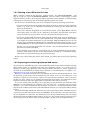
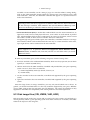
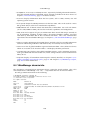
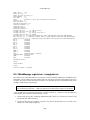
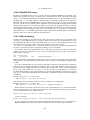
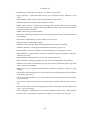
-> File offset
[ Note Header, type NT_VBOXCORE ]
[ COREDESCRIPTOR ]
-> Magic
-> VM core file version
-> VBox version
-> Number of vCPUs etc.
[ Note Header, type NT_VBOXCPU ] - one for each vCPU
[ vCPU 1 Note Header ]
[ CPUMCTX - vCPU 1 dump ]
[ Additional Notes + Data ] - currently unused
[ Memory dump ]
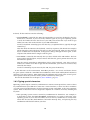
The memory descriptors contain physical addresses relative to the guest and not virtual addresses. Regions of memory such as MMIO regions are not included in the core file.
The relevant data structures and definitions can be found in the VirtualBox sources under
the following header files: include/VBox/dbgfcorefmt.h, include/VBox/cpumctx.h and
src/VBox/Runtime/include/internal/ldrELFCommon.h.
The VM core file can be inspected using elfdump and GNU readelf or other similar utilities.
12.2 General
12.2.1 Guest shows IDE/SATA errors for file-based images on slow host
file system
Occasionally, some host file systems provide very poor writing performance and as a consequence
cause the guest to time out IDE/SATA commands. This is normal behavior and should normally
cause no real problems, as the guest should repeat commands that have timed out. However
some guests (e.g. some Linux versions) have severe problems if a write to an image file takes
longer than about 15 seconds. Some file systems however require more than a minute to complete a single write, if the host cache contains a large amount of data that needs to be written.
The symptom for this problem is that the guest can no longer access its files during large write
or copying operations, usually leading to an immediate hang of the guest.
In order to work around this problem (the true fix is to use a faster file system that doesn’t
exhibit such unacceptable write performance), it is possible to flush the image file after a certain amount of data has been written. This interval is normally infinite, but can be configured
individually for each disk of a VM.
For IDE disks use the following command:
VBoxManage setextradata "VM name"
"VBoxInternal/Devices/piix3ide/0/LUN#[x]/Config/FlushInterval" [b]
For SATA disks use the following command:
VBoxManage setextradata "VM name"
"VBoxInternal/Devices/ahci/0/LUN#[x]/Config/FlushInterval" [b]
The value [x] that selects the disk for IDE is 0 for the master device on the first channel, 1 for
the slave device on the first channel, 2 for the master device on the second channel or 3 for the
master device on the second channel. For SATA use values between 0 and 29. Only disks support
this configuration option; it must not be set for CD/DVD drives.
The unit of the interval [b] is the number of bytes written since the last flush. The value for it
must be selected so that the occasional long write delays do not occur. Since the proper flush interval depends on the performance of the host and the host filesystem, finding the optimal value
that makes the problem disappear requires some experimentation. Values between 1000000 and
10000000 (1 to 10 megabytes) are a good starting point. Decreasing the interval both decreases
the probability of the problem and the write performance of the guest. Setting the value unnecessarily low will cost performance without providing any benefits. An interval of 1 will cause a
168