1
Mobility Entry
Mobility Entry allows you to access all of the features provided by your communications platform from your mobile
phone or your portable home office phone.
If Mobility Entry is activated (contact the responsible service
personnel), you can access the same communications platform functions that are available to you at an internal station
without having to install additional hardware or software. All
you need to do is dial your DISA phone number.
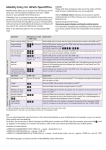
Refer to the following table for the corresponding DTMF
code.
Operation
Features in idle state
(HiPath 500, HiPath 3000, OpenScape Office MX,
HiPath OpenOffice ME, HiPath OpenOffice EE)
Features in talk state/following outgoing
selection (OpenScape Office MX,
HiPath OpenOffice ME, HiPath OpenOffice EE)
Activate/deactivate
"Do not disturb"
Send message
Add-on Mobility Client software can be used on specific
mobile phones to further enhance your user experience of
Mobility Entry.
Speech Design Partner Portal:
http://www.speech-design.com/hipath-mobility-clients/
For information regarding the availabilty of this software for
your phone, please contact the responsible service personnel.
DISA phone number Explanation
+ DTMF code
Station number dialing [Stn no.]
Program/delete
call forwarding
Caution
Please note that emergency calls cannot be made with Mobility Entry as mobile phones are not recognized.
*11+ [stn no.]
or
#1
*97 or
#97
*68+
[Stn no. of int. stn] +
[code 1 - 9]
Dial the DISA phone number and then enter the destination number as the DTMF
code[1].
Dial the DISA phone number, enter the DTMF code and (when programming) the call
forwarding destination number[1].
With OpenScape Office MX and HiPath OpenOffice ME: *111 or #11 .
Dial the DISA phone number and enter the DTMF code. This activates/deactivates "Do
not disturb" (e.g. close of business, holidays, "private").
Dial the DISA phone number and enter the DTMF code.
Enter the internal station number and select a number for the message you wish to
send. The message is then sent to the internal station.
Reset all
services
#0
Dial the DISA phone number and enter the DTMF code. The following services are
reset: Delete all call forwarding and active callback jobs, deactivate "Do not disturb"
and "Station number suppression".
Activate/deactivate
Calling Line Identification Restriction (CLIR)
*86 or
#86
Dial the DISA phone number and enter the DTMF code. This suppresses or displays
the station number for subsequent calls.
Operation
DTMF code
Explanation
Consultation hold
[Stn no. of 2nd stn]
Dial the station number of the second station[1]. This initiates consultation hold and
puts the first station on hold.
Toggle
*2
Enter the DTMF code to switch to the station on hold[2].
Conference
*3
Enter the DTMF code to include multiple stations in a call[2].
Release and return
to station on hold
*0
Enter the DTMF code to end the consultation call. You will then be reconnected with
the station on hold[2].
Activate callback
(delete in idle state via
#0)
*58
Enter the DTMF code to activate a callback ("Callback on busy" or "Callback on free").
A callback is requested as soon as the free/busy tone is heard. This is acknowledged
by a positive or negative acknowledgement tone (no display).
Enable DTMF
suffix dialing
*53
Enter the DTMF code. This initiates "transparent" forwarding of the subsequent DTMF
code for managing a voicemail system, for example (always the case in HiPath 3000).
[1] When dialing an external destination number, always enter the trunk access code.
[2] Requirement: The call is on consultation hold, see "Consultation hold".
TIP:
You can store frequently used functions in the internal phonebook on your mobile phone, for example, so you can access
them quickly and conveniently.
To do this, you must enter a "Pause" between the DISA phone number and DTMF code (for example, press and hold * until
"p" appears in the display). For further information, refer to the user manual provided with your mobile phone.
Examples of saved entries:
+49897221234p0004997214321 (DISA no. + pause + destination no.)
+49897221234p*86 (DISA no. + pause + CLIR on)
+49897221234p00049894321p*5399 (DISA no. + pause + trunk access code + am no. + pause + DTMF on + am ctrl. "99")
The following page is a pocket overview of key Mobility Entry information.
Mobility Entry - Pocket Overview
HiPath OpenOffice EE
Cut out, fold, glue together and keep at hand
In idle state
DISA phone no. +
[Stn no.]
*11+ [Stn no.] / #1
*97 / #97
*68+ [Stn no.] + [code]
#0
*86 / #86
Station number dialing
Program/delete call forwarding
Do not disturb
Send message
Reset all services
CLIR on/off
In talk state
[Stn no. of 2nd stn] Consultation hold
*2 Toggle
*3 Conference
*0 Release and return
*58 Activate callback
*53 DTMF suffix dialing on
Mobility Entry
Cut out, fold, glue together and keep at hand
OpenScape Office MX and
HiPath OpenOffice ME
Mobility Entry
In idle state
DISA phone no. +
[Stn no.]
*111+ [Stn no.] / #11
*97 / #97
*68+ [Stn no.] + [code]
#0
*86 / #86
Station number dialing
Program/delete call forwarding
Do not disturb
Send message
Reset all services
CLIR on/off
In talk state
[Stn no. of 2nd stn] Consultation hold
*2 Toggle
*3 Conference
*0 Release and return
*58 Activate callback
*53 DTMF suffix dialing on
Mobility Entry
HiPath 500 and
HiPath 3000
Mobility Entry
Cut out, fold, glue together and keep at hand
In idle state
DISA phone no. +
[Stn no.]
*11+ [Stn no.] / #1
*97 / #97
*68+ [Stn no.] + [code]
#0
*86 / #86
Station number dialing
Program/delete call forwarding
Do not disturb
Send message
Reset all services
CLIR on/off
Mobility Entry
Copyright © Siemens Enterprise Communications GmbH & Co. KG 2010
Hofmannstr. 51, 80200 Munich Germany
Siemens Enterprise Communications GmbH & Co. KG is a Trademark Licensee of Siemens AG
Reference No.: A31003-H1000-U100-4-7619