1
M 5 2 1 3 E V B
IRM
LR
LW
MD
MM
MMAP
RD
RM
RESET
SD
SET
SHOW
STEP
SYM
TRACE
VER
U S E R
M A N U A L
0 8 / 0 8 / 0 5
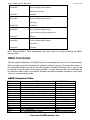
irm module.register data
lr <width> addr
lw <width> addr data
md <width> <begin> <end>
mm <width> addr <data>
mmap
rd <reg>
rm reg data
reset
sd
set <option value>
show <option>
step
symbol <symb> <-a symb value> <-r symb>
<-C| l |s>
trace <num>
version
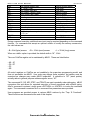
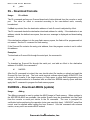
Internal Register Modify
Loop Read
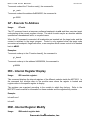
Loop Write
Memory Display
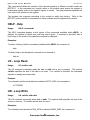
Memory Modify
Memory Map Display
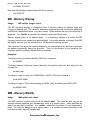
Register Display (core)
Register Modify (core)
Reset
Stack Display (contents)
Set Configurations
Show Configurations
Step (Over)
Symbol Management
Trace (Into)
Show dBUG Version
During command execution, additional user input may be required depending on the command
function. For commands that accept an optional <width> to modify the memory access size,
the valid values are:
• B = 8-bit (byte) access
• W = 16-bit (word) access
• L = 32-bit (long) access
When no <width> option is provided, the default width is “W”, 16-bit.
The core ColdFire register set is maintained by dBUG. These are listed below:
• A0 - A7
• D0 - D7
• PC
• SR
All control registers on ColdFire are not readable by the supervisor-programming model, and
thus not accessible via dBUG. User code may change these registers, but caution must be
exercised as changes may render dBUG inoperable. A reference to “SP” (stack pointer)
actually refers to general purpose address register seven, “A7.”
The commands DI, GO, MD, STEP, and TRACE are used repeatedly when debugging. dBUG
recognizes this and allows for repeated execution of these commands with minimal typing.
After a command is entered, simply press <RETURN> or <ENTER> to invoke the command
again. The command is executed as if no command line parameters were provided.
User programs are provided access to various dBUG routines by the “Trap 15 Functions".
These functions are discussed at the end of this chapter.
20
Freescale Semiconductor, Inc.