1
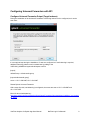
Configure Universal Forwarder Input
The inputs can be configured in the following file:
%SPLUNK_HOME%/etc/system/local/inputs.conf
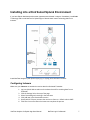
In general there are two options, either to listen directly for netflow events on a specific port or optionally
to monitor files created by syslog-ng or rsyslog.
Receiving Syslogs Directly from NFI
inputs.conf file example (NFI sends data on a UDP port 10514):
[udp://10514]
sourcetype = flowintegrator
index = flowintegrator
Configuring Universal Forwarder with syslog-ng or rsyslog
In this scenario syslog-ng or rsyslog are configured to listen to syslogs sent by NFI on a UDP port 10514.
Syslog-ng or rsyslog are usually writing the logs into configurable directories. In this example we assume
that those are written to /var/log/netflow.
inputs.conf file example (NFI sends data on a UDP port 10514 to syslog-ng or rsyslog):
[monitor:///var/log/netflow]
sourcetype = flowintegrator
index = flowintegrator
N.B. It is very important to set sourcetype=flowintegrator and to point it to the index where Netflow
Analytics for Splunk App is expecting it.
NetFlow Analytics for Splunk App User Manual
NetFlow Logic Confidential
9