1
LaCie Box • DESIGN BY NEIL POULTON
User Manual
Setting Up the LaCie Box
page 9
2.Setting Up the LaCie Box
Setup consists of two steps:
✦✦ 2.1. Step 1: Installing a Hard Drive
✦✦ 2.2. Step 2: Connecting to a Computer
2.1. Step 1: Installing a Hard Drive
You must install a hard drive to store your files.
IMPORTANT INFO: The LaCie Box is uniquely produced to
accommodate SATA 3.5” hard disk drives. No other drive save
for a SATA 3.5” hard disk drive is compatible with the LaCie Box.
Please note that, due to the numerous manufacturers of SATA
3.5” hard disk drives, LaCie cannot guarantee that every model
will work with the LaCie Box.
CAUTION: If you are replacing a drive, take care to make certain that it has cooled before touching it.
CAUTION: Please do not depress, push, or disrupt the front LED
circuit board or the circuit board in the rear of the bottom shell.
Doing so may affect the performance of the drive as well as void
the warranty.
1. Make certain the power and USB 2.0 cables are disconnected from the LaCie Box.
2. Turn the LaCie Box over so the rubber feet are pointing up.
Please note the two plastic bands for prying the bottom plate
from the top shell.
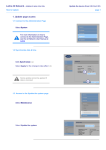
3. Open the casing by taking one plastic band in each hand,
between the thumb and index finger, and pull gently until the
bottom plate and the top shell have come apart (Fig. 03).
4. Turn the enclosure over, onto its rubber feet. Remove the top
shell and safely place it within reach.
continued on the next page >>
Fig. 03