1
8. OPERATION VIA HART COMMUNICATOR
8.3.4.7
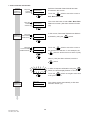
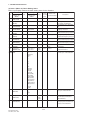
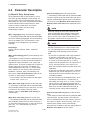
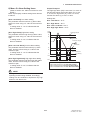
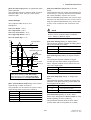
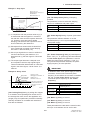
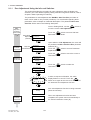
Example 4 of Other Settings: Burst Mode
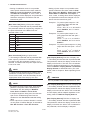
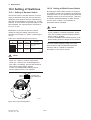
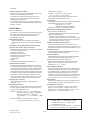
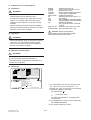
The AXFA14 continuously sends its stored data when the “Burst mode” is set to
“On”. Any one of instantaneous flow rate, output in %, totalization values or current
output can be selected and sent. The data is sent intermittently as a digital signal
when the AXFA14 is set in the “Burst mode”.
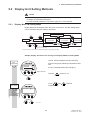
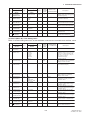
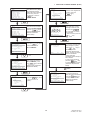
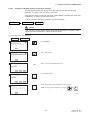
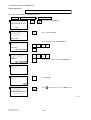
Setting of Burst Mode
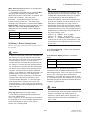
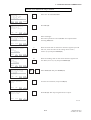
Open the “Burst option” display:
1. Device Setup
4. Detailed Setup
AXFA14 : FI-1100
Burst option
********
PV
% range/current
Process vars/crnt
HELP
DEL
ESC
F4
(ENTER)
ENTER
F2
(SEND)
5. HART Output
4. Burst option
Select the type of data to be sent.
• Instantaneous flow rate (PV)
• Output in % and current output (% range/current)
• Instantaneous flow rate, totalization value* and current
output (Process vars/crnt)
* “Totl”, “Reverse Totl” or “Dif Totl”
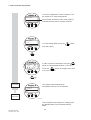
Call up “Burst mode” display.
5. HART Output
1
AXFA14 : FI-1100
Burst mode
Off
Off
On
DEL
2
3. Burst mode
DEL
ESC
AXFA14 : FI-1100
HART Output
1 Poll addr
2 Num req preams
3 Burst mode
4 Burst option
HELP
SEND
HOME
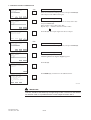
Select “On” and press ENTER (F4).
F4
ENTER
(ENTER)
F2
0
5
On
PV
Press SEND (F2).
(SEND)
ENTER
F0817.EPS
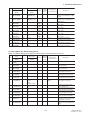
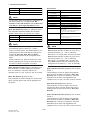
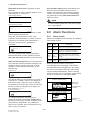
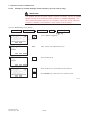
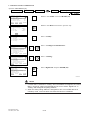
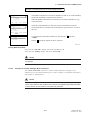
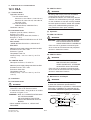
Exiting Burst Mode
Open the “Burst mode” display, and select “Off”.
8.3.4.8
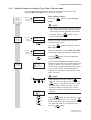
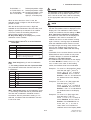
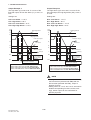
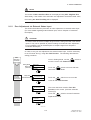
Example 5 of Other Settings: Multidrop Mode
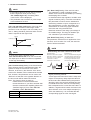
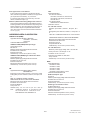
Field devices in “Multidrop Mode” refers to the connection of several field devices
on a single communication line. Up to 15 field devices can be connected when set
to the multidrop mode. To activate multidrop communication, the field device
address must be changed to a number from 1 to 15. This change deactivates the 4
to 20 mA output and changes it to 4 mA.
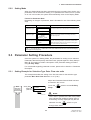
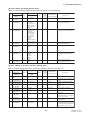
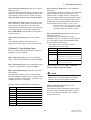
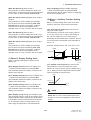
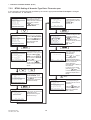
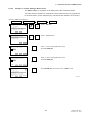
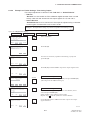
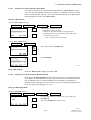
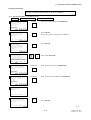
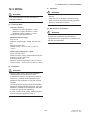
Setting of Multidrop Mode
Open the “Poll addr” display:
1. Device Setup
4. Detailed Setup
‘1’
AXFA14 : FI-1100
Poll addr
0
0
F4
5. HART Output
1. Poll addr
Set the polling address (a number from 1 to 15) and press
ENTER (F4).
Then, press SEND (F2) to send the data.
(ENTER)
HELP
DEL
ESC
ENTER
F2
(SEND)
F0818.EPS
8-15
IM 01R20C02-01E-E
3rd edition, Nov. 2006