1
LC-XO-PLUS Board User Manual
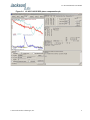
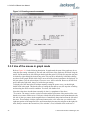
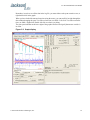
Figure 3.12 Expanded Graph Display
3.3.4 Exporting the graphics
The settings which control the mode of the Export function are contained in the Options dialog.
Export allows you to create an image file of either the graph or the satellite map. You select which
you want using the radio buttons. If you select 'Graph', you have the option to export only that which
is currently visible, or to export the graph which is a plot of the entire logfile contents. Use the
checkbox "All" to make this choice.
You may nominate a size in X and Y. The file format may be .BMP, .JPG, .GIF, or .PNG. Your settings
will be stored and will be the default next time you open this dialog.
If you choose to export the graph, you might want to override the TI max setting in force on the
screen display. You may do this by entering a non-zero value into the 'Override TI' control. A value
of zero causes the export to take the same setting if any as the screen display.
The export may be done automatically on a timed basis. Simply enter a non-zero value in seconds to
choose an export time interval. To manually export in accordance with the settings, press the 'Export'
button.
24
© 2014 Jackson Labs Technologies, Inc.