1
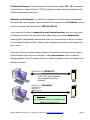
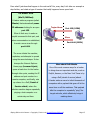
To See Your IP Address:
208.165.122.20
In Windows XP Choose Start /
Run, type in command, and
click OK. In Windows 7 type
“command” at the Start /
search box and then choose
Command Prompt.
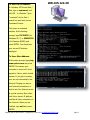
This opens a command
window. At the flashing
prompt, type IPCONFIG (for
Windows XP, 7) or WINIPCFG
(for Windows 98/ME) and
press ENTER. You should see
your current IP address
displayed.
To See a Sites Address:
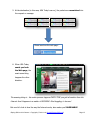
At the same prompt, type ping
www.yahoo.com and press
ENTER. This causes your
computer to send out 4 short
signals to Yahoo, which should
answer. If you get no answer,
your are not connected to the
Internet. Pinging is a way to
test Internet connections, or
test to see if an Internet server
is up and running. Also notice
that Yahoo has an IP address,
just like all other computers on
the Internet. When you are
finished, type exit and press
ENTER.
Staying Safe on the Internet – Copyright © John Lortz ([email protected])
Page 5