1
LB-40 thru LB-60 - User Manual
Electro-Steam Generator Corp.
3.7) SETTING THE PRESSURE CONTROLS (Continued)
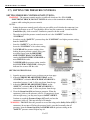
5. At this point the contactor(s) should be clicked off and you should be able to click them on
and then off again by pressing the SAFETY RESET. This is a way to test if the “SAFETY”
is still controlling the pressure, and not the “CONTROL”. While setting the “SAFETY” and
the contactor(s) are off, if the SAFETY RESET does not cause the contactor(s) to click on
and off again, INCREASE the setting on the “CONTROL”
WARNING – DO NOT allow the pressure to
exceed the rating on the Safety Valve (#18).
If contactor(s) do not turn off before the
pressure limit is exceeded, manually shut
off generator, open the Steam Out (#16),
and DECREASE the pressure setting on
the “SAFETY” pressure control. If you
cannot get the “SAFETY” to control the
pressure, it may need to be replaced.
Pressure Control Settings
High Pressure
(0-100 PSI)
High Pressure
(0-30 PSI)
Low Pressure
(0-15 PSI)
“Control”
“Safety”
80 PSI
85 PSI
25 PSI
27 PSI
11 PSI
13.5 PSI
6. Open the Steam Out (#16) to exhaust some pressure. Continue pressing the SAFETY
RESET until the contactor(s) click on and remain on. The pressure should eventually begin
to rise. If it doesn’t, throttle the Steam Out (#16) somewhere between closed and open until
it does.
7. Pay attention to what the pressure reads when the contactor(s) click off. If the pressure
stopped BELOW the “SAFETY PRESSURE SETTING”, then INCREASE the pressure
setting on the “SAFETY”. If the pressure stopped ABOVE, then DECREASE the pressure
setting.
8. Continue to watch the pressure go up and down, while adjusting the “SAFETY” and
pressing the SAFETY RESET, until the pressure stops at the proper “SAFETY
PRESSURE SETTING”.
9. At this point the “SAFETY” should be set to the proper “SAFETY PRESSURE
SETTING”, and the “CONTROL” should be set somewhere above the “SAFETY”.
10.
Let the pressure drop below the “OPERATING PRESSURE SETTING” and then press the
SAFETY RESET, so that the contactor(s) click on. DECREASE the pressure setting on the
“CONTROL” until the contactor(s) click off.
11.
Repeat Step 10 until you no longer need to press the SAFETY RESET for the contactor(s)
to click on.
12.
Continue to watch the pressure go up and down, while adjusting the “CONTROL”, until the
pressure stops at the proper “OPERATING PRESSURE SETTING”.
13.
The Pressure Controls are now set.
NOTE: If at anytime the SAFETY RESET needs to be pressed after the pressure controls are
set, either one of the controls are bad, the “SAFETY” is set too low, or the “CONTROL” is
set too high.
14 of 33