1
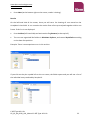
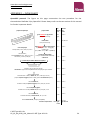
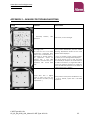
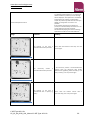
www.alere-technologies.com www.alere.com Click on My Computer, subsequently on Removable Disk, and choose the folder where to save or click on the button Make New Folder (on the bottom; a new folder icon appears). Rename the new folder (e.g. with the experiment name or date). Click on the OK button (data are exported into the new folder on your memory stick). Do NOT remove the memory stick as long as the hourglass symbol is visible. Switch off the device by clicking on the Power button (left / down on the screen): Switch off the Screen. There is no need to physically switch off the ArrayMate Reader. TROUBLESHOOTING In case of trouble always make sure that reagents are within the recommended shelf-life and stored under appropriate conditions. Should you encounter a problem, we will always be happy to support you. Please e-mail to [email protected] and include a description of the problem as well as the array images (*.bmp files) in question. Staining Control A staining control is included to check whether possible problems originate from the hybridisation or the staining procedure. If the staining control has “Failed” proceed as follows: C.diff-Type AS-1 Kit 05_16_04_0019_V01_Manual C.diff-Type AS-1 Kit 26