1
3.2.4 Setting the time
The Ei² Expert chlorinator is fitted with an internal memory. When the device is first switched on it is important
to leave it powered on continuously for at least 24 hours in order to initially charge the accumulator (permanent
separate power supply or filtering on permanently). Once charged the accumulator has several weeks of autonomy
in the event of a power failure.
The time is displayed in a 24 hour format.
• Switch on the device and wait until screen start-up sequence is finished.
• Press the
button to access the user menu, the minutes start to flash.
• Use the
and
buttons to set the minutes, then press
• Use the
and
buttons to set the hours, then press
to store.
to store.
• Press the
button to return to the home screen.
3.2.5 "Summer" and "Winter" modes and setting the "Timers"
"Timer" programming is used to define the device operating times within the filtering system operation times.
The daily operating times must be sufficient to correctly treat the water. Ei² Expert proposes default settings of
Timers 1 and 2. They can be customised (see §3.2.5.b).
A reminder of the calculation rule: the ideal daily filtering time is obtained by dividing the required pool water
temperature (measured in °C) by 2.
Example: for water at 28 °C, time = 28/2 = 14 hours per day
The Ei² Expert chlorinator can store 2 seasonal operating modes called by default "Sum" and "Win". The following
settings can be customised for each mode:
- the device operating times, the "timers": T1 (Timer 1) and T2 (Timer 2)
- the required chlorine production rate: 10 %, 20 %, 30 %,... up to 100 %.
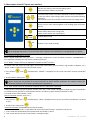
STANDBY = Device operating status
T = "Timer" mode (always active)
SUM = "Summer" operating mode
80 % = chlorine production rate
14:25 = time in 24 h format
3.2.5.a Mode selection: "SUMMER" or "WINTER"
• Press
• Use the
screen.
4 times to set the clock. "SUM" starts to flash.
buttons to choose "SUM" or "WIN" mode, then press the
and
button to return the home
3.2.5.b Programming the timers according to the modes
The times of Timers 1 and 2 cannot overlap. In addition, the time range of Timer 1 necessarily precedes that of
Timer 2.
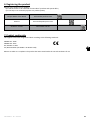
TE1 / TE2 = Timer in "summer" mode No. 1 / Timer in "summer" mode No. 2
08:00-12:00 = Operating time range of Timer No. 1
14:00-18:00 = Operating time range of Timer No. 2
H0470400.A - EN - 2014-09
8
EN