1
MITSUBISHI
WS0-GETH00200
Safety Controller Ethernet Interface Module
User's Manual (Hardware)
Mitsubishi Electric Corporation
2-7-3 Marunouchi, Chiyoda-ku, Tokyo, Japan
Mitsubishi Electric Europe BV
Gothaer strase 8, 40880 Ratingen, Germany
All rights reserved • Specified product properties and technical
data do not represent a guarantee declaration.
MODEL
WS-ET-U-HW
MODEL CODE
13J203
IB(NA)-0800446-C(1108)MEE
© 2009 MITSUBISHI ELECTRIC CORPORATION
Precautions regarding warranty and specifications
MELSEC-WS series products are jointly developed and manufactured
by Mitsubishi and SICK AG, Industrial Safety Systems, in Germany. Note
that there are some precautions regarding warranty and specifications
of MELSEC-WS series products.
<Warranty>
• The gratis warranty term of the product shall be for one (1)
year after the date of delivery or for eighteen (18) months after
manufacturing, whichever is less.
• The onerous repair term after discontinuation of production
shall be for four (4) years.
• Mitsubishi shall mainly replace the product that needs a repair.
• It may take some time to respond to the problem or repair the
product depending on the condition and timing.
<Specifications>
• General specifications of the products differ.
MELSEC-WS
Operating ambient
temperature
Operating ambient
humidity
Storage ambient
temperature
Storage ambient
humidity
MELSEC-Q
MELSEC-QS
-25 to 55°C
0 to 55°C
0 to 55°C
10 to 95%RH
5 to 95%RH
5 to 95%RH
-25 to 70°C
-25 to 75°C
-40 to 75°C
10 to 95%RH
5 to 95%RH
5 to 95%RH
*1
*1: When the WS0-GCC100202 is included in the system, operating
ambient temperature will be 0 to 55°C.
• EMC standards that are applicable to the products differ.
MELSEC-WS
EMC standards
EN61000-6-2, EN55011
MELSEC-Q,
MELSEC-QS
EN61131-2
2 Correct use
3 Conditions of use for the product
Do not use data from a MELSEC-WS Ethernet
interface module for safety related application!
ATTENTION
These gateways only generate non-safety-related
data which are not suitable for use in safety
related applications.
(1) Although MELCO has obtained the certification for Product's
compliance to the international safety standards IEC 61508, EN 9541/ISO 13849-1 from TUV Rheinland, this fact does not guarantee that
Product will be free from any malfunction or failure. The user of this
Product shall comply with any and all applicable safety standard,
regulation or law and take appropriate safety measures for the system
in which the Product is installed or used and shall take the second or
third safety measures other than the Product. MELCO is not liable for
damages that could have been prevented by compliance with any
applicable safety standard, regulation or law.
(2) MELCO prohibits the use of Products with or in any application
involving, and MELCO shall not be liable for a default, a liability for
defect warranty, a quality assurance, negligence or other tort and a
product liability in these applications.
1) power plants,
2) trains, railway systems, airplanes, airline operations, other
transportation systems,
3) hospitals, medical care, dialysis and life support facilities or
equipment,
4) amusement equipments,
5) incineration and fuel devices,
6) handling of nuclear or hazardous materials or chemicals,
7) mining and drilling,
8) and other applications where the level of risk to human life, health
or property are elevated.
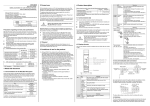
The WS0-GETH is an Ethernet based gateway and a part of the
MELSEC-WS system that communicates with primary control
systems. It provides non-safe fieldbus data for control and diagnostic purposes.
The gateway does not have its own power supply and can only
be operated with a MELSEC-WS system.
Up to two gateways can be used in a MELSEC-WS system.
These must be installed directly to the right of the WS0-CPUx.
This gateway must be used only by qualified safety personnel
and only on the machine where it has been installed and
initialized by qualified safety personnel in accordance with the
operating manuals.
ATTENTION
Observe the protective notes and measures in the
MELSEC-WS User’s manual!
Mitsubishi Electric Co. accepts no claims for liability if the
equipment is used in any other way or if modifications are made
to the device, even in the context of mounting and installation.
• When mounting, installing and using the MELSEC-WS system,
observe the standards and directives applicable in your
country.
• The national/international rules and regulations apply to the
installation, use and periodic technical inspection of the
MELSEC-WS system, in particular:
– EMC Directive 2004/108/EC,
– Provision and Use of Work Equipment Directive
89/655/EWG,
– Work safety regulations/safety rules.
• These manuals and the related operating manuals must be
made available to the user of the machine where a MELSECWS system is installed. The machine operator is to be
instructed in the use of the device by qualified safety
personnel and must be instructed to read the operating
manuals.
• If Ethernet-gateway (GETH) is used, the CPU module is
intended to be used with a Class 2 power source or Class 2
transformer in accordance with UL1310 or UL1585 (because
the Ethernet gateway is powered from the CPU module).
1 About this document
2.1 Disposal
1.1 Documentations for the MELSEC-WS system
Disposal of unusable or irreparable devices should always occur
in accordance with the applicable country-specific wastedisposal regulations (e.g. European Waste Code 16 02 14).
These manuals apply for the MELSEC-WS Ethernet interface
module and only in combination with the corresponding user’s
manual “Safety Controller Ethernet Interface Module User's
Manual”.
The installation, configuration and commissioning of the
MELSEC-WS safety control system are described in the "Safety
Controller User’s Manual" and "Safety Controller Setting and
Monitoring Tool Operating Manual".
Title
Safety Controller User’s Manual
Safety Controller Ethernet Interface User’s
Manual
Safety Controller CC-Link Interface User’s
Manual
Safety Controller Setting and Monitoring
Tool Operating Manual
Number
WS-CPU-U-E
(13JZ32)
WS-ET-U-E
(13JZ33)
WS-CC-U-E
(13JZ45)
SW1DNNWS0ADR-B-O-E
(13JU67)
In addition mounting protective devices also requires specific
technical skills which are not detailed in this documentation.
4 Product description
LED
PWR
LINK/
ACT 1
LINK/
ACT 2
MS
Off
Rights up
Green
4.2 Display elements
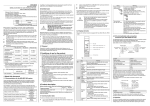
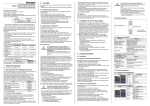
The WS0-GETH is equipped with four LEDs:
PWR (voltage supply), LINK/ACT 1 and LINK/ACT 2 and
Module Status (MS or STATUS (error and status indication)).
PORT 1
LED power supply (green)
LED network activity for
Ethernet port 1 or 2 (green)
LED MS or STATUS (red/green)
PORT 2
Power supply on
Off
No power supply ,
No Ethernet connection
Rights up
Green
Flashes
Green
Ethernet connection active, no data
transmission
Ethernet connection active, data
transmission
Off
Rights up
Green
Flashes
Green
No power supply , Power-up state
Flashes
Red
Rights up
Red
Flashes
Red/Green
4.1 Provided diagnostics data
The WS0-GETH provides the following diagnostics data:
• input values (HIGH/LOW) for all MELSEC-WS extension
modules and EFI devices connected
• output values (HIGH/LOW) for all MELSEC-WS input/output
extension modules and EFI devices connected
• logic results
• the error and status information of all modules
• diagnostics (system CRCs, I/O errors)
For a detailed description of the format and mapping of the
diagnostics data please read the operating manuals “Safety
controller user’s manual (detailed)”.
The occurrence of random or systematic faults within the
module or in its control does not impede the MELSEC-WS
system’s safety function.
Meaning
No power supply
Executing (live data to/from CPU)
Idle (CPU STOP)
1 Hz: Configuring/configuration
required
2 Hz: Critical fault (gateway fault)
Critical fault (other system module
fault)
Executing, but Ethernet
communication not established or
faulty
(When a closed connection is
interrupted, the MS LED will be this
state for ten seconds.)
4.3 Connections
The WS0-GETH provides an integrated Ethernet switch with two
RJ45 ports for connection to the Ethernet network.
5 Mounting/Dismantling
5.2 Steps for dismantling the modules
Do not commission without a check by
specialist personnel!
ATTENTION
Before the initial commissioning of the system in
which you are using a MELSEC-WS system, it
must be checked and released by qualified safety
personnel. The results of this check must be
documented.
The MELSEC-WS system is only suitable for
mounting in a control cabinet with at least IP
ATTENTION 54 degree of protection.
While supply voltage is applied, gateways
must not be plugged to nor be removed from
the MELSEC-WS system.
To ensure full electromagnetic compatibility
(EMC), the DIN mounting rail must be connected
to functional earth (FE).
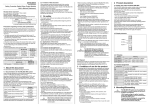
5.1 Steps for mounting the modules
• Mounting in accordance with EN 50274
• The modules are located in a 22.5-mm wide modular system
for 35 mm DIN rails to EN 60715.
• In a MELSEC-WS system the CPU module WS0-CPU0 or
WS0-CPU1 is positioned at the extreme left, the two optional
gateways follow directly. Only then do the expansion modules
follow. The relays modules WS0-4RO have to be mounted at
the extreme right.
• The connection between the modules is effected by means of
the plug connection integrated in the housing.
• Ensure that suitable ESD protective measures are also taken
during mounting. Otherwise the FLEXBUS+ bus may be
damaged.
2)
⇒ Remove the plug-in package terminals with wiring and the
end clips.
⇒ If there are several modules, slide the modules away from
each other individually in the direction of the arrow until the
side plug connection is separated.
1)
⇒ Press the module downwards at the rear 1) and remove it
from the DIN rail in the direction of the arrow while keeping it
pressed down 2).
3)
⇒ Make sure that the voltage supply of the MELSEC-WS
system is switched off
⇒ Hang the device onto the DIN rail 1).
⇒ Ensure that the earthing spring contact 2) contacts the DIN
rail such that it can electrically conduct.
⇒ Latch the module onto the DIN rail by pressing it lightly in the
direction of the arrow 3).
⇒ Slide the modules together individually in the direction of the
arrow until the side plug connection latches in.
⇒ Install the end clips on the right and left.
The WS0-GETH can be configured using the MELSEC-WS
Setting and monitor tool via the Ethernet interface of the
gateway or via the WS0-CPUx module’s RS232 interface. A
detailed description of the configuration can be found in the
operating instructions for the MELSEC-WS Gateways.
7 In the event of faults
In the event of unclear faults, cease operation!
Stop the machine if you cannot clearly identify or
ATTENTION
allocate the error and if you cannot safely rectify
the malfunction.
Complete functional test after error
rectification!
Carry out a full functional test after an error has
been rectified.
2)
1)
6 Electrical installation
8 Technical data
Supply circuits (via e.g. MELSEC-WS WS0-CPUx)
Supply voltage VS 24 V DC (16.8 to 30 V DC)
Power consumption Max. 2.4 W
Interfaces
Data Transmission 10MBit/s (10Base-T) or 100MBit/s
(100Base-TX), autosensing
Speed
3-Port layer-2 managed switch with
Integrated switch
Auto-MDI-X for automatic detection of
crossed Ethernet cable
Connection
2 × RJ45 ports
technology
IP address: 192.168.250.250
Address factory
Subnet mask: 255.255.0.0
setting
Default gateway: 0.0.0.0
Data interface
Backplane bus (FLEXBUS+)
See Safety controller Ethernet interface
Wire parameters
module user’s manual
Diagnostics data
See Safety controller Ethernet interface
format
module user’s manual
General specification
Ambient operating
–25°C to +55°C
temperature
Storage
–25°C to +70°C
temperature
Humidity
10 % to 95 %, non-condensing
Climatic conditions EN 61131-2 (55°C, 95% rel. humidity.)
in accordance with No corrosive gases
Vibration and
Tested in accrordance with EN61131-2
Rigidity
Electromagnetic
IEC 61000-6-2, EN 55011 Class A
compatibility
Weight (without
125 g
packaging)
SICK AG
http://www.sick.com/