1
Operating the 6810HDxl
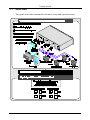
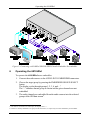
Figure 2: Connecting a 6810HDxl SDI/HD-SDI/3G Audio Embedder/De-embedder
6
Operating the 6810HDxl
To operate the 6810HDxl as an embedder:
1. Connect the audio sources to the AUDIO IN TO EMBEDDER connectors.
2. Choose the target group by pressing the EMBEDDER GROUP SELECT
button.
The display cycles through groups 1, 2, 3, 4, and – 1.
The “–“ indicates that no group is chosen and the given channels are not
embedded.
3. The audio channels are embedded from the audio sources into the selected
groups of the SDI data stream2.
1 If no audio is connected to the AES inputs, the display shows “–“
2 If audio was already embedded in the groups of the SDI stream, it is replaced by the audio embedded by the 6810HDxl
6
KRAMER: SIMPLE CREATIVE TECHNOLOGY