1
THE USER'S MODE
The console features a user's mode that keeps track of
the total number of miles that the walking belt has
moved and the total number of hours that the treadmill
has been operated. The user's mode also allows you
to setect miles or kilometers as the unit ot measurement and to turn on and turn off the demo mode.
When the user's mode is selected, you can also
choose an audio setting and a volume setting for your
iFIT workouts.
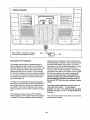
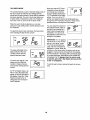
To select the user's mode, hold down the Stop button
while inserting the key intothe console.
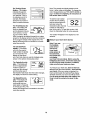
The upper left digit(s) in the
display will show the total
number of hours that the
treadmill has been used.
I= 56
The lower right digit(s) in the
display will show the total
number of miles (or kilometers) that the walking belt has
moved.
An "E" for English miles or an
"M" for metric kilometers will
appear as the top rightdigit in
the display. Press the 1 Step
Speed increase button to
change the unit of measurement if desired.
When you use an iFIT Card,
a personal trainer will guide
you through your workouts
and give detailed instructions
if "P" is selected as the audio
setting. If you turn off the "P"
setting, your personal trainer will simply guide you
through your iFIT workouts. Press the 1 Step Incline
decrease button to change the audio setting.
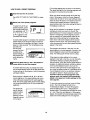
You can adjust the volume of
the personal trainer audio (0
through 5) by pressing the 1
Step Incline increase button
repeatedly. The volume setting appears as the lower middle digit in the display.
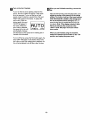
IMPORTANT: If a "d" appears
next to the "E" or "M," the console is in the "demo" mode.
This mode is intended to be
used only when a treadmill is
displayed in a store. When the
console is in the demo mode, the power cord can be
plugged in, the key can be removed from the console,
and the indicators in the display will automatically light
in a preset sequence; the buttons on the console will
not operate. If a "d" appears when the user's mode
is selected, press the 1 Step Speed decrease button
so the "d" disappears.
To exit the user's mode, remove the key from the console.
E
18