1
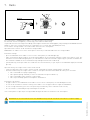
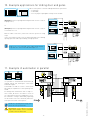
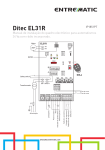
12.Example application for barriers
When control panel is used for barriers operations:
- set RF=5 (MAX);
- set TM=MAX;
- set JR6=ON;
- select the proper opening direction by means of DIP2.
1
3
4
5
(Example 1). Connect opening and closing limit switches N.C.
contacts to plug 12-0-11.
2
DIP2=OFF
RF=5
MAX
ON
ON
1 2 3 4
1 2 3 4
R1
TC TM
12 0 11
JR6
DIP2=ON
12 11 0 1 5 6 8 9 41
ON
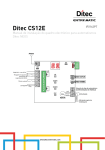
(Example 2). Control N.C. 1-6 (safety stop) can be changed into
control N.O. 1-4 (closing) setting 6→4=OFF.
To have the barrier close again soon after transit between the
photocells (or other safeties connected to 1-8), set DIP3=OFF.
6>4
Limit switch
Limit switch
1 2 3 4
DIP3=OFF
ON
1 2 3 4
R1
TC TM
12 0 11
JR6
Opening
Closing
12 11 0 1 5 6 8 9 41
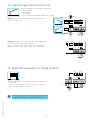
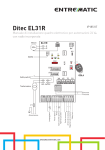
13.Application example for rolling shutters
<MAX
<MAX
ON
1 2 3 4
12 0 11
R1
TC TM
JR6
N C U W V
Limit switch
com
When the control panel is used in applications for rolling shutters:
- set JR6=ON
- connect the N.C. limit switches in succession to the motor phases
- make a jumper with the terminals 0-11-12.
M1
1~
IP2045EN - 2013-03-26
i
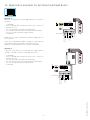
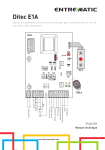
NOTE: if the control panel is used in the hold to run mode,
disconnect terminal 9 (see example 1 in Section 14).
13
12 11 0 1 5 6 8 9 41