1
Preference
System
Application Interface
Dynamic
Preferences API
Static
Documentation
GUI
User
Domain Knowledge
NLP
Algorithms
Command
Line
Synonyms
Antonyms
Relations
Topics …
Lexical DB
Abbreviations
Acronyms
Spelling
Prefixes
Suffixes
Stop words
Abbreviations
Acronyms
Spelling
Stop words
......
Dictionaries
(Default)
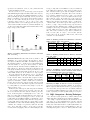
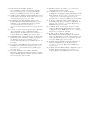
Figure 1: PrefFinder framework architecture
from the source code. But these may or may not match the
names found in the intermediate preference files where the
users manipulate preferences directly [14]. Therefore, while
useful (and a possible complement to our system), they will
not provide the information we seek. Before one can automate any sort of configuration manipulation, or allow technical support to help users change a configuration, they must
first translate from the intended behavior to these preference
names and then find a way to modify them.
Finally, configuration spaces are rapidly changing. We
need to be able to easily re-evaluate questions when a version is updated. For instance, the example discussed in the
introduction, and the work of Zhang and Ernst [45] highlight the changing configuration space and the need to find
options over and over again. In the next section we present
PrefFinder which will overcome most of these challenges.
3.
PREFFINDER
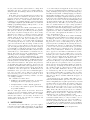
Figure 1 shows an overview of the PrefFinder framework.
On the left of this figure we see a (customizable) Application
Interface where interaction with the user and the application
itself takes place. On the right we see Domain Knowledge
that allows information to be added to our databases. In the
center lies the core component of PrefFinder. This contains
natural language processing algorithms, dictionaries and lexical databases. It can be used on its own or packaged into a
plugin or GUI application or run at the command-line which
permits automation of multiple queries at a time.
In PrefFinder, the users enter a short description or question (in English) about what features or functionality of the
system they want to lookup (customize). They also specify
a number of results to display, and PrefFinder will return a
list of ranked preferences (with a value showing the score)
and a description of each result if available. Users may enter arbitrary English sentences with different punctuation,
numbers, mixed-case letters, and may use different forms of
the language such as present participle (e.g., closing) and
plural (e.g., tabs).
To instantiate the framework, preference extraction is first
performed to build the preference system. Next, the core
component runs several steps to identify the correct preferences that best match the query: splitting, parsing, matching, and ranking. Finally, the documentation step connects
preference descriptions to corresponding preferences returned
in the results. Optionally, for instantiations that use a dy-
namic API to extract the preference system, PrefFinder is
able to also update the preference via its GUI. Let us take
Firefox as a running example. Suppose the user types a
query “Firefox 17.0 doesn’t warn me when closing multiple tabs any more.”. As reported online, there are four
different preferences that a user can set to modify this:
browser.tabs.warnOnCloseOtherTabs, browser.tabs.warnOn
Close, browser.showQuitWarning, and browser.warnOnQuit.
PrefFinder is expected to find at least one of them.
3.1
Preference Extraction
The first step is preference extraction from the application. To extract preferences, PrefFinder can utilize different
types of information, such as a static analysis like that of
Rabkin and Katz [30] or it can also use static artifacts such
as a user manual. We can also use APIs to extract the preferences dynamically. In our prior work we used the runtime
APIs to automatically extract preferences from two running
applications’ databases [14]. For one of the systems, there
are APIs that directly return a set of all the preferences. For
the other system, we traversed the hierarchical structure in
a depth first search fashion. We can also combine static
and dynamic methods to get a more complete view of the
preferences. In the running example we would extract the
preferences from Firefox using the dynamic API and obtain
approximately 1900 preferences in our list.
3.2
Splitting
Once we have the preferences, we normalize them into
bags of words. PrefFinder begins by taking in the the system
preferences and parsing/splitting them into sets of keywords
(see [13] for more details of the parsing algorithms we used).
Our identifier splitting algorithms are based on the work of
Enslen et al. [8]. Preference names are usually represented as
arbitrary strings, such as our running example from Firefox
browser.tabs.warnOnCloseOtherTabs, or org.eclipse.jdt.core.
compiler.codegen.targetPlatform as in Eclipse, and /org.openoffice.Office.Recovery/RecoveryList as in LibreOffice. As in
a program variable, a preference name must be a sequence of
characters without any white space. Soft words (individual
dictionary words), within a preference name are separated
by word markers such as a period(.), underscore ( ), dash (-),
backslash (/), or camel case letters [4, 9]. After splitting the
words, the remaining identifiers are called hard words. Once
the initial separation via word markers is complete, we next
use a camel case splitting algorithm. We found that this