1
3.0 Getting Started
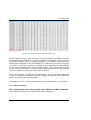
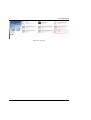
Figure 18. Converted File Format. Text2cap input
The file shown in figure 18 is the input of the text2cap tool provided with the
Wireshark Protocol Analyzer. A .bat file example is available on the web site
to use the text2cap utility, but before doing so, users need to check the time
format which appears in the timestamps of a capture file as shown in figure
18 circled in red. This is because changes in the timestamp format depend
on the internal configuration of the mobile device. The time format must be
in 24h clock format and not pm/am format although this issue will be fixed
in future releases to make the conversion seamless.
This is an example of using the text2cap utility. The time format appearing
in the converted file obtained from the SymPA tool should agree with that
used in the call to the text2cap utility.
text2pcap.exe -l 12 -t %%d/%%m/%%Y%%H:%%M:%%S, %1 %1.pcap
3.1.2 PDP Context Info
This functionality has been tested over GSM and UMTS networks.
Information provided can be divided into three categories:
User’s Manual