1
4-104-900-21(1)
Multi Channel
AV Receiver
Using Network Features
STR-DA6400ES
Printed in Malaysia
©2009 Sony Corporation
About This Manual
Please read the operating instructions supplied with
this receiver first.
This manual is written on the assumption that you
are skilled in the basic operation of this receiver after
performing basic connection and setup according to
the operating instructions.
About the supplied manual
STR-DA6400ES contains the following manuals.
Refer to them as required by the operation.
STR-DA6400ES Operating
Instructions
This manual explains the operations of the system
itself.
This manual mainly explains operations using the
main remote commander, but most of the same
operations can also be performed using the buttons
and controls on the system having the same or
similar names.
Using Network Featuers (this
manual)
This manual explains the operations of the network
function of STR-DA6400ES.
It explains also how to install supplied “ES Utility”
and “VAIO Media plus” application software on
your computer.
Quick Setup Guide
It explains how to connect components, speakers,
and a subwoofer so that you can enjoy multi-channel
surround sound.
GUI Menu List
GUI Menu List shows the menu tree of
STR-DA6400ES.
2GB
About the network
functions of the receiver
• The home network function of the receiver
supports the DLNA (Digital Living Network
Alliance) standard.
By configuring your home network with
DLNA-compliant devices, you can play
back analog audio signals with a DLNAcompliant device (DLNA CERTIFIED™
Products) that has an authorized DLNA logo
displayed on the device, and which has
functions corresponding to those of the
receiver.
You can also enjoy content (music, photos,
and videos) which have been stored on a
DLNA-compliant device (DLNA
CERTIFIED™ Products) that has an
authorized DLNA logo displayed on the
device.
• With an Internet connection, you can listen
to SHOUTcast and upgrade the firmware of
the receiver.
About DLNA
DLNA (Digital Living Network Alliance) is a
standards organization made up of
manufacturers of various products, such as
computers, AV components, and mobile
computing devices which exchange content
(music, photos, and videos). DLNA decides
upon standards and publishes an authorized
logo to be displayed on devices which support
DLNA standards.
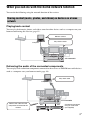
What you can do with the home network function
You can do the following using the network function of the receiver.
Sharing content (music, photos, and videos) on devices on a home
network
Playing back content
You can play back music, photos, and videos stored on other devices such as a computer on your
home network using this receiver (page 13).
Delivers content
Plays back content
Computer
STR-DA6400ES
Delivering the audio of the connected components
You can play back audio from components connected to the receiver or FM/AM tuner with devices
such as a computer over your home network (page 16).
Plays back audio
Computer
STR-DA6400ES
Delivers the audio from the
component connected to the
receiver
Component connected
using an audio cord
(not supplied)
3GB
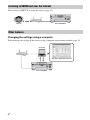
Listening to SHOUTcast over the Internet
You can listen to SHOUTcast using the receiver (page 19).
Internet
STR-DA6400ES
Other features
Changing the settings using a computer
You can change the settings of the receiver using a computer on your home network (page 23).
Computer
ES Utility application software
STR-DA6400ES
4GB
Firmware Update
You can update the firmware of the receiver over the Internet (page 26).
A) Update the firmware directly over the Internet
Internet
STR-DA6400ES
B) Update the firmware using a file downloaded from the Internet via a
computer
Computer
Internet
ES Utility application software
STR-DA6400ES
5GB
Table of Contents
About the network functions of the
receiver ....................................................2
What you can do with the home network
function ....................................................3
Getting Started
1: Connecting the receiver to your
network ....................................................7
2: Configuring the network settings of the
receiver ....................................................9
3: Preparing content for delivery to the home
network ..................................................10
4: Preparing a computer to use as a
server .....................................................11
Sharing Content (music,
photos, and videos) on
Devices on the Home
Network
Enjoying content stored on the server ........13
Enjoying content stored on a server in
zone 2 .....................................................15
Enjoying the audio of a component connected
to the receiver using other device via the
home network ........................................16
Listening to SHOUTcast
Using the Receiver
Listening to SHOUTcast ............................19
Adjusting the Receiver
Settings Using PC
Application Software
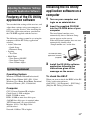
Features of the ES Utility application
software .................................................21
Installing the ES Utility application software
on a computer ........................................21
6GB
Using Other Functions
Checking the network settings ................... 22
Changing the network settings ................... 23
Changing the settings of the home network
function of the receiver ......................... 25
Updating the firmware ............................... 26
Additional Information
Glossary ..................................................... 28
Troubleshooting ......................................... 29
Specifications ............................................. 30
End-User License Agreement for Sony
Software Included in This Product ....... 31
Copyrights .................................................. 35
Index .......................................................... 40
1: Connecting the
receiver to your network
Configuring your home network with DLNAcompliant devices.
If your computer is connected to the Internet,
you can connect this receiver to the Internet as
well, through the wired LAN connection.
Note
The method used to connect your computer to the
Internet depends on the devices, your ISP, your
computer, and the router used.
System requirements
The following system environment is required
to use the network function of the receiver.
A Broadband line connection
A Broadband line connection to the Internet is
required in order to listen to the SHOUTcast
and to use the firmware update function of the
receiver.
Modem
This is the device that is connected to the
broadband line to communicate with the
Internet. Some of these devices are integrated
with the router.
Router
• Use a router compatible with 100 Mbps or
greater transmission speeds to enjoy content
on your home network.
• We recommend that you use a router
equipped with the built-in DHCP (Dynamic
Host configuration Protocol) server.
This function automatically assigns IP
addresses on the LAN.
7GB
Getting Started
Getting Started
LAN cable (CAT-5)
• We recommend that you use this type of
cable for a wired LAN.
Some flat-type LAN cables are easily
affected by noise. We recommend that you
use normal-type cables.
• If the receiver is used in an environment in
which there is power supply noise from
electric products or in a noisy network
environment, use a shielded-type LAN
cable.
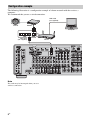
Configuration example
The following illustration is a configuration example of a home network with the receiver, a
computer.
We recommend that you use a wired connection.
LAN cable
(not supplied)
Internet
Modem
Computer
LAN cable
(not supplied)
Note
The audio may be interrupted when you use a
wireless connection.
8GB
Router
The network settings for the receiver must be
set correctly to use the network functions of
the receiver.
You can make the required network settings
for the receiver by following the instructions
provided by an initial setup wizard.
The procedure used to set up the IP address
automatically (DHCP) is explained below.
In this case, the router that is connected to the
receiver or the Internet provider must support
DHCP.
Press V/v repeatedly to select
“ Settings,” then press
or
b.
4
Press V/v repeatedly to select
“Network,” then press
or b.
5
Press V/v repeatedly to select
“Network Setup,” then press
.
“Start Network function Setup Wizard”
appears on the TV screen.
6
7
Press
to select “Next.”
Press
to select “Connect
Automatically (DHCP).”
“Success! Your device is now connected
to your network.” appears on the TV
screen when you have succeeded in
making a connection.
If the failure screen is displayed, perform
the process referring to “Changing the
network settings” (page 23), after you
have completed this process.
AMP
8
9
Press
to select “Finish.”
Press
to select “ON.”
The setting of the server function is
turned to ON.
Select “OFF,” when you will not use the
server function.
V/v/b,
MENU
10 Press
to select “Finish.”
To set the network settings
manually
Refer to “Configuring network settings
manually” (page 23).
1
Press AMP.
The receiver can be operated using the
remote.
2
Note
The wizard screen appears on the TV screen each
time you use the network function, until the network
function setup has been completed.
Press MENU.
The menu is displayed on the TV screen.
9GB
Getting Started
2: Configuring the
network settings of the
receiver
3
3: Preparing content for delivery to the home network
This receiver can deliver the audio of a component connected to the receiver using an audio cord
or audio from an FM/AM tuner over the home network.
Connecting components to the receiver using an audio cord
This receiver delivers to a device on a home network analog audio signals of a device connected to
the analog audio input jack or DMPORT jack of the receiver.
Connect the audio output of the device which stores audio you want to enjoy on the home network
to the analog audio input jack or the DMPORT jack of the receiver using an audio cord or DIGITAL
MEDIA PORT adapter.
Audio cord (not supplied)
DIGITAL MEDIA PORT adapter* (not supplied)
* The adapter form differs depending on the model.
10GB
Computer
A server is a device which delivers content
(music, photos, and videos) to a DLNA device
on a home network.
You can play back content stored on a
computer on a home network with this receiver
via that network after you have installed
application software such as VAIO Media plus
which has a DLNA compliant sever function.
Windows XP
Computer IBM PC/AT compatible
CPU
Intel Celeron M
processor
1.40 GHz or higher
(Intel Core 2 Duo
1.80 GHz or higher
is recommended)
Intel Core Duo
1.33 GHz or higher
(Intel Core 2 Duo
2.26 GHz or higher
is recommended)
Memory
512 MB or more
(1 GB or more is
recommended)
1 GB or more
(2 GB or more is
recommended)
Graphic
chip
Equipped with graphic chip by Intel,
NVIDIA or ATI.
DirectX 9.0c compatible video card
(DirectX 9.0c/128 MB compatible
video card and the latest driver are
recommended)
Display
800 × 600 or higher resolution
HDD
500 MB or more is recommended
What you can do with VAIO
Media plus
VAIO Media plus is an application software
that enables you to quickly find content on
your home network, such as music, photos,
and videos, and view the content on the
computer through the home network.
By connecting other devices to VAIO Media
plus, you can also find and view the content on
the connected devices through the home
network. For example, you can enjoy photos
and music, stored on your computer, on your
TV and audio device or play a TV program,
recorded with a hard disk recorder, on your
computer.
System Requirements
Operating System
Windows XP Home Edition/Professional/
Media Center Edition 2004/Media Center
Edition 2005 (SP3, 32 bit)
Windows Vista Home Basic/Home Premium/
Business/Ultimate (SP1, 32 bit/64 bit)
Windows Vista
Network 100Base-TX or higher
Sound
card
Direct Sound compatible sound card
Note
Sony does not guarantee trouble-free operation on
all computers that satisfy the system requirements.
Other software operating on background may affect
the operation of this software.
Installing the VAIO Media plus
application software on a
computer
When you use VAIO Media plus as server
software, install on your computer the VAIO
Media plus application software provided on
the CD-ROM supplied with the receiver by
following steps below.
1
Turn on your computer and
login as an administrator.
continued
11GB
Getting Started
4: Preparing a computer
to use as a server
2
Insert the supplied CD-ROM
into the CD-ROM drive of your
computer.
The installation launcher starts
automatically, then a Software Setup
window appears on the screen.
If installation launcher does not start
automatically, double-click
“SetupLauncher.exe” on the disc.
CD-ROM (VAIO Media
plus application
software) (supplied)
3
Install the VAIO Media plus
application software following
the instructions given in the
message on the screen.
Listening to the audio delivered
from the AV receiver using VAIO
Media plus
When you listen to the audio delivered from
the AV receiver, change the VAIO Media plus
view mode by following steps below (This
function is available only when the AV
receiver has a server function and that server
function has been turned on).
1
Click “ Settings” in the Home
Menu window.
2
3
4
Click “
General Settings.”
Click “Change Display.”
Select “Server Tree View.”
When “ Music” is selected in “Server
Tree View,” the AV receiver appears.
12GB
Referring to help files
For VAIO Media plus operations, refer to the
help files.
Click “
Settings” in the Home Menu
window, then select “ Help” to display help
files.
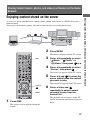
Sharing Content (music, photos, and videos) on Devices on the Home
Network
A server is a device which delivers content (music, photos, and videos) to a DLNA device on a
home network.
You can play back music, photos, and videos stored on the server using the receiver.
Computer
STR-DA6400ES
2
Press MENU.
The menu is displayed on the TV screen.
AMP
3
Press V/v repeatedly to select
“ Music,” “ Photo,” or
“
Video,” then press
or b.
4
Press V/v repeatedly to select
“Server,” then press
.
The server list appears on the TV screen.
5
Press V/v and
to select the
server which holds the content
you want to play.
The content list appears on the TV screen.
V/v/B/b,
MENU
1
Press AMP.
6
Press V/v/B/b and
repeatedly to select content
you want to play from the
content list.
The playback screen appears on the TV
screen, and content you selected is played
back.
The receiver can be operated using the
remote.
13GB
Sharing Content (music, photos, and videos) on Devices on the Home Network
Enjoying content stored on the server
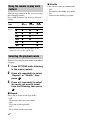
Using the remote to play back
content
You can enjoy content on the server by using
the following buttons.
Press AMP to operate the receiver using the
remote.
Content
Type
Remote
button
Music
Photo
Video
N
z
z
z
x
z
z
z
X
z
z
z
>
z
z
.
z
z
M
z*
z*
m
z*
z*
* This button may not work depending on the
connected server or the content type.
Selecting the playback mode
You can select the playback mode of the Music
category.
1
Press OPTIONS while listening
to the music content.
2
Press V/v repeatedly to select
“Repeat,” or “Shuffle,” then
press
.
3
Press V/v repeatedly to select
the mode you want to select
from the following, then press
.
x Repeat
Plays one or all the tracks repeatedly.
• Off
Deactivates the repeat play mode.
• One
Plays one track repeatedly.
• All
Plays all the tracks repeatedly.
14GB
x Shuffle
Plays all the tracks in random order.
• Off
Deactivates the shuffle play mode.
• On
Activates the shuffle play mode.
Enjoying content stored
on a server in zone 2
1
Turn on the main receiver (this
receiver). If you have an
amplifier in zone 2, turn it on.
2
Press ZONE.
The remote switches to zone 2.
3
The zone function is activated.
?/1
ZONE
Press ?/1.
4
Press MENU.
The menu is displayed on the TV screen.
5
Press V/v repeatedly to select
“ Music,” “ Photo,” or
“
Video,” then press
or b.
6
Press V/v repeatedly to select
“Server,” then press
.
SOURCE
The server list appears on the TV screen.
7
V/v/B/b,
Press V/v and
to select the
server which holds the content
you want to play.
The content list appears on the TV screen.
8
Press V/v/B/b and
repeatedly to select content
you want to play from the
content list.
The playback screen appears on the TV
screen, and content you selected is played
back.
Note
You can listen to only the same content in both the
main zone and the 2nd zone.
Priority is given to the content which has most
recently been selected, even if other content is
currently being selected in one of zones.
continued
15GB
Sharing Content (music, photos, and videos) on Devices on the Home Network
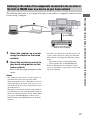
You can select and play back from zone 2
content stored on a device on the home
network by using the IR repeater (not
supplied).
Playing back content in zone 2
Tips
• You can enjoy content played back in the main
zone in zone 2 or zone 3 by pressing SOURCE on
the remote.
• You can control the playback operation using the
remote. For details, see “Using the remote to play
back content” (page 14).
Enjoying the audio of a
component connected to
the receiver using other
device via the home
network
The receiver can deliver the audio of a
component connected to the receiver using an
audio cord, or the audio from an FM/AM tuner
that have been converted to linear PCM format
to the devices on the home network.
Note
Digital audio signals which are input to the receiver
cannot be played back on a DLNA-compliant device
(DLNA CERTIFIED™ Products) that have an
authorized DLNA logo displayed on the device.
Moreover, some content may not be playable on a
compliant device (DLNA CERTIFIED™ Products).
16GB
Listening to the audio of the components connected to the receiver or
the built-in FM/AM tuner on a device on your home network
The following illustration is an example of listening to the audio of a component connected to the
receiver using a computer.
STR-DA6400ES
Component connected using an
audio cord (not supplied)
1
Select the receiver as a server
using the device on the home
network.
2
Select the content you want to
play back using device on the
home network.
Refer to the operating instructions of the
device.
• Turn the server function to off, then turn it to on
again to reflect the latest setting onto the home
network after you change the following setting
items.
– input name and icon assigned that name
– preset station name on the FM/AM tuner
Refer to “Turning the server function on/off”
(page 25) for details on operations to turn on/off
the server function.
Notes
• You cannot play back on two or more devices on
your home network at the same time audio
delivered from the receiver. When there is a device
already playing back content of the receiver, you
cannot play back any of the content of the receiver
on another device.
• The audio is switched to the latest audio which is
selected on the receiver, even though the display of
devices on a home network does not change when
you operate the FM/AM tuner on this receiver
while listening to the FM/AM tuner on the home
network.
17GB
Sharing Content (music, photos, and videos) on Devices on the Home Network
Computer
Content/input which can be
selected from the device on
your home network
Content which can be played
back/listened to with a device
on your home network
Content which can be played back using a
device on your home network are as follows.
Content
Playback
Music (analog signal)
a
Music (digital signal)
×
Photo
×
Video
×
Notes
• Some content may not be able to be played back
depending on the connected server or the content
type.
• The audio signals of a component connected to the
receiver using a audio cord or FM/AM tuner can be
delivered to your home network.
Audio input which can be
selected from a device on a
home network
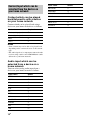
You can select analog audio input from a
device on your home network as follows.
Input name
Select
VIDEO1
a
VIDEO2
a
BD
a
DVD
a
SAT
a
TV
×
TAPE
a
MD
a
SA-CD/CD
a
PHONO
×
FM
a
AM
a
18GB
Input name
Select
MULTI IN
×
DMPORT1
a
DMPORT2
a
HDMI1-6
×
Server
×
SHOUTcast
×
SOURCE
a
Listening to SHOUTcast Using
the Receiver
Listening to SHOUTcast
You can enjoy listening to the sound of a
SHOUTcast internet radio without turning on
your computer by connecting the receiver
directly to Internet.
1
The receiver can be operated using the
remote.
2
3
Press V/v repeatedly to select
“ SHOUTcast,” then press
or b.
Proceed to step 5 when you receive the
SHOUTcast on this receiver at first time.
4
Press RETURN/EXIT O to
display SHOUTcast station list.
5
Press V/v repeatedly to select
“Preset List,” “0-9,” or A to Z,
then press
.
6
Press V/v repeatedly to select
the genre you want to listen to,
then press
.
7
Press V/v/B/b to select the
station you want to listen to,
then press
.
V/v/B/b,
MENU
Press MENU.
The menu is displayed on the TV screen.
AMP
OPTIONS
Press AMP.
The reception screen appears on the TV
screen, and the station you selected is
received.
Notes
• When the number of stations is large, up to 100
stations can be displayed (in order) on this receiver.
• The audio supplied in a format that is not supported
by this receiver does not appear on the list.
• You can listen to only the same station in both the
main zone and the 2nd zone.
Priority is given to the station which has most
recently been selected, even if other station is
currently being selected in one of zones.
19GB
Listening to SHOUTcast Using the Receiver
SHOUTcast is a digital audio streaming
technology-based radio service.
SHOUTcast is a directory of internet radio
stations, allowing users to access thousands of
free online radio stations from DJs and
broadcasters around the world.
Refer to http://www.shoutcast.com for details.
Selecting a SHOUTcast station
Presetting favorite stations
You can register your favorite SHOUTcast
stations on the receiver.
1
Press OPTIONS while listening
to the radio station.
2
Press V/v repeatedly to select
“Add to Preset,” then press
.
The preset number list appears on the TV
screen.
3
Press V/v repeatedly to select
the preset number you want to
preset, then press
.
Note
If you select a list number for which a station has
already been registered, the previously registered
station will be overwritten.
Tip
You can register one station for different list
numbers.
To return to the previous screen
Press RETURN/EXIT O.
Selecting preset stations
You can select your favorite stations from
among the stations you registered.
1
Press AMP.
The receiver can be operated using the
remote.
2
Press MENU.
The menu is displayed on the TV screen.
3
Press V/v repeatedly to select
“ SHOUTcast,” then press
or b.
Proceed to step 5 when you receive the
SHOUTcast on this receiver at first time.
20GB
4
Press RETURN/EXIT O to
display SHOUTcast station list.
5
Press V/v repeatedly to select
“Preset List,” then press
.
6
Press V/v repeatedly to select
the preset number station you
want to listen to, then press
.
The reception screen appears on the TV
screen, and the station you selected is
received.
Adjusting the Receiver Settings
Using PC Application Software
Features of the ES Utility
application software
You can check the settings of the receiver, and
adjust those settings using your computer, as
well as using the receiver, after installing the
ES Utility application software provided on
the CD-ROM supplied with the receiver.
System Requirement
login as an administrator.
2
Insert the supplied CD-ROM
into the CD-ROM drive of your
computer.
The installation launcher starts
automatically, then a Software Setup
screen appears on the screen.
If the installation launcher does not start
automatically, double-click
“SetupLauncher.exe” on the disc.
CD-ROM (ES Utility
application software)
(supplied)
3
Install the ES Utility software
application following the
instructions given in the
message on the screen.
Operating System
Windows XP Home Edition/Professional/
Media Center Edition 2005 (SP3, 32 bit)
Windows Vista Home Basic/Home Premium/
Business/Ultimate (SP1, 32 bit/64 bit)
To check the HELP
When you want to check the HELP of the ES
Utility application software,
click [Start] – [All Programs] – [ES Utility] –
[Help for ES Utility], in that order.
Computer
CPU: Celeron, Pentium III or higher
Clock Speed: 1 GHz or higher
RAM: 512 MB or more
HDD: 20 MB or more free disk space
(280 MB free disk space is required when
.NET Framework 2.0 is not installed)
Monitor: 1024 × 768, High Color
(65536 colors)
Network: 100Base-TX or higher
21GB
Adjusting the Receiver Settings Using PC Application Software
The following settings cannot be set using the
computer with the ES Utility application
software.
• Auto Calibration
– Quick Setup
– Enhanced Setup
• Speaker
– Test Tone
• Multi Zone
– Zone Power ON/OFF
– Zone Input Change
– Zone Volume Adjust
Installing the ES Utility
application software on a
computer
1 Turn on your computer and
5
Press V/v repeatedly to select
“Network Setup,” then press
.
6
Press V/v repeatedly to select
“Network Information,” then
press
.
Using Other Functions
Checking the network
settings
You can check the network settings of the
receiver using the Network settings menu.
AMP
V/v/b,
MENU
1
Press AMP.
The receiver can be operated using the
remote.
2
Press MENU.
The menu is displayed on the TV screen.
3
Press V/v repeatedly to select
“ Settings,” then press
or
b.
4
Press V/v repeatedly to select
“Network,” then press
or b.
22GB
The network setting information of the
receiver is displayed on the TV screen.
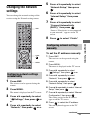
Changing the network
settings
5
Press V/v repeatedly to select
“Network Setup,” then press
.
6
Press V/v repeatedly to select
“Internet Setup,” then press
.
7
Press V/v repeatedly to select
“Connect Automatically
(DHCP),” then press
.
You can change the network settings of the
receiver using the Network settings menu.
AMP
“Success! Your device is now connected
to your network.” appears on the TV
screen.
8
Press
to select “Finish.”
V/v/b,
MENU
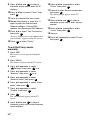
To set the IP address manually
1 Press AMP.
The receiver can be operated using the
remote.
2 Press MENU.
The menu is displayed on the TV screen.
3 Press V/v repeatedly to select
“
or b.
Settings,” then press
Configuring network settings
automatically
4 Press V/v repeatedly to select
1
5 Press V/v repeatedly to select
Press AMP.
The receiver can be operated using the
remote.
2
Press MENU.
The menu is displayed on the TV screen.
3
Press V/v repeatedly to select
“ Settings,” then press
or
b.
4
Press V/v repeatedly to select
“Network,” then press
or b.
or b.
“Network,” then press
“Network Setup,” then press
.
6 Press V/v repeatedly to select “Internet
Setup,” then press
.
7 Press V/v repeatedly to select “Manual
Configuration,” then press
.
The setting screen for the IP address
appears on the TV screen.
8 Press
to select the IP address.
The soft keyboard appears on the TV
screen.
continued
23GB
Using Other Functions
Configuring network settings
manually
9 Press V/v/B/b and
to select a
character one by one to enter the IP
address.
10Press V/v/B/b to select “Finish,” then
press
.
11Press b to display the next screen.
12Repeat the process in steps 8 to 11
again to enter the Subnet mask,
Gateway address, Primary DNS
address, and Secondary DNS address.
13Press V/v to select “Test Connection,”
then press
.
“Success! Your device is now connected to
your network.” appears on the TV screen.
14Press
to select “Finish.”
To set the Proxy server
manually
1 Press AMP.
The receiver can be operated using the
remote.
2 Press MENU.
The menu is displayed on the TV screen.
3 Press V/v repeatedly to select
“
or b.
Settings,” then press
4 Press V/v repeatedly to select
or b.
“Network,” then press
5 Press V/v repeatedly to select
“Network Setup” then press
.
6 Press V/v repeatedly to select “Proxy
setup,” then press
.
7 Press V/v repeatedly to select
“Enable,” then press
.
8 Press
.
The soft keyboard appears on the TV
screen.
9 Press V/v/B/b and
to select a
character one by one to enter the proxy
server address.
24GB
10Press V/v/B/b repeatedly to select
“Finish,” then press
.
11Press b to select the port number box,
then press
.
The soft keyboard appears on the TV
screen.
12Press V/v/B/b and
to select a
character one by one to enter the port
number.
13Press V/v/B/b repeatedly to select
“Finish,” then press
.
14Press b.
15Press V/v repeatedly to select “Finish,”
then press
.
4
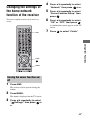
Changing the settings of
the home network
function of the receiver
Press V/v repeatedly to select
“Network,” then press
or b.
5
Press V/v repeatedly to select
“Server Function Setup,” then
press
.
You can set up the receiver to be used as a
server.
6
Press V/v repeatedly to select
“ON” or “OFF,” then press
.
A confirmation screen appears on the TV
screen
AMP
7
Press
to select “Finish.”
Using Other Functions
V/v/b,
MENU
Turning the server function on/
off
1
Press AMP.
The receiver can be operated using the
remote.
2
Press MENU.
The menu is displayed on the TV screen.
3
Press V/v repeatedly to select
“ Settings,” then press
or
b.
25GB
5
Press V/v repeatedly to select
“System Update,” then press
.
6
Press V/v repeatedly to select
“Internet Update,” then press
.
Updating the firmware
You can check the version of the firmware on
the system of the receiver, and you can also
update the firmware of the receiver.
The system information of the receiver
appears on the TV screen.
AMP
7
Press B/b to select “Cancel,”
then press
.
Updating the receiver using the
menu
1
Press AMP.
The receiver can be operated using the
remote.
V/v/b,
MENU
Checking the system
information
1
3
Press V/v repeatedly to select
“ Settings,” then press
or
b.
4
Press V/v repeatedly to select
“System,” then press
or b.
5
Press V/v repeatedly to select
“System Update,” then press
.
6
Press V/v repeatedly to select
“Internet Update,” then press
.
Press MENU.
The current system version and latest
system version are displayed on the TV
screen.
The menu is displayed on the TV screen.
3
4
26GB
Press V/v repeatedly to select
“ Settings,” then press
or
b.
Press V/v repeatedly to select
“System,” then press
or b.
Press MENU.
The menu is displayed on the TV screen.
Press AMP.
The receiver can be operated using the
remote.
2
2
7
Press
to select “Update.”
A confirmation screen appears on the TV
screen.
8
Press V/v repeatedly to select
“Start,” then press
.
Receiver updating starts.
The MULTI CHANNEL DECODING
lamp on the front panel flashes while
updating.
When the updating complete, the receiver
will restart automatically.
5
Press V/v repeatedly to select
“System,” then press
or b.
6
Press V/v repeatedly to select
“System Update,” then press
.
7
Press V/v repeatedly to select
“PC Update,” then press
.
Notes
Updating the receiver firmware
using the ES Utility
You can update the receiver firmware using the
ES Utility application software provided on
the CD-ROM supplied with the receiver. Refer
to the HELP of the ES Utility for details on
operations of the ES Utility.
1
Download the update program
from the support website on the
computer to which you
installed the ES Utility.
2
Press AMP.
A confirmation screen appears on the TV
screen.
8
Press V/v repeatedly to select
“Start,” then press
.
The status of waiting for the data from the
PC is displayed on the TV screen.
9
Click “System” in the ES Utility
window on the computer
screen, then click “Browse...”
and specify the path of the
update program, and click
“Start Update.”
Receiver updating starts.
When updating complete, the receiver
will restart automatically.
Notes
• Do not turn the receiver off or disconnect the
network cable during firmware updating. It may
cause a malfunction.
• It may take 30 minutes for the firmware updating to
complete.
The receiver can be operated using the
remote.
3
Press MENU.
The menu is displayed on the TV screen.
4
Press V/v repeatedly to select
“ Settings,” then press
or
b.
27GB
Using Other Functions
• In the following cases, a message appears on the
TV screen and the update of the receiver is not
performed.
– when all versions are the latest one.
– when the receiver cannot retrieve the data, such
as when the network has not been set up, or
when the server is down, etc.
• Do not turn the receiver off or disconnect the
network cable during firmware updating. It may
cause a malfunction.
• It may take 30 minutes for the firmware updating to
complete.
Additional Information
DNS is identified by an IP address. Also called
a “DNS server.”
x Ethernet
Glossary
x Broadband
General name for communication lines that
use a broad frequency bandwidth for sending
and receiving large amounts of video or audio
data at high speed. Currently, ADSL, CATV,
FTTH and other systems are identified as
broadband.
x Broadband router
For Internet connections through ADSL or a
cable TV line, devices called ADSL modems
or cable modems are used. However, for
Internet access from multiple terminals
connected at once, a broadband router is used.
x Client
A device which can use content and functions
that are provided from a server connected to
your network.
x DHCP
Abbreviation of Dynamic Host Configuration
Protocol.
A set of rules to automatically assign settings
necessary for network communication.
x DLNA
Abbreviation of Digital Living Network
Alliance.
An association that formulates audio/photo/
video distribution among PCs and other digital
devices in a home network environment, or the
format itself.
DLNA certified devices are interoperable with
each other, thus making them easy to
communicate on the network.
x DNS
Abbreviation of Domain Name System. A
server that translates domain names to IP
addresses, or IP addresses to domain names. A
28GB
A method of networking computers in a Local
Area Network (LAN). Developed by Xerox
Corporation, Ethernet has become a very
popular means of creating LANs.
x Gateway
An IP address of a device such as a computer
or a router, etc., which is required when the
receiver accesses the Internet or an external
network.
x Internet
A communication network linking computers
around the world. The Internet supports many
services, including email and search engines.
x LAN
Abbreviation of Local Area Network.
LAN is a general name for networks set up for
communication among devices including
computers, printers, and fax machines in
relatively small areas such as offices or
buildings.
x Player
A function/device which can play back content
such as music, photos, or videos, stored on the
server on your home network.
x Router
Device that relays data flow from network to
network. Routers are usually installed between
the Internet and the home network. Some
routers are capable of connecting multiple
devices to the Internet.
x Server
A function/device which provides content
such as music, photos, or videos to clients on
your home network.
x Subnet mask
Part of an IP address that identifies the subnet,
a smaller group on the network.
Troubleshooting
Sound is not output from the device on
your home network, or the sound cuts
off or has noise.
• Check the following:
– Is a component playing back the audio
selected?
– Is the device you selected and the audio
cord connected surely?
– Is the server function of the receiver set
to ON?
– Does the device on your home network
support “DLNA Tuner_1_0”?
Contact the manufacturer of the device
you are using to check whether or not it
supports “DLNA Tuner_1_0.”
If the trouble is other than the cases above and
the trouble is not solved even if you wait for a
while, press ?/1 on the remote or POWER on
the receiver to turn the receiver on again.
About support information
Content does not play back on the
device on your home network.
• Check whether or not another device on
your home network is already playing
back audio delivered from the receiver.
You cannot play back audio delivered from
the receiver on two or more devices on
your home network at the same time.
• Check whether or not the device on your
home network supports “DLNA
Tuner_1_0.” Contact the manufacturer of
the device you are using to check whether
or not it supports “DLNA Tuner_1_0.”
• When using a computer, check the
following:
– The built-in firewall settings for the
computer’s operating system.
Refer to the following web site for details of
the latest information on the receiver.
http://support.sony-europe.com/quickjump/
STR
29GB
Additional Information
Cannot find the server.
• Check the followings:
– Is the router is turned on?
– If there is another device between this
device and the router, check that device
is turned on.
– Are all of the cables are connected
correctly and securely?
– Is the settings to make sure that they
match the router’s settings (DHCP or
fixed IP address)?
• When using a computer, check the
following:
– the built-in firewall settings for the
computer’s operating system.
– the firewall settings of your security
software. To check the firewall settings
of your security software, refer to your
security software’s Help section.
• Register this device with the server. For
details, see the instructions supplied with
the server.
• Wait for a few moments, and then try
connecting to the server again.
– The firewall settings of your security
software. To check the firewall settings
of your security software, refer to your
security software’s Help section.
Specifications
Supported playback formats
Content delivered from the device on the home network needs to support the following formats for
you to play back content on this receiver.
Type of content
Format
Other conditions
MPEG-2 PS
Maximum resolution 720 × 480
MPEG-2 System (up to 10 Mbps) mixed with MPEG-1
Layer 1/2/3, PCM, or AC3 audio format
Windows Media Video
(WMV)
Maximum resolution 720 × 480
Windows Media Video 7/8/9 standard definition (up to
2 Mbps for Main profile) mixed with Windows Media
Audio 7/8/9 excludes all profile of Windows Media Audio
professional
Video
Linear PCM
MPEG-1 Layer3 (MP3)
Music
Windows Media Audio
(WMA)
Excludes all profile of Windows Media Audio
professional
AAC
JPEG
Photo
BMP
PNG
Supported formats for delivery by this receiver
This receiver converts to linear PCM the audio of a device connected to the receiver using an analog
cord, and delivers it onto a device on the home network.
Type of content
Format
Music
Linear PCM
30GB
End-User License Agreement for Sony Software Included in This Product
SOFTWARE LICENSE
END-USER LICENSE
AGREEMENT FOR SONY
SOFTWARE INCLUDED IN
THIS PRODUCT
The SOFTWARE is protected by copyright
laws and international copyright treaties, as
well as other intellectual property laws and
treaties. The SOFTWARE is licensed, not
sold.
GRANT OF LICENSE
YOU SHOULD CAREFULLY
READ THE FOLLOWING
AGREEMENT BEFORE USING
THIS PRODUCT. USING THIS
PRODUCT INDICATES YOUR
ACCEPTANCE OF THE
AGREEMENT.
DESCRIPTION OF
REQUIREMENTS,
RESTRICTIONS, RIGHTS AND
LIMITATIONS
Limitation on Reverse Engineering,
Decompilation and Disassembly. You may not
modify, reverse engineer, decompile,
disassemble or otherwise attempt to derive
source code from the SOFTWARE in whole or
in part.
Separation of Components. The SOFTWARE
is licensed as a single product. Its component
parts may not be separated unless expressly
authorized by Sony.
Data Files. The SOFTWARE may create data
files automatically for use with the
SOFTWARE. Any such data files will be
deemed as part of the SOFTWARE.
Single PRODUCT. The SOFTWARE is
licensed with the PRODUCT as a single
integrated product. The SOFTWARE may
only be used with the PRODUCT except as
continued
31GB
Additional Information
IMPORTANT-READ CAREFULLY: This
End-User License Agreement (“EULA”) is a
legal agreement between you and Sony
Corporation (“SONY”), the manufacturer of
this Sony hardware device (“PRODUCT”).
All SOFTWARE and third party software
(other than software subject to its own separate
license, in which case you will be informed of
such fact) included with this PRODUCT, or
provided or downloaded from websites as
updates/upgrades shall be referred to herein as
the SOFTWARE. This License covers only the
SOFTWARE. The SOFTWARE includes
software in this PRODUCT, the associated
media, any printed materials, and any “online” or electronic documentation, as well as
Sony-supplied or authorized updates/upgrades
thereto. You may use the SOFTWARE only in
connection with the use of the PRODUCT. By
your initial use of this PRODUCT, you agree
to be bound by the terms of this License. If you
do not agree to the terms of this License, you
should promptly contact SONY for
instructions on return of the entire PRODUCT
and included SOFTWARE for a refund of the
purchase price of the PRODUCT.
This License grants you the following nonexclusive, non-transferable (except as
expressly provided for herein) and limited
rights:
Software. You may use the SOFTWARE only
on this PRODUCT.
Personal Use. You may use the SOFTWARE
for personal use only.
Storage/Network Use. You may not use the
SOFTWARE over a network or distribute the
SOFTWARE except as specifically described
in documentation provided with the
SOFTWARE.
Back-up Copy. You may make one back-up
copy of the SOFTWARE solely for recovery
purposes.
specifically described in documentation
provided with the SOFTWARE.
Rental. You may not rent or lease the
SOFTWARE.
SOFTWARE Transfer. You may permanently
transfer all of your rights under this License
only as part of a sale or transfer of PRODUCT,
provided you retain no copies, transfer all of
the SOFTWARE (including all copies,
component parts, the media and printed
materials, all versions and any upgrades of the
SOFTWARE and this License), and the
recipient agrees to the terms of this License.
Termination. Without prejudice to any other
rights, SONY may terminate this License if
you fail to comply with the terms and
conditions of this License. In such event, you
must destroy all copies of the SOFTWARE
and all of its component parts.
Confidentiality. You agree to keep
information contained in SOFTWARE which
is not publicly known confidential to yourself,
and not to disclose such information to others
without SONY’s prior written approval.
Dependent Software. The software, network
services or other products other than
SOFTWARE upon which the SOFTWARE’s
performance depends might be interrupted or
discontinued at the discretion of the suppliers
(software suppliers, service providers, or
SONY). SONY and its suppliers do not
warrant that those software, network services
or other products will continue to be available,
or will operate without interruption or
modification.
COPYRIGHT
All title and copyright in and to the
SOFTWARE (including but not limited to any
images, photographs, animation, video, audio,
music, text and “applets”, incorporated into
the SOFTWARE), and any copies of the
SOFTWARE, are owned by SONY or its
suppliers. All rights not specifically granted
under this EULA are reserved by SONY.
32GB
USE OF SOFTWARE WITH
COPYRIGHTED MATERIALS
The SOFTWARE is capable of being used by
you to store, process and use content created
by you and third parties. Such content may be
protected by copyright, other intellectual
property laws, and/or agreements. You agree
to use the SOFTWARE only in compliance
with all such laws and agreements that apply to
such content. You agree that SONY may take
appropriate measures to protect copyright of
content stored, processed or used by the
SOFTWARE. Such measures include, but are
not limited to, counting the frequency of your
backup and restoration through certain
SOFTWARE features, refusal to accept your
request to enable restoration of data through
certain SOFTWARE features and termination
of this License in the event of your illegitimate
use of the SOFTWARE.
HIGH RISK ACTIVITIES
The SOFTWARE is not fault-tolerant and is
not designed, manufactured or intended for
use or resale as on-line control equipment in
hazardous environments requiring fail-safe
performance, such as in the operation of
nuclear facilities, aircraft navigation or
communication systems, air traffic control,
direct life support machines, or weapons
systems, in which the failure of the
SOFTWARE could lead to death, personal
injury, or severe physical or environmental
damage (“High Risk Activities”). SONY and
its suppliers specifically disclaim any express
or implied warranty of fitness for High Risk
Activities.
LIMITED WARRANTY ON CDROM MEDIA
EXCLUSION OF WARRANTY
ON SOFTWARE
You expressly acknowledge and agree that use
of the SOFTWARE is at your sole risk. The
SOFTWARE is provided “AS IS” and without
warranty of any kind and SONY and SONY’s
licensors (hereinafter, SONY and SONY’s
licensor’s shall be collectively referred to as
“SONY”) EXPRESSLY DISCLAIMS ALL
WARRANTIES, EXPRESS OR IMPLIED,
INCLUDING, BUT NOT LIMITED TO, THE
SONY provides no warranty that any
computer hardware and software will not be
damaged by the SOFTWARE or any data you
download using the SOFTWARE. You
expressly acknowledge and agree that use of
the SOFTWARE is at your sole risk and you
are responsible for installation of the
SOFTWARE and use of the SOFTWARE with
your PRODUCT.
continued
33GB
Additional Information
In situations where a back-up copy of the
SOFTWARE is furnished on CD-ROM media,
SONY warrants that for a period of ninety (90)
days from the date of its delivery to you the
CD-ROM media on which the back-up copy of
the SOFTWARE is furnished to you will be
free from defects in materials and
workmanship under normal use. This limited
warranty extends only to you as the original
licensee. SONY’s entire liability and your
exclusive remedy will be replacement of the
CD-ROM media not meeting SONY’s limited
warranty and which is returned to SONY with
proof of purchase in the form of a bill of sale
(which is evidence that the CD-ROM media is
within the warranty period). SONY will have
no responsibility to replace a disk damaged by
accident, abuse or misapplication. ANY
IMPLIED WARRANTIES ON THE CDROM MEDIA, INCLUDING THE IMPLIED
WARRANTIES OF MERCHANTABILITY
AND FITNESS FOR A PARTICULAR
PURPOSE, ARE LIMITED IN DURATION
TO NINETY (90) DAYS FROM THE DATE
OF DELIVERY. SOME JURISDICTIONS
DO NOT ALLOW LIMITATIONS ON HOW
LONG AN IMPLIED WARRANTY LASTS,
SO THESE LIMITATIONS MAY NOT
APPLY TO YOU. THIS WARRANTY
GIVES YOU SPECIFIC LEGAL RIGHTS,
AND YOU MAY ALSO HAVE OTHER
RIGHTS WHICH VARY FROM
JURISDICTION TO JURISDICTION.
IMPLIED WARRANTIES OF
MERCHANTABILITY AND FITNESS FOR
A PARTICULAR PURPOSE. SONY DOES
NOT WARRANT THAT THE FUNCTIONS
CONTAINED IN THE SOFTWARE WILL
MEET YOUR REQUIREMENTS, OR THAT
THE OPERATION OF THE SOFTWARE
WILL BE CORRECTED. FURTHERMORE,
SONY DOES NOT WARRANT OR MAKE
ANY REPRESENTATIONS REGARDING
THE USE OR THE RESULTS OF THE USE
OF THE SOFTWARE IN TERMS OF ITS
CORRECTNESS, ACCURACY,
RELIABILITY, OR OTHERWISE. NO
ORAL OR WRITTEN INFORMATION OR
ADVICE GIVEN BY SONY OR A SONY
AUTHORIZED REPRESENTATIVE SHALL
CREATE A WARRANTY OR IN ANY WAY
INCREASE THE SCOPE OF THIS
WARRANTY. SHOULD THE SOFTWARE
PROVE DEFECTIVE YOU (AND NOT
SONY OR A SONY AUTHORIZED
REPRESENTATIVE) ASSUME THE
ENTIRE COST OF ALL NECESSARY
SERVICING, REPAIR OR CORRECTION.
SOME JURISDICTIONS DO NOT ALLOW
THE EXCLUSION OF IMPLIED
WARRANTIES, SO THE ABOVE
EXCLUSION MAY NOT APPLY TO YOU.
LIMITATION OF LIABILITY
AUTOMATIC UPDATE FEATURE
HEREINAFTER, SONY, ITS AFFILIATES
AND THEIR RESPECTIVE LICENSOR’S
SHALL BE COLLECTIVELY REFERRED
TO AS “SONY”, SONY SHALL NOT BE
LIABLE FOR ANY INDIRECT,
INCIDENTAL, CONSEQUENTIAL OR
SPECIAL DAMAGES FOR BREACH OF
ANY EXPRESS OR IMPLIED WARRANTY,
BREACH OF CONTRACT, NEGLIGENCE,
STRICT LIABILITY OR ANY OTHER
LEGAL THEORY RELATED TO THIS
PRODUCT. SUCH DAMAGES INCLUDE,
BUT ARE NOT LIMITED TO, LOSS OF
PROFITS, LOSS OF REVENUE, LOSS OF
DATA, LOSS OF USE OF THE PRODUCT
OR ANY ASSOCIATED HARDWARE,
DOWN TIME AND USER’S TIME, EVEN
IF SONY HAS BEEN ADVISED OF THE
POSSIBILITY OF SUCH DAMAGES. IN
ANY CASE, SONY’S ENTIRE LIABILITY
UNDER ANY PROVISION OF THIS EULA
SHALL BE LIMITED TO THE AMOUNT
ACTUALLY PAID ALLOCABLE TO THE
ASSOCIATED PRODUCT. SOME
JURISDICTIONS DO NOT ALLOW THE
EXCLUSION OR LIMITATION OF
CONSEQUENTIAL OR INCIDENTAL
DAMAGES, SO THE ABOVE EXCLUSION
OR LIMITATION MAY NOT APPLY TO
YOU.
From time to time, SONY or third parties may
automatically update or otherwise modify the
SOFTWARE, for example, but not limited to,
for purposes of enhancement of security
functions, error correction and improvement
of functions, at such time as you interact with
SONY’s or third parties’ servers, or otherwise.
Such updates or modifications may delete or
change the nature of features or other aspects
of the SOFTWARE, including functions you
may rely upon. You hereby agree that such
activities may occur at SONY’s sole discretion
and that SONY may condition continued use
of the SOFTWARE upon your complete
installation or acceptance of such update or
modifications.
SOFTWARE DATA
COLLECTION AND
MONITORING
The SOFTWARE contains features which may
allow SONY and/or third parties to collect
data from, control and/or monitor computers
and devices running or interacting with the
SOFTWARE. You hereby agree that such
activities may occur. Please contact applicable
contact address of each country for SONY’s
current privacy policy.
EXPORT
You shall comply with all applicable export,
import and customs laws and regulations,
including, without limitation, those of
Department of Commerce or other United
States agency or authority, if you use the
SOFTWARE outside the country in which you
reside. You agree not to transfer, or authorize
the transfer, or the SOFTWARE to a
prohibited country or otherwise in violation of
any such restrictions or regulations.
US GOVERNMENT
RESTRICTED RIGHTS
The SOFTWARE is considered “commercial
computer software” and “commercial
computer documentation” pursuant to DFAR
Section 227.7202 and FAR Section 12.212, as
applicable. Use, duplication, or disclosure of
the SOFTWARE by the U.S. Government is
prohibited without a written agreement of
SONY.
SEVERABILITY
If any part of this EULA is held invalid or
unenforceable, the other parts will remain
valid.
34GB
GOVERNING LAW AND
JURISDICTION
THIRD PARTY BENEFICIARY
For all purposes of this License, each of
SONY’s third party licensors of any of the
SOFTWARE shall be expressly deemed an
intended third party beneficiary of this License
and shall have the right to enforce the terms
and conditions of this License.
Should you have any questions concerning this
License or this limited warranty, you may
contact SONY by writing to SONY at
applicable contact address of each country.
Copyrights
DLNA and DLNA CERTIFIED are
trademarks and/or service marks of the Digital
Living Network Alliance.
VAIO is a trademark of Sony Corporation.
Microsoft, Windows, Windows Vista, and
Windows Media are trademarks or registered
trademarks of Microsoft Corporation in the
United States and/or other countries.
Intel, Intel Core, and Pentium are trademarks
or registered trademarks of Intel Corporation
or its subsidiaries in the United States and
other countries.
iPod is a trademark of Apple Inc., registered in
the U.S. and other countries.
All other trademarks and registered
trademarks are of their respective holders. In
this manual, ™ and ® marks are not specified.
SHOUTcast® is a registered trademark of
AOL LLC.
The font type (Shin Go R) installed in this
receiver is provided by MORISAWA &
COMPANY LTD.
These names are the trademarks of
MORISAWA & COMPANY LTD., and the
copyright of the font also belongs to
MORISAWA & COMPANY LTD.
THIS PRODUCT IS LICENSED UNDER
THE VC-1 PATENT PORTFOLIO LICENSE
FOR THE PERSONAL AND NONCOMMERCIAL USE OF A CONSUMER
TO
(i) ENCODE VIDEO IN COMPLIANCE
WITH THE VC-1 STANDARD (“VC-1
VIDEO”)
AND/OR
continued
35GB
Additional Information
This EULA shall be governed by the laws of
Japan, without regards to conflict of laws
provisions. The parties hereby consent to
submit to the non-exclusive jurisdiction of the
courts of Japan. SONY RESERVES THE
RIGHT TO AMEND THE SPECIFIC
TERMS OF THE LICENSE REGARDING
THE SOFTWARE AT ITS SOLE
DISCRETION BY NOTICE TO YOU AT
THE E-MAIL ADDRESS YOU HAVE
PROVIDED TO SONY AS PART OF YOUR
REGISTRATION, OR ANY OTHER
LEGALLY RECOGNIZABLE FORM OF
NOTICE. If you do not agree to the terms to be
amended, which shall be notified to you by
SONY before they take effect, you must return
the entire PRODUCT, any other materials
bundled in the package at the time of the
purchase, together with any software you
obtained from Sony website for refund
pursuant to the terms in the first paragraph of
this License, titled “IMPORTANT-READ
CAREFULLY”. Your continued use of the
SOFTWARE after notice shall be deemed
agreement to be bound by such amendment.
(ii) DECODE VC-1 VIDEO THAT WAS
ENCODED BY A CONSUMER ENGAGED
IN A PERSONAL AND NONCOMMERCIAL ACTIVITY AND/OR WAS
OBTAINED FROM A VIDEO PROVIDER
LICENSED TO PROVIDE VC-1 VIDEO.
NO LICENSE IS GRANTED OR SHALL BE
IMPLIED FOR ANY OTHER USE.
ADDITIONAL INFORMATION MAY BE
OBTAINED FROM MPEG LA, L.L.C. SEE
HTTP://WWW.MPEGLA.COM
MPEG Layer-3 audio coding technology and
patents licensed from Fraunhofer IIS and
Thomson.
About the firmware of this
product
This product is protected by certain
intellectual property rights of Microsoft
Corporation. Use or distribution of such
technology outside of this product is
prohibited without a license from Microsoft or
an authorized Microsoft subsidiary.
Portions of the firmware of this product are
used on libpng version 1.2.8, the Independent
JPEG Group’s JPEG Software version 6b,
zlib.h -- interface of the ‘zlib’ general purpose
compression library version 1.2.2, FreeType 2
version 2.1.9 and OpenSSL version 0.9.8b.
linpng version 1.2.8
COPYRIGHT NOTICE, DISCLAIMER, and
LICENSE:
If you modify libpng you may insert additional
notices immediately following this sentence.
libpng versions 1.2.6, August 15, 2004,
through 1.2.30, August 15, 2008, are
Copyright © 2004, 2006-2008 Glenn RandersPehrson, and are distributed according to the
same disclaimer and license as libpng-1.2.5
with the following individual added to the list
of Contributing Authors:
36GB
Cosmin Truta
libpng versions 1.0.7, July 1, 2000, through
1.2.5 - October 3, 2002, are Copyright © 20002002 Glenn Randers-Pehrson, and are
distributed according to the same disclaimer
and license as libpng-1.0.6 with the following
individuals added to the list of Contributing
Authors:
Simon-Pierre Cadieux
Eric S. Raymond
Gilles Vollant
and with the following additions to the
disclaimer:
There is no warranty against interference with
your enjoyment of the library or against
infringement. There is no warranty that our
efforts or the library will fulfill any of your
particular purposes or needs. This library is
provided with all faults, and the entire risk of
satisfactory quality, performance, accuracy,
and effort is with the user.
libpng versions 0.97, January 1998, through
1.0.6, March 20, 2000, are Copyright © 1998,
1999 Glenn Randers-Pehrson, and are
distributed according to the same disclaimer
and license as libpng-0.96, with the following
individuals added to the list of Contributing
Authors:
Tom Lane
Glenn Randers-Pehrson
Willem van Schaik
libpng versions 0.89, June 1996, through 0.96,
May 1997, are Copyright © 1996, 1997
Andreas Dilger Distributed according to the
same disclaimer and license as libpng-0.88,
with the following individuals added to the list
of Contributing Authors:
John Bowler
Kevin Bracey
Sam Bushell
Magnus Holmgren
Greg Roelofs
Tom Tanner
libpng versions 0.5, May 1995, through 0.88,
January 1996, are Copyright © 1995, 1996
Guy Eric Schalnat, Group 42, Inc.
For the purposes of this copyright and license,
“Contributing Authors” is defined as the
following set of individuals:
Andreas Dilger
Dave Martindale
Guy Eric Schalnat
Paul Schmidt
Tim Wegner
1. The origin of this source code must not
be misrepresented.
2. Altered versions must be plainly
marked as such and must not be
misrepresented as being the original
source.
3. This Copyright notice may not be
removed or altered from any source or
altered source distribution.
A “png_get_copyright” function is available,
for convenient use in “about” boxes and the
like:
printf(“%s”,png_get_copyright(NULL));
Also, the PNG logo (in PNG format, of course)
is supplied in the files “pngbar.png” and
“pngbar.jpg” (88x31) and “pngnow.png”
(98x31).
Libpng is OSI Certified Open Source
Software. OSI Certified Open Source is a
certification mark of the Open Source
Initiative.
Glenn Randers-Pehrson
glennrp at users.sourceforge.net
August 15, 2008
The Independent JPEG Group’s JPEG
Software version 6b
• Portions of the firmware of this product is
used in part on The Independent JPEG
Group’s JPEG software. The Independent
JPEG Group’s JPEG software is copyright ©
1991-1998, Thomas G. Lane. All Rights
Reserved. “The Graphics Interchange
Format© is the Copyright property of
CompuServe Incorporated. GIF(sm) is a
Service Mark property of CompuServe
Incorporated.”
zlib.h -- interface of the ‘zlib’ general purpose
compression library version 1.2.2
zlib.h -- interface of the ‘zlib’ general purpose
compression library version 1.2.2, October
3rd, 2004
Copyright © 1995-2004 Jean-loup Gailly and
Mark Adler
continued
37GB
Additional Information
The PNG Reference Library is supplied “AS
IS”. The Contributing Authors and Group 42,
Inc. disclaim all warranties, expressed or
implied, including, without limitation, the
warranties of merchantability and of fitness for
any purpose. The Contributing Authors and
Group 42, Inc. assume no liability for direct,
indirect, incidental, special, exemplary, or
consequential damages, which may result
from the use of the PNG Reference Library,
even if advised of the possibility of such
damage.
Permission is hereby granted to use, copy,
modify, and distribute this source code, or
portions hereof, for any purpose, without fee,
subject to the following restrictions:
The Contributing Authors and Group 42, Inc.
specifically permit, without fee, and
encourage the use of this source code as a
component to supporting the PNG file format
in commercial products. If you use this source
code in a product, acknowledgment is not
required but would be appreciated.
FreeType 2 version 2.1.9
Portions of this firmware of this product are
copyright © 1996-2002 The FreeTypeProject
(www.freetype.org). All rights reserved.
1. No Warranty
THE FREETYPE PROJECT IS PROVIDED
‘AS IS’ WITHOUT WARRANTY OF ANY
KIND, EITHER EXPRESS OR IMPLIED,
INCLUDING, BUT NOT LIMITED TO,
WARRANTIES OF MERCHANTABILITY
AND FITNESS FOR A PARTICULAR
PURPOSE. IN NO EVENT WILL ANY OF
THE AUTHORS OR COPYRIGHT
HOLDERS BE LIABLE FOR ANY
DAMAGES CAUSED BY THE USE OR
THE INABILITY TO USE, OF THE
FREETYPE PROJECT.
OpenSSL version 0.9.8b
1. OpenSSL License
Copyright © 1998-2008 The OpenSSL
Project. All rights reserved.
Redistribution and use in source and binary
forms, with or without modification, are
permitted provided that the following
conditions are met:
1. Redistributions of source code must
retain the above copyrightnotice, this list
of conditions and the following
disclaimer.
2. Redistributions in binary form must
reproduce the above copyright notice, this
list of conditions and the following
disclaimer in the documentation and/or
other materials provided with the
distribution.
3. All advertising materials mentioning
features or use of this software must
display the following acknowledgment:
“This product includes software
developed by the OpenSSL Project for
use in the OpenSSL Toolkit. (http://
www.openssl.org/)”
38GB
4. The names “OpenSSL Toolkit” and
“OpenSSL Project” must not be used to
endorse or promote products derived
from this software without prior written
permission. For written permission,
please contact [email protected].
5. Products derived from this software
may not be called “OpenSSL” nor may
“OpenSSL” appear in their names
without prior written permission of the
OpenSSL Project.
6. Redistributions of any form whatsoever
must retain the following
acknowledgment:
“This product includes software
developed by the OpenSSL Project for
use in the OpenSSL Toolkit (http://
www.openssl.org/)”
THIS SOFTWARE IS PROVIDED BY THE
OpenSSL PROJECT “AS IS” AND ANY
EXPRESSED OR IMPLIED WARRANTIES,
INCLUDING, BUT NOT LIMITED TO,THE
IMPLIED WARRANTIES OF
MERCHANTABILITY AND FITNESS FOR
A PARTICULAR PURPOSE ARE
DISCLAIMED. IN NO EVENT SHALL THE
OpenSSL PROJECT OR ITS
CONTRIBUTORS BE LIABLE FOR ANY
DIRECT, INDIRECT, INCIDENTAL,
SPECIAL, EXEMPLARY, OR
CONSEQUENTIAL DAMAGES
(INCLUDING, BUT NOT LIMITED TO,
PROCUREMENT OF SUBSTITUTE
GOODS OR SERVICES; LOSS OF USE,
DATA, OR PROFITS; OR BUSINESS
INTERRUPTION)
HOWEVER CAUSED AND ON ANY
THEORY OF LIABILITY, WHETHER IN
CONTRACT, STRICT LIABILITY, OR
TORT (INCLUDING NEGLIGENCE OR
OTHERWISE) ARISING IN ANY WAY OUT
OF THE USE OF THIS SOFTWARE, EVEN
IF ADVISED OF THE POSSIBILITY OF
SUCH DAMAGE.
2. Original Ssleat License
Copyright © 1995-1998 Eric Young
([email protected])
All rights reserved.
This package is an SSL implementation
written by Eric Young ([email protected]).
The implementation was written so as to
conform with Netscapes SSL.
Redistribution and use in source and binary
forms, with or without modification, are
permitted provided that the following
conditions are met:
1. Redistributions of source code must
retain the copyright notice, this list of
conditions and the following disclaimer.
2. Redistributions in binary form must
reproduce the above copyright notice, this
list of conditions and the following
disclaimer in the documentation and/or
other materials provided with the
distribution.
3. All advertising materials mentioning
features or use of this software must
display the following acknowledgement:
THIS SOFTWARE IS PROVIDED BY ERIC
YOUNG “AS IS” AND ANY EXPRESS OR
IMPLIED WARRANTIES, INCLUDING,
BUT NOT LIMITED TO, THE IMPLIED
WARRANTIES OF MERCHANTABILITY
AND FITNESS FOR A PARTICULAR
PURPOSE ARE DISCLAIMED. IN NO
EVENT SHALL THE AUTHOR OR
CONTRIBUTORS BE LIABLE FOR ANY
DIRECT, INDIRECT, INCIDENTAL,
SPECIAL, EXEMPLARY, OR
CONSEQUENTIAL DAMAGES
(INCLUDING, BUT NOT LIMITED TO,
PROCUREMENT OF SUBSTITUTE
GOODS OR SERVICES; LOSS OF USE,
DATA, OR PROFITS; OR BUSINESS
INTERRUPTION)
HOWEVER CAUSED AND ON ANY
THEORY OF LIABILITY, WHETHER IN
CONTRACT, STRICT LIABILITY, OR
TORT (INCLUDING NEGLIGENCE OR
OTHERWISE) ARISING IN ANY WAY OUT
OF THE USE OF THIS SOFTWARE, EVEN
IF ADVISED OF THE POSSIBILITY OF
SUCH DAMAGE.
The licence and distribution terms for any
publically available version or derivative of
this code cannot be changed. i.e. this code
cannot simply be copied and put under another
distribution licence [including the GNU Public
Licence.]
39GB
Additional Information
This library is free for commercial and noncommercial use as long as the following
conditions are aheared to. The following
conditions apply to all code found in this
distribution, be it the RC4, RSA, lhash, DES,
etc., code; not just the SSL code. The SSL
documentation included with this distribution
is covered by the same copyright terms except
that the holder is Tim Hudson
([email protected]).
Copyright remains Eric Young’s, and as such
any Copyright notices in the code are not to be
removed.
If this package is used in a product, Eric Young
should be given attribution as the author of the
parts of the library used.
This can be in the form of a textual message at
program startup or in documentation (online
or textual) provided with the package.
“This product includes cryptographic
software written by Eric Young
([email protected])”
The word ‘cryptographic’ can be left out
if the rouines from the library being used
are not cryptographic related :-).
4. If you include any Windows specific
code (or a derivative thereof) from the
apps directory (application code) you
must include an acknowledgement:
“This product includes software written
by Tim Hudson ([email protected])”
Index
A
R
AM 17
Repeat 14
C
S
Connections
Components 10
Network 7
Server
Preparing 11
Setup 25
SHOUTcast
Favorite stations 20
Listening 19
Shuffle 14
D
DLNA 2
E
ES Utility 21
F
Favorite stations 20
Firmware 26
FM 17
H
Home network 10, 25
L
Listening 19
M
Multi Zone 15
N
Network settings
Change 23
Check 22
P
Playback
Music 13, 16
Photos 13
Videos 13
40GB
Additional Information
41GB
42GB