1
CHAPTER 2: OPERATOR GUIDE
5-19-98
PAGE 14
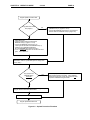
Program Upload Pr ocedure Start
Copy Reference Tables
with program?
Yes
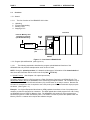
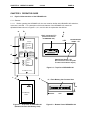
1. Insert the Flash PC Memory Card into the
HE690HPL100 (J1). (Figure 2.1 & 2.3)
2. Connect the HE690HPL100 to the PLC by inserting an
RS-422 cable into HE690HPL100 (P1) (Figure 2.2).
No
1. Switch off the PLC.
2. Insert the Flash PC Memory Card into the
HE690HPL100 (J1). (Figure 2.1 & 2.3)
3. Connect the HE690HPL100 to the PLC by
inserting an RS-422 cable into HE690HPL100 (P1).
4. Press the GO or RUN/Download button
(S1) and hold down while switching the PLC
to “On.” Continue holding down S1 until the LED blinks
green. Then, release S1.
Wait for a Power-up Status indication on the LED as
described in Table 2.1 (LED blinks green or orange when
unit is ready.)
Copy program into
EEPROM during
download?
Yes
Press Stop/Upload button (S2) and hold until LED blinks
orange (approximately 3 seconds). If S2 is released
before the orange blink occurs, the program will not be
copied into EEPROM during download.
No
Press the Stop/Upload button (S2) and release (Figure 2.2).
Program stored in RAM when downloaded.
Check result indications in Table 2.2.
Program Upload Procedure End
Figure 2.5 – Upload Procedure Flowchart