1
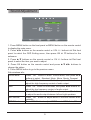
Sound Adjustment
Sound Mode
Treble
Bass
Balance
Auto Volume
SPDIF Mode
AD Switch
SOUND
Move
EXIT
MENU
Return
OK
Select
Personal
50
50
0
Off
Auto
Off
EXIT
Exit
OK
MENU
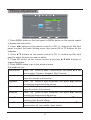
1. Press MENU button on the front panel or MENU button on the remote control
to display the main menu.
2. Press ◄/► buttons on the remote control or VOL +/- buttons on the front
panel to select the OSD Setting menu, then press OK or ▼ buttons for the
submenu.
3. Press ▲/▼ buttons on the remote control or CH +/ - buttons on the front
panel to select the item you want to adjust.
4. Press OK button on the remote control and press ▲/ ▼◄/► buttons to
change the status.
5. Press MENU button to go to the previous menu.
Sub windows info:
Sound Mode
Press “ OK ” button to enter Sound Mode, then press ▲/ ▼
Treble
buttons to select : Standard, Music, Movie, Sports, Personal.
Press “ OK ” button to enter Treble, then press ◄/► buttons to
Bass
adjust the high frequency content of audio output.
Press “ OK ” button to enter Bass, then press ◄/► buttons to
Balance
adjust the low frequency content of audio output.
Press “ OK ” button to enter Balance, then press ◄/► buttons
Auto Volume
SPDIF Mode
to adjust the audio output between left and right speakers.
Press “ OK ” button to a djust audio to the best volume automatically.
Press “ OK ” button to adjust SPDIF mode: PCM, Auto, Off.
9