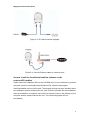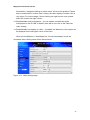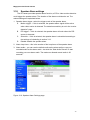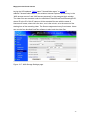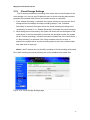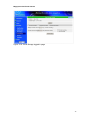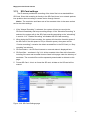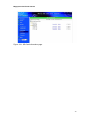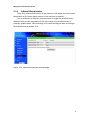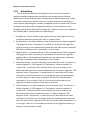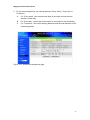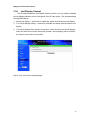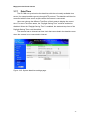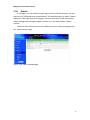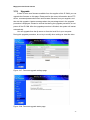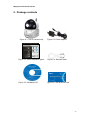
1
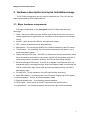
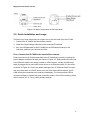
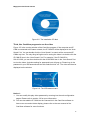
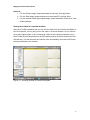
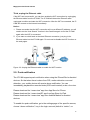
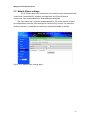
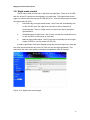
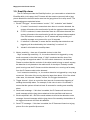
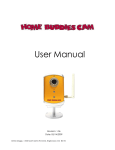
All-in-one Mega-pixel Pan/tilt IP Network Camera User Manual Revision: 030701 Date: 2014/10/12 For firmware version v030701 Mega-pixel Pan/Tilt IP Camera Table of Contents LIST OF FIGURES AND TABLES...................................................................................................... 4 1. INTRODUCTION .......................................................................................................................... 6 2. HARDWARE DESCRIPTION AND QUICK INSTALLATION/USAGE ................................ 8 4. 5. 2.1. M AJOR HARDWARE COMPONENTS. ...................................................................................... 8 2.2. QUICK INSTALLATION AND USAGE ...................................................................................... 10 2.3. WIRELESS CONNECTION (IF ROUTER/AP HAS WPS BUTTON) .......................................... 15 2.4. WIRELESS CONNECTION (IF WPS NOT SUPPORTED ON ROUTER/AP) .............................. 15 2.5. PUSH NOTIFICATION ............................................................................................................ 16 3.1. INFORMATION ...................................................................................................................... 19 3.2. VIDEO DISPLAY ................................................................................................................... 20 3.3. NETWORK ............................................................................................................................ 22 3.4. WIFI SECURITY .................................................................................................................... 24 3.5. ADVANCED NETWORK......................................................................................................... 26 3.6. VIDEO SETTINGS ................................................................................................................. 27 3.7. MOBILE VIDEO SETTINGS .................................................................................................... 29 3.8. NIGHT MODE CONTROL ....................................................................................................... 30 3.9. EMAIL/FTP ALARM ............................................................................................................... 31 3.10. SPEAKER ALARM SETTINGS ............................................................................................... 34 3.11. NAS SETTINGS.................................................................................................................... 35 3.12. CLOUD STORAGE SETTINGS............................................................................................... 37 3.13. SD-CARD SETTINGS ........................................................................................................... 39 3.14. INFRARED THERMOMETER .................................................................................................. 41 3.15. SCHEDULING ....................................................................................................................... 42 3.16. LED DISPLAY CONTROL ...................................................................................................... 44 3.17. DATE/TIME........................................................................................................................... 45 3.18. ADMIN .................................................................................................................................. 46 3.19. UPGRADE ............................................................................................................................ 47 3.20. REBOOT............................................................................................................................... 48 3.21. SET TO FACTORY DEFAULT .................................................................................................. 49 FEATURES AND SPECIFICATIONS...................................................................................... 50 4.1. FEATURES ........................................................................................................................... 50 4.2. SPECIFICATIONS.................................................................................................................. 51 PACKAGE CONTENTS ............................................................................................................ 54 APPENDIX A. LIST OF TESTED NAT/ROUTER DEVICES ........................................................ 55 2 Mega-pixel Pan/Tilt IP Camera APPENDIX B. MAXIMUM ALLOWED VIDEO USERS ................................................................. 56 APPENDIX C. PERFORMANCE INFORMATION ......................................................................... 57 APPENDIX D. TROUBLE SHOOTING ............................................................................................ 59 APPENDIX F. SNAPSHOT PICTURE ON ANY BROWSER........................................................ 62 3 Mega-pixel Pan/Tilt IP Camera List of Figures and Tables Figure 2-1: Major components in the front panel Figure 2-2: Major components in the back panel Figure 2-3: IP CAM connection diagram. Figure 2-4: Connect Ethernet cable to a switch/router. Figure 2-5: The installation CD disk Figure 2-6: The ID/Password card Figure 2-7: Running window of CamView program Figure 2-8: Pop-up play-video password window Figure 2-9: Unplug the Ethernet cable to enable the WiFi function Figure 3-1: Open the web configuration page from CamView software Figure 3-2: IP CAM Web configuration login page Figure 3-3: IP CAM Information page Figure 3-4: Video display page Figure 3-5: Network settings page for DHCP function Figure 3-6: Network settings page for fixed IP address Figure 3-7: WiFi security disabled page Figure 3-8: WiFi security enabled page Figure 3-9: WiFi testing page Figure 3-10: Advanced network settings page Figure 3-11: Video settings page Figure 3-12: Mobile video settings page Figure 3-13: Night mode control page. Figure 3-14: Email/FTP Alarm page Figure 3-15: SMTP server settings page Figure 3-16: Speaker Alarm Settings page Figure 3-17: NAS Storage settings page Figure 3-18: Cloud Storage Settings page Figure 3-19: Cloud Storage logged in page Figure 3-20: SD-Card settings page Figure 3-21: SD-Card information page Figure 3-22: Infrared thermometer settings page Figure 3-23: Schedule Management page Figure 3-24: Led Control settings page Figure 3-25: System date/time settings page Figure 3-26: Admin settings page Figure 3-27: Firmware upgrade settings page 4 Mega-pixel Pan/Tilt IP Camera Figure 3-28: Firmware upgrade status page Figure 3-29: System reboot settings page Figure 3-30: System reboot under-going page Figure 3-31: Stick on the reset button to set to the factory default Figure 5-1: The IP camera body Figure 5-2: Power Adaptor Figure 5-3: Quick installation guide Figure 5-4: Ethernet cable Figure 5-5: Installation CD Figure 5-6: ID/Password Card Table A-1: List of tested Wireless AP/router devices Table A-2: List of tested Wired NAT/router devices 5 Mega-pixel Pan/Tilt IP Camera 1. Introduction The IP Camera is designed for all day video surveillance on your iPhone/iPad and Android mobiles/pads. The setup is truly 1-2-3 : 1. Connect the camera to the network 2. Download the app mCamView into your iPhone/iPad or Android 3. View video by the camera ID/password The push notification is supported, so that you will get the notification from your iPhone/iPad and Android once there is any events detected through the PIR body sensor or sound detector on the camera, even when your mobile is on sleep mode. The pan/tilt functions allow the mobile user to pan./tilt the camera through a finger move on the mobile screen. You could monitor the whole room with a single camera. The SD card recording is supported, and you could playback the recorded video on your iPhone/iPad and Android. You could also do the SD card recording only when there is PIR or sound detection to save the SD card storage size. The PIR and sound detected recording has a 5 seconds pre-recording, so that you will always catch the critical moment. The NAS and cloud storage is supported. You can record the video files into any normal NAS devices or to your Dropbox account. And you can playback those recorded video files remotely on your mobile devices or computers. For day & night usage, there are two video sensors/lens on the camera, one for day and one for night. The day lens and night lens focus are separately tuned for day light and Infra Red light for best video quality. No ICR, no mechanical problem. Two-way audio is supported. You can monitor the synchronized video/audio and talk to or warn the people around the camera from your iPhone/iPad and Android once you got the push notification. There is a built-in speaker and a speaker jack is provided so that you could connect any high power speaker to the camera for your needs. The WPS(WiFi Protected Setup) is supported. You could set up the WiFi 6 Mega-pixel Pan/Tilt IP Camera connection of the camera with the router by clicking the WPS button on the camera and on the router at the same time. No more complicated WiFi configuration. An infrared thermometer is provided. You could monitor the temperature of the environment of the camera. And you could setup the camera to trigger alarm when the environment temperature is out of a specified range. The IP camera is ideal for securing small businesses, home offices and residences. The IP Camera is a perfect replacement of the alarm system and baby monitor in your house and shop. . The differences It’s very easy to see the video of the Pan/Tilt IP Camera, you only need to key in the ID/Password of the IP CAM any where in the world, you do not need to remember the IP address or domain name or DDNS name or port number. And you do not need to modify the settings(like port mapping, fixed IP, DDNS, virtual server) of the NAT/router devices, it’s just a plug & play usage. So, the differences are the followings: Public IP address needed ? No Dynamic DNS needed ? No Port mapping in router? No Virtual server in router ? No UPnP support in router ? No What’s needed ? ID and Password 7 Mega-pixel Pan/Tilt IP Camera 2. Hardware description and quick installation/usage The IP CAM is designed to be very easy to install and use. First, let’s see the major components of the IP CAM products. 2.1. Major hardware components. The major components on the front panel of the IP CAM products are the followings : 1. Lens – the lens is inside the mask and the focus of the lens is fixed, you do not need to spend time to adjust the focus, the effective focus range is from 30cm to infinity. 2. IR LED – there are two IR LEDs for the night mode usage. 3. PIR – passive infrared sensor for body detection 4. Microphone – for receiving the audio/voice. Effective distance is about 5 meters. 5. Thermometer – for measuring the environment temperature and alarm if out of some temperature range. 6. Status indication LED (red) – this LED is to indicate the Internet connection status. When the Internet connection is connected, the LED will be constant red light. If there is any Internet connection problem, the LED will be blinking red light. 7. Ethernet indication LED (blue) – this LED is to indicate if the Ethernet link is ok and packet traffic is sending/receiving. When the Ethernet cable is connected, the LED is constant blue light. When there is packet sending/receiving, the LED is blinking blue light. 8. SD card LED – for the indication of the SD card activity( recording ). 9. Micro-SD card slot – for inserting the micro SD-Card. (support up to 32G bytes) 10. Internal speaker – there is an internal speaker inside. 11. External speaker jack – for connecting external speaker. 12. WPS button – for the setup of the WiFi connection with WPS function. 13. Light detector – for switching between day time and night time automatically. 8 Mega-pixel Pan/Tilt IP Camera Figure 2-1: Major components in the front panel The major components on the back panel and bottom of the IP CAM products are the followings: 1. Bracket screw jack – this is the position to screw in the bracket of the IP CAM. With the bracket, you can put the IP CAM on the desk, on the wall or on the ceiling. (Bracket not provided) 2. Power jack – this is the place to plug in the power adaptor. The power needed for this IP CAM is 12V/1.0A, please make sure you are using the correct power adaptor. 3. Ethernet jack – this is the place to plug in the RJ45 Ethernet cable. When the Ethernet link is ok, the Ethernet indication LED on the front side will be blue light. 4. Reset button – this is the button to reset the IP CAM to default factory settings. You need to use a small stick like pencil or tooth stick to press the reset button for more than 3 seconds to enable the reset function. Usually when you forgot the administrator account, you will probably need to do this reset action to reset to the default factory settings. Please refer to section 3.19 for more details. 5. Wall mount – this is the place to hang the IP CAM on the ceiling or on the wall. 6. Antenna – this is the 802/11 n wireless antenna. 9 Mega-pixel Pan/Tilt IP Camera Figure 2-2: Major components in the back panel 2.2. Quick installation and usage There are only three things that you need to do to see the video from the IP CAM. 1. Connect the IP CAM to the home/office network. 2. Install the CamView/app software on the notebook/PC/mobiles. 3. Key in the ID/password of the IP CAM(from the ID/Password card) on the CamView, and then you can see the video. First, Connect the IP CAM to the home/office network Please connect the IP CAM accessaries to the IP CAM body correctly, including the power adapter and Ethernet cable, as shown in Figure 2-3. And connect the other end of the Ethernet cable to the home network or office network. Usually, this Ethernet cable is plugged into a home NAT/router device or an Ethernet switch if in the office, as shown in Figure 2-4. Since the default settings of the IP CAM use DHCP function and very often there is a DHCP server on most of the Home/office network, the IP CAM should be connected to the Internet immediately. The Internet status LED is constant red light to indicate this good connection status. If the LED is blinking, please refer to section 3.3~3.5 to try other network settings. 10 Mega-pixel Pan/Tilt IP Camera Figure 2-3: IP CAM connection diagram. Figure 2-4: Connect Ethernet cable to a switch/router. Second, Install the CamView/mCamView software on the notebook/PC/mobiles Please insert the installation CD into the CD-ROM drive in your notebook or personal computer (must be running Microsoft Windows OS). Execute the program CamViewInstaller-xxx.exe on the disk. The program will pop-up some windows about the installation options, please press the “next” button to proceed with the installation. After the installation is complete, there will be a CamView icon on the desktop of your computer screen, please execute this icon. The CamView program will run immediately. 11 Mega-pixel Pan/Tilt IP Camera Figure 2-5: The installation CD disk Third, Use CamView program to see the video Figure 2-5 is the running window of the CamView program. If the computer and IP CAM is connected to the same network, the IP CAM ID will be displayed in the “Auto Search” list. You can double click the “Auto Search” to search all the connected IP CAMs any time. The only thing left right now for seeing the video is to double click the IP CAM ID item in the “Auto Search” list. For example, if the IP CAM ID is 001-001-029, you can then double click the 001001029 item in the “Auto Search” list to view the video. A window asking for password input will pop up. Please key-in the password in your ID/Password card into this field and click “ok”. The video will then be displayed on the window. Figure 2-6: The ID/Password card Notice 1: 1. You can modify this play-video password by entering into the web configuration pages. Please refer to section 3.6 for more information. 2. You can also add the IP CAM into the CameraList in the CamView software to have more convenient video display, please refer to the user manual of the CamView software for more functions. 12 Mega-pixel Pan/Tilt IP Camera Notice 2: 1. For the iPhone usage, please download “mcamview” from App Store 2. For the iPad usage, please download “mcamviewHD” from App Store 3. For the Android mobile phone/pad usage, please download “mcamview” from Android Market. Seeing the video in a remote location After the IP CAM is installed and you can see the video from the CamView software in the local network, it’s very easy to see the video in a remote location. All you need to do is add a camera item in the “CameraList” folder of the CamView software, key in the IP CAM ID and Password(from the ID/Password card). And then double click this camera item. You will then see the Camera video immediately. No further NAT/router setting modifications are needed. Figure 2-7: Running window of CamView program 13 Mega-pixel Pan/Tilt IP Camera Figure 2-8: Pop-up play-video password window 14 Mega-pixel Pan/Tilt IP Camera 2.3. Wireless connection (if router/AP has WPS button) The IP Cam(w) can be connected to the home/office network through the 802.11 n wireless connection. If the router or AP has WPS button, then there are only three simple steps that you need to do to have the wireless connection: 1. Unplug the Ethernet cable from the camera. 2. Click the WPS button on the router. And then click the WPS button on the camera within one minute. 3. The yellow/blue/red led on the camera will be chasing. When the chasing stops and blue led is on within one minute, the wireless connection is established. 2.4. Wireless connection (if WPS not supported on router/AP) The IP CAM can also be connected to the home/office network through the 802.11 n wireless connection. There are only three things that you need to do to have the wireless connection: 1. Set the WiFi security settings on the web configuration page. 2. Test if the WiFi settings are correct. 3. Unplug the Ethernet cable. First, set the WiFi security settings on the web configuration page. Make sure there is a WiFi router or AP on your home or office network. Write down the WiFi security parameters used in this WiFi AP/router, including the SSID , security mode, encryption protocols and the “key” values. The supported WiFi security mode of the IP CAM is WEP(64 bits and 128 bits) and WPA-PSK(TKIP and AES). In most of the home/office WiFi environment, this is quite enough. The easiest way to set the WiFi settings on the IP CAM is through CamView software. Right-click the searched IP CAM in the “Auto Search” list and click the “Web Configure” to open the login window of the IP CAM. Fill in all the WiFi security parameters you have written down. The WiFi configuration is complete now. Please refer to section 3.4 for more detailed description if needed . Second, test if the WiFi settings are correct You can now test if the above WiFi settings are correct. Click the “WiFi test” on the “WiFi Security” settings web page. The testing result will be displayed in less than 60 seconds. If the test is failed, please check the WiFi security parameters and test again. 15 Mega-pixel Pan/Tilt IP Camera Third, unplug the Ethernet cable If the WiFi test is successful, you can then enable the WiFi connection by unplugging the Ethernet cable from the IP CAM. The IP CAM will detect the Ethernet cable unplugged condition and start the WiFi connection. After the WiFi is connected, the IP CAM will connect to the Internet immediately. Notice : 1. Please remember that the WiFi connection will use a different IP address, you will need to do the “Auto Search” function in the CamView again to find the IP CAM again after the WiFi is connected. 2. If you want to switch back to the wired Ethernet connection, just plug in the Ethernet cable into the IP CAM again. Do not need to disable the WiFi function on the web pages. Figure 2-9: Unplug the Ethernet cable to enable the WiFi function 2.5. Push notification The IP CAM supports push notification when using the iPhone/iPad or Android devices. So that when there is alarm from PIR, motion detection or sound detection, your mobile device will receive alarm notification. You can immediately playback the recorded video(if SD card inserted) or do a live view. Please download the “mcamview” app from App Store for iPhone. Please download the “mcamviewHD” app from App Store for iPad. Please download the “mcamview” app from Android Market for Android devices To enable the push notification, go to the settings page of the specific camera, choose “alarm notification”, key in the login account( default is “admin”, no 16 Mega-pixel Pan/Tilt IP Camera password ), and enable the alarm condition( PIR, motion detection or sound detection) you want. That’s all. The mobile device will receive push notification immediately when the alarm is triggered. If the SD card is inserted, the camera will start SD card recording when the alarm condition is detected. And the recording will include 5 seconds of pre-recording. 17 Mega-pixel Pan/Tilt IP Camera 3. Web configurations You can login into the web configuration page by directly key-in the IP address of the IP CAM or right-click the searched IP CAM in the “Auto Search” list of the CamView software and click the “Web Configure” to open the login window of the IP CAM. Figure 3-1: Open the web configuration page from CamView software The default login account is “admin”, leave the Password field empty. Figure 3-2: IP CAM Web configuration login page 18 Mega-pixel Pan/Tilt IP Camera 3.1. Information The first page of the web configuration of the IP CAM is the information page. You can see the model name/firmware version, IP CAM ID, registration status, network type and current video settings( bandwidth, resolution) in this page. The IP CAM can be viewed remotely by the CamView software only when the IP CAM is registered. If this IP CAM is not registered, please check the Ethernet wiring of your network environment. The “Network type” field displays the network connection(wired or wireless) and method(DHCP, PPPoE or static ip) the IP CAM is running. The “Video users” field displays the number of connected video viewing users. Figure 3-3: IP CAM Information page 19 Mega-pixel Pan/Tilt IP Camera 3.2. Video Display This display page allows you to view the video display and control the pan/tilt movement of the IP camera. For the first time use of this display on a computer, an activeX component will be automatically downloaded into the browser. This could take some time, depends on the internet speed. The component is downloaded from a public domain, so that the computer must be connected to the Internet. If you want to modify the video display screen size, please refer to section 3.6 for more details. Figure 3-4: Video display page Pan/tilt control: 1. Control by CamView – this is to enable/disable the pan/tilt control function by CamView software. 2. Speed – this is to control the pan/tilt moving step distance for each pan or tilt movement, fast means larger step movement. 3. Pan – click this button will let the IP CAM do one horizontal pan scan movement. 4. Tilt – click this button will let the IP CAM do one vertical tilt scan movement. 5. Patrol control – you can set up to 5 patrol points that will let the IP CAM to patrol through these patrol points. To set the patrol point, first move the IP CAM to the desired view position by clicking the different arrow buttons, and then press the 20 Mega-pixel Pan/Tilt IP Camera “position” button of the specific patrol point. The (x,y) axis values will be updated accordingly. You can click the (x,y) axis of the patrol point to direct the view to this specific patrol point directly. After the patrol points are set, you can click the “Patrol” button to start the patrol through these points one time. 6. Stay xx secs – this is the time for each patrol point to stay before going to next patrol point. 7. Patrol – click this button to start the patrol movement of the IP CAM. 8. Stop – this will stop the patrol movement. 21 Mega-pixel Pan/Tilt IP Camera 3.3. Network The Network page allows you to modify the network settings of the wired Ethernet. The default settings use DHCP to obtain an IP address automatically. In most of the home and office network environment, there is a DHCP server running. In this situation, by using this default settings, the IP CAM can work immediately in most of the time. If the Ethernet cable is unplugged, the IP CAM will lose connection. But as soon as the Ethernet cable is plugged in again, the IP CAM will obtain a new IP address immediately. Figure 3-5: Network settings page for DHCP function If the network environment does not support DHCP function, you will need to set the network settings of the IP CAM manually. Please fill all the fields including “IP address”, “Subnet mask”, “Default gateway” and “DNS server” to let the network work. All these settings must be correct for your network environment, otherwise the IP CAM can not work. The default setting is “Obtain an IP address automatically”. 22 Mega-pixel Pan/Tilt IP Camera Figure 3-6: Network settings page for fixed IP address 23 Mega-pixel Pan/Tilt IP Camera 3.4. WiFi security You can use the wireless to connect the IP CAM to the network. If your network environment has a 802.11 n router or AP running, you can check the “Enable WiFi function” button to use the wireless. Figure 3-7: WiFi security disabled page In order to use the wireless network, you need to fill the following fields: 1. SSID – this is the ID of the wireless router or AP of your wireless network environment, must be set correctly. 2. Security mode – this is the security mode used in the wireless router or AP. Need to choose one of the three modes – None, WEP and WPA-PSK. WEP : Wireless Encryption Protocol. WPA : WiFi Protected Access. PSK : Pre-Shared Key. TKIP : Temporal Key Integrity Protocol. AES : Advanced Encryption Standard. 3. WEP mode – when the WEP mode is chosen, you need also choose between 64-bit(5 char), 64-bit(10 hex), 128-bit(13 char) and 128-bit(26 hex) encryption mode, and then fill the WEP key correctly. 4. WPA-PSK mode - when the WPA-PSK mode is chosen, you need also choose between TKIP and AES encryption mode, and then fill the WPA-PSK key correctly. WPA2-PSK is also supported. But WPA Enterprise or WPA2 Enterprise is not supported. All the fields in this page must be filled correctly with the same settings the wireless router or AP using. 24 Mega-pixel Pan/Tilt IP Camera Figure 3-8: WiFi security enabled page You can click the “WiFi test” button to check if the IP CAM can connect to the wireless network for these settings. You will need to unplug the Ethernet cable to enable the wireless connection after the “WiFi test” is successful. You can click the “WiFi scan” button to scan for all the available access points nearby. If you want to define fixed IP address when using WiFi connection, please press the “IP address” button and key in your preferred IP address. After the setting and “Save&Apply”, do not need to restart the IP CAM to let the WiFi work, only need to unplug the Ethernet cable. The default setting is “Disable WiFi Function”. Figure 3-9: WiFi testing page 25 Mega-pixel Pan/Tilt IP Camera 3.5. Advanced Network In some special situation, your network environment only provides PPPoE connection(ADSL service), there is no NAT/router available. You will then need to set the PPPoE settings in the “Advanced Network” page. Only the PPPoE username and password are needed to let PPPoE work. After the “Save&Apply” button is pressed, the PPPoE function will work immediately. You can check the “Registration status” in the “Information” page to see if the IP CAM is registered using the PPPoE connection. Please be noticed that the DHCP or static IP settings in the “Network” page can work together with the PPPoE connection. Only that the PPPoE has higher priority, so, if the PPPoE is working, the IP CAM will use PPPoE to connect to the Internet. The default setting is “Disable PPPoE”. Figure 3-10: Advanced network settings page 26 Mega-pixel Pan/Tilt IP Camera 3.6. Video Settings The IP CAM is designed to provide high quality video for viewing from CamView software. In this page, you cam modify some settings related to the video viewing: 1. Password(play video) – this is the password needed for viewing the video from the CamView software. Together with the IP CAM ID, you can view the video of this IP CAM anywhere in the world through the Internet. 2. Internet speed – this is the Internet bandwidth of your network environment. Higher value will generate higher video quality. But if your internet connection can not provide more bandwidth than the specified value, the video quality could degrade. So, please key in a value that is lower than your internet bandwidth. 3. Select resolution & frame rate automatically – you can let the system select the suitable video resolution and frame rate automatically for you. The selection is based on the “Internet speed” value. This is the recommended default setting. 4. Resolution – there are four choices : 320x240, 640x480, 1024x768 and 1280x800. If you decided to choose the value manually, you can choose one of the four values. But, please be noticed that if the Internet speed is slow(low value), high resolution(1280x800) or frame rate could cause very bad video quality. 5. Frame rate – the video frame display rate. Higher value means faster movement and continuity in the video display. 6. Favor/Preference – choose between “Video motion”, “Image quality”, “better quality” and “best quality”. When the real bandwidth is not enough for the selected “Internet speed”, the system will need to degrade the video motion or image quality. This selection will decide if the user want to maintain the “video motion” or “image quality” when the internet speed is not good enough. 7. Brightness – the brightness of the video, lower value means darker display. 8. Sharpness – the sharpness of the video, higher value means sharper video. 9. Low light sensitivity – The low light sensitivity could be normal, high or very high. When the low light sensitivity is high, the system could see better video clearance under low light situation, but the moving object will not be very clear under this low light environment. Under very dark environment, set to “very high” will get better video clearance. The default value of this setting is “high”. 10. Video color – choose between “colored” and “black&white”. 11. Video flip – can do “normal” or “flip” video display, this is needed if the ip camera is hung on the ceiling or wall. 12. Outdoor/Indoor video – for better video display quality, modify this setting when taking indoor or outdoor video. The default setting is “Outdoor video”, in most cases, this is also ok for indoor usage. Under some special cases, there could be some strip lines on the video display when the IP camera is taking indoor video. In 27 Mega-pixel Pan/Tilt IP Camera this situation, change the setting to “Indoor video” will solve the problem. Please also be noticed that in “Indoor video” setting, the video display of outdoor view is very vague. For indoor usage, if there is strong sun light into the room, please select the “Indoor+sun light” choice. 13. Enable/disable audio microphone – you can enable or disable the audio microphone on the IP CAM. If disable, there will be no voice on the CamView video viewing. 14. Enable/disable time display on video – if enabled, the date/time of the system will be displayed on the left-upper corner of the video. When this modification is “Save&Apply”ed, it works immediately, but all the connected video viewing users will be disconnected. Figure 3-11: Video settings page 28 Mega-pixel Pan/Tilt IP Camera 3.7. Mobile Video settings The IP CAM is able to be viewed from a 3G mobile phone, please download “mcamview”/”mcamviewHD” software from App Store for iPhone/iPad and “mcamview” from Android Market for Android Mobiles and pads.. The video frame rate, resolution and bandwidth for 3G mobile access could be set independently from the video settings for CamView(PC) access. The maximum allowed resolution is 1280x800 and maximum allowed bandwidth is 2M bps. Figure 3-12: Mobile video settings page 29 Mega-pixel Pan/Tilt IP Camera 3.8. Night mode control The IP Cam is able to work both in day time and night time. There is an IR LED that can let the IP camera see the objects in the night time. This night mode control page is to control when the time the IR LED will be on. There are three ways to control the night mode( IR LED ) : 1. Automatic day and night mode switch : the IP cam will automatically turn on the IR LED when the night time is arrived or the environment is becoming dark. There is a light sensor on the IP cam that is doing this light detection. 2. Scheduled time of night mode : the IP Cam can also be scheduled to turn on the IR LED in a time range of each day. 3. Manual night mode control : the IP Cam can be manually forced to night mode( IR LED on ) or day mode( IR LED off ). In order to get better video color display during day time and night time, there are two video sensors and two lens on the IP Cam for day and night separately. This make sure the video color quality is excellent compared to other IP camera. Figure 3-13: Night mode control page. 30 Mega-pixel Pan/Tilt IP Camera 3.9. Email/ftp alarm The IP Camera provides the Email/ftp function, you can enable or schedule the Email/ftp ability in this page, the IP Camera will then send out an email with a jpeg picture attached in the email and/or send out the jpeg picture file to a ftp server. The related settings are explained below: 1. Email/FTP trigger – choose between “motion”, “D/I”, “schedule” and “disable” A. If “motion” is selected, it means that when there is a motion detected, the system will send out the email and/or ftp with the captured video snapshot. B. If “PIR” is selected, it means that when there is a PIR alarm detected, the system will send out the email and/or ftp with the captured video snapshot. If the PIR alarm is constantly on, the IP camera will keep sending out email/ftp message every second for up to 30 seconds. C. If “schedule” is selected, it means that the email/ftp alarm detection and triggering will be scheduled by the “scheduling” in section 3.12. D. “disable” will disable the email/ftp alarm. 2. Motion sensitivity – there are 10 possible choices in this field. “High” means high sensitivity, i.e., the motion detection is triggered by a very small movement in the video image. If “High” is selected and the size of the moving object is larger than about 1% of the whole video area, it is detected. Please be noticed that the real size of the object could be large or small, anyway, the detection is only based on the relative size of the object. Probably a small pencil moving near the IP Camera could be detected, but a moving car far away from the IP Camera could not be detected. “Low” means low sensitivity, i.e., the motion detection is triggered by a very large movement. If the size of the moving object is larger than about 10% of the whole video area, it is detected. “Median” means 3% to trigger the detection. 3. Trigger Interval – this is to control the time interval of consecutive triggering of sending the email/ftp alarm. For example, if this value is set to 10 seconds, it means that the system will wait at least 10 seconds for sending next email/ftp alarm. 4. Send email message – if this item is enabled, the IP Camera will send out an email message with the jpeg picture attached to the specified email account. 5. Email recipient#1~#3 – this is the email address to receive the detection notice message. An email message with the jpeg picture file named by the date/time of the triggered moment will reach this address. 6. Send FTP message – if this item is enabled, the IP Camera will send out a jpeg picture file to the specified ftp account. 31 Mega-pixel Pan/Tilt IP Camera 7. FTP server – this is the FTP server address to receive the jpeg file. 8. FTP username/password – this is the username/password to login into the FTP server, so, this triggered jpeg file will be allowed to reach this FTP server. 9. Remote folder – the jpeg file will be put under this folder of the FTP server. When this modification is “Save&Apply”ed, it works immediately, but all the connected video viewing users will be disconnected. The default setting is “Disable”. Figure 3-14: Email/FTP Alarm page For the email message to work, a SMTP server is required. Click the “advanced” button will display the SMTP server settings page. A default SMTP server is provided, so that the user does not need to use a specific SMTP server. But, any way, the user could also specify his own SMTP server. (SSL security is not supported) 1. SMTP server – this is the SMTP server that will help to transfer the email message. This server is irrelevant to the “Email recipient” address. 2. SMTP username/password – this is the account to use the SMTP server to transfer the email message. The SMTP server and username/password account are only for transfer the email message to the “Email recipient”, the “Email recipient” could be on another email server or any reachable email address. The username and password fields could be left empty if no authentication is needed for the SMTP server. 3. SMTP server test – after the settings are filled, you could press “SMTP server test” to check if all the settings are correct. If the default SMTP server is choosed, it will test the default SMTP server. 32 Mega-pixel Pan/Tilt IP Camera Figure 3-15: SMTP server settings page 33 Mega-pixel Pan/Tilt IP Camera 3.10. Speaker Alarm settings The IP Camera provides speaker alarm function, a PIR or video motion detection could trigger the speaker alarm. The duration of the alarm could also be set. The related settings are explained below: 1. Speaker alarm trigger– select the trigger mode of the speaker alarm A. Motion trigger – if this is selected, the speaker alarm signal will be active when video motion is detected. The detection sensitivity is set In the “motion detection” page. B. PIR trigger – if this is selected, the speaker alarm will work when the PIR sensor is detected.. C. Schedule – if this is selected, the speaker alarm is scheduled according to the settings of scheduling in section 3.13. D. Disable–disable the speaker alarm. 2. Alarm loop times – this is the number of the loop times of the speaker alarm. 3. Alarm audio – you can use the default audio as the alarm audio or use your recorded audio as the alarm audio. Just click the “Start Audio Record” to start recording your own alarm audio. The maximum allowed record audio is 30 seconds. Figure 3-16: Speaker Alarm Settings page 34 Mega-pixel Pan/Tilt IP Camera 3.11. NAS settings The IP Camera provides the recording of the video files into a standard NAS ( Network Access Storage ) device. The IP camera connects to the NAS device using the standard LMX_NS/CIFS/SSN protocols that are the same as the Microsoft Windows network neighborhood protocols. This makes the IP camera easily record the video files to all the standard NAS devices in the market. Since there are a lot of different choices, including prices and scales, users can decide by themselves which is best for their needs. By using this function, the standard NAS device is becoming a NVR ( Network Video Recorder ) device. Notice : the IP camera can only do NAS recording or Cloud recording at the same time. NAS recording and cloud recording can not be enabled at the same time. 1. If the “Always Recording” is selected, the system will start to record to the NAS storage device immediately and keep recording always. If the “Schedule Recording” is selected, the system will do the NAS recording according to the “scheduling” in section 3.12. “Disable Recording” will disable this NAS recording. 2. When doing the NAS recording, the system will check the free disk space of the NAS device. If the free disk space is less than the specified number, the system will do “Circular recording”( overwrite the oldest recorded files of this IP camera in the NAS device ) or “Stop recording” as selected. If the “keep recorded video for xx days” is selected, the system will do circular recording and over write the recorded video files older than xx days ago. 3. The IP camera can connect to the NAS device by using the “NAS IP address”. If the NAS device uses a fixed IP address( either in the local area network or in the public internet), the IP camera can connect to it by the “NAS IP address”. 4. The “Shared folder name” is the folder in the NAS device that will record the video files of the IP camera. 5. The “NAS access account” and “NAS access password” are the username and password to login into the specified “Shared folder name” of the NAS device. 6. NAS Scan – use this to scan for some specific NAS devices in the same network. Not all the NAS devices are supported for this scan function. 7. NAS Info – display the NAS storage capacity and available disk space. 8. Configure NAS(web) – click this to connect to the web configuration page of the NAS device. Need to key in the login username/password of the NAS device. 9. Access NAS files – on the Microsoft Windows platform, click this to access the files on the NAS devices. In the Microsoft Windows environment, you can access to the NAS device by 35 Mega-pixel Pan/Tilt IP Camera keying the URL address \\”NAS name”\”shared folder name” or \\”NAS IP address”\”shared folder name” in the windows Internet Explorer, and then key in the “NAS access account” and “NAS access password” to the prompted login window. The video files are recorded under the subfolder IPCamRecordFiles/Recording/ID-ID, where ID is the ID of this IP camera. All the recorded files are with the name of hhmmss.crf format, where hh is the hour, mm is the minute, ss is the second of the starting time of the recording video. The files are segmented every five minutes. Users can use the free bundled CamPlay software to play back the video files. Figure 3-17: NAS Storage Settings page 36 Mega-pixel Pan/Tilt IP Camera 3.12. Cloud Storage Settings The IP camera provides the recording of the video files into the Dropbox as the cloud storage. You can use your Dropbox account to do the recording and remotely playback the recorded video files on your mobile devices or computers. 1. If the “Always Recording” is selected, the system will start to record to the cloud storage device immediately and keep recording always. If the “Schedule Recording” is selected, the system will do the cloud recording according to the “scheduling” in section 3.14. “Disable Recording” will disable this cloud recording. 2. When doing the cloud recording, the system will check the free disk space of the cloud device. If the free disk space is less than the specified number, the system will do “Circular recording”( overwrite the oldest recorded files in the cloud device ) or “Stop recording” as selected. If the “keep recorded video for xx days” is selected, the system will do circular recording and over write the recorded video files older than xx days ago. Notice : the IP camera can only do NAS recording or Cloud recording at the same time. NAS recording and cloud recording can not be enabled at the same time. Figure 3-18: Cloud Storage Settings page 37 Mega-pixel Pan/Tilt IP Camera Figure 3-19: Cloud Storage logged in page 38 Mega-pixel Pan/Tilt IP Camera 3.13. SD-Card settings The IP camera provides the recording of the video files into a standard Micro SD-Card. Since this recording is directly to the SD-Card, there is no network packets loss problem when recording to remote device through internet. Notice : The resolution and frame rate of the recorded video is the same as that set for the video settings. 1. If the “Always Recording” is selected, the system will start to record to the SD-Card immediately and keep recording always. If the “Schedule Recording” is selected, the system will do the SD-Card recording according to the “scheduling” in section 3.12. “Disable Recording” will disable this SD-Card recording. 2. When doing the SD-Card recording, the system will check the free disk space of the SD-Card. If the disk space is full (no free disk space), the system will do “Circular recording”( overwrite the oldest recorded files in the SD-Card ) or “Stop recording” as selected. 3. SD-Card status – the SD-Card inserted or removed status is displayed here. 4. SD-Card files – as shown in fig.3-14, all the recorded video files with information including file name and recorded time are listed in this page under the directory of each date. The recorded file could be separately downloaded or deleted on this page. 5. Format SD Card – this is to format the SD card, all data on the SD card will be erased. Figure 3-20: SD-Card Settings page 39 Mega-pixel Pan/Tilt IP Camera Figure 3-21: SD-Card information page 40 Mega-pixel Pan/Tilt IP Camera 3.14. Infrared thermometer There is an infrared thermometer on the camera, it will display the environment temperature on the video display screen on the computer or mobiles. You could also set a range for the thermometer to trigger the schedule event. When the environment temperature is out of the range, the scheduled event of email/ftp, speaker alarm, NAS recording or SD card recording will start according to the schedules set on section 3.14. Figure 3-22: Infrared thermometer settings page 41 Mega-pixel Pan/Tilt IP Camera 3.15. Scheduling The IP camera provides the scheduling function for the motion detection triggered email/ftp sending and/or the NAS/cloud recording with the individual parameters set in the “Email/ftp alarm” settings and the “NAS settings” page. Totally 12 schedule list items are allowed. There is no conflict check for the scheduling, it means that the scheduling time could be overlapped, and the IP camera will do all the scheduled events during the overlapped time period. For the scheduling of the Email/ftp sending and/or NAS/cloud recording, the “Schedule” option must enabled in the “Email/ftp alarm” settings and/or the “NAS settings”. 1. Schedule list – all the scheduling are listed in this area. Each listed item can be modified or deleted by pressing the “Edit” or “Delete” button. 2. Email/ftp Alarm – for each scheduling, if this is selected and the “Motion triggered” , “PIR triggered” and/or “Temperature” is enabled, the IP camera will trigger the email/ftp sending in the scheduled time period when the video motion is detected, PIR alarm is detected and/or “temperature” is out of range. 3. Speaker Alarm – for each scheduling, if this is selected and the “Motion triggered”, “PIR triggered” and/or “Temperature” is enabled, the IP camera will trigger the speaker alarm in the scheduled time period when the video motion is detected, PIR alarm is detected and/or “temperature” is out of range. 4. NAS/cloud Record – for each scheduling, if this is selected, either “Continuous” or “Motion triggered” or “PIR triggered” or “Temperature” could be enabled. For “Continuous”, it means that the IP camera will do the video recording to the NAS/cloud device during the whole scheduled period. For “Motion triggered”, “PIR triggered” and/or “Temperature”, it means that the IP camera will do the video recording to the NAS/cloud device for 30 seconds during the scheduled period each time when the video motion is detected, PIR alarm is detected and/or “temperature” is out of range. There is a five seconds pre-recording of the triggered recording to keep the critical moment recorded. 5. SD-Card Record – for each scheduling, if this is selected, either “Continuous” or “Motion triggered” or “PIR triggered” or “Temperature” could be enabled. For “Continuous”, it means that the IP camera will do the video recording to the SD-Card during the whole scheduled period. For “Motion triggered”, “PIR triggered” and/or “Temperature”, it means that the IP camera will do the video recording to the SD-Card for 30 seconds during the scheduled period each time when the video motion is detected, PIR alarm is detected and/or “temperature” is out of range. There is a five seconds pre-recording of the triggered recording to keep the critical moment recorded. 42 Mega-pixel Pan/Tilt IP Camera 6. For the scheduling period, can choose between “Every week”, “Every day” or “Fixed time” : A. For “Every week”, can choose week days of the week and set the time duration of each day. B. For “Every day”, can set the time duration of every day for the scheduling. C. For “Fixed time”, can set the starting date/time and the end date/time of the scheduling period. Figure 3-23: Schedule management page 43 Mega-pixel Pan/Tilt IP Camera 3.16. Led Display Control The IP CAM provides the Led Display Control function, you can enable or disable the led display/indication on the front panel of the IP cam device. The related settings are explained below: 1. Normal led display – select this to enable the status led and ethernet led display. 2. Turn off led display always – select this to disable the status led and ethernet led display. 3. Turn off led display after network connected – select this then the led will display when the Internet connection has some problem, the led display will be off when the Internet connection is successful. Figure 3-24: Led Control settings page 44 Mega-pixel Pan/Tilt IP Camera 3.17. Date/Time The IP CAM can synchronize the date/time with the universally available time server( for example stdtime.gov.tw) through NTP protocol. The date/time will then be corrected with the time server anytime when the Internet is connected. Users can choose the different TimeZone of their areas to display the correct time. For some TimeZone areas, the “Daylight Saving Time” could be enabled or disabled. When the “Daylight Saving Time” is enabled, the start and stop time of the Daylight Saving Time could be edited. The camera has an internal real time clock that can maintain the date/time even when the camera is not connected to internet. Figure 3-25: System date/time settings page 45 Mega-pixel Pan/Tilt IP Camera 3.18. Admin In this page, you can modify the web login account. With this account, you can login to the IP CAM and do any modifications. The default account is “admin” without password. If the login account is forgotten, you can reset the IP CAM to the factory default settings by following the steps in section 3.19 and login with the “admin” account. Please be noticed that this account is different from the video play password in the “Video settings” page. Figure 3-26: Admin settings page 46 Mega-pixel Pan/Tilt IP Camera 3.19. Upgrade If there is some new firmware available from the supplier of this IP CAM, you can upgrade the firmware on this page. Please ask for the correct information about FTP server, username/password account and firmware filename from your supplier, and then do this upgrade. A status message about the percentage done in the upgrade procedure is displayed. Please be noticed that during the upgrade procedure, do not power off the IP CAM. After the upgrade procedure is finished, the system will restart automatically. You can upgrade from the ftp server or from the local file in your computer. During this upgrade procedure, do not try to modify other settings or view the video. Figure 3-27: Firmware upgrade settings page Figure 3-28: Firmware upgrade status page 47 Mega-pixel Pan/Tilt IP Camera 3.20. Reboot You can restart the IP CAM manually on this page. All the connected video viewing users will be disconnected. Figure 3-29: System reboot settings page Figure 3-30: System reboot under-going page 48 Mega-pixel Pan/Tilt IP Camera 3.21. Set to factory default For some reason, for example you forgot the web login password, you may want to set the IP CAM to the factory default settings. The only thing you need to do is using a stick to press the “reset” button on the back of the IP CAM body for more than 4 seconds and release it, do this when the IP CAM is powered on. The IP CAM will reset to the factory default settings and restart automatically. The web login account will be “admin” (no password), the play-video password will be “ipcam” after reset to factory default. Figure 3-31: Stick on the reset button to set to the factory default 49 Mega-pixel Pan/Tilt IP Camera 4. Features and specifications 4.1. Features Plug & play by ID/password, no IP address or DNS settings. H.264 video compression Mega-pixel for up to 1280x800 resolution at 30 fps. Pan/tilt control. Two sensors/lens for day and night separately. PIR body detection, effective distance – 7 meters. Two way audio, internal speaker. Infrared thermometer and temperature alarm control. SD card video recording with 5 seconds of pre-recording.. 802.11 n wireless with WEP and WPA/WPA2 security support. WPS (WiFi Protected Setup) support. Triple video streaming on PC, mobile and SD card recording. Night mode control – support automatic, manual and scheduled modes. Connect up to 20 users simultaneously Bundle with free video management software CamView. Push notification on iPhone/iPad and Android for PIR, temperature and sound detection. Email/ftp alarm message for PIR and sound detection. Event scheduling. Video recording on NAS device. Cloud storage on Dropbox Internal real time clock Watchdog function to prevent system failure. 50 Mega-pixel Pan/Tilt IP Camera 4.2. Specifications Models Mega-pixel with Pan/tilt Power DC 12V, 1A Processors RISC CPU, hardware video processing and compression. Network interface Ethernet 10BaseT/100BaseTX, Auto-MDIX, RJ-45 Wireless interface IEEE 802.11n 90 - 150 Mbps IEEE 802.11g 6 - 54 Mbps IEEE 802.11b 1 - 11 Mbps Transmit power: 14.5dBm typically @ 802.11g 17.5dBm typically @ 802.11b Receiver sensitivity: 54Mbps: Typical -73dBm @ 10% PER 11Mbps: Typical -86dBm @ 10% PER Antenna gain: 1.8 dBi Pan/Tilt control Pan viewing range 180° ( -90° ~ 90° ) Tilt viewing range 90° ( 0° ~ 90° ) Image sensor RGB Mega 1/4 inch CMOS Day and night separate sensors Automatic exposure control, automatic white balance, automatic gain control, automatic brightness control. PIR sensor Effective distance – 7 meters Infrared thermometer Infrared Range: -40 ~ 115 °C, accuracy:+-0.5°C Field of view : 90 degree Light sensitivity 0.2 Lux ( IR LED off ) 0 Lux (with 10 meters IR LED on) Automatically turn on the IR LED on low light environment. Lens 3.3 mm, F2.8, viewing angle: 70°, fixed iris. focus range: 50 cm to infinity Day and night separate lens Buttons One reset button, to factory default settings One WPS button for automatic WiFi setup Indicators One LED for Internet connection status indication One LED for Ethernet connection indication One LED for SD card recording indication 51 Mega-pixel Pan/Tilt IP Camera Video compression H.264, baseline profile level 3.1 Video streaming Separate frame rate/resolution/bandwidth settings for PC and mobile. Video settings Resolution: (WXGA)1280x800, 1024x768, VGA(640x480), QVGA(320x240) Bandwidth : 64k, 128k, 256k, 512k, 768k, 1M, 1.2M, 1.5M, 2M, 3M bps Frame rate : 1~5, 10, 15, 20, 25, 30 fps Audio Built-in microphone for audio monitoring Built-in 0.5W speaker for alarm and half-duplex two-way audio. Speaker jack for external speaker Audio compression: G.711 Security Web management username/password protection Video display ID/password protection WiFi WEP and WPA/WPA2 security mode Installation, Plug & play by ID/password. management and Video management software-CamView for video access maintenance and multi-camera management Firmware upgrades via FTP Web browsing Built-in web server for standard web browser access Video display on IE browser Video snapshot on any browser Supported protocols IPv4, HTTP, TCP, ICMP, RTSP, RTP, UDP, RTCP, SMTP, SNTP, FTP, DHCP, ARP, DNS, PPPoE, etc. Accessories (included) Power adaptor, RJ45 Ethernet cable, quick installation guide, CD with installation software and User’s Manual, ID/Password card. Video management Surveillance software for viewing and archiving up to 36 software cameras Users Up to 20 simultaneous unicast users (depends on video settings) Alarm and event Events triggered by PIR and sound detection management Email/ftp alarm message Push notification on iPhone/iPad and Android devices. 52 Mega-pixel Pan/Tilt IP Camera Dimensions (HxWxD) 124 x 91 x 100 mm, and weight 350 g, camera body only Approvals EMC - CE, FCC Part 15 Subpart B Class B Wireless RF - CE, FCC Part 15 Subpart C Power supply: CE, FCC, UL, EN 60950 Operating conditions 0-50 °C Humidity 20 – 80% RH (non-condensing) 53 Mega-pixel Pan/Tilt IP Camera 5. Package contents Figure 5-1: The IP camera body Figure 5-2: Power Adaptor Figure 5-3: Quick installation guide Figure 5-4: Ethernet cable Figure 5-5: Installation CD Figure 5-6: ID/Password Card 54 Mega-pixel Pan/Tilt IP Camera Appendix A. List of Tested NAT/router Devices The followings are the list of tested NAT/router devices that can work with the IP CAM and CamView software when viewing in a remote location. You do not need to do any modification on the default settings of the NAT/routers. In some office environment, if some strict firewall function is enabled, it’s possible that you can not view the IP CAM video through the firewall router. In this situation, please contact your MIS person to solve the problem. Brand name Model name Asus WL-550gE Belkin P5D7230-4 Buffalo WHR-G54S Buffalo WHR-HP-G54 Corega CG-WLBARGO D-Link DI-524 LanTech WL54G-BR Linksys WRT54G Netgear WNR834B PCi BLW-HPMM SMC SMCWBR14-G2 ZyXEL P-334WH Table A-1: List of tested Wireless AP/router devices Brand name Model name AboCom CAS5047 ASUS RX3041 Buffalo BBR-4HG Corega CG-BARSD DLink DI-604 Edimax BR-6104K LanTech HR-114Pro Lemel LM-IS6500 PCi BRL-04R ZyXEL Prestige-334 Table A-2: List of tested Wired NAT/router devices 55 Mega-pixel Pan/Tilt IP Camera Appendix B. Maximum Allowed Video Users The maximum allowed video users for a single Pan/Tilt camera at the same time is 20. 56 Mega-pixel Pan/Tilt IP Camera Appendix C. Performance Information 1. Video Performance Information The video quality is dependent on the video parameter settings and the network quality. If you want to have a better video quality, you will usually set higher resolution and higher frame rate. This is fine when you are viewing the video locally in the same network. But when you want to see the video remotely through the Internet, you need to know the Internet speed (bandwidth) connected to your home network. If the “Internet speed” setting of your IP camera is very large, but your real Internet speed (bandwidth) is relatively low, the video quality could be very bad. In some worst case, the video display could be disconnected. In order to have the best video quality, you better have broadband service from your ISP and set the “Internet speed” of the IP camera a little lower than the real Internet speed provided by your ISP. Also need to notice that when multiple users are displaying the videos from the same IP camera at the same time, the video bandwidth times number of users will be needed for the Internet speed. 2. WiFi Performance Information The WiFi performance is dependent on the distance between the IP camera and the AP (Access Point) / router and dependent on the number of devices connected to the AP/router. Also need to consider that if there are any barriers like wall or floor between the IP camera and the AP/router. IF there are some open space between the IP camera and the AP/router, you also need to know that the performance will be interfered in rainy day. The antenna gain and it’s direction in the AP/router will also affect the WiFi performance. In general case, when the IP camera is set to the default video setting ( 1M bps) and there are no other interferences between the IP camera and the AP/router, the working straight distance is about 100 meters between IP camera and the AP/router. 3. PIR and motion detection Performance Information The motion detection is based on the video change of the camera, any video change including moving objects(car, human, pet, door, leaves) and even light change (turn on/off light or light change in the morning/evening) could trigger the detection. The sensitivity of the motion detection is based on the size of the moving objects, more sensitive means the detection of smaller objects. The PIR detection is based on the temperature change on the environment, any object with temperature( human, pet or animal ) into the 57 Mega-pixel Pan/Tilt IP Camera detection area will trigger the PIR detection. But when the environment temperature is about the same temperature of human body( about 37 degree Celsius ), the PIR detection could fail. The PIR detection distance is about 7 meters. If the detection purpose is on human intruders, the PIR will be the better choice to avoid false alarm. 58 Mega-pixel Pan/Tilt IP Camera Appendix D. Trouble shooting 1. What’s going on when the red led light on the IP camera is flashing? A: When the IP Cam is connected to the Internet and working correctly, the red led light will be on constantly. If the red led light is flashing, it’s probably because there is some network connecting problem. Please check the network connection again and follow the instructions on the user manual to set it up again. 2. When the IP Cam is connected to the network through wireless connection, the video quality is not good, how could I fix this problem? A: When the IP Cam is connected using wireless network and the video quality is not good, it’s probably because the distance of the IP Cam is too far away from the wireless AP(Access Point) or WiFi router, or there are too many devices connected to the AP, or maybe because the WiFi antenna is not in the best position. Please try to figure out which one is the cause of the problem and you can then fix this problem. 3. Could I adjust the effective focus of the IP Cam? A: The effective focus of the IP Cam is from 30cm to infinity, so, in almost all circumstances you can see the video clearly. There is no need to adjust the effective focus. 4. What’s the viewing angle of the IP Cam? A: The viewing angle of the IP Cam is about 60 degrees. 5. What’s the longest distance using the IP Cam to see the video? A: When using the IP Cam to see a long-distance object, whether it’s clear or not depends on the size of the object. Usually when your eyes can see something clearly in that distance, the IP Cam can also see that object clearly in about the same distance. 6. What should I do if the password is forgotten, and the ID/password card is missing? A: The easiest way to solve this problem is to reset the IP Cam to the factory default. Please stick on the reset button on the rear panel of the IP Cam for more than 3 seconds and release it. The IP Cam will then restart to the factory default. The default administrator account is “admin”, administrator password is empty. The default video-play password is “ipcam”. You can adjust these account and passwords by using the browser to login into the IP Cam and do the needed modifications. 7. What should I do if I can not hear the audio sound from the IP Cam? A: There is a microphone inside the IP Cam. If you can see the video from the accompanied CamView software, but can not hear the audio sound, please check the followings: (1). Check if the speaker of the computer is turned on, you can try to play an audio file on the computer to verify this. (2). Check if the microphone on the IP Cam is enabled. Please login into the web configuration page of the IP Cam or open the “video settings” from CamView, select the “video” settings, click the “Enable audio microphone” choice. 8. I can see the video in a remote place, but the video quality is not good and sometimes the video will disconnect and then the video will reconnect again by itself. 59 Mega-pixel Pan/Tilt IP Camera A: It’s probably because the internet bandwidth (internet speed) is not big enough. Please try to apply for a better internet connection from your Internet Service Provider or decrease the bandwidth settings of the IP Cam. You can adjust the bandwidth requirement of the IP Cam either from the CamView software or login into the web configuration page of the IP Cam to do the modification. 9. Does the IP Cam provide the recording function? A: You can do the recording of the video/audio of the IP Cam from the CamView. Another software CamPlay is needed to play the recorded vide/audio files. The camera could also do recording on Micro-SD card and NAS devices. 10. The video seems a little dark when the IP Cam is used inside the house, how could I improve this? A: You can increase the “Low light sensitivity” in the “video settings” page either through web configuration or through CamView settings to “High” or “Very high”. This will tremendously improve the video quality in dark environment. 11. Can I connect the IP camera directly to my PC/notebook with an Ethernet cable? A: If the IP camera is directly connected to your PC/notebook computer using an Ethernet cable, the IP camera will automatically use an IP address called “auto IP” with IP address 169.254.xxx.xxx. If your PC/notebook computer is configured to DHCP, it will also use an “auto IP” address. But this will take about one minute after the IP camera is connected to the computer and you need to make sure that the WiFi interface on your PC/notebook computer is disabled. After about one minute, you can run the CamView software to access the IP camera, the CAM ID should be displayed on the “auto-search” list. You can then see the video by double clicking the CAM ID icon. But you need to know that in this situation, other local or remote computer can not see the video. 60 Mega-pixel Pan/Tilt IP Camera Appendix E. Third party and embedded web page integration For third party and embedded web page integration, the IP camera supports the standard RTSP protocol and video/audio codecs needed by most generally used video play software, including Apple QuickTime and VideoLAN. The supported media protocols including TCP and UDP. The IP camera will automatically use TCP or UDP media stream depends on the connection request. The video codec supported is MPEG4, the audio codec supported is G.711 audio. The access method is the following : rtsp://ip_cam_address/CAM_ID.password for MPEG4 video + G.711 audio Where ip_cam_address is the IP address of the IP camera. CAM_ID is the unique Camera ID of the specific IP camera. Password is the video play password of the specific IP camera(detailed in section 3.6). Users can modify the password of the IP camera to prevent others to see the video. For embedded web page integration, add the following codes into the proper position of the desired web page : <object classid="clsid:5C519EC4-2BAE-44CE-B7F5-AD0CCD4BEFBD" id="mpeg4ax" codebase="http://www.starvedia.com/ActiveX/axmpeg4.cab#Version=0,0,0,0" width="320" height="240"> <param name="Src" value=" rtsp://ip_cam_address/CAM_ID.password.mp2"> </object> 61 Mega-pixel Pan/Tilt IP Camera Appendix F. Snapshot picture on any browser If you want to have the live snapshot picture on any browser, use the URL http://ip_address/snapshot.cgi to access the snapshot of the camera. The ip_address is the IP address of the camera. This works for all the browsers on computer or mobile device. The only limitation is that the computer or mobile device needs to be on the same network as the camera or the camera has public IP address. This is only for some special case usage, not recommended for general users. 62