1
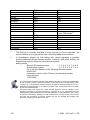
Operating instructions
TELE-Network
user's manual
english
for
TELE-PROFessional-II
Version 1.5
© 2003 - 2011 by PI + TIS
Operating instructions Tele-Network
Inhalt:
1 PREFACE ............................................................................................................... 6
0H
205H1
2 DESCRIPTION ........................................................................................................ 7
1H
206H1
3 SYSTEM REQUIREMENTS .................................................................................... 8
2H
207H13
3.1 REQUIREMENTS ................................................................................................... 8
3.2 FEATURES ........................................................................................................... 8
3H
208H14
4H
209H15
4 SCOPE OF DELIVERY AND ACCESSORIES ..................................................... 11
5H
210H6
4.1 SCOPE OF DELIVERY ........................................................................................... 11
4.2 OPTIONAL ACCESSORIES..................................................................................... 11
4.2.1 Interfaces switcher..................................................................................... 11
4.2.2 Win-TELE-PROF ....................................................................................... 11
6H
21H7
7H
21H8
8H
213H9
9H
214H0
4.2.2.1 S5 .................................................................................................................................................. 11
4.2.2.2 S7 .................................................................................................................................................. 11
10H
215H
1H
216H
4.2.3 PLC- connection cable............................................................................... 12
4.2.4 Accessories ............................................................................................... 12
12H
217H3
13H
218H4
4.2.4.1 Mounting accessories .................................................................................................................... 12
4.2.4.2 Other accessories.......................................................................................................................... 12
4.2.4.3 Phone accessories ........................................................................................................................ 12
14H
219H5
15H
20H6
16H
21H7
5 HANDLING............................................................................................................ 13
17H
2H8
5.1 WEB BROWSER .................................................................................................. 13
5.1.1 Access protection via WEB-Browser ......................................................... 14
5.2 ON-SITE CONFIGURATION ................................................................................... 17
5.2.1 Integrated Keypad ..................................................................................... 17
5.2.2 Menutree ................................................................................................... 19
18H
23H9
19H
24H30
20H
25H31
21H
26H3
2H
27H3
5.2.2.1 Menu item messages..................................................................................................................... 25
5.2.2.2 Menu item Hang Up....................................................................................................................... 25
5.2.2.3 Menu item Select Subscriber ......................................................................................................... 25
5.2.2.4 Menu item Edit subscriber ............................................................................................................. 25
5.2.2.5 Menu item online action................................................................................................................. 27
5.2.2.6 Menu item First config ................................................................................................................... 32
5.2.2.7 Menuitem Configuration................................................................................................................. 36
5.2.2.8 Menu item Options......................................................................................................................... 37
5.2.2.9 Menu item Special ......................................................................................................................... 41
5.2.2.10 Language..................................................................................................................................... 42
5.2.2.11 Info............................................................................................................................................... 43
23H
28H34
24H
29H35
25H
230H6
26H
231H7
27H
23H8
28H
23H9
29H
234H0
30H
235H41
31H
236H4
32H
237H4
3H
238H4
5.3 STATUS WITH LED ............................................................................................. 44
34H
239H45
6 IMPLEMENTING ................................................................................................... 45
35H
240H6
6.1 QUICK CONFIGURATION / QUICK ENTRANCE ......................................................... 45
6.2 KONFIGURATION ................................................................................................. 52
6.2.1 Device Type............................................................................................... 52
6.2.2 Device name.............................................................................................. 53
6.2.3 Router Mode.............................................................................................. 53
6.2.4 MPI OnBoard ............................................................................................. 53
36H
241H7
37H
24H8
38H
243H9
39H
24H50
40H
245H1
41H
246H5
6.2.4.1 MPI OnBoard Y/N .......................................................................................................................... 53
6.2.4.2 MPI OnBoard Baud........................................................................................................................ 53
6.2.4.3 OnBoard MPI-Adr. ......................................................................................................................... 53
6.2.4.4 MPI OnBoard HSA......................................................................................................................... 54
6.2.4.5 Fix OnBoard Baud ......................................................................................................................... 54
6.2.4.6 MPI/Profibus .................................................................................................................................. 54
42H
247H53
43H
248H5
4H
249H5
45H
250H6
46H
251H7
47H
25H8
6.2.5 PC/MPI-cable ............................................................................................ 55
48H
253H9
6.2.5.1 MPI cable Baud ............................................................................................................................. 55
6.2.5.2 MPI cable Adr. ............................................................................................................................... 55
2
49H
254H60
50H
25H61
© 2003 - 2011 by PI + TIS
Operating instructions Tele-Network
6.2.5.3 Cable HSA ..................................................................................................................................... 55
51H
256H
6.2.6 S7-Config (ONLY for PLC-TELE) .............................................................. 56
52H
257H63
6.2.6.1 PLC MPI address........................................................................................................................... 56
6.2.6.2 Poll list ........................................................................................................................................... 56
53H
258H64
54H
259H6
6.2.7 PG-MUX-Mode (Only for PLC-TELE and S5) ............................................ 57
6.2.8 IP Address ................................................................................................. 57
5H
260H
56H
261H7
6.2.8.1 Ethernet-IP .................................................................................................................................... 57
6.2.8.2 mit Eth-Netmask ............................................................................................................................ 58
6.2.8.3 Ethernet-Netmask.......................................................................................................................... 58
6.2.8.4 ISDN IP Address............................................................................................................................ 58
6.2.8.5 Analog IP Address ......................................................................................................................... 59
57H
26H8
58H
263H9
59H
264H70
60H
265H71
61H
26H7
6.2.9 Modem....................................................................................................... 59
62H
267H3
6.2.9.1 Extension ....................................................................................................................................... 59
6.2.9.2 Outline Code.................................................................................................................................. 59
6.2.9.3 Count of Rings ............................................................................................................................... 60
6.2.9.4 Analog Modem............................................................................................................................... 60
6.2.9.5 Dial mode ...................................................................................................................................... 60
6.2.9.6 Extension ....................................................................................................................................... 61
6.2.9.7 Speaker ......................................................................................................................................... 61
6.2.9.8 Hangup hearing ............................................................................................................................. 61
6.2.9.9 Baud rate manual .......................................................................................................................... 61
6.2.9.10 ISDN protocol .............................................................................................................................. 62
6.2.9.11 ISDN EAZ/MSN ........................................................................................................................... 62
6.2.9.12 Analogue on ISDN ....................................................................................................................... 62
6.2.9.13 ISDN aLaw/uLaw ......................................................................................................................... 63
6.2.9.14 ext. modem .................................................................................................................................. 63
6.2.9.15 Ext. modem baud......................................................................................................................... 63
63H
268H74
64H
269H75
65H
270H6
6H
271H
67H
27H8
68H
273H9
69H
274H80
70H
275H81
71H
276H8
72H
27H83
73H
278H4
74H
279H85
75H
280H6
76H
281H7
7H
28H
6.2.10 Connection .............................................................................................. 64
6.2.11 Recallmode (Only for PLC-TELE)............................................................ 64
6.2.12 Recallnumber (Only for PG-TELE) .......................................................... 64
78H
283H9
79H
284H90
80H
285H91
6.2.12.1 Max. Connect time....................................................................................................................... 64
6.2.12.2 Max. Idletime ............................................................................................................................... 65
81H
286H9
82H
287H93
6.2.13 Access code ............................................................................................ 65
83H
28H94
6.2.13.1 PIN device local ........................................................................................................................... 65
6.2.13.2 PIN plc local................................................................................................................................. 65
6.2.13.3 PIN device remote ....................................................................................................................... 65
6.2.13.4 PIN plc remote ............................................................................................................................. 66
84H
289H5
85H
290H6
86H
291H7
87H
29H8
7 FIELD OF APPLICATION ..................................................................................... 67
8H
293H
7.1 REMOTE MAINTENANCE ...................................................................................... 67
7.1.1 Via telephone line ...................................................................................... 67
89H
294H30
90H
295H301
7.1.1.1 Description..................................................................................................................................... 67
7.1.1.2 Requirements ................................................................................................................................ 67
7.1.1.3 Create Subscriber.......................................................................................................................... 67
7.1.1.4 Communication establishment....................................................................................................... 68
7.1.1.5 Accessing PLC .............................................................................................................................. 69
91H
296H30
92H
297H30
93H
298H304
94H
29H305
95H
30H6
7.1.2 WinTeleProf as replacement for PG-TELE ................................................ 70
96H
301H7
7.1.2.1 What is WinTeleProf? .................................................................................................................... 70
7.1.2.2 Requirements ................................................................................................................................ 70
7.1.2.3 Installation ..................................................................................................................................... 70
7.1.2.4 Communication establishment....................................................................................................... 72
97H
302H8
98H
30H9
9H
304H1
10H
305H1
7.1.3 Operation with UMTS/GPRS/Internet/OpenVPN ....................................... 75
10H
306H12
7.1.3.1 Requirements ................................................................................................................................ 75
7.1.3.2 Supported Cards............................................................................................................................ 75
7.1.3.3 Installation ..................................................................................................................................... 76
102H
307H1
103H
308H14
104H
309H15
7.1.4 Tele-Prof-II and GSM as Telephone line ................................................... 86
7.2 PLC-COUPLING ................................................................................................. 89
7.2.1 Coupling of several plcs via the telephone line .......................................... 89
105H
310H6
106H
31H7
107H
312H8
7.2.1.1 Set up a communication word between the plc and the TELE-Network device ............................. 89
7.2.1.2 Setup of the SPS-TELE flag .......................................................................................................... 90
7.2.1.3 Setup of the communication data module at the SPS-TELE ......................................................... 91
7.2.1.4 Send data with the SPS-TELE....................................................................................................... 92
108H
31H9
109H
314H20
10H
315H2
1H
316H2
7.3 ROUTERMODE ................................................................................................... 93
12H
© 2003 - 2011 by PI + TIS
317H2
3
Operating instructions Tele-Network
7.3.1 IP-Address................................................................................................. 94
7.3.2 Netzmask (Subnetmask) ........................................................................... 95
7.3.3 Standard Gateway ..................................................................................... 96
7.3.4 PPP-connect for the router function........................................................... 96
13H
318H24
14H
319H25
15H
320H6
16H
321H7
7.3.4.1 Connection to a dialing protected TELE-PROFessional-II ............................................................. 96
7.3.4.2 Edit of the modem user with keypad and display........................................................................... 97
7.3.4.3 How to define hostname, DNS and gateway ................................................................................. 98
17H
32H8
18H
32H9
19H
324H0
7.4 SEND FAILURE SIGNALS....................................................................................... 99
7.4.1 FAX............................................................................................................ 99
120H
325H1
12H
326H
7.4.1.1 Set-up of a communication word between plc and TELE-Network device..................................... 99
7.4.1.2 Set up of a communication data module at the FAX-TELE.......................................................... 100
7.4.1.3 Sending a fax with the FAX-TELE-function.................................................................................. 101
12H
327H
123H
328H4
124H
329H5
7.4.2 SMS......................................................................................................... 101
125H
30H6
7.4.2.1 Messages of the plc sending to a pager ...................................................................................... 101
126H
31H7
7.5 SERIAL EXTENSION (DIRECT-MODE) .................................................................. 106
7.5.1 Source-Com ............................................................................................ 106
7.5.2 Dest.-Com ............................................................................................... 107
7.5.3 Direct Mode ON ....................................................................................... 107
7.5.4 Direct Mode On with HW ......................................................................... 107
7.6 S7-CP-MODE EMULATION ................................................................................. 108
7.7 POSSIBLE CONNECTIONS FOR S7 FOR TP-II....................................................... 109
7.7.1 S7 connected to MPI/PROFIBUS-port of PLC-TELE-S7-300/400 ........... 109
127H
32H8
128H
3H9
129H
34H0
130H
35H41
13H
36H42
132H
37H4
13H
38H4
134H
39H45
7.7.1.1 PC connected to PG-TELE via RS232 to PG-V24-port ............................................................... 109
7.7.1.2 PC connected to PG-TELE via ethernet to the ethernet-port ....................................................... 109
135H
340H6
136H
341H7
7.7.2 S7 connected to ethernet-port of PLC-TELE-S7-300/400........................ 110
137H
342H8
7.7.2.1 PC connected to PG-TELE via RS232 to PG-V24-port ............................................................... 110
7.7.2.2 PC connected to PG-TELE via ethernet to the ethernet-port ....................................................... 110
138H
34H9
139H
34H50
8 SPECIAL FUNCTIONS ....................................................................................... 111
140H
345H1
8.1 RECALL MODE................................................................................................ 111
8.1.1 PLC-TELE ............................................................................................... 111
8.1.2 PG-TELE ................................................................................................. 111
8.1.3 Use recall-mode....................................................................................... 112
8.2 OPERATION OF SEVERAL PLCS AT ONE TELE-NETWORK DEVICE .......................... 112
8.2.1 Operation with Siemens MUX-757........................................................... 112
8.2.2 Operation with intelligent Bus-terminal IBX.............................................. 112
8.3 OPERATION OF SEVERAL PLCS VIA THE H1-BUS .................................................. 113
8.4 OPERATION OF SEVERAL PLCS VIA THE L1-BUS ................................................... 113
8.5 OPERATION OF SEVERAL PLCS VIA THE L2-BUS ................................................... 114
8.6 SEND DATA FROM THE PLC TO A MODEM SUBSCRIBER .......................................... 115
8.6.1 Setup of the communication word between plc and TELE-Network ........ 115
8.6.2 Setup of the ASCII-TELE-flag.................................................................. 117
8.6.3 Setup of the communication data module at the ASCII-TELE ................. 118
8.6.4 Send data with the ASCII-option.............................................................. 119
8.7 COMMUNICATION WITH A MAILBOX (MODEM)........................................................ 120
8.8 COMMUNICATION WITH AN S7-PLC.................................................................... 121
8.9 COMMUNICATION WITH EXTERNAL HANDY OR MODEM........................................... 122
8.9.1 Connecting a handy to a „PG-TELE“ ....................................................... 122
8.9.2 Connecting a handy to a „PLC-TELE S5“ ................................................ 122
8.9.3 Connecting a handy to a „PLC-TELE S7-300/400“ .................................. 123
8.10 FIREWALL ...................................................................................................... 123
8.11 HMI-MODULE ................................................................................................ 124
8.12 COMMUNICATION WITH TELE-SWITCH........................................................... 135
14H
346H52
142H
347H5
143H
348H5
14H
349H5
145H
350H6
146H
351H7
147H
352H8
148H
35H9
149H
354H60
150H
35H61
15H
356H2
152H
357H6
153H
358H64
154H
359H6
15H
360H
156H
361H7
157H
362H8
158H
4
36H9
159H
364H70
160H
365H71
16H
36H72
162H
367H
163H
368H74
164H
369H75
© 2003 - 2011 by PI + TIS
Operating instructions Tele-Network
8.12.1 Function of the TELE-SWITCH as MUX (compatible with Siemens-MUX
757) .................................................................................................................. 135
8.12.2 Function as TELE-SWITCH ................................................................... 135
8.12.3 Technical data of the TELE-SWITCH .................................................... 136
8.13 POSSIBILLITY OF PROGRAMMING OF SIEMENS OPS ........................................... 136
8.13.1 Programming with ProTool lite:.............................................................. 136
8.13.2 Programming with ProTool: ................................................................... 136
8.14 CONTROLLING OF THE TELE-NETWORK-DEVICES WITH TAPI-INTERFACE .......... 137
165H
370H6
16H
371H
167H
372H8
168H
37H9
169H
374H80
170H
375H81
17H
376H82
9 TECHNICAL DATA OF THE TELE-PROFESSIONAL-II .................................... 140
172H
37H8
9.1 MECHANICAL DATA ........................................................................................... 140
9.2 ELECTRICAL DATA ............................................................................................ 140
9.3 US-FCC-RULES FOR DEVICES WITH US-MODEM ................................................. 141
9.4 PIN ASSIGNMENT OF THE TELE-PROFFESIONAL-II................................................ 142
9.4.1 General.................................................................................................... 142
9.4.2 Analogue-modem connector.................................................................... 143
173H
378H4
174H
379H85
175H
380H6
176H
381H7
17H
382H
178H
38H9
9.4.2.1 Assignment of the connection pins of the TAE-SOCKET ............................................................ 143
179H
384H90
9.4.3 ISDN-connector ....................................................................................... 147
9.4.4 LAN-connector......................................................................................... 148
9.4.5 USB-connector ........................................................................................ 148
9.4.6 PCMCIA-connector.................................................................................. 149
9.4.7 PG-Connection ........................................................................................ 150
180H
385H91
18H
386H92
182H
387H9
183H
38H94
184H
389H5
9.4.7.1 Pin assignment for the PG-socket (TTY): .................................................................................... 151
9.4.7.2 PIN assignment for the PG-socket (V24): .................................................................................... 151
185H
390H6
186H
391H7
9.4.8 PLC-Connection ...................................................................................... 152
187H
392H8
9.4.8.1 PIN assignment for the PLC-socket (TTY):.................................................................................. 152
9.4.8.2 PIN assignment for the PLC-socket (V24): .................................................................................. 153
18H
39H
189H
394H0
9.4.9 PPI/MPI/Profibus-connector .................................................................... 154
190H
395H401
9.4.9.1 PIN assignment for the MPI/PPI/Profibus-port............................................................................. 154
19H
396H402
9.4.10 Voltage Connection ............................................................................... 155
9.5 PLC-TYPES ...................................................................................................... 156
9.6 USED PORTS ................................................................................................... 157
192H
193H
398H40
194H
39H405
397H40
10 TROUBLESHOOTING ...................................................................................... 158
195H
40H6
© 2003 - 2011 by PI + TIS
5
Operating instructions Tele-Network
1 Preface
The TELE-Network devices were developed especially for the remote maintenance
of plc-systems. This means that the device is geared completely to industrial
necessity, from its mechanical configuration to its handling. The compatibility of the
TELE-Network devices with the original programming tools of the respective plcmanufacturer has highest priority. Their connection mechanics, pin seizure, and
electrical data meet the specifications of the respective controls. Thus, users can
work directly and without special adapters with the normal cables of the devices they
want to connect, like for example PGs and control units.
All TELE-Network devices have the same hardware structure. The complete
electronics are integrated in a metal casing.
The TELE-PROFessional-II is available in 2 variations.
1. 9372-OEM
(without PCMCIA-slot for UMTS-/LAN-card)
2. 9372-OEM-H (with PCMCIA-slot for UMTS-/LAN-card)
3. 9372-FLAT (flat variant without PCMCIA-slot for UMTS-/LAN-card)
4. 9372-FLAT-H (flat variant with PCMCIA-slot for UMTS-/LAN-card)
6
© 2003 - 2011 by PI + TIS
Operating instructions Tele-Network
2 Description
The TELE-PROFessional-II can be connected with the integrated 33K6 V42-BIS
HIGH-SPEED-Modem direct to the telephone connector of your local telephone
provider and at every analogue port of your telephone system. You can connect this
device also to a digital connector, ISDN S0-port. The provided protocol is DSS1
(Euro-ISDN) or 1TR6 (national ISDN).
To connect a plc type, the device has the correct plug on board. For teleservice a S5
plc you use the additional S5-Kabel for connect the TELE-PROFessional direct to the
programming port of this plc. You can connect also to the 15pin female plug a PG or
PC to communicate with the integrated multiplexer. Or, in the office, you can connect
direct your PG or PC with the correct interface cable to this port. If you want to
connect the device to a S7 plc, you use the integrated 9pin female plug. With this
port, you are able to make connections to MPI- and Profibus with baudrates from
19K2 up to 12 MBaud. For S7-200 you have to use a RS232-PPI-cable like the
MPI/PPI-cable connected on the port PLC-V24.
The connection to a not provided plc is also possible. For this purpose, the device
has 2 9pin D-SUB plugs, one male the other female. From the PC you can connect to
the TELE-PROFessional with a standard serial cable, 9pin 1to1. The other plug
(male) has the same pinning like a PC, so you connect the plc with its own
programming cable.
The device has also 2 USB-ports. For example, you can connect a memory stick ( in
the moment not provided ) for the extension of the memory of the device. The
provided standard of the usb-port is USB1.1. Or, you can use the 2 PCMCIA-Slots
(only for version -H) for some special functions. You can connect a Handy to the
serial 9pin male port. You use for this the standard download cable of the handy. If
you make S7-teleservice, you don’t need this port, because you have connected the
plc to the on board mpi/profibus-port. For teleservice of the S5, there must be some
changes. The plc is not connected to the PLC-port, it is connect with the cable CPKabel, article number 9359-90 to the multiplexed PG-port. It is very important, that
the handy has an own number for this data transfer, you need for this a special kind
of the contract with your provider.
The TELE-PROFessional-II is connectable with a patch-cable to the Ethernet. So,
you can make a prolongation of your home Ethernet with the Ethernet of the plc side.
This function will be called “routing”. So, you can reach plc or pc they are connected
to this network.
The device can be fastened directly to the switchboard. Fixing straps for the Hut- and
C- contact rail are optionally available.
The operation of these remote maintenance units is only allowed if a supervising
person is present who can intervene in the installation at any time. Please do not
intervene in running programmes without visual communication or control.
Before installing the TELE-LINK-Network devices, please connect them by all means
with earthing PE at the casing or at the screw terminal!
Please read the user´s manual closely before installing the device. There is no
responsibility taken for damages due to incorrect connection or handling.
© 2003 - 2011 by PI + TIS
7
Operating instructions Tele-Network
3 System requirements
3.1 Requirements
The following requirements are demanded for the system environment of the TELENetwork devices:
• 230V line voltage which supplies the power pack of the plug (optional) or
• 24V DC with at least 360mA load current or
• TAE-mains socket of the Telekom, (N-coded), normally 3pin socket:
NFN <=> N = Extension device (modem, fax), F = Telephone, N = Extension
device or
• ISDN-connector (S0-bus) Euro-ISDN (DSS1) or national-ISDN (1TR6)
3.2 Features
•
• compatible with all SIMATIC-S5-PLC´s
• compatible with SIMATIC-S7-300/400-plc (connection of PLC-TELE by S7 via
standard MPI-cable with the MPI-connectors or the cable with article number
9379.1)
• compatible with SIMATIC-S7-200-plc (connection of PLC-TELE by S7 via
MPI/PPI-cable or ppi-adapter)
• ONLINE with the plc at the customer in a few seconds
• suitable for industrial use and in agreement with CE
• integrated HIGH-SPEED-modem with LineQualityControll-Functions, shorten LQM
• integrated ISDN-connector for Euro-ISDN (DSS1) or 1TR6
• 2 PMCMIA-slide-in unit for PCMCIA-plug-in cards (only for version -H)
• can be operated by all original and compatible programming devices
• second interface; select either Mulitplex operation for the operation of a 2nd PG /
PC / control device / ...or as a connection for a 2nd plc / CP for L1 / L2 / H1/ ... from
the PG-TELE, PLC 1 or PLC 2 can be switched only for S5-devices
8
© 2003 - 2011 by PI + TIS
Operating instructions Tele-Network
• supports the operation at the H1, L1, and L2 with reference to bus-dialling
• supports the operation KOR/MUX of Siemens, as well as PG-BUS
• operation software is saved in the flash memory which makes the updating of the
software easier
• absolutely simple to set parameter values
• module which checks all the device functions and the voltage supply
• the electronics to the telephone network, to the external voltage supply, to the plc
and to the programming device are dc-insulated.
• compact device in a metal casing
• easy mounting into the switchboard
• tough sheet-steel casing with a flange
• optional power supply 24V/DC or 230V/DC (24V plug-in power supply 350mA)
• circuit arrangement that fits the EMV
• easy handling because of menu drive and LCD-display in the uncoded text
• easy and fast configuration because of the menu item “first configuration“
• in the PG, a software driver is not necessary; the complete handling is taken over
by the TELE-PROFessional-II (after dialling the target system, the plc is “on your
desk“ inclusively the interface-cable). You communicate only “serial” with port PGRS232.
• only one device for several controls:
Siemens S5 & S7
AEG
Allen Bradley
Bosch
Mitsubishi
Klöckner Moeller
GE Fanuc
Selectron
Tele-Mechanique Premium TSX57
• safe data transmission because of a multiply protected data protocol, e.g. modules
are only transmitted to the plc after they have been checked for their correctness
• all PG-functions can be carried out via the telephone line or the portable phone
© 2003 - 2011 by PI + TIS
9
Operating instructions Tele-Network
• PG-coupling possible
• world-wide use possible, connection to GSM-net optional
• high data protection because of multistage password levels
• optimisation of telephone costs because of the recall function
• telephone register for 197 phone numbers is integrated into the TELE-device; this
guarantees quick and easy calling of the desired target system
• compatible world-wide to all TELE-network devices
• software updates and options transmittable by the telephone line
• update and hotline service are for free
• integrated Web-Browser for configuration the device
• possible / integrated functions:
fault report via the fax
data transmission to higher-ranking plc
data transmission to pc-server
data transmission Scall, Quix, SMS-message (standard in Siemens
Network-devices)
printer connection
L2-BUS-interface
configuration of control devices (e.g. Siemens-OPs /PCS/ ...) (OP´s
standard
for
the
Siemens
Network-Devices)
CAN-BUS-interface
Interbus-S-interface
image transmission (digital camera)
sending of e-mail
• coupling via VPN
• coupling via ethernet
10
© 2003 - 2011 by PI + TIS
Operating instructions Tele-Network
4 Scope of delivery and accessories
4.1 Scope of delivery
The TELE-PROFessional-II is delivered without any accessories. Additionaly
required accessories can be purchased later on. For more information please read
chapter 4.2 Optional accessories
401H7
402H8
4.2 Optional accessories
4.2.1 Interfaces switcher
Order number
9370-KOR
Article description
KOR-MUX / TELE-Switch
4.2.2 Win-TELE-PROF
4.2.2.1 S5
4.2.2.1.1 Ground package
Order number
9372-PC-S5
9372-PC-S5-S
9372-PC-S5-F
Article description
Win-TELEPROF Software S5 Ground package single license
Win-TELEPROF Software S5 Ground package Subsequent license
Win-TELEPROF Software S5 Ground package company license
4.2.2.1.2 Add-on package
Order number
9372-PC-S5-X
9372-PC-S5-X-S
9372-PC-S5-F-X
Article description
Win-TELEPROF Software S5 Add-on package single license
Win-TELEPROF Software S5 Add-on package Subsequent license
Win-TELEPROF Software S5 Add-on package company license
4.2.2.2 S7
4.2.2.2.1 Ground package
Order number
9372-PC
9372-PC-S
9372-PC-F
Article description
Win-TELEPROF Software S7 Ground package single license
Win-TELEPROF Software S7 Ground package Subsequent license
Win-TELEPROF Software S7 Ground package company license
4.2.2.2.2 Add-on package
Order number
9372-PC-X
9372-PC-X-S
9372-PC-F-X
Article description
Win-TELEPROF Software S7 Add-on package single license
Win-TELEPROF Software S7 Add-on package Subsequent license
Win-TELEPROF Software S7 Add-on package company license
© 2003 - 2011 by PI + TIS
11
Operating instructions Tele-Network
4.2.3 PLC- connection cable
Order number
9361-3
9361-3.05m
9361-3.06m
9361-3.10m
Article description
PLC- connection cable 15pins (S5) 3 m
PLC- connection cable 15pins (S5) 5 m
PLC- connection cable 15pins (S5) 6 m
PLC- connection cable 15pins (S5) 10 m
4.2.4 Accessories
4.2.4.1 Mounting accessories
Order number
Article description
9391-MT
Mounting set for DIN-rail-holder
4.2.4.2 Other accessories
Order number
Article description
9372
TELE-PROFessional-II Starter-Kit
9379.1
MPI-/Profibus connection cable 1m
9391.1
24V DC power supply
625mA Primary 100-240V AC
9372-24
Power connector 3pins big
9371-6
Servicebag (Only for Flat-Version)
4.2.4.3 Phone accessories
Order number
Article description
9370-8-D/USA
Phone-cable analogue Germany / USA
9370-8-ISDN
Phone-cable ISDN
9370-8-AT
Special phone-cable analogue
9370-8-BE
AT / BE / CH / DK / FR / GB / IT / NL
9370-8-CH
9370-8-DK
9370-8-FR
9370-8-GB
9370-8-IT
9370-8-NL
9370-Set
Phone-connector-set 16parts (worldwide use)
9370-TAE
TAE junction box
12
© 2003 - 2011 by PI + TIS
Operating instructions Tele-Network
5 Handling
General:
There are two ways to configure a TELE-PROF-II
1. Via the integrated Web Interface (see chapter 5.1 Web browser)
2. Via the implemented Keypad (see chapter 5.2 On-Site Configuration)
403H9
405H1
40H1
406H12
5.1 Web browser
A prerequisite for configuration via Web browser is a correct IP-Address
corresponding to your PC and a connection to a hub/switch or directly to your PC
with a cross-over-cable. A configuration with a PC via the serial interface is not
possible.
Start a Web browser of your choice (e.g. Internet Explorer) and type the IP-Addresse
of your device into the address-field. The default value of the IP-Address for the
TELE-PROFessional-II is 192.168.1.54, so you should enter the following address:
http://192.168.1.54
196H
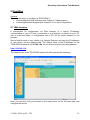
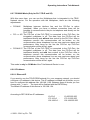
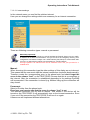
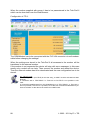
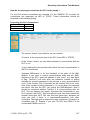
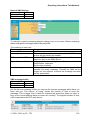
The Web-Server of the TELE-PROFessional-II will be started like following:
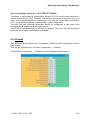
Now, you can click with your mouse to the menu items on the left hand side and
configure the device.
© 2003 - 2011 by PI + TIS
13
Operating instructions Tele-Network
5.1.1 Access protection via WEB-Browser
From Version 6.70 the TELE-Prof II has an Access protection via WEB-Browser.
Therefore we use the integrated login mechanism of your WEB-Browser. If no user
exists yet the access will be granted without entering a password.
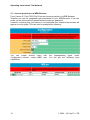
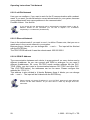
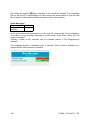
However a warning that your device is not protected from unauthorized access will
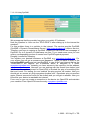
appear on every page. This can look for example like following:
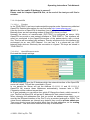
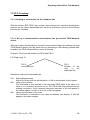
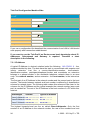
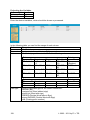
You can create several users with the corresponding rights under
Configuration→Access codes→WEB user. You will get the following input
capabilities:
14
© 2003 - 2011 by PI + TIS
Operating instructions Tele-Network
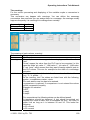
Please enter: full name, Username, Password and the rights.
First and foremost you should create a Superuser (right) SU. As soon as this one
exists you will be asked for a Username and Password at the next access.
Please note your Username and Password!
The „full name“ is just for information. For login you will need the Username and
Password.
When logged in as Superuser you have the rights to change every setting.
Furthermore there are userrights U1 … U5 whereas U1 has more rights than U5.
Each higher level automatically includes the rights of the lower level, that means
U1 includes U2 – U5
U2 includes U3 – U5 etc.
(however with further developement there will be differences for each group)
If no User with SU-rights exists, an unchecked access is possible!
Currently the groups differ from each other like following:
SuperUser Can watch and edit everything
U1
Read only
Can not edit anything
Connect and Disconnect
- No access on Userdata (WEB user and modem users)
U2
Read only
U3-U5
Not in use
Lost login data ?
If you lost your login data, it is possible to delete the WEB user via Keypad and
display (on-site at the device).
Therefore call the menu Configration→Access codes→delete WEB-user and answer
all the questions with yes. Now all WEB users are deleted and an unchecked access
is possible again.
© 2003 - 2011 by PI + TIS
15
Operating instructions Tele-Network
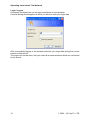
Login / Logout
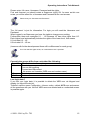
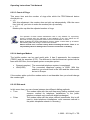
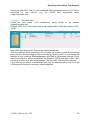
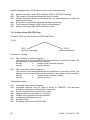
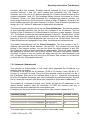
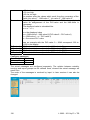
As already mentioned we use the login mechanism of your browser.
A similar dialog should appear at which you have to enter your login data.
After successfully logging in the browser will store your login data during the current
session to this device.
The logout will not be done until you close all browser-windows which are connected
to the device.
16
© 2003 - 2011 by PI + TIS
Operating instructions Tele-Network
5.2 On-Site Configuration
5.2.1 Integrated Keypad
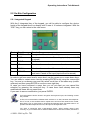
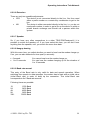
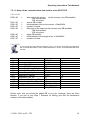
With the 6 integrated key of the keypad, you will be able to configure the device.
Inside of the keypad there is a display with 2 rows á 16 columns integrated. With the
“ESC”-key you can return to the main menu.
Taste
©
Bezeichnung
ENTER
Beschreibung
Change of menu and confirm of input.
Õ
LEFT
Ö
RIGHT
Go one menu-level back. Discarding input (Input will NOT
be stored).
Call Submenu
×
UP
Selection of a menu item. Increase of a value.
Ø
DOWN
Selection of a menu item. Decrease of a value.
Esc
ESCAPE
Cancel of the currently executed function / Go one menulevel back. Cancel of the input (Input will not be stored).
In order to get from menu level to menu level, use the cursor-up or cursor-down keys.
You can select a certain menu item by pressing ENTER or by using the cursor-right
key. You are in a submenu now and can select a sub item in the same way (cursorup/down) and then press ENTER or use the cursor-right key.
In case you have confirmed a menu item you do not want you can cancel this
selection by pressing the cursor-left key. In case there have already been any
modifications these are not saved then.
If you want to save a modification, just press ENTER.
If the tele-network device doesn’t recognize the keyboard input, the following causes
are possible:
At first, the communication between both modems is so bad, because the telephoneline is so bad, so the modems had to repeat more and more the same blocks of data,
then there is not so much time to recognize the keyboard input. But when there is no
problem with the telephone line more, the input of the keyboard is OK.
You have a connection with a tele-network device, which modem doesn’t work
correctly. So your modem tries to send the data blocks to the other modem, but there is
© 2003 - 2011 by PI + TIS
17
Operating instructions Tele-Network
no response, and so it tries it the whole time. When you have this problem, your device
has the same response as the first case. Remove the telephone plug from the device,
so that the connection cuts off. When you have a lot of time, you can press the key
codes and wait a long time, you can see under INFO-REMOTEVERSION, and there
you see nothing, so you know, that the device of the other side doesn’t work correctly.
You are at the PLC-TELE, and on the other side there is a force block or force variable,
in progress you can’t press any key, and the device does not the action you want. This
is of secure purpose.
18
© 2003 - 2011 by PI + TIS
Operating instructions Tele-Network
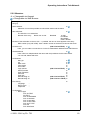
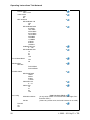
5.2.2 Menutree
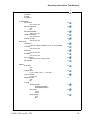
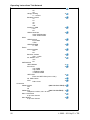
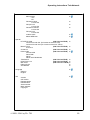
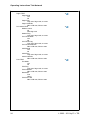
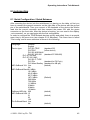
= Changeable via Keypad
= Changeable via Web Browser
messages
hang up
select subscrb.
Selection of one of the possible 197 subscriber entries and the dial to
edit subscriber
The edit of the 197 subscriber
Number of the entry
Name max. 9 char
Baudrate
12-33K
R12-R33K
M12-M33K
ISDN + RSDN
Number of the subscriber 16 chars, with “→“ possible, the next 16 chars append to this entry
RRV-number (only with recall): intern. telefon number of the device, that want this recall
Connect to IP
(ONLY for PG-TELE) Here, you can make a connection to a in the IP-addressbook defined name with Ethernet.
IP addressbook
Here is like in a telephonebook the name and the ip-address for this name stored.
You can edit, delete and store.
Onlineaction
Hang up
Lift
Data mode
Voice mode
Init modem
Login remote
Send Firmware
Fetch Firmware
Send OS
Fetch OS
Remoteconfig on
Remoteconfig off
First Config
Language
Device Type
Telephone
(ONLY for PG-TELE) (ONLY for PG-TELE) (ONLY for PLC-TELE) ...
...
...
Configuration
Device type
PLC-S5 TELE
PG-TELE
PLC-S5 KOR/MUX
PLC-S7 300/400
PLC-S7 200 9K6
PLC-S7 200 19K2
PLC-S5-F-TYPE
PLC-Pilz
PLC-Allen-Brad.
© 2003 - 2011 by PI + TIS
19
Operating instructions Tele-Network
Device name
max. 9 char
router-mode
Yes
No
MPI OnBoard
MPI OnBoard Y/N
Yes
No
MPI OnBoard Baud
9,6 kBit/s
19,2 kBit/s
45,45 kBit/s
93,75 kBit/s
187,5 kBit/s
500 kBit/s
750 kBit/s
1,5 MBit/s
3 Mbit/s
6 Mbit/s
12 Mbit/s
OnBoard MPI-Adr.
0 – 126
MPI OnBoard HSA
15
31
63
126
Fix OnBoard Baud
Yes
No
MPI/Profibus
MPI-Bus
Profi DP/Std.
Profi DP/FMS
PC/MPI-Cable
MPI-Cable Baud
19200
38400
57600
115200
Cable MPI-Adr.
0 – 31
Cable HSA
15
31
63
126
S7-Config
SPS-MPI-Address
Poll-list
Firewall
On
Off
20
(ONLY for PLC-TELE) ( is only valid, if there is no Poll-list active, for Pager, Faxand SPS-TELE)
( if there any entries exist, the S7-MPI-Adress is not valid)
© 2003 - 2011 by PI + TIS
Operating instructions Tele-Network
PG-MUX-Mode
(ONLY for PLC-S5-TELE)
PG-MUX
PG-AG
PG-MUX -c
IP-Addresses
Ethernet-IP
xxx.xxx.xxx.xxx
with Eth-Netmask
Yes
No
Ethernet-Netmask
xxx.xxx.xxx.xxx
ISDN IP-Address
xxx.xxx.xxx.xxx
Analog IP-Addr.
xxx.xxx.xxx.xxx
Net-Config
Hostname
Input for a logic hostname up to 16 char possible
1st DNS
xxx.xxx.xxx.xxx
2nd DNS
xxx.xxx.xxx.xxx
3rd DNS
xxx.xxx.xxx.xxx
Std. Gateway
xxx.xxx.xxx.xxx or logic name
list of hosts
Modem
Extension
Yes
No
Outline code
0,1,2,3,4,5,6,7,8,9,!,“,“,/,>,#,X,W,*
Count of Rings
0,1,2,3,4,5
Win2000-TAPI
Yes
No
Analog
Analogmodem
German(Komplex)
USA(600R-System)
Dial mode
Tone
Pulse
Busy identify
Yes
No
© 2003 - 2011 by PI + TIS
21
Operating instructions Tele-Network
Speaker
On
Off
Hangup hearing
0 – 10 Secs
Baudrate manual
12
24
48
96
33K
Analog on ISDN
Yes
No
ISDN aLaw/uLaw
aLaw EUR/Northam.
uLaw Southamerika
ISDN-Protocol
Euro-ISDN
1TR6
ISDN EAZ/MSN
0 – 999
ISDN
Extern
external modem
Yes
No
Baud ext. modem
9K6 – 115K2
ext. Modem cmd.
Yes
No
UMTS/GPRS
UMTS-Modem
Kind of net
only GPRS
only UMTS
1.GPRS/2.UMTS
1.UMTS/2.GPRS
UMTS-PIN
Enter the UMTS-Pins (max. 8 char)
No. SMS-Centre
APN
PIN 6 chars
Connection
Callback mode
(ONLY for PLC-TELE)
Yes
No
Callback no.
(ONLY for PG-TELE)
Telephone number, max. 16 char
Max. Connecttime
0 up to 60 minutes
Max. Idletime
0 up to 60 minutes
22
© 2003 - 2011 by PI + TIS
Operating instructions Tele-Network
Access code
dialin protect
Yes
No
PIN device local
6 chars Pin
PIN plc local
6 chars Pin
PIN device remote
6 chars Pin
PIN plc local
6 chars Pin
modem users
delete WEB-user
Special
to PG/PLC COM
(ONLY for PG-TELE)
Connect PG with PG (PG-socket of the PLC-Tele)
Connect PG with PLC (PLC-socket of the PLC-Tele’s)
Break Tx-line
(ONLY for PG-TELE)
0 bis 30 s
S7-200 on
(ONLY for PG-TELE)
Direct mode
(ONLY for PG-TELE)
Source-COM
Dest-COM
DM on
DM on with Handshake
Tele-Switch
(ONLY for PG-TELE)
PRO-TOOL 7/17
(ONLY for PG-TELE)
IBX-TEST
(ONLY for PLC-TELE)
Reboot ProfII
Soft Restart
Language
German
English
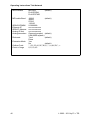
Info
Version
OS Version
Remoteversion
Remotename
Serial number
MAC-Address
Copyright
© 2003 - 2011 by PI + TIS
23
Operating instructions Tele-Network
Options
Pager-TELE
Pager Mode
Yes
No
Pager-Flag
Only even flag words, 0 to 254
Pager-COM-DB
DB1 to DB 255, DW 0 to 998
PLC/ASCII-TELE
Modem control
No
With flag word
Modem Flag
Only even flag words, 0 to 254
PLC-TELE-Mode
Yes
No
PLC-TELE-Flag
Only even flag words, 0 to 254
PLC-TELE-KOM-DB
DB1 to DB 255, DW 0 to 998
ASCII-Mode
Yes
No
ASCII-Flag
Only even flag words, 0 to 254
ASCII-COM-DB
DB1 to DB 255, DW 0 to 998
FAX-TELE
Fax-Mode
Yes
No
FAX-Flag
Only even flag words, 0 to 254
FAX-COM-DB
DB1 to DB 255, DW 0 to 998
Resolution
Fine
Heavy
FAX-POLL-DB
DB1 to DB 255, DW 0 to 998
24
© 2003 - 2011 by PI + TIS
Operating instructions Tele-Network
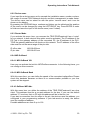
5.2.2.1 Menu item messages
In this menu item which occurs automatically on the display after starting the TELENetwork device, the user receives important data about the condition of his/her
device. It is displayed whether the TELE-Network has a direct connection to the
control:
• PLC ONLINE
• PLC OFFLINE
Moreover, after the first dialling, the user is informed whether there is a connection or
not:
• connected
• not connected
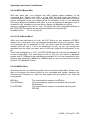
5.2.2.2 Menu item Hang Up
With this menu item, the modem disconnects an existing connection, i.e. it hangs up.
5.2.2.3 Menu item Select Subscriber
Select one of the maximally 197 saved entries by using the cursor-up/down key.
Then press ENTER for starting the actual dialling.
You can interrupt the dialling process by using the cursor-left key. This might become
necessary if you accidentally dialled the wrong number.
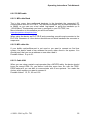
5.2.2.4 Menu item Edit subscriber
This function enables you to input up to 197 names and telephone numbers in a
telephone directory and save them there. You have the storage positions 1 to 197 at
your disposal.
If you are in this menu item, you can select with the cursor keys UP/DOWN your
desired storage position (1 to 197). Press ENTER and the cursor moves to the input
position:
© 2003 - 2011 by PI + TIS
25
Operating instructions Tele-Network
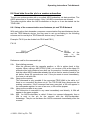
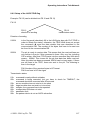
Number
of
the Subscriber name (max. 9 characters)
entry
Max. baudrate, to begin
the connection
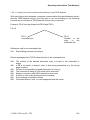
Telefon number of the subcriber (max. 16 character, or with “ “ select next entry, so
you can use both entries and you have max. 31 characters)
Schema of LCD-display for menu item Edit Subscriber
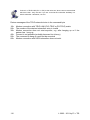
Possible baud rates:
12 – 33K
(Standartanruf ohne Besonderheiten)
R12 – R33K (Connection with Recall, see chap. Fehler!
Verweisquelle konnte nicht gefunden werden.)
M12 - M144 (call to a mailbox, no tele-network device,
see chap. Fehler! Verweisquelle konnte nicht
gefunden werden.)
ISDN
connection with the ISDN-port
RSDN
connection with Recall-mode with ISDN-port
If you have to edit a telefon number with more than 16 characters, you can do it with
following way:
You edit, for example subscriber 8, edit the telefon number with 15 characters, then
the special char “→“, and edit in subscriber 9 the rest of this telefon number.
You can select letters, numbers or other adjustments by using the cursor keys
UP/DOWN and the cursor position (if possible) by using the cursor keys
RIGHT/LEFT.
If you have activated the return call function (Rxx Baud), you will then have the
possibility to input the RC-PNr. (return call-prefix number).
If you have activated the modem call function, you had to configure the connected
PC by the TELE-PROFessional-II at the V24-Connector with following options:
19200 Baud, 8 Data-Bit, 1 Stop-Bit, No Parity and RTS/CTS for handshakes
26
© 2003 - 2011 by PI + TIS
Operating instructions Tele-Network
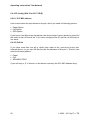
5.2.2.5 Menu item online action
5.2.2.5.1 Hang up
With this menu item, the modem disconnects an existing connection, i.e. it hangs up.
5.2.2.5.2 Lift
With this menu item, the modem receives incoming calls. This is only the case if the
adjustment “number of signals before picking up“ (which is explained further down) is
turned to zero and if the modem does not pick up independently.
5.2.2.5.3 Data Mode
In case there is only one telephone line that should be used by a TELE-Network
device and for the telephone communication with your co-worker, you can use this
telephone line with this menu item for both ends.
The co-worker recognises after picking up a parallelly working telephone the signal of
a calling TELE-Network device and can then connect the TELE-Network to the line
with this menu item. The device disconnects the existing connection to the telephone,
takes over the line and is then in data mode with the calling device. In case of speech
mode, this menu item can be used as well in order to connect TELE-Network devices
to the line. In this case, however, this function has to be carried out at both devices.
Only hang up the phone after the TELE-Network has displayed CONNECT. Do not
hang up the phone if there should be a speech mode after the data mode.
Analogue: see voice mode
© 2003 - 2011 by PI + TIS
27
Operating instructions Tele-Network
5.2.2.5.4 Voice Mode
This is the contrasting command to the command “DATA MODE“. It disconnects an
existing data connection and the speech connection is released again.
Do not hang up the phone while the data mode is in process.
Analogue: see data mode
5.2.2.5.5 Init Modem
With this command, modified initialisations are transferred to the modem.
5.2.2.5.6 Login Remote
With this action you can repeat the password input a second time, after you had
logged in incorrectly.
28
© 2003 - 2011 by PI + TIS
Operating instructions Tele-Network
5.2.2.5.7 Transmit programme
This command is used to transmit newer software versions to TELE-Network devices
with older versions. Your own programme is loaded to the other TELE-Network
device via the telephone line to the programme memory.
In this way, all TELE-Network devices can be updated with the most recent software
release.
Programmes can only be transmitted between device types that are configured
differently. (PLC-TELEÙPG-TELE or PG-TELEÙPLC-TELE): If the devics are of the
same type (PLC-TELEÙPLC-TELE or PG-TELEÙPG-TELE), there will be the error
report “partner does not recognise option“.
The TELE-Network device that has received the programme programmes itself after
the transmission. While the programming is in process, do not disconnect the device
from the voltage supply since then the complete programme becomes invalid. If the
programme is invalid, the device reports an ERROR. If this message appears, the
device has to send to your local distributor.
After the programming, the device executes a warm start and after that it reports with
the new software release yet with the same configuration.
5.2.2.5.8 Fetch programme
This is the contrasting command to the command “Transmit programme“. More
recent software releases are loaded down from the TELE-Network devices. Here, the
programme of another TELE-Network device is loaded to your own programme
memory via the telephone line.
In this way, all TELE-Network devices are updated to the most recent software
release.
Programmes can only be transmitted between device types that are configured
differently. (PLC-TELEÙPG-TELE or PG-TELEÙPLC-TELE): If the devics are of the
same type (PLC-TELEÙPLC-TELE or PG-TELEÙPG-TELE), there will be the error
report “partner does not recognise option“.
The TELE-Network device that has received the programme, programmes itself after
the transmission. While the programming is in process, do not disconnect the device
from the voltage supply since then the complete programme becomes invalid. If the
programme is invalid, the device reports an ERROR. If this message appears, the
device has to send to your local distributor.
After the programming, the device executes a warm start and after that it reports with
the new software release yet with the same configuration.
© 2003 - 2011 by PI + TIS
29
Operating instructions Tele-Network
5.2.2.5.9 Send OS
This command is used to transmit newer OS versions to TELE-PROFessional-II
devices with older versions. Your own OS is loaded to the other device via the
telephone line to the programme memory.
In this way, all TELE-PROFessional-II devices can be updated with the most recent
software release.
Programmes can only be transmitted between device types that are configured
differently. (PLC-TELEÙPG-TELE or PG-TELEÙPLC-TELE): If the devics are of the
same type (PLC-TELEÙPLC-TELE or PG-TELEÙPG-TELE), there will be the error
report “partner does not recognise option“.
The TELE-Network device that has received the programme, programmes itself after
the transmission. While the programming is in process, do not disconnect the device
from the voltage supply since then the complete programme becomes invalid. If the
programme is invalid, the device reports an ERROR. If this message appears, the
device has to send to your local distributor.
After the programming, the device executes a warm start and after that it reports with
the new software release yet with the same configuration.
5.2.2.5.10 Fetch OS
This command is used to get newer OS versions to TELE-PROFessional-II devices
with older versions. Your own OS is will be replaced from the other OS of the other
device via the telephone line to the programme memory.
In this way, all TELE-PROFessioanl-II devices can be updated with the most recent
software release.
Programmes can only be transmitted between device types that are configured
differently. (PLC-TELEÙPG-TELE or PG-TELEÙPLC-TELE): If the devics are of the
same type (PLC-TELEÙPLC-TELE or PG-TELEÙPG-TELE), there will be the error
report “partner does not recognise option“.
The TELE-Network device that has received the programme programmes itself after
the transmission. While the programming is in process, do not disconnect the device
from the voltage supply since then the complete programme becomes invalid. If the
programme is invalid, the device reports an ERROR. If this message appears, the
device has to send to your local distributor.
After the programming, the device executes a warm start and after that it reports with
the new software release yet with the same configuration.
30
© 2003 - 2011 by PI + TIS
Operating instructions Tele-Network
5.2.2.5.11 Remote Config ON
With item you can activate the configuration of the remote device. If you had
activated this item, and you change any parameter in the konfiguration, you change it
in the remote device and not in this device you are in front of. This item is so long
active, until you deactivate this item.
Be sure, that you switch off the remote configuration after ending of the edit, because
when you mean, you are ready with the configuration, and you want to edit your own
configuration, you overwrite the remote configuration, and so ist possible, you can´t get
a connect after this operation. Before you start the remote configuration, you should
have the same firmware in both devices. Please note, that the called device is a PLCTELE, because this is only from PG-TELE to PLC-TELE possible.
5.2.2.5.12 Remote Config OFF
With this item, you can deactivate the configuration of the other device, the remoet
device. After, you are ready for changing the data, go to this menu item, and after
select this item, you are on your device, no longer the on other.
Be sure, that you switch off the remote configuration after ending of the edit, because
when you mean, you are ready with the configuration, and you want to edit your own
configuration, you overwrite the remote configuration, and so ist possible, you can´t get
a connect after this operation. Before you start the remote configuration, you should
have the same firmware in both devices. Please note, that the called device is a PLCTELE, because this is only from PG-TELE to PLC-TELE possible.
© 2003 - 2011 by PI + TIS
31
Operating instructions Tele-Network
5.2.2.6 Menu item First config
With this menu item it is possible to configure the most important parameter, so that
the device is ready for action expressly.
With the cursor keys UP/DOWN you can browse through the menutree. With ENTER
you can select the corresponding menu item. With the cursor keys UP/DOWN you
can change the setting. By pressing ENTER-key again the selected value will be
receipted and stored.
5.2.2.6.1 Menu item LANGUAGE
• German
• English
menu drive in German
menu drive in English
5.2.2.6.2 Menu item DEVICE TYPE
• PLC-S5-TELE
• PG-TELE
•
PLC-S5 KOR/MUX
The device is next to the plc-control and is connected to it
The device is next to the programming device and is
connected to it
The device is not connected directly to the plc but via a
SIEMENS Multiplexer (PG-BUS-dialling), via a coordinator
(e.g. 923 C) or via the IBX-Bus (Bus system of PI with PGBUS-dialling);
(special
type
of
PLC-TELE).
The built-in Multiplexer is not active in this operation mode!
• PLC-S7 300/400
• PLC-S7 200 9K6
• PLC-S7 200 19K2
• PLC-S5-F-Type
• PLC-PILZ
• PLC-Allen-Bradley
32
This device is connected to a S7-300/400 PLC
This device is connected to a S7-200 plc and
communicates with 9600 Baud on port PLC-V24
This device is connected to a S7-200 plc and
communicates with 19200 Baud on port PLC-V24
This device is connected to S5 plc, especially a F-Type
This device is connected to PILZ PSSxxx plc, you should
connect the PLC with its own programming cable.
This device is connected to a Allen-Bradley SLC5 plc and
communicates with the DH485 or DF-1 mode.
© 2003 - 2011 by PI + TIS
Operating instructions Tele-Network
5.2.2.6.3 Menu item MPI OnBoard Y/N
• Yes
• No
The build in mpi/profibus-connector is activated and be
used.
The build in mpi/profibus-connector is deactivated.
5.2.2.6.4 Menu item MPI OnBoard Baud
With this menu item, you can define the speed of the connected mpi/profibus. Please
check this baudrate because so there is no communication possible or your bus
system will be stopped.
5.2.2.6.5 Menu item OnBoard MPI-Adr
With this menu item you define the address of the TELE-PROFessional-II as a bus
client. This address must be a unused address for the bus. If you use the default
address “0”, be sure that no PG with this address will be in the bus, too.
If you start a connection from the office to the plc, the devices uses the address, you
configured in your programming software. If your tele-service is ready, the device
uses the configured address.
5.2.2.6.6 Menu item MPI OnBoard HSA
With this menu item, you configure the HSA (highest station address) of the
connected bus. Please note that a too big HSA will slow down the speed of
communication to the bus. So, in your software, there will be the baudrate for the bus
system configured. Have you configured the “fis baudrate” to No, so, the baudrate
from the programming software is be used. If you’re a beginning to programm a plc it
is better for you, because so you are able to change the baudrate as you like.
Have you configured this item to “Yes”, the device uses the configured baudrate of
the TELE-PROFessional-II and ignors the baudrate from the software.
5.2.2.6.7 Menu item Fix OnBoard Baud
While you have tele-service to a plc, the PLC-Tele is for your software a PC/MPIadapter. So, in this driver you can configure the baudrate of your bus system. Have
you configured the “fix baudrate” to “No”, the device gets the baudrate from your
software and will use it. This is an advantage for you, so you can change the
baudrate from the office you want, and no one must chage the configuration of the
plc.
If you have configured it to “Yes”, the TELE-PROFessional-II will use the baudrate of
its own configuration. The advantage for this is, that you can’t define a baudrate
greater than 1.5 MBaud in the programming software. So, you are connected to bus
systems with baudrates 6 MBaud or 12MBaud and so, you can tele-service these
bus systems. The baudrate is fixed.
© 2003 - 2011 by PI + TIS
33
Operating instructions Tele-Network
5.2.2.6.8 Menu item MPI/Profibus
• MPI-Bus
• Profi DP/Stand.
• Profi DP/FMS
The connected bus-system is a MPI-bus
The connected bus-system is a profibus with the profile
DP/Standard
The connected bus-system is a profibus with the profile
DP/FMS
5.2.2.6.9 Menu item MPI cable Baud
The in this menu item configured baudrate is the baudrate the connected PC
communicates with the PG-TELE. The siemens software only provides baudrate up
to 38400, so you can use a tool called “mpi-speed” to setup the baudrate up to
115200 Baud. This baudrate you have to configure in your PG-TELE, too.
5.2.2.6.10 Menu item ISDN EAZ/MSN
The so called EAZ/MSN is the device number of the TELE-PROFessional-II on this
telephone plug. For the ISDN-S0-bus, every client must have this address, he will be
recognized through this number. So, the TELE-PROFessional-II knows, that he will
be meant and it will take the call. Often, the number of the telephone plug is also this
number. Please contact your supervisor of the telephone system, to get this
information. So, he can also change the ISDN-property to modem, this will be
needed for this telephone plug.
A special part is the system of Siemens, called HICOM. With a “optiset E ISDN
adapter” you don´t need a MSN/EAZ number. If you have defined one, the device
doesn’t work with this system.
5.2.2.6.11 Menu item Ethernet-IP
If you want to use the TELE-PROFessional-II in your company network, you should
configure a IP-address in this device. This IP-address is divided into 4 blocks, so you
have to configure this address like 192.168.1.100. Between these 4 blocks you can
change with → and ←. The input will be finished with the ENTER-key.
After RFC1918 free IP-addresses:
10.0.0.0
172.16.0.0 192.168.0.0 -
34
10.255.255.255
172.31.255.255
192.168.255.255
© 2003 - 2011 by PI + TIS
Operating instructions Tele-Network
5.2.2.6.12 Menu item ISDN-IP
The communication between each device is a ppp-protocoll, so every device need a
different ip-address. As you can connect with ISDN or analogue, so you need 2
different ip-addresses. So, every PG-TELE needs another address like the PLCTELE. While, you don’t need a communication between PLC-TELE and other PLCTele (PLC-TELE-option), the addresses can be the same. Please configure this
address like 176.16.1.1. This address is also divided in 4 blocks. Between these 4
blocks you can change with → and ←. The input will be finished with the ENTER-key.
Please change only this IP-address for your PG-TELE, because all other delivered
devices has the same address. So you don’t have to make any thought about this
menu item.
5.2.2.6.13 Menu item Analog IP-Adr.
The communication between each device is a ppp-protocoll, so every device needs a
different ip-address. As you can connect with ISDN or analogue, so you need 2
different ip-addresses. So, every PG-TELE needs another address like the PLCTELE. While, you don’t need a communication between PLC-TELE and other PLCTele (PLC-TELE-option), the addresses can be the same. Please configure this
address like 172.16.1.2. This address is also divided in 4 blocks. Between these 4
blocks you can change with → and ← . The input will be finished with the ENTERkey.
Diese IP-Adresse wird in 4 Blöcke aufgeteilt. Bitte geben Sie diese Adresse zum
Beispiel 176.16.1.1 ein. Zwischen den Blöcken können Sie mit → und ← wechseln.
Die Eingabe wird mit der Enter-Taste angeschlossen.
Please change only this IP-address for your PG-TELE, because all other delivered
devices have the same address. So you don’t have to make any thought about this
menu item.
5.2.2.6.14 Menuitem analogue modem
•
•
German(complex)
USA(600R)
The connected telephone system is complexed.
The connected telephone system is 600R. With this
selection you should work in the USA and the other world,
but not in Europe.
If the modem picks up but the modem noise is not hearable then you should change
the modem type!
© 2003 - 2011 by PI + TIS
35
Operating instructions Tele-Network
5.2.2.6.15 Menu item Dialmode
•
Tone:
•
Pulse:
The modem dials with the modern MFV-system. That
means you hear while dialing a little melody.
The modem dials with pulses. That means you hear while
dialing the noise of a relais.
5.2.2.6.16 Menu item Extension mode
•
YES
•
NO
The device is not connected directly to the line. You then
need either a prefix number or a certain key combination
to get to the line.
The device is either connected directly to the line, i.e. you
do not need a prefix number in order to get a line or the
device is within a private branch exchange and should call
a partner within this system.
5.2.2.6.17 Menuitem Outline Code
With these possible figures you can config the device to get a telefon line:
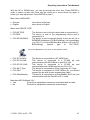
0,1,2,3,4,5,6,7,8,9,!,“,“,/,>,#,X,W,*
5.2.2.6.18 Menuitem Rings before Lifting
•
•
=
0
With this adjustment, the modem does not pick up independently. With the
menu item “pick up“ you have to make the modem pick up manually.
=
1-5
Modem picks up after the adjusted number of rings.
The operation of these remote maintenance units is only allowed if a supervising
person is present who can intervene in the installation at any time. Please do not
intervene in running programmes without visual communication or control.
Before installing the TELE-LINK-Network devices, please connect them by all means
with earthing PE at the casing or at the screw terminal!
Please read the user´s manual closely before installing the device. There is no
responsibility taken for damage due to incorrect connection or handling.
5.2.2.7 Menuitem Configuration
With this option, you can configure the TELE-PROFessional-II in its ground
configuration. For further informationen please read chapter 6.2 Konfiguration.
407H13
36
408H1
© 2003 - 2011 by PI + TIS
Operating instructions Tele-Network
5.2.2.8 Menu item Options
5.2.2.8.1 Pager-TELE
5.2.2.8.1.1
PAGER operation
With this menu item, you can turn the PAGER-TELE operation on or off.
5.2.2.8.1.2
PAGER flag
With this menu item, you can input the common flag word for the data
communication.
Use even numbers only (e.g. FW 122)! Only 0 to 254.
5.2.2.8.1.3
PAGER-COM-DB
With this menu item, you can set the communication data base (DB) in order to set
parameter values to the data flow and source at the PAGER-operation.
© 2003 - 2011 by PI + TIS
37
Operating instructions Tele-Network
5.2.2.8.2 PLC/ASCII-TELE
This menu item is only activated if the TELE-Network device has a plc-option or an
ASCII-option.
5.2.2.8.2.1
Modem Control
In this menu item, you can adjust how the communication between the plc and the
modem is carried out:
NO:
with flag word:
with digital I/O:
5.2.2.8.2.2
plc does not have the possibility to control the modem
PLC-TELE-LINK and plc have a common flag word for
controlling
PLC-TELE-LINK and plc communicated via the digital I/O-level
Modem flag
In case you selected “with FW“ (with flag word) in the menu item “modem control“,
you can now enter the common flag word for the modem control.
Use even numbers only (e.g. FW 120)! Only 0 to 254.
.
5.2.2.8.2.3
SPS-TELE operation
With this menu item, you can turn the PLC-TELE operation on or off.
5.2.2.8.2.4
SPS-TELE flag
With this menu item, you can input the common flag word for the data
communication.
Use even numbers only (e.g. FW 122)! Only 0 to 254.
38
© 2003 - 2011 by PI + TIS
Operating instructions Tele-Network
5.2.2.8.2.5
SPS-TELE-COM-DB
With this menu item, you can set the communication data base (DB) in order to set
parameter values to the data flow, source, and target at the PLC-TELE operation.
DB1 to 255, DW 0 to 998.
5.2.2.8.2.6
ASCII operation
With this menu item, you can turn the ASCII-TELE operation on or off.
5.2.2.8.2.7
ASCII flag
With this menu item, you can set the common flag word for the data communication.
Use even numbers only (e.g. FW 122)! Only 0 to 254.
5.2.2.8.2.8
ASCII-COM-DB
With this menu item, you can set the communication data base (DB) in order to set
parameter values to the data flow, source, and target at the ASCII-TELE operation.
DB1 to 255, DW 0 to 998.
© 2003 - 2011 by PI + TIS
39
Operating instructions Tele-Network
5.2.2.8.3 FAX-TELE
This menu item is only activated if the TELE-Network device has a FAX-option.
5.2.2.8.3.1
FAX-TELE operation
With this menu item, you can turn the FAX-TELE operation on or off.
5.2.2.8.3.2
FAX-TELE flag
With this menu item, you can input the common flag word for the data
communication.
Use even numbers only (e.g. FW 122)! Only 0 to 254.
5.2.2.8.3.3
FAX-TELE-COM-DB
With this menu item, you can set the communication data base (DB) in order to set
parameter values to the data flow and source at the PLC-TELE operation.
DB 1 to 255, DW 0 to 998.
5.2.2.8.3.4
Resolution
With this menu item, you can select the resolution of the fax transmit. Possible
parameters are:
• heavy
• fine
5.2.2.8.3.5
FAX-POLL-DB
In this menu item you define the communication-DB for polling. It has the same
building like the FAX-KOM-DB. But it is only activ, when the TELE-LINK-Network
device gets a fax call with a blank paper.
So you call the TELE-LINK-Network-device with your fax, send him a blank page,
and the device will call back your transmitted fax number with the data configured in
the FAX-POLL-DB.
DB 1 to 255, DW 0 to 998.
40
© 2003 - 2011 by PI + TIS
Operating instructions Tele-Network
5.2.2.9 Menu item Special
5.2.2.9.1 To PG/PLC interface?
In this menu item it is decided at the PG-TELE whether the communication at the
PLC-TELE is made via the PLC or via the PG-socket.
Normally, the PG-TELE communicates with the plc via the PLC-TELE and the PLCsocket. If there is for example a 2nd plc connected to the PLC-TELE at the PGsocket, then the PG-TELE can communicate with the plc at the PG socket of the
PLC-TELE with this adjustment.
This menu item is also valid for the H1, L1 and L2 communication if these software
options are released. In this case, the CP is connected to the PG-socket of the PLCTELE.
The following adjustments are possible:
• Connect PG-socket with PLC-socket
• Connect PG-socket with PG-socket
normal setting
2nd plc or switch to CP connection
5.2.2.9.2 Break Tx-line
This menu item is valid for example for turning on the H1. In case the connected CP
does not react anymore to the communication, a break with adjustable duration can
be sent to the CP. (Duration in seconds, 0 to 30)
5.2.2.9.3 Direkt-Mode
You can select this mode in order to realise a data transmission that does not
correspond to a communication protocol specific for controls as for example the
AS511-protocol of Siemens-plcs.
For further Information please read chapter 7.5 Serial Extension (Direct-Mode).
409H15
© 2003 - 2011 by PI + TIS
410H6
41
Operating instructions Tele-Network
5.2.2.9.4 Tele-Switch
With this option, you can configure the tele-switch device for the Tele-Networkdevices. The TELE-SWITCH can be operated at the PLC-or PG-socket of a TELENetwork device that is configured as PLC-TELE.
In the PG-TELE, the following adjustments have to be made for calling a channel:
1st line: TELE-SWITCH
2nd line: xx to ChaNr: yy xx = PG or PLC (with UP/DOWN key)
yy = Channel 00 (fed-through mode finished)
yy = Channel 01 to 16 (call corresponding slave number)
After this input, the question “Switch? YES/NO“ is displayed:
• YES
• NO
Input is taken over, channel is called
Input is dismissed, present condition remains
If there is a call, then it is reported whether the call or the transformation respectively
were successful or not. After connection clear-down, the SWITCH is automatically
deactivated.
5.2.2.9.5 IBX-Test (Only for PLC-S5 KOR/MUX)
If you have selected the device type KOR/MUX-TELE, you have now the possibility,
to test the connected pg-bus. First you select Test IBX: xx; xx stands for the pg-busnumber 1 to 31. The tele tells you, if the selected slave is connected. Automatic the
tele tries to connect the plc and gives you an OK if the Connection is good, or gives
you the message, where the failure is.
5.2.2.9.6 Restart Prof-II
With this menu item you can reset the TELE-PROFessional-II. If you have an active
telephone call, and you should reset the device on the other side, you activate the
remote configuration and select this item. So, then the telephone line will be broken,
but this is for a reset, normal. With this reset, the remote configuration will be also off.
5.2.2.10 Language
By using the UP/DOWN key, you can select between German and English menu
drive.
42
© 2003 - 2011 by PI + TIS
Operating instructions Tele-Network
5.2.2.11 Info
5.2.2.11.1 Version
This menu item informs you about the software release of your TELE-Network
device.
5.2.2.11.2 Remoteversion
This menu item informs you about software release of the called TELE-Network
device. If there is a more recent or older release, a software update can be made.
(see chapter 5.2.2.5.7
and Fehler! Verweisquelle konnte nicht gefunden
werden.).
41H7
5.2.2.11.3 Remotename
In this menu item, the device name of the called device is displayed. In this way, can
check with which installation a connection has been built up. This only works on the
condition that the called device has a device name. (see chapter 6.2.2 Fehler!
Verweisquelle konnte nicht gefunden werden.).
412H8
5.2.2.11.4 Serial number
With menu item, you can check the serial number of the TELE-PROFessional.
Normal, this number is on the back side of the device, and so, you don’t need to build
out the device to get this information.
5.2.2.11.5 MAC address
Here, you can see the internal MAC address of the TELE-PROFessional. This is an
information you can use if you are looking for a problem in our network system.
5.2.2.11.6 Copyright
Copyrights of the TELE-Network devices:
© 1994 - 2008 by PI & TIS
© 2003 - 2011 by PI + TIS
43
Operating instructions Tele-Network
5.3 Status with LED
The device can display the status of it with 5 LED. They have folowing meaning:
Connect
(analog or ISDN)
PLC/SPS Data
O
O
O
Error
Modem Data
O
O
LAN
With the Connect-LED the user knows, if there is an active telephone connection,
wether analogue or digital.
The PLC/SPS-Data-LED signs the user that data will be transferred to or from the
connected PLC. This LED is only flushing while data will be transferred.
If there will be transferred data from device to device with modem, this Modem-DataLED will be flushed.
If there is any error inside of the device, or a error with the communication, the ErroeLED is on. For further information look at the display.
If you have connected the device to the ethernet, this LED will be ON. If you have
connected the device to the Ethernet, and the LED is OFF, you should proof the
connection or the cable. While you send data with Ethernet, the LED will be flushed.
44
© 2003 - 2011 by PI + TIS
Operating instructions Tele-Network
6 Implementing
6.1 Quick Configuration / Quick Entrance
After mounting the device into the switchboard, or placing on the table, at first you
have to connect the ground connector on the right side of the device with the ground
pin of the switchboard. Then you connect of the backside of the device the telefon
lead into the correct connector and then connect the power 24V with the green
connector on the front side. After the device is booting, you can read in the display
„not connected“, so you can begin with the first configuration.
In order to configure the TELE-Network devices quickly and safely, there is a special
menu item in the menu tree (see chapter 5.2.2 Menutree). This menu item is called
“First config“ and its menu structure is shown in the following:
413H9
German
English
Device type:
PLC-S5-TELE
PG-TELE
PLC-S5-KOR/MUX
PLC-S7 300/400
PLC-S7 200 9k6
PLC-S7 200 19K2
PLC-S5-F-TYPE
PLC-Pilz
PLC-Allen-Bradley
MPI OnBoard Y/N Yes
No
MPI OnBoard Baud 9,6 kBit/s
19,2 kBit/s
45,45 kBit/s
93,75 kBit/s
187,5 kBit/s
500 kBit/s
750 kBit/s
1,5 MBit/s
3 Mbit/s
6 Mbit/s
12 Mbit/s
OnBoard MPI-Adr 000
MPI OnBoard HSA 15
31
63
126
Fix OnBoard Baud Yes
No
41H20
Language:
© 2003 - 2011 by PI + TIS
(standard S5)
(office device)
(standard S7-300/400)
(standard for PILZ-plc)
(standard for AB-plc)
(default)
(Default)
(default)
(default)
(default)
45
Operating instructions Tele-Network
MPI/Profibus
MPI-Bus
Profi DP/Std.
Profi DP/FMS
MPI-cable Baud
19200
(default)
38400
57600
115200
0-9999999
xxx.xxx.xxx.xxx
xxx.xxx.xxx.xxx
xxx.xxx.xxx.xxx
German(complex) (default)
USA(600R-system)
Tone
(default)
Pulse
Yes
No
(default)
“ “,0,1,2,3,4,5,6,7,8,9,!,“,“,/,>,#,X,W,*,→
0,1,2,3,4,5
ISDN EAZ/MSN
Ethernet-IP
ISDN IP-Adresse
Analog IP-Adr.
Analoguemodem
Dialmode
Extension-Mode
Outline-Code
Count of rings
46
(default)
© 2003 - 2011 by PI + TIS
Operating instructions Tele-Network
With the UP or DOWN keys, you can go through the menu tree. Press ENTER in
order to select a menu item. Now use the cursor-up or cursor-down key again to
select your next adjustment. Press ENTER to save it.
Menu item LANGUAGE:
• German
• English
menu drive in German
menu drive in English
Menu item DEVICE TYPE:
• PLC-S5-TELE
• PG-TELE
• PLC-S5 KOR/MUX
The device is next to the plc-control and is connected to it
The device is next to the programming device and is
connected to it
The device is not connected directly to the plc but via a
SIEMENS Multiplexer (PG-BUS-dialling), via a coordinator
(e.g. 923 C) or via the IBX-Bus (Bus system of PI with PGBUS-dialling);
(special
type
of
PLC-TELE).
The built-in Multiplexer is not active in this operation mode!
• PLC-S7 300/400
• PLC-S7 200 9K6
• PLC-S7 200 19K2
• PLC-S5-F-Type
• PLC-PILZ
• PLC-Allen-Bradley
This device is connected to a S7-300/400 plc
This device is connected to a S7-200 plc and
communicates with 9600 Baud on port PLC-V24
This device is connected to a S7-200 plc and
communicates with 19200 baud on port PLC-V24
This device is connected to S5 plc, especially a F-Type
This device is connected to PILZ PSSxxx plc, you should
connect the plc with its own programming cable.
This device is connected to a Allen-Bradley SLC5 plc and
communicates with the DH485 or DF-1 mode.
Menuitem MPI OnBoard Y/N:
• Yes
The build in mpi/profibus-connector is activated and be used.
• No
The build in mpi/profibus-connector is deactivated.
© 2003 - 2011 by PI + TIS
47
Operating instructions Tele-Network
Menuitem MPI OnBoard Baud:
With this menu item, you can define the speed of the connected mpi/profibus. Please
check this baudrate because so there is no communication possible or your bus
system will be stopped.
Menuitem OnBoard MPI-Adr:
With this menu item you define the address of the TELE-PROFessional-II as a bus
client. This address must be a unused address for the bus. If you use the default
address “0”, be shure, that no PG with this address will be in the bus, too.
If you start a connection from the office to the plc, the devices uses the address, you
configured in your programming software. If your tele-service is ready, the device
uses the configured address.
Menuitem MPI OnBoard HSA:
With this menu item, you configure the HSA (highest station address) of the
connected bus. Please note, that a to big HSA will slow down the speed of
communication to the bus. So, in your software, there will be the baudrate for the bus
system configured. Have you configured the “fis baudrate” to No, so, the baudrate
from the programming software is be used. If you’re a beginning to programm a plc it
is better for you, because so you are able to change the baudrate as you like.
Have you configured this item to “Yes”, the device uses the configured baudrate of
the TELE-PROFessional-II and ignors the baudrate from the software.
Menuitem Fix OnBoard Baud:
While you have tele-service to a plc, the PLC-Tele is for your software a PC/MPIadapter. So, in this driver you can configure the baudrate of your bus system. Have
you configured the “fix baudrate” to “No”, the device gets the baudrate from your
software and will use it. This is an advantage for you, so you can change the
baudrate from the office you want, and no one must chage the configuration of the
plc.
If you have configured it to “Yes”, the TELE-PROFessional-II will use the baudrate of
its own configuration. The advantage for this is, that you can’t define a baudrate
greater than 1.5 MBaud in the programming software. So, you are connected to bus
systems with baudrates 6 MBaud or 12MBaud and so, you can tele-service this bus
systems. The baudrate is fixed.
48
© 2003 - 2011 by PI + TIS
Operating instructions Tele-Network
Menuitem MPI/Profibus:
• MPI-Bus
• Profi DP/Stand.
• Profi DP/FMS
The connected bus-system is a MPI-bus
The connected bus-system is a profibus with the profil
DP/Standard
The connected bus-system is a profibus with the profil
DP/FMS
Menuitem MPI-Kabel Baud:
The in this menu item configured baudrate is the baudrate the connected PC
communicates with the PG-TELE. The siemens software only provides baudrate up
to 38400, so you can use a tool called “mpi-speed” to setup the baudrate up to
115200 Baud. This baudrate you have to configure in your PG-TELE, too.
Menuitem ISDN EAZ/MSN
The so called EAZ/MSN is the device number of the TELE-PROFessional-II on this
telephone plug. For the ISDN-S0-bus, every client must have this address, he will be
recognized through this number. So, the TELE-PROFessional-II knows, that he will
be meant and it will take the call. Often, the number of the telephone plug is also this
number. Please contact your supervisor of the telephone system, to get this
information. So, he can also change the ISDN-property to modem, this will be
needed for this telephone plug.
A special part is the system of Siemens, called HICOM. With a “optiset E ISDN
adapter” you don´t need a MSN/EAZ number. If you have defined one, the device
doesn’t work with this system.
Menuitem Ethernet-IP:
If you want to use the TELE-PROFessional-II in your company network, you should
configure a IP-address in this device. This IP-address is divided into 4 blocks, so you
have to configure this address like 192.168.1.100. Between these 4 blocks you can
change with → and ← . The input will be finished with the ENTER-key.
After RFC1918 free IP-addresses:
10.0.0.0
172.16.0.0 192.168.0.0 -
© 2003 - 2011 by PI + TIS
10.255.255.255
172.31.255.255
192.168.255.255
49
Operating instructions Tele-Network
Menuitem ISDN-IP:
The communication between each device is a ppp-protocoll, so every device need a
different ip-address. As you can connect with ISDN or analogue, so you need 2
different ip-addresses. So, every PG-TELE needs another address like the PLCTELE. While, you don’t need a communication between PLC-TELE and other PLCTele (PLC-TELE-option), the addresses can be the same. Please configure this
address like 172.16.1.1.
This address is also divided in 4 blocks. Between these 4 blocks you can change
with → and ← . The input will be finished with the ENTER-key.
Please change only this IP-address for your PG-TELE, because all other delivered
devices has the same address. So you don’t have to make any thought about this
menu item.
Menuitem Analog IP-Adr.:
The communication between each device is a ppp-protocoll, so every device need a
different ip-address. As you can connect with ISDN or analogue, so you need 2
different ip-addresses. So, every PG-TELE needs another address like the PLCTELE. While, you don’t need a communication between PLC-TELE and other PLCTele (PLC-TELE-option), the addresses can be the same. Please configure this
address like 172.16.1.2.
This address is also divided in 4 blocks. Between these 4 blocks you can change
with → and ← . The input will be finished with the ENTER-key.
Please change only this IP-address for your PG-TELE, because all other delivered
devices has the same address. So you don’t have to make any thought about this
menu item.
Menuitem analogue modem:
• German(complex)
The connected telephone system is complexed.
• USA(600R)
The connected telephone system is 600R. With this
selection you should work in the USA and the other world,
but not in Europe.
If the modem picks up but the modem noise is not hearable then you should change
the modem type!
Menuitem Dialmode:
• Tone:
•
50
Pulse:
The modem dials with the modern MFV-system, this
means you hear while dialing a little melody.
The modem dials with pulses, that means you hear while
dialing the noise of a relais.
© 2003 - 2011 by PI + TIS
Operating instructions Tele-Network
Menuitem Extension mode:
• YES
The device is not connected directly to the line. You
then need either a prefix number or a certain key
combination to get to the line.
• NO
The device is either connected directly to the line, i.e. you
do not need a prefix number in order to get a line or the
device is within a private branch exchange and should call
a partner within this system.
Menuitem Outline Code:
With these possible figures you can config the device to get a telefon line:
0,1,2,3,4,5,6,7,8,9,!,“,“,/,>,#,X,W,*
Menuitem Rings before Lifting:
•
•
=
0
With this adjustment, the modem does not pick up independently. With the
menu item “pick up“ you have tomake the modem pick up manually.
=
1-5
Modem picks up after the adjusted number of rings.
The operation of these remote maintenance units is only allowed if a supervising
person is present who can intervene in the installation at any time. Please do not
intervene in running programmes without visual communication or control.
Before installing the TELE-LINK-Network devices, please connect them by all means
with earthing PE at the casing or at the screw terminal!
Please read the user´s manual closely before installing the device. There is no
responsibility taken for damage due to incorrect connection or handling.
© 2003 - 2011 by PI + TIS
51
Operating instructions Tele-Network
6.2 Konfiguration
6.2.1 Device Type
With this option, you can configure the TELE-PROFessional-II in its ground
configuration. This configuration has following items:
• PLC-S5-TELE
• PG-TELE
• PLC-S5 KOR/MUX
The device is next to the plc-control and is connected to it
The device is next to the programming device and is
connected to it
The device is not connected directly to the plc but via a
SIEMENS MUX757 (PG-BUS-dialling), via a coordinator
(e.g. 923 C) or via the IBX-Bus (Bus system of PI with PGBUS-dialling);
(special
type
of
PLC-TELE).
The built-in Multiplexer is not active in this operation mode!
• PLC-S7 300/400
• PLC-S7 200 9K6
• PLC-S7 200 19K2
• PLC-S5-F-Type
• PLC-PILZ
• PLC-Allen-Bradley
52
This device is connected to a S7-300/400 plc
This device is connected to a S7-200 plc and
communicates with 9600 Baud on port PLC-V24
This device is connected to a S7-200 plc and
communicates with 19200 baud on port PLC-V24
This device is connected to S5 plc, especially a F-Type
This device is connected to PILZ PSSxxx plc, you should
connect the plc with its own programming cable.
This device is connected to a Allen-Bradley SLC5 plc and
communicates with the DH485 or DF-1 mode.
© 2003 - 2011 by PI + TIS
Operating instructions Tele-Network
6.2.2 Device name
If you input the a device name as for example the installation name, number or place,
the usage of several TELE-Network devices and their management is made easier.
The device name can be asked for with the option “remote name“ and it can be
shown on the display.
By pressing the UP/DOWN keys, numbers and letters can be edited and the position
of the cursor can be changed by using the LEFT/RIGHT key. Press ENTER in order
to finish and save the input of the device name (max. 9 chars).
6.2.3 Router Mode
If you activate this menu item, you cannuse the TELE-PROFessional-II as a “router”
for our network. In both devices this option must be activated. The IP-address of the
PG-Tele is the gateway address of the connected PC, the IP-address of the PLCTELE the gateway address of all clients on this network. The IP-address of the office
side must be not the same range of the plc side.
IP office side:
IP plc side:
192.168.004.xxx
192.168.001.xxx
6.2.4 MPI OnBoard
6.2.4.1 MPI OnBoard Y/N
Here you can activate the build in MPI/Profibus-connector. In the following items, you
can configure this connector.
6.2.4.2 MPI OnBoard Baud
With this menu item, you can define the speed of the connected mpi/profibus. Please
check this baudrate because so there is no communication possible or your bus
system will be stopped.
6.2.4.3 OnBoard MPI-Adr.
With this menu item you define the address of the TELE-PROFessional-II as a bus
client. This address must be a unused address for the bus. If you use the default
address “0”, be shure, that no PG with this address will be in the bus, too.
If you start a connection from the office to the plc, the devices uses the address, you
configured in your programming software. If your tele-service is ready, the device
uses the configured address.
Possible addresses are from 0 up to 126.
© 2003 - 2011 by PI + TIS
53
Operating instructions Tele-Network
6.2.4.4 MPI OnBoard HSA
With this menu item, you configure the HSA (highest station address) of the
connected bus. Please note, that a to big HSA will slow down the speed of
communication to the bus. So, in your software, there will be the baudrate for the bus
system configured. Have you configured the “fis baudrate” to No, so, the baudrate
from the programming software is be used. If you’re a beginning to programm a plc it
is better for you, because so you are able to change the baudrate as you like.
Have you configured this item to “Yes”, the device uses the configured baudrate of
the TELE-PROFessional-II and ignors the baudrate from the software.
Possible Values: 15, 31, 63 und 126
6.2.4.5 Fix OnBoard Baud
While you have tele-service to a plc, the PLC-Tele is for your software a PC/MPIadapter. So, in this driver you can configure the baudrate of your bus system. Have
you configured the “fix baudrate” to “No”, the device gets the baudrate from your
software and will use it. This is an advantage for you, so you can change the
baudrate from the office you want, and no one must chage the configuration of the
plc.
If you have configured it to “Yes”, the TELE-PROFessional-II will use the baudrate of
its own configuration. The advantage for this is, that you can’t define a baudrate
greater than 1.5 MBaud in the programming software. So, you are connected to bus
systems with baudrates 6 MBaud or 12MBaud and so, you can tele-service this bus
systems. The baudrate is fixed.
6.2.4.6 MPI/Profibus
With this menu itm, you define the profile of the connected mpi/profibus. Please note,
that you configure the correct profile for the connected bus system, because the
timing will be changed, not, that your bus system will be paused if you uses the
wrong profile.
MPI-Bus
Profi DP/Stand.
Profi DP/FMS
54
The connected bus-system is a MPI-bus
The connected bus-system is a profibus with the profil
DP/Standard
The connected bus-system is a profibus with the profil
DP/FMS
© 2003 - 2011 by PI + TIS
Operating instructions Tele-Network
6.2.5 PC/MPI-cable
6.2.5.1 MPI cable Baud
The in this menu item configured baudrate is the baudrate the connected PC
communicates with the PG-TELE. The siemens software only provides baudrate up
to 38400, so you can use a tool called “mpi-speed” to setup the baudrate up to
115200 Baud. This baudrate you have to configure in your PG-TELE, too.
More information to this software you will found under
www.tpa-partner.de/mpivers.htm
197H
When using the device as PLC-TELE and connecting a serial<>mpi-converter to the
PLC/V.24 connector of it the device should know at which baudrate the converter is
responsive.
6.2.5.2 MPI cable Adr.
If your buildin mpi/profibus-port is not used or you want to connect an 2nd bus
system, the device need a own address like every other client in the system. You
should proof, that you use a address no one other used it.
Possible Values: 0 up to 31.
6.2.5.3 Cable HSA
When you are using a serial<>mpi-converter like a MPI/PPI-cable, the device should
know the correct HSA. So, you define it with this menu item. So, with the TELEPROFessional-II you are able to communicate with 2 bus systems. You make the
choice, which system you want to connect it.
Possible Values: 15, 31, 63 und 126.
© 2003 - 2011 by PI + TIS
55
Operating instructions Tele-Network
6.2.6 S7-Config (ONLY for PLC-TELE)
6.2.6.1 PLC MPI address
Here is write down the mpi-adress for the plc, which you need for following options:
• Pager-Option
• Fax-Option
• SPS-Option
If you haven’t configured an mpi-adress, the device doesn’t know which plc gives him
the order to dial, to send a fax. If you have configured the S7-poll-list, so this entry is
not active.
6.2.6.2 Poll list
If you have more than one plc´s, which have order to fax, send sms for the telenetwork device, so you can edit this list with the adresses of this plc´s. This list is be
reed for following options:
• Pager
• Fax
• SPS/ASCII-TELE
If you edit only a „0“ in this list, so the device uses only the PLC MPI address-entry.
56
© 2003 - 2011 by PI + TIS
Operating instructions Tele-Network
6.2.7 PG-MUX-Mode (Only for PLC-TELE and S5)
With this menu item, you can use the Multiplexer that is integrated in the TELENetwork device. For the operation with the Mulitplexer, there are the following
adjustments:
•
•
•
PG-MUX
Multiplexer between telefone line and the PG-Port is active
(standard). When you have a telefone connection there will be
possible to communicate to the plc via telephone and directly on the
PLC-TELE.
PG <-> AG The PG-Port of the PLC-TELE is connected to the PLC-Port, the
integrated multiplexer is off. The data from the PG-Port will be
transferred directly and without time controll to the PLC-Port. After a
telephone connect this communication will be broken, so the
communication above telephone line can use maximum speed and
performance. After hang up the line the PG-Port top PLC-Port
communication will be driven, again.
PG-MUX-C The PG-Port of the PLC-TELE is connected to the PLC-Port, the
integrated multiplexer is off. The data from the PG-Port will be
transferred directly and with time controll to the PLC-Port. After a
telephone connect this communication will be broken, so the
communication above telephone line can use maximum speed and
performance. After hang up the line the PG-Port top PLC-Port
communication will be driven, again.
This mode is only for S5-Mode of the Tele-Network-Device in use.
6.2.8 IP Address
6.2.8.1 Ethernet-IP
If you want to use the TELE-PROFessional-II in your company network, you should
configure a IP-address in this device. This IP-address is divided into 4 blocks, so you
have to configure this address like 148.149.1.100. Between these 4 blocks you can
change with → and ← . The input will be finished with the ENTER-key.
The default IP-address of this device is 192.168.1.54.
According to RFC1918 free IP-addresses:
10.0.0.0
172.16.0.0 192.168.0.0 -
© 2003 - 2011 by PI + TIS
10.255.255.255
172.31.255.255
192.168.255.255
57
Operating instructions Tele-Network
6.2.8.2 mit Eth-Netmask
Here you can configure, if you want to work for the IP-communiccation with a subnetmask. If you want, you should select a correct subnet-mask for your system, because
wrong subnet-mask may cause problems in the communication.
Possible Values: Yes and No
If you choose NO the Subnetmask will be automatically calculated based on the IPAddress. Details for the calculation you can find in chapter 7.3.1 IP-Address
respectively 7.3.2 Netzmask (Subnetmask).
415H2
417H23
416H2
418H2
6.2.8.3 Ethernet-Netmask
Here is the subnet-mask if you want to use it, to define. Please note, that you use a
mask same in the current network in your system.
Between these 4 blocks you can change with → and ← . The input will be finished
with the ENTER-key.
The TELE-PROFessional-II uses the subnet-mask: 255.255.255.0
6.2.8.4 ISDN IP Address
The communication between each device is a ppp-protocoll, so every device need a
different ip-address. As you can connect with ISDN or analogue, so you need 2
different ip-addresses. So, every PG-TELE needs another address like the PLCTELE. While, you don’t need a communication between PLC-TELE and other PLCTele (PLC-TELE-option), the addresses can be the same. Please configure this
address like 172.16.1.1.
This address is also divided in 4 blocks. Between these 4 blocks you can change
with → and ← . The input will be finished with the ENTER-key.
Please change only these IP-address for your PG-TELE, because all other delivered
devices has the same address. So you don’t have to make any thought about this
menu item.
58
© 2003 - 2011 by PI + TIS
Operating instructions Tele-Network
6.2.8.5 Analog IP Address
The communication between each device is a ppp-protocoll, so every device need a
different ip-address. As you can connect with ISDN or analogue, so you need 2
different ip-addresses. So, every PG-TELE needs another address like the PLCTELE. While, you don’t need a communication between PLC-TELE and other PLCTele (PLC-TELE-option), the addresses can be the same. Please configure this
address like 172.16.1.1.
This address is also divided in 4 blocks. Between these 4 blocks you can change
with → and ← . The input will be finished with the ENTER-key.
Please change only these IP-address for your PG-TELE, because all other delivered
devices has the same address. So you don’t have to make any thought about this
menu item.
6.2.9 Modem
6.2.9.1 Extension
There are only two possible adjustments:
• YES
The device is not connected directly to the line. You then need
either a prefix number or a certain key combination to get to the
line.
• NO
The device is either connected directly to the line, i.e. you do
not need prefix number in order to get a line or the device is
within a private branch exchange and should call a partner within
this system.
6.2.9.2 Outline Code
Here, the key combination or the prefix number that are necessary for the connected
telephone installation or each telephone set are set in order to call the line.
Possible Values:
0,1,2,3,4,5,6,7,8,9,!,“,“,/,>,#,W,*
Numbers 0 to 9
Earthing key ( R )
Flash-key (#)
Break 1/8sec
Break 2sec
If you have to dial for example “0“ in order to get a line,
you have to input “0“ here
The earthing key can be input with the mathematical sign ( > )
The flash-key corresponds to the normal exclamation mark ( ! )
It is the / (Slash)
It is the , (comma)
© 2003 - 2011 by PI + TIS
59
Operating instructions Tele-Network
6.2.9.3 Count of Rings
This menu item sets the number of rings after which the TELE-Network device
should pick up.
• =0
With this adjustment, the modem does not pick up independently. With the menu
item “pick up“ you have to make the modem pick up manually.
• = 1-5
Modem picks up after the adjusted number of rings.
The operation of these remote maintenance units is only allowed if a supervising
person is present who can intervene in the installation at any time. Please do not
intervene in running programmes without visual communication or control.
Before installing the TELE-LINK-Network devices, please connect them by all means
with earthing PE at the casing or at the screw terminal!
Please read the user´s manual closely before installing the device. There is no
responsibility taken for damage due to incorrect connection or handling.
6.2.9.4 Analogue Modem
The buildin modem can be used world wide. It has 2 approavals, the european
(TBR21) and the american (FCC). The different is, that the american system has its
base with 600 Ohm, the european system a complex system.
•
•
German(complex) The connected telephone system is complexed.
USA(600R)
The connected telephone system is 600R. With this
selection you should work in the USA and the other world,
but not in Europe.
If the modem picks up but the modem noise is not hearable then you should change
the modem type!
6.2.9.5 Dial mode
In this menu item, you can choose between two different dialling methods:
• Tone
The modem dials with the multi-frequency dialling method (most
common method for telephone installations, in the public
telephone network only used with digital exchanges)
• Pulse
The modem dials with the pulse method (sometimes, this is still
used in older telephone installations, most common method in
the public telephone network in Germany)
60
© 2003 - 2011 by PI + TIS
Operating instructions Tele-Network
6.2.9.6 Extension
There are only two possible adjustments:
• YES
The device is not connected directly to the line. You then need
either a prefix number or a certain key combination to get to the
line.
• NO
The device is either connected directly to the line, i.e. you do not
need prefix number in order to get a line or the device is within a
private branch exchange and should call a partner within this
system.
6.2.9.7 Speaker
So, if you have very often connections to a other TELE-PROFessional-II, it is
possible to switch the speaker off. If you have select this item, you will don’t hear
anything from the speaker, until, you switch the menu item back.
6.2.9.8 Hangup hearing
With this menu item, you adjust whether you want to hear how the modem hangs up.
If so, you can also determine a time span (in seconds):
• 0 second:
• 1 to 10 seconds:
You cannot hear how the modem hangs up.
You can hear the modem hanging up for the duration of
1 to 10 seconds
6.2.9.9 Baud rate manual
This entry of the Baud rate is only valid for data and speech operation. When
switching from speech to data operation, the modem has to start with an initial value
(initial Baud rate) in order to build up the connection. This initial Baud rate
corresponds to the “Baud rate manual“.
Following items are possible:
12:
24:
48:
96:
33K:
1200 Baud
2400 Baud
4800 Baud
9600 Baud
33600 Baud
© 2003 - 2011 by PI + TIS
61
Operating instructions Tele-Network
6.2.9.10 ISDN protocol
For the connection to the digital ISDN-system, you should please note, that there are
2 different protocols are possible:
•
•
DSS1 (Euro-ISDN)
1TR6 (national ISDN)
The national ISDN is today not so often used. This was in earlier day a most used
system, but today not more. All new ISDN-system uses the newer form called EuroISDN or DSS1. With this menu item you switch the protocol. But be shure, that after
selectoing this menu item, the device must be restartet.
6.2.9.11 ISDN EAZ/MSN
The so called EAZ/MSN is the device number of the TELE-PROFessional-II on this
telephone plug. For the ISDN-S0-bus, every client must have this address, he will be
recognized through this number. So, the TELE-PROFessional-II knows, that he will
be meant and it will take the call. Often, the number of the telephone plug is also this
number. Please contact your supervisor of the telephone system, to get this
information. So, he can also change the ISDN-property to modem, this will be
needed for this telephone plug.
A communication with ISDN is without MSN/EAZ is not possible! A special part is the
system of Siemens, called HICOM. With a “optiset E ISDN adapter” you don´t need a
MSN/EAZ number. If you have defined one, the device doesn’t work with this system.
6.2.9.12 Analogue on ISDN
Here, with this menu item it is possibel for TELE-PROFessional with a hardware
version of 1.1 to communicate with a analogue partner althoug it is connected to a
digital ISDN port.
So, with this feature, you don’t have to aks your customer, do they use analog or
digital, you only have to select it in this menu item, you are possible to drive both.
Possibel Values: YES and NO
After changing this menu item, the TELE-PROFessional-II must be restartet.
62
© 2003 - 2011 by PI + TIS
Operating instructions Tele-Network
6.2.9.13 ISDN aLaw/uLaw
For the connection with „analogue on ISDN“ you should know, which protocol is for
the digitalization of the analogue system used.
Following protocols are provides with the TELE-PROFessional-II:
•
•
aLaw:
uLaw:
europe / north america
south america
After changing of this item, you must restart the device again.
6.2.9.14 ext. modem
You can drive the TELE-PROFessional-II with analogue or digital telephone system,
you can drive it also with handy or a external modem. Therefore, you have to connect
the handy/modem to the PLC-V24-port of the Tele-PROFessional-II.
With this item you change the communication path to the external modem.
6.2.9.15 Ext. modem baud
Here, you can define the serial speed for the communication to a defined external
modem or handy. Possible values are from 9600 up to 115200 baud.
If you connect a handy to the device, please note, that a lot of handys onlay provide
baudrates of 57600 or 19200 baud. That for the connection used PLC-V24-port has
the same pinning like a PC, you can try to communicate with your pc and a terminal
software to this modem, to get the information of the baudrate.
Connect the handy/modem to your PC, start a terminal software (Hyperterminal,
ZOC,…) and define the communication baudrate you think its correct. Now, after the
activation of this, type in your software an “AT” and press Enter. Get you an “OK” for
answer, the selected baudrate is ok, it is provided from the modem/handy. So, with
this way, you can get the maximum possible baudrate for communication. This
baudrate, you select in this menu item, connect the device to the TELEPROFessional-II and then restart it.
Now, the devices beginns to restart and the connected external modem/handy is the
standard modem for the analog communication.
© 2003 - 2011 by PI + TIS
63
Operating instructions Tele-Network
6.2.10 Connection
6.2.11 Recallmode (Only for PLC-TELE)
Here, you can turn the return call mode on or off.
Possible adjustments:
YES
NO
This menu item is only necessary for the PLC-TELE.
6.2.12 Recallnumber (Only for PG-TELE)
Here, you can input the prefix number plus the number with which the TELE-Network
device that requires a return call can be reached.
Possible Entries: max. 16 chars Telephonenumber
This menu item is only active with the PG-TELE.
6.2.12.1 Max. Connect time
With this menu item, you determine the maximum duration of the connection. After
this maximum, the connection is disrupted. The duration is set in minutes. The
maximum is 60 minutes. This item will be ignored, if you define this time with “0”.
64
© 2003 - 2011 by PI + TIS
Operating instructions Tele-Network
6.2.12.2 Max. Idletime
Here, you determine the maximum duration of the idle operation of the PG. The time
span starts when there is no exchange of data between the plc and the PG anymore.
After the maximum time is up, the connection is disconnected. The duration is set in
minutes. The maximum is 60 minutes.
This item will be ignored, if you define this time with “0”.
6.2.13 Access code
6.2.13.1 PIN device local
Password for the protection of the configuration of your TELE-Network device (PLCTELE or PG-TELE). The parameters of the device can only be changed after the
input of the correct password.
(local =>means the device in front of you)
Max. 6 characters
6.2.13.2 PIN plc local
Password of the device that is located at the installation (PLC-TELE). This password
protects the connected plc-control against unauthorised access via the telephone
line. Without inputting a password, “PLC-OFFLINE“ is reported via the telephone line
and then there is an access is not possible.
(local => means the device in front of you)
Max. 6 characters
6.2.13.3 PIN device remote
Input of the password “PIN device local“ at the partner device with which you are
connected via the telephone line. Input only possible if the partner device does not
have a password protection or if the user knows the password.
(Remote => means the device you have access to via the telephone line)
Max. 6 characters
© 2003 - 2011 by PI + TIS
65
Operating instructions Tele-Network
6.2.13.4 PIN plc remote
Input of the password “PIN plc local“ at the partner device with which you are
connected via the telephone line. Input only possible if the partner device does not
have a password protection or if the user knows the password.
(Remote => means the device you have access to via the telephone line)
Max. 6 characters
The access to a TELE-Network device that is protected by a password via the
telephone line (see Login Remote) or at the device itself is only possible if the user
knows the password.
Please do not forget your password or keep it at a safe place. In case you forget the
password, you have to send the device back to the producer because it has to be reset
in its original state. This cannot be done by the customer or the partner or by telefone
line!
66
© 2003 - 2011 by PI + TIS
Operating instructions Tele-Network
7 Field of Application
7.1 Remote Maintenance
7.1.1 Via telephone line
7.1.1.1 Description
A (Remote-)TELE-PROFessional II, which is connected to the PLC will be called
from the local TELE-PROFessional II. Consequently you can access your PLC from
your PC via telephone line quick and easily.
7.1.1.2 Requirements
Hardware:
- 2x TELE-PROFessional II
The remote maintenance can be also realized with only one TELE-PROFessional II
For further information please read chapter 7.1.2 WinTeleProf as replacement for PGTELE after that.
419H25
420H6
7.1.1.3 Create Subscriber
The TELE-PROFessional II has a phone-book similar to a mobile phone in which you
can store up to 197 entries.
To create a new entry or edit an existing entry choose the menu item Edit subscriber.
More information to this topic you can find in chapter 5.2.2.4 Menu item Edit
subscriber.
421H7
© 2003 - 2011 by PI + TIS
42H8
67
7.1.1.4 Communication establishment
Schematic:
7.1.1.4.1 Configuration PG-TELE
The Device which is connected to your PC must be configured as PG-TELE under
Configuration → Device type.
7.1.1.4.2 Configuration PLC-TELE
The Device which is connected to the PLC must be configured as PLC-TELE
depending on which PLC you want to control.
The automatic pick up should also be enabled. For this you have to set the value
under Configuration → Modem → Count of Rings to 1.
7.1.1.4.3 Connection establishment
To establish a connection the number of the PLC-TELE has to be stored in the
phone-book of the PG-TELE. Select the menu item Select subscrb. and then the
entry which includes the number of the PLC-TELE to cause a phone-call.
7.1.1.5 Accessing PLC
Now you can communicate with the PLC as if it was connected to your PC directly.
For further information please read chapter 8.8 Communication with an S7-PLC.
423H9
42H30
7.1.2 WinTeleProf as replacement for PG-TELE
7.1.2.1 What is WinTeleProf?
WinTeleProf is a Software, which simulates the PG-TELE in the remote-maintenance
via telephone (see chapter 7.1.1 Via telephone line). Thereby the remotemaintenance can be realized with only one TELE-PROFessional II. Though you will
need an additional external 56k Modem and the WinTeleProf Software on your local
PC.
425H31
426H3
For the remote-maintenance the carrier frequency must be constant. Some notebook
soft modems neglect that, because they mainly are designed for surfing the internet,
where the frequency is given by the provider. Our advice is to use an external modem
instead.
7.1.2.2 Requirements
Hardware:
- 1x TELE-PROFessional II
- 1x 56k Modem Extern
Software:
- 1x WinTeleProf
7.1.2.3 Installation
1. Insert the SPS_MEGA_TOOLBOX Disc into the CD – ROM drive of your PC
and wait until the SPS Toolbox appears.
Sollte dieser Dialog nicht automatisch erscheinen, starten Sie bitte die Datei Mega.exe
auf der SPS_MEGA_TOOLBOX CD.
70
© 2003 - 2011 by PI + TIS
Operating instructions Tele-Network
2. Click on „Tele-Professional II“ and then select „WinTeleProf“ to install the
demo-version.
3. After
choosing
language
the
welcome dialog appears in the
chosen language. Click “Next“ to
define the installation path (see
picture). This can be done by
clicking “Browse…”. If you are ready
press
“Next“
to
continue.
4. In the next dialog you can
choose the program folder for
your start menu. Continue with
“Next”.
5. In the following dialog choose the
Installationstype and click „Next“ to
continue. Now type your name and
the name of your company and
confirm by clicking „Next“.
6. Now a short summary in which you
can review your entries.
© 2003 - 2011 by PI + TIS
71
7. Now the software will be installed to your PC. This may take a few minutes on
elder systems.
8. To complete the installation
you must reboot your PC
now. Therefore let the
checkbox
„Reboot
now“
checked and click „Finish“
7.1.2.4 Communication establishment
1. When starting the software for the first time
the Settings-dialog will appear. Here you can
define the virtual COM Ports. This dialog can
be opened any time by clicking „Einstellungen“
(Settings).
S7 COM:
Via this COM Port you can
access the S7 which is
connected
to
your
PLC-TELE
S5 COM:
Via this COM Port you can
access the S5 which is
connected
to
your
PLC-TELE
Direkt Mode COM: This COM Port is for serial
extension, which means that no
protocol-inspection
will
take
place. Consequently you can
connect any desired serial
device.
2. Configure your modem under Start → Settings →
System
configuration
→
Telephone
and
Modemoptions
72
© 2003 - 2011 by PI + TIS
Operating instructions Tele-Network
3. When
you
have
configured
your
modem click „phone
book“
4. By clicking the symbol next to the entry number
you can edit the corresponding entry
respectively create a new entry. By clicking the
cross the corresponding entry will be deleted.
5. Create a new entry in which you have defined the number of your TeleProfessional II and then click on the Floppy-Disc-Symbol to store the entry.
6. Click on the phonenumber and enter the
login
data
you
have
configured in the menu item
„Access Codes“. Check if
you have chosen the
correct modem and click
„Verbinden“ (Connect) to
cause
a
phone-call.
© 2003 - 2011 by PI + TIS
73
7. If the connection establishment was successful, the mainscreen will appear
again. If you have configured a PIN for the local PLC in your Tele-Professional
II under „Access Codes“ then click on „RemoteSPS-Login“, enter the PIN and
press
„Anmelden“
(Login).
8. If this Message appears, you have
logged
in
to
your
PLC
successfully.
74
© 2003 - 2011 by PI + TIS
Operating instructions Tele-Network
7.1.3 Operation with UMTS/GPRS/Internet/OpenVPN
7.1.3.1 Requirements
Operating-System: minimum OS 0.37
Firmware: minimum 7.34
7.1.3.2 Supported Cards
Option 3G CDMA Model: GTmax EMEA
It is recommended to run the card with an external antenna. As network operator we
have tested T-Mobile and found large flexibility and consultation. T-Mobile currently
offers tariffs for „web’n walk“ with a monthly data volume till 5 GB. Please note that
even this amount can be exceeded. From then it will be really expensive (1,- Euro
per MByte). So look out for that.
© 2003 - 2011 by PI + TIS
75
7.1.3.3 Installation
Before you insert the card configuration data has to be entered in the device:
- Cardtype
- kind of net (only UMTS, only GPRS, 1.GPRS/2.UMTS, 1.UMTS/2.GPRS)
Please inform yourself which net is available in your region from your provider before
implementing. In case of doubt use 1.UMTS/2.GPRS. But therefore we will offer
diagnosis possibilities in future.
- Pin
It is important, that the Pin-Number is entered correctly. Otherwise it may happen
that the SIM-Card will be blocked. Unblocking it is only possible with the PUK. This
method is currently not supported by TELE-PROF-II which means you ought to put
the SIM-Card in a handy or a notebook and unlock it.
- No. SMS-Centre
This entry can normally be empty. If you provide the card in foreign countries please
inform yourself about the corresponding numbers from your provider. This number is
only necessary for SMS-operation anyway.
- APN
APN ist he so called Service-Point-Name over which you establish your internet
connection at yout provider. Following names are currently known:
for T-Mobile:
- internet.t-mobile
With this APN you only will get assigned a private IP-Address and will not be
reachable in the internet.
- ca.t-mobile
With this APN T-Mobile will assign a public IP-Addresse to the card. Therewith you
can use the DynDNS-Option.
You have to activate this APN from T-Mobile. (According to the last state the activation
is free of charge and very quick)
76
© 2003 - 2011 by PI + TIS
Operating instructions Tele-Network
7.1.3.3.1 Internetsettings
In the network menu you can find the subitem internet.
Here you can change the settings which are necessary for an internet-connection.
There are following connection-types: manual or permanent
Absolutely important:
When connecting to the internet you should activate the firewall. Never use your public
IP-Address for a direct communication. This you can do in an emergency case e.g. first
configuration via internet. Always use a VPN-Channel (see below) to communicate with
your PLC or other devices, which are connected to a TCP/IP-network.
Through operation via internet there can be additional costs. Ask your provider for a
suitable tariff.
Manual:
When choosing this connection-type the other settings of this dialog are not relevant.
This means that the user must start the internet connection via phone-book manually.
Therefore create the corresponding entry in the phone-book and don’t forget the
cross in the column “inet”, so the TELE-PROF-II knows that this is a connection to
the internet. After the connection is established depending to the settings DynDNS
will be executed. If the connection is closed (e.g. Modem hang up) the connection will
stay closed.
Permanent:
Select a Provider from the phone-book.
Even here you have to note that the cross in column “inet” is set.
The internet connection will be tried to remain. That means if the device will be
turned on the TELE-PROF-II will automatically turn on the internet-connection. Even
if you cut off the connection the TELE-PROF-II will turn it on again.
However we will implement different alternatives.
© 2003 - 2011 by PI + TIS
77
7.1.3.3.2 Using DynDNS
We presuppose that the provider has given us a public IP-Addresse.
Now the question is: How can the TELE-PROF-II after dialing-up to the internet be
reached?
For this problem there is a solution in the internet. The service provider DynDNS
(DynDNS = Dynamic DomainName Server) (http://www.dyndns.org) offers a service.
Therefore you have to register at DynDNS. Details you can find on the homepage of
DynDNS. Up to 5 dynamic IP-Addresses are free. If you need some more you can
order a corresponding number of names from DynDNS against payment.
Roughly it works like following:
You register your desired hostname at DynDNS e.g. mysystem.dynalias.com. For
your access you will get a username and password. These you have to enter in the
setting DynDNS config and set „use DynDNS“ to yes. At the next internet dial-up the
TELE-PROF-II will register the IP-Address which is assigned to it under
mysystem.dynalias.com. Instantly you have access to the machine via the address
mysystem.dynalias.com. However you are working with the firewall (see below) and
the access via modem (except for OpenVPN) is blocked the ping or something like
that won’t work. For testing you can unblock the ping service via modem. Now you
should get an answer at „ping mysystem.dynalias.com“. Deactivate ping via modem
again (internet connection must not be closed) and you will get no answer. Now you
know that your device is reachable via internet.
From now on you can create a connection to the device via OpenVPN and maintain
your machine. Even OpenVPN uses the entry mysystem.dynalias.com.
198H
19H
20H
201H
20H
78
© 2003 - 2011 by PI + TIS
Operating instructions Tele-Network
What to do if no public IP-Address is present?
Please read the chapter OpenVPN first, at the end of the text you will find a
solution.
7.1.3.3.3 OpenVPN
7.1.3.3.3.1
Function
In the TELE-PROF-II we have implemented the popular under Opensource published
OpenVPN. Detailed information you can find under http://www.openvpn.net .
Here the function of OpenVPN is described, how it is implemented in TELE-PROF-II.
Basically there are two operating modes of OpenVPN: server or client.
Normally the device on machine-side (PLC-TELE) is configured as server. With
OpenVPN we provide a new network-interface in TELE-PROF-II. This interface will
quasi be connected to the OpenVPN-interface of the partner-device with a virtual
line. This line will be realized with software. Thereby all protocols for this interface are
exchanged via an own UDP-Channel. You can say it is a phone-call per UDP
between both devices. Obviously the connection is crypted. The keys are stored in
TELE-PROF-II.
203H
7.1.3.3.3.2
OpenVPN server-mode
Enclosed the sample settings.
In server-mode you give the IP-Address which the network-interface of the OpenVPN
server will obtain. This will be committed in IP pool.
In our sample the Server will get the Address 10.111.111.1 and 10.111.111.2.
OpenVPN will reserve these addresses automatically, because later a PPPConnection will be realized across them.
In IP pool netmask you can define from which IP-Range the clients, which connect to
your TeleProf via OpenVPN, will get an IP-Address for their networt-interface.
When choosing the addresses note that you select an address-range which is not
used by the Ethernet-Interface of the Prof II or by a modem (analogue or ISDN). The
virtual tunnel-addresses are (almost) any desired, they must be private addresses.
They even should come from another block than the real addresses, so the routing
will be easier – real and virtual networks are easy to differentiate.
© 2003 - 2011 by PI + TIS
79
Private Address: Normal public IP-Addresses are worldwide unique. Only like this a
packet can find its correct destination. In contrast to this the private IP-Addresses are
only valid in local networks, they will not be routet into the public internet. That’s why
many networks can use the same private addresses. For this purpose several IPranges are reserved: 10.x.x.x and 192.168.z.z as well as 172.16.y.y to 172.31.y.y.
The communication basically is over UDP: merely you give the Port over which you
want to communicate. The Ports 9999 and 9998 should not be used as they are used
by the TELE-PROF-II. As default 1194 will be set. If you are using a firewall make
sure this Port is free (in this case UDP 1194). If you want to communicate with the
TELE-PROF-II from a PC over an OpenVPN-connection make sure that these
settings are configured in the firewall of your PC, too.
7.1.3.3.3.3
Access authorization
Who is allowed to build an OpenVPN-Connection? How can the Access be
controlled?
Principally everyone who has got the certificate and the IP-Address of the TELE-PROFII can build a VPN-connection and access the device. This is comparable with when
you have connected the device to the telephone-line but not given a password for the
authentication.
Protecting the device of unauthorized access
Enter the participants which are allowed to connect via OpenVPN under VPN-User.
A T T E N T I O N:
Only users which are marked with “active” will be allowed to connect. If no users are
entered or no user is active so every user will be allowed to connect never mind which
username or password is used. So the access is opened. THEREFORE: minimum one
active user should exist. This option is only helpful, if you have lost your login data and
it is necessary that you have to access the machine!
80
© 2003 - 2011 by PI + TIS
Operating instructions Tele-Network
The server side (PLC-Tele) is now configured. We presuppose that the PLC-Tele is
connected to the internet e.g. via UMTS and reacheable under
„teleprof.dynalias.org“.
7.1.3.3.3.4
Client (PG-Side)
Create an entry under „VPN connections“ which points to the address
„teleprof.dynalias.org“ .
Protocol: UDP, Port: 1194 Users have to be created under VPN-User (same as PLCTELE).
Now make sure that the PG-Tele has an internet connection.
This can either be done by dialing-in to a provider via modem (create a phone-book
entry with the corresponding number and mark by clicking “inet”) or by entering the
address of your router as Standardgateway and DNS in the network settings. In this
case the connection will be established via Ethernet TCP/IP and your router. Here
you have to look out for the firewallsettings. The Port UDP 1194 musst be opened.
If the internet connection is established just click the corresponding entry in of the
VPN-connection and the connection should establish.
© 2003 - 2011 by PI + TIS
81
7.1.3.3.3.5
After establishing VPN-Connection
If the VPN-connection is successfully established a route with all the IP-Addresses
which are reachable via Ethernet-interface of the server (PLC-Tele) will be created
for the client.
Example:
PLC IP-Address: 192.168.1.99
PLC-Tele-Ethernet-IP-Address: 192.168.1.54 Mask 255.255.255.0, (Routermode on)
OpenVPN-Pool: 10.111.111.0 Mask 255.255.255.0
PG-Tele: Ethernet-IP-Address: 192.168.0.54 (Routermode on)
PC: 192.168.0.1 (Standardgateway 192.168.0.54)
If the VPN-connection is established you can for example reach or even program the
PLC with „ping 192.168.1.99“
7.1.3.3.3.6
Client PC-Side
For connection with a PC you need:
1. An Open-VPN-installation on your PC
2. The corresponding configuration file and the appropriate certificate for the
TELE-PROF-II
3. The IP-Address of the TELE-PROF-II-device in the Internet. This can be a fix
or a DynDNS registered address.
If you use our OpenVPN-Install-Tool the file TProf2config.ovpn will be installed in
/program files/OpenVPN/Config.
Enter the following parameters in this file for:
remote (= IP-Address of dest. device: e.g. fix: xxx.yyy.nnn.xxx.) or a DynDNS
registered Domain e.g. test.dyndns.org.
port (like configured in TELE-PROF-II, Default = 1194)
Note that your firewall has to allow the UDP-Connection for this Port
82
© 2003 - 2011 by PI + TIS
Operating instructions Tele-Network
Statement from the Config-file:
##############################################
# client-side OpenVPN 2.0 config file
#
# for connecting to TeleProf II
#
#
#
# On Windows, you might want to rename this #
# file so it has a .ovpn extension
#
##############################################
# hier die Remote IP-Adresse für TELE-PROF-II eingeben
# here set the remote ip address of TELE-PROF-II
# e.g. remote tprof2.dynalias.org
# replace xxxx with the ip-address
remote tprof2.dynalias.com
# hier den Port für OPenVPN eingeben
# here set port of TELE-PROF-II, standard is 1194
# if you change it, you have to change it on both sides
port 1194
You can create this file for every of your machines and rename the file after the name
of the corresponding machine.
© 2003 - 2011 by PI + TIS
83
7.1.3.3.4 Connection establishment by using the OpenVPN GUI
After installation the OVPN-GUI Symbol
should appear in the task list. Move the
cursor over the icon choose the corresponding config-file and press “Connect”. The
rest should happen automatically. If there is only one config-file, so directly click
connect.
If there is any problem please look at the Log-File. There you can find information
about what didn’t work.
OpenVPN installs the so called TAP-network adapter in windows. That is a virtual
network adapter. This adapter will receive an IP-Address from the IP-Pool, which was
configured in the TELE-PROF-II-OpenVPN-Server.
If the „Routermode“ is activated in the TELE-PROF-II-device the corresponding route
to the Ethernet-IP-network of the TELE-PROF-II will be set for you automatically.
Example
IP-Pool: 10.111.111.0
IP-Pool-Mask: 255.255.255.0
Ethernet-IP of the TELE-PROF-II: 192.168.100.1
Ethernet-IP-Mask: 255.255.255.0
IP-Address of your PC: 192.168.1.1
Assigned Address of your TAP-Adapter: 10.111.111.16
After the connection is established all IP-Packets which are sent to the networks
10.111.111.0 and 192.168.100.0 will be routed over the IP-Address 10.111.111.16 of
your TAP-Adapter. After disconnecting this route will be removed automatically.
7.1.3.3.5 Operation of WinTELEPROF via VPN
Please proceed like this:
1. Start VPN-connection
2. create an entry in the IP-Address-book with the first IP-Address of the IP-Pool
of the Destination-TELE-PROF-II (e.g. 10.111.111.1) or the Ethernet IPAddress of the Destination-TELE-PROF-II (e.g. 192.168.100.1) and connect
7.1.3.3.6 Configuration of the Remote Device
1. Start VPN-connection
2. Start WEB-Browser with the first IP-Address of the IP-Pool of the DestinationTELE-PROF-II (e.g. 10.111.111.1) or with the Ethernet IP-Address of the
Destination-TELE-PROF-II (e.g. 192.168.100.1).
84
© 2003 - 2011 by PI + TIS
Operating instructions Tele-Network
What to do if no public IP-Address is present?
Some UMTS/GPRS-Providers do not assign a public IP-Address to the UMTS-Cards.
In this case DynDNS can not be used. However for this problem there is a solution.
You can your modem under http://www.mdex.de/. Details you can find on the
homepage of Mdex.
From Mdex you will get an OpenVPN-Access, too.
If you don’t want to perform routing on the TELE-PROF-II on the machine-side you
can also connect to the IP-Addresses which are given by Mdex. (In this case you can
decline OpenVPN on TELE-PROF-II) But if you want a safe connection you should
use VPN here, too.
If you want to perform routing, OpenVPN has to be active in the TELE-PROF-II onsite. Furthermore you will have to configure another TAP-adapter. You can find the
tool which is necessary therefore in the OVPN-directory.
After connecting to Mdex, start another OVPN-connection to the TELE-PROF-II over
the IP-Address given by Mdex.
204H
7.1.3.3.7 Tip for installation
1. Configure the TeleProf and run in the local network
2. Install OpenVPN on your PC and enter the local IP-Address of your TELEPROF-II as remote-address
3. Start connection. If this configuration works you can configure via internet.
© 2003 - 2011 by PI + TIS
85
7.1.4 Tele-Prof-II and GSM as Telephone line
The Tele-Prof-II also can be called via GSM any time. Therefore you have to notice
the following points:
•
•
PSI-GSM/GPRS-Modem/RS232 by Phoenix
SIMM-Card (3.3V) with activated CSD-(Circuit Switched Data)-service. It is
not an M2M-connection and will not be billed by volume (Mega-Byte).
Normally it is a regular SIM-Card with an extra phone-number for modemcommunication and one for FAX-communication.
The GSM-Modem has following parameters. Thereto Phoenix supplies an extra
parameter-software called “PSI-MODEM-CONF”. The parameters for the serial
interface should be set like following:
Other serial parameters concerning the baud-rate are possible any time, but the best
experiences have been found with 57K6. The Baudrate 115200 has sometimes not
been recognized correctly by the modem.
86
© 2003 - 2011 by PI + TIS
Operating instructions Tele-Network
The modem-settings itself:
The Phoenix-Modem will be connected to the PLC-V24-connector of the Tele-Prof-II
with a null-modem-cable. This is the same cable which is used for the connection
with a PC.
At devices which are used for the S5-remote maintenance the S5-controller can not
be connected as usual anymore. In this case the S5-controller has to be connected
to PG-TTY-connector. The connection cable for this can be ordered with the order
number 9359-90.
© 2003 - 2011 by PI + TIS
87
When the modem supplied with power it has to be parametered in the Tele-Prof-II
which can be doen best over the Web Browser.
Configuration in TP-II:
The GSM-Modem has to be connected with the PLC-V24-connector via null-modemcable before changing the settings!
When the settings are stored in the Tele-Prof-II all accesses to the modem will be
transferred to the external modem.
If the modem is not connected the device will stop with error messages. In this case
mostly only a switch-off can help. Then connect the modem and restart the device.
Then the external modem has to be deactivated and the new configuration has to be
stored.
A T T E N T I O N:
In the calling device (PG-TELE) for this the entry „no MNP” must be activated via Web
Browser.
A connection with a TELE-PROF-I or Tele-Link as PG-TELE is not possible in this
case.
A connection-establishment from this GSM-Device to a TELE-PROF-I or Tele-Link is
also not possible; Tele-Prof-II is possible, but at the first connection-establishment you
have to call twice so the device can switch to no MNP mode.
88
© 2003 - 2011 by PI + TIS
Operating instructions Tele-Network
7.2 PLC-Coupling
7.2.1 Coupling of several plcs via the telephone line
With the function SPS-TELE, texts, modes, data modules etc. that have already been
stored in the plc can be transmitted from the plc to another plc or they can be fetched
from the plc if needed.
7.2.1.1 Set up a communication word between the plc and the TELE-Network
device
With each option that demands a common communication flag word between plc and
TELE-Network device, the flag word is set up according to the following scheme and
is read by the TELE-Network device every 5 seconds:
Example: FW10 (can be divided into FB10 and FB11)
FW (Flag word) 10
FB 10
command byte
FB 11
Number of the
entry
in
the
subscriber list
Reference card for the command byte
01h:
02h:
03h:
Start dialling process
After the connect with the called station, a 10h is written back in this register.
Hang up the modem
This command is only possible if the connected TELE-LINK is the caller or if
there is no connection by phone at all. The TELE-LINK then disconnects the
existing connection. If the command has been executed, a 30h will appear in
the status register. In case of an error, a 50h will appear.
Hang up the modem in any case.
This instruction is executed in any case immediately and directly. A 30h will
appear in the same register.
© 2003 - 2011 by PI + TIS
89
Return messages of the TELE-network device in the command byte
10h:
20h:
30h:
40h:
50h:
60h:
Modem connection with TELE-LINK (plc-TELE or PG-TELE) existing
The number of the desired subscriber entry is invalid
Modem connection does not exist anymore, e.g. after hanging up or after the
partner has hung up
A Connect is not possible (probably because line is busy)
The command to hang up (02h) could not be executed
Modem connection with ASCII subscriber exists
7.2.1.2 Setup of the SPS-TELE flag
Example: FW12 (can be divided into FB12 and FB13)
FW 12
FB 12
direction of sending
FB 13
transmission status
Direction of sending
01h:
The command to send is triggered
The entries in the communication DM are treated as a command to send. The
defined sector is transmitted to the partner.
Sender
=
sender of the command (source)
receiver
=
partner (target)
02h:
The command to fetch is triggered
The entries in the communication DM are treated as a command to fetch. The
defined sector is transmitted from the partner to the sender of the command.
Sender
=
sender of the command (Target)
receiver
=
partner (source)
Transmission status
01h:
02h:
03h:
04h:
05h:
06h:
07h:
08h:
90
command ready without mistakes
command executed, but you have to check for TIMEOUT, the command
should be completely executed after 45 seconds
source module does not exist or is too short
target module does not exist or is too short
mistake; the command has to be repeated
configuration DB does not exist
parameter fault
the partner device is not a SPS-TELE
© 2003 - 2011 by PI + TIS
Operating instructions Tele-Network
7.2.1.3 Setup of the communication data module at the SPS-TELE
7.2.1.3.1 S5
DW0: KC
=
DW1: KF
DW2: KF
DW3: KF
DW4: KC
=
=
=
=
DW5: KF
DW6: KF
DW7: KF
=
=
=
data type of the source: (at the moment, only DB possible)
‘DB’ data module
‘EB’ entry byte
source DB number
initial address of the source sector = StartDWNr
number of words
Data type of the target (at the moment only DB possible)
‘DB’ data module
‘EB’ entry byte
target-DB number
initial address of the target sector = StartDWNr
number of words
7.2.1.3.2 S7
If you use the plc-option with an siemens s7-plc, you have to look before programming
the Communication-DB for even dataword-adresses. So this Communication-DB looks
like this:
adress
0.0
+0.0
+1.0
+2.0
+4.0
+6.0
+8.0
+9.0
+10.0
+12.0
+14.0
+16.0
*2.0
=1040.0
name
type
STRUCT
source_datatyp
CHAR
source_datatyp1
CHAR
source_DB_Nr
INT
source_beginning_DW_Nr
INT
source_number_of_words
INT
destination_datatyp
CHAR
destination_datatyp1
CHAR
destination_DB_Nr
INT
destination_beginning_DW_Nr INT
destination_number_of_words INT
temp_array
ARRAY[1..512]
INT
END_STRUCT
Value
´D´
´B´
10
0
2
´D´
´B´
10
0
2
Please note, that you proofe the edited DB in your plc, because, there are often
failures, if you use in your Step 7 Software for editing your DB, the declaration
window or the data window!
© 2003 - 2011 by PI + TIS
91
7.2.1.4 Send data with the SPS-TELE
In order to send data to or fetch data from another plc, you first have to define a
communication flag word, a communication data module, and the PLC-TELE-flag in
the TELE-LINK. The communication flag word and the PLC-TELE-flag always have
to be input as an even number (0, 2, 4, 6, ..., 254).
In order to start the transmission and to call the subscriber 4, the plc now gives the
following command to the communication flag word (f. ex. FW 10): 0104h.
The remaining data and the actual communication are executed according to the
scheme defined in the DB.
Please note, that you have selected the pg-mux-mode for pg-mux (see chapter 6.2.7
PG-MUX-Mode (Only for PLC-TELE and S5))
427H3
428H3
92
© 2003 - 2011 by PI + TIS
Operating instructions Tele-Network
7.3 RouterMode
Example:
You want to communicate with another PC from your PC via a Tele-Prof-IIconnection. Therefore it is important that the IP-Address-families differ from each
other! That means if you have the address-family 192.168.1.xxx in the office the
same family should not exist on-site.
A communication in RouterMode is not possible if the same family exists on
both sides!
If possible the IP-Addressfamily of the Analoque- and ISDN-IP-Address should not
be changed. An assimilation of the addresses could cause communication problems
which partially only occure sporadically.
The Router-Mode has to be active on both sides!
Office
PC-IP-Address:
PC-Subnetmask:
Standardgateway:
Machine-Side
192.168.1.11 PC-IP-Address:
255.255.255.0 PC-Subnetmask:
192.168.1.54 Standardgateway:
192.168.2.10
255.255.255.0
192.168.2.12
since Firmware V6.74 with Operatingsystem (OS)
V0.11 no Standardgateway has to be entered!
This function is works automatically!
Tele-Prof-II Configuration Office-Side:
Configuration
Office-Side -
Device type:
PG-TELE
Device name:
Office-Side
router mode:
Yes
IP-Addresses
Machine-Side -
Ethernet-IP:
192.168.1.54
use netmask for ethernet:
No
ethernet netmask:
255.255.255.0
ISDN IP address:
172.16.0.128
analog IP addr:
172.16.0.129
© 2003 - 2011 by PI + TIS
93
Tele-Prof-Configuration Machine-Side:
Configuration
Office-Side -
Device type:
AG-S7 300/400
Device name:
PLC-Side
router mode:
Yes
IP-Addresses
PLC-Side -
Ethernet-IP:
192.168.2.12
use netmask for ethernet:
No
ethernet netmask:
255.255.255.0
ISDN IP address:
172.16.0.130
analog IP addr:
172.16.0.131
If you use a configuration like described the communication from LAN to LAN should
work properly after connection establishment.
If you want to use the Tele-Prof-II as Router some basic knowledge about IPAddresses, Subnetmask and Gateway is required. Therefore a short
description in the following.
7.3.1 IP-Address
A typical IP-Address in decimal notation looks like following: 149.174.211.6 - four
numbers devided by dots. The dots have the task to communicate with superior and
inferior networks. Just like a country-identification-number, local-networkidentification-number, participant-telephone-number and sometimes an extension
belongs to a phone-number in the worldwide telephone network there is an area
code - the network number, and an extension - the host number, in the internet as
well.
The first part of an IP-Address is the network number and the second part is the host
number. The border between network and host number is defined by a classification
scheme for network types. The following table makes this scheme a little clear. In the
columns for the IP-Address and the typical example the network number (area code
part) is marked fat. The rest of the IP-Address is the host number of a PC within this
network.
Networktype
Scheme
Typical IP-Address
Class-A-Network xxx.xxx.xxx.xxx 103.234.123.87
Class-B-Network xxx.xxx.xxx.xxx 151.170.102.15
Class-C-Network xxx.xxx.xxx.xxx
192.23.155.113
The highest hierarchy-level are the so called Class-A-Networks. Only the first
number of an IP-Address is the network number, the rest of the numbers are host
94
© 2003 - 2011 by PI + TIS
Operating instructions Tele-Network
numbers within this network. Possible network numbers for such a network are
numbers between 1 and 126, which means that worldwide only 126 Class-ANetworks can exist. So an IP-Address belongs to a Class-A-Network when its first
number is between 1 and 126. The American military network for instance is a ClassA-Network. Within one Class-A-Network the corresponding network provider can
freely assign the second, third and fourth number of each IP-Address. As each of the
three numbers can have the value between 0 to 255 a Class-A-Network-provider can
assign up to 16,7 million IP-Addresses to hosts within his network.
The second highest hierarchy-level are the Class-B-Networks. The network number
of such networks stretches over the first two numbers of the IP-Address. The first
number of the IP-Address of a Class-B-Network can have a value between 128 and
191. The second number can have values between 0 and 255. Thereby about 16.000
of such networks are possible. As the numbers three and four also can have values
between 0 and 255 a Class-B-Network can have up to ca. 65.000 hosts. First of all
Class-B-Networks are assigned to huge firms, universities and online-services.
The lowest hierarchy-level are the Class-C-Networks. The first number of an IPAddress can have the values between 192 and 223. The numbers two and three
belong to the network number, too and can have the values between 0 and 255.
More than two million of such networks are addressable. First of all these networks
are assigned to smaller firms with a direct internet connection and smaller InternetProviders. As there is only one number left which can have the value between 0 and
255, a Class-C-Network can only have up to 255 hosts. One number of it is reserved,
so there are only 254 possible hosts left.
7.3.2 Netzmask (Subnetmask)
The netmask (or Subnetmask) is a bit mask, which separates the IP-Address in a
network- and a host part.
A netmask is as long as the IP-Address (32 Bit in IP-Version 4 and 128 Bit in IPVersion 6) on which it is used. Every bit of the netmask relates to exactly one bit of
the IP-Address. Every bit of the netmask which is set to 1 marks the corresponding
bit of the IP-Address as network part, which addresses the particular subnet. The bits
set to 0 mark the host part, with which each computer in this subnet is addressed.
The notation of a netmask is mainly not in binary but (like the IP-Addresses) in the
dotted decimal notation. With the foundation of CIDR the netmask was only a
decimal number which specified the used network part.
Examples (the first three entries correspond the origin network-classes A to C):
Netzmask (binary)
Netzmask (decimal) Netzmask (CIDR)
11111111.00000000.00000000.00000000 255.0.0.0
/8
11111111.11111111.00000000.00000000 255.255.0.0
/16
11111111.11111111.11111111.00000000 255.255.255.0
/24
11111111.11111111.11111111.11000000 255.255.255.192
/26
The network part is usually continuous (without intercostals zeros).
© 2003 - 2011 by PI + TIS
95
7.3.3 Standard Gateway
If an IP-Address is tried to reach, which is not in the own network in the first place the
PC doesn’t know where to find the address. Therefore a Standard Gateway can be
defined (the Standard Gateway can be defined in the network settings). If such a
Standard Gateway is configured the PC looks for remote-IP-Addresses via this
device.
7.3.4 PPP-connect for the router function
In the menu item Configuration → acces code → modem-user you can define user
for the modem-connection. The item has 4 parameters:
•
•
•
•
complete name
user name
password
direction
Î
Î
Î
Î
this is the name for the data set
this is the name for the user
password for the user
direction for the account
Please check, that the password is written down correctly. Please check uper- and
lower case.
Possible values for the direction:
•
DialIn
Î
•
DialOut
Î
•
DialIn/Out
Î
This data is only for the acces for a standard teleservice
The configured data is only for the login to the
router.
data for login to the router and acces for teleservice
In the menu item configuration → acces code → dialing protect you can activate this
acces code for the modem connection.
If you have defined a modem user with the direction DialIn/Out, the dialing protect will
be activated automatically. A acces to this device is only with PC (with modemconnection and password) or with TELE-PROFessional with firmware greater than 6.31
possible. With the keypad, you can switch off this dialing protection.
7.3.4.1 Connection to a dialing protected TELE-PROFessional-II
1.) Edit modem user in the device
2.) Select in edit subscriber for the telephone number the correct data set name.
3.) Begin to dial to this entry with select subscriber, after connect, you can work.
96
© 2003 - 2011 by PI + TIS
Operating instructions Tele-Network
7.3.4.2 Edit of the modem user with keypad and display
•
•
•
•
•
•
•
goto the menu item configuration → acces code → modem user
select with ↑ and ↓ the data set, you want to edit. Select it with the ENTER-key
now select the field (complete name, user name, password, direction) , you want
to edit, delete or store.
now, press ENTER and you are in the edit-mode
with ESC your input will be stored
after, you are ready for editing, you can store the data with the menu item save.
you can edit every time a new user
Connecting with LAN (ONLY for PG-TELE)
IN the menu item IP addressbook you can edit your clients with the correct ip
address. The ip address can be seperated with the “.” Or you write the DNS-name
down.
With the menu item “connect IP address” you select the client you want to connect.
Press ENTER to build the connection. After, you got the connect, the Connect-LED
goes on. With the menu item hang up you can cut the connection.
© 2003 - 2011 by PI + TIS
97
7.3.4.3 How to define hostname, DNS and gateway
In the menu item configuration → net-config, you can define the hostname for the
TELE-PROFessional-II. You can also define up to 3 DNS-server addresses. These
server will be needed, when you use instead of ip-addresses names and this names
ar not written doen in the own hostlist.
Example for the host list:
PG-TELE
192.168.1.51
So, you write down in the IP-address book instead of the ip-address the name PGTELE. So, the device looks in its own list or in the defined DNS-server list, which ipaddress is the correct for PG-TELE and begin to dial.
So, is you use the DNS-Server, you can edit central in your company a list with all ipadresses and the name and every client can read and wortk with it. If you have no a
change, you only have to change this list and not every client in your network area.
And, es foreign person don’t know, what to to with this names.
For this feature, you need the OS 0.10 in your TELE-PROFessional-II.
Standard Gateway
This is the IP-address in the network system, where the device can send to TCP/IPpackages, itself can’t send it, because the ip-address is not in this system.
So, the gateway is a interface, that can send the data to other not in this system
placed clients.
Example: Operation with a router
Tele-Prof-II (from PC) Î (Ethernet) Î Router Î Internet with VPN Î Router Î
Tele-Prof-II (To PLC)
So, the IP-address of the router is defined inside the TELE-PROFessional-II as the
gateway address. This entry can be written down like the normal ip-addresses or with
a dns-name for example Router1.
Host list
This list is the list, where you write down a dns-name and the correct ip-address. So,
you want to connect to the dns-name PG-TELE, this device looks at first in its own
host list, and then, if there is no correct entry, it looks at the defined DNS-server. So,
this host list is a own private DNS.
98
© 2003 - 2011 by PI + TIS
Operating instructions Tele-Network
7.4 Send failure signals
7.4.1 FAX
With the special option FAX-TELE, texts, modes, data modules that have already
been stored in the plc can be transmitted to a fax if needed.
7.4.1.1 Set-up of a communication word between plc and TELE-Network device
With each option that demands a common communication flag word between plc and
TELE-Network device, the flag word is set up according to the following scheme and
is read by the TELE-Network device every 5 seconds:
Example: FW10 (can be divided into FB10 and FB11)
FW (Flag word) 10
FB 10
command byte
FB 11
Number of the
entry
in
the
subscriber list
Reference card for the command byte
01h: Start dialling process
After the connect with the called station, a 10h is written back in this register.
02h: Hang up the modem
This command is only possible if the connected TELE-LINK is the caller or if
there is no connection by phone at all. The TELE-LINK then disconnects the
existing connection. If the command has been executed, a 30h will appear in
the status register. In case of an error, a 50h will appear.
03h: Hang up the modem in any case.
This instruction is executed in any case immediately and directly. A 30h will
appear in the same register.
Return messages of the TELE-network device in the command byte
10h: Everything OK, fax sent
20h: The number of the desired subscriber entry is invalid
30h: A data module is too small
40h: A Connect is not possible (probably because line is busy)
50h: Error occurred when fax was transmitted
© 2003 - 2011 by PI + TIS
99
7.4.1.2 Set up of a communication data module at the FAX-TELE
DW 0 - DW 9:
the station-ID of the plc-fax is input as KC
e.g. +49 1122331121
Input only valid ASCII-signs, otherwise blanks up to DW 9!
DW10:
DW11:
DW12:
DW13:
DW14:
DW15:
DW16:
Source data module 1
start data word in this DB
number of data words in this DB
source data module 2
start data word in this DB
number of data words in this DB
etc....
The end of the list is recognised if the number 0 (zero) is input in the source data
module.
Example: The characters in DB 5 up from DW 4 100 words and in DB 10 up from DW
0 200 words should be sent:
Set-up of the module:
DW0 - DW9 = KC´+4996199999´ (as you like it)
DW 10: 5
DW 11: 4
DW 12: 100
DW 13: 10
DW 14: 0
DW 15: 200
DW 16: 0 (end is recognised)
For S7:
adress
0.0
+0.0
*1.0
+20.0
+22.0
+24.0
+26.0
+28.0
+30.0
+32.0
=34.0
100
name
ID of sender
Source_DB_1
Source_Start_DW_1
Source_Count_of_Words1
Source_DB_2
Source_Start_DW_2
Source_Count_of_Words2
End_ID
name
type
STRUCT
ARRAY[1..20]
CHAR
INT
INT
INT
INT
INT
INT
INT
END_STRUCT
value
´+4´,´99´,´61´,´99´,´99´,
´9 ´
5
4
200
10
0
400
0
© 2003 - 2011 by PI + TIS
Operating instructions Tele-Network
7.4.1.3 Sending a fax with the FAX-TELE-function
If you want to send a fax, you have to define a communication flag word and a
communication data module in the TELE-LINK. The communication flag word always
has to be an even number in the range of 0, 2, ... 254.
In order to start the transmission and to call the subscriber 4, the plc now gives the
following command to the communication flag word (f. ex. FW 10): 0104h.
The remaining data and the actual communication are executed according to the
scheme defined in the DB.
Please note, that you have selected the pg-mux-mode for pg-mux (see chapter 6.2.7
PG-MUX-Mode (Only for PLC-TELE and S5))
429H35
430H6
7.4.2 SMS
7.4.2.1 Messages of the plc sending to a pager
*** Attention ***
Switch PAGER-operation only to „YES“ when you have set and proofed all
parameters.
With the PAGER-option you can send from the plc, in the plc defined data, the actual
build of flags and DB to a pager. This option is possible in all TELE-Network-Devices
with Software Version 4.00 or bigger with S5/S7-Firmware.
You have to look for the speciallities of the different pagers. Following pager are
supported with this option:
•
•
•
•
•
•
SMS to Handy
Cityruf (alphanumeric)
Scall
Skyper
Quix (alphanumeric)
ANP Belgacom (numeric and alphanumeric)
For your further information it exists for the sms kommunication different protocolls to
the sms data server. In this option are following protocolls implemented: TAP and
UCP. The TAP is for D1 and E-Plus. UCP is for D2. Befor you give the TELENetwork-device the command to start this operation, you have to select in the COMDB the right pager type. In the subscriber database of the TELE-device you have to
enter the telefonnumber of the data server of the pager.
© 2003 - 2011 by PI + TIS
101
Numbers for Germany
pager type
Number
D1 SMS
01712521002
D2 SMS
01722278025
E-Plus SMS
01771167
Cityruf number
01691
Scall number
01696nnnnnnn (*)
Quix
016591
(aphanumeric)
Quix (Numeric)
016592
Skyper
01692nnnnnnn (*)
(aphanumeric)
ANP Belgacom
0452500001
Proximus
0475161622
(*) n = number of the pager
protocol
TAP
UCP
TAP
special
special
special
maximum length of the
sending data in characters
160
160
160
80
15 numeric
80
special
special
15
80
special
UCP
120 / alpha
160
Please remark, that you have to edit the telefon number of the SCALL and SKYPER
complete in the subscriber database of the TELE-device. For the other pagers you
have to edit the telefon number in the PAGER-COM-DB.
Please note, if you have problems with sending some sms, proofe at first the telefon
number of the central dialing number of your provider. It is possible, that this number
has been changed. Please contact your dealer of this device, or the technical hotline of
this device.
102
© 2003 - 2011 by PI + TIS
Operating instructions Tele-Network
7.4.2.1.1 Setup of the communication word between plc and TELE-Network
With each option that demands a common communication flag word between the plc
and the TELE-Network device, the flag word is set up according to the following
scheme and is read by the TELE-Network device every 5 seconds.
Example: FW10 (can be divided into FB10 and FB11)
FW 10
FB 10
command byte
FB 11
Number of the
entry
in
the
subscriber list
Reference card for the command byte
01h:
Start dialling process to the pager
Return messages of the TELE-network device in the command byte
20h:
30h:
40h:
50h:
60h:
70h:
80h:
90h:
The number of the desired subscriber entry is invalid or the subscriber is
empty
a DB is too small, or doesn´t exist, or has wrong parameters e.g. the wrong
pager number
Connect is not possible (probably because line is busy)
The command to hang up 02h could not be executed
Modem connection with ASCII-subscriber does exist.
A failure is ocured by sending the sms-message
Sms-message is sended correctly
Command doesn´t exist, or is not supported with this option
© 2003 - 2011 by PI + TIS
103
7.4.2.1.2 Setup of the communication data module for S5 for PAGER
The minimum length of the PAGER-COM-DB is 142 words
(DW 0 to DW141)
DW 0:
Coding of the pager types: Format KF
D1 or E-Plus SMS with TAP
0
D2 SMS with UCP
1
Cityruf alphanumeric
2
Scall numeric
3
Quix alphanumeric
4
Quix numeric
5
Skyper alphanumeric
6
ANP Belgacom
7
Proximus
8
This table of coding the pager types is growing for the future for the different pager
types for foreign countries
DW 1 - DW 10:
Number for the first pager in KC with an ´E´ at the end. There are
only maximum 19 characters possible. For example
0171992282E.
Is the first character an ´E´, so is the following number not guilty.
A special opportunity for SMS pager is, that you can with one call
send the message to more than on sms-pager. This is only for
SMS-Pager, for the other one there is no possibility. If you use
the Skyper or Scall where you have edit the pager number in the
subscriber database, there is no look for the pager number in this
DB.
*** Attention: This entry must exist in every case! ***
DW 11 - DW 20:
Number of the second SMS-PAGER (only when 1 or 0 in DW0)
DW 21 - DW 30:
Number of the third SMS-PAGER (only when 1 or 0 in DW0)
DW 31 - DW 40:
Number of the fourth SMS-PAGER (only when 1 or 0 in DW0)
DW 41 - DW 50:
Number of the fifth SMS-PAGER (only when 1 or 0 in DW0)
DW 51 - DW59:
not used
DW60 - DW141:
Text of the message. Only maximum 160 characters.
Pay attention, that when you use pager with numeric data.
For e. g. Scall, Quix and so on. This numeric data is only from
20h to 7Fh ascii code available. All the other data is unguilty. The
end of the data is a 00h in this DB. You have to look for the
different maximum data characters for the different pagers. In
this case, your message is sent not correctly. Maximal data
characters are 160 characters.
104
© 2003 - 2011 by PI + TIS
Operating instructions Tele-Network
7.4.2.1.3 Setup of the communication data module for S7 for PAGER
Pay attention, that you finish the message text at the end with a 0. The type string is
used for the text, because is so easier to edit. TELE-LINK / PROF need for the end
detection a 00h.
Please note, that you have selected the pg-mux-mode for pg-mux (see chapter 6.2.7
PG-MUX-Mode (Only for PLC-TELE and S5))
431H7
432H8
7.4.2.1.4 Sending a message to a PAGER
After you have correctly defined the PAGER-COM-DB in the plc, now you can give
the TELE-Network-device the commnd for dial. For this you write into the
communication flag word the 01h for dialing. The TELE-Network-device gives the plc
after sending the message the status back. The status for sending ok or sending with
mistake.
© 2003 - 2011 by PI + TIS
105
7.5 Serial Extension (Direct-Mode)
You can select this mode in order to realise a data transmission that does not
correspond to a communication protocol specific for controls as for example the
AS511-protocol of Siemens-plcs.
After the TELE-Network devices have built up a connection, the direct / transparent
mode can be turned on. There is now a direct coupling between the PG-socket of the
PG-TELE and the PG-socket of the PLC-TELE: This means that data that enters the
PG-TELE is released unchecked at the PLC-TELE. In this way, you can transfer files
from one PC to another, configure a connected OP, or simply transfer and execute
the protocol of another control which is not supported by the TELE-Network devices.
The direct mode can only be activated from the PG-TELE! Moreover, it is an
unprotected transmitting medium without special checking. Because of that it is a plain
modem route with modem security (correction of errors according to modem
standards). We cannot take any guarantee for run time errors.
7.5.1 Source-Com
With this menu item, the device is configured for the so-called transparent mode. The
TELE-Network device is adjusted to parameters that are specifically made for
transmission:
•
•
•
•
•
PG or PLC (-socket)
Baud rate
Number of data bits
Parity
Number of stop bits
106
connection (input) from the dialling TELE-LINK
300, 1200, 1800, 2400, 4800, 9600, 19200, 38400 Baud
5 to 8 bits
N (none), E (even), O (odd)
1, 1.5 and 2 bits
© 2003 - 2011 by PI + TIS
Operating instructions Tele-Network
7.5.2 Dest.-Com
In this menu item, the device is configured for the so-called transparent mode. The
TELE-Network device is adjusted to parameters that are specifically made for
transmission:
•
•
•
•
•
PG -or PLC (-socket)
Baud rate
Number of data bits
Parity
Number of stop bits
connection (input) from the TELE-LINK that is called
300, 1200, 1800, 2400, 4800, 9600, 19200, 38400 Baud
5 to 8 bits
N (none), E (even), O (odd)
1, 1.5 and 2 bits
7.5.3 Direct Mode ON
If there is a connection between PG-TELE and PLC-TELE, the direct mode can be
turned on with this menu item. This mode is valid until the transmission is
disconnected by using the LEFT key.
7.5.4 Direct Mode On with HW
If there is a connection between PG-TELE and PLC-TELE, the direct mode can be
turned on with this menu item. This mode is valid until the transmission is
disconnected by using the cursor-left key. With this mode, there is a hand shaked
connection between the plc-tele and the device, you want to communicate. Here is
the DTR and DSR line used.
© 2003 - 2011 by PI + TIS
107
7.6 S7-CP-mode emulation
Since version V7.00 is the Tele-Prof-II able to simulate the communication to the S7plc above a CP341-1. The configuration is able in the integrated web-browser menu.
The menu name is S7/MPI-Konfig.
Switch the S7-CP-Emulation to “yes”. If you want to reach always one CP, switch
the “use default dest. mpi address” to “yes” and define the default dest. mpi
address. So all communication accesses for e.g. from WinCC will be send to this
defined plc, whether which rack- or slot-number you have configured.
Would you communicate to many different plcs on this mpi-bus you have to switch
“use default dest. mpi address” to “no”.
So, you will be able to communicate up to 20 to the mpi/profibus connected plcs per
TCP/IP for e.g. with WinCC. The access will be realised with the ethernet-ip-address
or a dial-up-connection and the rack- respective slot-number.
For the data exchange between the S7 plc and pc above TCP/IP with CP343-1 or
CP443-1 the user has to make the same definition for e.g. for WinCC or other
applications with ip-address of the CP and rack- and slot-number.
The Tele-Prof-II is connected to the mpi- or profibus and is so not able to
communicate with rack- or slot-number. There fore, for this is in the Tele-Prof-II a S7CP-MPI assignment table implemented. So with this table is a plc reachable with her
mpi-address. So you refer to a particular rack- or slot-number the mpi-address.
For example:
If in your mpibus are 4 plcs with the addresses 2, 3, 4 and 5 and you will
communicate with WinCC above TCP/IP to this plcs, you have to configure following:
So, you have to configure in WinCC the addresses, for e.g. plc with mpi-address 5:
IP-address: 192.168.1.54, rack-number: 0, slot-number: 5
108
© 2003 - 2011 by PI + TIS
Operating instructions Tele-Network
7.7 Possible Connections for S7 for TP-II
7.7.1 S7 connected to MPI/PROFIBUS-port of PLC-TELE-S7-300/400
7.7.1.1 PC connected to PG-TELE via RS232 to PG-V24-port
Office-side:
device-side
IP-address
use ethernet subnetmask
Subnet-mask
Isdn ip
analogue ip
router mode
PG-TELE
192.168.1.200
yes
255.255.255.0
172.16.0.3
172.16.0.4
yes
machine-side:
device-side
IP-address
use ethernet subnetmask
Subnet-mask
Isdn ip
analogue ip
router mode
on board mpi-address
PLC-S7-300/400
192.168.2.200
yes
255.255.255.0
172.16.0.1
172.16.0.2
yes
0 (for e.g. is standard for a programming device)
note:
for Step7-software:
PG/PD-Port
PC-adapter [MPI] or PC-adapter [Profibus]
Properties : correct COM-PORT of PC
7.7.1.2 PC connected to PG-TELE via ethernet to the ethernet-port
Office-side:
device-side
IP-address
use ethernet subnetmask
Subnet-mask
Isdn ip
analogue ip
router mode
PG-TELE
192.168.1.200
yes
255.255.255.0
172.16.0.3
172.16.0.4
yes
machine-side:
device-side
IP-address
use ethernet subnetmask
Subnet-mask
Isdn ip
analogue ip
router mode
on board mpi-address
PLC-S7-300/400
192.168.2.200
yes
255.255.255.0
172.16.0.1
172.16.0.2
yes
1 (for e.g.)
note:
for PLC-TELE:
S7-CP-emulation
Use default dest. mpi address
Default dest. mpi-address
PLC MPI-Addr. For FAX/SMS-Data
yes
yes
< here select the number of the direct connected plc >
< here select the number of the direct connected plc >
For Step7-software:
Work with your project, use inside the project a virtual PLC and a virtual CP. You can only work with an existing
project of the PLC!
The virtual PLC must have the mpi-address configured in the menu “item on board mpi-address” of the web
interface
of
the
TP-II.
Not
possible
for
PC-adapter
[MPI]
or
PC-adapter
[Profibus]
© 2003 - 2011 by PI + TIS
109
7.7.2 S7 connected to ethernet-port of PLC-TELE-S7-300/400
7.7.2.1 PC connected to PG-TELE via RS232 to PG-V24-port
For this situation there will be no reason to solve this communication.
7.7.2.2 PC connected to PG-TELE via ethernet to the ethernet-port
Office-side:
device-side
IP-address
use ethernet subnetmask
Subnet-mask
Isdn ip
analogue ip
router mode
PG-TELE
192.168.1.200
yes
255.255.255.0
172.16.0.3
172.16.0.4
yes
machine-side:
device-side
IP-address
use ethernet subnetmask
Subnet-mask
Isdn ip
analogue ip
router mode
on board mpi-address
PLC-S7-300/400
192.168.2.200
yes
255.255.255.0
172.16.0.1
172.16.0.2
yes
0 (for e.g. is standard for a programming device)
note:
For Step7-software:
Work with your project of the plc. Please note the correct ip-addresses! Not possible for PC-adapter [MPI] or PCadapter [Profibus]
110
© 2003 - 2011 by PI + TIS
Operating instructions Tele-Network
8 Special Functions
8.1 RECALL mode
In order to optimise or save phone charges, for example for longer and often
international calls, you can receive recalls from the TELE-Network device of your
interlocutor. After the firm or the technician there has reported a disturbance of the
installation, you call there with the TELE-Network device and cause a return call. In
this way, the phone costs are at the customer´s expense.
Please make the modifications described in the following chapters in order to be able
to work with the return call mode.
8.1.1 PLC-TELE
On the PLC-TELE, you have to config following:
Count of Rings:
Dial Mode:
Extension:
Outline Code:
Recall Mode:
minimum 1 or bigger
Tone or Pulse
Yes or No
0,1,2,3,4,5,6,7,8,9,!,”,”,/,>,#,X,W,*
YES
8.1.2 PG-TELE
In the PG-TELE, you have to configure following:
Count of Rings:
Recall Number:
minimum 1 or bigger
Own telefon number of this tele-network-device, if you
want a Recall from other areas, only with precall number
In your Edit Subscriber, you you have configured the telefon number, you want the
recall, you just have to select the baudrate beginning with the Rxxx. So for example
the R144, this means, you want a recall with 144000 baud.
As soon as the Baud rate with the “R“ has been activated, a new input field will be
shown after the input of the phone number (RC-PNr.) This return call - prefix number
stands for the international code of the PG-TELE (for Germany, the international
code is 0049). If the return call is a national one, just confirm with ENTER (field
remains empty). If you have input a RC-PNr., you must not delete the ZERO of the
prefix of the return call number. This happens automatically when the TELE-Network
device dials. This means that the return call number always remains completely in
the entry.
© 2003 - 2011 by PI + TIS
111
8.1.3 Use recall-mode
In order to start the return call, select (after having made the aforementioned
adjustments) the respective subscriber in the menu item “subscriber dialling“. As
usual, you start the dialling with ENTER and in this way you also start the return call.
The TELE-Network devices communicate with each other, exchange the return call
numbers, hang up immediately and then the PLC-TELE calls back the other TELENetwork device within a minute. If there is no return call, please check whether the
adjustments in the TELE-Network device (PG-TELE and PLC-TELE) are correct and
whether the device that calls back had got a line.
8.2 Operation of several plcs at one TELE-Network device
If you want to attend several automation devices that are not networked, there are
two possibilities to connect them to a TELE-Network device.
8.2.1 Operation with Siemens MUX-757
Connect the PLC´s in a star-shaped way with a MUX-757 of Siemens and connect
the latter to a PLC-TELE. In this way, you can programme up to maximally 8 plc
controls via one telephone connection. Turn the TELE-Network device to the
operation mode “KOR/MUX“ (see chapter 6.2.7 PG-MUX-Mode (Only for PLC-TELE
and S5)).
43H9
43H0
8.2.2 Operation with intelligent Bus-terminal IBX
With the intelligent Bus-system IBX-terminal up to 30 plcs can be contacted. At the
individual IBX-terminals, set the PG-number of the respective control via the DIP
switch that is located at top. The terminals are connected with each other in a busshaped way via a 4wire RS485-line. Please note: Use a 2 x 2 x 0,25 cable, single
shielded. The shield has to be connected both ways.
With your S5-software you contact with both variants the desired AG as usual via the
PG-BUS (Bus/path calling). Switch the TELE-Network device to the operation mode
“KOR/MUX“ (see chapter 6.2.7 PG-MUX-Mode (Only for PLC-TELE and S5)).
435H1
112
436H2
© 2003 - 2011 by PI + TIS
Operating instructions Tele-Network
8.3 Operation of several plcs via the H1-Bus
It is no problem to attend a complete H1-network.
With an additional software option, it is possible to configure the PLC-TELE in such a
way that a “local AG“ can be connected at the PLC-socket of the PLC-TELE and that
a CP can be connected at the PG-socket. After the connection set-up, the
programmer decides at the PG-TELE whether he/she wants to programme at the
PLC or at the CP. With the Bus-calling of his/her S5-software, he/she can reach and
programme all the SIMATIC-S5-PLCs that are connected to the H1-Bus.
With the menu item “Special items“ and the submenu item “To the PG/PLCinterface“, it is decided at the PG-TELE whether the communication at the PLC-TELE
is via the PLC-socket or the PG-socket.
Possible adjustments:
• Connect PG-socket with PLC-socket
• Connect PG-socket with PG-socket
normal setting
2nd plc or switch to CP-connection
8.4 Operation of several plcs via the L1-Bus
It is no problem to attend a complete L1-network.
With an additional software option, it is possible to configure the PLC-TELE in such a
way that a “local PLC“ can be connected at the PLC-socket of the PLC-TELE and
that a CP can be connected at the PG-socket. After the connection set-up, the
programmer decides at the PG-TELE whether he/she wants to programme at the
PLC or at the CP. With the Bus-calling of his/her S5-software, he/she can reach and
programme all the SIMATIC-S5-PLCs that are connected to the L1-Bus.
With the menu item “Special items“ and the submenu item “To the PG/PLCinterface“, it is decided at the PG-TELE whether the communication at the PLC-TELE
is via the PLC-socket or the PG-socket.
Possible adjustments:
• Connect PG-socket with PLC-socket
• Connect PG-socket with PG-socket
© 2003 - 2011 by PI + TIS
normal setting
2nd plc or switch to CP-connection
113
8.5 Operation of several plcs via the L2-Bus
It is no problem to attend a complete L2-network.
With an additional software option, it is possible to configure the PLC-TELE in such a
way that a “local PLC“ can be connected at the PLC-socket of the PLC-TELE and
that a CP143 or a CP1430 (H1) can be connected at the PG-socket. After the
connection set-up, the programmer decides at the PG-TELE whether he/she wants to
programme at the PLC or at the CP. With the Bus-calling of his/her S5-software,
he/she can reach and programme all the SIMATIC-S5-PLCs that are connected to
the L2-Bus.
With the menu item “Special items“ and the submenu item “To the PG/PLCinterface“, it is decided at the PG-TELE whether the communication at the PLC-TELE
is via the PLC-socket or the PG-socket.
Possible adjustments:
• Connect PG-socket with PLC-socket
• Connect PG-socket with PG-socket
114
normal setting
2nd plc or switch to CP-connection
© 2003 - 2011 by PI + TIS
Operating instructions Tele-Network
8.6 Send data from the plc to a modem subscriber
The plc can exchange data with a so-called ASCII-subscriber via data modules. The
ASCII-subscriber is a normal modem. Only V.42-BIS connections are allowed.
The caller might be either the ASCII-subscriber or the plc or it can be started via the
TELE-LINK.
8.6.1 Setup of the communication word between plc and TELE-Network
With each option that demands a common communication flag word between the plc
and the TELE-Network device, the flag word is set up according to the following
scheme and is read by the TELE-Network device every 5 seconds:
Example: FW10 (can be divided into FB10 and FB11)
FW 10
FB 10
command byte
FB 11
Number of the
entry
in
the
subscriber list
Reference card for the command byte
01h:
02h:
03h:
04h:
Start dialling process
After the connect with the opposite position, a 10h is written back in this
register. When calling a ASCII-TELE-LINK, you receive a 60h at the latest 20
seconds after both modems have built up a connection. Another possibility is
that the called ASCII-subscriber already has a line that he wants to send to the
plc before those 20 seconds are over. If the plc wants to send immediately,
you have to call with 04h.
Hang up the modem
This command is only possible if the connected TELE-LINK is the caller or if
there is no connection by phone at all. The TELE-LINK then disconnects the
existing connection. If the command has been executed, a 30h will appear in
the commando register. In case of an error, a 50h will be appear.
Hang up the modem in any case.
This instruction is executed in any case immediately and directly. A 30h will
appear in the same register.
04h: An ASCII-subscriber is called. If there is a connect afterwards, then a
60h is sent to the plc for the connect with the ASCII-subscriber.
Advantage: The plc can set down the ASCII-commands immediately after the
connect.
© 2003 - 2011 by PI + TIS
115
If there is a TELE-LINK (PLC or PG) at the other end, those cannot communicate
with each other. Only use this if you are sure that the subscriber definitely is a
ASCII-subscriber. Otherwise, use 01h.
Return messages of the TELE-network device in the command byte
10h:
20h:
30h:
40h:
50h:
60h:
Modem connection with TELE-LINK (PLC-TELE or PG-TELE) exists
The number of the desired subscriber entry is invalid
Modem connection does not exist anymore, e.g. after hanging up or if the
partner has hung up
Connect is not possible (probably because line is busy)
The command to hang up could not be executed
Modem connection with ASCII-subscriber does not exist.
116
© 2003 - 2011 by PI + TIS
Operating instructions Tele-Network
8.6.2 Setup of the ASCII-TELE-flag
Example: FW 12 (can be divided into FB 12 and FB 13)
FW 12
FB 12
direction of sending
FB 13
transmission status
Direction of sending
0100H
in the flag word (absolutely 00 in the LOW-byte also with PLC-TELE in
order to delete the status; otherwise, the TELE-LINK does not accept
the command) Î send the data module that was described in the
communication DB. The number of the bytes that have to be sent can
be found in the communication DB.
0200H
The plc is ready to receive data. This means that the received lines are
only written in the plc if this command is there. Only one line including
CR is written. After that, TELE inputs into the command flag 0AH which
means - 020AH. This means for the plc that data has been received.
After this data has been processed, 0200H can be input again. If there
are still lines in the TELE, these are sent to the plc. The following is
then in the target
DW: Number of the received bytes in KF-format
DW: from here in KC the signs
Transmission status
01h:
02h:
03h:
04h:
05h:
06h:
07h:
08h:
command is ready without mistakes
command is being executed, but you have to check for TIMEOUT, the
command should be executed after 45 seconds
source module does not exist or is too short
target module does not exist or is too short
mistake; the command has to be repeated
configuration DM does not exist
parameter fault
the partner device is not an ASCII-subscriber
© 2003 - 2011 by PI + TIS
117
8.6.3 Setup of the communication data module at the ASCII-TELE
DW0: KC
=
DW1: KF
DW2: KF
DW3: KF
DW4: KC
=
=
=
=
DW5: KF
DW6: KF
DW7: KF
=
=
=
118
data type of the source (at the moment, only DB possible)
‘DB’ data module
‘IB’ input byte
source DB number
initial address of the source sector = StartDWNr
number of words
Data type of the target (at the moment only DB possible)
‘DB’ data module
‘IB’ input byte
target-DB number
initial address of the target sector = StartDWNr
number of words
© 2003 - 2011 by PI + TIS
Operating instructions Tele-Network
8.6.4 Send data with the ASCII-option
The following criteria have to be fulfilled:
(the ASCII-subscriber is called “AS“ in the following)
• The AS does not send 0AH as 1st sign to the plc
• All transmissions form the AS have to be finished with CR = 13dez
• TELE-Network device saves maximally 3200 signs from the ASCII-subscriber in
the cache (also several lines)
• One line can be maximally 510 bytes long (including CR)
A communication flag word as well as a communication data module have to be
arranged here (compare to PLC-TELE). The source area is the area that is sent to
the AS. The AS on the other hand sends to the target area. It has to be noted that the
target area marks the number of the received bytes in the first word. (note: bytes!)
The TELE-LINK does not write the number of the received bytes in the configuration
DB but in the 1st word of the target area. When sending from the plc to the AS, the
number of the bytes that are to be send (not WORDS as with the PLC-TELE) is taken
over from the configuration DM. For the status report the same values as with the
PLC-TELE are valid.
If you want to send data from the plc to an ASCII-subscriber or if you want to fetch
data, you have to define a communication flag word, a communication data module
and the ASCII-TELE-flag in the TELE-LINK. The communication flag word and the
ASCII-TELE-flag always have to be an even number (0, 2, 4, 6, ..., 254).
In order to start the transmission and to call the subscriber 4, the plc now gives the
following command to the communication flag word (f. ex. FW 10): 0104h.
The remaining data and the actual communication are executed according to the
scheme defined in the DM.
Please note, that you have selected the pg-mux-mode for pg-mux (see chapter 6.2.7
PG-MUX-Mode (Only for PLC-TELE and S5))
437H
438H
© 2003 - 2011 by PI + TIS
119
8.7 Communication with a mailbox (modem)
With this option now you can communicate with the tele-network-device from your
pg/pc above the telefon line into a mailbox (esp. the modem). You only have to
configure your terminal programm in your pg/pc with following parameters:
Baudrate 19200 Baud, 8 data-bit, 1 stop-bit, no parity
Handshakes like following:
TELE-PROFessional-II:
RTS/CTS on V24-Connctor
At next, you select the subscriber you want to dial, but now you need this baudrate
like M144 or M96 and so on. After the connect you can work with your pc and your
terminal programm, like the modem is build in in your pc.
120
© 2003 - 2011 by PI + TIS
Operating instructions Tele-Network
8.8 Communication with an S7-PLC
This device, which is on the plc side, must be configured in the menu item
Konfiguration Device Type as PLC-S7 300/400. If you use the S7-200, you just have
to change the device type as PLC-S7 200 9K6 or PLC-S7 200 19K2. For the PGTELE you don´t have to change anything, because the PG-TELE recognices the plc
type, wether its S5 or S7. These schematic is for MPI and also for Profibuscommunication. You only have to note, that you will use the correct interface cable
for the used baudrates.
If you are using a S7-200 PLC, you should activate in the PG-TELE in the menu-item
Speciall the “S7-200 ON” item. After connecting the both modems together, you should
do this. Now you can work with the programmingtool MicroWin. It is better for the
communication, you configure your device driver PPI-Cable with the modemconnection.
With this feature, you get longer timeouts. For the modem device you can use the
Bausch Induline IL 14K4 with the normal standard parameters. The pc is connected to
the PG-TELE PG-V24-port with a straight cable 1to1 pin.
Connection scheme:
PG or PC
with S7-Software
PG-COM/PG-UNI-Kabel
or 9pol. 1to1 (V24)
Original cable for S5 of PG-7xx
PG-TELE
telephone line
S7-300/400
S7-200
MPI/PPI-cable or MPI-II for
S7-300 and 400
S7-300/400
PC-PPI-cable for S7-200
MPI-bus direct
PLC-TELE
PLC-V24
build in MPI-port
The baudrate of the serial communication is able up to 115200 baud. You should
only recognize that cables like PG-COM/PG-UNI are not able to drive this baudrate.
For a communication with TTY there is only maximum 38400 baud possible. If you
connect direct RS232, then you can drive the 115200 baud. If you use Siemens
Step7-software, you should use the tool “MPI-Speed” for to drive this higher
baudrates.
A connection in the office to the build in MPI-port is in the moment not possible. You
should use the driver „PC-Adapter“ with the serial baudrate of 19200 up to 115200
baud.
© 2003 - 2011 by PI + TIS
121
8.9 Communication with external handy or modem
The TELE-PROFessional-II can be driven instead of analogue or digital telefon
system with an external modem, terminal box or with a handy.
After, you have connected the handy/modem to the device, you should not
configurate only the baud rate of the serial communication, you must activate this in
the TELE-PROFessional-II, too.
So, you must activate this in the menu item configuration Î telephone Î ext.
modem. Then, restart the device, so this option will be active.
8.9.1 Connecting a handy to a „PG-TELE“
The handy or the modem is connected to the port PLC-V24 with the same cable you
use for connecting to a PC. Therefor, this port has the same pinning like a pc, you
don’t need a special adapter for connecting it. So, with the same cable connected to
a PC, you are able to test the communication or the configuration.
The with this test detected parameter should be configured in the menu item
configuration Î telephone Î ext.modem baud.
8.9.2 Connecting a handy to a „PLC-TELE S5“
The handy or the modem is connected to the port PLC-V24 with the same cable you
use for connecting to a PC. Therefor, this port has the same pinning like a pc, you
don’t need a special adapter for connecting it. So, with the same cable connected to
a PC, you are able to test the communication or the configuration.
The with this test detected parameter should be configured in the menu item
configuration Î telephone Î ext.modem baud.
The S5-plc is connected with a 15pin cable male Ù male to the PG-TTY-port of the
TELE-PROFessional-II. This cable is not a 15pin 1to1-cable, it has a special pinnnng,
name and article number. The name is “CP-KABEL” and the article number is 935990.
After, you got a telephone connect to this device, you don’t have to care, that the plc
is not connect to the plc-port, this makes the device itself.
122
© 2003 - 2011 by PI + TIS
Operating instructions Tele-Network
8.9.3 Connecting a handy to a „PLC-TELE S7-300/400“
The handy or the modem is connected to the port PLC-V24 with the same cable you
use for connecting to a PC. Therefor, this port has the same pinning like a pc, you
don’t need a special adapter for connecting it. So, with the same cable connected to
a PC, you are able to test the communication or the configuration.
The with this test detected parameter should be configured in the menu item
configuration Î telephone Î ext.modem baud.
The S7-plc is connected here to the build in mpi-port. Only so is the communication
to the plc and a handy communication possible.
8.10 Firewall
The TELE-PROFessional II has an integrated Firewall to block undesirable access
from outside.
This can be switched on or off under Configuration → Firewall
Via Web-Server (Netzwork → Firewall) you can configure further options:
© 2003 - 2011 by PI + TIS
123
8.11 HMI-Module
With the HMI-report module you can send PLC-event-depending SMS (PagerMessages) to practically as many recipients as you want without any programming
effort. The system classifies the messages to the corresponding recipient
automatically and sends the message via correct provider.
By sending SMS additional costs can come up. Please inform yourself at your provider.
That the HMI-Module can work correctly you must set a few basical settings.
Following points have to be setted up:
o Pagerprovider
o Pagerrecipients
o PLC-Connections
o PLC-Variables
o Normierungen (optional)
o Reports
o Activate base setting HMI-Option
Even the HMI-Module is secured by the Access protection via WEB-Browser. The
necessary rights are given by the corresponding points.
124
© 2003 - 2011 by PI + TIS
Operating instructions Tele-Network
Entering the pager provider
Access rights Level
Write
Superuser
Read / View
U2
Enter a statement under name which is expressive for you. The phone-number and
the protocol-type you can find out from your provider. In the column Baudrate you
can choose the connection of your choice (ISDN or Analog). The entry user is for
purpose of sending e-mail or for SMS-Provider, which offer an Internet- or PPPaccess.
Here a few important Providers:
Provider
Number
T-D1
D2 Vodaphone
E-Plus SMS
Protocol
0171/2521001 TAP
0172/2278025 UCP
0177-1167
TAP
© 2003 - 2011 by PI + TIS
125
Entering the Pagerrecipients
Access rights Level
Write
Superuser
Read / View
U2
In the next step enter the recipients of the short messages. Usually these are handynumbers of the recipients.
126
-
The name is freely selectable again. Phone number is the handy
number of the recipient.
-
In the column provider you can assign a provider to the recipient
-
The columns G0 – G9 stand for report groups. There are total 10 report
groups. Each recipient can belong to several report groups. Below you
can assign several report groups for each group similar like here. So
you can spread one message to the relevant recipients without any
problem.
© 2003 - 2011 by PI + TIS
Operating instructions Tele-Network
How do the messages come from the PLC to the handy ?
For the PLC-access connections are required. For the SIMATIC S7 currently the
connections are supported via MPI or TCP/IP. These connections should be
projected in the following dialog.
Projecting the PLC-Connections
Access rights Level
Write
Superuser
Read / View
U2
-
The column “Name” is provided for an own notation.
-
„Connect“ is the connection type to the PLC (here MPI or TCP/IP).
-
In the column “active” you can define whether to communicate with the
PLC or not
-
„Cycle“ defines the time periode after which the next communication to
the PLC should start.
-
“Address SMS-status“ is for the feedback of the state of the HMIModule. If you want to control communication state and the SMSshipment of the PLC, enter the address of one “word”, e.g. data block
or flag. TeleProf II will then write the maximum number of polling
attempts for queued messages to the low byte in every communication
cycle. If the number 254 is exceeded so the number 254 is set every
time. If the number of polling attempts is > 0, so the drop of a message
has failed. Like this the PLC can control the SMS-shipment. Now it
should be controlled whether TeleProf II is communicating with the
PLC. This can happen very easily. Overwrite the Counterbyte of your
PLC regularly with 0xFF. After the defined cycle time there should be
another value then 0xFF. But rate this time generously, because the
cycle can shift if there is a communicationproblem with other
controllers. The high byte is reserved for later extensions. Currently it is
overwritten with “0”. Examle: If you use FW 200, then FB201 is the
counter and FB200 is set to 0.
© 2003 - 2011 by PI + TIS
127
Projecting the Variables
Access rights Level
Write
Superuser
Read / View
U2
Enter the desired variables, which should be shown or processed.
In the following table you can find the usage of each column
Column
Usage
Name
Own notation
Connection Assignment of a variable to a PLC connection
Address
The underlying address in the PLC after following rules:
Data range
Input
E1.0 , I 1.0
EB 1, IB 1
EW 4, IW 4
ED 4, ID 4
Data type
128
Data type
Output
Flag
A1.0 , Q M 10.1
1.0
AB 4, QB, 4 FB 20
AW 6, QW FW 100
6
AD 6, QD 6 FD 100
Data block
DB1.DBX
1.0
DB2.DBB
20
DB4.DBW
0
DB4.DBD
10
Daten range
Timer
Counter
T1
---------Z1, C1
Choice of the data type for the correct conversion:
Boolean (Bit)
unsigned int (Word without sign)
signed int (Word with sign)
DWORD (Double Word without Sign)
signed DWORD (Double Word with Sign)
real (Floating-point-number)
Bit
(Boolean)
BYTE
WORD
DWORD
Data type
Timer
Counter
© 2003 - 2011 by PI + TIS
Operating instructions Tele-Network
The normings
For the correct processing and displaying of the variable maybe a conversion is
necessary.
This conversion can happen with normings. You can define the necessary
conversions here and later you can assign them to a message. As normings usually
happens frequently it is meaningful to manage them centrally.
Access rights Level
Write
Superuser
Read / View
Superuser
The meaning of each column „norming“:
Column
Usage
Name
Own notation
Norming
Currently there are two supported norming types, either “linear” or
“text”
“linear“ means the value from the PLC has to be converted. In this
case the fields “plc value 1”, “HMI value 1”, “plc value 2”, “HMI value
2” are “texts”, which means that they want to assign stateful texts to
the PLC-values. This can for example be the state of a multistage
actuation.
unit /state
At the norming „linear“ the text for sthe scale unit will stand here.
(e.g. °C, %, pieces, …)
At the norming „text“ the states are listed here with the following
syntax: <comparison><value>:<text>
For each state a new line has to be entered.
<comparison> is optional. If <comparison> is not entered the values
will be compared to equality.
Example for actuation:
0:OFF
1:step1
2:step2
For comparisions the following states can be defined aswell.
A temerature should be observed. A text should be printed out
whether the value is within limit or exceeded the limit. The value is
within limit as long as it is between 20 and 30. This looks like
following:
>=20: normal
<=30: normal
© 2003 - 2011 by PI + TIS
129
Conversion
<20: too low
>30: too high
>60: far too high
As number enter the values which result from the conversion of the
fields “plc value 1”, “HMI value 1”, “plc value 2”, “HMI value 2”.
For displaying the conversion of the numeric PLC-value a physical
value an assignement of the PLC-value and the HMI-value is
necessary.
The displayed value is calculated like:
w = m * x + t;
w = the displayed value
m = (HMI-value2 – HMI-value1)/(PLC-value2 – PLC-value1)
t = (HMI-value1 – m * PLC-value1)
x = the current PLC-value
PLC-value1
HMI-value 1
PLC-value 2
HMI-value 2
see an example with the PLC-value 0 – 2048 correspond -256 to
+256 in the display
PLC-value, which corresponds the HMI-value1. (0)
HMI-value, which corresponds the PLC-value1. (-256)
PLC-value, which corresponds the HMI-value2. (2048)
HMI-value, which corresponds the PLC-value2. (256)
Configure messages
Access rights Level
Write
Superuser
Read / View
U2
The actual messages are configured seperately. The relation between variable,
norming and report groups can be defined there, whereof the actual message will
result from.
The order of the messages is resolved by input. In later versions it can also be
changed.
130
© 2003 - 2011 by PI + TIS
Operating instructions Tele-Network
The meaning of each column „messages“:
Column
Usage
Text
Own notation
Variable
Here you can assign a variable to the message. If no variable is
assigned only the text will be displayed.
Active
If the cross is set, the message is active and worked up. Without
cross the variable will not be worked up.
Delay
The time, after which the message is sent out when the limit is
exceeded in seconds. So a measured value can be debounced.
If
The requirement / comparative operation to realize a limit
transgression or a report condition.
Possible comparisions:
==, >=, <= ,<>, ** means no limit observation, only displaying
G0 – G9
The assignement to each report group. So the particular message is
assigned to a group of recipients.
© 2003 - 2011 by PI + TIS
131
Context Connections – Variables – Normings – report groups – Messages
Connections
PLC 1
(MPI or TCP/IP)
PLC 2
(MPI or TCP/IP)
PLC n
(MPI or TCP/IP)
MPI-Address
IP-Address
Variables
Normings
Messagegroups
G0 – G9
Messages
An SMS-Message is materialized like following
Report groups
G0 – G9
Messages
Pagerreceiver
PagerProvider
SMS-Messages
132
© 2003 - 2011 by PI + TIS
Operating instructions Tele-Network
Basical HMI-Settings
Access rights Level
Write
Superuser
Read / View
U1
To activate a report processing basical settings have to be done. Before activating
these settings the messages should be projected.
The meaning of each row:
Row
activate SMS server
name of plant
SMS sender for UCP
Sign with transmit time
Insert message time
Usage
Yes / No
This text will be sent to the recipient in the SMS-header,
so that he can identify the sender
At the UCP-Protokoll the phone-number of the sender
has to be sent to the SMS-Server.
With „yes“ the transmitting time will be inserted to the
SMS-header, important:
Set the time correctly.
With „yes“ the time at which the message occurred will be
inserted into every message. Thereby the SMS will be
longer but the moment at which the message occurred
can be protocolled.
SMS message buffer
Access rights Level
Write
Superuser
Read / View
U2
On the site sms message buffer you can see the queued messages which have not
been sent yet. The column “tx trying” shows the number of tries to send the
message. This is bigger then 0 when for instance the phone-line does not exist, is
busy or the server-settings have not been set correctly. The highest number of tries
will be reported to the PLC (see above).
© 2003 - 2011 by PI + TIS
133
By clicking the symbol
every message in the list will be deleted. The messages
will not be sent! For test purpose you can remove the phone-cable so you can test
the functions of the machine without causing costs for sms-sending.
Show Messages
Access rights Level
Only reading is U1
possible
In the menu item show messages you can view the current state of the messages.
The state of every projected message is shown there. Even those, which can not
create messages.
Thereby a state of the machine can be watched without a PLC-programming
software
The message window is refreshed every 3 seconds. When a field is marked red it
means that the limit has been exceeded.
134
© 2003 - 2011 by PI + TIS
Operating instructions Tele-Network
8.12 Communication with TELE-SWITCH
8.12.1 Function of the TELE-SWITCH as MUX (compatible with Siemens-MUX
757)
All DIP switches are turned to the following adjustment corresponding to the slave
number:
DIP 1
OFF
ON
OFF
ON
DIP 2
OFF
OFF
ON
ON
meaning
channel 1 to 8 corresponding to slave 1 to 8
channel 1 to 8 corresponding to slave 9 to 16
channel 1 to 8 corresponding to slave 17 to 24
channel 1 to 8 corresponding to slave 25 to 30
The remaining DIP switches are all turned OFF. For the calling, the usual PG-BUScalling is used.
8.12.2 Function as TELE-SWITCH
DIP 3 has to be turned ON, DIP 1 and DIP 2 according to the above table. The
TELE-Network device supports with this operation mode only the slave numbers 1 to
16.
The TELE-SWITCH can be operated at the PLC-or PG-socket of a TELE-Network
device that is configured as PLC-TELE. In the PG-TELE, the following adjustments
have to be made for calling a channel:
Menu item: TELE-SWITCH
1st line: TELE-SWITCH
2nd line: xx to ChaNr: yy
xx =
yy =
yy =
PG or PLC (UP/DOWN key)
Channel 00 (fed-through mode finished)
Channel 01 to 16 (call corresponding slave
number)
After this input, the question “Switch? YES/NO“ is displayed:
• YES
• NO
Input is taken over, channel is called
Input is dismissed, present condition remains
If there is a call, then it is reported whether the call or the transformation respectively
were successful or not. After connection clear-down, the SWITCH is automatically
deactivated.
© 2003 - 2011 by PI + TIS
135
8.12.3 Technical data of the TELE-SWITCH
Supply Voltage
24V DC
(Power) input
12 VA
Functional control
LED display for the channel calling
Working temperature
5 to 55 degree Celsius
Dimensions
Metal casing: 325 x 182 x 42 mm
8.13 Possibillity of Programming of Siemens OPs
With the TELE-Network devices with a software version bigger than 4.41 it is
possible to programm Siemens Ops. For this, you have to do following:
8.13.1 Programming with ProTool lite:
With this, you can programm the OP7/17 directly with ProTool lite. You have to
connect the programming port of the OP with the PG-Port of the PLC-TELE. On the
PG-TELE side, you connect your PC on the same way as you want to programm the
plc. After connecting the two modems via telefon line, you restart your OP for
beginning the transfer, after this, you change to the menu item Special on your PGTELE and activate the ProTool 7/17. Now you can transfer your project to your OP.
After programming your OP, you can end the ProTool-Option with pressing the ← key. Now, your TELE-Network device is in the standard programming mode, for
example for the S5 or the S7.
By this way, you can also programm the C7, too.
8.13.2 Programming with ProTool:
For programming the bigger Ops, like OP27 / 37, you can´t use the software ProTool
lite. For this OPs you use ProTool. This OPs can be programmed only via MPIProtocoll, because, the standart protocoll of programming is not modem like. For this,
you must configure following:
-
Connection of PLC-TELE with MPI/PPI-cable and MPI-Netz-Adapter to the OP
Change devicetyp of PLC-TELE to PLC-S7 300/400
The ProTool-Software must be installed in the simatic manager
In your project or the OP must be activated the MPI-Interface for transfer
After connect of the telefon line, you restart the OP for the transfer mode. Now you
start your transfer with your ProTool-Software via PC-Adapter and 19200 Baud. After
the OP is programmed, you disconnect the telefon line and your OP is ready to work.
This Menthod works with S5 OPs, too. But you need for this way the simatic manager
for Step 7. This is only way to programm OPs.
136
© 2003 - 2011 by PI + TIS
Operating instructions Tele-Network
8.14 Controlling of the TELE-Network-Devices with TAPI-Interface
The Tele-Network-Devices can be controlled with the TAPI-Interface with MS Outlook
for example. So you can dial or hang up, without using the keyboard of the telenetwork-devices. So, if you have edited more telefon numbers, for example 120, so
you don’t have the time, to pull down until, you got your telefon entry number 120. So
you can controll this with a comfortable software.
You need following configuration:
You connect your PC with the second COM-port with a so-called “Zero-Modemcable” (it’s a cable not 1to1, you have twisted pairs, so 2 to 3, 3 to 2, and so on) to
the plc-V24-port of the tele-professional.
After this, you install in your pc a standart modem for this com-port.
Please note following:
TAPI-Controll to TELE-Professional:
Dial mode (ton, impulse), count of rings, busy
identify you must configure it on the TeleProfessional. (It was testet with Outlook
2000)
1. Connection to plc-v24-port of Device
Baudrate:
9600,8,N,1
without
Handshake!
2. Choose standart analog modem (with Win 9x or NT please first install, then
choose)
3. In the telefon number (MS Outlook: Contacts) you can with following symbols
configure following functions:
! => Pin number is following, but it is only a numeric pin allowed, you can´t
transfer ascci-chars with the TAPI-function
( => Baudrate is following
(12 = 1200 Baud
(24 = 2400 Baud
(48 = 4800 Baud
(96 = 9600 Baud
(144 = 14400 Baud (the maximum of the modem)
) => Callback with the RRV-number (max. 9 figures)
For example:
Dial the number 00418762112 with PIN:45671, baudrate 4800 and call back
from swiss to germany:
The right entry is: 00418762112!45671(48)0049
The placement of PIN, call back option or baudrate don´t care, it is only iportant, that
the telefon number is at first.
© 2003 - 2011 by PI + TIS
137
More commands for the TAPI-function
After, you get the connect via telephone line, you have more commands for the TAPIfunction via the PLC-V24-port. All commands beginn with “AT[“. You must define
every command allone, you can’t send 2 commands in one command line. Every
command must be closed with a CR.
command
function
AT[A
Connects the PG-TELE to the PLC-port of a PLC-TELE
result
OK
All is OK
ERROR
Nothing is OK, there must be a failure
You must login
Function can be activated, the other device has a activated pin
and there was no login, yet.
command
AT[B
result
OK
ERROR
You must login
command
AT[Dx
result
OK
ERROR
You must login
command
AT[E
AT[F
result
OK
ERROR
Direct mode off
You must login
138
function
Connects the PG-TELE to the PG-port of a PLC-TELE
All is OK
Nothing is OK, there must be a failure
Function can be activated, the other device has a activated pin
and there was no login, yet.
function
Tele-switch function over the PG-Port of the other device. X is
for the portnumber, you want to connect, possible values are
1..16
All is OK
Nothing is OK, there must be a failure
Function can be activated, the other device has a activated pin
and there was no login, yet.
function
Direct mode without handshakes is activated. It will be used the
in the PG-TELE defind parameter for source- and destinationcom. After, you have activated this mode, the ending will be only
reached, you change the status of the DSR-line (ALT-H for ZOC
or TELIX). Or, you press any key on the TELE-PROFessional-II.
see for AT[E, only with activated handshakes (RTS/CTS)
Direct mode is activ
Function not OK, maybe, source com not correct defined.
Direct mode is deactivated, somebody with the keypad, or DSLline
Function can be activated, the other device has a activated pin
and there was no login, yet.
© 2003 - 2011 by PI + TIS
Operating instructions Tele-Network
command
AT[Gx
result
OK
ERROR
You must login
function
Only for Siemens-TELE-PROFessional-II. Changes the plc-type,
x stands for the plc type. Possible values:
Attention: These switch need a few seconds time for to switch
x
Meaning
0
SIMATIC-S5
1
Not for use
2
SIMATIC-S5-KOR/MUX/IBX
3
SIMATIC-S7 300/400
4
SIMATIC-S7 200 9K6
5
SIMATIC-S7 200 19K2
6
SIMATIC-S5 mit F-Typ
All is OK
Nothing is OK, please check the parameter you used
Function can be activated, the other device has a activated pin
and there was no login, yet.
To make a telephone call with ISDN-modem is also possible. For this, you need
another command. Please look:
Connect Analogue: ATDT012345...
Connect ISDN:
ATDI012345... or
ATDT012345(ISDN
If you want to make a connect with ISDN, you see this in the result message, too:
Connect Analogue: Connect 33200 or sometimes a less baudrate
Connect ISDN:
Connect ISDN
© 2003 - 2011 by PI + TIS
139
9 Technical data of the Tele-Professional-II
9.1 Mechanical Data
Dimensions
metall case: 279 x 68 x 165 mm
Working temperature
5 to 55 degree Celsius
PLC-interface
TTY/20mA current loop
PLC-TELE active, plc-control passive
or
V24 completely same pinning like a PC
PG-interface
TTY/20mA current loop
100% mechanically and electrically
compatible or
V24 with 1to1 cable form the PC
MPI/Profibus
Pinning like a plc, connecting to a profius-connector and
profibus-cable possible
Ethernet-connector
RJ-45-Plug for directconnection to the network plug. A
connection to a PC with a Cross-Over-cable possible.
ISDN-modem
RJ-45-Plug for direct connection to the S0-bus
Analogue modem
33600 HIGH-SPEED, V.42/BIS MNP5
9.2 Electrical Data
Supply Voltage
24V/DC input range 18-36V
The supplied 24V are at the user´s disposal at the PG-socket without any restrictions.
Input
15 VA
Functional control
voltage- and watchdog supervision
140
© 2003 - 2011 by PI + TIS
Operating instructions Tele-Network
9.3 US-FCC-Rules for devices with us-modem
This equipment complies with Part 68 of the FCC Rules. On the soldering side of this
equipment is a label that contains, among other information, the FCC Registration
Number and Ringer Equivalence Number (REN) for this equipment. You must, upon
request, provide this information to your telephone company.
This equipment uses RJ12 plugs.
An FCC compliant telephone cord and modular plug are provided with this
equipment. This equipment is designed to be connected to the telephone network or
promises wiring using a compatible modular jack which is part 68 compliant. See
installation instructions for details.
The REN is useful to determine the quantity of devices you may connect to your
telephone line and still have all those devices ring when your telephone number is
called. In most, but not all areas, the sum of the REN´s of all devices connected to
one line should not exceed five (5.0). To be certain of the number of devices you may
connect to your line, as determined by the REN, you should contact your local
telephone company to determine the maximum REN for your calling area.
If your telephone equipment causes harm to the telephone network, the Telephone
Company may discontinue your service temporarily. If possible, they will notify you in
advance. But if advance notice is not practical, you will be notified as soon as
possible. You will be informed of your right to file a complaint with the FCC.
Your telephone company may make changes in ist facilities, equipment, operations
or procedures that could affect the proper functioning of your equipment. If they do,
you will be notified in advance to give you an opportunity to maintain uninterrupted
telephone service.
If you experience trouble with this telephone equipment, please contact your dealer
of this tele-network device, the telephone number is known by yourself, for
information on obtaining service or repairs. The telephone company may ask that you
disconnect this equipment from the network until the problem has been corrected or
until you are sure that the equipment is not malfunctioning.
This equipment may not be used on coin service provided by the telephone
company. Connection to party lines is subject to state tariffs.
© 2003 - 2011 by PI + TIS
141
9.4 Pin assignment of the Tele-Proffesional-II
9.4.1 General
On top of the device, there is a keypad with 6 keys and 2 LED for the communication
to the person in front of it.
keypad
LAN-connector
10/100 MBit
LED for status
analogue-modem
double-USB-Port for
future connections
ISDN-connector
(DSS1 or 1TR6)
MPI/Profibus-connector up
to 12 MBd
PG-V24-connector for
direct PC connection
PLC-V24-connector
pinning like a PC
double-PCMCIA for
future connections
PG-TTY-connector for
direct PG-connection
(pinning like a S5-plc)
PLC-TTY-connector for
direct connection to a S5PLC via 1to1-cable
ON/OFF-switch
Powerconnector with
ground pin
142
© 2003 - 2011 by PI + TIS
Operating instructions Tele-Network
9.4.2 Analogue-modem connector
When connecting the telephone, the cable with the black (TAE-)plug is plugged in the
telephone socket (N-contact). Please note that with some plugs a locking device has
to be removed with a screwdriver in order to extract the plug from the TAE-socket.
The other side, a so-called western-plug, has to be plugged, with the ejector up, in
the small hole of the modem. You will hear how the locking device latches. In order to
extract the western-plug, simply press down the locking lug and extract the plug.
Normally, you can use every analogue connector, but be shure, that this analogue
line the both lines A and B are connect to the middle contacts of your western plug
(RJ-11).
9.4.2.1 Assignment of the connection pins of the TAE-SOCKET
A
B
W
E
B2
1
2
3
4
5
N1
F1
A2 for N1 und F1 - connection
6
F2
6
5
4
3
2
1
A2
B2
E
W
B
A for F2 - connection
Connections A + B are absolutely sufficient for a modem connection only, without
telephones.
With pulse dialling and calling the line with earthing key, the connection E additionally
has to be connect to frame at the telephone installation.
© 2003 - 2011 by PI + TIS
143
9.4.2.1.1 Assignment of the normal telephone cord
9.4.2.1.1.1
Side of the modem
Earth
A2
A
B
B2
Bell
View from above on the western plug, gold contacts facing down, 6pin type. In this
way, the assignment of the western socket in the modem is visible. With the 4pin
type, the two pins at either end are left out.
9.4.2.1.1.2
TAE- plug
Earth
Bell
B2
B
A2
A
View from above on the TAE-plug (from the front).
9.4.2.1.2 World-wide use of the TELE-PROFessional-II (modem connection)
Normally, TAE-socket and German cable can always be connected to the
corresponding AB-line! In this way, there is a protection against the connection of
other phones as well.
144
© 2003 - 2011 by PI + TIS
Operating instructions Tele-Network
Country
Abu Dhabi
Africa
Algeria
Argentina
Australia
Austria
Belgium
Brasilia
Canada
Chile
China
Columbia
Czech Republic
Denmark
Dominikan Republic
Finland
France
Great Britain
Greece
Hong Kong
Hungary
India
Indonesia
Ireland
Israel
Island
Italy
Japan
Jemen
Kasachstan
Kenya
Korea
Kroatia
Latvia
Luxemburg
Malaysia
Marocco
Mexico
Moldawia
Netherlands
New Zealand
Norway
Peru
Philippines
Poland
Portugal
Puerto Rico
© 2003 - 2011 by PI + TIS
Modem type
USA
USA
USA
USA
USA
G
G
USA
USA
USA
USA
USA
USA
G
USA
G
G
USA
G
USA
G
USA
USA
USA
USA
USA
G/USA
USA
USA
USA
USA
USA
USA
USA
USA
USA
USA
USA
USA
G
USA
G
USA
USA
USA
USA
USA
Cable
USA
USA
USA
USA
USA
A
B
USA
USA
USA
USA with IDD-line 1)
USA
USA
DK
USA
G with TAE-socket 2)
F
USA
G with TAE-socket
USA
G with TAE-socket
USA
USA
USA
USA
USA
USA
USA
USA
USA
USA
USA
USA
USA
USA
USA
USA
USA
USA
NL
USA
G with TAE-socket 2)
USA
USA
USA
USA
USA
145
Country
Rumania
Russia
Serbia
Singapore
Slovenia
South Africa
Spain
Sri Lanka
Syria
Sweden
Switzerland
Taiwan
Thailand
Turkey
United Arab Emirates
USA
Venezuela
Modem type
USA
USA
USA
USA
USA
USA
G
USA
USA
S
G
G/CH
G/USA
USA
USA
USA
USA
USA
Cable
USA
USA
USA
USA
USA
USA
USA
USA
USA
S
G with TAE-socket 2)
CH
USA
USA
USA
USA
USA
USA
1)
The IDD-line is normally available in every big firm in China; otherwise, the
communication is very bad, almost like a second parallel phone network.
2)
In Scandinavia, please not that calling with inband signalling is possible
without problems with the German modem. However, with pulse dialling, the
Scandinavian system differs form the German system:
dialling series
German (European) system:
1, 2, 3, 4, 5, 6, 7, 8, 9, 0
Scandinavian system:
0, 1, 2, 3, 4, 5, 6, 7, 8, 9
For a call from Sweden to the following German number:
0049-11833
(information service of the Telekom) the following number
has to be input:
1150-22944.
For a world-wide operation with the TELE-Network devices it is normally indispensable
to use for each country in which the modem is used the modem corresponding to that
country (e.g. for Great Britain a British modem, for Spain a Spanish modem and so on).
Experience shows that this is not always possible. Then, the decision has to be made
by the user himself/herself.
The above table that shows the usable modem types for several countries is put
together according to practical experience. Therefore it is not guaranteed that the
corresponding TELE-Network device has the admission for the operation in the country
in question. Technically speaking, the US modem works in every country since it does
not have the restrictions a German modem has (as for example bell voltage, bell
frequency, charging pulse filter and so on).
146
© 2003 - 2011 by PI + TIS
Operating instructions Tele-Network
9.4.3 ISDN-connector
The TELE-PROFessional-II should be connected from the ISDN-port to the ISDNplug on the wall with a standard ISDN-cable. But before you can use digital
communication, you should be shure and check the protocole of your ISDN. Possible
protocols:
•
•
DSS1 (Euro-ISDN)
1TR6 (national ISDN)
This protocol has to be configured im the configuration menu. After this, you have to
restart the device.
You must configure an EAZ/MSN – number of your ISDN-port. This means, the
addres of this device in your S0-bus. While, the ISDN-port is a bus structure, so
every client of this bus needs a own address. This address is the EAZ or MSN. So,
the device knows this address and can ring and lift up, if this address will be called.
Sometimes, the configured EAZ or MSN is the same number of this telephone port,
often a normal number between 1 and 999. This address you get from your
supervisor of the telephone device.
A T T E N T I O N:
A communication with ISDN is without MSN/EAZ is not possible!
© 2003 - 2011 by PI + TIS
147
9.4.4 LAN-connector
This connector is an autosensing 10/100 Mbit/s connector. For the connection to a
Hub or a network connector, you should use a socalled patch-cable (both sided RJ45, 1to1, shielded). For the direct connection to a PC, you should use a cross-linkcable for this connection.
9.4.5 USB-connector
On this USB-1.1 compatible connector can be plugged slaves like memory stick or
digital cameras. But, if you want to connect slaves like this, you should get support
from your dealer, because they must check it and integrate this slave into the
firmware of the device.
148
© 2003 - 2011 by PI + TIS
Operating instructions Tele-Network
9.4.6 PCMCIA-connector (only for version -H)
This PCMCIA-connector can be used for future communication, for e.g. a memory
card for extension of the memory or a flash card for firmware-upgrades.
© 2003 - 2011 by PI + TIS
149
9.4.7 PG-Connection
If the device is defined as PG-TELE, the connection or programming cable which is
normally designed for the Siemens-control, is now either plugged in the 15pin DSUB-socket or 9pin D-SUB-socket right next to it is connected to the serial interface
of the PC with a 9pin 1to1 cable.
The 9pin and 15pin D-SUB-sockets right next to it are not used in this setting.
150
© 2003 - 2011 by PI + TIS
Operating instructions Tele-Network
9.4.7.1 Pin assignment for the PG-socket (TTY):
PIN 1:
PIN 2:
PIN 3:
PIN 4:
PIN 5:
PIN 6:
PIN 7:
PIN 8:
PIN 9:
PIN 10:
PIN 11:
PIN 12:
PIN 13:
PIN 14:
PIN 15:
Mext
TTY IN+ 5V
+ 24V
ground
TTY OUT+
TTY OUTMext
TTY IN+
ground 24V
20mA for sender
ground
20mA for receiver
+ 5V
ground
9.4.7.2 PIN assignment for the PG-socket (V24):
PIN 1:
PIN 2:
PIN 3:
PIN 4:
PIN 5:
PIN 6:
PIN 7:
PIN 8:
PIN 9:
DCD
TxD
RxD
DSR
GND
DTR
CTS
RTS
RI
© 2003 - 2011 by PI + TIS
(data carrier detect)
(transmit data)
(receive data)
(data set ready)
(ground)
(data terminal ready)
(clear to send)
(request to send)
(ring indicator)
151
9.4.8 PLC-Connection
If the device is defined as AG-TELE, either the optionally available connection cable
(interface cable V24ÙTTY) is plugged onto the 9pin D-SUB-socket or the optionally
available connection cable is plugged onto the 15pin D-SUB-socket and is then
connected to the programming interface of the Siemens-control. In contrast to PGTELE, a programming system can now be connected either to the unused 15pin DSUB-socket or to the unused 9pin D-SUB-socket. This means that the control can be
accessed by phone from outside and that the co-worker at the face can
simultaneously have access to the control with his programming tools.
9.4.8.1 PIN assignment for the PLC-socket (TTY):
PIN 1:
PIN 2:
PIN 3:
PIN 4:
PIN 5:
PIN 6:
PIN 7:
PIN 8:
PIN 9:
PIN 10:
PIN 11:
PIN 12:
PIN 13:
PIN 14:
PIN 15:
Mext
TTY OUTN.C.
N.C.
N.C.
TTY IN+
ground (TTY OUT-)
Mext
20mA for receiver (TTY OUT+)
N.C.
N.C.
N.C.
N.C.
N.C.
N.C.
Therefore, a connection to a TTY-compatible interface via a 15pin 1to1 cable is
possible.
152
© 2003 - 2011 by PI + TIS
Operating instructions Tele-Network
9.4.8.2 PIN assignment for the PLC-socket (V24):
PIN 1:
PIN 2:
PIN 3:
PIN 4:
PIN 5:
PIN 6:
PIN 7:
PIN 8:
PIN 9:
N.C.
RxD
TxD
DTR
GND
DSR
RTS
CTS
N.C.
© 2003 - 2011 by PI + TIS
(receive data)
(transmit data)
(data terminal ready)
(ground)
(data set ready)
(request to send)
(clear to send)
153
9.4.9 MPI/Profibus-connector
This connector has for the bus pins and ground the same pinning like a plc. The
TELE-PROFessional can be connected with a 9pin 1to1 male Ù male cable to the
plc or the profibus. You can use also a standard profibus cable with its own
connectors.
It can be provided bus systems from 9600 Baud up to 12 MBaud.
9.4.9.1 PIN assignment for the MPI/Profibus-port
PIN 1:
PIN 2:
PIN 3:
PIN 4:
PIN 5:
PIN 6:
PIN 7:
PIN 8:
PIN 9:
154
N.C.
N.C.
Ltg_B
RTS-AS
M5V
5V Out
N.C.
Ltg_A
RTS-PG
(MPI/PPI/Profibus line B)
(handshake to plc)
(signal ground)
(5V Out for terminal resistors)
(MPI/PPI/Profibus line A)
(handshake to PG)
© 2003 - 2011 by PI + TIS
Operating instructions Tele-Network
9.4.10 Voltage Connection
For the voltage supply of the TELE-BOOK-device, either the provided plug-in power
supply or the existing power supply of 24V/DC ±20% with at least 625mA current is
connected to the green 3pin plug. The device can be switched on/off with the power
switch on the front side, so you don’t have to unplug/plug the green power connector.
So, as you can see the TELE-PROFessional on the picture, we have from up to
down following pinning:
+24V DC
PE
PE must be connected allways!
0V
© 2003 - 2011 by PI + TIS
155
9.5 Plc-types
The TELE-Network device can be used with the following plc-controls:
Siemens:
S5-90 U
S5-95 U
S5-100 U
S5-90 U
S5-115 U + F
S5-135 U
S5-155 U + H
S7-200
S7-300
S7-400
+ H1-function
+ L1-function
+ L2-function
+ FAX-function
+ SPS-function
+ ASCII-function
( only for PLC-S5-TELE-devices)
( only for PLC-S5-TELE-devices)
( only for PLC-S5-TELE-devices)
( only for Siemens-devices)
( only for Siemens-devices)
( only for Siemens-devices)
Bosch:
CL200
CL300
CL400
CL500
AEG:
A 120
A 250
Mitsubishi:
FX-Serie
A-Serie
ALLEN Bradly:
SLC 500
Klöckner Moeller:
PS3 plc
PS4 plc
156
DF1-protocoll + DH485
(V24)
© 2003 - 2011 by PI + TIS
Operating instructions Tele-Network
Selectron:
PMC 20
GE Fanuc
Pilz PSS3xxx
Telemechanique Premium TSX57
Please note that for each of the mentioned plc-types, you should ask your dealer, if
this plc firmware is integrated in this TELE-PROFessional-II. Sometimes, you can
use the older one, called TELE-Professioanl, where you can download the special
firmware with the Tele-Manager-Software into the device. The connection between
Tele-PROF-II and Tele-Professional is provided.
9.6 Used Ports
Port
9998
9999
9999
80
102
Type
TCP
TCP
UDP
TCP
TCP
Description
Firmware-Transfer
Remote-Maintenance (between 2 devices)
Remote-Maintenance (between 2 devices)
Webbrowser-Access
CP-Mode (RFC1006)
© 2003 - 2011 by PI + TIS
157
10 Troubleshooting
Display /Condition
Display remains dark
Modem does not dial
Return call does not
work
No connect by dialling
Device doesn´t lift up
Hardly ONLINE to the
plc
No ONLINE to the plc
158
Cause
Voltage connected?
Voltage poled?
Telephone line connected?
Telephoneline in the correct connector?
Dialling method recognised correctly?
Parameters for dialling set correctly?
Is the phone installation released for data operation?
Is the modem connected to an ANALOGUE connector?
Are the parameter values for the return call set according to
the instructions?
PLC-TELE and PG-TELE correctly configured?
Uses your company a Call-By-Call-Provider?
So it is possible, that the line is be multiplexed, and so the
carrier ton is be interrupted.
Baudrate correctly configured? For some countries it is
better, not to dial with the maximum baudrate, it is better to
select a baudrate less than 1 or 2 steps
Count of rings correctly configured?
A - and B -line correctly connected?
Telefon-lead coreectly connected?
TELE-Network device is earthed correctly?
Cable connection between AG-TELE and plc OK?
Is the device really an AG-TELE?
PG-MUX-Mode correctly configured?
Cable connection between AG-TELE and plc OK?
Is the device really an AG-TELE?
Cable between plc and tele correct or damaged?
© 2003 - 2011 by PI + TIS
Operating instructions Tele-Network
License informations
The in the Tele-Prof-II used software - technologies and programmes of the firmware
are tied in part to the below listed licenses. The parts of source code of the firmware
of Tele-Prof-II which is tied to the listet licenses can be obtained on request from PI /
TIS or on your supplier.
1. GNU GENERAL PUBLIC LICENSE
Version 2, June 1991
Copyright (C) 1989, 1991 Free Software Foundation, Inc.
51 Franklin Street, Fifth Floor, Boston, MA 02110-1301, USA
Everyone is permitted to copy and distribute verbatim copies of this license document, but changing it
is not allowed.
Preamble
The licenses for most software are designed to take away your freedom to share and change it. By
con-trast, the GNU General Public License is intended to guarantee your freedom to share and
change free software--to make sure the software is free for all its users. This General Public License
applies to most of the Free Software Foundation's software and to any other program whose authors
commit to using it. (Some other Free Software Foundation software is covered by the GNU Lesser
General Public License instead.) You can apply it to your programs, too.
When we speak of free software, we are referring to freedom, not price. Our General Public Licenses
are designed to make sure that you have the freedom to distribute copies of free software (and charge
for this service if you wish), that you receive source code or can get it if you want it, that you can
change the software or use pieces of it in new free programs; and that you know you can do these
things.
To protect your rights, we need to make restrictions that forbid anyone to deny you these rights or to
ask you to surrender the rights. These restrictions translate to certain responsibilities for you if you
distribute copies of the software, or if you modify it.
For example, if you distribute copies of such a program, whether gratis or for a fee, you must give the
recipients all the rights that you have. You must make sure that they, too, receive or can get the
source code. And you must show them these terms so they know their rights.
We protect your rights with two steps: (1) copyright the software, and (2) offer you this license which
gives you legal permission to copy, distribute and/or modify the software.
Also, for each author's protection and ours, we want to make certain that everyone understands that
there is no warranty for this free software. If the software is modified by someone else and passed on,
we want its recipients to know that what they have is not the original, so that any problems introduced
by others will not reflect on the original authors' reputations.
Finally, any free program is threatened constantly by software patents. We wish to avoid the danger
that redistributors of a free program will individually obtain patent licenses, in effect making the
program pro-prietary. To prevent this, we have made it clear that any patent must be licensed for
everyone's free use or not licensed at all.
The precise terms and conditions for copying, distribution and modification follow.
TERMS AND CONDITIONS FOR COPYING, DISTRIBUTION AND MODIFICATION
0. This License applies to any program or other work which contains a notice placed
by the copyright holder saying it may be distributed under the terms of this General
Public License. The "Program", be-low, refers to any such program or work, and a
"work based on the Program" means either the Program or any derivative work under
copyright law: that is to say, a work containing the Program or a portion of it, either
verbatim or with modifications and/or translated into another language. (Hereinafter,
translation is included without limitation in the term "modification".) Each licensee is
addressed as "you".
© 2003 - 2011 by PI + TIS
159
Activities other than copying, distribution and modification are not covered by this License; they are
out-side its scope. The act of running the Program is not restricted, and the output from the Program is
cov-ered only if its contents constitute a work based on the Program (independent of having been
made by running the Program). Whether that is true depends on what the Program does.
1. You may copy and distribute verbatim copies of the Program's source code as you receive it, in any
medium, provided that you conspicuously and appropriately publish on each copy an appropriate
copy-right notice and disclaimer of warranty; keep intact all the notices that refer to this License and to
the absence of any warranty; and give any other recipients of the Program a copy of this License
along with the Program.
You may charge a fee for the physical act of transferring a copy, and you may at your option offer warranty protection in exchange for a fee.
2. You may modify your copy or copies of the Program or any portion of it, thus forming a work based
on the Program, and copy and distribute such modifications or work under the terms of Section 1
above, provided that you also meet all of these conditions:
a) You must cause the modified files to carry prominent notices stating that you
changed the files and the date of any change.
b) You must cause any work that you distribute or publish, that in whole or in part contains or is
derived from the Program or any part thereof, to be licensed as a whole at no charge to all third parties
under the terms of this License.
c) If the modified program normally reads commands interactively when run, you must cause it, when
started running for such interactive use in the most ordinary way, to print or display an an-nouncement
including an appropriate copyright notice and a notice that there is no warranty (or else, saying that
you provide a warranty) and that users may redistribute the program under these conditions, and
telling the user how to view a copy of this License. (Exception: if the Pro-gram itself is interactive but
does not normally print such an announcement, your work based on the Program is not required to
print an announcement.)
These requirements apply to the modified work as a whole. If identifiable sections of that work are not
derived from the Program, and can be reasonably considered independent and separate works in
them-selves, then this License, and its terms, do not apply to those sections when you distribute them
as sepa-rate works. But when you distribute the same sections as part of a whole which is a work
based on the Program, the distribution of the whole must be on the terms of this License, whose
permissions for other licensees extend to the entire whole, and thus to each and every part regardless
of who wrote it.
Thus, it is not the intent of this section to claim rights or contest your rights to work written entirely by
you; rather, the intent is to exercise the right to control the distribution of derivative or collective works
based on the Program.
In addition, mere aggregation of another work not based on the Program with the Program (or with a
work based on the Program) on a volume of a storage or distribution medium does not bring the other
work under the scope of this License.
3. You may copy and distribute the Program (or a work based on it, under Section 2) in object code or
executable form under the terms of Sections 1 and 2 above provided that you also do one of the
follow-ing:
a) Accompany it with the complete corresponding machine-readable source code, which must be
distributed under the terms of Sections 1 and 2 above on a medium customarily used for soft-ware
interchange; or,
b) Accompany it with a written offer, valid for at least three years, to give any third party, for a charge
no more than your cost of physically performing source distribution, a complete machine-readable
copy of the corresponding source code, to be distributed under the terms of Sections 1 and 2 above
on a medium customarily used for software interchange; or,
c) Accompany it with the information you received as to the offer to distribute corresponding source
code. (This alternative is allowed only for noncommercial distribution and only if you re-ceived the
program in object code or executable form with such an offer, in accord with Subsec-tion b above.)
The source code for a work means the preferred form of the work for making
modifications to it. For an executable work, complete source code means all the
source code for all modules it contains, plus any associated interface definition files,
plus the scripts used to control compilation and installation of the executable.
However, as a special exception, the source code distributed need not include
anything that is normally distributed (in either source or binary form) with the major
components (compiler, kernel, and
160
© 2003 - 2011 by PI + TIS
Operating instructions Tele-Network
so on) of the operating system on which the executable runs, unless that component itself
accompanies the executable.
If distribution of executable or object code is made by offering access to copy from a designated place,
then offering equivalent access to copy the source code from the same place counts as distribution of
the source code, even though third parties are not compelled to copy the source along with the object
code.
4. You may not copy, modify, sublicense, or distribute the Program except as expressly provided
under this License. Any attempt otherwise to copy, modify, sublicense or distribute the Program is
void, and will automatically terminate your rights under this License. However, parties who have
received copies, or rights, from you under this License will not have their licenses terminated so long
as such parties remain in full compliance.
5. You are not required to accept this License, since you have not signed it. However, nothing else
grants you permission to modify or distribute the Program or its derivative works. These actions are
pro-hibited by law if you do not accept this License. Therefore, by modifying or distributing the
Program (or any work based on the Program), you indicate your acceptance of this License to do so,
and all its terms and conditions for copying, distributing or modifying the Program or works based on it.
6. Each time you redistribute the Program (or any work based on the Program), the recipient automatically receives a license from the original licensor to copy, distribute or modify the Program subject to
these terms and conditions. You may not impose any further restrictions on the recipients' exercise of
the rights granted herein. You are not responsible for enforcing compliance by third parties to this
License.
7. If, as a consequence of a court judgment or allegation of patent infringement or for any other reason
(not limited to patent issues), conditions are imposed on you (whether by court order, agreement or
oth-erwise) that contradict the conditions of this License, they do not excuse you from the conditions of
this License. If you cannot distribute so as to satisfy simultaneously your obligations under this
License and any other pertinent obligations, then as a consequence you may not distribute the
Program at all. For example, if a patent license would not permit royalty-free redistribution of the
Program by all those who receive copies directly or indirectly through you, then the only way you could
satisfy both it and this Li-cense would be to refrain entirely from distribution of the Program.
If any portion of this section is held invalid or unenforceable under any particular circumstance, the
bal-ance of the section is intended to apply and the section as a whole is intended to apply in other
circum-stances.
It is not the purpose of this section to induce you to infringe any patents or other property right claims
or to contest validity of any such claims; this section has the sole purpose of protecting the integrity of
the free software distribution system, which is implemented by public license practices. Many people
have made generous contributions to the wide range of software distributed through that system in
reliance on consistent application of that system; it is up to the author/donor to decide if he or she is
willing to distrib-ute software through any other system and a licensee cannot impose that choice.
This section is intended to make thoroughly clear what is believed to be a consequence of the rest of
this License.
8. If the distribution and/or use of the Program is restricted in certain countries either by patents or by
copyrighted interfaces, the original copyright holder who places the Program under this License may
add an explicit geographical distribution limitation excluding those countries, so that distribution is
permitted only in or among countries not thus excluded. In such case, this License incorporates the
limitation as if written in the body of this License.
9. The Free Software Foundation may publish revised and/or new versions of the General Public
License from time to time. Such new versions will be similar in spirit to the present version, but may
differ in detail to address new problems or concerns.
Each version is given a distinguishing version number. If the Program specifies a version number of
this License which applies to it and "any later version", you have the option of following the terms and
condi-tions either of that version or of any later version published by the Free Software Foundation. If
the Pro-gram does not specify a version number of this License, you may choose any version ever
published by the Free Software Foundation.
10. If you wish to incorporate parts of the Program into other free programs whose distribution
conditions are different, write to the author to ask for permission. For software which is copyrighted by
the Free Software Foundation, write to the Free Software Foundation; we sometimes make exceptions
for this. Our decision will be guided by the two goals of preserving the free status of all derivatives of
our free software and of promoting the sharing and reuse of software generally.
NO WARRANTY
© 2003 - 2011 by PI + TIS
161
11. BECAUSE THE PROGRAM IS LICENSED FREE OF CHARGE, THERE IS NO WARRANTY FOR
THE PROGRAM, TO THE EXTENT PERMITTED BY APPLICABLE LAW. EXCEPT WHEN OTHERWISE STATED IN WRITING THE COPYRIGHT HOLDERS AND/OR OTHER PARTIES PROVIDE
THE PROGRAM "AS IS" WITHOUT WARRANTY OF ANY KIND, EITHER EXPRESSED OR
IMPLIED, IN-CLUDING, BUT NOT LIMITED TO, THE IMPLIED WARRANTIES OF
MERCHANTABILITY AND FIT-NESS FOR A PARTICULAR PURPOSE. THE ENTIRE RISK AS TO
THE QUALITY AND PERFORM-ANCE OF THE PROGRAM IS WITH YOU. SHOULD THE
PROGRAM PROVE DEFECTIVE, YOU AS-SUME THE COST OF ALL NECESSARY SERVICING,
REPAIR OR CORRECTION.
12. IN NO EVENT UNLESS REQUIRED BY APPLICABLE LAW OR AGREED TO IN WRITING WILL
ANY COPYRIGHT HOLDER, OR ANY OTHER PARTY WHO MAY MODIFY AND/OR
REDISTRIBUTE THE PROGRAM AS PERMITTED ABOVE, BE LIABLE TO YOU FOR DAMAGES,
INCLUDING ANY GENERAL, SPECIAL, INCIDENTAL OR CONSEQUENTIAL DAMAGES ARISING
OUT OF THE USE OR INABILITY TO USE THE PROGRAM (INCLUDING BUT NOT LIMITED TO
LOSS OF DATA OR DATA BEING RENDERED INACCURATE OR LOSSES SUSTAINED BY YOU
OR THIRD PARTIES OR A FAILURE OF THE PROGRAM TO OPERATE WITH ANY OTHER
PROGRAMS), EVEN IF SUCH HOLDER OR OTHER PARTY HAS BEEN ADVISED OF THE
POSSIBILITY OF SUCH DAMAGES.
162
© 2003 - 2011 by PI + TIS
Operating instructions Tele-Network
2. GNU LIBRARY GENERAL PUBLIC LICENSE
Version 2, June 1991
Copyright (C) 1991 Free Software Foundation, Inc.
51 Franklin St, Fifth Floor, Boston, MA 02110-1301, USA
Everyone is permitted to copy and distribute verbatim copies
of this license document, but changing it is not allowed.
[This is the first released version of the library GPL. It is numbered 2 because it goes with version 2 of
the ordinary GPL.]
Preamble
The licenses for most software are designed to take away your freedom to share and change it. By
con-trast, the GNU General Public Licenses are intended to guarantee your freedom to share and
change free software--to make sure the software is free for all its users.
This license, the Library General Public License, applies to some specially designated Free Software
Foundation software, and to any other libraries whose authors decide to use it. You can use it for your
libraries, too.
When we speak of free software, we are referring to freedom, not price. Our General Public Licenses
are designed to make sure that you have the freedom to distribute copies of free software (and charge
for this service if you wish), that you receive source code or can get it if you want it, that you can
change the software or use pieces of it in new free programs; and that you know you can do these
things.
To protect your rights, we need to make restrictions that forbid anyone to deny you these rights or to
ask you to surrender the rights. These restrictions translate to certain responsibilities for you if you
distribute copies of the library, or if you modify it.
For example, if you distribute copies of the library, whether gratis or for a fee, you must give the recipients all the rights that we gave you. You must make sure that they, too, receive or can get the source
code. If you link a program with the library, you must provide complete object files to the recipients so
that they can relink them with the library, after making changes to the library and recompiling it. And
you must show them these terms so they know their rights.
Our method of protecting your rights has two steps: (1) copyright the library, and (2) offer you this
license which gives you legal permission to copy, distribute and/or modify the library.
Also, for each distributor's protection, we want to make certain that everyone understands that there is
no warranty for this free library. If the library is modified by someone else and passed on, we want its
recipi-ents to know that what they have is not the original version, so that any problems introduced by
others will not reflect on the original authors' reputations.
Finally, any free program is threatened constantly by software patents. We wish to
avoid the danger that companies distributing free software will individually obtain
patent licenses, thus in effect transforming
the program into proprietary software. To prevent this, we have made it clear that any patent must be
licensed for everyone's free use or not licensed at all.
Most GNU software, including some libraries, is covered by the ordinary GNU General Public License,
which was designed for utility programs. This license, the GNU Library General Public License,
applies to certain designated libraries. This license is quite different from the ordinary one; be sure to
read it in full, and don't assume that anything in it is the same as in the ordinary license.
The reason we have a separate public license for some libraries is that they blur the distinction we
usu-ally make between modifying or adding to a program and simply using it. Linking a program with a
library, without changing the library, is in some sense simply using the library, and is analogous to
running a utility program or application program. However, in a textual and legal sense, the linked
executable is a combined work, a derivative of the original library, and the ordinary General Public
License treats it as such.
Because of this blurred distinction, using the ordinary General Public License for libraries did not effectively promote software sharing, because most developers did not use the libraries. We concluded that
weaker conditions might promote sharing better.
However, unrestricted linking of non-free programs would deprive the users of those programs of all
benefit from the free status of the libraries themselves. This Library General Public License is intended
to permit developers of non-free programs to use free libraries, while preserving your freedom as a
user of such programs to change the free libraries that are incorporated in them. (We have not seen
how to achieve this as regards changes in header files, but we have achieved it as regards changes in
the ac-tual functions of the Library.) The hope is that this will lead to faster development of free
libraries.
© 2003 - 2011 by PI + TIS
163
The precise terms and conditions for copying, distribution and modification follow. Pay close attention
to the difference between a "work based on the library" and a "work that uses the library". The former
con-tains code derived from the library, while the latter only works together with the library.
Note that it is possible for a library to be covered by the ordinary General Public License rather than by
this special one.
TERMS AND CONDITIONS FOR COPYING, DISTRIBUTION AND MODIFICATION
0. This License Agreement applies to any software library which contains a notice placed by the copyright holder or other authorized party saying it may be distributed under the terms of this Library
General Public License (also called "this License"). Each licensee is addressed as "you".
A "library" means a collection of software functions and/or data prepared so as to be conveniently
linked with application programs (which use some of those functions and data) to form executables.
The "Library", below, refers to any such software library or work which has been distributed under
these terms. A "work based on the Library" means either the Library or any derivative work under
copyright law: that is to say, a work containing the Library or a portion of it, either verbatim or with
modifications and/or translated straightforwardly into another language. (Hereinafter, translation is
included without limitation in the term "modification".)
"Source code" for a work means the preferred form of the work for making modifications to it. For a library, complete source code means all the source code for all modules it contains, plus any
associated interface definition files, plus the scripts used to control compilation and installation of the
library.
Activities other than copying, distribution and modification are not covered by this License; they are
out-side its scope. The act of running a program using the Library is not restricted, and output from
such a program is covered only if its contents constitute a work based on the Library (independent of
the use of the Library in a tool for writing it). Whether that is true depends on what the Library does
and what the program that uses the Library does.
1. You may copy and distribute verbatim copies of the Library's complete source code as you receive
it, in any medium, provided that you conspicuously and appropriately publish on each copy an
appropriate copyright notice and disclaimer of warranty; keep intact all the notices that refer to this
License and to the absence of any warranty; and distribute a copy of this License along with the
Library.
You may charge a fee for the physical act of transferring a copy, and you may at your option offer warranty protection in exchange for a fee.
2. You may modify your copy or copies of the Library or any portion of it, thus forming a work based on
the Library, and copy and distribute such modifications or work under the terms of Section 1 above,
pro-vided that you also meet all of these conditions:
a) The modified work must itself be a software library.
b) You must cause the files modified to carry prominent notices stating that you changed the files and
the date of any change.
c) You must cause the whole of the work to be licensed at no charge to all third parties under the
terms of this License.
d) If a facility in the modified Library refers to a function or a table of data to be supplied by an
application program that uses the facility, other than as an argument passed when the facility is
invoked, then you must make a good faith effort to ensure that, in the event an application does not
supply such function or table, the facility still operates, and performs whatever part of its pur-pose
remains meaningful. (For example, a function in a library to compute square roots has a purpose that
is entirely well-defined independent of the application. Therefore, Subsection 2d re-quires that any
application-supplied function or table used by this function must be optional: if the application does not
supply it, the square root function must still compute square roots.)
These requirements apply to the modified work as a whole. If identifiable sections of that work are not
derived from the Library, and can be reasonably considered independent and separate works in themselves, then this License, and its terms, do not apply to those sections when you distribute them as
sepa-rate works. But when you distribute the same sections as part of a whole which is a work based
on the Library, the distribution of the whole must be on the terms of this License, whose permissions
for other licensees extend to the entire whole, and thus to each and every part regardless of who
wrote it.
164
© 2003 - 2011 by PI + TIS
Operating instructions Tele-Network
Thus, it is not the intent of this section to claim rights or contest your rights to work written entirely by
you; rather, the intent is to exercise the right to control the distribution of derivative or collective works
based on the Library.
In addition, mere aggregation of another work not based on the Library with the Library (or with a work
based on the Library) on a volume of a storage or distribution medium does not bring the other work
un-der the scope of this License.
3. You may opt to apply the terms of the ordinary GNU General Public License instead of this License
to a given copy of the Library. To do this, you must alter all the notices that refer to this License, so
that they refer to the ordinary GNU General Public License, version 2, instead of to this License. (If a
newer version than version 2 of the ordinary GNU General Public License has appeared, then you can
specify that version instead if you wish.) Do not make any other change in these notices.
Once this change is made in a given copy, it is irreversible for that copy, so the ordinary GNU General
Public License applies to all subsequent copies and derivative works made from that copy.
This option is useful when you wish to copy part of the code of the Library into a program that is not a
library.
4. You may copy and distribute the Library (or a portion or derivative of it, under Section 2) in object
code or executable form under the terms of Sections 1 and 2 above provided that you accompany it
with the complete corresponding machine-readable source code, which must be distributed under the
terms of Sections 1 and 2 above on a medium customarily used for software interchange.
If distribution of object code is made by offering access to copy from a designated place, then offering
equivalent access to copy the source code from the same place satisfies the requirement to distribute
the source code, even though third parties are not compelled to copy the source along with the object
code.
5. A program that contains no derivative of any portion of the Library, but is designed to work with the
Library by being compiled or linked with it, is called a "work that uses the Library". Such a work, in
isola-tion, is not a derivative work of the Library, and therefore falls outside the scope of this License.
However, linking a "work that uses the Library" with the Library creates an executable that is a
derivative of the Library (because it contains portions of the Library), rather than a "work that uses the
library". The executable is therefore covered by this License. Section 6 states terms for distribution of
such executa-bles.
When a "work that uses the Library" uses material from a header file that is part of the Library, the
object code for the work may be a derivative work of the Library even though the source code is not.
Whether this is true is especially significant if the work can be linked without the Library, or if the work
is itself a library. The threshold for this to be true is not precisely defined by law.
If such an object file uses only numerical parameters, data structure layouts and
accessors, and small macros and small inline functions (ten lines or less in length),
then the use of the object file is unre-stricted, regardless of whether it is legally a
derivative work. (Executables containing this object code plus portions of the Library
will still fall under Section 6.)
Otherwise, if the work is a derivative of the Library, you may distribute the object code for the work
under the terms of Section 6. Any executables containing that work also fall under Section 6, whether
or not they are linked directly with the Library itself.
6. As an exception to the Sections above, you may also compile or link a "work that uses the Library"
with the Library to produce a work containing portions of the Library, and distribute that work under
terms of your choice, provided that the terms permit modification of the work for the customer's own
use and reverse engineering for debugging such modifications.
You must give prominent notice with each copy of the work that the Library is used in it and that the Library and its use are covered by this License. You must supply a copy of this License. If the work
during execution displays copyright notices, you must include the copyright notice for the Library
among them, as well as a reference directing the user to the copy of this License. Also, you must do
one of these things:
a) Accompany the work with the complete corresponding machine-readable source code for the
Library including whatever changes were used in the work (which must be distributed under Sec-tions
1 and 2 above); and, if the work is an executable linked with the Library, with the complete machinereadable "work that uses the Library", as object code and/or source code, so that the user can modify
the Library and then relink to produce a modified executable containing the modified Library. (It is
understood that the user who changes the contents of definitions files in the Library will not
necessarily be able to recompile the application to use the modified defini-tions.)
© 2003 - 2011 by PI + TIS
165
b) Accompany the work with a written offer, valid for at least three years, to give the same user the
materials specified in Subsection 6a, above, for a charge no more than the cost of perform-ing this
distribution.
c) If distribution of the work is made by offering access to copy from a designated place, offer
equivalent access to copy the above specified materials from the same place.
d) Verify that the user has already received a copy of these materials or that you have already sent
this user a copy.
For an executable, the required form of the "work that uses the Library" must include any data and
utility programs needed for reproducing the executable from it. However, as a special exception, the
source code distributed need not include anything that is normally distributed (in either source or
binary form) with the major components (compiler, kernel, and so on) of the operating system on
which the executa-ble runs, unless that component itself accompanies the executable.
It may happen that this requirement contradicts the license restrictions of other proprietary libraries
that do not normally accompany the operating system. Such a contradiction means you cannot use
both them and the Library together in an executable that you distribute.
7. You may place library facilities that are a work based on the Library side-by-side in a single library
together with other library facilities not covered by this License, and distribute such a combined library,
provided that the separate distribution of the work based on the Library and of the other library
facilities is otherwise permitted, and provided that you do these two things:
a) Accompany the combined library with a copy of the same work based on the Library, uncom-bined
with any other library facilities. This must be distributed under the terms of the Sections above.
b) Give prominent notice with the combined library of the fact that part of it is a work based on the
Library, and explaining where to find the accompanying uncombined form of the same work.
8. You may not copy, modify, sublicense, link with, or distribute the Library except as expressly
provided under this License. Any attempt otherwise to copy, modify, sublicense, link with, or distribute
the Library is void, and will automatically terminate your rights under this License. However, parties
who have re-ceived copies, or rights, from you under this License will not have their licenses
terminated so long as such parties remain in full compliance.
9. You are not required to accept this License, since you have not signed it.
However, nothing else grants you permission to modify or distribute the Library or its
derivative works. These actions are prohib-ited by law if you do not accept this
License. Therefore, by modifying or distributing the Library (or any work based on the
Library), you indicate your acceptance of this License to do so, and all its terms and
conditions for copying, distributing or modifying the Library or works based on it.
10. Each time you redistribute the Library (or any work based on the Library), the recipient
automatically receives a license from the original licensor to copy, distribute, link with or modify the
Library subject to these terms and conditions. You may not impose any further restrictions on the
recipients' exercise of the rights granted herein. You are not responsible for enforcing compliance by
third parties to this License.
11. If, as a consequence of a court judgment or allegation of patent infringement or for any other
reason (not limited to patent issues), conditions are imposed on you (whether by court order,
agreement or oth-erwise) that contradict the conditions of this License, they do not excuse you from
the conditions of this License. If you cannot distribute so as to satisfy simultaneously your obligations
under this License and any other pertinent obligations, then as a consequence you may not distribute
the Library at all. For ex-ample, if a patent license would not permit royalty-free redistribution of the
Library by all those who re-ceive copies directly or indirectly through you, then the only way you could
satisfy both it and this License would be to refrain entirely from distribution of the Library.
166
© 2003 - 2011 by PI + TIS
Operating instructions Tele-Network
If any portion of this section is held invalid or unenforceable under any particular circumstance, the
bal-ance of the section is intended to apply, and the section as a whole is intended to apply in other
circum-stances.
It is not the purpose of this section to induce you to infringe any patents or other property right claims
or to contest validity of any such claims; this section has the sole purpose of protecting the integrity of
the free software distribution system which is implemented by public license practices. Many people
have made generous contributions to the wide range of software distributed through that system in
reliance on consistent application of that system; it is up to the author/donor to decide if he or she is
willing to distrib-ute software through any other system and a licensee cannot impose that choice.
This section is intended to make thoroughly clear what is believed to be a consequence of the rest of
this License.
12. If the distribution and/or use of the Library is restricted in certain countries either by patents or by
copyrighted interfaces, the original copyright holder who places the Library under this License may
add an explicit geographical distribution limitation excluding those countries, so that distribution is
permitted only in or among countries not thus excluded. In such case, this License incorporates the
limitation as if written in the body of this License.
13. The Free Software Foundation may publish revised and/or new versions of the Library General
Pub-lic License from time to time. Such new versions will be similar in spirit to the present version, but
may differ in detail to address new problems or concerns.
Each version is given a distinguishing version number. If the Library specifies a version number of this
License which applies to it and "any later version", you have the option of following the terms and
condi-tions either of that version or of any later version published by the Free Software Foundation. If
the Li-brary does not specify a license version number, you may choose any version ever published by
the Free Software Foundation.
14. If you wish to incorporate parts of the Library into other free programs whose distribution
conditions are incompatible with these, write to the author to ask for permission. For software which is
copyrighted by the Free Software Foundation, write to the Free Software Foundation; we sometimes
make excep-tions for this. Our decision will be guided by the two goals of preserving the free status of
all derivatives of our free software and of promoting the sharing and reuse of software generally.
NO WARRANTY
15. BECAUSE THE LIBRARY IS LICENSED FREE OF CHARGE, THERE IS NO WARRANTY FOR
THE LIBRARY, TO THE EXTENT PERMITTED BY APPLICABLE LAW. EXCEPT WHEN
OTHERWISE STATED IN WRITING THE COPYRIGHT HOLDERS AND/OR OTHER PARTIES
PROVIDE THE LI-BRARY "AS IS" WITHOUT WARRANTY OF ANY KIND, EITHER EXPRESSED OR
IMPLIED, INCLUD-ING, BUT NOT LIMITED TO, THE IMPLIED WARRANTIES OF
MERCHANTABILITY AND FITNESS FOR A PARTICULAR PURPOSE. THE ENTIRE RISK AS TO
THE QUALITY AND PERFORMANCE OF THE LIBRARY IS WITH YOU. SHOULD THE LIBRARY
PROVE DEFECTIVE, YOU ASSUME THE COST OF ALL NECESSARY SERVICING, REPAIR OR
CORRECTION.
16. IN NO EVENT UNLESS REQUIRED BY APPLICABLE LAW OR AGREED TO IN
WRITING WILL ANY COPYRIGHT HOLDER, OR ANY OTHER PARTY WHO MAY
MODIFY AND/OR REDISTRIBUTE THE LIBRARY AS PERMITTED ABOVE, BE
LIABLE TO YOU FOR DAMAGES, INCLUDING ANY GENERAL, SPECIAL,
INCIDENTAL OR CONSEQUENTIAL DAMAGES ARISING OUT OF THE USE OR
INABILITY TO USE THE LIBRARY (INCLUDING BUT NOT LIMITED TO LOSS OF
DATA OR DATA BEING RENDERED INACCURATE OR LOSSES SUSTAINED BY
YOU OR THIRD PARTIES OR A FAILURE OF THE LIBRARY TO OPERATE WITH
ANY OTHER SOFTWARE), EVEN IF SUCH HOLDER OR OTHER PARTY HAS
BEEN ADVISED OF THE POSSIBILITY OF SUCH DAMAGES.
© 2003 - 2011 by PI + TIS
167
3. Other licenses
ElinOS, Embedded Linux distributed by SYSGO AG (www.sysgo.com)
--------------------------------------------------------------
In the Tele-Prof-II is used the Embedded Linux(ElinOS), collected by the company
Sysgo (www.sysgo.com). The in ElinOS used software – technologies and
programmes are tied in part to the GENERAL PUBLIC LICENSE.
05H2
OpenVPN license:
-----------------------Copyright (C) 2002-2005 OpenVPN Solutions LLC <[email protected]>
OpenVPN is distributed under the GPL license version 2 (see below).
Special exception for linking OpenVPN with OpenSSL:
In addition, as a special exception, OpenVPN Solutions LLC gives permission to link the code of this
program with the OpenSSL library (or with modified versions of OpenSSL that use the same license
as OpenSSL), and distribute linked combinations including the two. You must obey the GNU General
Pub-lic License in all respects for all of the code used other than OpenSSL. If you modify this file, you
may extend this exception to your version of the file, but you are not obligated to do so. If you do not
wish to do so, delete this exception statement from your version.
LZO license:
----------------LZO is Copyright (C) Markus F.X.J. Oberhumer, and is licensed under the GPL.
Special exception for linking OpenVPN with both OpenSSL and LZO:
Hereby I grant a special exception to the OpenVPN project (http://openvpn.net/) to link the LZO library
with the OpenSSL library (http://www.openssl.org).
Markus F.X.J. Oberhumer
OpenSSL License:
-----------------------The OpenSSL toolkit stays under a dual license, i.e. both the conditions of the OpenSSL License and
the original SSLeay license apply to the toolkit. See below for the actual license texts. Actually both
licenses are BSD-style Open Source licenses. In case of any license issues related to OpenSSL
please contact [email protected].
Copyright (c) 1998-2003 The OpenSSL Project. All rights reserved.
Redistribution and use in source and binary forms, with or without modification, are permitted provided
that the following conditions are met:
1. Redistributions of source code must retain the above copyright notice, this list of conditions and the
following disclaimer.
2. Redistributions in binary form must reproduce the above copyright notice, this list of conditions and
the following disclaimer in
the documentation and/or other materials provided with the distribution.
3. All advertising materials mentioning features or use of this software must display the following acknowledgment:
"This product includes software developed by the OpenSSL Project for use in the OpenSSL Toolkit.
(http://www.openssl.org/)"
4. The names "OpenSSL Toolkit" and "OpenSSL Project" must not be used to endorse or promote
prod-ucts derived from this software without prior written permission. For written permission, please
contact [email protected].
5. Products derived from this software may not be called "OpenSSL" nor may "OpenSSL" appear in
their names without prior written permission of the OpenSSL Project.
6. Redistributions of any form whatsoever must retain the following acknowledgment:
"This product includes software developed by the OpenSSL Project for use in the OpenSSL Toolkit
(http://www.openssl.org/)"
168
© 2003 - 2011 by PI + TIS
Operating instructions Tele-Network
THIS SOFTWARE IS PROVIDED BY THE OpenSSL PROJECT ``AS IS'' AND ANY
EXPRESSED OR IMPLIED WARRANTIES, INCLUDING, BUT NOT LIMITED TO,
THE IMPLIED WARRANTIES OF MERCHANTABILITY AND FITNESS FOR A
PARTICULAR PURPOSE ARE DISCLAIMED. IN NO EVENT SHALL THE OpenSSL
PROJECT OR ITS CONTRIBUTORS BE LIABLE FOR ANY DIRECT, INDIRECT,
INCIDENTAL, SPECIAL, EXEMPLARY, OR CONSEQUENTIAL DAMAGES
(INCLUDING,
BUT NOT LIMITED TO, PROCUREMENT OF SUBSTITUTE GOODS OR SERVICES; LOSS OF
USE, DATA, OR PROFITS; OR BUSINESS INTERRUPTION) HOWEVER CAUSED AND ON ANY
THEORY OF LIABILITY, WHETHER IN CONTRACT, STRICT LIABILITY, OR TORT (INCLUDING
NEGLIGENCE OR OTHERWISE) ARISING IN ANY WAY OUT OF THE USE OF THIS SOFTWARE,
EVEN IF AD-VISED OF THE POSSIBILITY OF SUCH DAMAGE.
This product includes cryptographic software written by Eric Young ([email protected]). This product
includes software written by Tim Hudson ([email protected]).
BusyBox
BusyBox is licensed under the GNU General Public License, version 2
BusyBox is licensed under the GNU General Public License version 2, which is often
abbreviated as GPLv2. (This is the same license the Linux kernel is under, so you
may be somewhat familiar with it by now.)
206H
A complete copy of the license text is included in the file LICENSE in the BusyBox
source code.
Anyone thinking of shipping BusyBox as part of a product should be familiar with the
licensing terms under which they are allowed to use and distribute BusyBox. Read
the full test of the GPL (either through the above link, or in the file LICENSE in the
busybox tarball), and also read the Frequently Asked Questions about the GPL.
207H
208H
Basically, if you distribute GPL software the license requires that you also distribute
the source code to that GPL-licensed software. So if you distribute BusyBox without
making the source code to the version you distribute available, you violate the license
terms, and thus infringe on the copyrights of BusyBox. (This requirement applies
whether or not you modified BusyBox; either way the license terms still apply to you.)
Read the license text for the details.
A note on GPL versions
Version 2 of the GPL is the only version of the GPL which current versions of
BusyBox may be distributed under. New code added to the tree is licensed GPL
version 2, and the project's license is GPL version 2.
Older versions of BusyBox (versions 1.2.2 and earlier, up through about svn 16112)
included variants of the recommended "GPL version 2 or (at your option) later
versions" boilerplate permission grant. Ancient versions of BusyBox (before svn 49)
did not specify any version at all, and section 9 of GPLv2 (the most recent version at
that time) says those old versions may be redistributed under any version of GPL
(including the obsolete V1). This was conceptually similar to a dual license, except
that the different licenses were different versions of the GPL.
However, BusyBox has apparently always contained chunks of code that were
licensed under GPL version 2 only. Examples include applets written by Linus
Torvalds (util-linux/mkfs_minix.c and util_linux/mkswap.c) which stated they "may be
© 2003 - 2011 by PI + TIS
169
redistributed as per the Linux copyright" (which Linus clarified in the 2.4.0-pre8
release announcement in 2000 was GPLv2 only), and Linux kernel code copied into
libbb/loop.c (after Linus's announcement). There are probably more, because all we
used to check was that the code was GPL, not which version. (Before the GPLv3
draft proceedings in 2006, it was a purely theoretical issue that didn't come up much.)
To summarize: every version of BusyBox may be distributed under the terms of GPL
version 2. New versions (after 1.2.2) may only be distributed under GPLv2, not
under other versions of the GPL. Older versions of BusyBox might (or might not) be
distributable under other versions of the GPL. If you want to use a GPL version other
than 2, you should start with one of the old versions such as release 1.2.2 or SVN
16112, and do your own homework to identify and remove any code that can't be
licensed under the GPL version you want to use. New development is all GPLv2.
License enforcement
BusyBox's copyrights are enforced by the Software Freedom Law Center (you can
contact them at [email protected]), which "accepts primary responsibility for
enforcement of US copyrights on the software... and coordinates international
copyright enforcement efforts for such works as necessary." If you distribute BusyBox
in a way that doesn't comply with the terms of the license BusyBox is distributed
under, expect to hear from these guys. Their entire reason for existing is to do probono legal work for free/open source software projects. (We used to list people who
violate the BusyBox license in The Hall of Shame, but these days we find it much
more effective to hand them over to the lawyers.)
209H
210H
Our enforcement efforts are aimed at bringing people into compliance with the
BusyBox license. Open source software is under a different license from proprietary
software, but if you violate that license you're still a software pirate and the law gives
the vendor (us) some big sticks to play with. We don't want monetary awards,
injunctions, or to generate bad PR for a company, unless that's the only way to get
somebody that repeatedly ignores us to comply with the license on our code
170
© 2003 - 2011 by PI + TIS