1
SimRoutes Documentation
Introduction
The Menu Bar
Searching for Routes
Advanced Searching
NOTAMs
SimRoutes Statistics
The Search Results Page
The Route Details Page
Route Details: NOTAMS
Route Details: Charts & Weather
Route Details: Prefiling & Imports
Route Details: Importing Flight Plans
Route Details: Dispatch
Route Details: The Navigation Log
Route Details: The Map
Introduction
What is SimRoutes.com?
SimRoutes.com is a preferred route database designed for pilots trying to fly from point A to point B. We try to match your route queries to a small set of
route possibilities that are preferred by the ARTCC/FIR/vACC which you are flying from or to - rather than present you with 20 slightly different routes for
each departure/arrival pair.
The intended Users of these routes are virtual pilots flying on the VATSIM network. The data contained on SimRoutes is NOT intended for real world use.
Where does the Data come from?
The data is provided and maintained by volunteer administrators from various ARTCC, FIR, and vACC's within Vatsim. It may have been created based on
FAA preferred routes, prefferred virtual traffic flows based on letters of agreement between centers, or simply based on suggestions by pilots. The Navigation
data supplied is imported from the DAFIF.
Who is Eleventhstreet.com?
Eleventhstreet.com is a domain owned by Eleventhstreet Technologies Inc. - owned and operated by Ian Elchitz in Calgary, AB.
Special Thanks
SimRoutes would like to thank Ross Carlson, the author of the VRC: Virtual Radar Client for providing SimRoutes with the layout and code required to
complete this User Documentation.
The Menu Bar
The Menu bar is located at the top of each screen. Clicking on any of the hyperlinks will take you to the selected page as defined below.
Home
The Home link takes you to the main SimRoutes.com page where you may enter a new query.
About
The About link takes you to a page that displays information about SimRoutes.com
Stats
The Stats link takes you to a page that displays statistics about SimRoutes.com
Admin
The Admin link takes you to a page where administrators may log in to perform system maintenance.
Forum
The Forum link opens the SimRoutes.com forum in a new window.
Searching for Routes
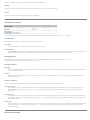
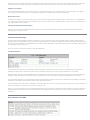
The Search Routes section is where you query the database by entering your search criteria and pressing the Find Plans button.
Search Modes
The search section may be used in two modes - basic or advanced mode:
Basic Mode
Basic Mode allows you to enter your departing and/or arriving airports.
Advanced Mode
Advanced Mode allows you to specify your departing and/or arriving airports and additionally you may ask they system to return routes based on their
type, operations, distance, rnav, or noise abatement properties. These properties are all discussed in greater details below.
Changing Modes
By default the Search Routes section is in basic mode. To change to Advanced mode simply click the hyperlink titled More Detail>>.
To change back to Basic mode click the hyperlink titled << Less detail.
Search Properties
Departing
This field expects the ICAO code for your departure airport. For example, if you wish to search for routes departing Los Angeles International Airport,
you would type the code KLAX.
Arriving
This field expects the ICAO code for your arrival airport. For example, if you wish to search for routes arriving at Calgary International Airport, you
would type the code CYYC.
Types of searches
There are 3 basic types of searches that may be performed: Departure/Arrival, Departure Only, and Arrival Only.
Departure/Arrival
Use this type of search if you know the departure and arrival airports for a route you wish to search, simply type in the ICAO codes for both your
arrival and departure airports - then click the Find Plans button. SimRoutes will query the database and display the search results in the Search
Results page.
Departure Only
Use this type of search if you only know that you want to depart a specific airport and are not sure where you want to fly to. Enter the ICAO code for
your departure airport in the "Departing" field and click the Find Plans button. SimRoutes will query the database and display the search results in the
Search Results page.
Arrival Only
Use this type of search if you only know that you want to arrive a specific airport and are not sure where you want to fly from. Enter the ICAO code for
your arrival airport in the "Arriving" field and click the Find Plans button. SimRoutes will query the database and dispaly the search results in the
Search Results page.
Advanced Searching
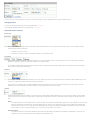
You may narrow your search based on a number of criteria entered by the system administrators by using the Advanced mode.
Changing Modes
To change to Advanced mode simply click the hyperlink titled More Detail>>.
To change back to Basic mode click the hyperlink titled << Less detail.
Advanced Mode Properties
Route Type
Routes may be specified as High Altitude, Low Altitude, International, Military, or TEC (Tower Enroute Control) routes. You may combine multiple
criteria using the following selections:
❍
❍
All Routes - Returns all routes.
All Domestic - Returns all routes not specified as Military or International routes.
Operations
Routes may be specified as Normal or Alternate Operations. You may specifically search on either criteria or select "All" to return both. "Alternate
Operations" might be a routing only used when a field is in an alternate mode.
For example Los Angeles International (KLAX) operates the field in a configuration landing and departing over the Pacific Ocean to the west 95% of
the time. When strong winds blow offshore,
Distance
You may filter your search based on the distance of the route. Select Longer Than or Less Than and enter the distance in Nautical Miles that you wish
to filter by. To ignore the distance entered in this section select N/A.
For example, if you wanted to fly out of Boston (KBOS) but only had a limited amount of time to complete the flight, you might enter "Less Than
400NM" in order to limit possible routes to those that you could complete before you ran out of time.
Options
SimRoutes administrators have the ability to further categorize routes by RNAV and Noise Abatement. To only show routes containing these options
check the box next to the option you wish to filter by. Leaving the box unchecked will result in routes that contain this flag, and do not contain this
flag.
RNAV
The system determines a route's RNAV status in one of two ways. If the SimRoutes administrator specifies the route as RNAV then the route will
always be categorized as an RNAV route. If the administrators do not specify a route as RNAV, then the system will determine its RNAV state
based on the inclusion of one (or more) procedures (SID/STAR) that are specifically categorized as RNAV in the SimRoutes system. Using this
flag can help you narrow your search to RNAV only - if you are in the mood to try one of these.
Noise Abatement
The system determines a route's Noise Abatement status based on specifications provided by the SimRoutes administrators. This can be very
helpful when flying in areas with known (and confusing) noise abatement rules.
Advanced Mode Examples
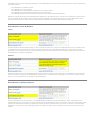
Here's an example of how Advanced Mode Properties can help narrow your search. Conducting a search for Las Vegas (KLAS) to Los Angeles (KLAX) in basic
results in the following routes:
KLAS
KLAS
KLAS
KLAS
BOACH2 HEC RDEYE2 KLAX
BOACH2 HEC MITTS2 KLAX
MCCRN3 HEC RDEYE2 KLAX
MCCRN3 HEC MITTS2 KLAX
If a User wanted to fly this route using RNAV procedures, they would check the RNAV Option and search the database again, resulting in:
KLAS BOACH2 HEC RDEYE2 KLAX
KLAS BOACH2 HEC MITTS2 KLAX
The user realizes that it's 2 AM local time at KLAX and they should file a Noise Abatement route. Checking that option and searching again finally results in
the route:
KLAS BOACH2 HEC RDEYE2 KLAX
NOTAMs
System NOTAMS are displayed on the SimRoutes welcome page. These notices are hidden when your search results are displayed.
To view NOTAMS, select "Home" from the main menu.
SimRoutes Statistics
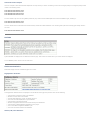
SimRoutes displays two sets of statistical pages for its Users.
Flightplanner Statistics
The Flightplanner Statistics section is displayed on the SimRoutes home page and provides users with the following:
●
●
●
●
●
●
●
●
●
Total number of preferred routes in the database
Number of unique visits to the website
The date that SimRoutes (version 4) officially went live
The most recent ARTCC/FIR/ACC to join SimRoutes
Total number of searches performed
Number of flightplans filed online with Vatsim directly from SimRoutes
Total number of ARTCC/FIR/ACC participating in the project
The current AIRAC navigational database cycle
The most recent Route added to the database
ARTCC/FIR/vACC Statistics
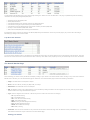
The ARTCC/FIR/vACC Statistics page can be accessed by selecting the "Stats" item from the Main Menu. This page is updated daily with the following
information for each participating ARTCC/FIR/vACC:
●
●
●
●
●
●
●
ICAO Code for the ARTCC/FIR/vACC
ARTCC/FIR/vACC Name
Total Routes departing from Airports owned by the ARTCC/FIR/vACC
Total Routes arriving to Airports owned by the ARTCC/FIR/vACC
Total Routes arriving to AND departing from Airports owned by the ARTCC/FIR/vACC
Country in which the ARTCC/FIR/vACC resides
Date that the ARTCC/FIR/vACC officially joined SimRoutes
By default this page is sorted by the date that the ARTCC/FIR/vACC joined SimRoutes. Users may sort this page by any column either ascending or
descending by clicking on the column header
Top 20 Routes Selected
The Top 20 Routes Selected section is accessible from the SimRoutes home page. This section lists the top 20 most popular routes of all time. This list is
based on the number times that a routes details have been viewed by Users. Each route's popularity can only be increased by one for each User session.
The Search Results Page
After submitting your search criteria, SimRoutes will display a listing of your results in the Search Results section. Clicking on any of the items under the
ROUTE column will take you to the Route Details page for that Route. The Search Results page consists of the following information:
●
Origin: The ICAO code for the Departure Airport
●
Route: The entire Route, including any SID, STAR, or Airways
●
Destination: The ICAO code for the Arrival Airport
●
●
NM: The Distance of this route in Nautical Miles. This is calculated by adding the distance of each segment on the route, and not just the simple
distance between the Origin and Destination Airports.
Type: Lists the categories for this Route. A Route may meet the criteria for more than one Category.
❍
❍
❍
❍
❍
❍
❍
❍
●
HI: High Altitude Routing
LO: Low Altitude Routing
TEC: Tower Enroute Control Routing
INTL: International Routing
RNAV: Routing for RNAV equipped aircraft only
ALT: Alternate Operations Routing
NOISE: Noise Abatement Routing
MIL: Military Routing
Comments: Lists the first 30 characters of any comments for the Route. Comments longer than 30 characters will be preceeded by a "[...]" indicating
that additional comments may be viewed from the Route Details page.
Sorting your Results
Results are by default sorted by Origin Airport ascending, Destination Airport ascending. Users may resort the routes displayed on the results page
either ascending or descending by clicking on the header of the column they wish to sort by. Results may not be sorted by the Route string.
Paging your Results
By default, SimRoutes displays only 25 routes per page. You may identify the page you are currently viewing as well as navigate to other pages in
your results by viewing and/or clicking on the Page numbers located on the bottom left hand side of the Results Page.
No Routes Found
If SimRoutes is unable to find any Routes that meet your search criteria, the Results page will display no data. If this happens, we recommend that
you verify that your Origin and/or Destination ICAO codes are correct in the search form. If SimRoutes does not have a route you are looking for, you
may request that the route be added.
Viewing Detailed Route Information
Clicking on any of the items in the ROUTES column will take you to the Route Details page for that Route where additional detailed information
regarding that route may be viewed.
The Route Details Page
The Route Details contains detailed information regarding the currently selected route such as Airport details, Notams, Weather, Charts Required,
Navigation Log, and a Topographical map of your route. This page also allow you to Import yoru flightplan into your favorite Flight Sim 3rd Party AddOn or Pre-file your Flightplan for the VATSIM network. To access the Route Details page, simply click the Route Column on the Search Results page for
the appropriate route you wish to see.
Here is an overview of the sections contains in the Route Details Page
The Route Section
The first part of this section lists the Airport Name, ICAO, and Elevation in feet above Sea Level for both your Departing and Arriving Airports. If
available, the system will also provide a hyperlink for more information about the Airport. This page will be displayed in a new window.
Below the Airport information, the ARTCC/FIR/vACC that is responsible for each of the Departure and Arrival Airports will be listed in their ICAO and
Full Name formats. If available, the system will provide a hyperlink to the Center's home page. This page will be displayed in a new window.
The third element displayed are the Categories that SimRoutes has applied to this Route. This may be any combination of High Altitude, Low Altitude,
International, TEC, Military, Noise Abatement, RNAV, and/or Alternate Operations.
The most important part of this section is probably the "Filed Route" data. This is the route you should be filing, entering into your FMC, exporting to a
third party fuel planner, or whatever else you wish to do with the route.
Finally, any comments entered for this route specifically by the ARTCC, FIR, vACC that are responsible for both the Departure and Arrival airports are
displayed. These comments often contain important information surrounding when to and when not to file these routes, as well as other pertinent
information.
Route Details: NOTAMS
The NOTAM section of the Route Details page displays any active NOTAMs (Notices To Airmen) that are associated with the currently selected Route.
This possibly includes:
❍
❍
❍
❍
❍
Active
Active
Active
Active
Active
NOTAMs
NOTAMs
NOTAMs
NOTAMs
NOTAMs
for your Departure Airport
for your Arrival Airport
for the ARTCC/FIR/vACC responsible for your Departure Airport
for the ARTCC/FIR/vACC responsible for your Arrival Airport
intended for the entire SimRoutes System as determined by SimRoutes administrators
NOTAM's are created and maintained by ARTCC/FIR/vACC's participating in the SimRoutes project. This feature was implemented in August 2006 in
order to give SimRoutes users better access to real time information applicable to their specific flight plans. If you have a NOTAM that you think
should be added to the System, please contact the ARTCC/FIR/vACC responsible for the Airport that the NOTAM will apply to.
Route Details: Charts & Weather
Charts
The Charts Section of the Route Details provides you with a hyperlink that leads you to a page with all applicable Charts. A link is provided for both
your Departure and Arrival Airports. As the links are provided and maintained by the responsible ARTCC/FIR/vACC - their accuracy can not be
guaranteed. If you come across a broken link or have a link that may be more useful for this specific Airport, please contact either the Responsible
ARTCC/FIR/vACC or a SimRoutes Administrator.
Weather
SimRoutes provides the most up to date METAR reports available for both your Departure and Arrival airports. These METARs are not stored locally
and are retrieved dynamically from the VATSIM weather servers as soon as you load the Route Details page. You may retrieve up to date weather
closer to your actual departure time by reloading the Route Details Page.
Route Details: Prefiling & Imports
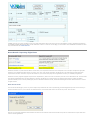
Clicking on this hyperlink will take you directly to the VATSIM Flightplan Management web page and populate a number of fields based on the
SimRoutes Route that you have selected. Currently SimRoutes only submits the Departure Airport, Arrival Airport, and Route of your flightplan. Future
enhancements to SimRoutes will allow us to populate your aircraft type, altitude, alternate airport, time enroute, as well as your name and Vatsim
Identification. This should save most VATSIM pilots precious time spent on pre flight activites, resulting in more time for you to actually fly on the
network!
VATSIM users may go to this web page to enter their flight plan details rather than entering them via Squawkbox or FSInn. Flightplans submitted on
the VATSIM Flightplan Management page will be retained for 2 hours. In order to use this page you must hold a valid VATSIM ID and Password. These
may be obtained at the VATSIM Web Site.
Route Details: Importing Flight Plans
SimRoutes consists of a powerful Route Parser that can take your simple text based route and extrapolate it into a complex and dynamic flight plan
containing very detailed information about your entire route. As a result of this information, SimRoutes can now dynamically generate flight plan
import files on demand. These files may then be loaded into your favorite third party add on application and save you valuable pre flight time.
SimRoutes currently supports flightplan import files for Squawkbox 3, Wilco's 767: Pilot in Command, and the Level-D Simulations 767. Users of FSInn
may load the Squawkbox3 files into their software at this time. SimRoutes is currently working on expanding this feature to support the PMDG
(Precision Manuals) suite of aircraft, FSNavigator, Phoenix Simulation Software aircraft, and the Microsoft Flight Simulator 2002 and 2004: A Centure
of Flight formats.
How does it work?
From the Route Details page, click on any of the Import links, SimRoutes will create a dynamically generated flightplan import file in the format you
selected and then send it to your browswer for download. When your browser asks what to do with the file, select "Save to Disk".
Refer to your third party application documentation to determine the location these files should be saved, and the method used to import these files
into the various applications.
Route Details: Dispatch
Pilots may select to have all of the Details for their selected Routes emailed to their home address. This allows them to view the details offline and
share it with friends who may not have access to SimRoutes.
To use this feature, type a valid email address into the Dispatch box on the Route Details Page. Once you have entered the address press the Dispatch
button. This will instantly send the route details to the address specified.
NB: Due to security reasons, the Dispatch feature is currently disabled. We apologize for this inconvenience.
Route Details: The Navigation Log
The SimRoutes Navigation Log is dynamically generated in real time by the SimRoutes Dynamic Route Parser. This engine can take a simple text
based Route and transform it into a rich, powerful, and highly detailed Route - with the ability to display itself in a variety of formats. One of the most
useful of these formats (for sim pilots anyhow) is the Navigation Log.
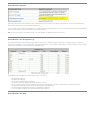
The Navigation Log lists details about each waypoint in your route such as:
❍
❍
❍
❍
❍
❍
❍
❍
The
The
The
The
The
The
The
The
Waypoints ICAO code
Name of the Waypoint
Frequency of the Waypoint, if applicable
Airway or Procedure (SID/STAR) that the Waypoint is a part of
True Heading required to reach this Waypoint from the previous Waypoint. (This does not take Magnetic Variation into account)
Distance between this Waypoint and the Previous Waypoint in Nautical Miles
Total Distance travelled along this Route, from Waypoint to Waypoint
Current AIRAC Navigation Cycle that the Navigation Log is based on
Route Details: The Map
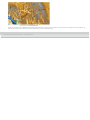
Thanks to the great work at Falling Rain Genomics, Inc. SimRoutes is pleased to present Pilots with a graphical representation of the Navigation Log.
This map is located at the bottom of the Route Details Page, below the Navigation Log.
© Copyright 2006 11th Street Technologies Inc. - All Rights Reserved