1
Flat Par TRI7XS
ADJ LED RC Operation
DMX Control:
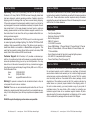
Operating through an DMX controller gives the user the freedom to
create their own programs tailored to their own individual needs.
Follow the directions below to set your DMX Mode and address.
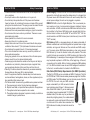
1. Before connecting to an DMX controller, your fixture has different DMX channel modes, please select your desired mode by press-
ing the DMX Mode button, then using the “+” or “-” buttons to
scroll through the DMX Channel Modes. Set the mode before you
address the fixture. See the bottom of this page for the DMX
modes.
2. After you have selected your mode, set the DMX address for the fixture by pressing the “S” button. When the “S” button is pressed
the LED’s will flash 2-3 times and all the red LED’s will light. Use the number buttons to press in your desired address. See “SET ADDRESS” on page 11 for examples.
Note: When seeting the DMX address each time a number is pressed
a LED color will glow, when you have set the DMX address correctly
all LED’s will flash 2-3 times.
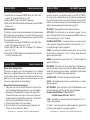
3. Now you may connect the fixture via the XLR connections to any standard DMX controller. Please see pages 13-16 to for a detailed descriptions of the DMX modes, values, and traits.
• If the Red LED’s glow you are in DMX Mode 1: 1 DMX Channel.
• If the Green LED’s glow you are in DMX Mode 2: 2 DMX
Channels.
• If the Blue LED’s glow you are in DMX Mode 3: 3 DMX
Channels.
• If the Red & Green LED’s glow you are in DMX Mode 4: 4 DMX
Channels.
• If the Red & Blue LED’s glow you are in DMX Mode 5: 5 DMX
Channels.
• If the Green & Blue LED’s glow you are in DMX Mode 6: 6 DMX
Channels.
• If all of the LED’s glow you are in DMX Mode 7: 7 DMX
Channels.
ADJ Products, LLC - www.adj.com - Flat Par TRI7XS User Manual Page 12
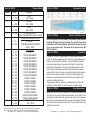
Flat Par TRI7XS
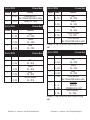
Channel
1
1 Channel Mode
Value
Function
1-7
8 - 15
16 - 23
24 - 31
32 - 39
40 - 47
48 - 55
56 - 63
64 - 71
72 - 79
80 - 87
88 - 95
96 - 103
104 - 111
112 - 119
120 - 127
128 - 135
136 - 143
144 - 151
152 - 159
160 - 167
168 - 175
176 - 183
184 - 191
192 - 199
200 - 207
208 - 215
216 - 223
224 - 231
232 - 239
240 - 247
248 - 255
COLOR MACROS
BASTARD AMBER
MEDIUM AMBER
PALE AMBER GOLD
GALLO GOLD
GOLDEN AMBER
LIGHT RED
MEDIUM RED
MEDIUM PINK
BROADWAY PINK
FOLLIES PINK
LIGHT LAVENDER
SPECIAL LAVENDER
LAVENDER
INDIGO
HEMSLEY BLUE
TIPTON BLUE
LIGHT STEEL BLUE
LIGHT SKY BLUE
SKY BLUE
BRILLIANT BLUE
LIGHT GREEN BLUE
BRIGHT BLUE
PRIMARY BLUE
CONGO BLUE
PALE YELLOW GREEN
MOSS GREEN
PRIMARY GREEN
DOUBLE CTB
FULL CTB
HALF CTB
DARK BLUE
WHITE
ADJ Products, LLC - www.adj.com - Flat Par TRI7XS User Manual Page 13