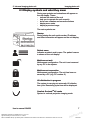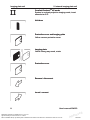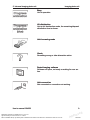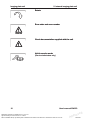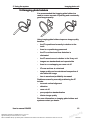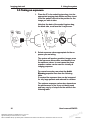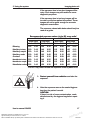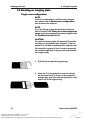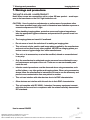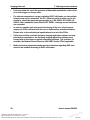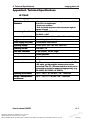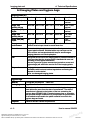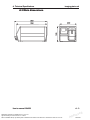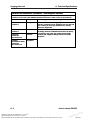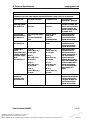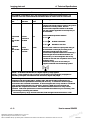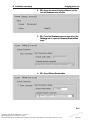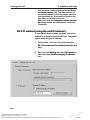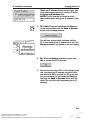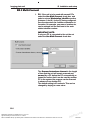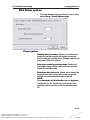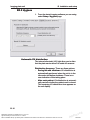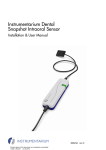
1
ENGLISH DIGORA® Optime DXR-50 001 Digital intraoral imaging plate system User’s Manual Document no. 204253 rev. 6 (2012-05) Reviewed: Taskinen Jari Pekka 29.05.12 11:37:01 Approved: Äärynen Teemu 29.05.12 14:52:44 See the PaloDEx Group Oy PDM system to determine the status of this document. Printed out: 28.08.12 13:43:18 d Ap ve o r p D504182 Reviewed: Taskinen Jari Pekka 29.05.12 11:37:01 Approved: Äärynen Teemu 29.05.12 14:52:44 See the PaloDEx Group Oy PDM system to determine the status of this document. Printed out: 28.08.12 13:43:18 d Ap ve o r p D504182 Imaging plate unit DIGORA® Optime DXR-50 001 Digital intraoral imaging plate system User’s Manual This unit is marked according to the Medical Device Directive 93/42/EEC (if the unit contains the CE mark) Document number 204253 rev. 6 (2012-05) Original approved English language version Manufactured by SOREDEX P.O. BOX 148 FIN-04301 TUUSULA, FINLAND Tel. +358 (0)10 270 2000 Fax. + 358 9 701 5261 User’s manual 204253 Reviewed: Taskinen Jari Pekka 29.05.12 11:37:01 Approved: Äärynen Teemu 29.05.12 14:52:44 See the PaloDEx Group Oy PDM system to determine the status of this document. Printed out: 28.08.12 13:43:18 III d Ap ve o r p D504182 Imaging plate unit SOREDEX endeavours to produce product documentation that is accurate and up to date. However, our policy of continual product development may result in changes to products that are not reflected in the product documentation. Therefore, this document should not be regarded as an infallible guide to current product specifications. SOREDEX maintains the right to make changes and alterations without prior notice. IV User’s manual 204253 Reviewed: Taskinen Jari Pekka 29.05.12 11:37:01 Approved: Äärynen Teemu 29.05.12 14:52:44 See the PaloDEx Group Oy PDM system to determine the status of this document. Printed out: 28.08.12 13:43:18 d Ap ve o r p D504182 Imaging plate unit Contents 1. The DIGORA® Optime ...................................................................... 1 1.1 Introduction................................................................................................... 1 1.2 System installation........................................................................................ 2 Positioning the unit..................................................................................... 2 Positioning the PC .................................................................................... 3 Other devices............................................................................................. 3 2. Intraoral imaging plate unit ............................................................... 4 2.1 Main parts and controls................................................................................ 4 2.2 Accessories.................................................................................................. 5 2.3 Display symbols and what they mean.......................................................... 7 3 Using the system...............................................................................11 3.1 General........................................................................................................11 3.2 Preparing the system...................................................................................11 3.3 Preparing an IP for exposure...................................................................... 13 3.4 Imaging plate holders................................................................................. 15 3.5 Taking an exposure.................................................................................... 16 3.6 Reading an imaging plate........................................................................... 18 Single user configuration......................................................................... 18 Multiconnect configuration....................................................................... 22 3.7 Removing IPs from the plate collector........................................................ 23 3.8 Standby mode............................................................................................ 23 3.9 Retrieve last image..................................................................................... 24 3.10 Shutting down the unit ............................................................................. 25 3.11 IP erasing mode (Initial erasing of the IPs)............................................... 25 3.12 Taking an occlusal projection image......................................................... 27 3.13 Errors and warnings................................................................................. 28 4. Handling and care of imaging plates............................................... 29 4.1 General....................................................................................................... 29 4.2 Handling..................................................................................................... 29 4.3 Cleaning..................................................................................................... 30 4.4 Storage....................................................................................................... 30 4.5 Replacement.............................................................................................. 31 4.6 Disposal...................................................................................................... 31 User’s manual 204253 Reviewed: Taskinen Jari Pekka 29.05.12 11:37:01 Approved: Äärynen Teemu 29.05.12 14:52:44 See the PaloDEx Group Oy PDM system to determine the status of this document. Printed out: 28.08.12 13:43:18 V d Ap ve o r p D504182 Imaging plate unit 5. Unit care and maintenance............................................................. 32 5.1 Cleaning the unit......................................................................................... 32 5.2 Disinfecting the unit.................................................................................... 32 5.3 Maintenance............................................................................................... 33 5.4 Repair......................................................................................................... 33 5.5 Disposal...................................................................................................... 33 6. Symbols that appear on or in the unit.............................................. 34 7. Warnings and precautions............................................................... 35 Appendix A. Technical Specifications.................................................... 1 A.1 Unit............................................................................................................... 1 A.2 Imaging Plates and hygiene bags................................................................ 2 A.3 Main dimensions.......................................................................................... 3 Appendix B. Installation and setup........................................................ 1 VI User’s manual 204253 Reviewed: Taskinen Jari Pekka 29.05.12 11:37:01 Approved: Äärynen Teemu 29.05.12 14:52:44 See the PaloDEx Group Oy PDM system to determine the status of this document. Printed out: 28.08.12 13:43:18 d Ap ve o r p D504182 Imaging plate unit B1 System installation........................................................................... 1 B1.1 Positioning the unit..................................................................................... 1 B1.2 Positioning the PC(s) (not supplied) .......................................................... 1 B1.3 Other devices............................................................................................. 2 B2 Connecting the unit to a PC / LAN................................................... 2 B2.1 Direct connection method (uses the unit s/n)............................................. 2 B2.2 IP method (using the unit IP address)........................................................ 4 B2.3 Multi-Connect............................................................................................. 6 B3 Setup options................................................................................... 8 B3.1 Scanner ..................................................................................................... 8 Status......................................................................................................... 9 Image Scanning......................................................................................... 9 Using the dental chart....................................................................................................9 Resolution................................................................................................ 10 Image Processing.................................................................................... 10 Last image .............................................................................................. 10 Scanner Unit Serial number..................................................................... 10 B3.2 Settings.....................................................................................................11 B3.3 Workflow...................................................................................................11 Readout start........................................................................................... 12 Touchless operation................................................................................. 13 Plate eject mode...................................................................................... 13 B3.4 Power options.......................................................................................... 14 Power options.......................................................................................... 14 B3.5 Hygiene.................................................................................................... 15 Automatic UV disinfection........................................................................ 15 Manual UV disinfection control................................................................ 16 B3.6 Occusal.................................................................................................... 17 Occlusal / Size 3...................................................................................... 17 B4 Troubleshooting............................................................................. 18 User’s manual 204253 Reviewed: Taskinen Jari Pekka 29.05.12 11:37:01 Approved: Äärynen Teemu 29.05.12 14:52:44 See the PaloDEx Group Oy PDM system to determine the status of this document. Printed out: 28.08.12 13:43:18 VII d Ap ve o r p D504182 Imaging plate unit VIII User’s manual 204253 Reviewed: Taskinen Jari Pekka 29.05.12 11:37:01 Approved: Äärynen Teemu 29.05.12 14:52:44 See the PaloDEx Group Oy PDM system to determine the status of this document. Printed out: 28.08.12 13:43:18 d Ap ve o r p D504182 1. Introduction Imaging plate unit 1. The DIGORA® Optime 1.1 Introduction This manual describes how to use the DIGORA® Optime digital imaging plate unit (the unit) which is part of the digital intraoral imaging plate system (the system). The complete system comprises the following: - the DIGORA® Optime digital imaging plate unit (the unit). - SOREDEX® dental Imaging Plates (IPs), protective covers, hygiene bags and other related imaging plate accessories. - A PC (not supplied) in which suitable dental imaging software. - A local area network (LAN) cable (not supplied) will be required if the system is to be used in a network. The unit is a laser scanning device designed to automatically read reusable SOREDEX® dental intraoral imaging plate sizes 0, 1, 2, and 3. The Comfort OcclusalTM 4C kit also allows two size 3 imaging plates to be used to take an occlusal projection image. After reading the images can be viewed on the PC using the dental imaging sofware. The unit can either be connection directly to the PC or to network via the LAN cable. User’s manual 204253 Reviewed: Taskinen Jari Pekka 29.05.12 11:37:01 Approved: Äärynen Teemu 29.05.12 14:52:44 See the PaloDEx Group Oy PDM system to determine the status of this document. Printed out: 28.08.12 13:43:18 1 d Ap ve o r p D504182 Imaging plate unit 1. Introduction The unit can be set up to work with a single PC, the single user configuration, or with several PCs, the multiconnect (multiple user) configuration. With the multiconnect configuration up to eight PCs can be used, one at a time, with the unit. This manual describes how to use both configurations. NOTES: Only personnel trained and authorized by the manufacturer of the unit are allowed to install and configure the unit. Only use the imaging plates, protective covers and hygiene bags supplied by the manufacturer of the unit. Please read the section 7. Warnings and precations before using the unit. 1.2 System installation Positioning the unit Do not position the unit in direct sunlight or near bright light. Sunlight or bright light must not be allowed to shine directly on the unit door into which the IPs are inserted. Position the unit on a stable flat surface so that vibrations will not degrade the image quality. The unit can also be attached to a wall, under or on a shelf with the optional mounting kit. The unit must not be positioned so that it it touching other equipment. It must not be placed on top of or under other equipment. The unit can be positioned within the environment in which the patient is examined and treated (patient environment). 2 User’s manual 204253 Reviewed: Taskinen Jari Pekka 29.05.12 11:37:01 Approved: Äärynen Teemu 29.05.12 14:52:44 See the PaloDEx Group Oy PDM system to determine the status of this document. Printed out: 28.08.12 13:43:18 d Ap ve o r p D504182 1. Introduction Imaging plate unit Positioning the PC The PC connected to the unit should not be used in the patient environment. The minimum horizontal distance between the patient and the PC is 1.5 m (4.5 ft). The minimum vertical distance between the patient and the PC is 2.5 m (6.5 ft). Other devices DO NOT connect any other devices to the unit or the PC connected to the unit that are: - not part of the supplied system - not supplied by the manufacturer of the unit - not recommended by the manufacturer of the unit. User’s manual 204253 Reviewed: Taskinen Jari Pekka 29.05.12 11:37:01 Approved: Äärynen Teemu 29.05.12 14:52:44 See the PaloDEx Group Oy PDM system to determine the status of this document. Printed out: 28.08.12 13:43:18 3 d Ap ve o r p D504182 Imaging plate unit 2. Intraoral imaging plate unit 2. Intraoral imaging plate unit 2.1 Main parts and controls 4 User’s manual 204253 Reviewed: Taskinen Jari Pekka 29.05.12 11:37:01 Approved: Äärynen Teemu 29.05.12 14:52:44 See the PaloDEx Group Oy PDM system to determine the status of this document. Printed out: 28.08.12 13:43:18 d Ap ve o r p D504182 2. Intraoral imaging plate unit Imaging plate unit 2.2 Accessories For additional information about the accessories listed below contact your authorized dealer. Not all accessories are available separately for all units. Imaging plates (IPs). Equivalent to film sizes 0, 1, 2 and 3. IDOT version. IDOT IPs (optional) have individual identification codes that appear on the images. IDOT aids quality assurance by making it possible to identify the plates used to take individual images. Standard (STD) version. The standard version has no identification mark on the active side of the plate. Protective covers. For IPs 0, 1, 2 and 3. Hygiene bags. For IPs 0, 1, 2 , 3 and Comfort OcclusalTM 4C. User’s manual 204253 Reviewed: Taskinen Jari Pekka 29.05.12 11:37:01 Approved: Äärynen Teemu 29.05.12 14:52:44 See the PaloDEx Group Oy PDM system to determine the status of this document. Printed out: 28.08.12 13:43:18 5 d Ap ve o r p D504182 Imaging plate unit 2. Intraoral imaging plate unit Comfort OcclusalTM 4C bite protector For holding two size 3 IPs that are used for taking an occlusal projection image. CAUTION: For optimum performance only use IPs, protective covers and hygiene bags supplied by the manufacturer of the unit or the manufacturer’s authorized distributors. The manufacturer will not be held responsible for problems caused by using accessories from other manufacturers. IP storage box For storing IPs safely and conveniently. Microfiber cloth For cleaning IPs. IP holders For bitewing, periapical and endodontic exposures (optional, not included) See section Imaging plate holders for more information. 6 User’s manual 204253 Reviewed: Taskinen Jari Pekka 29.05.12 11:37:01 Approved: Äärynen Teemu 29.05.12 14:52:44 See the PaloDEx Group Oy PDM system to determine the status of this document. Printed out: 28.08.12 13:43:18 d Ap ve o r p D504182 2. Intraoral imaging plate unit Imaging plate unit 2.3 Display symbols and what they mean During use symbols and animations will appear on the unit display. These: - indicate the status of the unit - help you to operate the unit correctly - show user mistakes and corrective actions - display error codes - display a preview image The main symbols are: Startup During startup the unit serial number, IP address and other information will appear on the unit display. Patient name Indicates a patient card is open. The patient’s name is shown on the unit display. Multiconnect wait Multiconnect configuration. The unit is not reserved by any PC in the system. Multiconnect reservation Multiconnect configuration. The unit has been reserved by a PC (e.g. PC number 2). UV disinfection in progress The system is carrying out automatic UV disinfection cycle. Remaining cycle time will be displayed. Comfort OcclusalTM 4C mode System in occlusal projection imaging mode. User’s manual 204253 Reviewed: Taskinen Jari Pekka 29.05.12 11:37:01 Approved: Äärynen Teemu 29.05.12 14:52:44 See the PaloDEx Group Oy PDM system to determine the status of this document. Printed out: 28.08.12 13:43:18 7 d Ap ve o r p D504182 Imaging plate unit 2. Intraoral imaging plate unit Comfort OcclusalTM 4C mode System in occlusal projection imaging mode, insert second size 3 IP. Unit door Protective cover and imaging plate Yellow: remove protective cover Imaging plate Yellow: wrong way round, rotate Protective cover Remove / disconnect Insert / connect 8 User’s manual 204253 Reviewed: Taskinen Jari Pekka 29.05.12 11:37:01 Approved: Äärynen Teemu 29.05.12 14:52:44 See the PaloDEx Group Oy PDM system to determine the status of this document. Printed out: 28.08.12 13:43:18 d Ap ve o r p D504182 2. Intraoral imaging plate unit Imaging plate unit Busy Unit in operation. UV disinfection Unit in UV disinfection mode, the remaining/elapsed disinfection time is shown. Unit in erasing mode Check Something wrong or take alternative action. Dental imaging software Software not open, not ready or waiting for user action. Unit connection Not connected or connection not working. User’s manual 204253 Reviewed: Taskinen Jari Pekka 29.05.12 11:37:01 Approved: Äärynen Teemu 29.05.12 14:52:44 See the PaloDEx Group Oy PDM system to determine the status of this document. Printed out: 28.08.12 13:43:18 9 d Ap ve o r p D504182 Imaging plate unit 2. Intraoral imaging plate unit Rotate Error state and error number Check documentation supplied with the unit Unit in service mode (Service technicians only) 10 User’s manual 204253 Reviewed: Taskinen Jari Pekka 29.05.12 11:37:01 Approved: Äärynen Teemu 29.05.12 14:52:44 See the PaloDEx Group Oy PDM system to determine the status of this document. Printed out: 28.08.12 13:43:18 d Ap ve o r p D504182 3. Using the system Imaging plate unit 3 Using the system 3.1 General For optimum performance only use IPs, protective covers and hygiene bags designed for this unit and supplied by authorized distributors. The manufacturer of this unit will not be held responsible for any problems caused by using accessories from other manufacturers. Proper handling, cleaning and storage of the IPs ensures the best image quality and maximum service life of the IPs. Refer to section 4. Handling and care of imaging plates. IMPORTANT NOTE: If you are using the system for the first time check the setup options to ensure that they are suitable for your work methods and dental environment. See section Appendix B3. Setup options. 3.2 Preparing the system 1. PC: Switch on the PC connected to the unit. 2. PC: Open the dental imaging software and a new or existing patient card where you wish to store the intraoral images. 3. Press the on/off key to switch the unit on. User’s manual 204253 Reviewed: Taskinen Jari Pekka 29.05.12 11:37:01 Approved: Äärynen Teemu 29.05.12 14:52:44 See the PaloDEx Group Oy PDM system to determine the status of this document. Printed out: 28.08.12 13:43:18 11 d Ap ve o r p D504182 Imaging plate unit 3. Using the system The startup animation will appear on the display and the unit will carry out self test during which the IP carrier will slide out of the unit door. When the status light turns green and ready animation, indicating IP insertion, appears on the unit display, the unit is ready to use (in the ready state). NOTE: If the ready animation does not appear, check the system setup described in the installation instructions. 12 User’s manual 204253 Reviewed: Taskinen Jari Pekka 29.05.12 11:37:01 Approved: Äärynen Teemu 29.05.12 14:52:44 See the PaloDEx Group Oy PDM system to determine the status of this document. Printed out: 28.08.12 13:43:18 d Ap ve o r p D504182 3. Using the system Imaging plate unit 3.3 Preparing an IP for exposure IMPORTANT NOTE: If the IP is being used for the very first time or if it has not been used within the last 24 hours, it must be erased before use to remove any fogging caused by background radiation. See section, 3.11 IP erasing mode (Initial erasing of the IPs). CAUTION: When handling IPs, protective covers and hygiene bags take all appropriate measures and precautions to prevent cross contamination. NOTE: If you are taking an occlusal projection exposure refer to section 3.12 Taking an occlusal projection image and to the separate instructions supplied with the Comfort OcclusalTM 4C kit. 1. Place the IP you wish to use onto a protective cover. The light blue side (sensitive) of the IP must face and be placed on the half of the protective cover that is the same shape as the IP. 2. Fold the half of the protective cover with the semicircular cutout over onto the IP. The metal disk on the back (black side) of the IP must appear in the semicircular cut out. 3. Turn the protective cover and IP over so that the black side of the protective cover is uppermost. This makes it easier to slide the protective cover and IP into the hygiene bag. User’s manual 204253 Reviewed: Taskinen Jari Pekka 29.05.12 11:37:01 Approved: Äärynen Teemu 29.05.12 14:52:44 See the PaloDEx Group Oy PDM system to determine the status of this document. Printed out: 28.08.12 13:43:18 13 d Ap ve o r p D504182 Imaging plate unit 3. Using the system 4. Slide the protective cover and IP into the hygiene bag as far as they will go. Make sure that the black side of the protective cover is on the same side as the black side of the hygiene bag. 5. Peel off the cover paper from the sealing tape and then fold the flap, along the pre-formed line, over and onto the sealing tape. 6. Press and slide your thumb along the tape to ensure that the flap is properly sealed. 7. Turn the sealed hygiene bag over and check that the IP and protective cover are in the correct position. You must be able to see the light side of the protective cover and the metal disk on the IP. 14 User’s manual 204253 Reviewed: Taskinen Jari Pekka 29.05.12 11:37:01 Approved: Äärynen Teemu 29.05.12 14:52:44 See the PaloDEx Group Oy PDM system to determine the status of this document. Printed out: 28.08.12 13:43:18 d Ap ve o r p D504182 3. Using the system Imaging plate unit 3.4 Imaging plate holders It is recommended that imaging plate holders be used to ensure accurate IP positing and consistently good images quality. Using imaging plate holders improves image quality because: - the IP is positioned correctly in relation to the tooth - there is no positioning guesswork - the IP is not bent and thus distortion is eliminated - the IP cannot move in relation to the X-ray unit - images are standardized and reproducible - there is no overlapping nor cone cut off - IP wear and tear is minimized - image quality can be maintained irrespective of who takes the image - time is saved and profitability increased Problems caused by manually positioning the IP include: - incorrect vertical alignment - distortion - cone cut off - poor projection standardization - inferior image quality For more information on imaging plate holders and systems contact you dealer. User’s manual 204253 Reviewed: Taskinen Jari Pekka 29.05.12 11:37:01 Approved: Äärynen Teemu 29.05.12 14:52:44 See the PaloDEx Group Oy PDM system to determine the status of this document. Printed out: 28.08.12 13:43:18 15 d Ap ve o r p D504182 Imaging plate unit 3. Using the system 3.5 Taking an exposure 1. Place the IP in its sealed hygiene bag, into the appropriate imaging plate holder and then insert it into the patient’s mouth in the position for the image you wish to take. Note that the back of the sealed hygiene bag, the black side, must face the X-ray source. 2. Select exposure values appropriate for the exposure you are taking. The system will produce excellent images even if the exposure values differ considerably from the optimum values. In most cases the same exposure values can be used for virtually all imaging purposes. For normal everyday use select the Adult Bitewing exposure time from the following table. If required the exposure time can be increased for very large patients and reduced for children. The optimum exposure values also depends on the performance of the X-ray unit being used and may vary by ±1 step from the values in the following table. 16 User’s manual 204253 Reviewed: Taskinen Jari Pekka 29.05.12 11:37:01 Approved: Äärynen Teemu 29.05.12 14:52:44 See the PaloDEx Group Oy PDM system to determine the status of this document. Printed out: 28.08.12 13:43:18 d Ap ve o r p D504182 3. Using the system Imaging plate unit If the exposure time is too short images will be noisy. Such images may still usable for some diagnostic purposes. If the exposure time is too long images will be too dark or will show patient movement. These images will not be good enough for accurate diagnostic examination. The exposure values table below should only be used as a guide. Recommended exposure values (s) for DC x-ray units* 60 kV, 7 mA70 kV, 7 mA short cone long cone short cone long cone AdultChildAdultChildAdultChildAdultChild Bitewing Maxillary incisor Maxillary cuspid Maxillary molar Occlusal Mandibular incisor Mandibular cuspid Mandibular molar 0.25 0.16 0.50 0.32 0.12 0.08 0.25 0.16 0.20 0.12 0.40 0.25 0.10 0.06 0.20 0.12 0.20 0.12 0.40 0.25 0.10 0.06 0.20 0.12 0.30 0.20 0.63 0.40 0.16 0.10 0.33 0.20 0.25 0.16 0.50 0.32 0.12 0.08 0.25 0.16 0.20 0.12 0.40 0.25 0.10 0.06 0.20 0.12 0.25 0.16 0.50 0.32 0.12 0.08 0.25 0.16 0.25 0.16 0.50 0.32 0.12 0.08 0.25 0.16 *For AC x-ray units increase the exposure times by about 30% 3. Protect yourself from radiation and take the exposure. 4. After the exposure remove the sealed hygiene bag from the patient’s mouth. CAUTION: If there is a risk of cross contamination, wash, disinfect and dry the hygiene bag before opening it. User’s manual 204253 Reviewed: Taskinen Jari Pekka 29.05.12 11:37:01 Approved: Äärynen Teemu 29.05.12 14:52:44 See the PaloDEx Group Oy PDM system to determine the status of this document. Printed out: 28.08.12 13:43:18 17 d Ap ve o r p D504182 Imaging plate unit 3. Using the system 3.6 Reading an imaging plate Single user configuration NOTE: If the unit is operated in a multiconnect configuration, please refer to Multiconnect configuration first to reserve the scanner. NOTE: If you are taking an occlusal projection exposure refer to section 3.12 Taking an occlusal projection image and to the separate instructions supplied with the Comfort OcclusalTM 4C kit. CAUTION: For optimum image quality the exposed IP must be read as soon as possible after exposure. If the exposed IP is not read immediately after exposure but left unread for a period of time it must be protected from ambient light and X-rays as both may degrade the image quality. 1. Pull the flap to open the hygiene bag. 2. Keep the IP in the protective cover so that you do not touch the IP or allow it to be exposed to ambient light, and then slide the protective cover and IP out of the hygiene bag. 18 User’s manual 204253 Reviewed: Taskinen Jari Pekka 29.05.12 11:37:01 Approved: Äärynen Teemu 29.05.12 14:52:44 See the PaloDEx Group Oy PDM system to determine the status of this document. Printed out: 28.08.12 13:43:18 d Ap ve o r p D504182 3. Using the system Imaging plate unit 3. Hold the protective cover and IP so that the white side of the protective cover is on the right. The metal disk on the IP will also be on the right. Insert the protective cover and IP into the unit door. A magnet will hold the IP in the correct position. 4. Slide the protective cover off of the IP, and leave the IP in position half way in the unit door. As soon as the protective cover is removed the unit detects that the IP is in the unit door and will switch from the standby state to the ready state (ready to use) and automatically slide the IP into the unit. CAUTION: If the IP does not slide into the unit after the protective cover has been removed, the IP is misaligned or has been placed in the unit the wrong way round. Reposition the IP and insert it into the unit again. If after repositioning the IP it still does not slide into the unit press the Start key to manually switch the unit from the standby to the ready state and the IP will then slide into the unit when the protective cover is removed. User’s manual 204253 Reviewed: Taskinen Jari Pekka 29.05.12 11:37:01 Approved: Äärynen Teemu 29.05.12 14:52:44 See the PaloDEx Group Oy PDM system to determine the status of this document. Printed out: 28.08.12 13:43:18 19 d Ap ve o r p D504182 Imaging plate unit 3. Using the system The busy animation will appear on the display which indicates that the imaging plate is being read. After few seconds a preview image will appear on the unit display PC: A read-out progress window will appear on the PC display. After a few seconds the image will appear in the dental imaging software. The image can now be saved. Refer to the documentation supplied with the dental imaging software you are using. CAUTION: If the metal disk on the rear of the IP can be seen on the digital image, it indicates that the IP was exposed from the wrong side. CAUTION - RETRIEVING IMAGES If the image is not transferred to the PC because of a network, PC or software failure, the image can be retrieved from the unit’s memory as long as the unit is NOT switched off. For information on how to do this see section 3.9 Retrieve last image. 5. After the IP has been read it will be automatically erased and then ejected from the unit into the plate collector. 20 User’s manual 204253 Reviewed: Taskinen Jari Pekka 29.05.12 11:37:01 Approved: Äärynen Teemu 29.05.12 14:52:44 See the PaloDEx Group Oy PDM system to determine the status of this document. Printed out: 28.08.12 13:43:18 d Ap ve o r p D504182 3. Using the system Imaging plate unit NOTE: The unit can be configured so that the IP remains in the plate carrier (it is not ejected into the plate collector). When the IP is in the plate carrier the IP is easier to handle and stricter hygiene measures can be observed. Refer to Appendix B 3.3 Workflow/Plate ejection mode. After the IP has been ejected or removed the ready animation will reappear on the display. The unit is now ready to read the next IP. User’s manual 204253 Reviewed: Taskinen Jari Pekka 29.05.12 11:37:01 Approved: Äärynen Teemu 29.05.12 14:52:44 See the PaloDEx Group Oy PDM system to determine the status of this document. Printed out: 28.08.12 13:43:18 21 d Ap ve o r p D504182 Imaging plate unit 3. Using the system Multiconnect configuration 1. PC: To reserve the unit click the GREEN multiconnect icon, which is in the bottom right-hand corner of the PC display. The Connect window will appear. 2. PC: In the Connect window click the Reserve the Scanner button to reserve scanner. The window will disappear and the GREEN multi-connect icon will start to flash. This indicates that you have now reserved the unit and it can now be used to read an image. NOTE: If the multiconnect icon is YELLOW, it indicates that the unit has been reserved by someone else. Wait until the unit is free. If you wish to know who has reserved the unit, place the cursor on the multiconnect icon (while yellow) and the message: Scanner reserved by XXXX (where XXXX is the multiconnect ID of the PC that has reserved the unit) will appear. NOTE: If the multiconnect icon is GRAY, it indicates that the unit has not been switched on or is just starting up and is not yet ready for use. Switch the unit on and / or wait until the unit is ready for use. 22 User’s manual 204253 Reviewed: Taskinen Jari Pekka 29.05.12 11:37:01 Approved: Äärynen Teemu 29.05.12 14:52:44 See the PaloDEx Group Oy PDM system to determine the status of this document. Printed out: 28.08.12 13:43:18 d Ap ve o r p D504182 3. Using the system Imaging plate unit 3. PC: To release the unit click the GREEN multiconnect icon and then click the Free the scanner (unit) button. 3.7 Removing IPs from the plate collector When removing IPs from the plate collector hold them by their edges. Alternatively, pull the plate collector out of the unit and tip the IPs out onto a flat clean surface. If they are not to be reused immediately or within a short period of time, store them in their storage box. 3.8 Standby mode If no IP is inserted into the unit within a certain period of time, the unit will beep several times and the status light will start to flash. When status light turns yellow and the unit display turns off the unit is in the standby mode. The unit will automatically exit the standby mode as soon as a new imaging plate is inserted into the unit or when the Start key is pressed. After four hours the unit will exit the standby mode and automatically shut down. User’s manual 204253 Reviewed: Taskinen Jari Pekka 29.05.12 11:37:01 Approved: Äärynen Teemu 29.05.12 14:52:44 See the PaloDEx Group Oy PDM system to determine the status of this document. Printed out: 28.08.12 13:43:18 23 d Ap ve o r p D504182 Imaging plate unit 3. Using the system 3.9 Retrieve last image If the last image read is not transferred to the PC because of a network, communication, PC or software failure, the last image read can be retrieved. IMPORTANT NOTE The LAST read image can only be retrieved if the unit is left on. If the unit is switched off the image will be lost. To retrieve the last scanned image: 1. Correct the problem that caused the communication failure. When the connection between the unit and the PC is re-established the last read image will automatically be transferred to the PC. 2. PC: If the image is not automatically transferred to the PC, select the Setup > Scanner page from the dental imaging software your are using. 3. PC: In the Last Image field, click the Retrieve now button to retrieve the last read image. NOTE: If required you can select different parameters (e.g. resolution, show image preview etc.) for the image to be retrieved. 4. PC: Click OK to close the Setup window. The last read image will be transferred to the PC. 24 User’s manual 204253 Reviewed: Taskinen Jari Pekka 29.05.12 11:37:01 Approved: Äärynen Teemu 29.05.12 14:52:44 See the PaloDEx Group Oy PDM system to determine the status of this document. Printed out: 28.08.12 13:43:18 d Ap ve o r p D504182 3. Using the system Imaging plate unit 3.10 Shutting down the unit 1. Press and hold down the power on / off key. The UV disinfection cycle, when active (refer to section Installation and set up / hygiene), will be automatically carried out before the unit switches itself off. If you wish to switch the unit off before the UV disinfection cycle is complete, press and hold down the power on / off key again (4 seconds) and the unit will shutdown. If you wish to return to the normal operation mode, press and hold down (4 seconds) the start key. NOTE: If there is an untransferred image in the unit’s memory the unit cannot be shut down. The image must be transferred first. Refer to section 3.9 Retrieve last image. 3.11 IP erasing mode (Initial erasing of the IPs) If an IP is being used for the very first time or has not been used for 24 hours and has not been exposed to ambient light the erasing procedure must be carried out before the IP is used. The erasing procedure removes any fogging due to background radiation. The dedicated erasing mode erases the IP but does not send the image (blank) to the dental imaging software. User’s manual 204253 Reviewed: Taskinen Jari Pekka 29.05.12 11:37:01 Approved: Äärynen Teemu 29.05.12 14:52:44 See the PaloDEx Group Oy PDM system to determine the status of this document. Printed out: 28.08.12 13:43:18 25 d Ap ve o r p D504182 Imaging plate unit 3. Using the system 1. Press and hold down the Start key for several seconds until the erase mode animation appears on the unit display. The unit is now in the erase mode. 2. Hold the IP by its edges (or use a protective cover) and position it so that the side with the metal disk (the back) is on the right. Insert the IP into the unit door (remove the protective cover if used). A magnet will hold the IP in position and then automatically slide it into the unit. NOTE: It may take longer to erase IPs using the erasing mode than the normal read and erase mode. This is to ensure that IPs that have not been used recently are erased properly. 3. After the IP has been erased it will be ejected from the unit. The IP can now be used to take an exposure. 4. To exit the erasing mode, either wait 15 seconds for the unit to automatically exit the mode, or press and hold down the Start key until the erase animation disappears. 26 User’s manual 204253 Reviewed: Taskinen Jari Pekka 29.05.12 11:37:01 Approved: Äärynen Teemu 29.05.12 14:52:44 See the PaloDEx Group Oy PDM system to determine the status of this document. Printed out: 28.08.12 13:43:18 d Ap ve o r p D504182 3. Using the system Imaging plate unit 3.12 Taking an occlusal projection image Comfort OcclusalTM 4C images are produced using TWO size 3 IPs, the Comfort Occlusal bite protector and the hygiene bag (The Comfort Occlusal 4C IP). Refer to the separate instructions supplied with the Comfort OcclusalTM 4C kit. IMPORTANT NOTE: Due to occlusal imaging geometry and imaging plate positioning, accurate distance and angle measurements cannot be taken from occlusal projection images. 1. PC: Select occlusal from Setup > Scanner > Occlusal (see section: B3.6 Occlusal). 2. Place two size 3 IPs into their corresponding protective covers. 3. Slide the two size 3 IPs and protective covers into the Comfort Occlusal bite protector. Insert the Comfort Occlusal bite protector and IPs into the Comfort Occlusal hygiene bag and seal the bag. 4. Place the sealed Comfort Occlusal 4C IP into the patient’s mouth and take an exposure. 5. Remove the sealed Comfort Occlusal 4C IP from the patient’s mouth. 6. Open the sealed Comfort Occlusal 4C IP. Remove the two size 3 IPs and scan them. User’s manual 204253 Reviewed: Taskinen Jari Pekka 29.05.12 11:37:01 Approved: Äärynen Teemu 29.05.12 14:52:44 See the PaloDEx Group Oy PDM system to determine the status of this document. Printed out: 28.08.12 13:43:18 27 d Ap ve o r p D504182 Imaging plate unit 3. Using the system 3.13 Errors and warnings • If there is a problem with the unit the error state symbol and an error number will appear on the unit display. Restart the unit. The error should clear. If not contact your authorized distributor for assistance. • Warning, UV lamp blown. NOTE: The unit can still to be used if the UV disinfecting lamp has blown. Press the start key to continue using the unit. If you wish to disable UV disinfection completely see section: B 3.5 Hygiene/Automatic UV disinfection/Disinfection frequency. • PC: If the message: Degraded image quality appears on the PC display during or after an IP is read it indicates that the image may not be within the factory set quality limits. If the image looks okay no action is necessary. If the message appears frequently, contact your authorized distributor for assistance. 28 User’s manual 204253 Reviewed: Taskinen Jari Pekka 29.05.12 11:37:01 Approved: Äärynen Teemu 29.05.12 14:52:44 See the PaloDEx Group Oy PDM system to determine the status of this document. Printed out: 28.08.12 13:43:18 d Ap ve o r p D504182 4. Handling and care of imaging plates Imaging plate unit 4. Handling and care of imaging plates The correct use, handling, cleaning and storage of imaging plates guarantees the best image quality and maximum service life of the imaging plates. 4.1 General • X-ray exposures DO NOT cause IPs to age. • The light-coloured side of the IP is the side which “stores” the x-ray image. It is the SENSITIVE side! • Image information “stored” on an IP after an exposure is sensitive to light. • Handle IPs in the same way as you would handle CDs or DVDs. • Hold IPs by their edges using your finger tips. • Protect the sensitive side of the IP from: - scratches, wear and mechanical damage - stains, dirt, dust and fingerprints 4.2 Handling NOTE: Stains / fingerprints on the sensitive side can degrade the diagnostic value of the image Dust/wear on the sensitive side can appear as white/grey spots on the image! • Unprotected IPs must not come in contact with the patient, the patient’s saliva or any other bod ily fluids. Always use hygiene bags and protective covers with IPs when taking exposures to: - eliminate cross contamination - maintain image quality - maximize IP service life. User’s manual 204253 Reviewed: Taskinen Jari Pekka 29.05.12 11:37:01 Approved: Äärynen Teemu 29.05.12 14:52:44 See the PaloDEx Group Oy PDM system to determine the status of this document. Printed out: 28.08.12 13:43:18 29 d Ap ve o r p D504182 Imaging plate unit 4.3 Cleaning 4. Handling and care of imaging plates If IPs are handled and stored correctly cleaning should not be necessary or can be kept to an absolute minimum. Clean the IP if there you see any visible marks or stains (which are not obvious scratches) on the image or if there is a reason to believe that the IP is contaminated. • Use the microfibre cloth supplied. • First very gently wipe the IP in a backwards forwards movement in both the widthwise and lengthwise directions and then finish with a circular wiping movement. • For stubborn marks and stains that cannot be be removed using the microfibre cloth, use 70… 96% ethanol (70…96 EtOH / 30…4 DI WATER) or ethanol anhydride. Wipe the IP as described above and then wipe dry. NEVER USE abrasive chemicals or materials to clean IPs. Unsuitable cleaning solutions/methods may damage or destroy the IPs or leave residues on the sensitive surface that may appear on the images. 4.4 Storage • Unpacked, exposed to ambient light in the dedicated storage box • Below 33°C / 80% RH and shielded from X-rays and ultraviolet radiation. • If an IP is stored for over 24 hours in a hygiene bag or in a location that is shielded from ambient light, the IP must be erased, to remove any potential fogging, before being used to take an exposure. 30 User’s manual 204253 Reviewed: Taskinen Jari Pekka 29.05.12 11:37:01 Approved: Äärynen Teemu 29.05.12 14:52:44 See the PaloDEx Group Oy PDM system to determine the status of this document. Printed out: 28.08.12 13:43:18 d Ap ve o r p D504182 4. Handling and care of imaging plates Imaging plate unit 4.5 Replacement Replace an IP if: 4.6 Disposal • the image shows marks, spots or dots, which still appear on images even after the IP has been properly cleaned. • the IP is mechanically damaged (scratched) or badly bent. IPs must be disposed of in accordance with all local, national and international regulations regarding the disposal of non-environmentally friendly or hazardous materials. Phosphor substance, under the top coat, on the sensitive side of IPs must not be swallowed. User’s manual 204253 Reviewed: Taskinen Jari Pekka 29.05.12 11:37:01 Approved: Äärynen Teemu 29.05.12 14:52:44 See the PaloDEx Group Oy PDM system to determine the status of this document. Printed out: 28.08.12 13:43:18 31 d Ap ve o r p D504182 Imaging plate unit 5. Unit care and maintenance 5. Unit care and maintenance WARNING Switch the unit off and disconnect it from the main power supply before cleaning or disinfecting the unit. Do not allow liquids to enter the unit. 5.1 Cleaning the unit Use a non abrasive cloth moistened with either: - cool or lukewarm water, - soapy water, - mild detergent, - butylalcohol, - or ethanol (ethyl alcohol) 70 - 96% to clean the unit. After cleaning wipe the unit with a non abrasive cloth moistened with water. Never use solvents or abrasive cleaners to clean the unit. Never use unfamiliar or untested cleaning agents. If you are not sure what the cleaning agent contains, DO NOT use it. If you use a spray cleaning agent DO NOT spray it directly into the unit door. 5.2 Disinfecting the unit CAUTION Wear gloves and other protective clothing when disinfecting the unit. Wipe the unit with a cloth dampened with a suitable disinfectant solution such as ethanol 96%. Never use abrasive, corrosive or solvent disinfectants. All surfaces must be dried before the unit is used. WARNING Do not use any disinfecting sprays as the vapor could ignite and cause injury. Disinfecting techniques for both the unit and the room where the unit is used must comply with all local and national regulations and laws concerning such equipment and its location. 32 User’ manual 204253 Reviewed: Taskinen Jari Pekka 29.05.12 11:37:01 Approved: Äärynen Teemu 29.05.12 14:52:44 See the PaloDEx Group Oy PDM system to determine the status of this document. Printed out: 28.08.12 13:43:18 d Ap ve o r p D504182 5. Unit care and maintenance Imaging plate unit 5.3 Maintenance The unit does not require any maintenance. 5.4 Repair 5.5 Disposal If the unit is damaged or malfunctions in any way it must only be repaired by service personnel authorized by the manufacturer of the unit. At the end of the useful working life of the unit and/ or its accessories make sure that you follow national and local regulations regarding the disposal of the unit, its accessories, parts and materials. The unit includes some or all of the following parts that are made of or include materials that are non-environmentally friendly or hazardous: - electronic circuit boards - electronic components - UV lamp (Hg) User’s manual 204253 Reviewed: Taskinen Jari Pekka 29.05.12 11:37:01 Approved: Äärynen Teemu 29.05.12 14:52:44 See the PaloDEx Group Oy PDM system to determine the status of this document. Printed out: 28.08.12 13:43:18 33 d Ap ve o r p D504182 Imaging plate unit 6. Symbols that appear on or in the unit 6. Symbols that appear on or in the unit DANGEROUS VOLTAGE LASER RADIATION ULTRAVIOLET RADIATION UV IMPORTANT INFORMATION (Refer to user’s manual) Direct current Eternet connector RJ45 straight cable CE (0537) Symbol MDD 93/42/EEC This unit is marked according to the Medical Device Directive 93/42/EEC (if the unit contains the CE mark) ETL symbol GOST R –certificate (Certificate of Conformity) asserts that the goods delivered in Russia, and/ or production line where they were manufactured, conform to the Russian Safety Standards. This symbol indicates that the waste of electrical and electronic equipment must not be disposed as unsorted municipal waste and must be collected separately. Please contact an authorized representative of the manufacturer for information concerning the decommissioning of your equipment. 34 User’s manual 204253 Reviewed: Taskinen Jari Pekka 29.05.12 11:37:01 Approved: Äärynen Teemu 29.05.12 14:52:44 See the PaloDEx Group Oy PDM system to determine the status of this document. Printed out: 28.08.12 13:43:18 d Ap ve o r p D504182 7. Warnings and precautions Imaging plate unit 7. Warnings and precautions THE UNIT IS A CLASS 1 LASER PRODUCT Note! When covers are removed the unit is a class 3B laser product – avoid exposure to the laser beam or the UV-C light inside the unit. CAUTION - Use of controls or adjustments or performance of procedures other than those specified herein may result in hazardous laser radiation exposure or excessive exposure to UV-C light. • When handling imaging plates, protective covers and hygiene bags always take the appropriate hygiene measures and precautions to prevent cross contamination. • The imaging plates are harmful if swallowed. • Do not move or knock the unit when it is reading an imaging plate. • This unit must only be used to read image plates supplied by the manufacturer and must not be used for any other purpose. NEVER use imaging plates, protective covers or hygiene bags from other manufacturers. • This unit, or its accessories, must not be modified, altered or remanufactured in any way. • Only the manufacturer’s authorized service personnel are authorized to carry out maintenance and repair of the unit. There are no user serviceable parts inside the unit. • Infection control procedures must be observed when using accessories, such as film holders, x-ray tube guides and imaging plates. When using accessories always follow the manufacturer’s instructions on how to use the accessory and prevent cross contamination from one patient to another. • This unit can interfere with other devices due to its EMC characteristics. • Other devices can interfere with this unit due to their EMC characteristics. • This unit complies with IEC 60601-1 standard. Accessory equipment connected to this device must be in compliance with the related nationally harmonized IEC standards. User’s manual 204253 Reviewed: Taskinen Jari Pekka 29.05.12 11:37:01 Approved: Äärynen Teemu 29.05.12 14:52:44 See the PaloDEx Group Oy PDM system to determine the status of this document. Printed out: 28.08.12 13:43:18 35 d Ap ve o r p D504182 Imaging plate unit 7. Warnings and precautions • Unit not suitable for use in the presence of flammable anaesthetic mixture with air or with oxygen or nitrous oxide. • For ethernet connections, use an unshielded CAT6 LAN cable, so that multiple chassis must not be connected! The PC / Ethernet switch to which unit is connected to, should be approved appropriately (e.g. EN 60950, IEC 60950, UL 60950). After installation check that the IEC 60601-1 leakage current levels are not exceeded. • In order to maintain safe and correct functioning of the unit, only the power supply unit (PSU) delivered with the unit or distributed by authorized dealers. Please refer to the unit technical specifications for a list of the PSUs. • If this device will be used with 3rd party imaging application software not supplied by the manufacturer, the 3rd party imaging application software must comply with all local laws on patient information software. This includes, for example, the Medical Device Directive 93/42/EEC and/or FDA if applicable. • Medical electrical equipment needs special precautions regarding EMC and needs to be installed according to EMC information. 36 User’s manual 204253 Reviewed: Taskinen Jari Pekka 29.05.12 11:37:01 Approved: Äärynen Teemu 29.05.12 14:52:44 See the PaloDEx Group Oy PDM system to determine the status of this document. Printed out: 28.08.12 13:43:18 d Ap ve o r p D504182 A. Technical Specifications Imaging plate unit Appendix A. Technical Specifications A.1 Unit Intraoral imaging plate unit DXR 50 Classification IEC60601-1 - Class 1 or 2 equipment depending on the classification of the PSU. No applied part - Continuous operation - IPX0 (enclosed equipment without protection against ingress of liquids Laser Safety Classification CLASS 1 LASER PRODUCT EN 60825-1 :2007 Dimensions (H x W x D) 190 mm x 200 mm x 383mm (7.5in x 7.8in x 15.1in) Weight 9.8 – 10.3 kg (21.6 – 22.7 lb) Power supply unit (PSU) POWERBOX EMX 805121 Operating voltage 24 VDC (PSU: 100 – 240 VAC, 50/60 Hz) Operating current Less than 1.5 A Pixel size, selectable 35 µm (Super), 64 µm (High) Bit depth 14 bits grayscale Clinical resolution 10 lp/mm Spatial resolution 14.3 lp/mm Interface cable For Ethernet connections, use an unshielded CAT6 LAN cable, so that multiple chassis must not be connected! The PC / Ethernet switch to which unit is connected to should be approved appropriately (e.g. EN 60950, IEC 60950, UL 60950). Operating environment +10°C - +40°C, 30 – 90 RH%, 700 – 1060 mbar Storage / transportation environment -10°C – +50°C, 0 – 90 RH%, 500 – 1080 mbar User’s manual 204253 Reviewed: Taskinen Jari Pekka 29.05.12 11:37:01 Approved: Äärynen Teemu 29.05.12 14:52:44 See the PaloDEx Group Oy PDM system to determine the status of this document. Printed out: 28.08.12 13:43:18 A-1 d Ap ve o r p D504182 Imaging plate unit A. Technical Specifications A.2 Imaging Plates and hygiene bags Imaging plates (IP) Size Size 0 Dimensions (mm) 22 x 31 Size 1 Size 2 Size 3 Size 4C 24 x 40 31 x 41 27 x 54 48 x 54 nominal Image size (pixels), 35 µm 628 x 885 685 x 1143 886 x 1171 771 x 1542 1372 x 1542 nominal Image size (KB), 35 µm 1085 Image size (pixels), 64 µm 1529 2026 2322 4000 nominal 484 x 344 625 x 375 641 x 484 844 x 422 750 x 843 nominal Image size (KB), 64 µm 325 606 695 1150 nominal Storage environment Imaging plates must be stored in their protective box below 33°C. The box must be kept closed to remain dust free. Material Photo-stimulable phosphorous material uniformly coated on a support plastic material. Shielded with a top coat layer on the active surface and encapsulated with lacquer around edges. Imaging plates do not include phosphor. Use The typical service life for an imaging plate is several hundreds of cycles provided that the imaging plate is handled with care and according to the supplied instructions. The use of genuine hygiene accessories (protective covers and hygiene bags) will extend the service life of the imaging plates. Disposal Imaging plates are industrial waste and must be disposed of in accordance with local and national regulations concerning the disposal of such material. Never use damaged imaging plates. 458 Hygiene bags Material Food-grade polyethylene - Latex free Packaging Supplied in boxes Use For the best performance it is recommended the hygiene bags are used within two years from the date of manufacture. The date of manufacture is printed on the bottom of the box containing the hygiene bags (DDMMYYXX). Extended storage time or exceeding the specified storage conditions may compromise the performance of the adhesive tape and/or the plastic material from which the hygiene bags are made. Disposal Observe relevant national requirements. A - 2 User’s manual 204253 Reviewed: Taskinen Jari Pekka 29.05.12 11:37:01 Approved: Äärynen Teemu 29.05.12 14:52:44 See the PaloDEx Group Oy PDM system to determine the status of this document. Printed out: 28.08.12 13:43:18 d Ap ve o r p D504182 A. Technical Specifications Imaging plate unit A.3 Main dimensions User’s manual 204253 Reviewed: Taskinen Jari Pekka 29.05.12 11:37:01 Approved: Äärynen Teemu 29.05.12 14:52:44 See the PaloDEx Group Oy PDM system to determine the status of this document. Printed out: 28.08.12 13:43:18 A-3 d Ap ve o r p D504182 Imaging plate unit A. Technical Specifications Guidance and manufacturer’s declaration – electromagnetic emissions The DXR-50 is intended for use in the electromagnetic environment specified below. The customer or the user of the DXR-50 should assure that it is used in such an environment. Emissions test Compliance Electromagnetic environment - guidance RF emissions CISPR 11 Group 1 The DXR-50 uses RF energy only for its internal function. Therefore, its RF emissions are very low and are not likely to cause any interference in nearby electronic equipment. RF emissions CISPR 11 Class B Harmonic emissions IEC 61000-3-2 Class A The DXR-50 is suitable for use in all establishments, including domestic establishments and those directly connected to the public low-voltage power supply network that supplies buildings used for domestic purposes. Voltage fluctuations/ flicker emissions IEC 61000-3-3 Complies A - 4 User’s manual 204253 Reviewed: Taskinen Jari Pekka 29.05.12 11:37:01 Approved: Äärynen Teemu 29.05.12 14:52:44 See the PaloDEx Group Oy PDM system to determine the status of this document. Printed out: 28.08.12 13:43:18 d Ap ve o r p D504182 A. Technical Specifications Imaging plate unit Guidance and manufacturer’s declaration – electromagnetic immunity The DXR-50 is intended for use in the electromagnetic environment specified below. The customer or the user of the DXR-50 should assure that it is used in such an environment. Immunity test IEC 60601 test level Compliance level Electromagnetic environment - guidance Electrostatic discharge (ESD) IEC 61000-4-2 6 kV contact 6 kV contact 8 kV air 8 kV air Floors should be wood, concrete or ceramic tile. If floors are covered with synthetic material, the relative humidity should be at least 30 %. Electrical fast transients/bursts IEC 61000-4-4 2 kV for power supply lines 1 kV for input/output lines 2 kV for power supply lines 1 kV for input/output lines Mains power quality should be that of a typical commercial or hospital environment. Surge IEC 61000-4-5 1 kV differential mode 1 kV differential mode Mains power quality should be that of a typical commercial or hospital environment. Voltage dips, short interruptions and voltage variations on power supply lines IEC 61000-4-11 <5 % UT (>95 % dip in UT) for 0.5 cycle <5 % UT (>95 % dip in UT) for 0.5 cycle 40 % UT (60 % dip in UT) for 5 cycles 40 % UT (60 % dip in UT) for 5 cycles 70 % UT (30 % dip in UT) for 25 cycles 70 % UT (30 % dip in UT) for 25 cycles <5 % UT (>95 % dip in UT) for 5 sec <5 % UT (>95 % dip in UT) for 5 sec Mains power quality should be that of a typical commercial or hospital environment. If user of the DXR-50 requires continued operation during power mains interruptions, it is recommended that the DXR-50 be powered from an uninterruptible power supply or a battery. 3 A/m 3 A/m Power frequency (50/60 Hz) magnetic field IEC 61000-4-8 Power frequency magnetic field should be at levels characteristic of a typical location in a typical commercial or hospital environment. NOTE UT is the AC mains voltage prior to application of the test level. User’s manual 204253 Reviewed: Taskinen Jari Pekka 29.05.12 11:37:01 Approved: Äärynen Teemu 29.05.12 14:52:44 See the PaloDEx Group Oy PDM system to determine the status of this document. Printed out: 28.08.12 13:43:18 A-5 d Ap ve o r p D504182 Imaging plate unit A. Technical Specifications Guidance and manufacturer’s declaration – electromagnetic immunity The DXR-50 is intended for use in the electromagnetic environment specified below. The customer or the user of the DXR-50 should assure that it is used in such an environment. Immunity test IEC 60601 test level Compliance level Electromagnetic environment - guidance Portable and mobile RF communications equipment should be used no closer to any part of the DXR-50, including cables, than the recommended separation distance calculated from the equation applicable to the frequency of the transmitter. Conducted RF IEC 610004-6 Radiated RF IEC 610004-3 3 Vrms 150 kHz to 80 MHz 3 V/m 80 MHz to 2.5 GHz 3V 3 V/m Recommended separation distance d = 1.2 P d = 1.2 P 80 MHz to 800 MHz d = 2.3 P 800 MHz to 2.5 GHz where P is the maximum output power rating of the transmitter in watts (W) according to the transmitter manufacturer and d is the recommended separation distance in metres (m). Field strengths from fixed RF transmitters, as determined by an electromagnetic site survey, a should be less than the compliance level in each frequency range. b Interference may occur in the vicinity of equipment marked with the following symbol: NOTE 1 At 80 MHz and 800 MHz, the higher frequency range applies. NOTE 2 These guidelines may not apply in all situations. Electromagnetic propagation is affected by absorption and reflection from structures, objects and people. a Field strengths from fixed transmitters, such as base stations for radio (cellular/cordless) telephones and land mobile radios, amateur radio, AM and FM radio broadcast and TV broadcast cannot be predicated theoretically with accuracy. To assess the electromagnetic environment due to fixed RF transmitters, an electromagnetic site survey should be considered. If the measured field strength in the location in which the DXR-50 is used exceeds the applicable RF compliance level above, the DXR-50 should be observed to verify normal operation. If abnormal performance is observed, additional measures may be necessary, such as reorienting of relocating the DXR-50. b Over the frequency range 150 kHz to 80 MHz, field strengths should be less than 3 V/m. A - 6 User’s manual 204253 Reviewed: Taskinen Jari Pekka 29.05.12 11:37:01 Approved: Äärynen Teemu 29.05.12 14:52:44 See the PaloDEx Group Oy PDM system to determine the status of this document. Printed out: 28.08.12 13:43:18 d Ap ve o r p D504182 A. Technical Specifications Imaging plate unit Recommended separation distances between portable and mobile RF communications equipment and the DXR-50. The DXR-50 is intended for use in an electromagnetic environment in which radiated RF disturbances are controlled. The customer or the user of the DXR-50 can help prevent electromagnetic interference by maintaining a minimum distance between portable and mobile RF communications equipment (transmitters) and the DXR-50 as recommended below, according to the maximum output power of the communications equipment. Rated maximum output power of transmitter W Separation distance according to frequency of transmitter m 150 kHz to 80 MHz d = 1.2 P 80 MHz to 800 MHz d = 1.2 P 800 MHz to 2.5 GHz d = 2.3 P 0.01 0.12 0.12 0.23 0.1 0.38 0.38 0.73 1 1.2 1.2 2.3 10 3.8 3.8 7.3 100 12 12 23 For transmitters rated at a maximum output power not listed above, the recommended separation distance d in meters (m) can be estimated using the equation applicable to the frequency of the transmitter, where P is the maximum output power rating of the transmitter in watts (W) according to the transmitter manufacturer. NOTE 1. At 80 MHz and 800 MHz, the separation distance for the higher frequency range applies. NOTE 2. These guidelines may not apply in all situations. Electromagnetic propagation is affected by absorption and reflection from structures, objects and people. User’s manual 204253 Reviewed: Taskinen Jari Pekka 29.05.12 11:37:01 Approved: Äärynen Teemu 29.05.12 14:52:44 See the PaloDEx Group Oy PDM system to determine the status of this document. Printed out: 28.08.12 13:43:18 A-7 d Ap ve o r p D504182 Imaging plate unit A - 8 A. Technical Specifications User’s manual 204253 Reviewed: Taskinen Jari Pekka 29.05.12 11:37:01 Approved: Äärynen Teemu 29.05.12 14:52:44 See the PaloDEx Group Oy PDM system to determine the status of this document. Printed out: 28.08.12 13:43:18 d Ap ve o r p D504182 B. Installation and setup Imaging plate unit Appendix B. Installation and setup Installation and setup must only be carried out by service personnel trained and approved by the manufacturer of the unit. B1 System installation B1.1 Positioning the unit Position the unit on a stable flat surface that is not effected by vibrations that could degrade the image quality. The unit can also be attached to a wall, under or on a shelf using the optional scanner mounting kit (pt. no. 204138). Do not position the unit in direct sunlight or near bright light. Sunlight or bright light must not be allowed to shine directly on the unit door into which the IPs are inserted. The unit must not be positioned so that it touching other equipment. The unit must not be placed on top of or under other equipment. The unit can be positioned within the environment in which the patient is examined and treated (patient environment). B1.2 Positioning the PC(s) (not supplied) The PC(s) connected to the unit should not be used in the patient environment. The minimum horizontal distance between the patient and the PC(s) is 2.5 m (6.5 ft). B-1 Reviewed: Taskinen Jari Pekka 29.05.12 11:37:01 Approved: Äärynen Teemu 29.05.12 14:52:44 See the PaloDEx Group Oy PDM system to determine the status of this document. Printed out: 28.08.12 13:43:18 d Ap ve o r p D504182 Imaging plate unit B. Installation and setup B1.3 Other devices DO NOT connect any other devices to the unit or the PC(s) connected to the unit that are: - not part of the supplied system - not supplied by the manufacturer of the unit - not recommended by the manufacturer of the unit. B2 Connecting the unit to a PC / LAN The procedure for connecting the unit to a single PC or several PCs in a local area network (LAN) is exactly the same except that every PC in the LAN needs to be given a unique ID number. B2.1 Direct connection method (uses the unit s/n) IMPORTANT NOTE: It may not be possible to connect the unit to the PC using the direct connection method if another device is already connected to the PC using direct connection. If the direct connection field is not active (greyed out) or the system does not work correctly after the unit has been connected, reconnect the unit using the IP connection method. 1. After positioning the unit connect it to the PC(s) in the local area network using the Ethernet cable(s), not supplied. 2. Switch the unit on. The dental imaging software animation will appear. This indicates that the unit is not communicating with the PC(s) in the network. 3. PC: Install the dental imaging software to be used in the PC(s). B-2 Reviewed: Taskinen Jari Pekka 29.05.12 11:37:01 Approved: Äärynen Teemu 29.05.12 14:52:44 See the PaloDEx Group Oy PDM system to determine the status of this document. Printed out: 28.08.12 13:43:18 d Ap ve o r p D504182 B. Installation and setup Imaging plate unit 4. PC: Open the dental imaging software and select the Scanner setup window. 5. PC: From the Scanner setup window select the Settings tab to open the Scanner Connection page. 6. PC: Select Direct Connection. B-3 Reviewed: Taskinen Jari Pekka 29.05.12 11:37:01 Approved: Äärynen Teemu 29.05.12 14:52:44 See the PaloDEx Group Oy PDM system to determine the status of this document. Printed out: 28.08.12 13:43:18 d Ap ve o r p D504182 Imaging plate unit B. Installation and setup Key the serial number of the unit into the Scanner serial number field. The serial number of the unit will appear on the unit display when the unit is switched on. It can also be found on the type label on the back of the unit. Make sure that the Computer network connection that provides the LAN network connection is selected. B2.2 IP method (using the unit IP address) If your system does not allow the direct connection method to be used to connect the PC(s), connection can be done using an IP address 1. Follow steps 1 to 5 from the previous section, B2.1 Direct connection method (uses the unit s/n). 2. PC: From the Settings tab select IP based and then select the Enable changing IP address box. B-4 Reviewed: Taskinen Jari Pekka 29.05.12 11:37:01 Approved: Äärynen Teemu 29.05.12 14:52:44 See the PaloDEx Group Oy PDM system to determine the status of this document. Printed out: 28.08.12 13:43:18 d Ap ve o r p D504182 B. Installation and setup Imaging plate unit Obtain an IP address for the unit from your network administrator and key it into the IP field in the Scanner IP address area. NOTE! The PC and the unit must be in the same subnet when setting the IP address of the unit. 3. PC + Unit: Press and hold down the Start key on the unit and then click the Send to Scanner button on the settings window. You will hear a beep which indicates that the PC is now sending the IP address the unit. The Startup animation will appear on the unit display 4. PC: When the Startup animation clears click OK to connect the PC to the unit. 5. Now connect the other PCs in the network to the unit. Just enter the IP address into the IP field and then click OK to connect the PC to the unit (it is not necessary to hold down the Start key and click the Send to Scanner button with the other PCs once the unit has already got an IP address). B-5 Reviewed: Taskinen Jari Pekka 29.05.12 11:37:01 Approved: Äärynen Teemu 29.05.12 14:52:44 See the PaloDEx Group Oy PDM system to determine the status of this document. Printed out: 28.08.12 13:43:18 d Ap ve o r p D504182 Imaging plate unit B. Installation and setup B2.3 Multi-Connect 1. PC: If the unit is to be used with several PCs select the Use Multi-Connect check box. and select a unique Workstation identifier number (between 1 and 8), for the PC being configured, from the drop down list. Addition workstation information, for example, user name, location etc, can be entered into the field next to the work station identifier number. IMPORTANT NOTE: If only one PC is connected to the unit do not select the Use Multi-Connect check box. The Scanner Autorelease timeout is the length of time that the unit will remain reserved and unused by a PC before the PC automatically released the unit so that it can be used by another PC in the system (the scanner can be reserved in advance from another PC). The default setting is 40 seconds. This can be changed by keying in a new value. B-6 Reviewed: Taskinen Jari Pekka 29.05.12 11:37:01 Approved: Äärynen Teemu 29.05.12 14:52:44 See the PaloDEx Group Oy PDM system to determine the status of this document. Printed out: 28.08.12 13:43:18 d Ap ve o r p D504182 B. Installation and setup Imaging plate unit 2. Click OK to connect the PC to the unit. NOTE: An automatic technique will automatically locate the unit within the local area network and connect the PC. 3. Repeat the above process for all the other PCs in the network. Make sure that you give each PC a different Workstation identifier. 4. Check the installation by starting image capture using the imaging software. If the Use Multi-Connect was selected the Workstation identifier of the PC (1 - 8) being used will appear on the unit display. B-7 Reviewed: Taskinen Jari Pekka 29.05.12 11:37:01 Approved: Äärynen Teemu 29.05.12 14:52:44 See the PaloDEx Group Oy PDM system to determine the status of this document. Printed out: 28.08.12 13:43:18 d Ap ve o r p D504182 Imaging plate unit B3 Setup options B. Installation and setup The scanner setup options allow you to configure the scanner to the user’s clinical requirements. B3.1 Scanner 1. From the dental imaging software you are using select Setup / Scanner page. B-8 Reviewed: Taskinen Jari Pekka 29.05.12 11:37:01 Approved: Äärynen Teemu 29.05.12 14:52:44 See the PaloDEx Group Oy PDM system to determine the status of this document. Printed out: 28.08.12 13:43:18 d Ap ve o r p D504182 B. Installation and setup Imaging plate unit Status Shows the scanner type, version and serial number. Image Scanning If Show Image Preview and Dental Chart is selected a preview image with a dental chart for tooth numbering will appear before the image is saved. Using the dental chart 1. After an IP has been read a window will open that shows a preview image and a dental chart. 2. Click the tooth / teeth on the chart that correspond to the tooth / teeth in the image. Tooth numbers will be assigned to the selected teeth. The tools at the top of the window allow the image to be manipulated. 3. Click OK to save the image and tooth numbers. B-9 Reviewed: Taskinen Jari Pekka 29.05.12 11:37:01 Approved: Äärynen Teemu 29.05.12 14:52:44 See the PaloDEx Group Oy PDM system to determine the status of this document. Printed out: 28.08.12 13:43:18 d Ap ve o r p D504182 Imaging plate unit Resolution B. Installation and setup Super gives a pixel size of 35µ. This results in images with better resolution, but more memory is required as the image files are larger. High (default) gives a pixel size of 64µ. This results in images with less noise especially if short exposure times are used. Image Processing Noise Filtering, normally selected, makes images smoother when they are taken at low radiation doses. Last image Refer to section 3.9 Retrieve last image. Scanner Unit Serial number Adds the unit serial number to all new images. B-10 Reviewed: Taskinen Jari Pekka 29.05.12 11:37:01 Approved: Äärynen Teemu 29.05.12 14:52:44 See the PaloDEx Group Oy PDM system to determine the status of this document. Printed out: 28.08.12 13:43:18 d Ap ve o r p D504182 B. Installation and setup B3.2 Settings Imaging plate unit See B2 Connecting the unit to a PC / LAN for information on Settings. B3.3 Workflow 1. From the dental imaging software you are using select Setup / Workflow page. B-11 Reviewed: Taskinen Jari Pekka 29.05.12 11:37:01 Approved: Äärynen Teemu 29.05.12 14:52:44 See the PaloDEx Group Oy PDM system to determine the status of this document. Printed out: 28.08.12 13:43:18 d Ap ve o r p D504182 Imaging plate unit B. Installation and setup Readout start Select Automatic if you want the scanner to start automatically. The Start after options allow to to select when the scanner will start: - after Plate insert: the scanner will automatically start when it detects and IP in the plate carrier. - after Cover removal: after the IP and protective cover have been inserted into the plate carrier, the unit will automatically start when the protective cover is removed. The Start delay options allow the the start delay time to be selected. - Short = approximately 0.2 seconds - Medium = approximately 0.4 seconds - Long = approximately 0.6 seconds Select Manual if you want the unit to start reading an IP only when the Start key is pressed. NOTE: If Manual is selected when the unit is also set up to use the occlusal mode (See B3.6 Occlusal), single size 3 IPs cannot be read. B-12 Reviewed: Taskinen Jari Pekka 29.05.12 11:37:01 Approved: Äärynen Teemu 29.05.12 14:52:44 See the PaloDEx Group Oy PDM system to determine the status of this document. Printed out: 28.08.12 13:43:18 d Ap ve o r p D504182 B. Installation and setup Imaging plate unit Touchless operation If Use touchless operation sensor is selected the unit will automatically “wake up” from the standby mode as soon as the sensor detects a movement within a distance of 20 cm. If it is NOT selected the unit will “wake up” when the start is pressed. Plate eject mode The options are: - Drop in plate collector: the IP is ejected into the plate collector after the IP has been scanned. - Leave in plate carrier: the IP remains in the plate carrier after the IP has been scanned. The Leave in plate carrier option is recommended for users who want to handle the IPs with more care and reduce wear and tear on them. This option extends IP service life and allows greater hygiene standards to be observed. B-13 Reviewed: Taskinen Jari Pekka 29.05.12 11:37:01 Approved: Äärynen Teemu 29.05.12 14:52:44 See the PaloDEx Group Oy PDM system to determine the status of this document. Printed out: 28.08.12 13:43:18 d Ap ve o r p D504182 Imaging plate unit B. Installation and setup Preview Time Allows you to select the length of time that an image will remain on the unit display after scanning. Minimum 0 seconds (no image appears) maximum 60 seconds. B-14 Reviewed: Taskinen Jari Pekka 29.05.12 11:37:01 Approved: Äärynen Teemu 29.05.12 14:52:44 See the PaloDEx Group Oy PDM system to determine the status of this document. Printed out: 28.08.12 13:43:18 d Ap ve o r p D504182 B. Installation and setup Imaging plate unit B3.4 Power options 1. From the dental imaging software you are using select Setup / Power options page. Power options Standby after (seconds): Allows you to select the length of time the scanner will remain unused before it enters the standby mode (Display switches off and power LED turns yellow). Beep when entering standby mode: Select this and audible signal will be heard when the scanner enters the standby mode. Shutdown after (minutes): Allows you to select the length of time the scanner will remain unused before the unit automatically switches itself off. NOTE: If the Automatic UV disinfection option (Hygiene) is selected, the UV disinfection cycle will be automatically carried out before the unit switches itself off. B-15 Reviewed: Taskinen Jari Pekka 29.05.12 11:37:01 Approved: Äärynen Teemu 29.05.12 14:52:44 See the PaloDEx Group Oy PDM system to determine the status of this document. Printed out: 28.08.12 13:43:18 d Ap ve o r p D504182 Imaging plate unit B. Installation and setup B3.5 Hygiene 1. From the dental imaging software you are using select Setup / Hygiene page. Automatic UV disinfection The internal ultraviolet (UV) light allow you to disinfect the plate carrier when it is inside the scanner. Disinfection frequency: There are three options: - During idle and shutdown: UV disinfection is automatically performed when the unit is in the idle mode and before shutdown. There is no user indication of this taking place. - After each patient: UV disinfection is automatically carried out after the patient card is closed. The remaining UV disinfection time appears on the unit display. B-16 Reviewed: Taskinen Jari Pekka 29.05.12 11:37:01 Approved: Äärynen Teemu 29.05.12 14:52:44 See the PaloDEx Group Oy PDM system to determine the status of this document. Printed out: 28.08.12 13:43:18 d Ap ve o r p D504182 B. Installation and setup - Imaging plate unit Disable the user can switch off UV disinfection so that it does not operate. Also, all warning messages related to UV lamp status are discarded. NOTE: If any automatic UV disinfection mode is selected a UV disinfection cycle will ALWAYS be automatically carried out when the unit is switched off and prior to final unit shutdown During this shutdown UV disinfection cycle the remaining disinfection time will appear on the unit display. If you wish to stop the UV shutdown disinfection cycle : - Press and hold down (4 seconds) the power on / off key, the unit will immediately shutdown. or - Press and hold down (4 seconds) the start key, the unit will return to the normal operation mode. Manual UV disinfection control Click the Disinfect key to manually start and stop (Cancel) UV disinfection. The elapsed disinfection time will appear on the unit display. UV disinfection will automatically stop after 15 minutes. If you wish to stop manual UV disinfection before the complete cycle is finished, press the Manual UV disinfection control / Cancel key or press and hold down (4 seconds) the start key. B-17 Reviewed: Taskinen Jari Pekka 29.05.12 11:37:01 Approved: Äärynen Teemu 29.05.12 14:52:44 See the PaloDEx Group Oy PDM system to determine the status of this document. Printed out: 28.08.12 13:43:18 d Ap ve o r p D504182 Imaging plate unit B3.6 Occusal B. Installation and setup From the dental imaging software you are using select Setup / Occlusal page. Occlusal / Size 3 Occlusal 4C image from two sequential size 3 plates allows the two size 3 IPs, used in the Comfort Occlusal 4C IP, to be read separately and then stitched together to form a single occlusal image. Refer also to 3.12 Taking an occlusal projection image and the Occlusal quick guide. NOTE: When you are in the Occlusal 4C mode it is possible to temporarily override the mode and read a single size 3 IP. Insert the size 3 IP into the unit so that it can be read. When the insert second plate symbol appears on the unit display press the start key. This will cancel the Occlusal 4C mode for this operation and produce a single size 3 image. Size 3 image from each size 3 plate allows size 3 IPs to read as individual IPs. B-18 Reviewed: Taskinen Jari Pekka 29.05.12 11:37:01 Approved: Äärynen Teemu 29.05.12 14:52:44 See the PaloDEx Group Oy PDM system to determine the status of this document. Printed out: 28.08.12 13:43:18 d Ap ve o r p D504182 B. Installation and setup B4 Troubleshooting Imaging plate unit PROBLEM The unit does not come on. The unit’s power on / off status light and display are off. CAUSE / SOLUTION The main power supply to the unit is off or the unit is not switched on. i. If the LED on the PSU is not on it is not receiving power from the mains. Switch the mains power on. ii. If the LED on the PSU is on switch the unit on. iii. If status light and display still do not come on check the unit’s membrane control panel and cabling. Replace if faulty. PROBLEM Animation displaying either Unit connection or Dental imaging software (flashing yellow) appear on the unit display and the unit will not work. CAUSE / SOLUTION • Defective RJ45 cable. Replace. B-19 Reviewed: Taskinen Jari Pekka 29.05.12 11:37:01 Approved: Äärynen Teemu 29.05.12 14:52:44 See the PaloDEx Group Oy PDM system to determine the status of this document. Printed out: 28.08.12 13:43:18 d Ap ve o r p D504182 Imaging plate unit B. Installation and setup PROBLEM The IP-connection between the unit and the PC does not work. CAUSE / SOLUTION i. Check that the Direct connection method was configured correctly. If all the setting are correct but the connection still does not work, use the IP connection method. ii. The unit has been configured to work with one PC only and does not recognize any other PCs. Reconfigure the system for multiple users. PROBLEM The unit is connected to the PC but cannot scan images. CAUSE / SOLUTION i. Reserve the unit and check that it is configured for multiple users. If not reconfigure the system. ii. If the Dental imaging software animation (flashing yellow) appears it indicates that a patient has not been selected for the scanned image(s). Select a patient. iii. If the Insert animation appears on the unit display while inserting the IP but the unit does not insert the IP into the unit nor start scanning, the reflective sensor in the unit door is faulty (refer to the service manual). B-20 Reviewed: Taskinen Jari Pekka 29.05.12 11:37:01 Approved: Äärynen Teemu 29.05.12 14:52:44 See the PaloDEx Group Oy PDM system to determine the status of this document. Printed out: 28.08.12 13:43:18 d Ap ve o r p D504182 B. Installation and setup Imaging plate unit PROBLEM Local area network (LAN) / subnet configuration problem. CAUSE / SOLUTION i. If the Dental imaging software animation (flashing yellow) appears and cable(s) / router(s) are known to be okay ask your network administrator for assistance. ii. Conflict / mismatch IP-addresses and / or subnet mask of the unit / PC. Use command <ipconfig> from the command prompt (Start >> Run >> cmd in Windows) to get information about the active network settings. Change either the IP address of the PC or the unit so that they are both in the same subnet. If the problem persists ask your network administrator for assistance. iii. Network connection not functioning or not stable due to LAN signal quality problems. Install a network switch between the unit and PC or network socket. PROBLEM Ethernet link not active. The Ethernet connection consists of correctly installed cabling and any switches and/or hubs used, basically the complete Ethernet link If the link is active it does not necessarily mean that the unit is physically connected to PC. It only means that the unit is physically connected to something that is Ethernet comp atible (hub, switch, another PC etc.). B-21 Reviewed: Taskinen Jari Pekka 29.05.12 11:37:01 Approved: Äärynen Teemu 29.05.12 14:52:44 See the PaloDEx Group Oy PDM system to determine the status of this document. Printed out: 28.08.12 13:43:18 d Ap ve o r p D504182 Imaging plate unit B. Installation and setup CAUSE / SOLUTION First remove and then reconnect the Ethernet cable between the unit and PC to see if this solves the problem. i. Physical connection is okay (link active), but the the Dental imaging software animation (flashing yellow) appears on the unit display. The unit is not configured correctly. Reconfigure. ii. Cabling not correct (link not active), and the Unit connection animation appears on the unit display. The unit is not connected to the PC. Connect the unit to the PC. iii. The PCs Ethernet connector(s) is faulty. There is usually a green link LED near the PCs Ethernet connector(s) on the NIC. If the LED is not on replace the NIC. PROBLEM The unit display is not active but the power on / off status light is on, green or yellow. CAUSE / SOLUTION • Green LED - defective display or its cabling. Replace • Yellow LED - unit is in standby (energy save) mode. B-22 Reviewed: Taskinen Jari Pekka 29.05.12 11:37:01 Approved: Äärynen Teemu 29.05.12 14:52:44 See the PaloDEx Group Oy PDM system to determine the status of this document. Printed out: 28.08.12 13:43:18 d Ap ve o r p D504182