1
Crucible Technologies
8
NOTE: The display freeze only works in the On-line mode, as in the Off-line
mode, the Ring On/Off button is used to turn the signal on.
The scrolling of the display carries on in the Off-line mode.
PULSE DIAL TIMINGS
Pulse dial Make/Break/IDP timings can be brought up on the display by dialling
200 after seizing the line. The displayed Make/Break timings are based on the
last digit dialled and the IDP based on the last two digits dialled. Further digits
(Pulse or Tone) can be timed by dialling these after 200.
The display will
automatically update to show the Make/Break timings of the last digit dialled and
the IDP between the last two digits.
TONE DIAL TIMINGS
Tone dialling On/Off times can be displayed by entering 200 after seizing the
line. On timings are based on the last digit dialled whilst Off timings are based
on the pause between last two digits dialled. Further digits (Pulse or Tone) can be
timed by entering these after dialling 200.
PULSE DIAL TIMING CHECK
CHECK
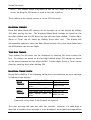
During Pulse dialling, if the following timing errors are detected, an error message
is flashed on the display:
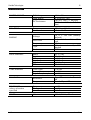
MAKE
TIMINGS
BREAK
TIMINGS
Limits 33.3 mS ± 30%
Low timing gives an error
High timing gives an
error
Limits 66.6 mS ± 30%
Low timing gives an error
High timing gives an
error
MKE<23 mS
MKE>43 mS
MKE<46 mS
MKE>86 mS
Transients of less than 5 mS duration are ignored.
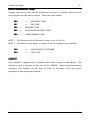
The error message will time out after five seconds. However, if a valid digit is
detected or another error message is to be displayed, the original message will be
Labline
Issue 3.1