1
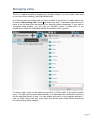
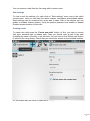
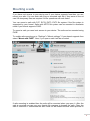
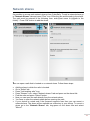
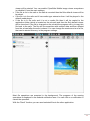
CYBERSOFT LLС User Manual Android App 1 Contents Program features Managing safes Mounting a safe Network shares File operations. Encrypting and decrypting files Using a hand-drawn pattern as a password Playing media files directly from an encrypted safe CyberSafe Mobile widgets FAQ 4 5 8 11 13 16 17 18 19 3 Program features With CyberSafe Mobile you can store your files in the encrypted safe to prevent unauthorized access to sensitive information. The program can operate in two modes: normal and mounted. In normal mode you can open a safe on any supported device but it doesn't provide "on the fly" encryption. So you'll have to decrypt a file to some temporary location to open it in external application (except some media formats). Normal mode supports only FAT file system. Mounted mode provides "on the fly" encryption: you can work directly with your encrypted files in any application. But mounted mode works only on rooted device. Also the kernel must have fuse support. Mounted mode supports the following file systems: FAT, EXT4, EXT3, EXT2, NTFS (with fuse). Main program features: AES, GOST encryption algorithms. Encrypt/decrypt any kind of file. Safe mounting is supported (on rooted devices). You can browse your safe with any file manager and access your files from any program (not available in the "Lite" version). It's possible to mount a safe with FAT, EXT4, EXT3, EXT2 or NTFS file system (not available in the "Lite" version). Hidden safes support (not available in the "Lite" version). Keyfiles support (not available in the "Lite" version). A safe can be opened directly from a network share (not available in the "Lite" version). Network shares can be mounted to the file system of your device. Automatic mount/dismount is supported (depending on the available Wi-Fi connection)(not available in the "Lite" version, root access required) All the standard file operations supported. You can play media files directly from the safe (not available in the "Lite" version). You can use a hand-drawn pattern along with a password to get easier access to your safe on a device with a touch screen (not available in the "Lite" version). You can quickly open any file or folder inside the safe using widget (not available in the "Lite" version). The full version of the program requires Internet Access permission. It is used in order to play media files. Media files are played using http streaming. It requires a connection to the local socket. The program won't make any external connections. If you're going to open a safe in normal mode then you have to consider the following: FAT safes are likely limited to around 500GB in size due to app memory limitations when formatted with 64KB block size. Smaller block sizes require correspondingly smaller safes. 64KB block size recommended with FAT to maximize the safe size you can open. 4 Managing safes The list of registered safes is displayed on program startup. You can create a new safe or you can use an existing CyberSafe Mobile safe. In order to access an existing safe you have to add it to the list first. To add a safe to the list press "Add existing safe" button and select your safe. To browse a safe click on its name in the list and enter the password (or draw the pattern password). If your safe is encrypted using keyfiles, you can click on "Keyfiles" button to select them. If the password is correct the CyberSafe Mobile file browser will be opened. To close a safe, return to the safes list and click on "Close safe" in the safe's context menu. The safe can be closed automatically, if no data has been read/written to/from it for the specified period of time. You can enable this option in the program settings. If click on "Stop service and exit" menu item, then all the open safes will be closed and the main service will be stopped. 5 You can remove a safe from the list using safe's context menu. Safe settings To view or edit the settings of a safe click on "Safe settings" menu item in the safe's context menu. Here you can learn the safe's location, total space and available space. Some settings can be accessed only when safe is open. Also in this window you can enable or disable indexed search, setup the pattern password and enable or disable Dropbox synchronization of this safe. Creating a safe To create new safe press the "Create new safe" button. At first, you have to choose safe type: standard safe or hidden safe. Then you should enter a path to the safe (including the name of the file) in the first field. You can click on the "Select path" button to select a file using dialog. Check that you have write access to the selected location. For the hidden safe you have to select an existing standard safe file. 6 Then you have to enter safe size and a password. You can click on "Keyfiles" button to use keyfiles in addition to the password. Currently the size of a safe cannot be increased after the safe is created. Minimum safe size is 1 Mb. If you plan to synchronize your safe using Dropbox later then you shouldn't set large safe size. If you're creating a hidden safe then maximum safe size is determined by the free space of the outer safe. Note. On Android version lower than Honeycomb there is a bug (http://code.google.com/p/android/issues/detail?id=21696) which prevents correct work with safes larger than 2Gb. Mounted safes are not affected. If you want to use the search function then you should leave "Enable search" checked. You can change this later in the safe settings. After all the fields are filled you can click "OK" button. The new safe will be created and added to the safes list. 7 Mounting a safe If you have root access to your device and if your device supports fuse then you can mount your safe. You can work with files on mounted safe like if they were on the sd card. No temporary files are required. All file operations will work faster. You can mount a safe with FAT, EXT4, EXT3, EXT2 file system if the file system is supported by your kernel. Safes with NTFS file system can be mounted in read/write mode if your kernel supports FUSE. To mount a safe you need root access to your device. The safe can be mounted using FUSE. To enable safe mounting go to "Settings"->"Mount settings". If your kernel supports fuse select "Mount with FUSE". Now, if you open a safe it will be mounted. If safe mounting is enabled then the safe will be mounted when you open it. After the safe is mounted you can use your favorite file manager to browse the safe. Close the safe to unmount it. Sometimes the safe could not be closed because some process is 8 accessing files inside the safe. In that case you can choose to "force unmount" the safe. You can enable automatic force unmount from the "Mount settings". The default mount point for a safe is /mnt/csm/[name of the safe] (or /data/data/com.CyberSafe.mobile/files/mnt/[name of the safe]). You can change mount base path in the mount settings. You can specify custom mount point for each safe from the safe settings. You have to specify an existing directory. It is possible to open external file manager when a safe is mounted. You can choose external file manager in the mount settings. Currently only activities which handle resource/folder mime type are allowed. 9 Network shares It's possible to access smb network shares from CyberSafe. To add a network share go to "Network Shares" tab and press "Plus" icon. Enter the title and the path to the share. The path must be entered in the following form: smb://[host name or ip]/[path to the folder]/ . Press "OK" button to add the share. You can open a safe that is located on a network share. Follow these steps: Add the share in which the safe is located. Go to "Safes" tab. Press "Add existing safe" icon. Press "Browse" icon, select "Network shares" tab and press on the share title. Find the safe and press "Select" button. Now you can open the safe directly from the network share. You have to open the network share before opening the safe. If your device is rooted and if the firmware supports fuse then you can mount a network share. The share will be available as a directory in your device. To mount a share go to the "Network Shares" tab, long-press on the share title and select "Mount". 10 A share can be mounted and dismounted automatically depending on the availability of the Wi-Fi connection. To enable auto-mounting of the share follow these steps: Enable Wi-Fi connection which can be used to access the share. Go to "Network shares" tab. Long-press on the share and select "Properties". Click on "Store username and Password" checkbox. Enter username, password and press "ok". Click on "Mount this share automatically when current network is available" checkbox. Press back button. Next time you connect to the Wi-Fi, the share will be mounted automatically. 11 File operations Currently the following file operations are available in "normal" mode: copy, move, delete, rename, send and copy to the temporary folder. To encrypt a file you have to copy it from the device to the safe. To decrypt a file you have to copy it from the safe to the device. If you want to perform a file operation with a single file then you should find this file in the CyberSafe Mobile file manager, open its context menu and select the operation. To perform a file operation with multiple files you have to select them first. Open the folder in which the files are located in CyberSafe Mobile file manager. Click on "Multi select" in the main menu. Select the files. Then you can select the operation you want in the context menu or in the main menu. If you want to copy (or move) files then after selecting "Copy" (or "Cut") in the menu you have to go to the destination folder and click on "Paste" menu item in the main menu or in the context menu. There is a "Play" button near each file. If you click on the "Play" button, the program will work as follows: If the file is an image file and the file is inside a safe and the safe is not mounted then the program will open CyberSafe Mobile image viewer. Else the default image 12 viewer will be started. You can enable CyberSafe Mobile image viewer everywhere (or disable it) from the main settings. If the file is not in the safe or the safe is mounted then the file's default viewer will be launched. If the file is in the safe and it has media type extension then it will be played in the default media player. If the file is in the safe and it is not a media file then it will be copied to the application folder (which is located on the sd card) and then the file's default viewer will be launched. If the file is changed on the sd card the program will try to copy this file back to the safe. The file will be overwritten with random data and then deleted from the sd card after the safe is closed. You can change the maximum size of a file, that can be started this way, in the program settings. Most file operations are executed in the background. The progress of the running operations is displayed in the Android notification area. You can click on a notification to cancel the operation. With the "Send" function you can send selected files to the other application. 13 If you select "Decrypt files to temporary folder" in the main menu the files will be copied to the temporary folder which is located in the application folder. These files will be wiped after the safe is closed. You can learn the size of the selected files and folders by pressing "Properties" context menu item. 14 Using a hand-drawn pattern as a password To simplify the process of entering a password you can use a hand-drawn pattern as an alternative to the password. To setup a hand-drawn pattern for your safe go to the safe settings. Click on "Enable pattern password". Draw your pattern and click on "OK". You can draw any pattern but only the green lines are counted. The direction in which you are drawing is important. The number of strokes is also important. E. g., two clicks in the center is a valid pattern even if it is not visible. The complexity of the pattern should be proportional to the complexity of the password. If you want to redraw a pattern you can click on "Reset" in the menu. 15 Playing media files directly from an encrypted safe To play a media file you can simply click on it's name in the CyberSafe Mobile file manager. It will be played using http streaming. Some files could not be played this way by the default player. You can convert these files to the supported format and bitrate. You can use the following tools to convert the files: MediaCoder, Any Video Converter, VLC media player. If a player is not started when you click on a media file then you may need to associate the filename extension of the file with the mime-type: open main CyberSafe Mobile settings, press "Override mime type..." and enter the filename extension and its mimetype. E.g., if you want to play a flash video file, you should enter the following text: flv video/x-flv. 16 CyberSafe Mobile shortcut widget The widget can be used to quickly open the folder (or file) inside the safe from the Home screen. To setup the widget follow these steps. Add the widget to the Home screen. The widget configuration activity will open. Enter the title of the widget in the first field. Click on the "Select path" button. Click on the safe in which the destination folder is located. Find the folder or file that you need and mark it. Click on "Select". Click "OK". Now you can click on the widget to open the folder (or the file or the record editor). You can use "Close all safes widget" to quickly close all open or mounted safes. 17 FAQ Safe opening fails with "Context initialization failed" message This problem can happen if CyberSafe Mobile doesn't have a permission to open the safe file. If you open a safe in read/write mode then make sure that the safe file is writable by CyberSafe Mobile. By default CyberSafe Mobile opens a safe in read/write mode. Write access to the external sd card is blocked for all non-system applications in Android 4.4.2 "KitKat" firmwares (it's not an CyberSafe Mobile issue). If your device is rooted then you can fix your ext sd card permissions: http://www.androidpolice.com/2014/03/21/easily-restore-full-access-to-the-sd-card-onandroid-4-4-kitkat-with-sdfix-root-required/ or http://forum.xda-developers.com/showthread.php?t=2617921. Otherwise you can move the safe file to /Android/data/com.CyberSafe.mobile/ sub-folder of the external sd card or you can open your safe in read-only mode or move the safe file to the internal memory. You can enable read-only mode in the safe settings. The program is closed without an error message when mounting a safe If your firmware supports Samsung KNOX then make sure that you've installed modified selinux policy and rebooted the device. You can install modified selinux policy in the mount settings. What is the maximum size of a safe? In non-mounted mode FAT safes are likely limited to around 500GB in size due to app memory limitations when formatted with 64KB block size. Smaller block sizes require correspondingly smaller safes. 64KB block size recommended with FAT to maximize the safe size you can open In mounted mode the program was tested with 4Tb safes. When I click on a file from the CyberSafe Mobile file manager I get "No Activity found to handle Intent..." error message You may need to associate the filename extension of the file with the mime-type: open main CyberSafe Mobile settings, press "Override mime type..." and enter the filename extension and its mime-type. 18