1
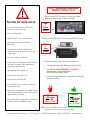
IMPORTANT: The electrical system in your cart is designed to handle a MAXIMUM of 1875 Watts.
In order to reduce the risk of overloading, if your device’s power adapters draw more than 45 Watts each, use Cycle Mode 1 or 2 ONLY.
CYCLE TIMER
1
2
5
3
6
4
A: Cycle Mode 1 Cycle power, Auto OFF after 8 hours of operation.
1. Power Cord Inlet
2. Timer Duration Dial
3. Internal Power Button
4. Timer Mode Switch
5. LED Indicators
6. External Switch Cable
8h
Move the Timer Mode Switch to the “A” position.
Turn the Timer Duration Dial to the
desired cycle duration time (in minutes).
B: Cycle Mode 2 Cycle power until switched off or unplugged.
Move the Timer Mode Switch to the “B” position.
C: ALL ON Mode
Turn the Timer Duration Dial to the
desired cycle duration time.
“A” LED illuminates and charges half the cart for set
duration, then cycles to “B”until 8 hours is reached.
∞
“A” LED illuminates and charges half the cart for set
duration, then cycles to “B” until manually turned off.
Both LEDs illuminate and all power strips are active until switched off.
Move the Timer Mode Switch to the “C” position.
Both “A” and “B” LED illuminate and charges
all devices until manually turned OFF.
IMPORTANT:
If your device’s TOTAL power draw
exceeds 1875 watts
Do Not Use “C” ALL ON MODE
Turning ON the Charging System
1. Plug power cord into outlet.
2. Press button located underneath the handle.
Switch will illuminate.
Specifications subject to change without notice | © 2015 Anywhere Cart | 42400 Winchester Rd Temecula, CA 92590 | 888-650-4488 | www.AnywhereCart.com