1
18
Copyright © 2004 Electronic Displays, Inc.
grounds are pins 5 and 7, respectively. Please refer to the manual for your keyboard or
manual for its serial pinouts. No other connections are required.
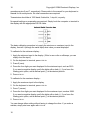
Transmission should be at 1200 baud, 8 data bits, 1 stop bit, no parity.
No special settings or preparation are required. Simply hook the computer or terminal to
the display with the appropriate RS-232 cable.
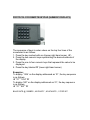
The basic calibration procedure is to apply the miminum or maximum input to the
display, then tell it (through the serial input) what value you want displayed.
To calibrate for the minimum display…
1. Apply the minimum input to the display. (If this is zero volts or milliamps, you can
simply short the input.)
2. On the keyboard or terminal, press CTRL+B.
3. Press 0 (zero).
4. Press the four digits you want displayed for the minimum input, such as 0010.
If you want a negative display, prefix the digits with a dash (-). If you have the
floating-point option, add a decimal point (.) at the desired position.
5. Press CTRL+C.
To calibrate for the maximum display…
1. Apply the maximum input to the display.
2. On the keyboard or terminal, press CTRL+B.
3. Press 7 (seven).
4. Press the four digits you want displayed for the maximum input, such as 2999.
If you want a negative display, prefix the digits with a dash (-). If you have the
floating-point option, add a decimal point (.) at the desired position.
5. Press CTRL+C.
You can change either setting without having to change the other. If you make a
mistake, simply start over again with CTRL+B.
18