1
5. MAINTENANCE
Product
Maintenance
Dust build-up reduces light output performance and can cause overheating. This can
lead to reduction of the light source’s life and/or mechanical wear. To maintain optimum
performance and minimize wear, clean your lighting products at least twice a month.
However, be aware that usage and environmental conditions could be contributing
factors to increase the cleaning frequency.
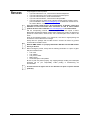
To clean the product, follow the instructions below:
1. Unplug the product from power.
2. Wait until the product is at room temperature.
3. Use a vacuum (or dry compressed air) and a soft brush to remove dust collected on
the external surface/vents.
4. Clean all transparent surfaces with a mild soap solution, ammonia-free glass
cleaner, or isopropyl alcohol.
5. Apply the solution directly to a soft, lint free cotton cloth or a lens cleaning tissue.
6. Softly drag any dirt or grime to the outside of the transparent surface.
7. Gently polish the transparent surfaces until they are free of haze and lint.
Always dry the transparent surfaces carefully after cleaning them.
Do not spin the cooling fans using compressed air because you could damage
them.
Page 24 of 27
Intimidator Trio User Manual Rev. 1