1
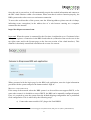
d) On the left side of the window, select “Change adapter settings”.
e) Right click on the appropriate network adapter and select “Properties”. Usually this is
named “Local Area Connection”, possibly followed by a number. It is important that the
adapter corresponding to the connected Ethernet cable is selected.
f) Select “Internet Protocol Version 4 (TCP/IPv4)” and click on the button marked
“Properties”.
g) Write down the initial settings (e.g., IP address, subnet mask).
h) Select “Use the following IP address” and enter the following values in the fields:
1) IP address: 192.168.10.10
2) Subnet mask: 255.255.255.0
i) Select “OK”.
j) Click “Close” in the remaining window.
W INDOWS XP
a) In the Windows Start Menu, select “Control Panel”.
33