1
PRO S CA N
32” LCD Television TV with DVD
MODEL: PLCD3271A-B
PRO S CA N
Contents
Contents
Caution
Safety Information
2
3
Unit and Accessories
4
Introduction
1. Front View
2. Rear View
3. Instruction for Wall Mount
4. Remote Control
5-9
5
6
7
8-9
Basic Operation
10
OSD Menu
1. Picture menu
2. Audio menu
3. Time menu
4. Setup menu
5. Lock menu
6. Channel menu
11-17
11
12
13
14
15
16-17
Simple Troubleshooting
18
19
1
Caution
Caution
is intended to alert the user to the presence of un-insulated "dangerous
to constitute a risk of electric shock to the persons.
The exclamation point within an equilateral triangle is intend to alert the
user to the presence of important operating and maintenance (servicing)
instructions in the literature accompanying the appliance.
Correct disposal of this Product
(Waste Electrical & Electronic Equipment (WEEE)
Your product is designed and manufactured with high quality materials and
components which can be recycled and reused.
This symbol means that electrical and electronic equipment, at their endof-life should be disposed of separately from your household waste.
Please dispose of this equipment at your local community waste collection/
recycling centre.
In the USA there are separate collection systems for used electrical and
electronic products. Please help us to conserve the environment we live
in!
This unit complies withAmerica Safety directives.
This unit complies with FCC directives.
ENERGY
PERFORMANCE
VERIFIED
VE
RI FI ED
lntertek
EP 4005700
RENDEMENT
ENERGETIQUE
VERIFIE
This unit complies with Canada Energy efficiency directives.
2
Safety Information
Safety Information
Electrical safety
power
Physical safety
3
Unit and Accessories
Unit and Accessories
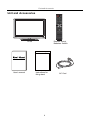
INPUT
1
2
3
4
5
6
7
8
9
0
-/--
PICTURE SOUND
SLEEP
DISPLAY
CH+
VOL+
MUTE
CH-
VOL-
MENU
EXIT
OK
CC
MTS
EPG
FAV
Remote control
Batteries: 2xAAA
TV set
Instructions for fixing stand
User's manual
Instructions for
fixing stand
4
AC Cord
Introduction
Introduction
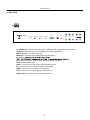
1. Front View
MENU
MENU
INPUT
CH+
CH+
CH-
CHVOL+
VOL-
VOL+
VOL-
POWER
Power Indicator
Remote Control window (Keep clear)
1). (IR) Infrared Receiver: Receives IR signals from the remote control.
(Power on/Standby)LED Indicator: Press POWER to turn on and off.
Indicator on(Red)
Indicator on(Green)
Standby mode
Power on mode
The effective receiving range for the signal is 5-8 metres from the front of the remote
control window, and 300 to the left or right side and 200 above or below the remote control
window.
2). The functions of the buttons:
INPUT: Press to display the input source menu.
MENU: Press to display the OSD menu,
press again to exit the menu.
CH+/-: Press to scan through channels.
VOL+/-: Press to adjust the volume.
POWER: Turn on/standby the TV set.
TV
AV
Component
HDMI1
HDMI2
HDMI3
VGA
Press INPUT button on the TV set or remote control to
display the input source menu, and use CH+/- button on
/
button on remote control to select the
the TV set or
input source, press OK button on the remote control to
enter.
Note: Before you select the input source, make sure the
connections are prepared.
5
Introduction
2. Rear View
Y
USB
(
for Service) HDMI1
HDMI2
HDMI3
PC Audio in
VGA
RF
Coax
Video
Pb
Pr
L in
R in
L
R
L
R
AUDIO OUT
AC POWER IN: Connect it to AC100-240V~ 50/60Hz power supply with the mains cable.
Headphone out: Connect it to your headphone or audio equipments.
USB for Service : For service use only.
HDMI1/2/3 : Connect it to the HDMI output of video device.
PC Audio in:
:::;
RF : Connect antenna or cable 75 Ohm coaxial to receive TV signal.
COAX : Digital audio output.
YPbPr : Connect them to the video output terminal of DVD.
L/R : Connect them to the audio output terminal of DVD
VIDEO : Connect it to video output of video device.
L/R in : Connect them to audio output of video device.
AUDIO L/R out : Connect them to audio equipments.
6
Introduction
3. Instruction for Wall Mount
The wall mount kit (not included) with your purchase allows you to mount your
PROSCAN TV on the wall. For detailed information on installing the wall mount, refer
to the instructions provided by the wall mount manufacturer. It is strongly
recommended to contact a technician for professional assistance for wall mount
installation. PROSCAN is not responsible for any damage to the product or injury to
yourself or others resulting from the wall-mounting.
Dimensions for Mounting Hole Pattern
400mm
200mm
- This PROSCAN TV is compatible with a 400mm x 200mm mounting hole pattern.
- 4 pcs of type M6 screws are required for installing the wall mount bracket to
your PROSCAN TV. Do not use screws that are longer than10 mm. Screws that
are too long may cause damage to the inside of the TV set.
- Do not fasten the screws too tight for this may damage the TV or cause the
TV to fall, resulting in personal injury. PROSCAN is not liable for these kinds of
incidents
- Do not mount your PROSCAN TV at more than a 15 degree tilt.
- Always use two people to mount the TV to a wall.
- Do not install your Wall Mount Kit while your TV is turned on. It may result in
personal injury due to electric shock.
7
Introduction
4. Remote Control
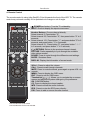
The remote control is using Infra-Red(IR). Point it towards the front of the LED TV. The remote
control may not work correctly if it is operated out of range or out of angle.
POWER(red button): Turn the TV on/standby.
INPUT: Press to display the input source menu.
INPUT
1
2
3
4
5
6
7
8
9
0
-/--
PICTURE SOUND
SLEEP
DISPLAY
CH+
VOL+
MUTE
CH-
VOLEXIT
MENU
OK
CC
Number Buttons: Choose channel directly.
Select channel 5, Press button "5";
Select channel 62, Press button "6", then press button "2" in 2
seconds;
Select channel 151, Press button "1", and press button "5" in 2
seconds, and press button "1" in 2 seconds;
Select channel 5-1, Press button "5", and press button "- / - -"
in 2 seconds, and press button "1" in 2 seconds;
(RETURN): Return to the previous channel viewed.
PICTURE: Press repeatedly to cycle through the available
video picture modes.
SOUND: Press to cycle through the different sound settings.
SLEEP : Shutdown timer.
DISPLAY: Display the information of current mode.
MTS
EPG
FAV
VOL+/-: Press to adjust the volume.
CH+/-: Press to scan through channels.
MUTE: Press to mute the sound, press again or press VOL+ to
unmute.
MENU: Press to display the OSD menu.
EXIT: Press to exit the OSD menu.
): Allows you to navigate the on-screen
Thumbstick(
menus and adjust the system settings to your preference.
OK: CONFIRM button.
CC: Press to display the closed caption.
MTS: Press to select the audio channels.
EPG: Press to enter the EPG menu directly.
FAV: Press to add or remove favorite channel.
Universal Remote Code:11359
Universal Remote Control not included.
8
Introduction
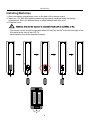
Installing Batteries
1. Open the battery compartment cover on the back of the remote control.
2. Insert two 1.5V AAA size batteries observing the polarity markings inside the battery
compartment. Don’t mix different types or used batteries with new ones.
3. Close the cover.
- The remote control should be operated within 30 feet(7m) and 300 to the left and right of the
IR receive at the front of the LED TV.
- Used batteries should be disposed properly.
9
Basic Operation
Power on/off
1. -To turn on the Switch
Press POWER button on the TV or remote control.
-To turn off the TV
Press POWER button on the TV or remote control.
Input Source select
TV
AV
Component
Press INPUT button on the TV set or remote control to display input
source menu, and use CH+/- button on the TV set or Ĥ0ĥ!button
on remote control to select the input source, press OK button on the
remote control to enter.
Note: Before you select the input source, make sure the
connections are prepared.
HDMI1
HDMI2
HDMI3
VGA
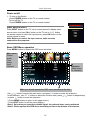
Basic OSD Menu operation
Press MENU button to display the OSD menu as below:
Main menu
Picture
Audio
Time
Setup
Lock
Channel
Submenu
(Setup menu
for example)
ĥ
Ĥ
Hint---you should operate the OSD menu according to the hint.
ĥ
ĥ
Ĥ
Use
/
button to select the main menu, and press ĥ button to enter the submenu.
In the submenu, use Ĥ / ĥ button to select the function item, press / button to adjust/setup,
or press
button to enter the submenu.
* (Press MENU button to return to the upper menu.)
* (Press EXIT button to exit the menu display.)
Note1: Only when you input the suitable signal, the relevant items can be activated
Note2: Please operate the OSD menu according to hint on the bottom of the banner.
10
OSD Menu
OSD Menu
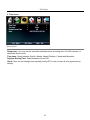
1. Picture menu
Description
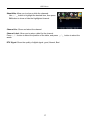
Picture mode: Select between Standard, Dynamic, Mild, SportsˈUser and Power Saving.
You may select the picture mode directly by pressing the PICTURE button on the remote
control.
Note: when select the "Power Saving", the machine is in energy-saving status.
Contrast: Control the difference between the bright and dark regions of the screen picture.
Brightness: Adjust brightness of the picture.
Color: Adjust color of the picture.
Tint: Control the fresh tones to make them appear natural.
Sharpness: Set the amount of fine detail in the picture.
Color Temp.: Select between Normal, Cool and Warm.
11
OSD Menu
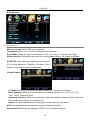
2. Audio menu
12
6
Picture
Audio
Sound Mode
Time
Setup
Lock
Channel
Flat
Bass
50
Treble
50
Balance
50
Surround
SPDIF Type
Audio Language
Select
Off
PCM
English
Move
MENU
Exit
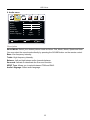
Description
Sound Mode: Select your desired picture mode as follow: Flat, Music, Movie, Sports and User
You may select the sound mode directly by pressing the SOUND button on the remote control.
Bass: Low frequency intensity.
Treble: High frequency intensity.
Balance: Left and right stereo audio channels balance.
Surround: Activate or deactivate the Surround function.
SPDIF Type: Allows you to select between PCM and RAW.
Audio Language: Select audio language.
12
OSD Menu
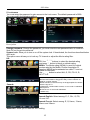
3. Time menu
Description
Sleep timer: You may set the automatic shutdown timer choosing from 5 to 240 minutes, or
deactivate this function.
Time zone: Select between Pacific, Alaska, Hawaii, Eastern, Central and Mountain.
Daylight Saving Time: Select between On and Off.
Clock: User can not change time manually during DTV mode, for time is from signal source
directly.
13
OSD Menu
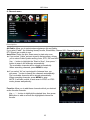
4. Setup menu
Description
Menu Language: Select OSD menu language.
Transparency: Turn on or off the transparency menu function.
Zoom Mode: Select the zoom mode between 16:9, 16:9 zoom, 4:3, 4:3 zoom just scan.
Noise reduction: Select the noise reduction mode between Strong, Off, Weak and Middle.
PC SETUP: If the video input signal comes from your
PC, you may adjust the V-Position, H-Position, Clock,
Phase or even perform an Auto adjustment.
Closed Caption:
CC Mode: Allow you to select the CC Mode among: On, Off and CC on Mute.
Basic Selection: Allow you to select the basic selection among: CC1, CC2, CC3, CC4,
Text1, Text2, Text3 and Text4.
Advanced Selection: Allow you to select the advanced selection among: Service1, Service2,
Service3 Service4, Service 5 and Service 6.
Option: Use thumbstick buttons to operating in option menu as your desire.
XVS: Activate/deactivate the automatic dynamic brightness function.
Restore Default: Restore all settings in SETUP menu to factory settings.
14
OSD Menu
5. Lock menu
You must enter the password to gain access to the Lock menu. The default password is 0000.
You may modify the following options:
Description
Ģ
Change password: Change the password, you must enter the new password twice to confirm it.
Note: Do not forget the password.
System Lock: Allow you to turn on or off the system lock. If deactivated, the functions described below
don’t work.
This option menu allows you to lock any TV channel or adjust the Movie rating filter.
US:
TV: Use ġ / Ģ buttons to select the desired rating
and press
button to block or unblock rating.
MPAA: The Movie rating (MPAA) is used for original
movies rated by the Motion Picture Association of
America (MPAA) as broadcasted on cable TV and not
edited for television.
Use ġ / Ģ button to select N/A, G, PG, PG-13, R,
NC-17 or X.
Canada:
G: General Audiences. Movie is appropriate for all ages.
PG: Parental Guideance Suggested. May contain material not
suited for younger viewers.
PG-13: Contains content that may not be appropriate for viewers
under the age of 13.
R: Restricted. Contains adult content, no one under 17 admitted
without parent.
NC-17: No one 17 and under admintted.
X: Adults only.
Canada English: Select among: E, C, C8+, G, PG,
14+ and 18+.
Canada French: Select among: E, G, 8ans+, 13ans+,
16ans+ and 18ans+.
Reset RRT: Allow you to reset the RRT setting.
15
OSD Menu
6. Channel menu
Description
Air/Cable: Allow you to select antenna between Air and Cable.
If you selet “Cable”, the following items(Favorite, Show/Hide, Channel NO, Channel Label and
DTV Signal) are unable to use.
Auto Scan: Enter the Auto Scan menu to start auto scan.
Ģ
ƾ If you select “Cable” as input signal in Antenna item, allows
you to select Cable System among: Auto, STD, IRC and HRC.
Use Ģ button to highlight the “Start to Scan”, then press
button to search the channels automatically.
The receivable channels will be stored automatically.
When searching channels, press MENU to stop.
Ģ
ƾ If you select “Air” as input signal in Antenna item, you
can press button to search the channels automatically.
The receivable channels will be stored automatically.
When searching channels, press MENU to stop.
NOTE: It will take a while to auto scan in NTSC or ATSC
mode, please wait patiently.
Favorite: Allow you to add these channels which you desired
as the favorite channels.
Ģ
Use / Ģ button to highlight the desired item, then press
OK button to add or remove the highlighted channel as
favorite.
16
OSD Menu
Show/Hide: Allow you to show or hide the channels.
Ģ
Use / Ģ button to highlight the desired item, then press
OK button to show or hide the highlighted channel.
Ģ
Channel Label: Allow you to setup a label for the channel.
Press
/ Ģ button to select the position of the table, and press
words.
Ģ
DTV Signal: Show the quality of digital signal: good, Normal, Bad.
17
/
Ģ
Channel No.: Show and select the channel.
button to select the
Simple Troubleshooting
Simple Troubleshooting
If the display fails or performance dramatically deteriorates check the Display in accordance
with the following instructions.Remember to check the peripherals topinpiont the source of the
failure.
If the display still fails to perform as expected,connect your helpline for assistance.
No power
- Check all connections to the TV.
- Press either the power button or the Standby button on the Remote control.
No picture or sound
- Ensure that the TV is plugged in and the power is on.
- Ensure that the aerial is connected.
- Try a different programme.
Poor picture quality
- Check the aerial connections.
- Check that the channel is tuned in properly.
- Adjust the picture settings:brightness,colour,sharpness,contrast,hue.
- Make sure that the TV is not located close to electrical appliances that may emit radio
frequency interference.
No colour
- Adjust the colour setting.
- Check that the programme is broadcast in colour.
- Check that the cannel is tuned properly.
TV does not respond to remote control
- Check that there are no obstructions between the remote control and the unit.
- Check that the remote control is within range of the unit.
- Check that the batteries in the remote control and not weak or exhausted.
This LED TV is for household use and registered as harmless on electromagnetic waves.
Therefore,you can use it in every location as well as residential areas.
18
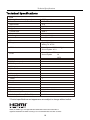
Technical Specifications
LCD
Viewing Picture Size (diagonal)
32”(Diagonal)
Resolution
1366x768
Aspect Ratio
16:9
Display colours
16.7M
Brightness
Contrast ratio
350 cd/m2
3000:1
Response time
8ms
View angle
1760(H)/1760(V)
TV
TV system
Digital TV: ATSC
Analog TV: NTSC
ATSC decode
Video System MPEG-2MP@HL
Sound System AC-3
NTSC
Video System NTSC
Sound System
M
MTS
Terminals
USB (Service port)
1
HDMI Input
3
VGA Input
1
PC Audio IN
Coax
1
Video
1
1
Audio (L/R)
2
Y PbPr
Headphone out
1
Audio out
1
Others
Input Power Voltage
Power consumption
100-240V ȫ 50/60Hz
120W
Audio Output Power (THD İ7%)
2 x 8W
1
* Product specifications and appearance are subject to change without notice.
HDMI, the HDMI Logo, and High-Definition Multimedia Interface are trademarks or
registered trademarks of HDMI Licensing LLC in the United States and other countries.
19