1
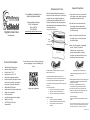
Video Instructions for Use
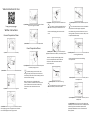
8) Circulator: Gently place camera inside the cover
http://qrs.ly/xp2ygja
5) Circulator: Remove the excess rings which will leave
only correct ring size on bezel.
Written Instructions
Camera Preparation Phase
11) Scrub person: Remove the adhesive tape liner
Tip: Camera can be placed upside down so
that controls are easily accessible when in use
Tip: Place covered camera on a sterile stand for
steps 11-14 so that the weight is supported.
Caution: Avoid dropping the camera into the
cover
Press down on bag to remove all excess air prior to
sealing so that it is easier to use camera. Step 11 can
be performed before Step 9.
6) Circulator: Turn off the camera to collapse bezel
Cover Preparation Phase
9) Scrub person: Hold the green circles and pull in
opposite directions to tear off top. Discard top portion
1) Circulator: Remove the camera strap
Caution: The newly created top edge of the
cover is considered to be unsterile after the
cuffs are torn off. Avoid contact with this
area for steps 9-14.
12) Scrub person: Fold cover over at fold lines 1 then 2 to
seal along adhesive tape
Caution: Avoid unsterile areas when folding
over top of cover.
7) Scrub person: Place hands inside cuffs and separate
to create opening to cover
2) Circulator: Turn the camera on to extend the bezel
3) Circulator: Remove the white ring liner
Tip: When putting camera into the cover
during next step, the scrub person can hold cover
horizontally to allow for circulator to easily place the
camera inside the opening.
Note: The entire cover is packaged sterile;
“Sterile”/”Unsterile” indicator line is to help scrub
person visualize which areas the circulator may
have touched. Users should not have cross
contact.
10) Scrub person: Press cover to the ring
13) Scrub person: If “NOT SEALED” is visible, cover is
not ready for use
Tip: Make sure there are no wrinkles in the
cover so that clear pictures can be taken
.
14) Scrub person: Once “SEALED” is formed, cover is
ready for use
4) Circulator: Stick the rings to the center of the camera
bezel by aligning center of rings with center of bezel.
Press around edges to secure rings to bezel.
15) Scrub person: Once the cover is done being used,
unfold top seal to remove the camera. Carefully remove
adhesive ring from camera bezel. Dispose of the
potentially biohazardous cover in accordance with
facility protocol.