1
VDH-NK800 Hardware Manual
E. Product appearance
1.
Front Panel
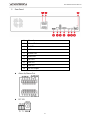
MENU
Going to Menu
ESC
ESC
Exit
■ / SEQ
Stop
Stop when Playback
INFO
INFO
Information Page
When playing back,there are 2*、4*、8*、16*、
Backward
32*、1/2*、1/4* backward speeds.
Under live page、2Ch and 9Ch can be changed
When playback,there are
Forward
32*、1/2*、and 1/4* forward speeds
Under live mode,
Play
2*、4*、8*、16*、
2Ch and 9Ch can be changed
Under Live mode, going to broadcast and copy;
however, under playback mode, going to broadcast.
Pause
PLAY/LIVE
REC
Playback
Under LIVE mode, going to playback.
LIVE
Under playback, going to LIVE mode.
Record
Under LIVE mode, going to manual force recording.
Power
One touch, turn on and press 3 second, turn off.
USB Port
Confirm
POWER
Power Indicator
LAN
Network Indicator
REC
PLAY
Pause
Recording
Indicator
Play Back Indicator
USB/ Mouse
Confirm
Power on
Network on and this LED flashing
NVR recording function on
Playback
4