1
2. TV PLACEMENT SETUP
1.
2.
3.
4.
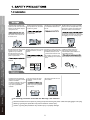
100mm
200mm
Thread hole size
TV & Electronic
Programme Guide
Digital Video
DVD Operation
100mm
Recording (DVR)
200mm
USB Multimedia
Playback
7.
8.
9.
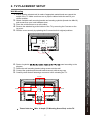
Fasten 4 eyebolts
panel according to the
diagram.
Fasten the wall mounting bracket using screws onto the wall.
Connect the eyebolts and the wall bracket securely with strong rope
Carefully check that all fastenings are secure before releasing the TV.
M4 x 10 depth (TV Mounting Screw Size) on the TV.
7
Reference
6.
On-Screen Display
(OSD) Menu
Remote Control
Initial Setup &
Input Sources
Parts & Connections
5.
Ensure that the selected wall is made of appropriate material and can support the
weight of the TV. Make sure there are no pipes or cables inside the wall on your
chosen position.
Obtain a suitable wall mounting bracket and mounting eyebolts (thread size M4x10)
and screws from your local hardware store.
Place the unit face down on a soft surface.
Remove the attached leg at the bottom of the TV by removing the 5 screws on the
leg cover.
Refit the cover securely by replacing the 5 screws into their original positions.
TV Placement
Setup
Wall Mounting