1
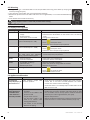
Malfunction
Possible causes
Buffer solution defective
•
Problem on porous element •
of sensor and/or deposits
pH sensor is worn
•
Solutions
•
Ensure that the solution used is pH7 or pH4
•
Check the pH of buffering solution using an electronic pH
tester
pH7 and/or
•
Use new pH7 and/or pH4 buffering solution
pH4 calibration
• Restart calibration
impossible (error
• Check that the bulb on the pH sensor is not damaged or has
message)
not dried up while out of the water.
or
• As a last resort, clean it by leaving sensor in a solution of
pH sensor reliability
10% hydrochloric acid for a few hours.
< 25%
• Check that the porous element on the sensor is in good
condition (clean with acid solution).
• Replace the pH sensor
Slow response of pH pH sensor is charged electrosta- Do not use a cloth or paper to wipe the sensor, shake it gently
sensor
tically
6. Registering the product
Register your product on our website:
- be the first to be informed of new Zodiac products and special offers,
- help us to continuously improve our product quality.
Australia – New Zealand
Europe, South Africa & Rest of the World
H0434900.A - EN - 2013-11
www.zodiac.com.au
www.zodiac-poolcare.com
EN
10