1
Messages
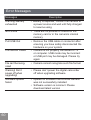
Description
Internal memory card
full
• The internal memory is full and cannot
store any additional files. Copy files to
computer and delete files from camera
or insert a new memory card
Memory card full
• Memory card is full and cannot store
any new files. Copy files to computer
and delete files from card or insert a
new memory card
Exceeded maximum
folder number
• This indicates that the SD card
exceeded the maximum number of
folders (999).This could cause a long
read time during the camera's power
up. Copy the data to your PC, format
the memory card.
Write protection of
memory card
• Memory card lock is switched to
protection mode. Take out the memory
card and unlock it
File cannot be edited
• The file has already been edited and
cannot be edited again
Memory card error
• The memory card is not recognized or
failed. Replace with a new memory
card or format this card again
The memory card is
not formatted
• Format the memory card as described
on page 48
Battery exhausted,
can’t update FW
• The firmware cannot be updated
without sufficient power. Charge the
battery fully before attempting to update
firmware
61