1
n,
8
w
1-1
ESD-TR-66-301
MTR-219
H
ESD ACCESSION LIST
ESD RECORD COPY
ESTI Call No. p
RETURN TO
SCIENTIFIC & TECHNICAL INFORMATION DIVISION
(ESTI). BUILDING 1211
fli
Copy No.
I
33432
of
'9
cys.
USER'S MANUAL FOR PEST,
A MONITOR PROGRAM FOR
THE PHOENIX COMPUTER
October 1966
M. ben-Aaron
Prepared for
DEPUTY FOR ENGINEERING AND TECHNOLOGY
DIRECTORATE OF COMPUTERS
ELECTRONIC SYSTEMS DIVISION
AIR FORCE SYSTEMS COMMAND
UNITED STATES AIR FORCE
L. G. Hanscom Field, Bedford, Massachusetts
Project 508F
Distribution of this document is unlimited.
Prepared by
THE MITRE CORPORATION
Bedford, Massachusetts
Contract AF19(628)-5165
This document may be reproduced to satisfy official
needs of U.S. Government agencies. No other reproduction authorized except with permission of Hq.
Electronic Systems Division, ATTN: ESTI.
When US Government drawings, specifications, or
other data are used for any purpose other than a
definitely related government procurement operation,
the government thereby incurs no responsibility
nor any obligation whatsoever; and the fact that the
government may have formulated, furnished, or in
any way supplied the said drawings, specifications,
or other data is not to be regarded by implication
or otherwise, as in any manner licensing the holder
or any other person or corporation, or conveying
any rights or permission to manufacture, use, or sell
any patented invention that may in any way be related
thereto.
Do not return this copy. Retain or destroy.
ESD-TR-66-301
MTR-219
USER'S MANUAL FOR PEST,
A MONITOR PROGRAM FOR
THE PHOENLX COMPUTER
October 1966
M. ben-Aaron
Prepared for
DEPUTY FOR ENGINEERING AND TECHNOLOGY
DHIECTORATE OF COMPUTERS
ELECTRONIC SYSTEMS DIVISION
AIR FORCE SYSTEMS COMMAND
UNITED STATES AIR FORCE
L. G. Hanscom Field, Bedford, Massachusetts
Project 508F
Distribution of this document is unlimited.
Prepared by
THE MITRE CORPORATION
Bedford, Massachusetts
Contact AF19(628)-5165
ABSTRACT
PEST is a non-time-shared program which gives a user access to an
editor and an assembler on PHOENIX, a computer developed by The MITRE
Corporation. PEST allows the user to enter, edit, assemble, load, debug,
and execute a symbolic program.
REVIEW AND APPROVAL
This technical report has been reviewed and is approved.
CHARLES A. LAUSTRUP
Colonel, USAF
Director of Computers
111
TABLE OF CONTENTS
ag_e
SECTION I
INTRODUCTION
1
SECTION n
DISCUSSION
2
LOADING PEST FROM TAPE
LOADING PEST FROM DRUM
2
4
Legitimate Control Characters
Illegitimate Control Characters
FILES FROM TAPE
THE EDITOR UNDER PEST CONTROL
EDITOR Output for PAT Processing
PAT UNDER PEST CONTROL
Typewriter Input to PAT
Tape Input to PAT
EDITOR Input to PAT
Input-Independent PAT-PEST Conventions
The Aftermath
LOADING CODE FOR EXECUTION OR DEBUGGING
DEBUG0
Space Requirements for DB0
DEBUG1
To Call DEBUG1
Use of DEBUG1
Space Requirements for DEBUG1
APPENDIX
APPENDLX
APPENDLX
APPENDLX
APPENDLX
I
II
IH
TV
V
REFERENCES
4
4
5
6
7
7
8
8
9
10
10
13
15
15
15
15
16
16
TERMINATE
16
MAGNETIC TAPE DATA INPUT
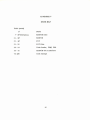
CORE MAP FOR PEST SYSTEM
PHOENLX SUPPLEMENTARY OPCODES
REPRESENTATION OF ICS-1 CHARACTERS
DRUM MAP
19
21
22
24
25
26
SECTION I
INTRODUCTION
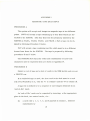
PEST (PAT EDITOR SYSTEM TENTATIVE) is a program which puts
at the user' s disposal the tools necessary to assemble and run a program on
the PHOENDC computer. PEST is an interim, non-time-sharing monitor
which will be used until the time-sharing MONITOR is operational. Under
PEST control, a programmer may use PAT (the macro-assembler), the
EDITOR, and two debugging programs (DEBUGS and DEBUG1).
SECTION II
DISCUSSION
LOADING PEST FROM TAPE
To load PEST into the machine, perform the following operations:
(1) Mount a PEST system tape (preferably with the protect ring
removed) on one of the tape drives.
(2) Set tape-drive selector to logical ' 6' .
At this point the tape
should be at load-point (LOAD switch light ' on1), and the
READY switch should be lighted.
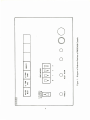
(3) At the console, with the ' CPU SINGLE-INSTRUCTION1 switch
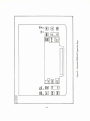
down, press the 'MASTER RESET' button (Figure 1).
(4)
Press the ' LD FROM TAPE' button.
A short bootstrap loader
will be automatically loaded.
(5) Push the 'COMPUTE' button.
(6) Raise the ' CPU SINGLE-INSTRUCTION' switch.
load itself onto the drum.
The tape will
When PEST is successfully loaded,
the message ' pest on drum,
please bring in drum bootstrap'
will be typed out.
(7)
Tabs should now be set, if not already set.
The recommended
tab settings are at 15, 25, 50, 6fi, and 87 spaces to the right
of the left-hand margin.
o
u
X
o
o
10
UJ
I—
CO
1
U_l
CO
UJ
CO
C3
uj
s
»—
C* —
01
I
<
oo
o
o
o
-a
o
z
UJ
o
in
c
o
'•t
O
Q_
-*c
D
>
<U
£
2
o
2?
LOADING PEST FROM DRUM
To call in PEST from drum:
(1)
Depress the 'CPU SINGLE-INSTRUCTION' switch (i.e. , put in
'single-step' position).
(2)
Press the 'MASTER RESET' button.
(3)
Press the 'LD FROM DRUM' button.
(4)
Press the 'COMPUTE' button.
(5)
To transfer control to this program put 'CPU SINGLEINSTRUCTION' switch up (i.e. , into the 'automatic' position).
Steps 1 through 4 cause a core loader to be transferred from the drum
into core.
Step 5 causes the remainder of the PEST program to be read into
core from drum, and control to be transferred to the PEST program proper.
The program will then pause, waiting for the SOM key to initialize the
typewriter subroutines.
The first action of PEST after receiving the SOM
pulse is to type out the message:
'control'.
The program then waits for an appropriate control character to be
typed in.
Legitimate Control Characters
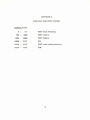
Table I lists the legitimate control characters and describes their actions.
Illegitimate Control Characters
An attempt to type in a character not enumerated in the above table will
cause the message
Table I
Legitimate Control Characters
Character
Action
c
loads code for execution
d
brings in DBff
D
brings in DB1
e
brings in ' EDITOR'
f
loads ' EDITOR' files from magnetic tape
P
brings in working copy ' PAT'
P
brings in fresh ' read-only' version of ' PAT'
S
saves DB1
T
terminates 'PEST'
'illegal command'
to be typed out.
This is followed by a return to the start of the program.
FILES FROM TAPE
Data can be entered into the EDITOR files from a suitably prepared
tape (Appendix I). PEST will normally load only four files from the tape.
If there are more than four files on the tape, PEST will complain
'too many files on tape, only 4 loaded1,
and control will be handed back to PEST. At this point the tape will be positioned just beyond an end-of-file mark and be well-placed for reading further
files from tape.
The PEST command which initiates the action of loading files from tape
is the typing of an 'f.
The response is:
'_files to be prepared from tape'.
'please mount protected source tape on tape drive 0\
'please type a 'y' when ready'.
If any character other than a 'y' is typed in, PEST will loop back and
try the last two messages again.
When a 'y' is typed in, PEST will load the tape onto drum and build a
drum-list to hand down to the EDITOR.
The successful completion of the operation will be signalled by the
message:
'files from tape successfully loaded'.
Before these files can be used with the EDITOR, the EDITOR must be
reinitialized by using its 'reinitialize' command1.
THE EDITOR UNDER PEST CONTROL
When PEST is in the 'control' mode and an 'e' is typed in, the program
responds by typing out the rest of the message:
'jjditor requested'.
PEST will then move the EDITOR program from the drum to core, and
it will transfer control to the EDITOR.
The first action the EDITOR expects is striking of the SOM key, which
will cause initialization of the typewriter subroutines and typing of the message:
'the editor is ready'.
From this point on, the EDITOR program is firmly in control.
EDITOR Output for PAT Processing
After the editing phase is complete, it will generally be the practice to
'hand down' an edited file to PAT for processing.
This process is accom-
plished by 'opening' the relevant file and then ordering the EDITOR to
'terminate'.
This procedure causes the 'opened' file to be copied, starting in a particular field on the drum so that it can be accessed by PAT.
Control then returns
to PEST.
PAT UNDER PEST CONTROL
When PEST is in the 'control' mode and a 'p' is typed in, the program
responds by typing out the rest of the message:
'£at requested1.
PEST will then move the PAT program from the drum to core and
transfer control to the PAT program.
The first action the PAT program expects is striking of the SOM key
which will cause initialization of the typewriter subroutines and typing of the
message:
'pat ready'.
This message is immediately followed by a request to the user to specify
the mode of input of the source language.
typeout:
'type t, m, or e'.
The request takes the form of the
If any other character is typed in, the message,
'illegal input source,
try again',
will be typed out, and the sequence just described starts again with the
message:
'pat ready1.
Typewriter Input to PAT
If a 't' is typed, PAT will be initialized to expect input from the typewriter keyboard.
The program will acknowledge the input of the 't' by
completing the message:
'Jtypewriter input selected'.
With typewriter input, PAT's PASS1 error messages will be printed out
as the errors occur.
The assembly can be terminated at any time by typing
in right parentheses until PAT seizes control.
Tape Input to PAT
If an 'm' is typed, PAT will be initialized to expect input from a suitably
prepared magnetic tape (see Appendix I).
The program acknowledges the
request by typing:
'mag tape input needs protected source tape on tape drive 0'
'please signal tape ready by typing a 'y' ' .
If any character other than a 'y' is typed in, the message will be repeated.
When a 'y' is typed in, the next message out will be:
'depress sense-switch 1 for type-out' .
This message means that the input from the tape can be monitored as
it comes in. Monitoring is initiated by depressing the sense-switch. Raising
the switch at any point simply shuts off the type-out and has no effect on the
way the program runs.
A virgin copy of PAT is available in case it should be expedient to make
a fresh start with an uncluttered symbol table. This 'clean' version is
'read-only' in the sense that it cannot be saved in the way that the working
version can.
To call in the fresh version of PAT, get PEST in the 'control' mode and
type in a 'P' . Pest will indicate that the read-only version has been
requested by typing
'PAT requested' .
From this point on, the regular PAT procedures apply.
EDITOR Input to PAT
If an 'e' is typed, PAT will be initialized to expect input from the EDITOR
(see EDITOR Output for PAT Processing).
The program acknowledges 'he
selection by typing
'editor input' .
The message:
'depress sense-switch 1 for type-out1
reminds the user that the input from the edited file can be monitored as it
comes in by depressing sense-switch 1. Raising the switch at any subsequent time simply shuts off the type-out and has no further effect on the
running of the program.
Input-Independent PAT-PEST Conventions
Because PAT requires a name for each program it assembles, it
requests:
'please type in a three-character identifying name' .
Each program should have a unique name.
Once this name has been
entered, the PAT program proper takes over.
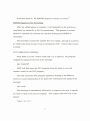
If the input is from the typewriter, the 'input status' light (Figure 2)
will be energized, indicating that PAT is waiting for input from the keyboard.
If input is from magnetic tape or the EDITOR, the input will be automatically
read in from the appropriate source.
From this point on, the PAT ground rules apply.
2
The Aftermath
After PAT has successfully processed the source program, it will give
the user the following options (in the order described):
Typing a Listing
The message:
•for a listing of the output code, type a 'y' please' ,
gives the programmer the choice of having the output code listed.
Any
character other than a 'y' will suppress the listing.
Saving the Output Code
The output code, if any, can be saved on drum for subsequent execution
under the control of the PEST program.
It will be accessible through the
three-character name given to it at the start of the PAT run.
10
s
so
<-r>
a.
s
1
_
u.
00
5
to
c
ae
UJ
£
u_
to
0)
0)
CL
O
X
Q-
a
>
CN
0)
LB
ae —i
«<UJ
0
INPUT
STATUS
S
3E oe
3
_l
C_3
UJ
CO
so
UJ
<s)ae
UJ
11
The message:
'type a 'y' to save this code for running' ,
will indicate that the time to make the choice has come.
Any character other than a 'y' will cause the output code to be discarded.
Typing the Symbol Table
The message:
'symbol-table printout: e = entire , p = partial'
gives the user the choice of printing the PAT symbol table in whole or in
part, or, by typing a character other than an 'e' or a 'p', of bypassing this
operation altogether.
The only difference between the 'entire' and the 'partial'
symbol-table listing is that the 'null tail' and the symbols with this tailing* are
elided.
If the SOM key is pressed while the symbols under a particular tail are
being typed out, the remainder of the symbols under this tail will not be typed
out.
Instead, the next tail in sequence will be announced, and the symbols
associated with it will be listed.
Thus, by judicious use of the SOM key, any
selected portion of the symbol table can be listed.
Preserving the Symbol Table
PEST preserves the PAT symbol table by copying the entire PAT program back on drum (overlaying the previous version).
The message:
'to save this version of PAT, type a *y",
announces that the decision, whether or not to save the version of PAT
currently in core, must be made.
The first set of symbols to be typed consists of those with no tail (the null
tail). All remaining tails appear in alphabetical order, i.e., a, a:a, a:b,
a:b:c, b, b:a, ... . Symbols with the same tail are also listed in alphabetical
order.
12
Any character other than a 'y' will transfer control back to PEST,
leaving the 'old' version of PAT unchanged.
If the new version is saved, control is handed back to PEST after PAT
has been saved.
LOADING CODE FOR EXECUTION OR DEBUGGING
This section presupposes that one or more programs have been compiled by PAT and that the PAT option of saving the code has been exercised.
PEST provides the facilities for calling for this code by 'name' and
having it loaded into core in the appropriate locations. (If a non-unique name
was chosen, only the most recent version is accessible.)
To accomplish loading, the user types a 'c' and the response is:
'code loader requested'.
'type a 'y' for code list printout'.
If a 'y' is typed in, the 'names' of the stored programs will be typed
out, preceded by 'name of code* and followed by 'end of code list'. If any
other character is typed in, no listing will be produced.
The next request by the program will be:
'please type in name of program to be loaded'.
At this point a three-character name (which should be one of the names
in the list) is expected from the user. When this has been typed in, the
designated program will be retrieved from the drum and loaded into core.
Should the user request a program which is not named in the list of
stored programs, the message:
13
•program identity unknown,
try again please',
will appear, and the program will then cycle back to type:
'type a 'y* for code list printout'.
PEST will indicate that the specified program has been found and
loaded by typing out:
'program loaded and ready to transfer to location*****'
'an 'x' transfers control, a 'D' brings in dbl, a 'd' brings in db0\
If the symbolic input to PAT ended with an 'end' statement, ***** is the
address named in the 'end' statement.
***** will be '
If no 'end' statement was included,
0'.
In this case (as in the case where the starting location was intended to
be 0), control will not be transferred and PEST will keep typing the same
message asking for an 'x', a 'D' or a 'd', even if an 'x' is typed in.
short, control cannot be transferred to location 0 directly.
In
If the user
really wants to start a program at '0' , it must be done under control of one
of its debugging programs.
It should be remembered that locations 0 through
3
7 are used by the trap instructions and interrupts.
If any character other than an 'x', 'd', or 'D' is typed in, PEST expects
that more code is to be loaded, so it cycles back and types:
'please type in name of program to be loaded',
again, and the sequence repeats itself.
A program to be executed under control of either of the debugging
programs must not overlap that program in core, of course (Appendix II).
14
DEBUG0
DEBUG0 (or DB0) is a debugging program which provides minimal
4
capabilities for debugging a program on the PHOENIX computer. It requires
a relatively small amount of core storage.
To call DB0, the command 'd' is typed in. The system responds:
'debug0 requested'.
The typewriter subroutines must be initialized by the SOM key.
The user may wish to return to the PEST program at some point. If
there is reasonable assurance that the core region from 20 to 176 is
8
8
untouched, control can be transferred by typing in
'20g' .
If the status of the core region in question is in doubt, the PEST program will have to be brought in from drum in the usual way.
Space Requirements for DB0
The area of core occupied by DB0 is given in Appendix II.
DEBUG1
DEBUG1 (or DB1) is a symbolic debugging program providing operation
definition capabilities to assist and expedite the difficult and time-consuming
process of checking out programs.
To Call DEBUG1
To call DB1, the command 'D' is typed in. The system responds:
'Debugl requested'.
The typewriter subroutines must be initialized by means of the SOM key.
15
Use of DEBUG1
The use of DB1 is fully described in Reference 4.
The user may wish to return to the PEST program at some point.
If
there is reasonable assurance that the core region from 20 to 176 is un8
o
touched, control can be transferred by typing in
'start 20' .
If the status of the core region in question is in doubt, the PEST program
will have to be brought in from drum in the usual way.
Space Requirements for DEBUG1
The area of core occupied by DEBUG1 is shown in Appendix II.
TERMINATE
When the user wishes to capture the system in a particular state (as a
backup or when getting off the machine), PEST will make a tape which, when
loaded in, will recreate the system as it was when captured.
The command
for this action is a 'T' which initiates the following sequence of messages:
'Termination requested' .
'please mount unprotected blank tape on tape drive 1' .
'please type a 'y' to indicate output tape ready'.
When these requests are complied with, PEST will create a new tape and
signal completion of the action by the message:
'output tape complete'.
16
The newly-created tape is a PEST system tape containing all system
programs, current user files, and changes made to PAT and EDITOR
symbol tables.
Upon request, a fresh PEST system tape may be obtained. This tape
contains all system programs but no user files or definitions. The PAT
symbol table contains the PHOENDC machine opcodes and those symbols
essential to the operation of PAT.
The EDITOR files contain a set of
PHOENDC supplementary opcodes given in Appendix in. The user may, at
his discretion, either add them to PAT or discard them. The entire cycle
can now be repeated using this tape.
After terminating, control will be handed back to the PEST program.
Should the user wish to continue working with the PEST system currently
on drum, he should proceed as usual.
It should be noted that whenever a PEST system is loaded from tape,
an EDITOR file should be opened if PAT is to be run. The user must not
assume that the file previously opened for handing down to PAT is still in
existence.
17
APPENDIX I
MAGNETIC TAPE DATA INPUT
PROCEDURE A
The system will accept card images on magnetic tape at two different
points.
PEST will accept a tape containing up to four files which are for-
warded to the EDITOR.
(The four files will be arbitrarily labeled by the
EDITOR as FILEA, FILEB, FILEC, and FILED.) Such a tape can be obtained by following Procedure B below.
PAT will accept a tape containing one file which must be in a different
format from those for the EDITOR.
The tape is prepared by following
procedures B and C below.
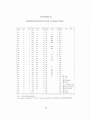
The PHOENLX ICS character codes and combinations of card-code
characters used to represent them are shown in Appendix IV.
PROCEDURE B
Submit a reel of tape and a deck of cards to the 7030 facility and request
a PRESTO run.
If an unlabeled tape is used, the first card in the deck must be a card
with CTL NOLABEL on it, with the 'C in column 6 and the *N* in column 10.
A tape file is defined to be a sequence of card images delimited by an
'end-of-file' mark.
An 'end-of-file' mark can be requested by inserting, at the appropriate
place in the deck, two control cards, viz.:
(1)
a card with 4, 5, 6, 7, 8, and 9 punched in column 1, followed
immediately by
19
(2)
a card with CTL FILE where the 'C is in column 6 and the 'F'
is in column 10.
No control cards are needed at the end of the deck.
After the last card,
5
two 'end-of-file' marks are automatically written on the tape.
The tape, when it comes back, will have one 20-word record for each
card image, each word containing four 6-bit BCD characters.
PROCEDURE C
The output tape from a PRESTO run (procedure B) must be processed
by the PHOENLX program TXFM into a form acceptable to PAT.
The output
from TXFM is a tape containing card images in the form of 27-word records,
each word containing three ICS characters.
A copy of the program TXFM is
available at the PHOENIX maintenance console.
20
APPENDIX H
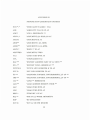
CORE MAP FOR PEST SYSTEM
Location (octal)
0 -
176
PEST drum bootstrap
200 -
4000
PEST control
4000 - 10000
PEST buffers
63000 - 75227
DB1
75230 - 76137
PEST code-loading functions
76140 - 77777
DB0
21
APPENDIX III
PHOENIX SUPPLEMENTARY OPCODES
NUL**,*
ZERO BASE W/ADDR + TAG
ABS
ABSOLUTE VALUE OF AC
ADI**
ADD A IMMEDIATE **
ARG**,*
ARGUMENT (24-BITS) TO AC
ARGAC
ARGUMENT IS AC
ARGI**
ARGUMENT I (16-BITS)
ARGR**
ARGUMENT R (16-BITS)
ARGX *
INDEX * TO AC
ARGZERO
ARGUMENT ZERO
CLA
LOAD ZERO INTO AC
CPL
COMPLEMENT AC
DAP **
DEPOSIT ADDRESS PART OF AC INTO **
DZA **
DEPOSIT ZERO ADDRESS AT **
FETCH R
FETCH LIVE REGISTER R TO AC
GET R
GET RTH REGISTER TO AC
GO **
TRANSFER CONTROL UNCONDITIONALLY TO **
JMP **
TRANSFER CONTROL UNCONDITIONALLY TO **
LAI **
LOAD ** IMMEDIATE
LAR **
LOAD ADDRESS REMOTE FROM **
LAZ
LOAD ZERO INTO AC
LDZ
LOAD ZERO INTO AC
MBZ *
ZERO BIT * IN AC
NIL **
ONE FULL-WORD ARGUMENT
NOP
NO OPERATION
PUT R
PUT AC IN RTH REGSTR
22
PHOENIX SUPPLEMENTARY OPCODES (Cont'd.)
RESET **
•RESET (SET TO ZERO) THE SWITCH **
SAB *
•SKIP IF AC BIT * IS 1
SETACBIT **
•SET AC BIT * TO 1
SKP **
'SKIP ** LOCATIONS
SLEZ
'SKIP IF AC . LE. PLUS ZERO
SKPOC
'NR (MASKED) TO AC. SKIP IF PUP OP COMP
SKPI
•SKIP IF PUP H)LE
SKPSSW*
'SKIP ON SENSE-SWITCH * (0, 1, 2, 3)
SGZ
•SKIP IF AC . GR. PLUS ZERO
SMA
'SKIP MINUS AC
SNA
•SKIP NEGATIVE AC
SNLZ
'SKIP IF AC NOT LESS ZERO (ARITHMETIC)
SNOV
'SKIP IF NO OVERFLOW
SNPZA
•SKIP IF NOT PLUS ZERO AC
SNZ
'SKIP IF NON-ZERO (ARITHMETIC) AC
SNZA
'SKIP IF NON-ZERO AC (ARITHMETIC)
SPA
'SKIP IF POSITIVE AC
SPZA
'SKIP IF PLUS ZERO AC
STASH R
'STASH AC IN LIVE REGISTER R
SZA
'SKIP IF AC IS ZERO (ARITHMETIC)
SZB
'SKIP IF ZERO (ARITHMETIC) BR
TBL**,*
•ADDRESS FIELD + BITS 0-7 FffiLD
WRD **
•ONE FULL-WORD ARGUMENT
XAB
•EXCHANGE AC AND BR
The 'R' refers to the registers in Table 9.46. 3 of Reference 1.
23
APPENDIX IV
REPRESENTATION OF ICS-1 CHARACTERS
Octal
000
H. R.
ICS
0
0
ICS
Octal
H. R.
010
W
w
Octal
100
H. R.
ICS
•
*
Octa
001
1
1
041
X
X
101
2
2
042*
Y
y
102
/
$/
/
\
141
002
003
3
3
043
Z
z
103
$0A
t
143
004
4
4
044
$A
A
104
$f*v
005
5
5
045
$1)
B
105
$0K
006
6
6
046
SC-
C
106
$0R
007
7
7
047
SI)
D
107
=
1
~~
—
=
010
B
8
050
$E
E
110
$0L
<£
Oil
9
9
051
$F
F
111
$0G
G
112
>
(
)
[
]
\
/
ICS
142
144
145
146
147
150
151
A
a
052
st;
013
IS
b
053
SH
H
113
(
)
014
c
c
054
SI
I
114
S(
015
1)
d
055
SJ
J
115
S)
016
E
e
056
SK
K
116
$6
(117
F
f
057
SL
L
117
Sfl
020
G
g
060
$M
M
120
021
11
b
061
SK
N
121
,
022
I
i
062
So
O
122
s.
023
J
j
063
$P
P
123
$,
i
024
K
k
064
$Q
Q
124
$0Q
?
164
025
I,
1
065
SH
125
ss
M
m
066
SK
126
$0/
$=
$
1
_
165
026
u
s
012
H. R.
140
152
153
154
155
156
157
160
>
161
162
163
160
167
$0S space
027
N
n
067
$T
T
127
o:io
0
o
070
Sr
U
130
170
031
P
P
071
Sv
V
131
171
$0B backspace
032
Q
q
072
sw
w
132
172
$0X index
033
R
r
073
Sx
X
133
173
$+ carriage return
034
S
s
074
$y
Y
134
174
$(fP partial message
035
T
t
075
$z
Z
135
175
$0E end message
036
U
u
076
+
+
136
176
037
V
V
077
-
-
137
177
$- tab
$* null
$0D delete
H. R, • Hollerith Representation
For example, the sequence 2 [ 5 f A:Q]
must be represented on an IBM card by 2$(5$0A$A$. $Q$)$.
24
APPENDIX V
DRUM MAP
Field (octal)
0
1-20 (inclusive)
PEST
EDITOR files
21- 30
EDITOR
31- 40
PAT
51- 52
PAT files
53- 54
Code-loader, DB0, DB1
55- 75
EDITOR-PAT interface
76-103
Code storage
25
REFERENCES
1.
B. Isquith, User's Manual for the EDITOR, The MITRE Corporation,
Bedford, Massachusetts, MTR-222, 27 June 1966, (U).
2.
M. ben-Aaron, PAT User's Manual, The MITRE Corporation, Bedford,
Massachusetts, MTR-220, (U).
3.
The MITRE Corporation, Reference Manual for the PHOENIX Digital
Computer, TM-3870, Bedford, Massachusetts, 15 Nov. 1963 (U).
4.
M. ben-Aaron, User's Guide to Symbolic Debugging on the PHOENIX
Computer, The MITRE Corporation, Bedford, Massachusetts.
5.
The MITRE Corporation, 7030 Facility Manual - Second Edition, (U),
Bedford, Massachusetts, May 1965.
Note: These references are corporate reports not reviewed by the Directorate
of Security Review, Department of Defense, for public release.
26
Unclassified
Security Classification
DOCUMENT CONTROL DATA - HAD
(Security claealtication ol title, body of abetract and indexing annotation muat ba entered when the overall report it elaeaitted)
I. ORIGINATING ACTIVITY (Cotpormta author)
la
REPORT SECURITY
C \, A*S I F I C A T ION
Unclassified
The MITRE Corporation
Bedford, Massachusetts
26 GROUP
3 REPORT TITLE
USER'S MANUAL FOR PEST, A MONITOR PROGRAM FOR THE PHOENIX COMPUTER
4. DESCRIPTIVE NOTES (Type of report and incluetve datem)
N/A
5. AUTHORfSJ (Lmmt name, IIret name, initial)
ben-Aaron, Max
7f. TOTAL NO. OF PACES
6 REPORT DATE
8a. CONTRACT OR GRANT NO.
7b. NO OF REFl
28
October 1966
9a. ORIGINATOR-* REPORT NUMBERfSj
ESD-TR-66-301
AF19(628)-5165
6 PROJECT NO.
508F
9 6 OTHER REPORT NOW (Any other numbera that may be aealaTted
mil report)
MTR-219
10. AVAILABILITY/LIMITATION NOTICES
Distribution of this document is unlimited.
II. SUPPLEMENTARY NOTES
12. SPONSORING MILITARY ACTIVITY Directorate of Computers, Electronic Systems Division; L. G.
Hanscom Field, Bedford, Massachusetts
13 ABSTRACT
PEST is a non-time-shared program which gives a user access to an
editor and an assembler on PHOENIX, a computer developed by The MITRE
Corporation. PEST allows the user to enter, edit, assemble, load, debug,
and execute a symbolic program.
DD ,^^ 1473
Unclassified
Security Classification
Unclassified
Security Classification
14
LINK A
KEY WORDS
ROLE
LINK C
WT
DIGITAL COMPUTER
ON-LINE
OPERATING SYSTEM
NON-TIME-SHARED
INSTRUCTIONS
1. ORIGINATING ACTIVITY: Enter the name and address
imposed
such as:
of the contractor, subcontractor, grantee, Department of Defense activity or other organization (corporate author) issuing
(1)
the report.
2a. REPORT SECURITY CLASSIFICATION: Enter the over(2)
all security classification of the report. Indicate whether
"Restricted Data" is included. Marking is to be in accord(3)
ance with appropriate security regulations.
2b. GROUP: Automatic downgrading is specified in DoD Directive 5200.10 and Armed Forces Industrial Manual. Enter
the group number. Also, when applicable, show that optional
markings have been used for Group 3 and Group 4 as authorized.
3. REPORT TITLE: Enter the complete report title in all
capital letters. Titles in all cases should be unclassified.
If a meaningful title cannot be selected without classification, show title classification in all capitals in parenthesis
immediately following the title.
4. DESCRIPTIVE NOTES: If appropriate, enter the type of
report, e.g., interim, progress, summary, annual, or final.
Give the inclusive dates when a specific reporting period is
covered.
5. AUTHOR(S): Enter the name(s) of author(s) as shown on
or in the report. Entei last name, first name, middle initial.
If rr.ilitary, show rank end branch of service. The name of
the principal ..athor is an absolute minimum requirement.
6. REPORT DATE: Enter the date of the report as day,
month, year; or month, year. If more than one date appears
on the report, use date of publication.
7a. TOTAL NUMBER OF PAGES: The total page count
should follow normal pagination procedures, i.e., enter the
number of pages containing information.
76. NUMBER OF REFERENCES: Enter the total number of
references cited in the report.
8a. CONTRACT OR GRANT NUMBER: If appropriate, enter
the applicable number of the contract or grant under which
the report was written.
8b, 8c, it. 8d. PROJECT NUMBER: Enter the appropriate
military department identification, such as project number,
subproject number, system numbers, task number, etc.
9a. ORIGINATOR'S REPORT NUMBER(S): Enter the official report number by which the document will be identified
and controlled by the originating activity. This number must
be unique to this report.
9b. OTHER REPORT NUMBER(S): If the report has been
assigned any other report numbers (either by the originator
or by the sponsor), also enter this number(s).
10. AVAILABILITY/LIMITATION NOTICES: Enter any limitations on further dissemination of the report, other than those
by security classification, using standard statements
"Qualified requesters may obtain copies of this
report from DDC."
"Foreign announcement and dissemination of this
report by DDC is not authorized."
"U. S. Government agencies may obtain copies of
this report directly from DDC. Other qualified DDC
users shall request through
(4)
"U. S. military agencies may obtain copies of this
report directly from DDC Other qualified users
shall request through
(5)
"All distribution of this report is controlled. Qualified DDC users shall request through
If the report has been furnished tc the Office of Technical
Services, Department of Commerce, for sale to the public, indicate this fact and enter the price, if known.
11. SUPPLEMENTARY NOTES: Use for additional explanatory notes.
12. SPONSORING MILITARY ACTIVITY: Enter the name of
the departmental project office or laboratory sponsoring (paying for) the research and development. Include address.
13. ABSTRACT: Enter an abstract giving a brief and factual
summary of the document indicative of the report, even though
it may also appear elsewhere in the body of the technical report. If additional space is required, a continuation sheet shall
be attached.
It is highly desirable that the abstract of classified reports
be unclassified. Each paragraph of the abstract shall end with
an indication of the military security classification of the information in the paragraph, represented as (TS), (S), (C). or (U).
There is no limitation en the length of the abstract. However, the suggested length is from ISO to 225 words.
14. KEY WORDS: Key words are technically meaningful terms
or short phrases that characterize a report and may be used as
index entries for cataloging the report. Key words must be
selected so that no security classification is required. Identifiers, such as equipment model designation, trade name, military
project code name, geographic location, may be used as key
words but will be followed by an indication of technical context. The assignment of links, rules, and weights is optional
GPO 886-551
Unclassified
Security Classification