1
Operation Guide 2926
Stopwatch
• The table below describes button operations you can perform during an elapsed
time measurement operation in the elapsed time mode.
To do this:
Do this:
Stop the elapsed time operation
Press D.
Resume a stopped elapsed time operation
Press D again.
Display the countdown start time
While the elapsed time is
stopped, press B.
Stop the elapsed time operation and display the reset time
Press B.
Start the countdown from the displayed reset time
Press D.
Minutes
Hours
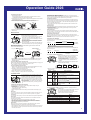
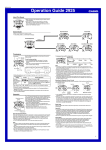
The stopwatch lets you measure elapsed time, split times,
Seconds and two finishes.
1/100 second
• The display range of the stopwatch is 99 hours, 59
minutes, 59.99 seconds.
• The stopwatch continues to run, restarting from zero
after it reaches its limit, until you stop it.
• The stopwatch measurement operation continues even
if you exit the Stopwatch Mode.
• Exiting the Stopwatch Mode while a split time is frozen
on the display clears the split time and returns to
elapsed time measurement.
• All of the operations in this section are performed in the
Stopwatch Mode, which you enter by pressing C.
To measure times with the stopwatch
Alarms
Elapsed Time
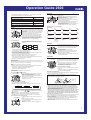
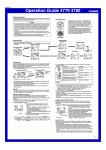
You can set five independent Daily Alarms. When an
Alarm time Alarm number alarm is turned on, the alarm tone sounds when the alarm
(Hour : Minutes)
time is reached. One of the alarms can be configured as a
Timekeeping Mode time
snooze alarm or a one-time alarm, while the other four are
one-time alarms.
You can also turn on an Hourly Time Signal that causes
the watch to beep twice every hour on the hour.
• There are five alarm screens numbered 1 through 5.
The hourly time signal screen is indicated by :00.
• When you enter the Alarm Mode, the screen you were
viewing when you last exited the mode appears first.
• All of the operations in this section are performed in the
Alarm Mode, which you enter by pressing C.
D
Start
x1
x2
x3
:00
x5
x4
• You can configure Alarm 1 as a snooze alarm or a one-time alarm. Alarms 2
through 5 can be used as one-time alarms only.
• The snooze alarm repeats every five minutes.
2. After you select an alarm, hold down A until the hour setting of the alarm time
starts to flash. This indicates the setting screen.
• This operation automatically turns on the alarm.
3. Press C to move the flashing between the hour and minute settings.
4. While a setting is flashing, use D (+) and B (–) to change it.
• When setting the alarm time using the 12-hour format, take care to set the time
correctly as a.m. (no indicator) or p.m. (P indicator).
5. Press A to exit the setting screen.
Alarm Operation
The alarm sounds at the preset time for about 10 seconds. In the case of the snooze
alarm, the alarm operation is performed a total of seven times, every five minutes, until
you turn the alarm off or change it to a one-time alarm.
Note
• Pressing any button stops the alarm tone operation.
• Performing any one of the following operations during a 5-minute interval between
snooze alarms cancels the current snooze alarm operation.
Displaying the Timekeeping Mode setting screen
Displaying the Alarm 1 setting screen
To test the alarm
In the Alarm Mode, hold down D to sound the alarm.
➤D
Re-start
➤D
Stop
➤B
Clear
➤B
Split
➤B
Split release
➤D
Stop
➤B
Clear
➤D
Stop
➤B
Split release
➤B
Clear
Split Time
D
Start
(SPL displayed)
Two Finishes
➤B
Split
D
Start
First runner
finishes.
Display time of
first runner.
To set an alarm time
1. In the Alarm Mode, use D to scroll through the alarm
screens until the one whose time you want to set is
displayed.
➤D
Stop
Second runner
finishes.
Display time of
second runner.
Dual Time
Dual time
(Hour : Minutes Seconds)
Timekeeping Mode time
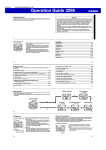
The Dual Time Mode lets you keep track of time in a
different time zone.
• The seconds count of the Dual Time is synchronized
with the seconds count of the Timekeeping Mode.
To set the Dual Time
1. Press C to enter the Dual Time Mode.
2. Use A, B, and D to set the Dual Time Mode time.
• Each press of D (+) and B (–) changes the time
setting in 30-minute increments.
• Pressing A sets the Dual Time Mode to the same time
as the Timekeeping Mode.
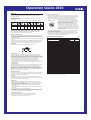
Illumination
Auto light switch
on indicator
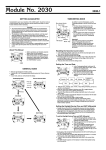
The display of the watch is illuminated by an LED (lightemitting diode) and a light guide panel for easy reading in
the dark. The watch’s auto light switch automatically turns
on illumination when you angle the watch towards your
face.
• The auto light switch must be turned on (indicated by
the auto light switch on indicator) for it to operate.
• See “Illumination Precautions” for other important
information about using illumination.
To turn on illumination manually
In any mode, press L to illuminate the display for about
one second.
• The above operation turns on illumination regardless of
the current auto light switch setting.
About the Auto Light Switch
To turn Alarms 2 through 5 on and off
1. In the Alarm Mode, use D to select a one-time alarm
Alarm on indicator
(alarm number 2 through 5).
2. Press B to toggle the displayed alarm on and off.
• Turning on a one-time alarm (2 through 5) displays the
alarm on indicator on its screen.
• If any alarm is on, the alarm on indicator is shown on
the display in all modes.
Turning on the auto light switch causes illumination to turn on, whenever you position
your wrist as described below in any mode.
Moving the watch to a position that is parallel to the ground and then tilting it
towards you at more than 40 degrees causes illumination to turn on.
• Wear the watch on the outside of your wist.
Parallel to
ground
More than
40°
To select the operation of Alarm 1
1. In the Alarm Mode, use D to select Alarm 1.
2. Press B to cycle through the available settings in the sequence shown below.
Alarm on
Snooze alarm on
Alarm off
or
) is displayed in all modes when an
• The applicable alarm on indicator (
alarm is turned on.
• The snooze alarm on indicator flashes during the 5-minute intervals between
alarms.
• Displaying the Alarm 1 setting screen while the snooze alarm is turned on
automatically turns off the snooze alarm (making Alarm 1 a one-time alarm).
To turn the hourly time signal on and off
1. In the Alarm Mode, use D to select the Hourly Time
Hourly time signal
Signal.
on indicator
2. Press B to toggle it on and off.
• Turning on the Hourly Time Signal displays the hourly
time signal on indicator.
• The hourly time signal on indicator is displayed in all
modes.
Warning!
• Always make sure you are in a safe place whenever you are reading the
display of the watch using the auto light switch. Be especially careful when
running or engaged in any other activity that can result in accident or injury.
Also take care that sudden illumination by the auto light switch does not
startle or distract others around you.
• When you are wearing the watch, make sure that its auto light switch is turned
off before riding on a bicycle or operating a motorcycle or any other motor
vehicle. Sudden and unintended operation of the auto light switch can create a
distraction, which can result in a traffic accident and serious personal injury.
To turn the auto light switch on and off
In the Timekeeping Mode, hold down D for about two seconds to toggle the auto light
switch on (auto light switch on indicator displayed) and off (auto light switch on
indicator not displayed).
• In order to protect against runnning down the battery, the auto light switch will turn
off automatically approximately six hours after you turn it on. Repeat the above
procedure to turn the auto light switch back on if you want.
• The auto light switch on indicator is on the display in all modes while the auto light
switch is turned on.
3