1
Operation Guide 2926
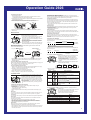
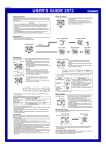
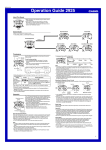
To determine your bearings
1. Enter the Bearing Mode.
• This displays the current solar azimuth value in accordance with the current
Timekeeping Mode data (time, date, Home Site data).
2. Find the same value on the bezel as the angle value displayed for the solar azimuth
on the Bearing Mode screen.
3. Position the watch so the value you found in step 2 is pointing at the sun.
4. The 12 o’clock position of the watch should now be pointed north.
Bezel
North
• Note that the bearings produced by the Bearing Mode are intended for general
reference only.
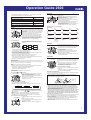
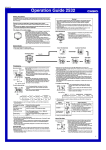
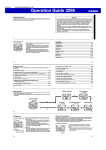
Moon/Tide Data
Moon age
Moon/tide data lets you view the Moon age and Moon
phase for a particular date, and tidal movements for a
particular date and time for the Home Site.
• If you suspect that the Moon/tide data is not correct for
some reason, check the Timekeeping Mode data
(current time, date, and Home Site settings), and make
changes as required.
• See “Moon Phase Indicator” for information about the
Moon phase indicator and “Tide Graph” for information
about the tide graph.
• All of the operations in this section are performed in the
Moon/Tide Data Mode, which you enter by pressing C.
Moon/Tide Data Screens
Moon Data Screen
Tide gragh
Press A.
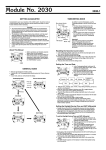
Countdown start time: 10 minutes; Reset time: 5 minutes; Timer mode: Auto-repeat;
Progress beeper: On
Reset Period
Start Time
Reset Time
Start Time
Year Month – Day
To view tide data for a particular time
1. While the Moon Data screen is displayed in the Moon/Tide Data Mode, use D (+)
and B (–) to display the date whose tide data you want to view.
2. Press A to switch to the Tide Data screen.
• The initial screen shows the tide graph for 6:00 AM.
3. Specify the time for which you want to display tide data.
• Use D (+) and B (–) to change the time in one-hour steps.
Elapsed time
measurement
5'00"
Countdown
End Beeper
Start
Time
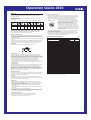
The following are the settings you should configure before actually using the
countdown timer.
Countdown start time and reset time
Timer mode (auto-repeat, elapsed time)
Progress beeper on/off
• See “To configure countdown timer settings” for information about setting up the
timer.
Reset Time
You can set a “reset time,” which is a kind of alternate countdown start time you can
recall with the press of a button any time a countdown operation is in progress.
Timer Mode
The countdown timer gives you a choice of two modes: auto-repeat and elapsed time.
Auto-repeat
Auto-repeat automatically restarts the countdown from the countdown start time
whenever zero is reached.
• Auto-repeat mode is best when timing the starts of match races.
• Even if you start a countdown operation from the reset time, the countdown
automatically restarts from the countdown start time whenever it reaches zero.
• Auto repeat timing repeats up to seven times.
Timer
Mode
Progress
Beeper
Setting
Screen
Button Operations
Start Time
Use D (+) and B (–) to change the setting.
• You can set a start time in the range of 1 to 60 minutes
in 1-minute increments.
Reset Time
Use D (+) and B (–) to change the setting.
• You can set a reset time in the range of 1 to 5 minutes
in 1-minute increments.
||||
Timer Mode
|| ||
||||
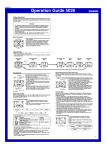
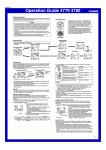
Configuring Countdown Timer Settings
Reset
Time
3. When the setting you want to change is flashing, use D and B to change it as
described below.
|||
The countdown timer can be set within a range of one
minute to 60 minutes. An alarm sounds when the
countdown reaches zero. The countdown timer has two
modes: auto-repeat and elapsed time, and a progress
beeper signals the progress of the countdown. All of this
makes the countdown timer a valuable tool for timing the
start of a yacht race.
• All of the operations in this section are performed in the
Countdown Timer Mode, which you enter by pressing
C.
0'00"
To configure countdown timer settings
1. While the countdown start time is on the display in the
Countdown Timer Mode, hold down A until the
countdown start time setting starts to flash, which
|
|
|
indicates the setting screen.
• If the countdown start time is not displayed, use the
procedure under “To use the countdown timer” to
display it.
2. Press C to move the flashing in the sequence shown
below to select other settings.
Countdown Timer
Timekeeping Mode time
2'00"
||||
To view the Moon data for a particular date
While the Moon Data screen is displayed in the Moon/Tide Data Mode, use D (+) and
B (–) to display the date whose Moon data you want to view.
• You can select any date from 2000 to 2039.
Seconds
3'00"
Time
• When you enter the Moon/Tide Data Mode, the data that appears first is the Moon
data (Moon age and Moon phase indicator) for the current date as kept by the
Timekeeping Mode.
Minutes
Countdown
End Beeper
1'00" 0'30" 0'00"
Reset Period Progress Beeper
4'00"
Reset Time
10'00"
▲
▲
Countdown Timer Examples
Countdown start time: 10 minutes; Reset time: 5 minutes; Timer mode: Elapsed time;
Progress beeper: Off
Tide Data Screen
Moon age
Progress Beeper
The progress beeper actually includes two beepers: a reset time beeper and a reset
period progress beeper.
• The reset time beeper and reset period progress beeper sound only while the
progress beeper is turned on.
Reset Time Beeper
The reset time beeper is similar to the countdown end beeper. When the progress
beeper is turned on, the watch beeps each second of the final 10 seconds before the
countdown reaches the reset time.
Reset Period Progress Beeper
The reset period is the portion of the countdown between the reset time and zero.
When the progress beeper is turned on, the watch emits four short beeps at the top of
each minute during the reset period, and 30 seconds before the end of the
countdown.
5'00"
10'00"
Reset Time Beeper
Each press of A in the Moon/Tide Data Mode toggles between the Moon Data
screen and the Tide Data screen.
Moon phase indicator
Countdown End Beeper
The watch beeps each second of the final 10 seconds before a countdown reaches
zero, and at zero. The first five beeps (seconds 10 through 6) are higher pitched than
the final five beeps (seconds 5 through 1). The watch emits a longer beep to signal
when the countdown reaches zero.
• The countdown end beeper always sounds, regardless of the on/off status of the
progress beeper.
||||
Tide graph
The watch beeps at various times during a countdown so you can keep informed
about the countdown status without looking at the display. The following describes the
types of beeper operations the watch performs during a countdown.
||||
Moon phase indicator
Countdown Timer Beeper Operations
Progress
Beeper
Press D to toggle between the auto-repeat mode (ON)
and the elapsed time mode (OFF).
• An auto-repeat indicator ( ) appears when the autorepeat mode is selected.
Press D to toggle progress beeper on (ON) and off (OFF).
• A progress beeper indicator ( ) appears when this
setting is turned on.
4. Press A to exit the setting screen.
• The reset time setting must be less than the countdown start time setting.
To use the countdown timer
In the Countdown Timer Mode, press D to start the
countdown timer.
• The countdown timer measurement operation continues
even if you exit the Countdown Timer Mode.
• The table below describes button operations you can
perform to control countdown operations.
To do this:
Do this:
Stop the countdown operation
Press D.
Resume a stopped countdown operation
Press D again.
Display the countdown start time
While the countdown is
stopped, press B.
Stop the countdown operation and display the reset time
Press B.
Start the countdown from the displayed reset time
Press D.
Elapsed Time
When the end of the countdown is reached in the elapsed time mode, the timer
automatically switches to an elapsed time measurement operation.
• The elapsed time mode is best when timing the speed of yachts during ocean races.
• The elapsed time operation is performed in one-second increments up to 99 hours,
59 minutes, 59 seconds.
2