1
TIMECODE AND SYNC
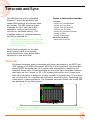
When the 688 is locked to external word clock, it is indicated by WCK in yellow
text at the bottom of the Main screen.
If no valid external word clock is present, the word UNLOCK blinks yellow and
red on the Main screen.
Word Clock Sensitivity
A menu option is available on the 688 letting you adjust the sensitivity of the
word clock input to allow the mixer to work with word clock sources of lower
voltage amplitude.
To set the sensitivity:
1. Press the MENU button.
2. Select the Timecode/Sync > Word Clock In Termination. Options include:
Off or 75 Ohm. By default, sensitivity is set to Off.
71