1
TIME SETTING
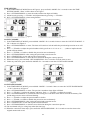
1) In the TIME DISPLAY MODE shown in Figure 6, press and hold <MODE> for 3 seconds to enter the TIME
SETTING MODE. “Hour” will be shown as in Figure 7.
2) Press <SET/POSSESSION> to enter the mode and the time digits will blink.
3) Adjust hour by pressing <+/-TEAM1> and adjust minute by pressing <+/-TEAM2>.
4) Press <SET/POSSESSION> when setting finishes.
Figure 6
Figure 7
COUNT UP MODE
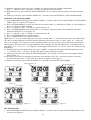
1) In the TIME DISPLAY MODE, press and hold <MODE> for 3 seconds 2 times to enter the COUNT UP MODE. “C
UP” is shown as in Figure 8.
2) Press <SET/POSSESSION> to enter. The timer will switch to 0:00:00 while the period and possession arrow will
blink.
3) Press <+/-TEAM2> to adjust the period number which goes from 1>2>3>4>n>1>…….(where n implies that the
period will keep blank.)
4) Press <+/-TEAM1> to enable or disable the possession arrow alternately.
5) Press <SET/POSSESSION> after setting the period and possession arrow.
6) Press <START/STOP> to start and stop the count up timer.
7) Press <SET/POSSESSION> to alter the arrow direction during the count up process.
8) When timer stops, press and hold <SET/POSSESSION> for 3 seconds to reset the timer to zero.
9) Under any static state, press and hold <MODE> for 3 seconds to enter the COUNT DOWN MODE.
Figure 8
Figure 9
COUNT DOWN MODE
1) In the TIME DISPLAY MODE, press and hold <MODE> 3 seconds 3 times to enter the COUNT DOWN MODE.
“C dn” is shown as in Figure 9.
2) Press <SET/POSSESSION> to enter. The previous countdown time digits will blink.
3) Press <+/- TEAM 1> to adjust the minutes and hours. Press <+/- TEAM 2> to adjust the seconds.
4) Press <SET/POSSESSION> to confirm the timer setting, the count down time will be stored in the memory. The
period and possession arrow will start blinking.
5) Press <+/-TEAM2> to adjust the period number as before.
6) Press <+/-TEAM1> to enable or disable the possession arrow alternately.
7) Press <SET/POSSESSION> after setting the period and possession arrow.
8) Press <START/STOP> to start and stop the count down timer.
9) Press <SET/POSSESSION> to alter the arrow direction during the count down process.
10) The scoreboard will give a long beep when the time is up.
11) When the count down timer stops, press and hold <SET/POSSESSION> for 3 seconds to reset the timer to the
original memorized record.
P.2